

Key takeaways
- Core HR system features include a centralized employee database, employee self-service, payroll, benefits administration, time tracking, and compliance support.
- Advanced platforms add recruiting, onboarding, talent management, performance, learning, engagement, workforce analytics, and asset management.
- Asset management is most valuable when HR and IT need a shared process for assigning equipment during onboarding and recovering it during offboarding.
- A long feature list does not guarantee less work. The right combination of features will support your business’s HR goals now and in the future.
With so many human resources (HR) software options on the market, it can be hard to choose the one that’s best for your business. One company’s perfect set of features may be too much or not enough for another. To make the best choice, it’s important to look for HR system features that will address your business’s current needs while also considering which features might add value down the road.
HR software like Paycom can support those changing needs by bringing HR and payroll data together in a single database. As your business grows, employee information can move between recruiting, onboarding, timekeeping, benefits, and payroll without HR rebuilding the employee record at each step.
Update notes
July 30, 2026: Robie Ann Ferrer verified and refreshed all HR system features for 2026, replaced outdated product examples, added asset management tools, and expanded guidance on platform foundations, demo testing, and feature prioritization.
What features should an HR system have?
The right HR software suite should include the following features as part of its core functionality or as optional add-ons:
- Centralized database
- Employee self-service
- Talent management
- Recruiting
- Onboarding and offboarding
- Asset management
- Payroll and compensation management
- Benefits administration
- Time tracking
- Employee scheduling
- Performance management
- Learning and development
- Employee engagement
- Workforce analytics
- Compliance
Centralized database
Think of the centralized employee database as the home base for workforce information. It’s one of the must-have HR features because it stores contact details, job information, documents, compensation history, benefits elections, time-off balances, and other employee records in one searchable location.
A well-connected database also keeps those records useful. Role-based access protects sensitive information, change histories support audits, and effective-dated updates help HR manage promotions, transfers, and pay changes without losing the earlier record. Once leaders or people managers approve a change, the system can carry it into the processes that rely on it.
If employee information is your main buying priority, read our guide to the best HRIS systems.
Employee self-service
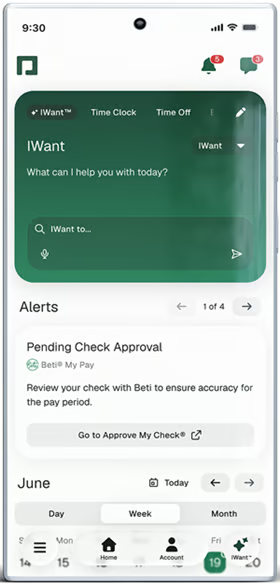
If your HR team is constantly bogged down by employee requests, then look for HR software that offers an employee self-service portal. These portals let employees log in by themselves and take care of HR tasks like clocking in and out, viewing and requesting PTO, enrolling in benefits, and downloading tax forms without having to go through HR.
For instance, Paycom offers a dedicated employee self-service mobile app that gives employees direct access to their HR information and assigned tasks. Its command-driven AI tool, IWant™, also provides employees instant answers to their routine questions, reducing the number of requests that HR has to complete on a daily basis.
Check out our list of solutions that help small teams operate more efficiently: Best HR software for small business
Talent management
Talent management brings together the work involved in attracting, developing, and retaining employees. It can include recruiting, performance management, succession planning, compensation planning, learning, career development, and employee engagement.
These features become more useful when they inform one another. A performance conversation might reveal a skill gap, lead to a learning assignment, and shape a future development or succession plan. The exact mix varies by platform, so you should match the available tools with the talent priorities you actually plan to manage.
Learn more about software suites that cover the entire employee lifecycle: Top HR Management Systems (HRMS) Software
Recruiting
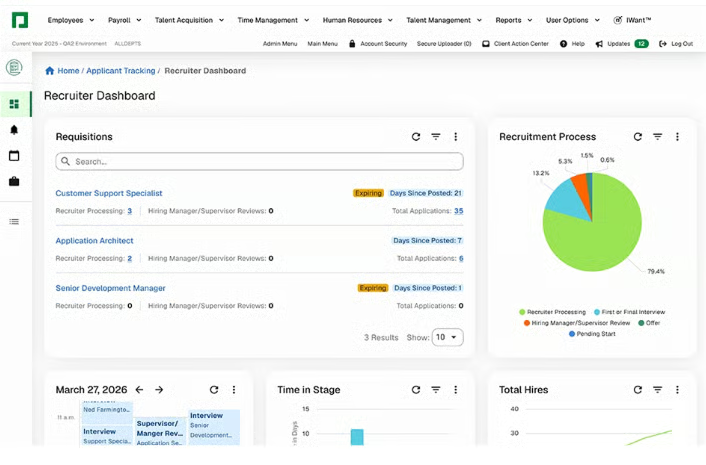
Recruiting software helps internal HR teams or external recruiting agencies find and hire quality candidates. Applicant tracking systems (ATS) automate much of the recruiting process, including posting to various job boards, sourcing promising candidate profiles, and sorting through resumes based on keywords. They also offer tools for scheduling interviews and rating and reviewing candidates.
There are many different standalone applicant tracking systems available, but you can also find some HR software platforms that also include ATS functionality. Paycom, for example, connects candidate information with the rest of the HCM platform. Once a candidate accepts an offer, the system moves the collected information into the next stage instead of making HR and the new hire start over.
Onboarding and offboarding
Onboarding and offboarding aren’t the most glamorous parts of the employee lifecycle, but they are essential for hiring and firing. HR software can generate paperwork to complete either process and offer e-signature capabilities so you don’t have to fuss with paper copies. Some HR systems also offer additional features that allow your IT team to set up or decommission employee devices like phones and laptops.
HR software like Paycom uses information from the newly hired employee’s record to support onboarding paperwork and assigned tasks. Keeping that information connected helps HR coordinate the transition without creating another standalone record for the same person.
For practical workflow ideas, see these employee onboarding best practices.
Asset management
Asset management helps HR, IT, and facilities track company property assigned to employees, including laptops, phones, vehicles, uniforms, licenses, access cards, and workspaces. It can make equipment handoffs easier during onboarding, transfers, and offboarding
Paycom’s Asset Management tool runs in the same HR platform, so connecting assets and workspace assignments with employee and position data is easier. When someone joins, the requirements attached to the role can guide which equipment and workspace they receive. If the employee transfers or leaves, the same record helps the business identify what needs to move or come back. It also lets you see an asset’s location, value, and assignment history without chasing a separate spreadsheet.
Payroll and compensation management
Payroll features don’t just help your team run payroll each week or month; they also make it possible to view employee salary history, implement pay bumps, handle taxes, and more. No matter the size of your company, choosing an HR system that includes payroll can significantly reduce the administrative burden and even fully automate payroll in some cases.
It’s also where small data gaps can turn into urgent problems and payroll errors. Native connections with time tracking and benefits can cut down on data reentry and catch missing information earlier. Paycom’s Beti moves part of the payroll review earlier by giving employees visibility into their pay before payroll submits it. If a missing punch, unapproved expense, or other incomplete item could affect the check, the system flags it so the employee or manager can address it before payday.
Watch Paycom’s Beti in action.
Looking for dedicated tools to pay employees? Read: Top Payroll Software
Benefits administration
Regular paychecks are only part of a global compensation strategy, which is why benefits administration is another key HR system feature. Many platforms help your team browse benefit plans, collaborate with a broker, manage open enrollment, and streamline the benefits selection process for employees.
Self-service tools also give employees a clearer way to compare plans, submit their choices, and make qualifying life event updates or update their coverage without contacting HR for assistance.
Time tracking
If you pay employees or bill clients by the hour, then you will definitely need time tracking as an HR system feature. In fact, many HR platforms include time clock software that lets employees clock in and out from anywhere while giving managers and HR teams the necessary tools to review timesheets and maintain compliance. Then the data can automatically flow over to payroll, so your team doesn’t have to calculate pay manually.
Employee scheduling
In addition to time tracking, some businesses also need employee scheduling software to track employee availability, manage shift schedules, and plan adequate coverage for the busiest operating times. Paycom Scheduling makes this easy by connecting schedules with employee availability, PTO, and time records. It has predictive scheduling features and automatically assigns recurring shifts, making it easy for people managers to allocate work schedules and easily see who’s free.
Performance management
Performance management goes way beyond the traditional annual review. The right software will offer reminders for other regular check-ins, provide templates for performance ratings and rubrics, offer coaching resources for supervisors, and more.
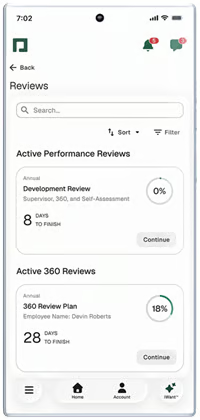
Paycom’s Performance Management tool supports self, manager, and 360-degree reviews. HR can set review timing, weight goals, group competencies by role, and let employees report their progress. Managers and employees can complete self-assessments and final reviews through the mobile app, while a dashboard shows review progress and pending approvals
Learn more about the tools that can help you identify and grow your top employees: Top Performance Management Software
Learning and development
Learning management systems (LMS) help HR teams identify training needs, automate qualifications and training compliance, track completion, monitor certifications, and offer self-service tools for employees to educate themselves. Some also come with a built-in library of learning courses with templates HR can use or customize.
However, LMS tools provide more value when learning connects with an employee’s role, performance goals, or career plans instead of sitting in a separate course library. This allows HR to assign training programs that fit a current role or development need rather than treating every employee as if they need the same course.
Find the top software that can help train your staff: Best Corporate Learning Management Systems
Employee engagement
Employee engagement functionality allows you to gather anonymous feedback, identify areas for improvement, and measure employee morale and satisfaction over time. In many instances, these features also support peer recognition and other elements that create strong engagement among employees.
Paycom Surveys includes more than 45 editable templates and lets HR teams create anonymous surveys. Employees can respond through the self-service tool on desktop or mobile, while automated notifications encourage completion. HR can view results in charts and use predefined or custom reports to track feedback trends over time.
Workforce analytics
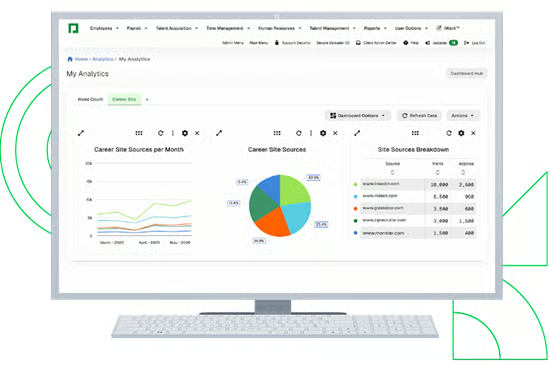
In an increasingly data-driven world, workforce analytics is rapidly becoming a critical HR system feature. HR analytics tools help your team track key performance indicators (KPIs) and visualize them in charts. This information can then be used to assess performance at the individual, team, department, and company levels.
Analytics features in robust HR suites like Paycom combine data from multiple sources, including payroll, recruiting, and performance management modules. Its Reporting Center also comes with analytics and custom dashboards, allowing you to review data and track trends in real time.
Explore solutions that provide advanced workforce analytics: Top Human Capital Management (HCM) Software
Also read: HRIS vs HRMS vs HCM: What Is the Difference?
Compliance
HR software cannot replace legal, tax, or HR compliance expertise. It can make compliance work easier to organize by applying policies consistently, protecting records, documenting approvals, monitoring deadlines, and producing required reports.
Paycom brings several of these processes together through Government and Compliance and related tools. For example, E-Verify and ACA support connect compliance tasks with employee information already stored in the platform. This can reduce duplicate entry and make the supporting records easier to find when HR needs them.
Check the platform underneath the features
Individual tools matter, but they work best on a solid foundation. A useful HR platform keeps data consistent, protects sensitive information, and connects with the other systems the business relies on.
Look for four foundations:
- Data continuity: An approved change should update every relevant workflow without forcing HR to enter the same information again.
- Workflow depth: The software should support triggers, approvals, reminders, escalations, and exception handling, not just simple task automation.
- Security and accountability: Role-based permissions, audit histories, retention controls, and security documentation help organizations protect sensitive employee data and trace changes.
- Integration and data access: Review native integrations, application programming interfaces (APIs), export options, implementation work, and extra fees. A connector on a feature list may still require manual intervention.
Artificial intelligence (AI) tools deserve the same scrutiny. It should improve a specific workflow, make its output understandable, and leave consequential hiring, pay, performance, and employee-relations decisions with a person. For a closer look at connected workflows, check out our guide to HR process automation.
Also read: HR Software Pricing Guide
Which HR system features are most important?
The most important HR system features for your business are the ones that address the biggest challenges your HR team faces.
For example, time tracking and payroll may be the top priority for a business that’s just starting out. In contrast, a business that’s focused on growing its workforce may be more interested in people analytics and talent management features.
Use the table below to identify which features to prioritize and what vendors should demonstrate.
| Business need | Features to prioritize | What to test in a demo |
|---|---|---|
| Duplicate data entry | Employee databaseSelf-service toolsIntegrations | Change an employee’s job, manager, or address once and confirm which records update |
| Payroll accuracy | Time trackingPayrollBenefits | Correct one timecard and follow it through approval and payroll |
| Faster hiring and onboarding | RecruitingOnboardingAsset management | Move one candidate from offer to employee setup, including tasks and equipment |
| Employee retention | Engagement toolsPerformance reviewsLearning management | Turn an employee feedback or segment a workforce trend, assign an action, and track follow-through |
| Compliance-heavy operations | ComplianceSchedulingReporting | Show a policy change, permission change, exception, and audit report |
Before buying, ask each software provider to demonstrate three real workflows using your own scenarios. Include the standard path, an exception, and a correction. That will expose manual work, add-on fees, permission gaps, and integration limits that a feature checklist will miss.
It’s also important to consider the tools needed to overcome HR hurdles today while also thinking about the technology that will help your team meet its goals in the future. Identifying these must-have and nice-to-have features will make the HR software buying process much smoother.
If you’ve identified the HR system features you need, check out our HR Software Guide to explore top vendors. Or, if you’re still not sure what software you need, watch this video to understand the five main types of HRIS solutions on the market: