

What is performance management software?
Performance management software gives HR teams and managers one place to set expectations, follow employee goals, conduct reviews, share feedback, and plan development. You can buy it as a standalone tool that connects to your HR system or as part of a broader HR management platform.
The strongest tools do more than digitize an annual appraisal. They connect day-to-day feedback with goals, one-on-one meetings, review cycles, skills, and compensation decisions so managers can evaluate performance using a broader record of an employee’s work. That record can support more consistent discussions, but it does not remove bias or make difficult people decisions for you.
For this guide, I reviewed the top performance management software solutions on the market and narrowed them down to the best of the best.
| Software | Best for | Starter monthly price |
|---|---|---|
| 15Five | Overall performance management software | $11 per user* |
| Leapsome | Employee coaching and development | Call for a quote |
| Engagedly | Goal management | $5 per user* |
| HiBob | Global organizations | Call for a quote |
| Lattice | Compensation management | $13 per user seat |
*for performance review tools
Why you can trust TechnologyAdvice
I’ve spent more than eight years researching and evaluating HR software, backed by a decade of working in HR and using many of the systems I now write about. That experience helps me spot the difference between a platform that looks complete on paper and one that can realistically support how HR teams manage employee performance.
For this guide, I reviewed seven performance management systems and used a scoring rubric to identify my top picks. I also verified current product and pricing information, then considered where each platform fits best, what tradeoffs come with it, and when another option may serve an HR team better.
Robie Ann Ferrer
Human resources expert for TechnologyAdvice

Methodology
To find the best performance management software, I used a 51-data-point rubric to compare seven providers and narrow my list to the top five. My research included current product and pricing pages, help articles, security and integration resources, video tutorials, user reviews, and available product demonstrations. Since I could not test every platform firsthand, I used these sources to assess how the tools work and where administrators may encounter limitations.
My evaluation covered:
- Performance management features (25%): I looked at how each product handles reviews, one-on-ones, ongoing feedback, calibration, and employee development. I also checked how much HR can customize and which tools require a higher-priced plan.
- Goal-tracking features (20%): Goals only help when people can understand and update them. I checked how each platform handles individual and company goals, OKRs, weighting, progress updates, and alignment across teams. I also considered whether managers could easily bring those goals into performance conversations.
- Platform and interface (15%): I considered how easy the platform is to learn, manage, and scale. Permissions, security, mobile access, and integrations also factored into the score because a strong review tool can still create headaches if it does not fit the rest of the HR setup.
- Reporting and analytics (15%): I looked for reports that help HR do something with the information, not just display it. That included customizable dashboards, calibration views, sentiment analysis, and ways to compare results across teams or bring in outside data.
- Pricing (10%): I compared the cost of the performance tools themselves, along with free trials, contract minimums, billing terms, and add-ons. Products with clear pricing scored better than those that require a sales call before HR can estimate the budget.
- Support (10%): I checked how customers can get help, when support is available, and whether implementation or dedicated guidance costs extra. A knowledge base is useful, but it does not replace access to a person when a review cycle runs into trouble.
- User scores (5%): Ratings from G2, TrustRadius, and Capterra make up the final 5%. I use them as a useful check on the product experience, not as proof that the same software will work for every company.
Update notes
- August 3, 2026: Robie Ann Ferrer checked the evaluation rubric and reviewed each provider’s score based on current pricing, product capabilities, and limitations. She updated the copy to reflect new features and monthly fees. She also added direct selection guidance, stronger fit and rejection criteria, and clearer AI caveats.
- Feb. 14, 2025: Avery re-evaluated the software recommendations using an objective rubric. 15Five replaced BambooHR, Bob replaced Performyard, and the “best for” attributions were updated.
Top performance management software compared
| Software | One-year contract required | Performance review is an add-on | Compensation management tools | Expert score (out of 5) |
|---|---|---|---|---|
| 15Five | Yes | No | $9 per user monthly | 3.94 |
| Leapsome | Yes | No | Call for a quote | 3.83 |
| Engagedly | With a $7,500 minimum spend | No | $10 per user monthly | 3.77 |
| HiBob | Yes | Yes; call for a quote | Call for a quote | 3.35 |
| Lattice | With a $4,000 minimum spend | No | $10 per user seat monthly | 3.24 |

15Five: Best overall performance management software
Pros
- Transparent pricing.
- Recommended actions function with in-app learning modules.
- Customizable weekly check-ins.
- Built-in career development features.
Cons
- Limited integrations.
- Slow customer support and lack of live chat feature.
- Most unique features are only available in the Total Platform plan.
Why I chose 15Five
15Five has all the features you need for managing the performance review process, and those tools integrate effectively with each other. Everything connects. For example, weekly check-ins can surface an issue, carry it into a one-on-one, inform a review, and lead to a development action. That continuity is why 15Five rises above products that offer many of the same functions but leave managers to piece the record together.
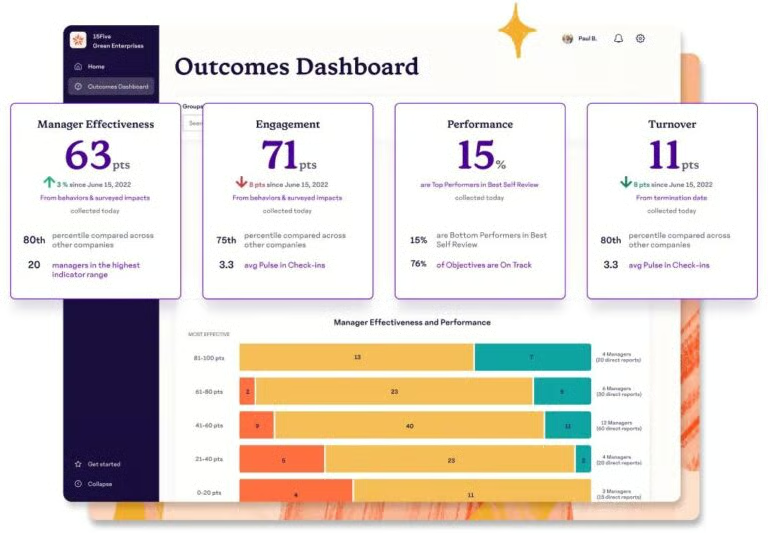
I like its AI-curated recommended actions that connect you to its in-app learning hub. I also appreciate its HR dashboard, which displays critical information like manager effectiveness, performance, and engagement and provides recommended actions to address issues like reducing turnover.
Leapsome may go deeper on competency-based development, and Lattice in creating a more deliberate connection between reviews and compensation. However, 15Five is the better all-around choice for midsize organizations that want weekly manager habits, goals, formal reviews, and development actions to operate as one connected process.
About 15Five
15Five stands out for its holistic approach to performance management, using the HR flywheel as a guideline. As such, its features are designed to address and connect all of the points on the wheel: outcomes, signals, insights, recommendations, and actions.
The software’s goal-setting features allow you to design and assign objectives and monitor progress on those objectives through weekly check-ins. All of that data is available to managers and admins, who receive AI-driven recommendations and action plans to facilitate employee development and goal achievement.
15Five offers both Engage and Perform products, with the former covering employee surveys and sentiment and the latter covering performance management tools. These are designed to work together, but you can purchase them separately.
While some of its best features are only available in the Total Platform plan, the Perform plan still gives you access to its cascading goal management features, 360-degree performance reviews, and employee feedback features, all of which have a robust suite of customization options.
Key features
Outcomes dashboard
15Five’s outcomes dashboard prominently displays four major data points: manager effectiveness, engagement, performance, and turnover. You can filter those views right from the dashboard, giving you a snapshot of how different groups of employees are doing with these metrics. Further down the dashboard are more ways to visualize the data.
The true advantage of the dashboard, though, is that it provides easy pathways to other parts of the software. You can click around on a specific metric to get further details and insights, along with getting AI-assisted recommended actions that connect you to learning resources.
Weekly check-ins
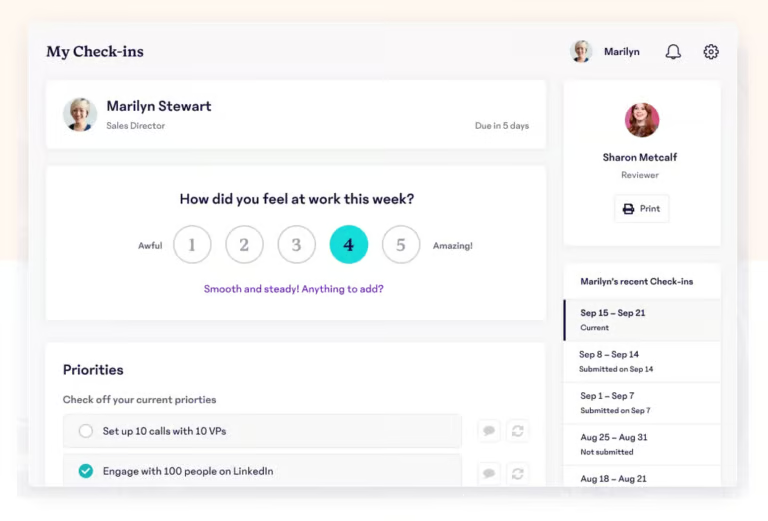
15Five’s attention toward employee engagement shows through its weekly check-in feature. Managers can create custom check-in questions to assess sentiment, check goal progress, and answer questions, all through a short survey. These check-ins also offer space for employees to provide feedback to their managers and “high five” other employees to offer positive recognition.
Thanks to 15Five’s interconnectivity, these survey results are kept on record to address in 1:1s and performance reviews. Having long-term data like this is critical for mitigating bias in larger reviews; this means that not only are these check-ins useful to address issues at the moment, but they can also contribute to overall employee success.
Manager effectiveness indicator
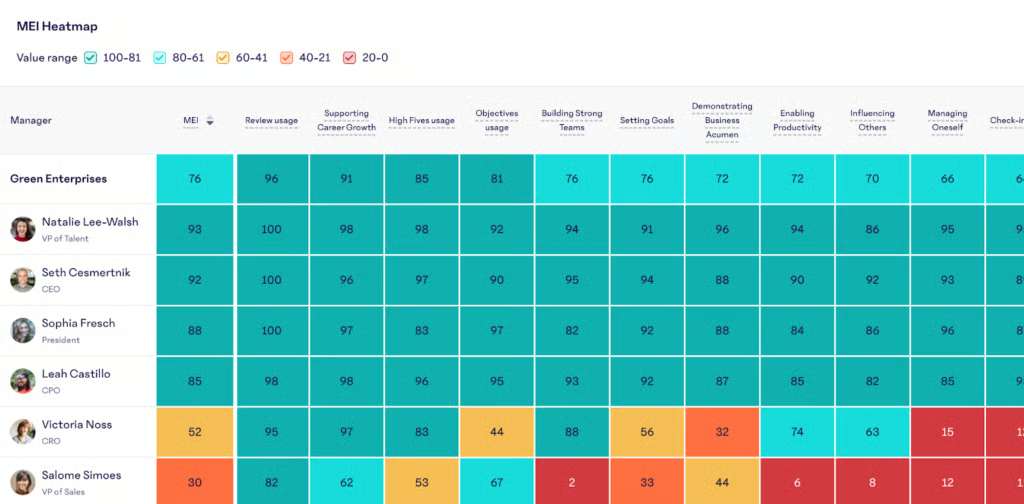
The Manager Effectiveness Indicator is a unique tool that gives admins an overview of manager success within an organization based on a customizable set of objective and subjective criteria. 15Five pulls this data not only from surveys and reviews but also from manager performance in the software. It can track how often they review check-ins, how they organize goals, and more, depending on your customizations.
You can view this data as a timeline or broken down by skill or manager. Combined with the outcomes dashboard, administrators can draw insights and create action plans for any flagging skills or individuals.
Gallery

Outcomes dashboard 
Objective page 
1-on-1 page
Pricing
15Five easily has the most transparent pricing on its website. Its plans are divided into three tiers, all billed annually: Engage, Perform, and Total Platform. It also offers an add-on for comp reviews, pay ranges management, and total rewards dashboards for $9 per user per month, or $11 per user monthly if it includes salary benchmarking.
- Engage: $4 per user per month, which includes engagement surveys and analytics.
- Perform: $10 per user per month, which includes performance reviews, goal management, check-ins, 1:1 support, and general performance features.
- Total Platform: $16 per user per month, which includes everything from the first two tiers, along with the outcomes dashboard, management effectiveness indicator, AI tools, and access to microlearning modules.
While the Total Platform package is on the slightly more expensive side, its unique features mean you’re still getting an impressive bang for your buck. If you just want its interconnected performance management features, though, the Perform plan is reasonably priced in comparison to other platforms and will serve you just fine.

Leapsome: Best for employee coaching and development
Pros
- Available in 38 languages.
- Functional, comprehensive AI tools.
- Single sign-on (SSO) capabilities with integrated apps.
- Modular pricing, with multi-module discounts available.
Cons
- Need to call for a price quote.
- Customer success teams’ services are limited to customers with a $6,000 annual contract.
- High learning curve.
Why I chose Leapsome
I chose Leapsome as the best option for employee coaching and development because of its data-driven, AI-guided frameworks and insights. Leapsome has the most superior AI tools I’ve seen in my research, which sets it apart when it comes to pulling and interpreting data. That data then integrates with its other systems to build a clear, achievable career development plan.
Leapsome’s fully customizable competency frameworks identify the skill benchmarks and objectives necessary for teams and individual positions. These tie into employee goals and performance reviews; Leapsome’s AI can identify skill gaps and connect individuals to the software’s learning hub to facilitate growth. Every one of these steps and integrations is designed to help employees along their desired path.
15Five provides a more structured rhythm for weekly manager conversations, but Leapsome gives HR more control over defining proficiency and connecting a skill gap to learning. That matters because coaching often stalls at general advice such as “improve communication” or “show more leadership.”
About Leapsome
Leapsome has grown beyond its original talent-management focus and now offers an HRIS alongside its Talent Suite. It also has time tracking, recruiting, and learning management system (LMS) features. However, Leapsome has significantly more advanced and customizable performance management tools, such as:
- Objective and key results (OKR) management.
- One-on-one management meetings.
- 360-degree reviews.
- Engagement surveys.
Leapsome offers several modules, such as Reviews, Surveys, Goals, and Learning, to address every area of performance management, including employee-manager feedback, compensation management, and career planning and development. The modules are priced separately, so you can select them à la carte to address specific business needs or combine them for a holistic approach to performance management.
Moreover, Leapsome uses AI tools to drive insights, improve feedback, and create templates. It encourages users to check and customize all AI results; it uses AI as a tool, not a solution, which makes it much more effective overall.
Lastly, Leapsome’s competency frameworks act as the backbone for its performance management functions, informing goals, development plans, and feedback delivery. This feature provides a structure for career development; employees know exactly what skills are necessary to achieve their next goal, what benchmarks they need to hit in those skills, and the resources they can use to get there.
Key features
Competency frameworks
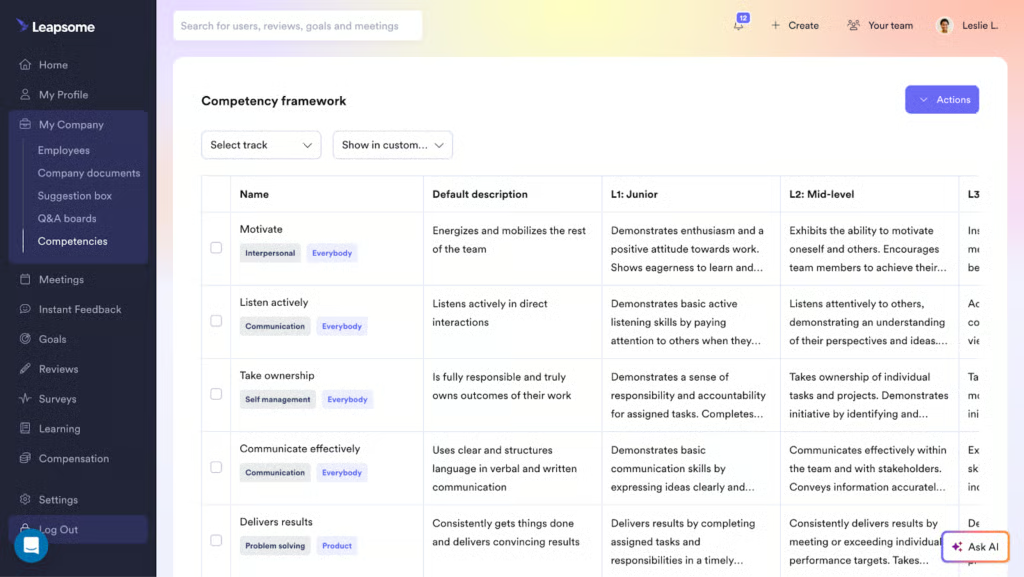
Leapsome’s competency frameworks are structured metrics of skill improvement. The software comes with pre-populated frameworks, as well as the option to add and edit your own. Each of these competencies comes with levels, showing what must be demonstrated to achieve each level of mastery. You can also sort them by team and category, making sure each competency is presented only to the relevant people.
You can then connect these competencies to goals and performance reviews. In addition, you can tie review questions and individual goals to specific competencies, keeping employees on their chosen development track. Finally, you can also link competencies to paths in Leapsome Learning; if an employee is struggling in one of these areas, they can be directed to ways to improve.
Instant feedback
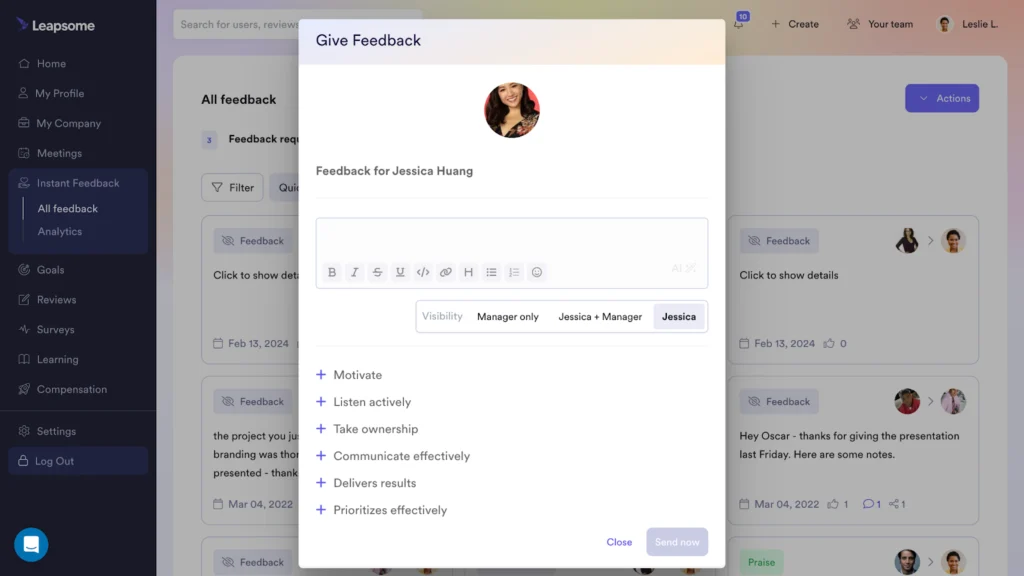
Leapsome aims to cultivate a culture of continuous feedback through its Instant Feedback tool. With a few clicks, any employee can give feedback to anyone at any time. Givers can customize the comment’s visibility, and they have the option to tie the feedback to a competency framework.
The Instant Feedback feature makes clever use of Leapsome’s AI tools. Copilot AI can help make feedback language more constructive, and receivers of feedback can derive AI-driven insights from people’s comments. Feedback can also connect to 1:1s and goals, supporting an employee’s career development.
Gallery

Competencies assessment 
Goal page 
AI-assessment chart 
Feedback request
Pricing
With Leapsome, you have to call its sales team to request a quote. It offers various modules, which you can mix and match to fit your requirements. You can choose from the following:
- Reviews.
- Goals.
- Surveys.
- Learning.
- Compensation.
- HRIS.
- Time tracking.
- Recruiting.
Other things to note regarding Leapsome’s pricing:
- 14-day free trial available.
- Multi-module and volume discounts are available.
- Requires a one-year contract.

Engagedly: Best for goal management
Pros
- Easy to use.
- Comprehensive, customizable goal-setting.
- Strong customer support.
Cons
- Does not offer a comprehensive HR solution.
- It can be cost-inefficient depending on company size.
Why I chose Engagedly
Engagedly is my top pick for goal management because it allows admins to assign weights to objectives, which sets it apart from traditional “high/low” priority displays. On top of that, it’s the only platform I reviewed that used gamification features, offering points, badges, and incentives as rewards for completing goals.
Engagedly’s goal management features also encourage alignment across the organization. Cascading goals mean that individuals and teams can see how their tasks contribute to the wider company and that a global perspective can drive engagement. Goal templates and automation also make it easier to set and sync these goals across the organization.
However, if you want to connect employee goals to competencies and learning, consider Leapsome. 15Five is also stronger than Engagedly at carrying goals into weekly check-ins.
About Engagedly
Engagedly is a dedicated talent management software that functions as an addition to an HR solution rather than a substitution. It includes features for real-time feedback, 360-degree reviews, 1:1 management, and more. It also contains additional modules for compensation, employee communication, and mentorship.
Within its rewards module lies a suite of gamification options to motivate employees. Managers can offer badges for particular successes, and employees can accumulate points to spend on more tangible rewards. This is the only software I could find with dedicated gamification features like this, which provides a unique spin on employee engagement.
Key features
Goal tracking
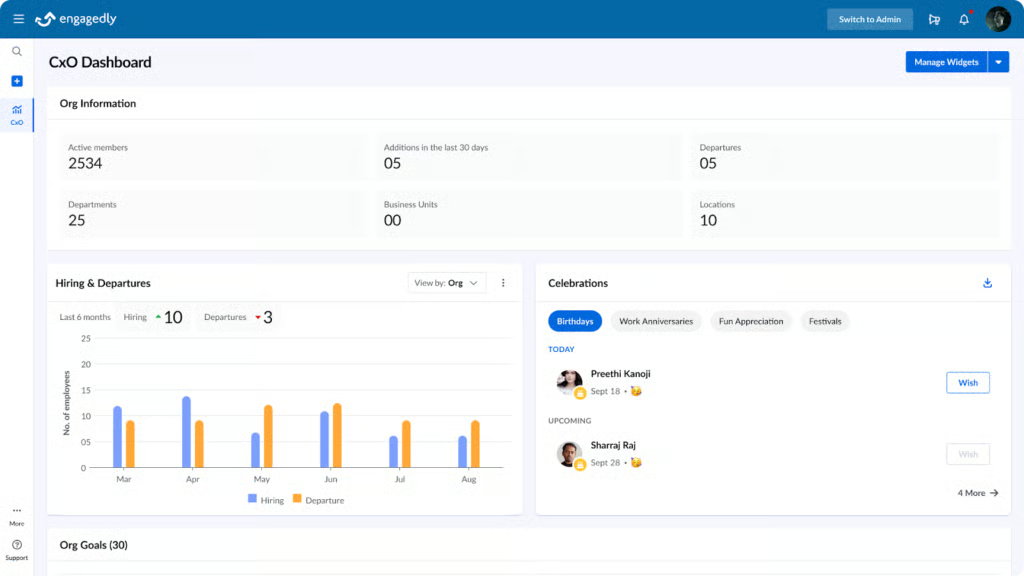
Engagedly’s CXO insights allow executives and HR leaders to get a holistic perspective on organizational performance. Its custom CXO dashboard displays your choice of data for talent and workforce management, and real-time AI insights derived from that data can help drive organizational strategy.
Using this dashboard, leaders can track goals across the organization and measure progress toward those goals. If there are roadblocks to these goals, Engagedly’s insights can help drive solutions.
Cascading goals
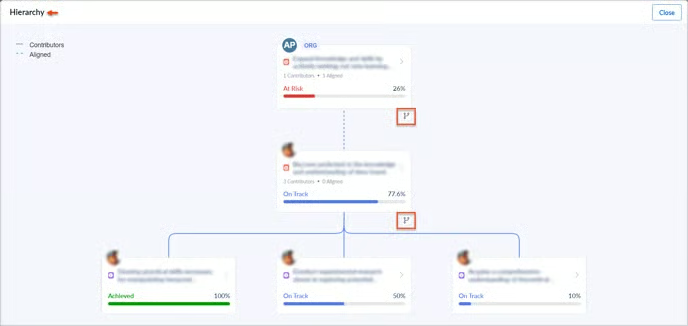
Engagedly’s cascading goals feature allows managers to add contributors and stakeholders to goals and show how each goal feeds into others. This can be within a team or outside it, from individual goals up to company-wide objectives.
Goal owners and contributors can view the hierarchy of their tasks as a tree, creating a clear understanding of how their work matters. They can also track the completion rate of the goals in that tree to get a holistic perspective on progress.
Gallery

Goal weight setting 
Rewards dashboard 
Goals overview 
Feedback request
Pricing
Engagedly lists its Manage Performance package at $5 to $8 per user monthly, but billed annually, with a $7,500 minimum spend per year. It also offers the following modules:
- Talent mobility: $2 per user monthly, which includes skill gap analysis, succession planning, and career paths
- Engage & listen: $2 per user monthly, which comes with surveys and a centralized intranet
- Recognize & reward: $2 per user monthly, which includes gamification tools and access to a reward storefront where employees can exchange their earned points for awards
- Learn & grow: $3 to $5 per user monthly, which has a skill library, 360-degree feedback, and a learning experience platform
You can add any of these three products, or all of them, to your selected Engagedly modules:
- Deskless employee communication: $5 per user monthly for a centralized communication hub with SMS and push notifications and target content.
- Mentoring suite: $8 per user monthly for mentoring program management, progress tracking, customizable templates, and mentor-mentee precision matching tools.
- Manage compensation: $10 per user monthly for compensation planning, variable pay management, benchmarking, budget control and allocation, and customizable pay grades.

Bob: Best for global organizations
Pros
- Global mindset, with localized templates for various lifecycle stages.
- Truly comprehensive HR platform.
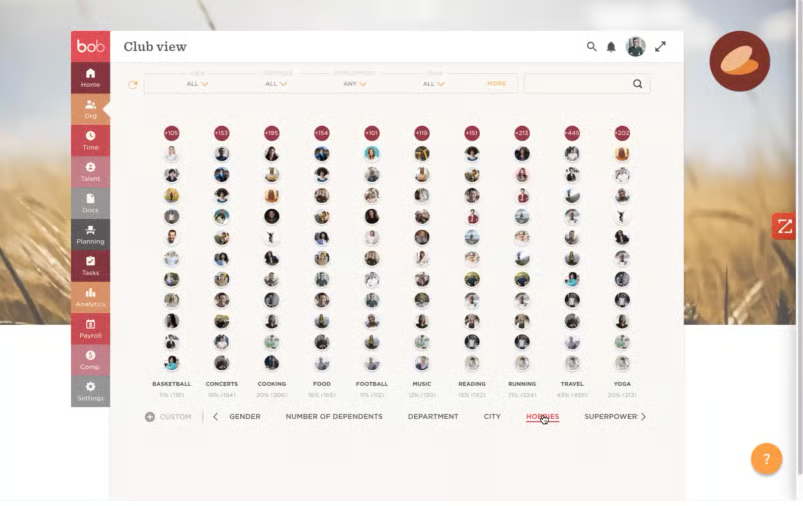
- Club view connects employees based on hobbies and interests.
Cons
- Mobile app lacks some features.
- Lack of pricing transparency.
- Performance management is part of the paid Talent add-on.
Why I chose HiBob
Global performance processes get messy quickly. Review dates, local holidays, reporting lines, currencies, and employment practices can differ by location even when the organization wants a shared framework. HiBob is the strongest fit here because it combines performance tools with location-aware employee data and configurable sites.
It’s a solid performance management software with strong customization options, performance review and goal-setting functions, recognition options, and compensation management tools. HiBob tailors each of these tools to the work culture, employment regulations, and time zones of each employee’s location and combines them on one platform.
15Five and Engagedly may offer more focused performance review routines, but HiBob is better equipped to keep reviews connected to the employee records, locations, and compensation data of a global distributed workforce.
About HiBob
Bob is an HR platform that is tailored for large or widespread organizations. It offers a suite of features and workflows for onboarding, attendance management, compensation, people analytics, and performance management. Plus, its mobile app allows you to access most of those features, but it is not possible to do performance review tasks through the app.
What sets Bob apart is its ability to connect a global remote or hybrid workforce. Many of its features, including its Club View, which can sort employees by city, hobby, and other categories, help build connections with people scattered around the world. The software is available in 14 languages, and it can set up sites and workflows for specific countries that are all viewable through a global dashboard.
Key features
Global sites
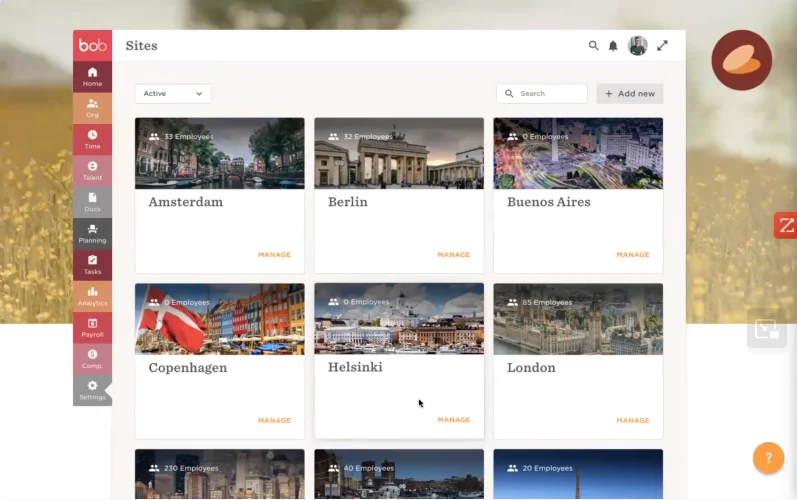
Bob offers specific “sites” for the various cities and countries that make up an organization’s workforce. Employees in each country can be grouped into these sites, which contain a suite of templates and workflows for all stages of the employee life cycle. You can set them up on implementation, and then it just takes a click to make sure that an employee is receiving all of the correct data.
The local site feature creates a ripple effect through the whole platform. Bob’s compensation management tools, for example, will reflect local currency, markets, laws, and compliance. Time off and holidays will be tailored to each employee by country, and people analytics tools can be grouped by country as well. These sites are also viewable on a global dashboard, preventing them from seeming too separate.
Club view
Club View is a feature that is entirely unique to Bob and a great way to encourage relationship-building and drive employee engagement. This view allows you to group employees by demographic data, as well as things such as city, hobbies, superpowers, and any number of custom fields.
While this is not specifically a performance management feature, it allows managers to get a comprehensive view of their team members’ lives. In an era of remote and hybrid work, those connections are essential for fostering a culture of honest feedback and support to facilitate growth.
Gallery

Employment timeline 
1:1 meetings 
360 peformance review 
Pay bracket
Pricing
Unfortunately, HiBob does not have any standard pricing information on its website. You have to call for a custom quote based on your needs.
It offers a Core package, which comes with time off, document management, lifecycle workflows, analytics and reporting, and integrations. A mobile app is also included in the package, as well as access to an employee database and an AI tool, Bob AI Companion.
HiBob lets you add modules to its Core package if you need core HR, payroll and benefits, compensation and workforce planning, and finance tools. For performance reviews, you need to get the Talent module, which also covers hiring and learning features.

Lattice: Best for compensation management
Pros
- Customizable performance and compensation review cycles.
- Actionable insights from engagement surveys.
- Configurable pay guidelines, approvals, budgets, and market data.
Cons
- Minimum annual contract is $4,000, billed annually.
- Difficult-to-navigate UI.
Why I chose Lattice
When it comes to compensation management, the most important things are transparency and equity. I chose Lattice as the best in this field because its features enable those two factors. Lattice includes market benchmarks based on role and location to drive pay equity and can connect its compensation frameworks to performance reviews to drive transparency.
About Lattice
Lattice is a top favorite performance management solution among employers and employees because it offers the most comprehensive selection of features, such as continuous feedback cadences similar to PerformYard, career development features like 15Five, and robust analytics like Leapsome.
However, Lattice is an expensive solution, with a minimum annual contract of $4,000 and a steep learning curve among administrators and employees alike. Therefore, it may not be the best option financially for teams with limited budgets or just starting with a performance management solution.
Despite this, Lattice is optimized to handle large, diverse teams while providing customized and granular insights into their performance. Notably, Lattice differentiates itself from the other solutions on this list by offering a Compensation product dedicated specifically to measuring performance to inform promotions and raises.
Besides setting up compensation review cycles, Lattice also allows users to create compensation guidelines and benchmarks to maintain consistent and fair practices among employees with similar roles, experience, and tenure. As such, Lattice may be perfect for organizations needing to implement equitable compensation strategies that directly correspond with employee performance-based metrics instead of a manager’s gut feelings.
Key features
Benchmarking data
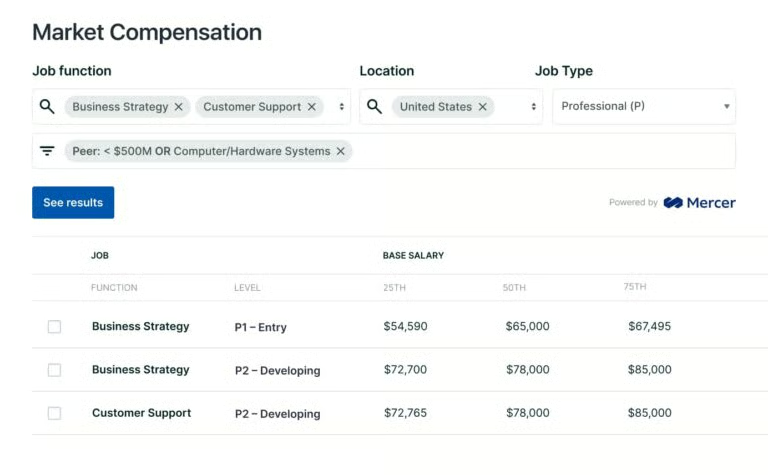
During employee compensation reviews, Lattice allows managers to access compensation market data according to the employee’s role, location, and industry. You can remain competitive and reduce turnover by comparing an employee’s compensation to similar positions. Moreover, it helps you reduce internal pay disparities by ensuring employees in the same role follow similar pay schemes.
Lattice’s emphasis on benchmarking sets it apart from other performance management software. Benchmarking helps ensure that employees are not only being paid fairly within the organization but also competitively for the industry, which can improve overall retention.
Budget and spend tracking
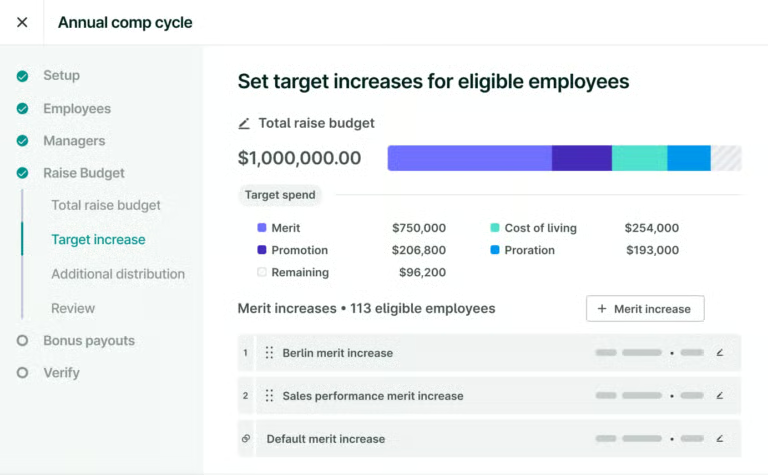
Managers can review compensation changes over time to determine an individual employee’s return on investment. In addition, Lattice provides merit and promotion raise guidelines so you can easily tie employee performance with appropriate compensation changes while staying within budget.
Lattice allows managers to connect compensation and review cycles; its performance review features can guide managers toward fair compensation for an employee’s work.
Gallery

Direct report goals dashboard 
Compensation budgeting 
Compensation benchmarking 
Compensation review results 
Detailed goal progress 
Q&A boards
Pricing
Lattice’s Foundations plan starts at $13 per user seat per month, with a minimum annual contract of $4,000. This plan contains its Performance and Goals & OKRs modules. It further offers the following add-ons to this plan:
- Engagement: $4 per user seat per month.
- Grow: $4 per user seat per month.
- Compensation: $6 per user seat per month.
What I appreciate about Lattice is that it lets you build your package. You can choose from three base products:
- Engagement: $4 per user seat per month.
- Goals & OKRs: $8 per user seat per month.
- Engagement: $10 per user seat per month.
Then, add these products if you need them:
- Grow: $4 per user seat per month.
- Compensation: $6 per user seat per month.
Find your new performance management software
Performance management software FAQs
What are the benefits of performance management software?
Boosts morale and motivation
One of the most important elements of performance management software is facilitating performance reviews. Regular performance reviews let managers recognize individuals for their hard work, improving employee morale. Moreover, performance management software includes feedback features that support consistent communication between managers and employees.
Along the same lines, many performance management software solutions have employee recognition and rewards capabilities, enabling organizations to further show appreciation for employees’ work. When companies consistently praise workers for exceptional performance, this encourages other staff members to enhance their own performance.
Strengthens employee retention
Regular feedback sessions give employees opportunities to interact with their managers and raise concerns. You can then resolve said issues as soon as possible. Workers are more likely to stay loyal to the company when their concerns are swiftly addressed, improving employee retention. Performance management also helps in role clarity, expectations, and more consistent and fair compensation practices, which also lower the possibility of employees looking for work elsewhere.
Supports employee engagement
Performance management software’s continuous feedback and one-on-one manager meeting features make employees feel heard and included in the organization. Further, these mechanisms help your employees better understand what’s expected of them. When employees have clear guidance on day-to-day tasks, their efforts naturally achieve better outcomes.
Surfaces skill gaps and opportunities
With frequent performance check-ins, managers can better monitor and understand the skill sets and capacity of employees. HR teams can pinpoint individuals with skill gaps and introduce training to bridge the gap before it impacts productivity. At the same time, regular performance reviews also reveal which employees are ready for a promotion or increased responsibilities.
Encourages employee agency
Numerous performance management solutions let employees view their work progress and set business goals for themselves. Employees feel valued and more engaged because of their active involvement in the decision-making process and their focus on their own professional goals.
What are the common features of performance management software?
Performance review tools
Unsurprisingly, performance management software tends to have tools to facilitate performance reviews. This includes larger annual or quarterly performance reviews, along with structures for 1:1 meetings with managers, performance improvement plans, and other feedback. Many platforms will have 360-degree review capability, allowing reviews from yourself, your peers, and your managers.
Goal management tools
These tools include methods of assigning and setting goals, tracking progress, OKR management, and so on. Anything that involves measuring what an employee is doing and how far along they are can fall into this category. Goal management tools often integrate with review tools to provide objective measures of performance metrics.
Reports and dashboards
Performance review and goal management tools gather data, and reports and dashboards are for analyzing and displaying it. They can track performance over time, by team or manager, or highlight what skills need improvement. These displays are often customizable to specific organizational needs.
What are the types of performance management software?
Performance review software
As the name suggests, performance review software lets managers evaluate the performance of their direct reports. The software usually measures employee performance on a set cadence throughout the year based on standardized metrics and/or self-evaluation. To be successful, the performance review process requires consistent communication between the manager and the employee.
KPI software
Key performance indicator or KPI software is a performance management tool that automatically tracks how well your organization, its departments, teams, or individual employees are performing against company goals and objectives. KPIs also work as an HR tool when used to support data-driven performance conversations with employees.
Similarly, goal setting and tracking solutions concentrate on setting work-related goals to inspire employees to improve their performance. Goal software also ensures that employee goals align with department and organization objectives.
360-degree feedback software
360-degree feedback software simplifies the performance review process by gathering feedback from multiple sources instead of focusing on only manager reviews. It provides each employee with a performance assessment based on the views of their colleagues, clients, and leaders.
Moreover, this software allows employees to provide assessments of their managers. Evaluation results are always confidential, but this software tends to be more successful when deployed in larger teams.
Employee recognition software
Employee recognition systems play a critical role in any performance management strategy. You can distribute rewards and recognition in the form of cash incentives or bonuses or via simple public acknowledgement of employees’ efforts and contributions. Regardless of the form it takes, recognizing high performance is key to maintaining morale and retaining top talent.