

BambooHR® 2026 Overview: Pricing, Ratings & Details
BambooHR® Product Overview
BambooHR is an HR management system (HRMS) built primarily for small and midsize businesses that want to manage employee information and HR processes in one place. Its tools cover much of the employee life cycle, from recruiting and onboarding to performance management and offboarding. Some capabilities are included only in higher-tier plans or offered as paid add-ons.
BambooHR includes tools for:
-
Onboarding.
-
Employee records and self-service.
-
Time-off management.
-
Reporting and analytics.
-
Goal tracking and one-on-ones.
-
Compensation management.
-
Employee satisfaction and wellbeing surveys.
-
Compliance training.
-
Global employment support.
BambooHR covers a broad range of HR needs without trying to match the complexity of a full-scale human capital management (HCM) platform. That makes it easier to approach, but businesses that need highly configurable workflows, advanced workforce planning, deep learning management, or native payroll across multiple countries may still need a more specialized system.
For small to midsize businesses (SMBs) that want a centralized employee database with recruiting, onboarding, paid time off (PTO), reporting, and employee self-service built around it, BambooHR strikes a useful balance between functionality and usability. Its clean layout, prebuilt reports, customizable workflows, and relatively straightforward setup are some of the reasons it remains a strong HRMS option for growing businesses.
BambooHR pros & cons
Pros
-
Huge integration marketplace with over 150 options
-
Easy and intuitive interface
-
Broad HR tools across the employee life cycle
-
Centralized HR documents and e-signatures
Cons
-
Advanced analytics require the Elite plan
-
Payroll, benefits, and time and attendance cost extra
-
Costs can rise quickly as you add more tools
Is BambooHR right for your business?
BambooHR primarily serves SMBs, but its broad feature set will fit some HR teams better than others. It works best when you want several HR processes connected in one system rather than a standalone tool for one specific need.
Choose BambooHR if…
-
You want to consolidate your HR tools: BambooHR brings employee records, recruiting, onboarding, PTO, performance management, reporting, and other HR functions into one platform, reducing the need to manage separate systems.
-
You manage both salaried and hourly employees: BambooHR's Time & Attendance add-on now includes shift scheduling, time tracking, overtime calculations, and mobile clock-ins, making it more practical for businesses with mixed workforces.
-
You want a comprehensive mobile app: Employees and managers can use the mobile app for PTO, time tracking, onboarding tasks, performance management, e-signatures, benefits enrollment, and other common HR tasks while away from their desks.
Do not choose BambooHR if…
-
You only need payroll and time tracking: Both are add-ons that require a BambooHR subscription first. A payroll-focused provider may be more cost-effective if HR management is not a priority.
-
You need native global payroll: BambooHR supports international hiring through Employer of Record (EOR) services, contractor management, and localized payroll partners. However, its own payroll product remains U.S.-focused, while international payroll and benefits rely on partners such as Remote.
-
You need a full learning management system (LMS): BambooHR has built-in compliance training and lets HR assign and track courses. Businesses that need custom course creation, learning paths, certifications, or broader professional development tools would still need a dedicated LMS.
Did you know?BambooHR appears in several of our HR software shortlists, particularly for ease of use, core HR management, and employee experience: |
BambooHR pricing
BambooHR offers three plans: Core, Pro, and Elite. Businesses with more than 25 employees pay per employee, per month (PEPM), while companies with 25 or fewer employees pay a flat monthly rate starting at $250.
-
Core: $10 per employee monthly.
-
Pro: $17 per employee monthly.
-
Elite: $25 per employee monthly.
Core plan
Core covers the HR essentials, including employee records, custom reporting, workflows and approvals, hiring and onboarding, PTO management, employee surveys, and compliance tools.
It works best for businesses that need a central HR system without advanced performance, compensation, or analytics features.
Pro plan
Pro adds performance management, 360-degree feedback, one-on-ones, goal tracking, employee communication, recognition and rewards, and expanded compliance training.
This plan makes more sense for growing HR teams that want to manage both HR administration and employee performance within BambooHR rather than adding separate tools.
Elite plan
Elite adds compensation planning, salary benchmarking, job levels and bands, advanced dashboards, HR benchmarks, and premium services.
This plan is best for businesses that need deeper compensation and workforce insights. At $25 per employee per month, though, it may be more than smaller teams need.
Payroll, Benefits Administration, Time & Attendance, and Global Employment (EOR services powered by Remote) are paid add-ons, so your total cost will depend on the combination of tools you need. BambooHR offers month-to-month terms and automatically applies volume discounts as headcount increases.
Pricing tip: Don't compare BambooHR based on its starting HR price alone. If you need payroll, benefits, or time tracking, factor those add-ons into your total monthly cost before comparing it with competitors.
BambooHR features
We evaluated BambooHR on features that are essential to effective all-in-one HR software, including:
- User interface.
- Core HR.
- Workforce management.
- Talent acquisition.
- Onboarding, performance, and training.
- Employee experience and engagement.
User interface
BambooHR’s tab system is an intuitive way for users to access its main modules:
-
Home: The main BambooHR homepage.
-
My Info: Your employee profile.
-
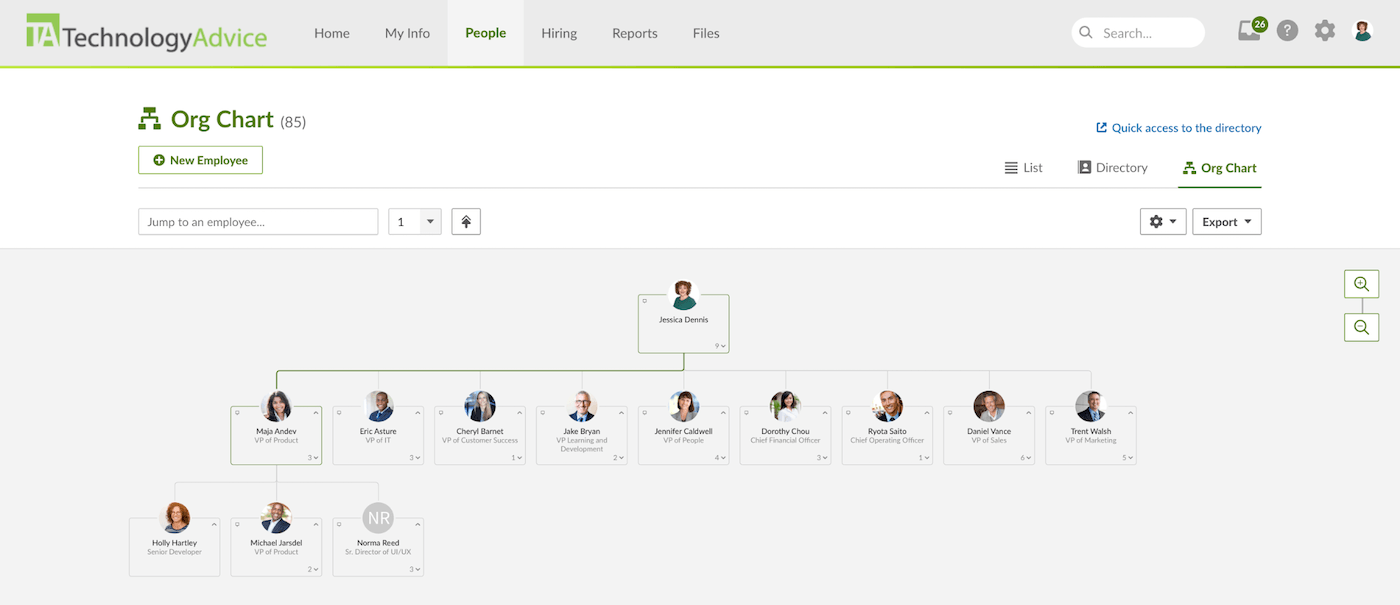
People: Your company’s employee directory and organizational chart.
-
Hiring: Applicant tracking and other recruitment features.
-
Reports: Standard, saved, and custom HR reports.
-
Files: Your company’s document database for handbooks, policies, and other important HR files.
Clicking on each tab opens that part of the platform, with areas such as My Info, People, and Hiring offering additional menus for related features. For example, you can access your company’s organizational chart through the People section.
The Home dashboard can also be customized with widgets for information such as headcount, time off, hiring, compensation, and employee demographics. This gives HR teams and managers a quick view of important workforce information without opening individual reports. BambooHR's custom report builder also lets administrators select fields, rearrange columns, apply filters, and preview results as they build a report.
Some administrative customization is less direct. Changes to approval workflows, access levels, time-off policies, and certain hiring settings still happen under BambooHR's Settings rather than within the individual module, which can take a little getting used to. However, administrators can customize areas such as employee profile tabs and fields to better match their HR processes.
Overall, BambooHR's interface remains one of its stronger features. Everyday tasks are easy for employees and managers to locate, while HR administrators still get useful control over dashboards, reports, employee profiles, workflows, and integrations.
Get a look behind the scenes with a quick overview of BambooHR’s homepage:
Core HR
For core HR tools, we looked at two areas: its HRIS and reporting and analytics. The centralized employee database remains one of BambooHR’s strongest features, while reporting has solid tools with its custom report builder, filters, and real-time previews. More advanced dashboards and benchmarking, however, are still reserved for higher tiers.
HRIS
Employees and managers can access the company directory and organizational chart in BambooHR, making it easy to find coworkers, reporting relationships, and contact information. The mobile app also gives employees access to key profile and directory details while away from their desks.
BambooHR's self-service tools can reduce routine HR admin work. Depending on their permissions, employees can update personal information, request time off, complete benefits tasks, and access payroll information without contacting HR for every change.
Administrators can also control what employees and managers can view or edit based on their roles. Different access levels can be created for specific groups or types of employee information.
The main drawback for very small teams is cost. BambooHR's $250 monthly minimum may be hard to justify if you only need basic employee recordkeeping.
Reporting and analytics
BambooHR includes a wide range of standard HR reports covering areas such as headcount, turnover, benefits, payroll, recruiting, employee demographics, and compliance. You can also mark frequently used reports as favorites, making them easier to access from the Reports tab.
Its custom report builder lets you choose fields, rearrange columns, apply filters, sort or group data, and preview changes in real time while building a report. More advanced analytics are available in Elite, including customizable dashboards, additional visualization options, curated insights, and HR benchmarks for metrics such as turnover, employee satisfaction, wellbeing, and workforce demographics.
Workforce management
BambooHR's workforce management tools cover payroll, benefits administration, and time tracking. These features connect with its core employee records, although each is available as a paid add-on.
Payroll
You can complete payroll in BambooHR in a few steps:
-
Review approved or imported hours.
-
Check wages and employee pay information.
-
Add extra pay, such as bonuses or reimbursements.
-
Review taxes and deductions before approving payroll.
Approved hours from its Time Tracking module flow directly into payroll, while BambooHR handles federal, state, and local payroll tax filings. Employees can also access pay stubs and update information, such as direct deposit and tax withholdings, through self-service.
BambooHR Payroll is designed for U.S.-based employees. For international hiring and payroll support, BambooHR uses Remote for Employer of Record and contractor management services.
Benefits administration
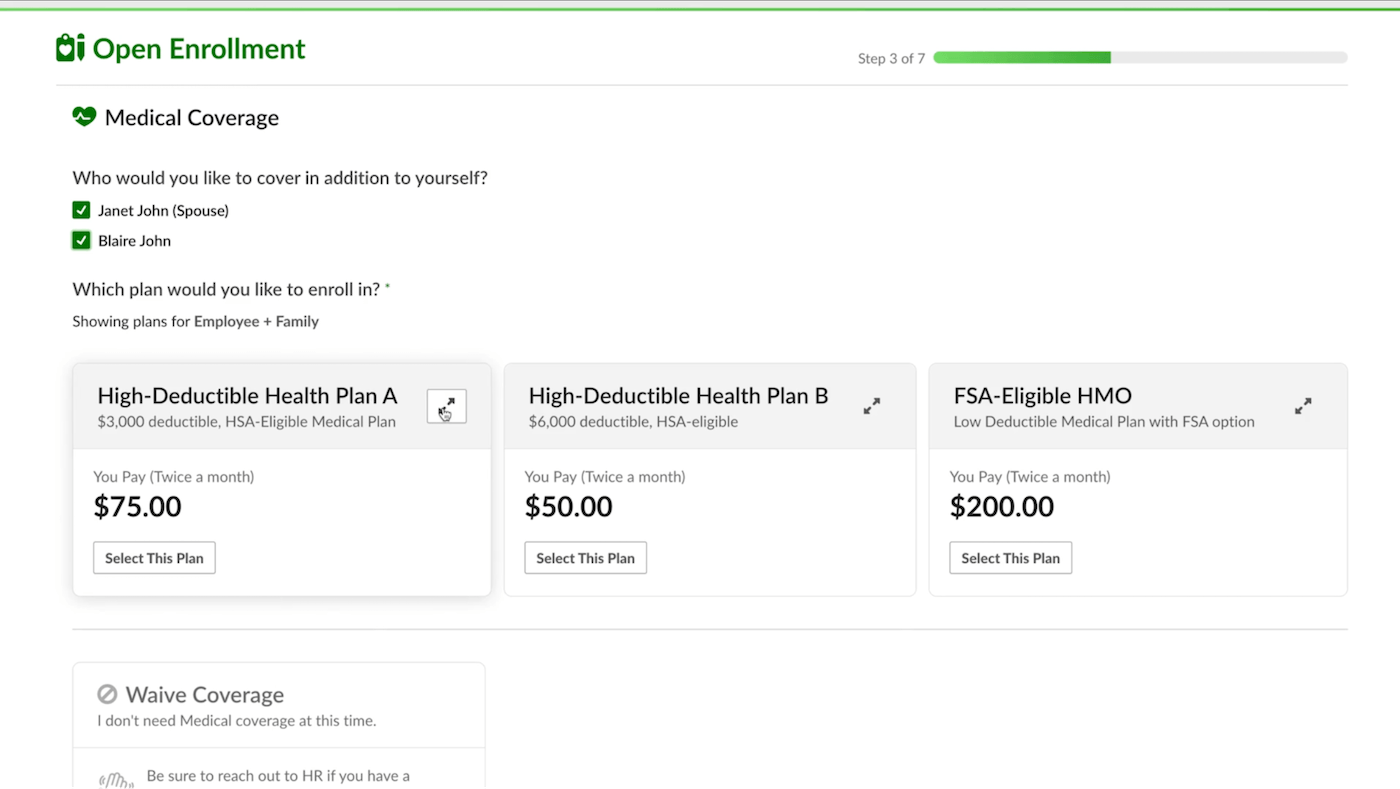
Benefits tracking is included across BambooHR's HR plans, so you can store benefit information and keep it tied to employee records. Full Benefits Administration is a paid add-on that adds employee enrollment, eligibility rules, approvals, and benefits workflows.
With the add-on, you can set up medical, dental, vision, retirement, life insurance, HSA/FSA, and disability plans. Employees can enroll during open enrollment, new-hire enrollment, or qualifying life events, while administrators manage elections and notifications from the benefits dashboard. If you also use BambooHR Payroll, benefit deductions can sync to payroll.
The main limitation is that BambooHR manages the enrollment process rather than acting as your broker or plan administrator. Your HR team and benefits advisers still need to make sure plan design, eligibility rules, and compliance requirements are handled correctly.
Time tracking
BambooHR's Time & Attendance add-on includes:
-
Web, mobile, kiosk, and physical time clocks.
-
Employee timesheets and project tracking.
-
Geolocation for mobile punches.
-
Overtime and shift differential calculations.
-
Meal and rest break tracking.
-
Automated timesheet approvals and reminders.
-
Shift scheduling.
-
BambooHR Payroll integration.
Employees can check schedules, request time off, and view balances in BambooHR, while managers can create recurring or one-time shifts, account for employee availability and PTO, and restrict early clock-ins. The platform also supports deskless teams with an iPad Time Kiosk and compatible physical time clocks.
The main limitation is location control. BambooHR records where mobile employees clock in and out but does not list native geofencing among its Time & Attendance features. Businesses that need location-based punch restrictions, complex labor forecasting, or highly specialized scheduling rules may still need a dedicated workforce management platform.
Time tracking on BambooHR’s mobile application is easy for both employees and managers. Check out our overview of BambooHR’s mobile app in the video below:
Talent acquisition
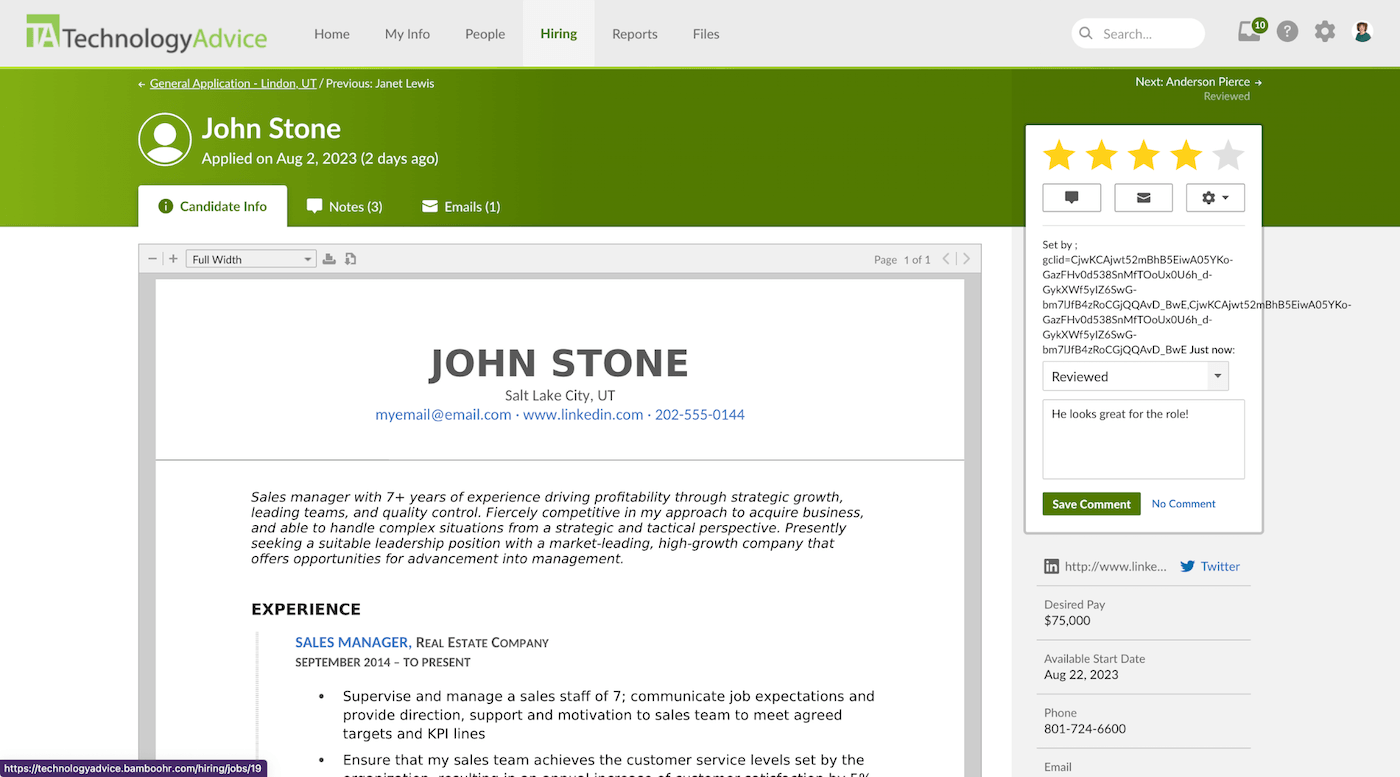
BambooHR lets you create job openings and post them to your BambooHR-hosted career page, social networks, and job boards such as Indeed, ZipRecruiter, and LinkedIn. Once candidates enter the hiring funnel, you can review resumes, application answers, ratings, and screening questions, then move applicants through customized hiring stages.
Hiring teams can collaborate through candidate notes, use email and offer letter templates, and automate certain communications based on hiring stages. Candidate self-scheduling also lets applicants choose interview times based on your team's availability, with calendar and video conferencing integrations available for supported tools.
Applicant tracking is included across BambooHR plans, but active job limits vary by tier: five in Core, 25 in Pro, and 50 in Elite. This should be enough for many small and midsize businesses, while companies with high-volume recruiting or deeper sourcing and candidate relationship management needs may still prefer dedicated recruiting software.
Onboarding, performance, and training
BambooHR helps HR teams manage the steps between hiring someone and getting them settled into the company. You can create reusable new-hire packets, collect e-signatures, assign responsibilities to employees and internal stakeholders, and automate reminders. A progress dashboard shows what has been completed, while information collected during hiring and onboarding flows into the employee record.
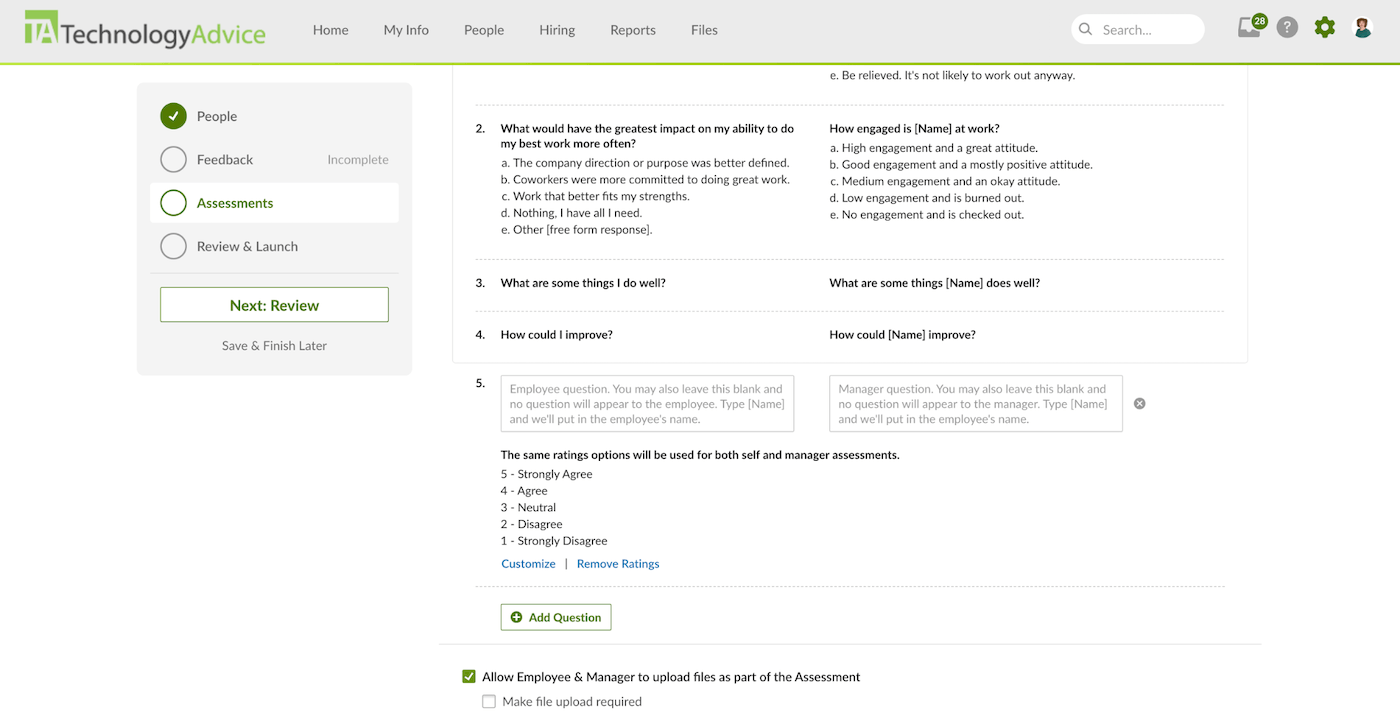
Once employees are onboarded, BambooHR's performance tools support regular check-ins and goal management. Performance Management is included in the Pro and Elite plans and includes:
-
Customizable performance review cycles.
-
360-degree feedback.
-
One-on-one meetings.
-
Individual and team goal tracking.
BambooHR also includes compliance courses across all plans, although the size of the course library varies by tier. HR teams can assign courses and monitor completion within the platform, but companies that need extensive course creation, structured learning paths, or broader professional development programs may still need an integrated learning management system.
Employee experience and engagement
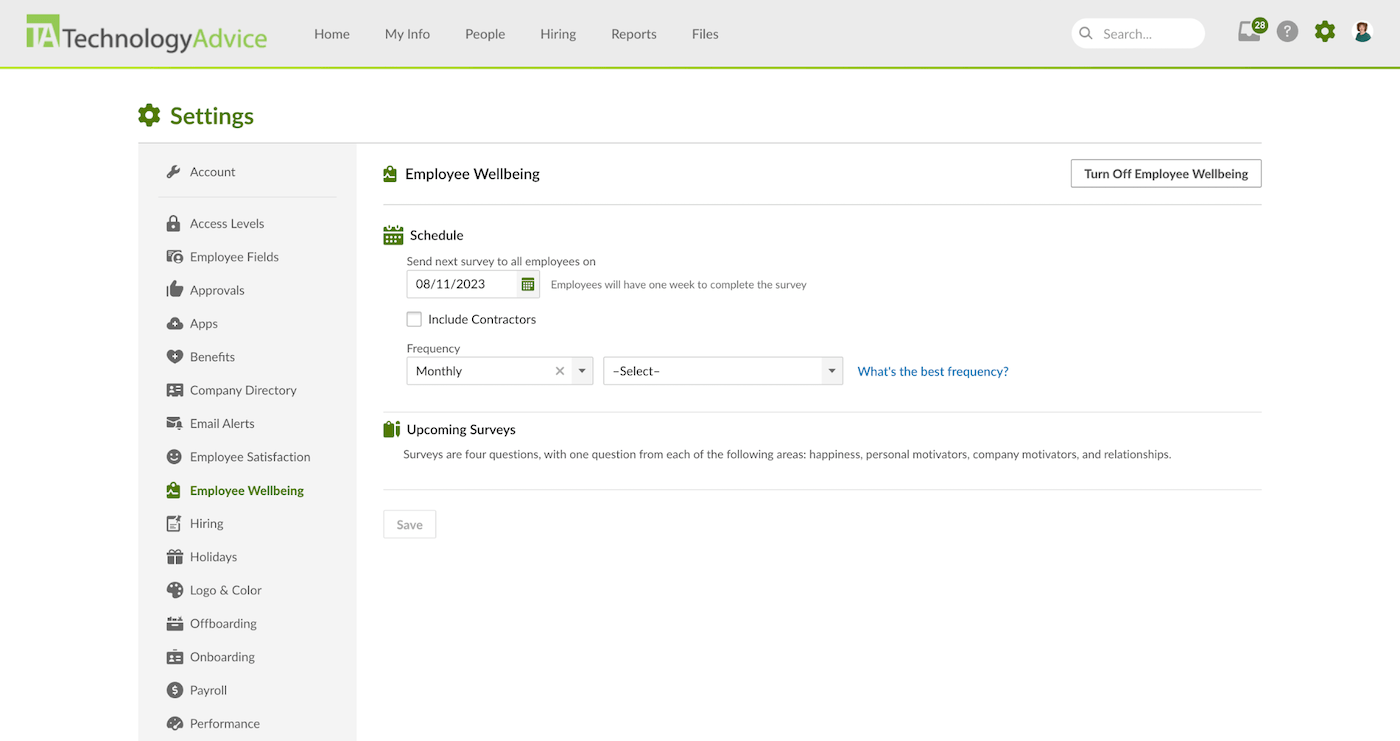
BambooHR includes employee satisfaction and wellbeing tools across all of its HR plans. Employee Satisfaction uses eNPS surveys and AI-powered topic summaries to surface common themes in feedback, while Employee Wellbeing looks at areas such as happiness, relationships, and workplace motivators.
Pro and Elite plans add Employee Community, where companies can share announcements, create interest groups, run polls, and schedule posts. These plans also include Recognition & Rewards, which lets employees recognize coworkers, connect praise to company values, and, if enabled, award redeemable points.
These features give HR teams useful ways to monitor sentiment and strengthen workplace connection, but BambooHR is not a replacement for a real-time collaboration platform. Companies that rely heavily on direct messaging will likely still use tools such as Slack or Microsoft Teams alongside it.
BambooHR user reviews
As of this writing, BambooHR continues to receive strong ratings across major software review sites:
-
Capterra: 4.6 out of 5 stars from more than 3,500 reviews.
-
G2: 4.4 out of 5 stars from more than 6,700 reviews.
-
TrustRadius: 8.3 out of 10 from more than 1,000 ratings.
What users like
-
Ease of use: Reviewers frequently praise BambooHR's clean interface and straightforward navigation. Common tasks such as requesting PTO, accessing employee information, onboarding new hires, and updating records generally require little training.
-
Centralized HR information: Users like having employee records, documents, time off, onboarding, performance information, and other HR processes in one place. Employee self-service also reduces the need to contact HR for routine requests.
-
Customer support: Several reviewers highlight responsive and helpful support, particularly when setting up the system or resolving payroll and administrative questions.
What users dislike
-
Limited customization: Some reviewers say BambooHR can feel restrictive when they need highly specific workflows, permissions, or configurations for more complex HR processes.
-
Reporting limitations: Although BambooHR includes standard and custom reporting tools, users with more advanced reporting needs sometimes want greater flexibility and deeper analysis.
-
Costs can add up: Reviewers generally view BambooHR as a good fit for small and midsize businesses, but some note that adding payroll, time tracking, benefits administration, and other services can increase the overall cost considerably.
Other HR suites to consider
BambooHR offers broad HR functionality in an easy-to-use platform, but another provider may be a better match if you need deeper payroll, more advanced workflow automation, or stronger tools for managing hourly employees. For more options, see our guide to the top BambooHR alternatives.
| Key differentiators | Starting price | |
| Gusto | Small-business payroll with integrated benefits | $6 per employee + $49 base fee |
| TriNet Zenefits | Advanced workflows for complex workforce operations | Call for a quote |
| Homebase | Scheduling and time tracking for hourly teams |
Free: For up to 10 employees in one location Paid plans: $30 per location for unlimited employees |
How we reviewed BambooHR
For this BambooHR review, we researched the platform using BambooHR's product pages, pricing information, help resources, product updates, and other official documentation. We also reviewed feedback from users on third-party software review sites to understand how the platform performs in day-to-day use.
Our review focused on the areas most relevant to small and midsize businesses, including pricing, ease of use, core HR, payroll, benefits administration, time and attendance, recruiting, onboarding, performance management, training, and employee engagement.
We also compared BambooHR's capabilities with other HR platforms to identify where it stands out and where businesses may need additional tools or integrations.
Over 3 million industry leaders trust our advice





Screenshots
Videos
Features
- Employee Self Service
- Job Postings
- Learning Management
- Recruiting
- Compensation Management
- Employee Management
- Employee Satisfaction
- API
- Electronic Signature
- 360 Degree Feedback
- Mobile Capabilities
- Task Management
- Employee Surveys
- Employee Shift Scheduling
- Reporting and Compliance
- Performance Management
- Workflow Management
- Collaboration
- Org Chart
- Onboarding
- Payroll
- Dashboard
- Self-Service Portal
- Interviews and Assessments
- Billing / Invoicing
- Employee Database
- Time Tracking
- Time Clock
- Employee Database
- Talent Management
- Mobile Compatible
- Document Management / Sharing
- Applicant Tracking
- Training / Support Resources
- HR Reporting & Analytics
- Global Payroll
- Custom Workflows
- Vacation / Leave Management
- Analytics / Reports
- Employee Handbook
- Time/Attendance Management
- Compensation / Succession Planning
- Benefits Administration
- Calendar
- Reward and Recognition
- Analytics
- Offers and E-Signatures
- Reporting/Analytics
- Notifications
- Applicant Tracking System
Integrations
- 15Five
- Checkr
- Cronofy
- Glassdoor
- Greenhouse
- Indeed
- Make
- Okta
- QuickBooks Online
- SAML
- Slack
- Spark Hire
- Zapier
- Zendesk
- ZipRecruiter
Reviews
- 5 Star4
- 4 Star14
- 3 Star2
- 2 Star0
- 1 Star0
Loading reviews…
TechnologyAdvice is able to offer our services for free because some vendors may pay us for web traffic or other sales opportunities. Our mission is to help technology buyers make better purchasing decisions, so we provide you with information for all vendors — even those that don't pay us.