


Key takeaways
- A thoughtful project plan creates alignment, improves efficiency, and reduces risks.
- Project plan examples provide structure but must be adapted to each team’s needs.
- Project management software, especially with AI features, makes planning more efficient and scalable.
A project plan is often the difference between a team that’s aligned and one that’s constantly reacting. Project planning gives teams a practical framework to organize tasks and align on deliverables. They help standardize documentation and reduce the risk of missing critical details.
While project management software continues to grow in popularity, 14% of teams still rely on Microsoft Excel for planning and often at the expense of collaboration and real-time visibility.
In this guide, I’ll break down real project plan examples, show you what actually works (and what doesn’t), and give you a template you can adapt immediately—whether you’re managing a marketing campaign, product launch, or internal initiative.
- What is project planning and why does it matter?
- What are the key components of a project plan?
- How to create a project plan: A step-by-step guide
- How can project planning tools help?
- Free project plan template download
- What are the common issues in project planning?
- What are the best practices for project planning?
- FAQs
What is project planning and why does it matter?
Project planning is the process of building a shared vision for how work will get done, creating the stage for collaboration and measurable success. It reduces uncertainty and provides a clear direction for everyone involved.
In practice, teams that invest time in planning upfront spend less time reworking tasks later—a pattern I’ve consistently seen when reviewing project workflows across tools.
Effective planning also strengthens decision-making. Stakeholders gain visibility into priorities, resources, and progress, which makes it easier to stay aligned. The process helps teams anticipate challenges before they happen and ensures proper resource allocation.
Still, planning isn’t always without a hitch. According to a 2025 Wellington report, 46% of project practitioners say they’re somewhat or very dissatisfied with their organization’s project management maturity. This underscores why thoughtful, consistent planning remains one of the most important practices in project management.
With a solid project plan in place, you give your team structure that keeps everyone moving together through the phases of project management. That’s why planning isn’t just paperwork, but the foundation of successful project delivery.
What are the key components of a project plan?
Reviewing a sample project plan helps you understand how they look in practice. Based on my experience reviewing project planning frameworks across dozens of teams and industries, these are the core components consistently found in effective project plans. While the format may change depending on industry, these core elements remain consistent across most plans.
Element | Purpose |
|---|---|
| Scope | This defines what’s included and excluded from your project. Notably, 53% of organizations mostly or always create a scoping document as part of planning, which shows how critical it is for avoiding misunderstandings. In practice, unclear scope is one of the most common reasons projects go off track, especially when stakeholders aren’t aligned early. |
| Objectives and goals | Defining measurable outcomes ensures all parties understand what success looks like. Objectives provide focus, while goals break down into actionable targets that can be tracked over time. |
| Milestones | These are the major checkpoints that tell you how far you’ve come. They break a large project into smaller, more manageable wins that keep motivation high. |
| Deliverables | This section outlines the actual outputs your team is expected to produce. Whether it’s a new software feature or a campaign, these are the tangible results your stakeholders want to see. |
| Timelines | This is where you map out when tasks should start and how long they’ll take. From experience, overly optimistic timelines are a frequent issue. That’s why building in buffer time for dependencies and approvals can make plans far more realistic and achievable. |
| Resources | They cover everything from your team members’ time to the budget, tools, and any equipment or purchases that need to be made. |
| Risk management | Identifying possible setbacks early allows for contingency strategies. In fact, 65% of project practitioners say they mostly or always engage in risk mitigation strategies, showing how essential this step is for keeping projects on track. Teams that revisit risks regularly—not just at the start—are typically better prepared to handle unexpected changes without derailing progress. |
How to create a project plan: A step-by-step guide
Building a project plan might sound overwhelming at first, but breaking it down into smaller steps makes the process much easier to handle. Here’s a simple guide to follow to ensure nothing gets missed along the way.
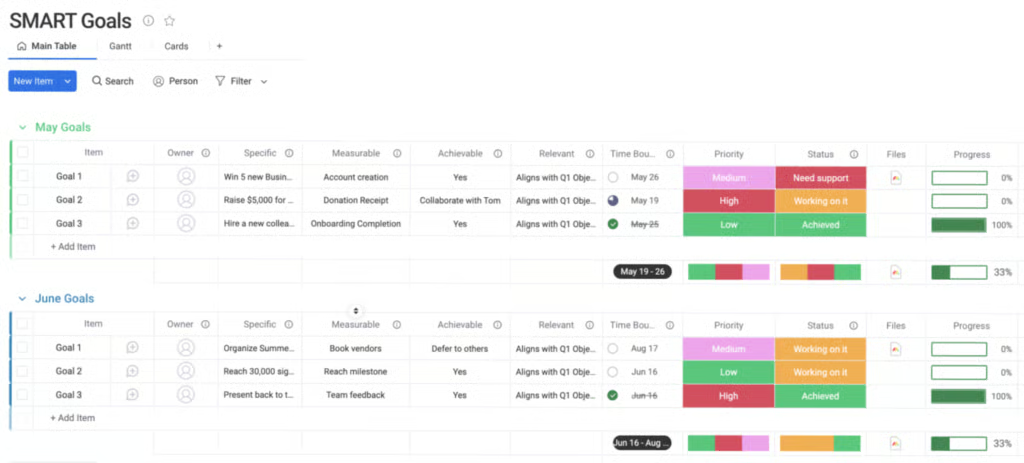
1. Define the project goals
Start by clarifying why the project matters and what success looks like. Clear goals give your team a shared sense of direction and make it easier to measure progress later on. Looking at a project plan example from similar projects can help confirm that your goals are specific and measurable.
- Good: “Launch a new onboarding flow by Q3 to reduce churn by 15%”
- Weak: “Improve onboarding”
2. Identify the scope
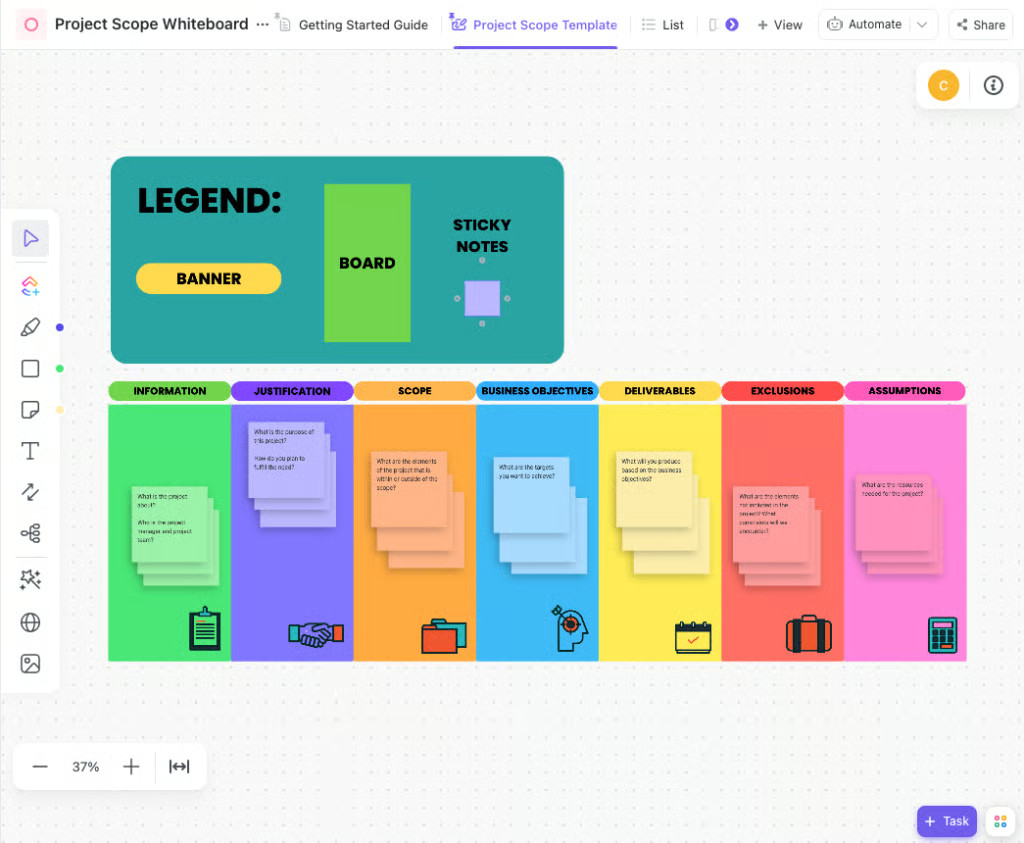
Scope outlines what’s included in the project and what’s out of bounds. This step eliminates misunderstandings and helps manage expectations with stakeholders. A well-structured project plan sample that sets scope boundaries in place is often useful for preventing confusion.
- Good: “Redesign homepage + 5 key landing pages; exclude blog and help center”
- Weak: “Update the website”
3. List out deliverables
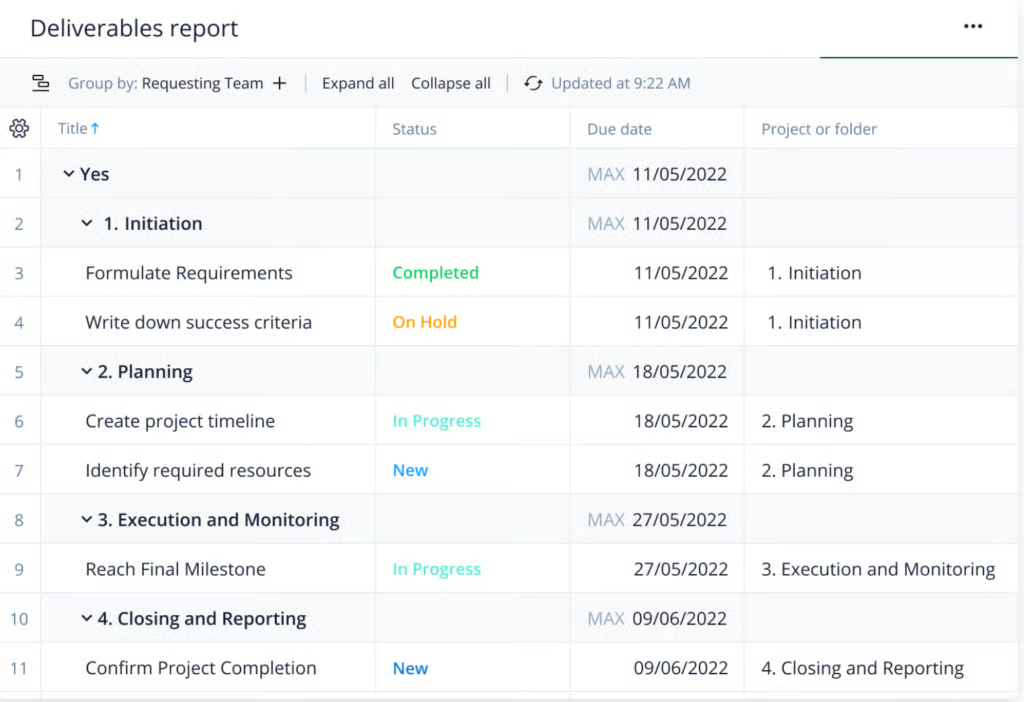
Deliverables are the tangible results your project is expected to complete by the end of the project lifecycle. Getting these down in writing helps your team understand exactly what needs to be done. It also supports tracking and helps confirm when something is truly finished.
- Good: “Wireframes, high-fidelity designs, QA-tested pages, final deployment”
- Weak: “Design updates”
4. Create a timeline
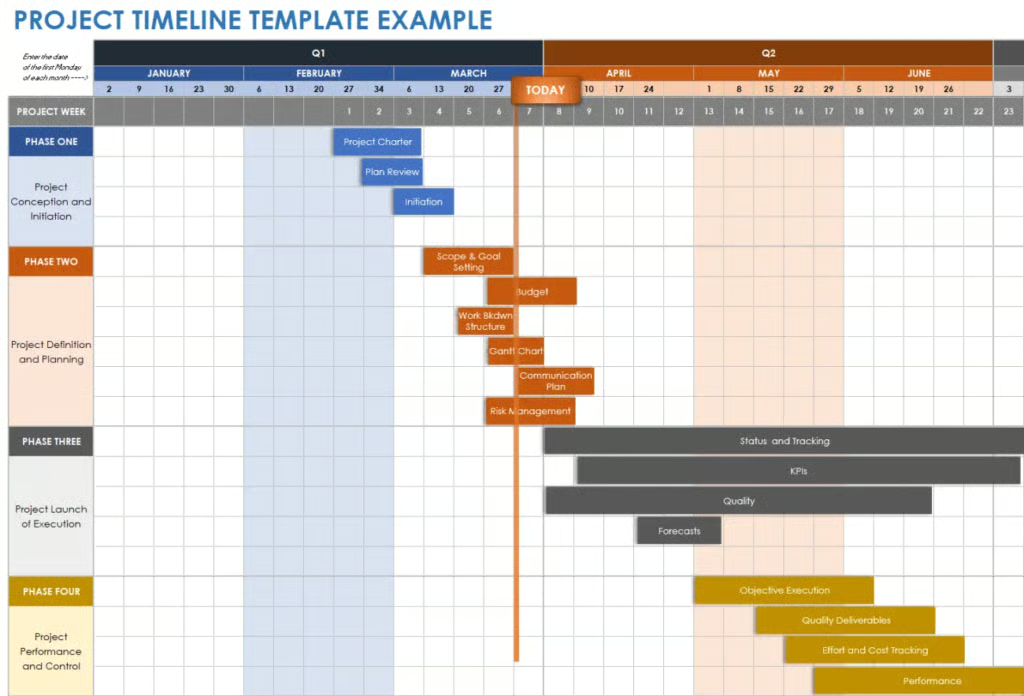
Map out the major tasks and decide when they need to be done. A timeline helps you identify dependencies and provides your team with a realistic view of deadlines. This way, everyone knows what’s coming up next and how their work fits into the bigger picture.
- Good: “Design (2 weeks) → Development (4 weeks) → QA (1 week)”
- Weak: “Finish by end of month”
5. Assign roles and responsibilities
Projects run more smoothly when everyone knows who’s responsible for what. Assigning tasks based on skills and availability helps prevent work from being duplicated or missed. It also fosters accountability, which boosts productivity.
- Good: “Designer owns wireframes; PM approves; developer builds and tests”
- Weak: “Team handles design”
6. Plan for risks
Consider what could go wrong and how you would respond. Risk planning may seem like over-preparation, but it saves you time when issues arise. Having backup options in place also helps your team stay confident and focused in the face of challenges.
- Good: “Risk: content delays → Mitigation: pre-approve drafts and set deadlines 1 week early”
- Weak: “Delays may happen”
7. Review and finalize the plan
Before kicking things off, take time to review your plan with the team and stakeholders. This step ensures everyone is aligned on the goals, scope, and timeline, reducing the risk of costly rework later.
- Good: “Stakeholder sign-off on scope, timeline, and deliverables before kickoff”
- Weak: “Quick team review”
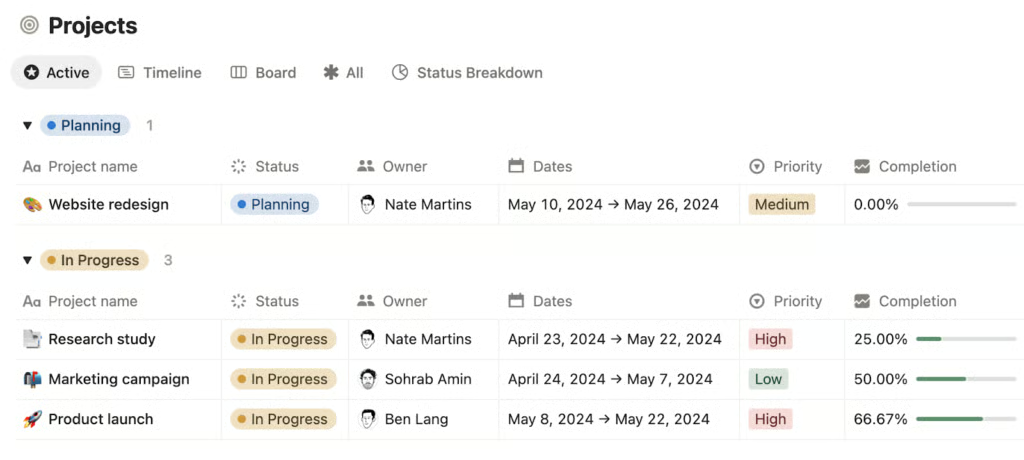
How can project planning tools help?
Using the right software can make project planning faster, more streamlined, and more effective for your entire team. In fact, 82% of companies use project management software to drive organizational efficiencies, according to a recent report by monday.com. With so many businesses already relying on these tools, it’s clear they play a big role in turning plans into action.
Best for | Starting price | Key features | |
| monday | Cross-functional teams needing visual workflows | Free plan; $12 per user/mo |
|
| ClickUp | Detailed task tracking | Free plan; $7 per user/mo |
|
| Smartsheet | Custom reports and interactive dashboards | $19 per user/mo |
|
| Wrike | Large projects or portfolios | Free plan; $10 per user/mo |
|
| Notion | Small, creative teams | Free plan; $10 per user/mo |
|
Modern project management platforms often come with AI and automation tools, such as auto-scheduling task dependencies or flagging potential risks. These features provide you with proactive insights, allowing you to address problems before they escalate. A Capterra survey revealed that the desire to add AI functionality is the top trigger for new project management software purchases among 55% of businesses. This trend highlights how teams are prioritizing smarter tools that improve decision-making and efficiency.
Free project plan template download
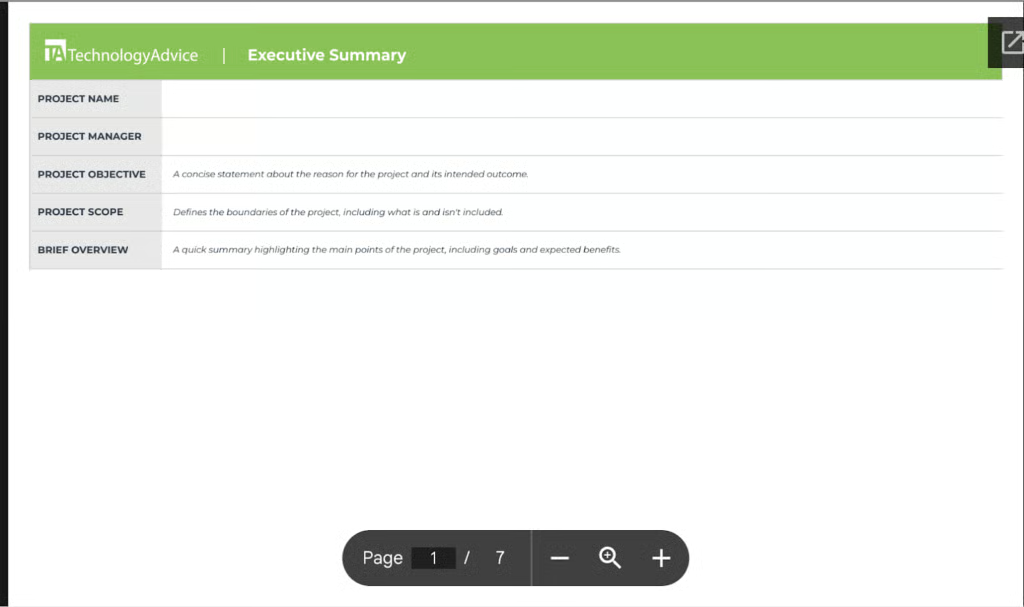
If you want a quick way to jumpstart your planning, download this free project plan template and tailor it to your needs.
What are the common issues in project planning?
Even with the best intentions, project plans can run into problems that slow things down or throw a project off course. The good news is that reviewing common pitfalls in project plan samples can help you recognize where projects often falter. Here are common challenges in project planning you should be aware of.
Unclear goals
When goals aren’t clearly defined, teams often find themselves questioning what they’re actually trying to achieve midway through the project. This lack of clarity leads to wasted effort, rework, and misalignment across stakeholders.
How to avoid it: Spend time upfront defining specific, measurable goals and confirm that everyone agrees on what success looks like. Document these goals so they serve as a reference point for your team throughout the project.
Scope creep
Projects often grow beyond their original scope when new requests are added without proper review. Over time, this creates a steady stream of additional tasks without corresponding adjustments to timelines or resources, leading to budget overruns, delays, and team burnout.
How to avoid it: Create a clear scope statement during planning and set up a process for evaluating changes. That way, you can protect your timeline while still handling high-priority adjustments.
Poor communication
When communication breaks down, teams miss updates or overlook risks. Information becomes scattered across emails, chats, and meetings, making it harder for stakeholders to stay aligned and increasing the likelihood of duplicated work or missed tasks.
How to avoid it: Use project management tools and regular check-ins to keep everyone on the same page. Ensure communication channels are clear and easy for the whole team to use. Tools like ClickUp come with built-in chat, allowing you to collaborate with teammates directly from your project board.
Inaccurate time estimates
Underestimating the time required for tasks is a common pitfall that can put projects behind schedule. Tasks are frequently delayed or marked as nearly complete, which creates a ripple effect of missed deadlines, lower-quality output, and increased pressure on the team.
How to avoid it: Build a project timeline plan based on past data or input from experienced team members. Add buffers for unexpected delays to keep deadlines realistic.
What are the best practices for project planning?
Good project plans rely not only on templates but also on discipline and foresight. Applying best practices helps teams avoid mistakes and improve outcomes.
- Keep objectives measurable and realistic: Vague goals make it difficult to determine whether a project has succeeded. Instead, define objectives using a clear structure, such as a specific metric, timeframe, and outcome (e.g., “increase sign-ups by 20% within 3 months”), to create a roadmap that guides decisions and promotes accountability across the team.
- Build in flexibility for changing priorities: No plan survives without adjustments, so it’s important to account for change upfront. Adding buffer time between key phases or revisiting priorities during weekly check-ins helps teams adapt without derailing the entire timeline.
- Use project plan templates, but tailor them to your context: Project planning templates save time, but they shouldn’t be applied blindly. Customize sections like scope, timelines, and workflows to reflect how your team actually works, and consider using visual tools like Kanban boards or Gantt charts to make the plan easier to follow and update.
- Review the plan frequently and update as needed: A project plan is a living document, not a one-time exercise. Set a regular cadence—such as a weekly or biweekly review—to ensure progress stays aligned with current priorities and allows teams to catch issues early.
- Make the plan accessible to all stakeholders: Hidden documents create silos and confusion. Keeping the plan in a shared, centralized location, like a project management tool or shared workspace, ensures everyone can access updates, track progress, and stay aligned without relying on scattered communication.
Looking at examples of a project plan shows how structure and foresight help teams deliver projects on time and within budget. By customizing pre-built templates, you give your team the best chance of success. Pair this with project management software and you’ll gain real-time visibility and AI-driven insights that keep projects on track while reducing the manual effort of coordination.
FAQs
What is the difference between project plan examples and templates?
Project plan examples are real-world samples that illustrate how others structure their projects, while project plan templates are reusable frameworks. Templates provide a starting point, but examples offer insight into practical application.
Can I use project plan templates for any industry?
Yes, project plan templates are flexible and can be tailored to different industries. Customizing sections such as scope, roles, and risk planning ensures the template aligns with your specific goals.
How often should I update a project plan example or template?
Project plans should be updated whenever major changes occur, such as new stakeholders, shifting deadlines, or adjusted priorities. Regular reviews (weekly or biweekly) keep the plan accurate and useful.