


SAP SuccessFactors HXM is our top enterprise HR software for organizations prioritizing AI-assisted HR workflows, while Workday HCM stands out for workforce reporting and analytics. ADP Vantage HCM is a strong fit for large U.S.-based organizations, Dayforce HCM offers extensive customization and global payroll capabilities, and Oracle Fusion Cloud HCM is best suited to enterprises that want HR connected to a broader ERP ecosystem.
Here’s a list of our top picks for the best enterprise HR software and their designation:
- SAP SuccessFactors HXM is best for optimizing workflows through AI.
- Workday HCM is best for its detailed reporting and analytics.
- ADP Vantage HCM is best for expanding U.S.-based enterprises.
- Dayforce HCM is best for its platform customization and extensibility.
- Oracle Fusion Cloud HCM is best for enterprises needing a full-scale ERP solution.
Update notes
- Sep. 10, 2026: Hanna Sillo updated pricing, payroll coverage, integrations, AI capabilities, and other product details across all five vendors to remove outdated or unsupported claims.
- Sep. 5, 2025: Hanna Sillo updated the product cards and other elements to their latest versions. She also changed all mentions of “Ceridian Dayforce” to simply “Dayforce.”
- Dec 12, 2023: Jessica Dennis added a video overview to the article.
- Sep 24, 2023: We revised the article’s formatting for improved efficiency and visual flow. We also removed Saba, Skillsoft, and iCIMs from our choices and added SAP SuccessFactors HXM, ADP Vantage HCM, Ceridian Dayforce HCM, and Oracle Fusion Cloud HCM. Finally, we outlined our methodology.
Methodology
We picked our choices with you in mind.
First, we evaluated 15 enterprise HR software based on current options and the reviews of customers like you. We then narrowed our selections to the platforms that best addressed your top-of-mind concerns, such as global capabilities, succession planning, and custom automations. We evaluated the following vendors during our research:
- SAP SuccessFactors HXM
- Workday HCM
- UKG Pro
- HROne
- greytHR
- ADP Vantage HCM
- Paycom
- Paylocity
- Dayforce
- Paycor
- Oracle Fusion Cloud HCM
- isolved
- Deel
- Papaya Global
- Rippling
As the market changes, we reevaluate our choices so you always receive the best insight for your purchasing decision.
Looking for more options? Explore our HR Software Guide.
What is the best enterprise HR software?
The best enterprise HR software depends on your organization’s size, workforce complexity, geographic footprint, and reporting needs. The comparison below evaluates five leading platforms across core HR, payroll, talent management, analytics, integrations, AI capabilities, pricing, and implementation considerations.
Enterprise HR platforms are generally designed for organizations with complex workforces across multiple departments, locations, business units, or countries. Beyond core HR administration, these systems typically add workforce analytics, talent management, succession planning, automation, integrations, and global workforce capabilities.
| Provider | Standout feature | Notable customers |
|---|---|---|
| SAP SuccessFactors HXM | Breadth of AI-enhanced add-ons | Microsoft, MOD Pizza, Coca-Cola |
| Workday HCM | Ease of report customization | Target, Southwest, Shutterstock |
| ADP Vantage HCM | Open API and large integration marketplace | Conair, Cisco Systems, Dell |
| Dayforce HCM | Zero-code product integration studio | Spirit AeroSystems, Danone, Gannett |
| Oracle Fusion Cloud HCM | Personalized employee workflows | Fujifilm, Xerox, Wendy’s |
You can also watch our video below for a quick overview of our favorite enterprise HR platforms.
SAP SuccessFactors HXM: Best for optimizing workflows through AI
Pros
- Huge product library: SAP offers solutions in finance, manufacturing, sales, marketing, and supply chain management, making it easier to connect HR with other business functions.
- Competitive price: SAP offers separately priced SuccessFactors modules, allowing enterprises to select products based on their HR needs rather than purchasing every capability in the HXM portfolio.
- Continuous learning features: HXM includes a robust learning platform that supports compliance training, personalized learning recommendations, and gamification.
Cons
- Slow backend: Some users report a “clunky” backend and occasional slow load times.
- Inconsistent interface: Connecting SAP SuccessFactors with other SAP products can result in different user experiences across applications, increasing the learning curve.
- Add-ons: Some capabilities may require additional products or integrations at an extra cost, including benefits administration and ACA-related functionality.
Why I chose SAP SuccessFactors HXM
SAP SuccessFactors HXM Suite is a strong option for enterprises that want AI embedded across HR workflows while connecting HR data with other parts of the business. SAP is expanding SuccessFactors around Joule and AI agents that can surface relevant employee information, recommend next steps, assist managers with performance-related tasks, and support learning and development workflows.
SuccessFactors also combines AI-assisted tools with personalized employee experiences, including tailored home pages, digital self-service, and HR support. These features can reduce manual HR tasks and make it easier for employees and managers to find information and complete routine processes.
About SAP SuccessFactors HXM
SAP SuccessFactors Human Experience Management (HXM) Suite is an HCM platform for enterprises needing products that support the entire employee life cycle, from recruiting and onboarding through development and separation. Its HXM suite also integrates with SAP’s broader enterprise resource planning (ERP) portfolio, helping employee and workforce data flow across business functions such as finance.
SAP has continued expanding its artificial intelligence capabilities within SuccessFactors through Joule and embedded AI features. These tools can assist with tasks such as preparing for performance conversations, surfacing employee information, recommending actions, and supporting learning and development.
One criticism of SAP is that its broad product ecosystem can create a more complex user experience than some competing platforms. Organizations using multiple SAP products or third-party integrations may encounter differences in workflows and interfaces that require additional training and configuration.
At the same time, SAP’s broad ecosystem gives enterprises access to a large range of HR, ERP, analytics, and integration capabilities within the wider SAP environment.
Also read: Top 6 SAP ERP Alternatives
Core features
Performance review writing assistant
People managers can use AI-assisted tools during performance review cycles to help prepare feedback and organize relevant employee information. SAP has also expanded its performance-management capabilities through Joule and AI agents that can surface performance information and recommend next steps.
These tools can reduce some of the manual preparation involved in performance reviews while helping managers produce clearer, more relevant feedback.
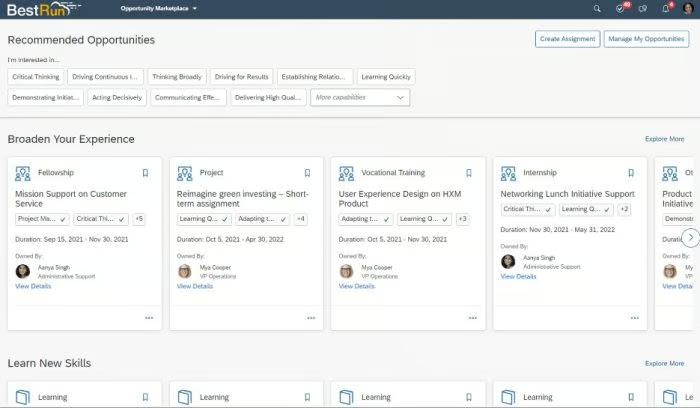
AI-suggested learning paths
Employees can access learning recommendations based on factors such as their roles, skills, goals, and interests. Beyond assigning mandatory training or courses, this gives employees more control over their professional development.
SAP SuccessFactors can also recommend training and internal development opportunities, helping employees identify ways to build skills that align with their roles and career goals.
Pricing
SAP does not publish a single price for the entire SuccessFactors HXM suite because its products are sold separately. SAP currently publishes pricing for several individual modules, while others require a custom quote. All SAP SuccessFactors offerings also require implementation by a certified SAP partner.
| HR Function | SAP Product | Starting Price |
|---|---|---|
| Core HR | SAP SuccessFactors Employee Central | $6.30/user/mo. |
| Payroll | SAP SuccessFactors Employee Central Payroll | Quote-based* |
| Workforce management | SAP SuccessFactors Time Tracking | $3.20/user/mo.** |
| Onboarding | SAP SuccessFactors Onboarding | Quote-based |
| Recruiting | SAP SuccessFactors Recruiting | Quote-based |
| Performance management | SAP SuccessFactors Performance & Goals | $3.72/user/mo. |
| Learning | SAP SuccessFactors Learning | $1.85/user/mo. |
| Compensation | SAP SuccessFactors Compensation | Quote-based |
| Talent development | SAP SuccessFactors Career and Talent Development | Quote-based |
*Employee Central Payroll requires an existing SAP SuccessFactors Employee Central license and has a minimum purchase quantity of 1,000 users.
**SAP SuccessFactors Time Tracking requires an existing Employee Central license.
Workday HCM: Best for its detailed reporting and analytics
Pros
- User-friendly interface: Workday offers a modern, relatively consistent interface across many HR workflows, which can make routine employee and manager tasks easier to navigate.
- Talent Marketplace: Employees can explore internal jobs, projects, flex teams, and learning opportunities based on their skills and interests.
- Mobile access: Managers and employees can complete many HR tasks and access workforce information through Workday’s mobile app.
Cons
- Custom pricing: Workday does not publish standard HCM pricing, making it difficult to compare costs without requesting a quote.
- Limited native payroll coverage: Workday offers its own payroll in Australia, Canada, France, Ireland, the U.K., and the U.S., while relying on partners for broader international payroll coverage.
- Narrower ERP breadth than some competitors: Workday offers financial management, planning, procurement, and related business applications, but its broader ERP portfolio is not as extensive as SAP’s or Oracle’s.
Why I chose Workday HCM
Workday stands out for its reporting and analytics capabilities, which help HR teams connect workforce data across areas such as talent, compensation, payroll, and workforce planning. This makes it particularly useful for enterprises that need to investigate trends around retention, skills, labor costs, and organizational growth.
I also like Workday for organizations that want configurable reporting without relying on separate HR data systems. Its unified data model gives HR leaders a more consistent view of workforce information and makes it easier to analyze patterns across different parts of the employee life cycle.
About Workday HCM
Workday HCM is a cloud-based HCM suite that combines core HR, talent management, payroll, workforce planning, reporting, and employee self-service tools. This makes it easier for IT departments to configure Workday to meet the specific cadences of their business, such as an open application programming interface (API) to extend functionality and streamline data via third-party integrations.
Workday is also well known for its robust reporting and analytics capabilities that make employee data easier to understand. These features range from standardized payroll and EEO-1 reports to analytics that measure and interpret attrition, employee sentiment, and pay equity data points.
In addition, Workday leverages customer benchmarking data to compare your employee satisfaction and compensation metrics against competitors. With this data, you can understand where you excel and fall short and take strategic measures to engage and retain your talent.
Core features
Workday consists of the following modules:
- Talent acquisition.
- Payroll and benefits administration.
- Workforce planning.
- Analytics and reporting.
- Employee self-service and help management.
- Learning and performance management.
Key differentiators
Workforce analytics
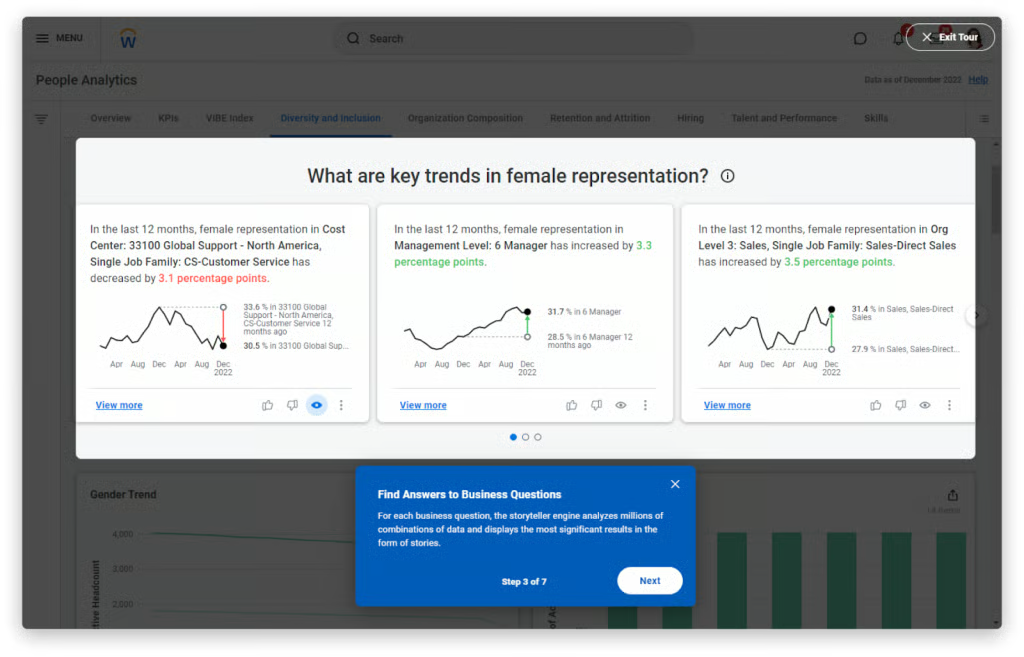
Workday lets organizations analyze workforce data across areas such as retention, talent, performance, compensation, and workforce composition. Configurable reports and dashboards can help HR teams identify trends, investigate changes, and drill into the underlying workforce data.
For example, HR teams can use reporting tools to examine changes in workforce representation, turnover, hiring, or promotions and better understand which employee groups or business units are contributing to those trends.
AI-assisted insights
Workday uses AI and machine learning across its analytics and HCM products to help surface relevant workforce information and reduce the amount of manual analysis required. These tools can help HR teams identify trends, summarize information, and make workforce data easier for managers and other stakeholders to interpret.
The result is a more accessible reporting experience for teams that need workforce insights without requiring every user to be an advanced data analyst.
Pricing
Workday does not publicly disclose standard HCM pricing and instead provides customized quotes based on factors such as employee count, selected modules, and contract scope. Third-party estimates commonly place Workday at around $40–$60 per employee, per month (PEPM), although actual costs can vary significantly by deployment.
Implementation is typically an additional expense. Third-party estimates suggest implementation can cost around one to three times the annual subscription, depending on the complexity of the rollout, integrations, and services required.
ADP Vantage HCM: Best for growing, U.S.-based enterprises
Pros
- Integration ecosystem: ADP Marketplace and API Central give Vantage HCM users access to third-party apps, APIs, and custom integration tools that can extend the platform’s functionality.
- Broad HCM functionality: Vantage HCM supports core HR, payroll, talent, benefits, workforce management, and analytics, with additional apps and services available through ADP’s wider ecosystem.
- Compliance support: ADP offers payroll tax, wage garnishment, ACA, and other compliance-related tools and services that can reduce some of the manual work involved in managing U.S. payroll and workforce requirements.
Cons
- Steep learning curve: Some users report that Vantage HCM can take time to learn, particularly for organizations new to ADP’s enterprise products.
- Customer support concerns: Some users report slow turnaround times for technical support and difficulty navigating support channels.
Why I chose ADP Vantage HCM
ADP Vantage HCM is a strong option for large U.S.-based organizations that want enterprise HR technology backed by ADP’s payroll, compliance, analytics, integration, and managed-services capabilities. ADP also offers HCM Managed Services for organizations that want additional support across areas such as payroll, HR, benefits, talent, and time and labor.
Vantage HCM is particularly worth considering if your organization already uses other ADP products. Staying within the ADP ecosystem can simplify integrations and data movement as your HR requirements become more complex, while API Central provides tools for connecting ADP data with internal and third-party systems.
About ADP Vantage HCM
Vantage HCM is ADP’s solution for U.S.-based, multinational enterprises that need additional support to keep up with their growth rate. The platform covers all of the typical HR capabilities with extra features that give your HR team a boost, like automated processes, broad integrations, and managed services.
Compared to others on our shortlist, ADP’s solution is the most scalable. If you are already using an ADP product, it is easy to stay within ADP’s product catalog and graduate to its more robust solutions as you grow. In turn, your company can avoid potential data loss and training headaches that would come with switching to a product outside the ADP family.
Learn more about changing HR systems in our HRIS Implementation Guide: The Steps for Success.
Core features
Vantage HCM includes capabilities for:
- Recruiting and talent management.
- Performance management.
- Learning.
- Succession planning.
- Benefits administration.
- Workforce management.
- Payroll.
- Analytics and reporting.
- Managed services.
Enterprises can also use ADP’s U.S. payroll and compliance tools for areas such as tax administration, wage garnishments, ACA-related processes, and workforce compliance.
Key differentiators
Extensive HCM services
With ADP Vantage HCM, you can opt in for additional services, including:
- Payroll services: Support for payroll administration, taxes, and related compliance responsibilities.
- Benefits administration: Administrative and specialist support for benefits processes.
- Talent and recruiting services: Support for recruiting, talent management, and other workforce needs.
- HR and compliance support: Specialists and advisory services for HR operations, compliance, and change management.
These services can be useful for large organizations that want additional operational support alongside their HCM software rather than handling every HR, payroll, and benefits process internally.
Strategic HR analytics
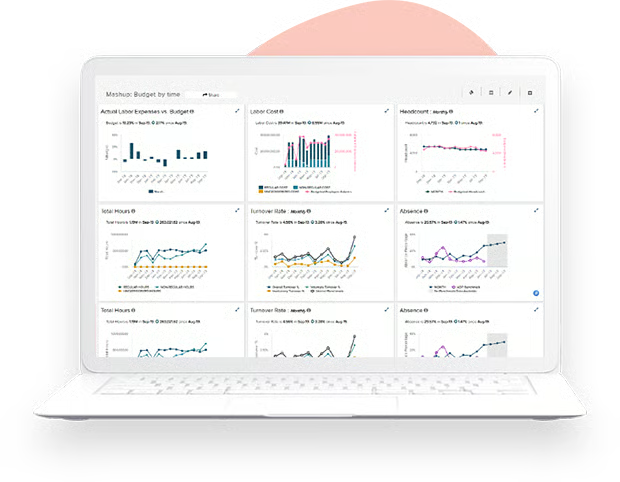
ADP Vantage HCM comes standard with ADP DataCloud, an extensive reporting and analytics tool. DataCloud uses internal employee data and external benchmarking to provide insights into areas like turnover cost, compensation, overtime rates, and industry-specific recruitment metrics.
Besides ensuring your business remains competitive, Vantage HCM shows how your business is doing compared to historical data. That way, you can constantly adjust your processes for better productivity and efficiency while making your workforce happy.
Pricing
ADP does not publicly disclose standard pricing for Vantage HCM, so organizations must request a customized quote. Pricing can vary based on factors such as employee count, selected HCM modules and services, payroll frequency, integrations, implementation requirements, training, and support.
Dayforce HCM: Best for customization and extensibility
Pros
- Continuous payroll: Dayforce continuously calculates pay as time is captured, reducing reliance on traditional batch payroll processing.
- Personality profiles: Dayforce’s TeamRelate feature helps employees and managers understand communication styles and provides check-ins around factors such as stress and energy levels.
- Managed services: Dayforce offers managed payroll, tax filing, wage attachment, and benefits administration services that can reduce your team’s administrative workload.
Cons
- Narrower ERP scope: Dayforce focuses primarily on HCM and workforce management and does not offer the same broad finance, supply chain, and ERP application portfolio as SAP or Oracle.
- Customer support concerns: Some users report slow customer support and difficulty getting complex issues routed to the right specialist.
- Implementation challenges: Some users report lengthy or complex implementations, particularly for larger deployments.
Why I chose Dayforce HCM
Dayforce is a strong choice for enterprises that need to extend their HCM platform beyond its native features. Its APIs and low-code Integration Studio let organizations connect third-party systems and build integrations around more complex workforce requirements.
Dayforce also supports multinational employers, with payroll capabilities that can pay employees in more than 160 countries. That combination of extensibility and global payroll support makes it particularly useful for enterprises expanding across multiple markets.
About Dayforce HCM
Dayforce HCM most closely rivals ADP Vantage HCM in terms of features and functionality, especially global payroll capabilities. Dayforce boasts its platform supports 160 countries for payroll, compared to ADP’s 140. Both also offer on-demand payroll schedules through their employee payroll apps — ADP’s Wisely and Dayforce Wallet.
Dayforce also stands out for its talent development tools. Its AI-powered talent intelligence features can help organizations identify skills gaps and connect employees with relevant development and internal career opportunities.
Meanwhile, employees can leverage the same AI to suggest and explore internal opportunities and create their own career paths. In fact, the software facilitates collaboration between managers and direct reports on development plans that align with employees’ professional goals and the future needs of the business.
Also read: A Guide to Creating a Global Compensation Strategy
Core features
Dayforce includes the following modules:
- Core HR, including employee database, payroll, benefits, and time management.
- Recruitment
- Onboarding
- Scheduling
- Absence management
- Learning
- Performance management
Key differentiators
Open API and integration studio
Dayforce includes a public API to connect your favorite third-party programs. Its Integration Studio gives customers a low-code way to build, manage, and monitor integrations using prebuilt connectors or customized integrations.
As a result, you can integrate the niche tools of your industry and facilitate employee data transfer across your entire enterprise system.
AI assistant
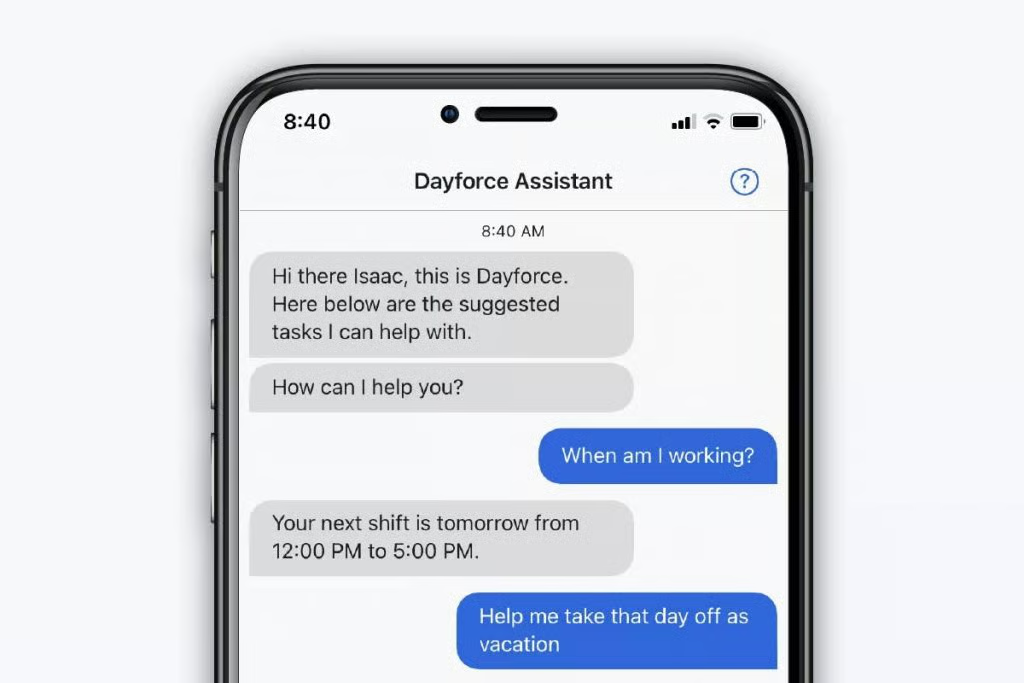
Dayforce Assistant is an AI-powered program that allows employees to complete self-service functions through either chat or voice commands. It can answer HR-related questions using Dayforce resources and your organization’s Hub content, while AI agents can also help automate tasks such as checking leave balances and requesting time off.
For example, employees can use AI Assistant to check vacation balances or submit time-off requests. Managers can also use Dayforce Assistant to review pending and approved time-away requests, with approval and denial actions available through Dayforce’s manager tools.
Pricing
Dayforce does not publicly disclose standard HCM pricing, so organizations must request a customized quote. Pricing can vary based on factors such as employee count, selected modules, countries of operation, integrations, and implementation requirements.
Dayforce uses per-employee, per-month (PEPM) pricing for at least some subscriptions, while implementation costs vary based on the size and complexity of the deployment.
Oracle Fusion Cloud HCM: Best HCM for a streamlined tech stack
Pros
- Broad Oracle ecosystem: Oracle Fusion Cloud HCM connects with Oracle’s ERP, finance, supply chain, and other cloud applications, making it easier to consolidate workforce and business data within one technology ecosystem.
- Access governance: Oracle Access Governance integrates with Fusion Cloud Applications to help organizations provision, review, and manage user access to HCM and ERP data.
- Regular feature updates: Oracle delivers quarterly Fusion Cloud updates and provides release-readiness materials and test environments so organizations can evaluate changes before they reach production.
Cons
- Complex interface: Some users report that Oracle Fusion Cloud HCM can take time to learn because of its broad feature set and configuration options.
- Frequent release cycle: Oracle’s quarterly updates require organizations to regularly review, test, and prepare for changes, particularly when they use complex integrations or custom configurations.
- Performance concerns: Some users report occasional slow load times or performance issues when navigating data-heavy workflows.
Why I chose Oracle Fusion Cloud HCM
Oracle Fusion Cloud HCM brings workforce data together across areas such as attrition, compensation, payroll, talent, and workforce planning. Its analytics tools can help HR teams identify trends and connect workforce decisions with broader labor-cost and business-planning data.
Oracle also offers one of the broadest enterprise application portfolios on this list. That makes Fusion Cloud HCM a strong choice for organizations that want HR connected with finance, supply chain, planning, sales, service, and other business functions within the wider Oracle ecosystem.
About Oracle Fusion Cloud HCM
Oracle Fusion Cloud HCM combines global talent and workforce management capabilities with next-generation AI tools to support every stage of the employee life cycle.
In addition to Fusion Cloud HCM, Oracle’s portfolio includes cloud applications for marketing, customer relationship management (CRM), supply chain management (SCM), enterprise performance management (EPM), and enterprise resource planning (ERP). Integrating Fusion Cloud HCM with these other products helps consolidate your company’s tech stack and creates a single source of truth for end-to-end business processes.
Oracle’s native payroll coverage is more limited than some global payroll specialists, but organizations can extend coverage through Oracle’s payroll integrations and partner ecosystem. This can make Fusion Cloud HCM workable for multinational employers, although the exact payroll setup will depend on the countries where you operate and the providers you use.
Core features
Oracle Fusion Cloud HCM includes native functions for:
- Payroll
- Benefits administration
- Recruiting
- Onboarding
- Learning
- Career development
- Performance management
- Compensation
- Succession planning
- Time and labor
- Absence management
- Workforce health and safety
- Reports and analytics
Key differentiators
Cross-functional business insights
Oracle Fusion Cloud HCM uses a shared data model across Oracle Fusion applications, making it easier to connect workforce data with finance, planning, and other business functions. Oracle’s newer AI agents can also work across enterprise data, workflows, policies, approvals, and permissions to help employees and managers complete tasks within Fusion applications.
For example, Oracle’s Pay Analyst AI Agent lets employees retrieve payslip history and ask questions about earnings, deductions, taxes, and net pay through a conversational interface.
Predictive analytics
Oracle Fusion HCM Analytics provides workforce insights across areas such as attrition and retention, talent acquisition, compensation, and workforce composition. Its reporting and workforce modeling tools can help HR teams analyze historical patterns, identify emerging trends, and plan for future workforce needs.
These capabilities can help HR teams investigate issues such as retention risk, staffing changes, and workforce costs before making broader talent or workforce-planning decisions.
Learn more about Oracle Fusion Cloud’s HCM analytics in the video below:
Pricing
Oracle Fusion Human Capital Management Base Cloud Service costs $15 per hosted employee, per month, with a minimum purchase quantity of 500 employees. That means the base subscription starts at $7,500 per month, even if your organization has fewer than 500 employees. Oracle lists a standard cloud subscription term of three years.
The base HCM service does not include every Oracle HCM capability. Additional modules and services have separate subscription fees, with pricing metrics that vary by product. Many add-ons have a 500-user minimum, while several country-specific payroll services require a minimum of 1,000 compensated individuals.
Check out Oracle’s Fusion Cloud Service Global Price List to estimate the cost for your needed features.
Need a business case for your planned upgrades? See how one delivery service partner achieved a 205% return on its investment.
Enterprise HR software FAQ
What is enterprise HR software?
Enterprise HR software supports human resource processes for businesses with over 1,000 employees. The software handles day-to-day HR operations, including scheduling, payroll, and PTO management, plus collects employee data for strategic workforce planning, like filling skill gaps or identifying successors to prevent knowledge loss.
What is the difference between enterprise HR and human capital management software?
Enterprise HR software focuses mainly on supporting organizations with a large employee headcount across multiple locations, divisions, and countries. On the other hand, HCM software focuses on collecting employee data to uncover inefficiencies and promote strategic planning.
Enterprise HR systems and HCM software frequently overlap since an increased headcount means companies need software to parse large datasets before making major company decisions, like expansion or reorganization.
But, at the right price, fast-growing startups and small and medium businesses (SMBs) can also use HCM solutions to help with brand awareness, international expansion, or workflow optimization, unlike purely HRIS or human resources management systems (HRMSs).
How much does enterprise HR software cost?
Enterprise-grade HR software vendors notoriously hide their prices, requiring interested buyers to call for personalized quotes or consultations.
Although a frustrating industry practice, the nature of enterprise software often involves the interaction of several invested stakeholders with specific requirements and feature requests. This makes it difficult for vendors to provide uniform pricing since enterprises’ needs and workflows differ.
The cost of enterprise HR software typically revolves around your employee headcount, business goals, necessary modules, and customized feature requests. Learn more about HR software pricing in How Much Does HR Software Cost in 2023?
What are the benefits of using enterprise HR software?
- Advanced analytics for strategic workforce management.
- Employee support from onboarding to offboarding.
- Customized workflows for speedier task completion organization-wide.
- Support for expansion into international markets.
- Candidate relationship management tools to engage passive candidates.
- AI to handle tedious tasks and provide customized employee experiences.
How to choose the best enterprise HR software
The best enterprise HR software depends on where your organization needs the most scale, whether that is global payroll, analytics, AI-assisted workflows, integrations, or a broader enterprise technology ecosystem.
- Choose SAP SuccessFactors HXM if you want AI-assisted HR workflows and a modular HCM platform that fits well within the wider SAP ecosystem.
- Select Workday HCM if workforce reporting, analytics, and configurable data insights are your top priorities.
- Go with ADP Vantage HCM if you’re a large U.S.-based organization that needs payroll expertise, compliance support, and managed HCM services.
- Pick Dayforce HCM if you need strong global payroll capabilities and the flexibility to extend your platform through APIs and low-code integrations.
- Choose Oracle Fusion Cloud HCM if you want HR connected with finance, supply chain, planning, and other enterprise applications in the Oracle ecosystem.
But if none of the vendors on our shortlist sound like the right fit, browse our HR Software Guide for other all-in-one HR platforms.
You may also visit our HR Beyond the Busywork Hub for practical guidance on reducing manual work.