Key takeaways
- Payroll is a critical HR function where mistakes can result in fines, penalties, and increased employee distrust.
- The five biggest payroll errors are misclassifying employees, miscalculating overtime, non-compliance with payroll laws, overlooking benefits, and missing payroll and tax deadlines.
- You can reduce your risk of payroll errors by using payroll or HR software that keeps up with changing pay laws and automates most of the process.
- May 21, 2026: Robie Ann Ferrer made changes to this article to refresh payroll compliance guidance, source references, and software-related recommendations. She also strengthened sections on worker classification, overtime, benefits deductions, compliance monitoring, and payroll tax deadlines.
- Jan. 21, 2026: Hanna Sillo updated this article to refresh information, restructure the content for clarity, add illustrative real-world examples, and improve the page elements.
- May 14, 2024: Jessica Dennis rewrote the article for freshness and accuracy using her background in HR and first-hand experience with payroll mistakes. She also added additional common payroll mistakes, like forgetting benefits and important payroll deadlines. Finally, she added a frequently asked questions section.
Disclaimer: We’re not legal experts, and every case is different, so check with your legal counsel or tax expert before making an important decision. TechnologyAdvice does not offer legal or tax counsel.
5 common payroll errors and how to avoid them
I’ve made payroll errors, and you probably will too. Even large, well-resourced companies aren’t immune. In 2023, the supermarket chain Kroger faced four class-action lawsuits for incorrect calculations and missed paydays.
And the pattern hasn’t slowed. In September 2025, the Walt Disney Company received final court approval for a $233 million settlement to resolve allegations it failed to comply with Anaheim’s Measure L local minimum wage ordinance, affecting more than 51,000 current and former employees.
These cases help explain why payroll compliance remains such a persistent challenge. According to Alight’s 2024 Company Payroll Complexity Report, 53% of employers were penalized for payroll non-compliance at least once over a five-year period
This is evidence that payroll errors are rarely isolated incidents and often stem from systemic gaps.
This guide breaks down the five most common payroll mistakes and explains how HR teams can prevent them using better processes, stronger compliance checks, and payroll software that supports those controls.
1. Misclassifying workers
Worker misclassification is not only the most common payroll error but also one of the biggest causes of downstream problems. In practice, this looks like:
- Treating an independent contractor like an employee by setting their schedule, requiring attendance at meetings, or giving them access to internal systems
- Paying a salaried employee a flat weekly rate and assuming they’re exempt from overtime without confirming they meet the legal salary and duties tests
- Classifying employees based on job title (“manager,” “administrator,” “specialist”) instead of what they actually do day to day
- Applying one classification standard across locations, even when state or local laws differ
- Treating classification as a payroll setup task instead of a workforce design decision
That last point matters. In my experience, classification risk often starts before payroll ever gets involved. It begins when a manager drafts a vague job description, brings on a “contractor” who works like an employee, or assumes a salary automatically removes overtime obligations.
The bottom line is, you don’t decide how to classify workers. The law does.
Under the Fair Labor Standards Act (FLSA), workers classified as employees are entitled to benefits, like overtime and minimum wage, that independent contractors are not. Employers must also pay a portion of employees’ payroll taxes on their behalf. Employees are further divided into exempt or non-exempt from overtime, and full or part-time, depending on their compensation and responsibilities.
But correctly classifying employees is one of the hardest parts of payroll because:
- Job titles don’t always reflect employees’ job duties
- Roles change over time, even when payroll records do not
- Worker classifications are different by country and jurisdiction
- U.S. laws are confusing, and interpretations change frequently
Case in point: In 2024, the Department of Labor Wage and Hour Division (WHD) changed its interpretation of independent contractor classification under the FLSA. The last time was in 2021. However, in May 2025, the DOL announced it would stop enforcing the 2024 independent contractor rule entirely and reinstated earlier guidance.
This shows that we shouldn’t rely on old internal templates when reviewing contractor status. Guidance changes, enforcement priorities shift, and courts and agencies may not always move in the same direction.
When classification missteps go unchecked, they often cascade into unpaid overtime, back taxes, retroactive benefit corrections, penalties, and a loss of employee trust that’s far harder to fix than the original classification error. The cost can be steep: workers misclassified as independent contractors can lose as much as $20,399 per year in compensation and benefits, according to a 2026 Economic Policy Institute report.
Employers pay heavily, too. In 2022, Uber paid $100 million in back taxes for misclassifying drivers as independent contractors.
Need a refresher on the different employee categories? Check out: Employee Classification: HR’s Guide to Classification Compliance.
How to prevent worker misclassification
Before a new hire starts or someone changes positions internally, pull out their job description and talk to their manager about their job expectations and compensation package. Then ask yourself whether they’re an employee or an independent contractor.
Rule of thumb: The more control you have on the worker’s duties, hours, and pay, the more likely they’re an employee. If they’re an employee, then ask yourself:
- Are they exempt or non-exempt from overtime?
- Are they full-time or part-time?
Doing this for every new worker significantly reduces the risk of classification errors. This handy chart provides resources to help with the process:
Classification
Resource(s)
Notes
Employee vs. independent contractor
- IRS’ test is to evaluate worker status for federal tax purposes.
- WHD’s test is to identify worker status under federal wage-and-hour law.
Exempt vs. non-exempt from overtime
- Use this to determine if the employee’s salary level (at least $684 weekly) and duties qualify for exempt status.
- Check your employee’s state, county, and city laws on overtime, as some are stricter than the FLSA.
Full-time vs. part-time
- Department of Health and Human Services ACA page
- Your company’s benefit plan summaries
- The ACA considers full-time employees average at least 30 hours a week for more than 120 days a year.
- Outside the ACA, you can choose what full and part-time statuses mean for your company’s benefits eligibility.
Don’t treat one classification review as covering every legal purpose. IRS guidance helps determine worker status for federal tax treatment, while DOL guidance focuses on wage-and-hour protections under the FLSA. A worker can create risk in both areas, but the analysis is not exactly the same.
If figuring out the answer to each is tricky, consult a labor law attorney to help. Trust me, paying a little now is better than thousands of dollars in fines later.
I’d also check the services available if you partner with a professional employer organization (PEO). Most PEOs come with human resources (HR) or employment practices liability insurance (EPLI) hotlines that can help you classify your employees for free.
2. Miscalculating overtime
The FLSA defines overtime as any hours worked over 40 in a workweek. If you’ve got a non-exempt employee, they’re entitled to 1.5 times their regular pay rate for overtime hours.
But while the math is straightforward, overtime mistakes usually stem from how time and pay are tracked, not from misunderstanding the rule itself.
Overtime errors usually happen when employers:
- Assume salaried employees are exempt from overtime without confirming they meet both the salary and duties tests
- Calculate overtime using pay periods instead of the FLSA’s fixed 168-hour workweek
- Exclude bonuses, commissions, shift differentials, or tips from the regular rate of pay
- Apply federal overtime rules uniformly, even when state or local laws are stricter
- Rely on incomplete, late, or unreviewed time records
These kinds of time-tracking errors lead to employees losing compensation that’s rightfully theirs and open you up to hefty backpay and penalties by the WHD.
H.K. Construction is an example. It owed $119,000 in backpay, damages, and penalties for failing to record and pay overtime to 43 employees.
The bottom line: Even if your employees fail to properly track time, you’re responsible for any overtime miscalculations or underpayments to your employees. If left unfixed, it can cost you thousands of dollars.
So, how do I calculate overtime?
Calculating overtime seems easy. Federally, it’s 1.5 times your regular rate for every hour worked over 40 in a workweek.
So, if my straight-time rate is $20 per hour, my overtime rate is $20 times 1.5, or $30 per hour. If I worked 45 hours total in a workweek, here’s how to calculate my straight-time and overtime earnings:
Straight-time wages: 40 hours (straight-time) x $20 (straight-rate) = $800.
Overtime wages: 5 (overtime hours) x $30 = $150.
The problem is this gets complex if an employee has multiple pay rates and other forms of income. State overtime laws also vary. You can learn more about calculating overtime in How to Do Payroll Yourself: A Small Business Guide.
How to prevent overtime miscalculations
- Step one: Create clear and consistent time-tracking and payroll policies. (Update your handbook and onboarding training if you need to!)
- Step two: Communicate these policies and processes with your employees.
- Step three: Use digital time-tracking software.
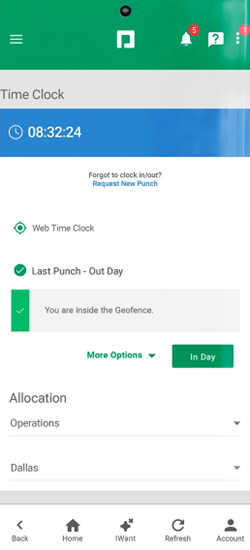
The goal is not just to collect employee work hours. It’s to catch exceptions before payroll runs. With time clock software, you can:
- Remind employees to clock in and out for shifts and breaks.
- Limit time fraud with GPS tracking, geofencing, pin codes, photos, or biometric authentication.
- Set overtime rules based on location.
- Automate overtime calculations, even with various pay rates.
- Monitor your labor costs.
- Track time through mobile phones, desktop computers, tablets, or on-premise time clocks.
With Paycom’s Time and Attendance tools, employee work hours flow directly into its payroll module. It automatically calculates pay, overtime, taxes, and deductions so you don’t have to manually collect these on your own. It also has geofencing and IP address filtering to help reduce time theft, while managers can use Paycom reports to view missing punches, punch audits, total hours, overtime analysis, and tardiness trends.
3. Non-compliance with payroll laws
Payroll non-compliance usually doesn’t stem from ignoring the law, but from employers using the wrong law, applying it inconsistently, or failing to update payroll processes as regulations change.
Wage and hour laws vary by state, county, and city, which adds extra layers of complexity to payroll calculations. The big laws to look out for involving payroll include:
- Minimum wage
- Sick leave benefits
- Paid time off (PTO) benefits
- Mandatory breaks
- Youth labor
- Final paycheck requirements
- Minimum payday frequencies
- Payroll tax rates and schedules
Errors in violation of these laws often stem from:
- Applying federal wage and hour rules without accounting for stricter state or local laws
- Failing to update payroll systems after changes to minimum wage, paid leave, or tax requirements
- Using one set of payroll policies across multiple locations with different legal standards
- Missing required updates to final pay, pay frequency, or payroll tax deadlines
Federal law regulates minimum wage ($7.25 per hour), overtime, youth labor, regular paydays, equal pay, and special breaks for nursing mothers. You and your HR teams should become familiar with federal standards first to understand how employees’ state and local laws supplement them.
But what do you do if laws from various jurisdictions conflict with federal law?
The best practice is to always follow the law that offers employees more rights, protections, or benefits.
However, cases like this also raise the question of pay fairness and equity among your employees in different regions.
Real-world example
I worked at a company with employees in Michigan and Florida. Besides having different minimum wage laws, Michigan’s Paid Medical Leave Act requires companies to offer qualifying employees 40 hours of paid sick leave every benefit year. Florida does not.
When the Michigan law went into effect in 2019, I changed our company policies, updated our handbook and labor law posters, spread awareness across the company, and instituted sick leave eligibility tracking.
But what about our employees in Florida?
Sure, the law didn’t require us to offer them sick leave. But we knew that providing our Floridian employees with the same benefit would do more for retention and morale than it would negatively affect our bottom line. So, folks in the Sunshine State also got paid sick leave.
Navigating these various laws will require similar conversations and decisions to ensure you’re following the law and doing right by your employees for long-term success.
How to prevent compliance violations
Although tedious, providing your HR teams with the time and training to keep up-to-date with changing labor laws is vital. Only their knowledge of these rules and your business can help them strategize policy and process changes whenever regulations change.
But you can make it easier with payroll software that does most of the heavy lifting. Most systems help surface rule changes and flag possible violations.
Payroll software also:
- Updates tax withholdings by jurisdiction automatically.
- Deducts and sends garnishment payments on your behalf.
- Ensures consistent paydays.
- Support audit trails for payroll changes.
It can reduce the chance of errors like duplicate Social Security numbers or multiple names. (This is so you don’t do what I did and switch paychecks for employees with the same name. Yikes.)
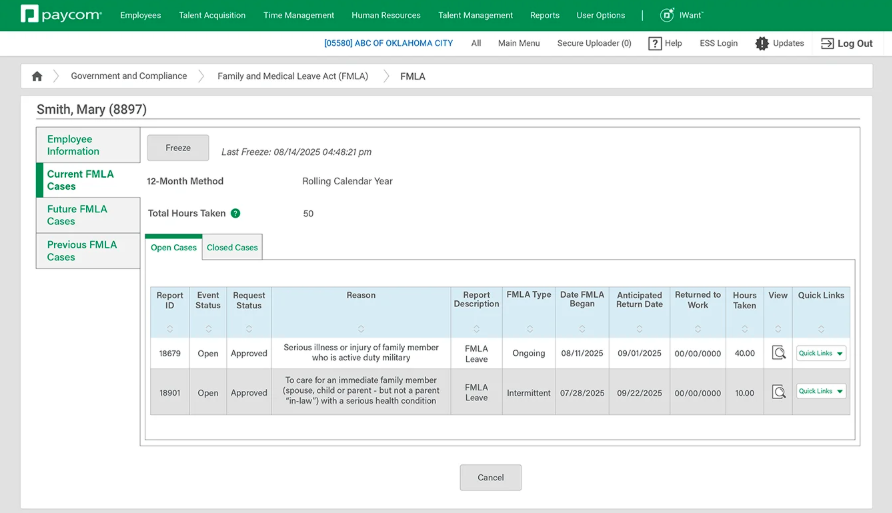
Paycom’s Government and Compliance tools, for example, make tracking compliance easier for you. In addition to generating compliance reports, it provides insight into unemployment claims and FLSA data, alerts you of employee leave statuses and workplace injuries or illnesses, and sends updates when legislative and regulatory changes may impact your business.
4. Overlooking benefits
Most benefits-related payroll mistakes start with things like missed enrollment updates, a deduction that wasn’t adjusted, or a carrier change that wasn’t reflected in payroll. Often, you won’t know employees were under- or over-deducted until later.
Benefits themselves add complexity because their mechanics differ from just wages. A benefit is any non-monetary compensation you provide to employees, including mandatory federal benefits such as:
- Workers’ compensation
- Affordable Care Act (ACA) insurance (for applicable large employers)
- Social Security
- Medicare
- Unemployment insurance
- Job-protected leave under the Family and Medical Leave Act (FMLA)
But you may also provide fringe benefits to your employees outside of the legally required ones. If that’s the case, it means a lot of additional payroll responsibilities on your end, like:
- Tracking benefits eligibility and enrollment
- Determining which benefits are taxable or non-taxable
- Ensuring proper deductions for insurance premiums and retirement
- Keeping an accurate record of your company’s benefit payments for end-of-year paperwork, like W-2s
The challenge is that eligibility rules vary, benefit plans change annually, and communication between carriers, HR, and payroll is often manual. That combination makes benefit-related payroll mistakes easy—even for experienced teams.
But what if you forgot to deduct premiums from an employee for several months upon their enrollment?
Real-world example
Following our passive open enrollment, I forgot to update an employee’s new health premium deduction amount. In my case, the problem went unnoticed for several months and would take multiple “catch-up” deductions across many payrolls to recover the funds. There was also no guarantee we’d receive everything back should the employee separate with us.
It goes to show that these mistakes may seem simple, but they cost your business time to investigate, money to resolve, and the trust of your employees over time.
Curious about what kind of benefits you can offer your employees? Check out these Benefits that Make Employees’ Lives Easier.
How to prevent benefits mistakes
The most effective way to prevent benefit-related payroll errors is to remove as many manual handoffs as possible between employees, HR, payroll, and benefits carriers.
First, make employees responsible for keeping their benefits updated by providing an easy way to review and revise their information online. Then, automate the carrier and payroll update process to make it more efficient.
You can use an all-in-one HR solution or integrated payroll and benefits administration systems to reduce pay-related mistakes. This software can:
- Empower employees to self-enroll in benefits.
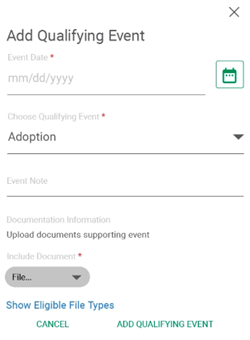
- Update payroll benefit deductions and eligibility requirements based on qualifying events.
- Calculate wages based on tax-deductible benefit payments.
- Send benefit changes automatically to carriers through EDI feeds.
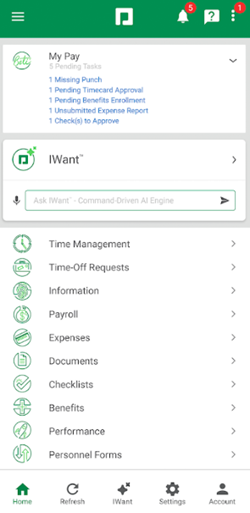
Paycom is an example of a comprehensive HR suite that can do all of the above. I especially like its automated workflows that streamline processes, from onboarding to scheduling and expense claims tracking.
Connecting your benefits to your payroll in a digital environment also makes tracking and noticing changes easier. Plus, it gives employees control to play a more active role in benefits management, so there are fewer chances for error.
5. Missing payroll and tax deadlines
Missing a payroll deadline is one of the fastest ways to damage employee trust. People rely on predictable paydays to cover rent, mortgages, and everyday expenses. Even a one-day delay can have real financial consequences for them.
Unlike some payroll errors that start small, missed deadlines tend to be obvious immediately. There are many reasons you miss your payroll deadline, like:
- Other business priorities got in the way
- Inefficient payroll processes
- Missing essential payroll information
- Miscommunication among payroll stakeholders
- Manual data entry
- Poor time tracking procedures
But none of those reasons should prevent people from receiving paychecks. While the FLSA implies prompt wage payment, most states are more explicit about missing paydays. In California, for example, you’ll pay waiting time penalties every day your employee’s paycheck is late.
There are also those pesky payroll tax deadlines. You have to track when you remit tax payments and file tax returns to various federal, state, and local agencies.
The deposit and tax filing schedules for federal payroll taxes are on the IRS employment tax due dates page. But you’ll have to contact the treasury departments of your employees’ state and local governments for their tax schedules.
How to prevent missed deadlines
The most reliable way to prevent missed payroll and tax deadlines is to create a process with clear ownership, cutoff rules, and exception review. Payroll systems can support that by building deadlines, reminders, approvals, and automation directly into the workflow. This way, payroll can’t move forward unless critical steps are completed.
I’ve never missed a payroll deadline because my system handled the timing for me. Most payroll software considers pay processing times and reminds you of payroll tasks far enough in advance so you can initiate direct deposits or print checks in time for payday.
It’ll even reach out to employees, like new hires, if they’re missing necessary payroll information. That means no more chasing down employees for their missing timesheet.
Many payroll software providers also reduce tax-related risk by automatically filing returns and remitting payments to the appropriate agencies. Even platforms that don’t offer full-service tax filing typically include compliance calendars and alerts to keep important dates front and center.
Paycom is a platform that does both and more. I’m most impressed with its Beti tool, which can start payroll automatically and collect pay-related data from Paycom’s different modules to calculate payments and deductions. Employees can even review and approve their paychecks, with Beti identifying errors and guiding workers to fix them before payroll submission.
This saves you time and gives employees more visibility into how they are paid. It also reduces missed deadlines by making payroll and tax tasks more automated, yet still giving you internal controls to monitor the progress and ensure compliance.
Other payroll mistakes to look out for
The five I listed above are the biggest and most common, but they are not the only errors that can disrupt pay accuracy. Watch for these issues too, especially if they happen more than once.
| Problem | Solution |
| Disorganized recordkeeping | Move to electronic processes to create auditable files and find information faster. |
| Failure to report taxable compensation | Keep track of employee gifts, rewards, and stock options to report to the IRS. |
| Missing new hires’ first payday | Put together an onboarding checklist to ensure they’re on your payroll as soon as they start. |
| Improper payments to folks on leave | Create leave policies and workflows that clarify responsibilities and pay schedules, like disability checks or PTO payouts. |
What to do if there’s a payroll error
Even strong payroll controls won’t catch everything. When an error happens, the goal is to correct the paycheck, document the fix, and find the process gap that allowed it to happen.
Use this correction process:
- Confirm the issue: Identify what went wrong, which pay periods are affected, and whether the error involves wages, overtime, taxes, benefits, deductions, garnishments, PTO, final pay, or classification.
- Correct the payment: Fix underpayments as soon as possible. For overpayments, check your state rules and company policy before deducting anything from a future paycheck.
- Communicate with the employee: Explain what happened, when the correction will appear, and who they can contact with questions.
- Document the fix: Keep a record of the error, correction, employee communication, and any required approvals.
- Fix the process gap: Review whether the issue came from late approvals, missing data, manual entry, outdated rules, or unclear ownership.
Find the payroll mistake: An example
Two administrative assistants, Abby and Bobby, walk into a bar. Over drinks, they discover that:
When an attorney overhears this conversation and says, “I wanna represent you!” which administrative assistant do they mean? Abby or Bobby?
It’s both.
Neither Abby nor Bobby is classified correctly as an administrative assistant exempt from overtime.
Abby performs non-manual administrative work related to general business operations. Also, their primary duties require them to use “discretion” and “independent judgment” since they make budgetary decisions that affect their company’s bottom line. Abby satisfies the duties test to be considered exempt from overtime.
But, Abby’s salary is only $600 per week instead of the minimum of $684. Because they do not satisfy the salary level test, they are not exempt from overtime.
Meanwhile, Bobby performs non-manual office work, but their duties do not require them to exercise independent judgment. While they make $700 per week to pass the salary level test, they do not pass the duties test to be exempt from overtime.
So, folks, they’re both misclassified. This is why exempt classification should never be based on salary or job title alone. Employees generally need to satisfy both the applicable salary basis or salary level requirement and the duties test. If either side of that analysis fails, the employee may still be entitled to overtime.
Frequently asked questions (FAQs)
Featured partnersFeatured partners