

Payroll integration connects your payroll software with the other systems that create or use employee pay information, such as HR, time tracking, benefits, and accounting. Instead of entering the same information in several places, connected systems can pass approved data from one part of the payroll process to the next.
That can save your team from chasing spreadsheets and retyping routine updates before every pay run. But an integration is only useful if it sends the right information at the right time. This guide explains how payroll software integrations work, which connections matter most, where problems tend to show up, and what to check before relying on them.
- Software Spotlight: QuickBooks Workforce
- How payroll integrations work
- Systems that connect with payroll
- Benefits of payroll software integrations
- Common payroll integration problems
- How to plan a payroll system integration
- How to evaluate payroll integrations before choosing software
- Integrated payroll vs. separate systems
- Frequently asked questions (FAQs) about payroll integration
Software Spotlight: QuickBooks Workforce
If you prefer to keep more of those workflows in one ecosystem, QuickBooks Workforce brings together payroll, time tracking, employee management, and benefits options, with QuickBooks accounting tools available alongside them.
How payroll integrations work
Think about how many places employee information may touch before payday. HR updates a pay rate. A manager approves a timecard. An employee changes a benefit election. Payroll uses those inputs to calculate pay. Finance then needs the finished payroll numbers for accounting.
Without connected systems, someone may have to move that information manually at each step.
A payroll system integration gives those applications a defined way to exchange data. Depending on the setup, information might move automatically when something changes, sync at set times during the day, or transfer only when an administrator starts the process.
This is also why two products displaying an integration badge does not tell you much about what happens after you connect them. You still need to know which information moves and whether that workflow matches the way your team runs payroll.
The biggest differences come down to how data moves, how often it updates, and what type of connection sits between the systems.
One-way vs. two-way payroll integrations
A one-way integration sends information from one application to another. For example, your time-tracking system might send approved employee hours into payroll. Payroll receives the information but does not send anything back.
A two-way, or bidirectional, integration lets approved information travel in both directions. Payroll might receive an employee’s benefits deduction while sending current employee or payroll information back to the benefits system.
You may also see some vendors describe these as 180-degree and 360-degree integrations. In general, 180-degree refers to one-way data movement, while 360-degree refers to data moving in both directions.
Neither approach is automatically better. The direction should match the job each system needs to do.
Let’s say HR approves salary changes. It may make sense for your HR system to send the new salary rate to payroll rather than allowing both systems to independently maintain the employee’s pay rate.
Real-time vs. scheduled data syncs
Connected does not always mean instant. Payroll integrations may update information in several ways:
- Real-time: A change triggers an update almost immediately.
- Scheduled: Systems exchange information at set intervals, such as hourly or overnight.
- On demand: An administrator starts the sync when needed.
- Manual file transfer: Someone exports information from one system and imports it into another.
The right timing depends on what you are moving. Your accounting team probably does not need a payroll journal entry seconds after payroll closes. A pay-rate change approved just before the payroll cutoff is much more time-sensitive.
Even a working integration can create extra work if information arrives too late. During setup, compare its sync schedule with your actual payroll deadlines rather than assuming faster is always better.
Common payroll integration methods
You do not need to be an IT specialist to understand every connection method. These are the main ones you are likely to encounter:
| Integration method | How it works | Where it fits | What to watch |
| Native integration | Vendors provide a ready-made connection | Common payroll and HR workflows | May not sync every field |
| Application programming interface (API) | Systems exchange data directly | Custom or complex workflows | May need technical help |
| Middleware | A third-party tool connects systems | Businesses using several apps | Adds another tool to manage |
| File transfer | Data moves through CSV or similar files | Simple or legacy setups | More manual work |
| Webhook | One system triggers an update in another | Fast event-based updates | Supports only certain actions |
For a deeper look at APIs, webhooks, and other HR connections, see our HRIS integration guide.
Systems that connect with payroll
Payroll rarely works alone. Pay depends on information coming from several parts of the business, and finished payroll data often needs to go somewhere else afterward.
For a small business, that might mean connecting payroll only with time tracking and accounting. A growing company may also link its HRIS, benefits platform, applicant tracking system, expense software, or scheduling tools.
You do not need to connect everything just because you can. Start with the places where people repeatedly re-enter information, reconcile two systems, or chase down missing updates.
HR and payroll integration
A payroll HR integration keeps core employee information aligned between your HR and payroll systems. Depending on your setup, this may include:
- Employee name and contact information
- Employment status
- Job and department
- Work location
- Hire and termination dates
- Pay rate or salary
- Manager or organizational information
Picture a promotion that changes an employee’s title, department, and salary. Without an integration, HR may update the HRIS and then send the same changes to payroll for someone to enter again.
A connected workflow can pass that approved information to payroll instead. You still keep the compensation approval in place, but your team does not need to reproduce the update in another system.
Some payroll platforms also bring basic employee management into the same ecosystem. QuickBooks Workforce, for example, includes employee profiles and team directories alongside payroll tools, which can reduce the number of separate places a smaller team needs to maintain basic worker information.
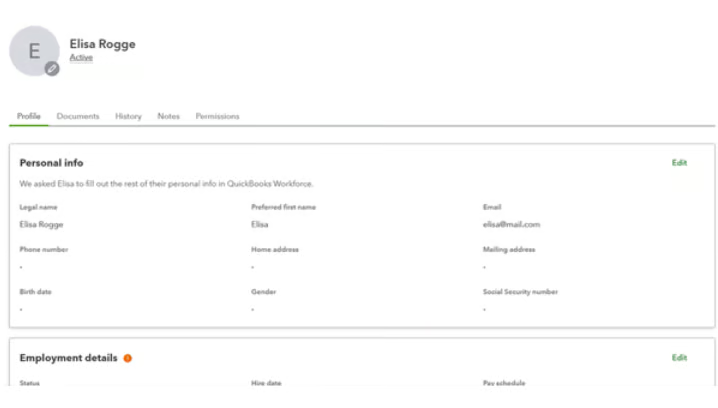
If you need a broader HR platform, our guide to the best HRIS systems covers software built to manage employee records alongside other HR functions.
Time tracking and payroll
For companies with hourly employees, time tracking may be one of the most useful payroll connections. Approved time can reach payroll without someone collecting timesheets and retyping totals.
Depending on your workforce, that may include:
- Regular hours
- Overtime
- Paid time off
- Shift differentials
- Tips
- Commissions
- Other earnings tied to time or attendance
The approval step still matters. If an employee forgets to clock out and the timecard shows a 17-hour shift, automatically sending that record to payroll does not make it correct. A manager should still have a chance to review and fix it.
This is where connected tools can remove a lot of routine work without removing the review. QuickBooks Workforce lets employees track and submit time while managers can create, edit, approve, or reject timesheets. When QuickBooks’ time tracking module is used with supported QuickBooks products, approved employee time can flow into payroll, invoicing, and other workflows.
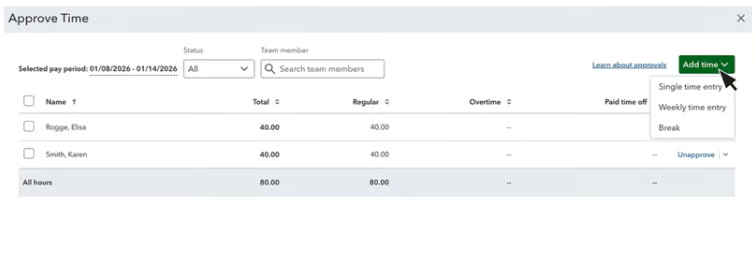
The practical goal is simple: automate the routine transfer, but keep people involved where a record needs verification.
Also see: Our guide to simplifying payroll and HR workflows has more examples of where removing unnecessary handoffs can make payroll easier without removing oversight.
Payroll accounting integration
Once payroll is finished, finance still needs to record wages, employer taxes, liabilities, deductions, and other payroll expenses. A payroll accounting integration can send those figures to your accounting system instead of requiring someone to build the journal entry manually. For a very small business, transferring payroll totals may be enough. Once the organization has several departments or locations, the level of detail matters more.
You may need payroll costs separated by:
- General ledger account
- Department
- Location
- Cost center
- Project
- Job
- Class
Larger businesses may send the same information into an enterprise resource planning (ERP) system rather than small-business accounting software. Either way, the important question is whether the integration preserves the dimensions finance actually uses.
A connection can look good on paper and still leave work behind. Payroll might transfer successfully while finance still has to split entries by location or correct account mappings afterward.
QuickBooks takes a more consolidated approach for businesses already using its accounting software. It bundles QuickBooks Workforce with QuickBooks Online, keeping payroll, HR, and bookkeeping within the broader QuickBooks platform.
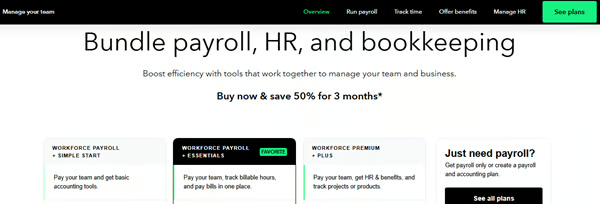
Even with one vendor, test your own accounting structure. Use a real payroll journal and confirm how departments, locations, accounts, and other dimensions will appear after the data reaches accounting.
For businesses comparing payroll systems, check out our best payroll software for small businesses guide.
Benefits and retirement systems
Benefits create another flow of payroll information. Payroll may need current deductions for health insurance, retirement contributions, loan repayments, or other benefits. The benefits system may also need employee or earnings information from payroll.
A connected workflow can reduce the spreadsheet swapping that often happens between benefits and payroll. Even when benefits sit close to payroll, effective dates still matter. If an employee changes coverage today but the new election starts next month, payroll needs the correct deduction for the correct pay period.
That timing detail can be easy to overlook in a demo because the software connection itself may be working exactly as designed.
Expense management systems
Some businesses reimburse employee expenses when they do payroll. In that case, an expense management system can send an approved reimbursement into the upcoming pay run.
A simple workflow might look like this:
Employee submits expense → Manager approves it → Expense system sends approved amount → Payroll adds reimbursement
That can save HR or payroll from entering the reimbursement again.
Tip: Not every business can use this approach. If your company handles reimbursements through accounts payable, there may be little reason to route them through payroll. Connect the process you actually use rather than redesigning it simply because an integration is available.
Recruiting and onboarding systems
New hires can generate a surprising amount of repeated setup. A candidate accepts an offer, HR creates an employee profile, payroll needs a worker record, and benefits may need many of the same details.
Recruiting and onboarding integrations can pass approved new-hire information into HR and payroll. Useful data may include:
- Employee name and contact details
- Start date
- Position
- Department
- Work location
- Employment type
- Approved compensation
Keep sensitive payroll setup, such as tax withholding and direct deposit information, inside secure employee or payroll workflows rather than passing those details around by email or spreadsheet.
Scheduling and POS systems
Restaurants, retailers, hospitality businesses, salons, and other employers with variable hourly work may also connect payroll with scheduling or point-of-sale (POS) systems. Depending on the software, those integrations may help transfer:
- Hours worked
- Overtime
- Tips
- Commissions
- Location
- Pay codes
If you use a separate POS or scheduling tool, check exactly which fields cross over. A restaurant that handles credit-card tips and declared cash tips separately, for example, should confirm that the integration preserves that distinction.
Benefits of payroll software integrations
Good payroll software integrations remove repetitive work without making payroll harder to control. For most businesses, the practical gains fall into four areas:
- Less duplicate data entry: A compensation change, approved timecard, or other update does not have to be typed into every system that needs it.
- Fewer handoff errors: Reducing copy-and-paste work lowers the chances of using an old file, missing an employee, or entering a value incorrectly.
- Faster payroll preparation: Routine inputs can arrive earlier, leaving payroll teams more time to deal with missing information and exceptions instead of collecting files.
- Cleaner payroll and accounting records: A more consistent data trail makes payroll corrections and labor-cost reconciliation easier to investigate.
None of those benefits mean payroll becomes hands-off. Bad information can still travel through a perfectly functioning integration. That is why approvals, exception checks, and clear data ownership still matter.
This is also where broader HR process automation can help. The strongest workflows automate repeatable tasks while keeping people involved when pay, compliance, or employee-impacting decisions need review.
Common payroll integration problems
Most integration problems are not dramatic software failures. They are smaller mismatches that become painful when payroll is due. A department code no longer matches, a deduction arrives after cutoff, an employee exists twice, or a sync fails, but nobody catches the error.
Knowing where those problems tend to appear makes them much easier to plan for.
Conflicting systems of record
If HR and payroll both maintain an employee’s department, pay rate, address, and employment status, your team needs to know where each approved change starts. Otherwise, two applications can end up holding different versions of the same record.
A simple ownership map can help:
| Employee data | Typical primary system |
| Personal and employment information | HRIS or core HR system |
| Approved employee work hours | Time tracking system |
| Benefit elections | Benefits software |
| Payroll calculations | Payroll system |
| Payroll journal entries | Accounting system |
Your setup may differ, but the principle holds. Give each payroll-critical data point a clear home.
Missing or incorrect field mapping
Two systems can use different labels or codes for the same thing. Your HRIS may call a department “Customer Support,” while payroll identifies it as department 220. Your time system may use one overtime code while payroll expects another. Field mapping tells the systems how those values match.
During setup, pay extra attention to:
- Employee ID numbers
- Departments
- Locations
- Earning codes
- Deduction codes
- Pay rates
- General ledger accounts
Do not test only your easiest employee record. Include workers with multiple pay rates, different locations, deductions, overtime, or other situations your business regularly handles.
Sync failures
Integrations sometimes fail. Credentials may expire or permissions change. A required field may be missing, a vendor updates something, or a duplicate record blocks the transfer.
The bigger risk is not noticing until payroll is already underway. Useful controls include:
- Clear error messages
- Failed-record reports
- Sync history
- Administrator alerts
- A way to retry failed records
Give those alerts an owner, too. A dashboard full of warnings does very little if everyone assumes somebody else is watching it.
Payroll timing issues
An overnight sync might work well for one process and be far too slow for another. Let’s say payroll closes Friday at 3 p.m. An employee changes a benefit election Friday morning, but the benefits system sends updates overnight. The new deduction may not reach payroll until after the cutoff.
Nothing necessarily failed, but the sync schedule simply did not match the payroll schedule.
When setting up an integration, compare the sync schedule against:
- Payroll cutoff
- Manager approval deadlines
- Benefit effective dates
- Timecard deadlines
- Accounting close schedules
- Off-cycle payroll procedures
This is a small implementation detail that can prevent a surprisingly large amount of cleanup later.
Security and access risks
Payroll data can include compensation, tax information, direct deposit details, benefits information, and other sensitive employee records. Before connecting another system, understand what the integration can access and change.
Ask:
- Which payroll fields can the integration read?
- Which fields can it update?
- Who can turn the integration on or change its settings?
- Are actions and errors logged?
- What happens when an administrator leaves the company?
- Can access be limited to only the data the connection needs?
Connected systems also do not replace your recordkeeping responsibilities. The IRS requires employers to keep employment tax records for at least four years after the tax becomes due or is paid, whichever is later. Those records include information related to wage payments, tax deposits, employee information, and withholding.
How to plan a payroll system integration
Before you start connecting software, map the process you already have.
A workflow that looks simple in a demo can behave very differently once real approvals, deadlines, employee exceptions, and accounting requirements get involved.
1. Follow one payroll from start to finish
Pick a recent pay period and trace where the information came from. Include:
- Employee changes
- Hours
- Paid time off
- Bonuses
- Benefits
- Deductions
- Expenses
- Payroll approvals
- Accounting entries
Also write down the spreadsheets, emails, and manual reminders people use along the way. Those side processes often reveal where an integration could save the most work.
2. Decide where each update starts
Choose which application should own each important type of information. For example:
- HRIS → employee status and compensation
- Time tracking → approved hours
- Benefits platform → benefit elections
- Payroll → wage and tax calculations
- Accounting → financial reporting structure
You do not need to force everything into one system. You need a clear place for each approved update to begin.
3. Choose what actually needs to sync
Avoid connecting fields simply because you can. For each piece of information, document:
- Where it starts
- Where it needs to go
- Which direction it moves
- When it should arrive
- Whether someone must approve it first
You may discover that some systems need only a handful of fields from payroll, not an entire employee record.
4. Clean your data first
If your current systems already contain duplicate employees, old department codes, incorrect locations, or unused earning codes, an integration can spread those problems.
Fix them before connecting the systems. Cleaning 20 outdated department codes once is easier than correcting them after they appear in several applications.
5. Map and configure the fields
Match employee IDs, earning codes, deductions, departments, locations, and other fields between applications. Use your real data structure wherever possible.
If your company has three overtime codes, six locations, and employees working across departments, test those conditions. A demo built around one salaried employee will not tell you much about your actual process of paying employees.
6. Test the exceptions
Routine payroll is not where integrations usually earn their keep. Test situations such as:
- New hires
- Terminations
- Pay increases
- Overtime
- Bonuses
- Retroactive changes
- Benefit changes
- Paid leave
- Reimbursements
- Off-cycle payroll
- Corrections
If the integration requires a manual workaround for one of these, document it before launch so the payroll team is not inventing a process under deadline pressure.
7. Check the results before relying on them
Compare integrated data with what you expected to see. For payroll-critical connections, test the new process alongside your existing method before you fully switch over. This gives you a chance to spot missing fields, incorrect mappings, or timing problems while you still have a fallback.
Also read: Our HRIS implementation guide covers testing, rollout planning, data preparation, and post-implementation review in more detail.
8. Decide who monitors the integration
Go-live is not the end of the job. Departments may change, and new pay codes may appear. There might be software updates, or permissions might be revised. Integrations need occasional attention, too.
Assign one person or team to:
- Review errors
- Check failed syncs
- Update mappings
- Coordinate vendor changes
- Retest important workflows
Without clear ownership, a small integration issue can quietly become a payroll problem.
How to evaluate payroll integrations before choosing software
Integration directories are useful for creating a shortlist. They should not be your final check. If a vendor says its payroll platform integrates with the HRIS, time system, or accounting software you already use, dig one level deeper.
Use these questions during a demo or sales call:
- Is the integration built by the payroll vendor, the other vendor, or a third party?
- What exact information moves between the two systems?
- Is it a one-way or two-way connection?
- Which system can update each field?
- How often does the integration sync?
- Can an administrator run a sync manually?
- What happens when a record fails?
- Can I see a sync log or error report?
- Does it support my departments, locations, pay codes, deductions, and accounting structure?
- Does the integration cost extra?
- Who provides support when the integration breaks?
- Can we test it before going live?
- What happens when either vendor updates the software?
Integrated payroll vs. separate systems
Connecting separate software is not always the best answer. Some businesses are better served by a platform that already brings payroll, employee information, time tracking, benefits, scheduling, and other workforce tools closer together. Others need separate applications because one product cannot provide enough depth in every area.
Separate connected systems may work better when:
- You already have specialized software that works well.
- Replacing an existing system would be disruptive or expensive.
- Your industry requires tools a broader HR platform cannot replace.
- The available integrations support your actual workflows.
A more consolidated HR and payroll setup may make sense when:
- Your HR or payroll team is small.
- Employees use too many separate applications.
- Your payroll process includes many manual transfers.
- You spend too much time reconciling employee records.
- Your HR and payroll needs are relatively straightforward.
Neither setup is automatically better. Five well-connected applications can create less work than two systems your team constantly has to reconcile.
My rule of thumb is to focus on the handoffs. If the same information repeatedly moves by spreadsheet, email, or manual entry, that is where consolidation or a stronger integration can make the biggest difference.
QuickBooks Workforce is one example of the consolidated approach. For businesses already using its accounting module, QuickBooks Online, keeping bookkeeping, payroll, and related workforce tools in the same product ecosystem can reduce the number of separate connections the team has to maintain.
Frequently asked questions (FAQs) about payroll integration
What is payroll integration?
Payroll integration connects payroll software with other business systems so approved information can move between them without being manually re-entered each time. Common connections include HR, time tracking, benefits, accounting, recruiting, scheduling, and expense management software.
Can a small business use payroll integrations without an IT team?
Yes. Many native payroll software integrations are designed for HR, payroll, or business administrators to configure without custom coding. API-based or highly customized connections may require help from IT, the software vendor, or an implementation specialist.
Do payroll integrations eliminate manual payroll checks?
No. Integrations can reduce manual data entry, but someone should still review approvals, unusual changes, incomplete information, and sync errors before payroll is processed. Automation works best when it removes repetitive transfers without removing important payroll controls.
What happens if a payroll integration stops working?
The payroll team may need to correct the connection, retry failed records, or temporarily move payroll-critical information another way. Before launch, know how the software reports errors and document a fallback process for data that must reach payroll before the deadline.
How often should payroll integrations be reviewed?
Review an integration when you change software, add new pay or deduction codes, reorganize departments, change permissions, or notice recurring errors. It is also smart to include key integrations in periodic payroll process reviews so old mappings and workflows do not quietly become permanent workarounds.