

Knowing how to switch payroll providers is less about moving data from one system to another and more about protecting the next payday. A safe transition starts with choosing a clear cutover date, transferring complete payroll history, assigning tax responsibilities, and testing the new setup before it processes a live paycheck.
You do not necessarily have to wait until January to change payroll providers. A midyear payroll migration is manageable, but it requires more historical information and careful reconciliation. The goal is to have the new system fully checked before it becomes responsible for paying employees.
When should you switch payroll providers?
The first payday of a new calendar year is often the simplest starting point because the replacement system does not need payroll history from earlier in that year. A quarter boundary can also create a clearer reporting checkpoint, although year-to-date information still needs to transfer.
Pay attention to the paycheck date, not just the dates employees worked. A December pay period paid in January generally belongs to the new calendar year for payroll tax reporting.
Convenient timing should still be weighed against the problems prompting the change. If recurring errors, poor support, or inefficient processes are creating significant disruption, waiting several months may prolong those problems.
Businesses with multiple tax jurisdictions, several pay schedules, multiple legal entities, complex benefits, or a professional employer organization relationship should allow additional preparation time. Those setups usually involve more information and outside parties to coordinate.
What to do before switching payroll providers
Before moving any data, determine and document when the existing service ends, when the replacement takes over, and which provider is responsible for unfinished work. Sorting out those boundaries first makes the technical part of switching much easier to manage.
Review your current provider agreement
Check the cancellation terms for notice requirements, final fees, data-access deadlines, and any services that may need to be canceled separately.
Also find out what happens to administrator and employee access after service termination. Do not assume you will be able to sign back in several months later for a missing payroll register, tax form, or employee record.
Before access ends, identify and download the records you may need for payroll migration, reconciliation, compliance, or future corrections. Store those files somewhere the business controls and restrict access because payroll exports can contain sensitive employee information.
Choose your final payroll with the old provider
Put the critical transition dates on one calendar. At minimum:
- Mark the final old-system payroll. Include the pay period, check date, and submission deadline.
- Mark the first new-system payroll. Confirm its pay period and payday with the replacement provider.
- Add banking deadlines. Include bank verification, funding, and direct deposit submission requirements.
- Set internal checkpoints. Reserve time for reconciliation, testing, employee setup, and final approval.
Pay particular attention to direct deposit processing. Payroll software may calculate wages quickly, but funding and bank processing still need enough time for employees to receive their money by payday.
For the first payroll, give your team more review time than usual. That buffer is valuable if a bank verification, tax setting, or payroll calculation needs another look.
Also Read: Our payroll processing timeline guide explains what typically happens between the end of a pay period and the employee's check date.
Confirm who handles outstanding payroll taxes
Ask both providers which company will handle tax payments and filings connected with payroll processed before, during, and after the switch.
Confirm:
- Who makes remaining federal, state, and local payroll tax deposits.
- Who files returns for the quarter containing the transition.
- Who prepares applicable year-end payroll tax forms.
- Who corrects a return or payroll processed before the switch.
- Which tax authorizations need to be created or revoked.
- Who responds to tax notices relating to periods before the change.
Employers using payroll service providers generally remain responsible for federal employment tax obligations. The IRS recommends using the Electronic Federal Tax Payment System (EFTPS) to verify federal deposits made on the employer’s behalf.
Make sure one responsibility is not accidentally assigned to both providers. Duplicate filings can create their own cleanup work. Get the division of responsibilities in writing, including any fees for year-end forms or corrections after cancellation.
How to change payroll providers in 7 steps
Once the dates and responsibilities are clear, you can begin the actual payroll migration. Use these steps as your payroll transition checklist. Start by organizing the work and collecting records, then configure and test the replacement system before approving its first payday.
Step 1. Assign owners and build the transition schedule
Give each major task an owner, deadline, and escalation contact. One person may cover several responsibilities in a small business, but no task should depend on everyone assuming someone else has it.
Group the work into three phases:
- Preparation: Export records, confirm tax responsibilities, and complete banking requirements.
- Setup and review: Configure employees, deductions, integrations, payroll history, and testing.
- Launch and closure: Communicate with employees, approve the first payroll, monitor results, and close the old service.
Work backward from the first planned payday and include the provider’s onboarding deadlines.
Keep a change log after the initial export. New hires, terminations, raises, bank changes, benefit elections, garnishments, and voided checks can make an otherwise accurate import outdated before launch.
Step 2. Gather and export your payroll records
Ask the replacement provider for its required reports and file formats before exporting. Collect both the information needed for future payrolls and the history needed to calculate and report the current year correctly.
Records | What to collect | Why it matters |
| Business and tax accounts |
| Establishes the employer’s tax setup |
| Employee records |
| Supports accurate employee setup |
| Compensation and payroll history |
| Reconstructs wages and taxes already processed |
| Deductions and balances |
| Preserves ongoing obligations and employee balances |
| Reporting and payment evidence |
| Supports reconciliation and future corrections |
Include everyone paid during the current calendar year, even if they have left the business. An active employee roster alone can omit wages needed for year-end reporting.
Check whether exports mask Social Security numbers or bank information. Have employees provide missing details through the replacement provider’s secure process when necessary.
Keep an untouched backup of the original payroll report exports as well. If something changes during migration, you will still have a source file to compare against.
Step 3. Set up the new payroll system
Enter the business, tax, banking, and employee information the new system needs to run payroll. Then configure pay schedules, earning types, deductions, benefits, garnishments, and paid time off policies. Check current state unemployment rates and decide who can prepare, review, and approve payroll.
Match payroll items by how they work, not simply by what they are called. For example, two deductions labeled “health insurance” may have different tax treatment. Selecting the closest-looking option can change an employee’s taxable wages.
Make sure the provider records imported history as payroll already paid. It should inform future calculations and tax reporting without issuing another paycheck. Also confirm how the system records tax deposits the old provider already made.
Review what came over before moving on. A successful upload can still leave missing employee details or payroll items that need attention.
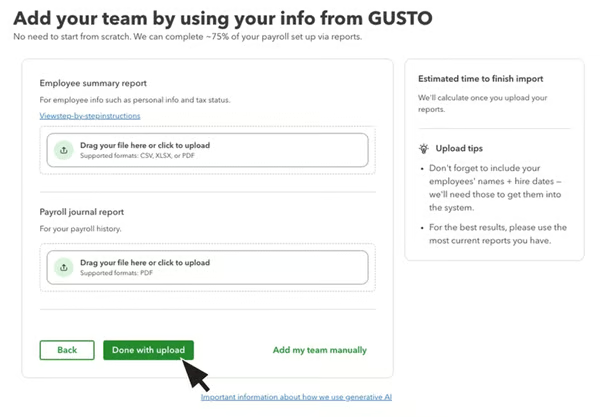
Some providers can reduce manual data entry during this step. QuickBooks Workforce supports importing employee information and payroll history from certain providers. Its current workflows can bring in data from software like ADP, Gusto, and Paychex, although the exact import process differs by source provider.
Step 4. Reconcile payroll history and tax totals
Compare the new system’s records with the final approved reports from the old provider. Check each employee’s totals as well as the company totals. The business-wide numbers can match even when an amount belongs to the wrong person.
Organize the review into four groups:
- Wages: Gross pay and wages subject to each applicable tax.
- Taxes: Employee withholding and employer payroll taxes.
- Deductions and contributions: Benefits, retirement, garnishments, and other pre-tax or post-tax deductions.
- Payments and balances: Net pay and relevant balances, such as paid time off.
For a midquarter switch, compare individual paycheck records where the provider’s import process supports it. This makes missing payrolls, duplicate entries, voided checks, and off-cycle payments easier to spot.
Check completed quarters against filed tax returns. Then compare the taxes owed with deposits already made, accounting for any balance due, credit, or adjustment. A payroll tax calculation and a tax payment record answer different questions, so review both.
For example, a former employee’s wages may be missing even though every current employee looks correct. Company totals can flag the omission; employee-level checks help locate it.
This is one of the places where I would slow the project down rather than rush toward launch. Historical payroll errors may not make the first paycheck look wrong, but they can surface later in tax liabilities and year-end reporting.
Also Read: Check out our payroll audit checklist. It can help you check employee records, wages, taxes, deductions, time information, and accounting totals systematically.
Step 5. Reconnect the processes that feed payroll
Trace the information entering and leaving payroll. This includes approved time, employee changes, benefit elections, reimbursements, retirement contributions, garnishment payments, and accounting entries.
For each connection, record its owner, transfer method, timing, and error notification process. Then test a real record through both systems.
A successful connection is not enough. Confirm that the information reaches the correct employee, pay period, payroll item, or accounting account.
Also confirm the other side of the workflow. For example, correctly deducting an employee's 401(k) contribution in payroll does not help if the process for sending that contribution to the retirement provider has been overlooked.
Time tracking deserves extra attention for hourly teams because missing approved hours can become a paycheck problem very quickly. With QuickBooks Workforce, employees can record time through its time tracking tools and approved work hours flow into payroll rather than being re-entered manually.

Step 6. Run a test or parallel payroll
Before submitting the first live payroll, use a previously completed pay period as a rehearsal. You should include test runs for employees with different situations, such as multiple pay rates, bonuses, garnishments, or different tax jurisdictions. A straightforward salary calculation may not reveal the same setup problems.
Enter the same hours, earnings, deductions, and other payroll inputs into the new system without issuing duplicate payments. Compare the calculated results with the payroll that was actually processed.
Review:
- Regular and overtime earnings.
- Bonuses, commissions, and other pay.
- Employee taxes.
- Employer payroll taxes.
- Benefit deductions.
- Retirement contributions.
- Garnishments.
- Paid time off.
- Gross-to-net calculations.
- Direct deposit setup.
- Accounting entries.
Rather than treating that review as a substitute for your own testing, use it as another checkpoint before the replacement system pays employees.
The reports themselves do not need to look identical. The calculations should agree closely enough that every meaningful difference can be explained.
For instance, a minor rounding difference may have a legitimate explanation. An unexplained change in taxable wages, withholding, or a benefit deduction should be investigated before go-live.
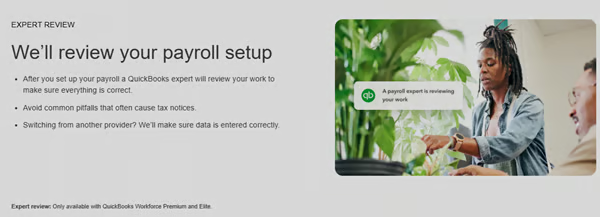
Provider setup assistance can be especially useful here. QuickBooks Workforce offers payroll setup guidance and expert assistance, with the level of service depending on the selected plan.
Step 7. Process the first live payroll and verify the results
When the test results are resolved, process the first payroll in the new system.
Avoid introducing unnecessary payroll changes during the same cycle if possible. Postponing a new bonus structure or deduction change by one payroll can leave you with fewer variables to troubleshoot.
After submitting payroll, confirm that:
- Payroll funded successfully.
- Direct deposits reached employees on payday.
- Paper checks, if used, were issued correctly.
- Pay stubs show the correct wages, taxes, deductions, and year-to-date totals.
- Tax payments are scheduled or completed as expected.
- Benefits, retirement contributions, and garnishments follow the intended process.
- Payroll entries post to the correct accounting accounts.
Ask employees to report paycheck problems promptly, but do not rely on them to catch migration errors for you. Payroll should already have passed internal reconciliation before employees see the results.
Keep a short issue log during the first few pay cycles. Problems with report access, approval workflows, user permissions, or accounting mappings may not delay payday, but fixing them early will make the new process more dependable.
What to tell employees when changing payroll providers
Employees do not need the project's technical details. They need to understand anything that changes how they record time, access payroll information, or receive their pay.
Communicate:
- Payday and launch date: State the first payday through the replacement system and whether pay frequency or payment methods will change.
- Required actions: Explain account activation, any direct deposit confirmation or reauthorization, and the deadline for completing setup.
- Time tracking: Identify the new process, when it begins, and where employees should submit or correct hours.
- Payroll documents: Explain where future pay stubs and tax forms will appear and how employees can obtain historical documents.
- Help channel: Provide a named contact or monitored support channel for employee account setup questions and paycheck problems.
Use a secure system for sensitive information. Avoid asking employees to send bank account numbers, Social Security numbers, or tax forms through ordinary email simply because information did not transfer from the previous provider. A short message with a clear deadline and contact usually serves employees better than a detailed account of the migration.
When can you cancel your old payroll provider?
Wait until the new system has processed a successful payroll and you have secured the information the business may still need.
Before the effective cancellation date, confirm that:
- The first new-system payroll reached employees.
- Final historical exports, returns, and deposit records are stored securely.
- Remaining deposits, filings, and corrections have documented owners.
- Necessary post-cancellation services and fees are confirmed.
- Employees know how to retrieve needed payroll documents.
- Connected services are continuing or ending as intended.
Remove old access and revoke authorizations at the appropriate point without disrupting work the former provider still needs to complete. Do not confuse canceling access with disposing of payroll records.
The IRS’ employment tax recordkeeping requires employers to retain tax records for at least four years. Its recordkeeping guidance includes information such as employee identifying details, wages, withholding certificates, tax deposits, and related employment tax records.
Frequently asked questions (FAQs)
Can you switch payroll providers midyear?
Yes. A midyear switch requires accurate year-to-date payroll history, including employees who have left, and clear responsibility for deposits and tax filings. Starting with the first payday of a year or quarter can simplify the reporting boundary, but it is not mandatory.
How long does it take to switch payroll providers?
There is no universal timeline. Data quality, employee count, tax jurisdictions, banking requirements, integrations, and provider onboarding affect the schedule. Ask the replacement provider for an account-specific timeline and reserve time for reconciliation and testing before the first payday.
Will switching providers change employees’ take-home pay?
Changing providers alone should not change agreed compensation. Net pay can differ if tax elections, deductions, payroll settings, or applicable calculation rules differ. Investigate unexpected changes and explain legitimate differences before the first live payroll.
Will the new provider prepare W-2s for the whole year?
That depends on the provider agreement and reporting arrangement. Confirm who prepares and files Forms W-2 and W-3, whether complete earlier payroll history is required, and whether the former provider must stop its year-end filing service.