

Free payroll timesheet templates give small businesses a simple way to collect employee hours before payroll without investing in separate time-tracking software. The best format depends on how often you pay employees and how much detail you need to capture, such as breaks, overtime, or time spent on different jobs.
In this guide, I’ve included five downloadable templates covering common payroll schedules and workforce needs. You can use them as is or adapt each one to your process rather than building a spreadsheet from scratch.
What should a payroll timesheet include?
A payroll timesheet should contain enough information to show when an employee worked and how those hours feed into pay. The exact fields can vary depending on your workforce, payroll schedule, and whether you also use the record for job costing, attendance, or client billing.
The Fair Labor Standards Act (FLSA) does not require employers to use one specific time clock, spreadsheet, or timekeeping system. For covered employers, required records must be accurate and include information such as hours worked each day and total hours worked each workweek, along with other employee and wage information.
A practical payroll timesheet may include:
- Employee name or ID
- Pay period dates
- Workweek dates
- Date worked
- Start and end times
- Unpaid break time, when applicable
- Regular hours
- Overtime hours
- Paid time off or other paid hours
- Project, customer, or job code, when needed
- Notes or correction details
- Employee or manager approval, if part of your internal process
Free payroll timesheet templates to download
Choose a template based first on your pay or reporting period, then on the additional detail payroll needs. A business with predictable schedules may only need daily hours, breaks, and approvals, while project-based teams may also need job or customer codes.
The free payroll timesheet templates in this guide include:
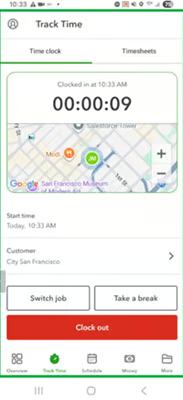
Prefer digital time entry? Platforms like QuickBooks Workforce allow employees to clock in and out and manage their timesheets from a phone or via a computer, giving teams an alternative to passing spreadsheets or printed forms back and forth.
Weekly payroll timesheet
A weekly payroll timesheet gives you a clear seven-day view of employee work hours. Regular hours, overtime, paid time off, and unpaid breaks stay within one workweek, which makes this one of the easiest formats to review before payroll.
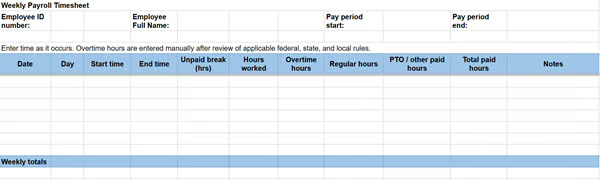
That weekly view can still be useful when employees are paid less often. Under the FLSA, covered nonexempt employees generally earn overtime for hours worked beyond 40 in a fixed, recurring workweek. Employers cannot average hours across multiple workweeks to determine federal overtime.
For example, an employee who works 45 hours in one week and 35 in the next may still have five overtime hours in the first workweek, even though the two-week total equals 80. Keeping each week intact makes that much easier to spot.
Biweekly payroll timesheet
Businesses that pay every two weeks can use one timesheet for the full 14-day pay period, but Week 1 and Week 2 should remain visibly separate. That gives payroll one form to process without losing the workweek detail needed to review overtime for covered nonexempt employees.
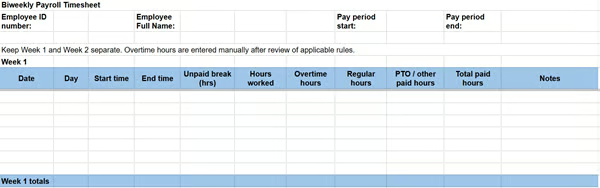
Separate weekly totals also make payroll errors easier to trace. If overtime looks unusually high or a shift is missing, payroll can narrow the issue to one week instead of searching the entire pay period.
This setup is especially useful for small teams that want one form per pay period without treating the full 80-hour period as the basis for overtime calculations.
Semimonthly payroll timesheet
Semimonthly payroll usually means employees are paid twice per month, such as on the 15th and the last day of the month. That differs from biweekly payroll, which runs every two weeks and generally produces 26 pay periods each year instead of 24.
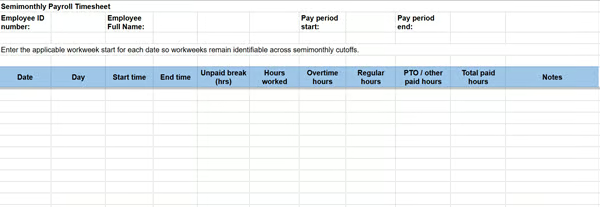
A semimonthly cutoff can land in the middle of an employee’s workweek, so the timesheet should preserve daily entries and identifiable workweeks instead of treating the first or second half of the month as one total.
For covered nonexempt employees, federal overtime rules still operate on the established workweek rather than the semimonthly pay period. Keeping workweeks visible makes it easier to follow hours across a payroll cutoff when one workweek spans two pay periods.
Monthly payroll timesheet template
A monthly timesheet gives HR or payroll one view of employee hours across an entire calendar month. It can be especially useful when the same record supports project reporting, client billing, attendance tracking, or month-end reconciliation.
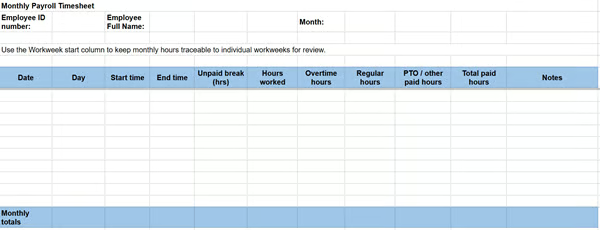
A monthly view should not collapse four or five workweeks into one total. For employees covered by federal overtime requirements, employers still need records showing hours worked each day and total hours worked each workweek.
Preserve daily entries and weekly subtotals throughout the month so payroll can trace the overall figure back to individual workweeks. Employers should also check applicable state pay-frequency rules before using a monthly record as the basis for actual payroll timing.
Project and job payroll timesheet template
Not every timesheet is only about total hours. Contractors, agencies, consulting firms, and field service businesses may also need to know which customer, project, job, or task generated those hours.
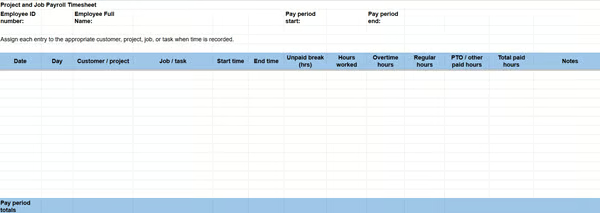
A project and job payroll timesheet adds that context without losing the basic time record. An employee may work eight hours in one day but spend three hours on Customer A, four on Customer B, and one on internal administrative work. Payroll still gets the employee’s eight-hour total, while the project breakdown shows where those labor hours were spent.
This approach works best when employees assign time to the appropriate job or customer as they record it instead of asking a manager to reconstruct those allocations later.
QuickBooks Workforce’s time tracking tools can support that workflow by letting businesses control which customers or projects employees can select while recording time. That makes it easier to use the same time data for payroll, job costing, invoicing, and reporting instead of maintaining a separate allocation spreadsheet.
How to use a timesheet template for payroll
Choosing the right template only solves the first part of the process. Before those hours become payroll, someone still needs to check that the record is complete, resolve errors, confirm overtime and paid time, and approve the final figures.
A consistent review process helps keep a simple spreadsheet from turning into a collection of last-minute corrections.
1. Set expectations before employees start entering time
Explain when the timesheet is due, what employees should record, and how they should report a missed entry or correction. Use the same process each pay period, so employees are not guessing whether to email HR, edit the file, or leave a note.
2. Check the underlying entries before relying on the total
Look for missing start or end times, unusual shift lengths, unpaid breaks, paid time off, overtime, and corrections. A formula can total the sheet correctly even when one of the entries feeding it is wrong.
Also read: See our payroll chaos before payday article, which covers common upstream issues that can disrupt an otherwise accurate pay run.
3. Check weekly totals before the full pay period total
For biweekly, semimonthly, and monthly templates, review each workweek separately before relying on the overall total. This helps identify overtime correctly for covered nonexempt employees when a pay period contains or splits multiple workweeks.
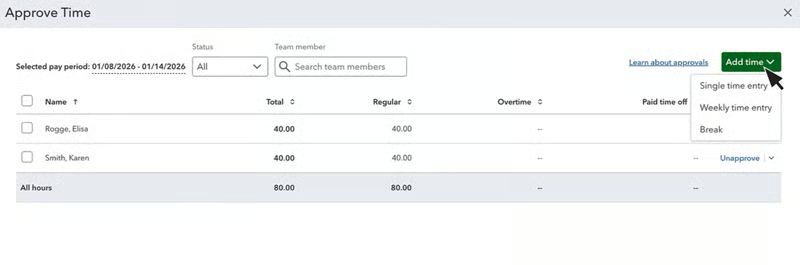
4. Have the appropriate manager review the record
The goal is to confirm that the hours make sense based on the employee’s schedule and work performed, not simply to collect a signature. If something changes, document the correction before payroll uses the final total.
QuickBooks Workforce can formalize this review step. It allows managers to review individual timesheets, make eligible corrections, approve time, or reject entries that need changes before payroll is processed.
5. Transfer the approved hours into payroll and compare the figures
Check regular hours, overtime, paid leave, and any other payable time against the approved record before finalizing the run. Our guide to how to do payroll yourself covers the broader payroll process if you also need help calculating pay, deductions, and taxes.
6. Keep the completed records
Under the FLSA, covered employers generally must keep payroll records for at least three years. Records used to determine wages, including time cards and work schedules, generally must be retained for at least two years. Other federal, state, or local requirements may also apply.
Also see: If you periodically reconcile time records against wages, deductions, taxes, and payroll reports, our payroll audit guide and checklist walks through that review in more detail.
When a free timesheet template stops being enough
There is nothing wrong with continuing to use a spreadsheet if employees complete it correctly, managers review it on time, and payroll can process the information without much cleanup. For a small team with predictable hours, that may remain the simplest option for years. The better signal that you’ve outgrown it is workflow friction, not headcount.
You may have outgrown a free timesheet template if:
- Managers routinely chase missing or late timesheets.
- Employees frequently submit corrections.
- Staff work across several jobs, customers, or locations.
- Overtime takes significant manual review.
- Employees use multiple pay rates or time categories.
- Payroll repeatedly enters the same employee hours into another system.
- Approvals regularly delay payroll preparation.
- You need a clearer history of edits and approvals.
A business with 20 employees on stable schedules can have a simpler timekeeping process than an eight-person field service team moving among several customer jobs each day. The number of handoffs usually tells you more than the number of employees.
Ready to move beyond manual timesheets? Check out our time tracking software guide to compare options.
Frequently asked questions (FAQs) about payroll timesheets
What’s the difference between a timesheet and a time card?
A timesheet records employee hours over a set period and may also include breaks, overtime, paid time off, projects, or approvals. A time card traditionally records when an employee clocks in and out, although businesses often use the terms interchangeably today.
How often should employees complete their timesheets?
Employees should record their time as close to when the work happens as practical instead of reconstructing an entire week or pay period from memory. For many businesses, that means updating the timesheet daily and reviewing it before the payroll cutoff.
What is the best file format for a payroll timesheet template?
Microsoft Excel or Google Sheets usually works best when you want formulas to total hours automatically. A printable PDF is useful for manual entry or businesses that prefer paper records. The best format is the one employees can complete consistently, and payroll teams can review without recreating the data elsewhere.
Should employees track unpaid breaks on a payroll timesheet?
Yes, if unpaid breaks affect the employee’s total hours worked. Recording them separately can make it easier for employees, managers, and payroll to understand how daily totals were calculated. Break requirements vary by state and local law, so businesses should also check the rules that apply where employees work.