

Payroll reports show how pay, taxes, and deductions were calculated for a given payroll period. They’re used throughout the pay cycle to validate salaries, reconcile totals, and support tax filings.
This guide explains what a payroll report is, which reports are actually used, and how pay processing software like QuickBooks Workforce (formerly QuickBooks Payroll) simplifies reporting while reducing manual work.
Running payroll and creating reports shouldn’t be separate steps. With QuickBooks Workforce, your payroll registers, summaries, and tax liability reports update automatically after each pay run, so totals don’t need to be rebuilt or double-checked manually before review.
What is a payroll report?
A payroll report summarizes pay-related data for a specific pay schedule or period. Depending on the report, that data may include wages, hours worked, tax withholdings, deductions, employer payroll taxes, and benefits contributions. Some payroll reports also serve as source documents for tax filings and other compliance requirements.
In payroll software like QuickBooks Workforce, these reports are generated directly from pay runs, reducing inconsistencies caused by re-keying data or reliance on spreadsheets. To learn more about how to run payroll reports in QuickBooks Workforce, check out the video below.
Why payroll reports matter for your business
Payroll reports are often one of the earliest places where pay problems show up. When discrepancies, gaps, or unusual changes go unnoticed, they tend to repeat across pay cycles and surface later as costly payroll errors and filing issues. The impact usually shows up in these areas:
1. Compliance and audit readiness
Audits and payroll tax notices usually require proof of how wages, withholdings, and employer taxes were calculated for specific pay periods. Payroll reports provide that record. When reports are incomplete or inconsistent, you may need to pull data from multiple sources under tight deadlines, increasing the risk of delays or penalties.
2. Pay accuracy and employee trust
Pay errors like incorrect hours, missed overtime, or misapplied deductions rarely affect just one pay run. When these issues aren’t caught early, they tend to repeat, leading to employee disputes and additional payroll corrections. Over time, frequent errors undermine confidence in payroll accuracy and create unnecessary administrative work.
3. Reconciliation and system alignment
Payroll totals must remain consistent across payroll, accounting, and bank records. Payroll reports help confirm that alignment. When numbers don’t match, reconciliation becomes reactive and time-consuming, especially during month-end close or filing periods.
4. Labor cost visibility
Payroll reports make it easier to see where labor costs are trending over time, not just what was paid in a single period. Patterns like recurring overtime or rising benefits costs often show up here first, giving you time to plan for additional headcount, set aside funds for seasonal labor, or anticipate benefit cost changes before payroll expenses start to pressure budgets.
Types of payroll reports you’ll actually use
Not every payroll report is reviewed every pay run. Some reports are checked immediately after payroll is finalized to confirm accuracy. Others are pulled during month-end close, quarterly reviews, or payroll audits to support reconciliation and compliance. These are the reports most businesses rely on day to day:
Payroll register
A payroll register is the most detailed pay-period report. It lists earnings, deductions, tax withholdings, and gross/net pay for each employee for a specific payroll run. This is often the first report reviewed before finalizing payroll or when validating calculations.
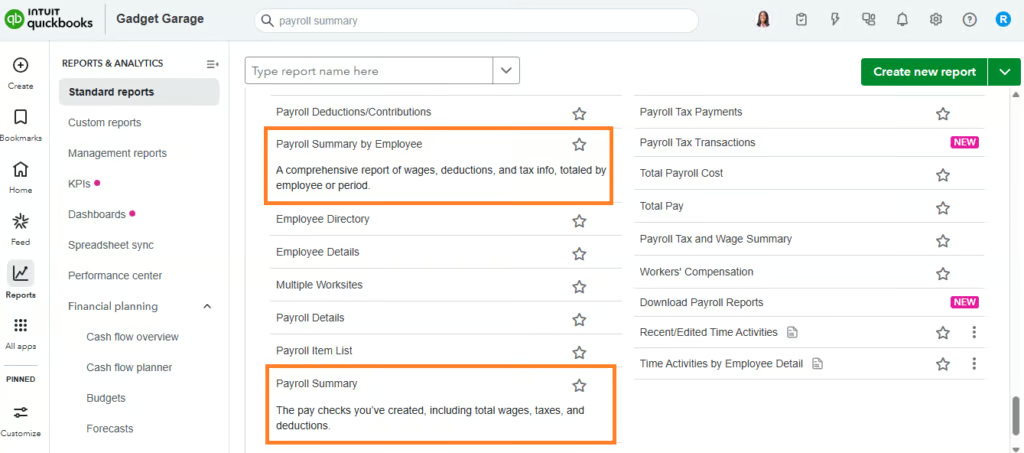
Payroll summary
This report answers a simple question after pay runs: Do the totals look right?
It shows total wages, taxes, deductions, and net pay for a selected period. A payroll summary is typically reviewed immediately after processing payroll and again during month-end close, when expenses are reconciled against accounting records. In tools like QuickBooks Workforce, payroll summary reports are automatically updated after each run, eliminating the need for manual data entry.
Payroll detail report
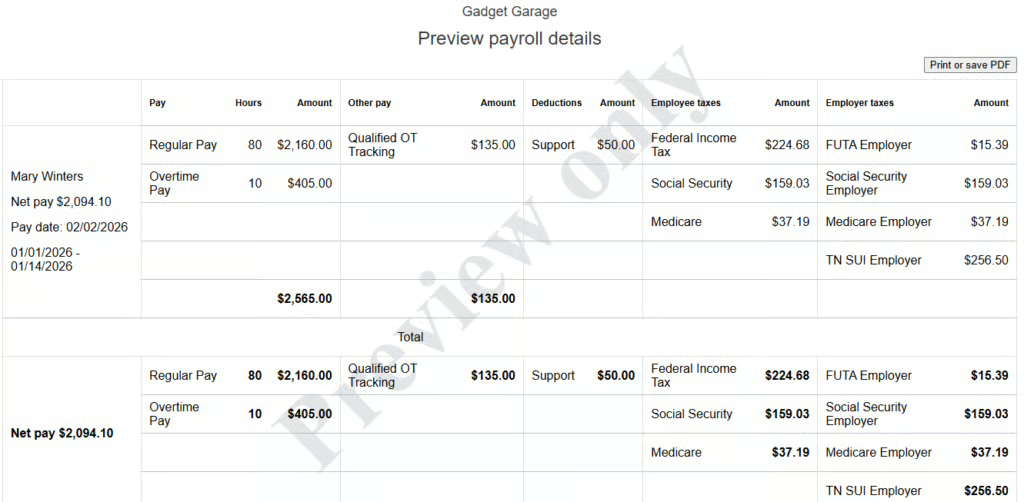
This is the report you open when a paycheck doesn’t line up with expectations. It breaks payroll down by employee, showing work hours, rates, and deductions. The payroll detail report is also commonly used to investigate discrepancies or as document support during audits.
With tools like QuickBooks Workforce, a payroll detail report is typically generated after a pay run is finalized. However, it also lets you view a report preview while running payroll, making it easy to check each employee’s pay details and spot potential errors.
Employee earnings by pay period
An employee earnings report shows compensation history for a single employee or a group of employees. It’s commonly used to verify pay accuracy, support year-end reporting, or review compensation across specific pay periods.
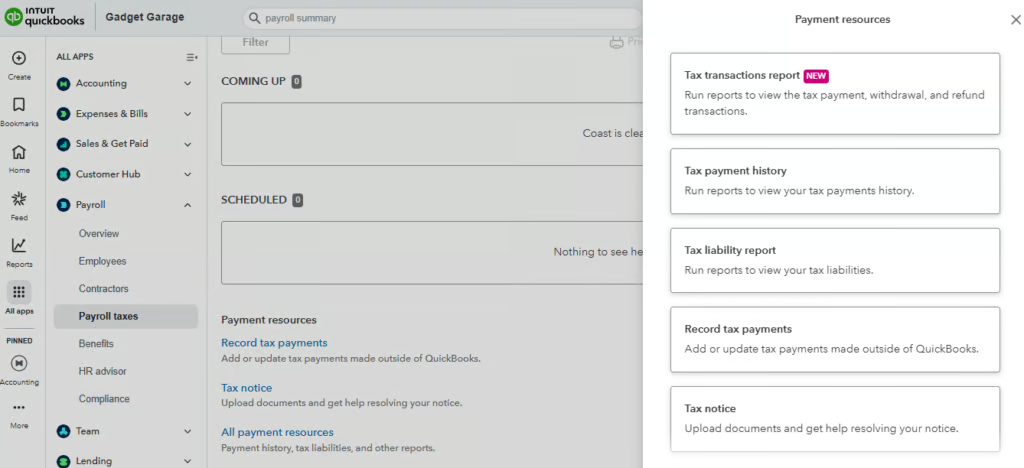
Payroll tax liability report
Payroll tax liability reports summarize federal, state, and local payroll taxes owed for a given period, including employee withholdings and the employer’s share of taxes such as Social Security and Medicare. These totals are typically reviewed before payroll taxes are submitted and used to support filings, like Form 940, Form 941, and year-end wage reporting.
When these reports update automatically, as they do in QuickBooks Workforce, discrepancies are easier to catch before they result in penalties or amended filings. QuickBooks can even handle tax filings and payments for you, but it also provides the option to handle these yourself.
Benefits and deductions
This report confirms that benefit deductions and employer contributions are applied correctly. It’s often reviewed during benefits changes, open enrollment, or when reconciling payroll deductions against carrier invoices.
Paid time off (PTO) and leave balances
PTO reports show each employee’s accrued and used time-off balances. They help ensure time off is paid correctly, and balances remain accurate as headcount changes. They are commonly reviewed when approving leave, checking accruals, or resolving balance questions.
Workers compensation report
This report organizes payroll by job classification or state to support workers’ compensation audits and premium calculations. It’s typically pulled during insurance renewals or audits.
Cash requirements report
This report, also known as the total payroll cost report, shows how much cash is needed to fund the next payroll, including wages, taxes, and deductions. It’s especially useful when payroll includes bonuses, commissions, or higher-than-usual overtime, which can cause totals to fluctuate.
Department and job costing
This report allocates payroll expenses to departments, locations, or projects. It’s most useful for tracking labor costs by function and is often reviewed monthly or quarterly.
How payroll software simplifies reporting
Payroll reporting becomes more difficult when data is scattered across systems or if you do payroll yourself. Payroll software streamlines reporting by centralizing pay data and reducing the need for manual updates. Platforms like QuickBooks Workforce support reporting in a few key ways:
- Ready-to-use standard reports: QuickBooks Workforce offers over 20 standard reports, from paycheck histories to payroll tax transaction reports. These documents are built on completed payroll data, making them reliable starting points for payroll reviews and reconciliations.
- Filtering and customization: QuickBooks Workforce’s reports can be filtered by pay period, employee, and other data ranges. This makes it easy to pull targeted reports for audits, interview reviews, or specific pay questions without sorting through unrelated data.
- Payroll tax tracking: With QuickBooks Workforce, payroll tax liability reports update as payroll is processed, helping ensure tax totals stay current. This allows for easier reviews of amounts owed before deposits or filings, without re-entering or recalculating data.
- Payroll and accounting integration: When QuickBooks Workforce is connected to its accounting module, QuickBooks Online, payroll expenses post directly to the general ledger. This keeps payroll reports aligned with accounting records and reduces the need for additional integration work since the two systems connect easily with each other.
Read more: Who Should Own Payroll in 2026? Hint: It’s Not HR or Accounting
Frequently asked questions (FAQs) about payroll reports
What’s the difference between a payroll report and a payroll register?
A payroll register is a detailed, pay-period-specific record listing earnings, deductions, tax withholdings, and net pay for each employee. A payroll report is a broader category that includes summaries of taxes and other pay-related costs.
Which payroll reports should be reviewed every pay period?
Most businesses review the payroll register or detail report, payroll summary, and cash requirements report every pay period.
What should be checked first when reviewing a payroll report?
Start by reviewing totals for wages, taxes, and deductions to confirm they match expectations. From there, drill into employee-level details if something looks off.
Which payroll reports matter most for quarterly and year-end filings?
Payroll tax liability reports and other payroll tax summary reports are most important during filing periods because they collate data on taxable wages and employer taxes.
How long should payroll reports be kept?
Retention requirements vary depending on federal, state, and local requirements, but payroll reports are typically kept for at least three to four years.