

AI in HR software can take repetitive tasks off an HR team's plate, but getting those benefits often requires work that isn't visible in a product demo. Someone has to prepare the employee data, establish approval rules, help people adjust, and make sure the answers or recommendations are reliable. Those responsibilities can affect how much time and money the organization actually saves.
For HR leaders, the better question is what the software will change during an ordinary workweek. Faster answers mean little if staff have to correct them or employees keep using the old process.
HR platforms such as Paycom combine AI-assisted capabilities with payroll, time tracking, employee self-service, and other HR functions. For businesses considering AI, this can mean fewer separate tools to integrate and maintain, and fewer systems for employees to learn.
The price of AI is only the beginning
A vendor's monthly quote may cover access to an AI assistant but exclude the work needed to connect it to workforce records, company policies, and existing applications. Businesses might also end up paying for capabilities their current HR software already provides.
Before investing in AI HR software, HR and finance leaders should review their existing systems alongside the vendor's proposal. Three questions can help uncover expenses that aren't obvious in the initial quote:
- What's included? Check for separate license fees, usage charges, or restrictions on features and employee access.
- What's already available? Review the must-have HR system features your current platform offers. Determine whether it can already handle the same employee requests, approvals, or reporting tasks.
- What needs to be connected? Identify the integrations, configuration work, and ongoing IT support required.
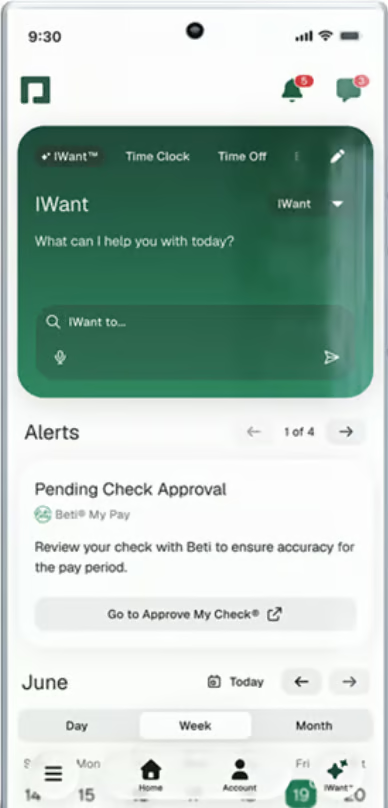
Pricing arrangements vary. Paycom's IWant AI tool, for example, is included for users without separate token or usage charges. Businesses don't have to estimate how many employee questions will generate additional AI fees, removing one potential source of unpredictable spending.
Another expense can arise when a company continues paying for older applications while introducing a new platform. Overlapping software subscriptions and support requirements may remain until employees have fully transitioned and the previous software can be retired.
Poor data quality can make AI more expensive
Getting an AI tool connected to existing HR systems is only part of the setup. HR teams may also need to update policies and correct staff records before the software can provide reliable answers. Otherwise, a simple employee question could create more work instead of less.
For example, an employee asks an AI assistant whether unused sick leave carries over into the next year. The assistant retrieves an outdated policy and gives the wrong answer. HR now has to explain the correct rule, replace the old document, and determine whether other employees received the same information.
Two types of information deserve attention before introducing AI:
- Policies and reference documents: Confirm that the tool can retrieve current leave policies, benefits documents, and eligibility rules. Remove outdated versions that could lead to incorrect answers.
- Employee and workforce records: Review employee statuses, pay rates, department assignments, and other information the technology uses. Inconsistent records across systems can affect the accuracy of answers and reports.
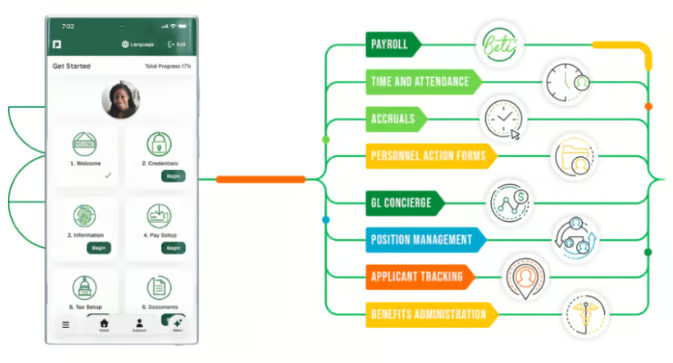
Paycom, for instance, maintains employee, payroll, and time information in a single database. When an employee's pay rate or personal details change, updates can flow through related Paycom processes without staff entering the same information repeatedly. This reduces the chances of mismatched records and the time HR spends correcting them.
However, a shared database doesn't guarantee that the original information is accurate. If someone enters the wrong pay rate, that mistake could still carry through to other processes. HR needs a way to identify and correct errors at the source.
New AI workflows still need setup
Having accurate employee information doesn't necessarily mean an AI tool can handle an entire HR process. Consider a time-off request. An assistant might know an employee's available leave balance and the company's policy, but what happens if the employee wants Friday off when the team is already short-staffed?
Someone still needs to decide whether the request can be approved and what should happen if it doesn't meet the usual requirements. Before introducing AI or automation, HR teams need to work out how those decisions will be handled.
Before automating an HR workflow, decide:
- What the system can handle: Identify routine requests that follow established policies and don't require individual judgment.
- When employees need human assistance: Define situations involving conflicting rules, incomplete information, or exceptions.
- Who makes the final decision: Assign responsibility for requests that affect employee pay, leave, or other employment matters.
Some of these steps can be handled through traditional automation rather than generative AI. Paycom's GONE® feature, for example, allows employers to configure time-off criteria based on company policies and staffing requirements. The system can approve or deny qualifying requests, while managers retain the ability to override decisions when necessary.
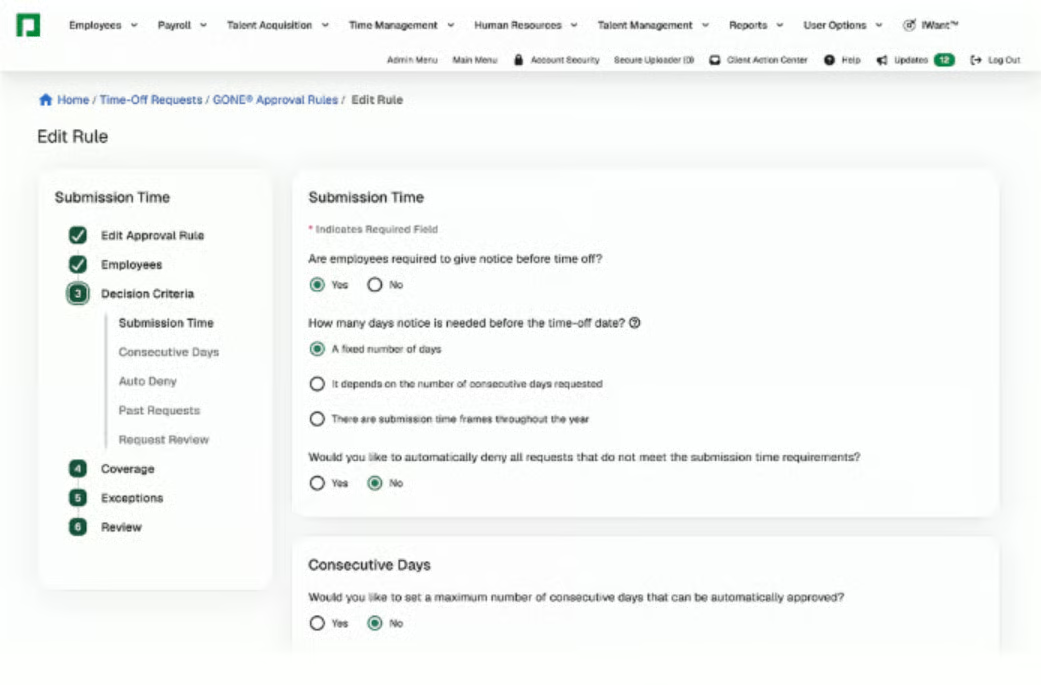
GONE® shows how clearly defined processes can reduce routine approval work. The setup still takes time because HR must translate company policies into rules and determine which requests need a manager's attention.
Similar considerations apply when simplifying payroll and HR workflows. Employees need to know what happens after they submit a request, and managers need to understand when they're expected to step in.
Employee adoption takes time
A well-designed workflow won't save much time if employees continue using the old process. HR might still receive questions about PTO balances and pay statements, even though the new AI assistant can answer them. Meanwhile, the team spends additional time explaining the software and supporting employees who haven't started using it.
The reasons aren't always straightforward. Some workers may not know where to find the tool, while others tried it once, received an unhelpful answer, and returned to emailing HR. More training won't necessarily solve either problem.
Instead of walking employees through every AI feature, focus on the tasks they're expected to complete themselves. Someone checking a PTO balance needs to know where to ask, how to recognize an incorrect answer, and who can help if something doesn't match their records.
Support tickets and recurring employee questions can reveal what's preventing adoption. Repeated requests about pay statements, for example, might point to three different problems:
- Access issues: Employees can't sign in because of login or permission problems.
- Navigation difficulties: Workers can access the platform but don't know where to find their pay information.
- Unclear information: Employees can find their pay statements but need help understanding the details.
Each problem calls for a different response. IT may need to resolve access issues, clearer instructions could help with navigation, and questions about incorrect pay details require HR or payroll to investigate.
Oversight remains part of the job
Getting employees to use AI is only part of the work. Once people start relying on its answers and recommendations, HR also needs to decide when those results require review and who can access the information behind them.
When AI influences employment decisions
Consider a recruiter reviewing an AI-generated ranking of job applicants. A qualified candidate appears near the bottom because their resume describes a relevant skill differently from the job posting. If the hiring team relies entirely on the ranking, that candidate might never receive proper consideration.
The amount of human review should depend on the decision. An incorrect answer about the next payday may be relatively easy to correct, while an AI recommendation involving hiring, compensation, or performance could affect someone's career or earnings.
For recruiting, this might mean checking lower-ranked applications before excluding candidates and documenting why the team disagrees with an AI recommendation. That review takes time, but it helps HR catch mistakes before they affect employees or applicants.
Protecting sensitive employee information
An AI assistant answering questions about pay, benefits, or leave may need access to employee records. However, that doesn't mean everyone using the tool should be able to retrieve the same information. An employee asking about their paycheck, for instance, shouldn't be able to access a coworker's salary details.
Before rollout, HR and IT teams should check which records the AI can retrieve, what access restrictions are available, and how the vendor handles sensitive data. They should also clarify whether customer information is used to train AI models and how long that information is retained.
These checks don't end after implementation. Employee permissions may change when someone moves into a new role, while new AI features could introduce additional data access concerns. Reviewing those changes adds to the ongoing work of maintaining the software.
Check what AI actually improves
Once AI is in use, HR leaders need to determine whether the time it saves outweighs the work required to maintain it. An assistant might answer employee questions in seconds, but HR could still spend time correcting responses, updating information, or handling requests the software can't resolve.
Consider an AI assistant that handles common payroll and benefits questions. Before rollout, HR can track how many inquiries arrive, how long they take to resolve, and which ones require follow-up. After implementation, the team should compare that workload with the time spent reviewing answers, correcting errors, and maintaining the tool.
| Area to review | What HR should check |
| Employee inquiries | Have repeat questions declined or moved to another channel? |
| Answer quality | Do employees receive correct information without extra follow-up? |
| Rework | Are staff correcting fewer records and requests? |
| Employee experience | Can employees complete common tasks without assistance? |
| Support effort | How much time goes into maintaining and reviewing the tool? |
Saving time doesn't necessarily mean saving money. If a payroll specialist spends fewer hours answering routine employee questions, the company hasn't reduced payroll expenses. Instead, that employee may have more time for audits, complex payroll issues, or other responsibilities.
Direct cost reductions are easier to identify when AI helps eliminate duplicate software subscriptions, reduce paid overtime, or lower spending on outsourced administrative work. HR should also account for the time employees spend maintaining the AI tool and correcting its responses.
Before expanding AI into another process, compare the work it has eliminated with the additional responsibilities it has created. This gives HR leaders a clearer picture of whether the technology is reducing costs or simply changing how the team spends its time.
Frequently asked questions about AI in HR software
How should HR leaders prioritize which tasks to automate with AI?
Start with repetitive, time-consuming tasks that follow predictable processes and use reliable data. Employee inquiries, document searches, and routine reporting are potential starting points. Before introducing AI, consider how often the task occurs, how much employee judgment it requires, and whether existing HR software can already handle it.
What should HR teams ask vendors about AI data privacy?
HR teams should ask which employee records the AI can access, how that information is stored, whether customer data is used to train AI models, and what access controls are available. They should also clarify how long information is retained and how the vendor handles data deletion and security incidents.
What's the difference between AI in HR and HR automation?
AI in HR can interpret questions, analyze information, and generate responses or recommendations. Traditional HR automation follows predefined rules to complete tasks, such as routing approvals or calculating leave balances. Both can reduce administrative work, but AI-assisted decisions may require different safeguards and review procedures.
What should HR teams test before rolling out AI HR software?
HR teams should test the software's accuracy, employee data access, workflow compatibility, and ability to handle exceptions. A small pilot using realistic employee requests can reveal incorrect answers, missing information, or unnecessary manual steps. These findings help teams address problems before introducing the technology across the organization.