

A payroll implementation checklist helps you organize everything that needs to happen before a new payroll system takes over a real pay run. That includes cleaning employee information, moving payroll history, setting up taxes and deductions, testing calculations, and preparing the people who will use the system.
For a small business, payroll implementation doesn't need to become a months-long technology project. It does need more care than completing setup screens and hoping the first paycheck comes out right. This checklist focuses on the work most likely to affect employee pay, tax reporting, and the amount of manual cleanup your HR or payroll team has to handle after launch.
Software Spotlight
Getting payroll live usually means coordinating employee data, time, approvals, and pay information across several steps. QuickBooks Workforce brings those workflows closer together, which can make setup and testing easier to manage for small businesses.
Payroll implementation checklist at a glance
A typical small-business payroll implementation process includes eight main steps:
- Choose your first live payroll and assign ownership.
- Gather and clean the information you'll need.
- Set up company, employee, and tax details.
- Configure payroll rules and approvals.
- Transfer and reconcile historical payroll data.
- Test the full payroll process with real scenarios.
- Prepare managers and employees for the switch.
- Complete your final checks and closely review the first payroll.
Working through these steps in order gives you a chance to catch problems before they reach a paycheck. An incorrect pay rate or tax setting is much easier to fix during setup than after it has affected payroll records, tax calculations, and an employee's take-home pay.
Want a version you can work through with your team? Download our printable payroll implementation checklist with checkboxes, space for your implementation owner, payroll system, target first payroll date, and notes for each step.
How to implement a payroll system
The exact payroll implementation process will look a little different depending on your company size, payroll complexity, and whether you're starting fresh or replacing another system. The core work is similar, though. You need reliable information, settings that match how you actually pay employees, enough testing to catch unusual cases, and a clear plan for that first live run.
The sections below walk through what to prepare, what to verify, and where small mistakes can cause bigger payroll problems later.
1. Choose your first live payroll and assign ownership
Pick the first payday you want to process in the new system, then work backward. Leave enough room for data entry or migration, configuration, testing, employee communication, and any setup work you need to complete with your payroll provider.
A January switch can make historical balances simpler because you're starting a new tax year, but waiting until January isn't necessary. A midyear move just requires more care when transferring year-to-date wages, taxes, deductions, and other payroll activity.
Give one person responsibility for keeping the implementation on track. In a smaller company, that may be the HR manager, payroll administrator, office manager, bookkeeper, or owner. Other people can handle individual pieces, such as finance verifying payroll funding or managers testing time approvals, while the implementation owner keeps track of what has been completed and what still needs attention.
You don't need a large project team, but you should know:
- Who verifies employee information?
- Who confirms tax accounts?
- Who approves the payroll setup?
- Who checks migrated balances?
- Who runs the test payroll?
- Who contacts the provider when something doesn't match?
Clear assignments are especially helpful when one person wears several hats. They reduce the chance that a tax account, employee balance, or payroll setting goes unchecked because everyone thought someone else handled it.
2. Gather and clean the information you'll need
Before entering anything into the new system, pull together the records you'll use for setup. Having the information in one place keeps you from bouncing between old payroll reports, employee files, tax portals, and bank records halfway through implementation.
For the business, gather your legal company information, employer identification number, payroll bank details, work locations, tax account numbers, and pay schedules.
Employee records will usually include:
- Legal name and address.
- Social Security number.
- Hire date.
- Employment status.
- Salary or hourly rate.
- Tax withholding information.
- Direct deposit details.
- Benefits and deductions.
- Wage garnishments, if applicable.
- Paid time off balances.
If you're switching from another payroll system, you'll also need year-to-date wages, taxes, deductions, employer contributions, bonuses, commissions, prior payroll adjustments, and completed tax payments or filings.
3. Set up company, employee, and tax details
With the source information checked, you can start entering the details the payroll system will rely on for each pay run. Company setup generally covers your business information, bank account, tax accounts, work locations, and payroll calendar. Employee setup includes compensation, withholding elections, direct deposit, deductions, benefits, and other information that affects pay.
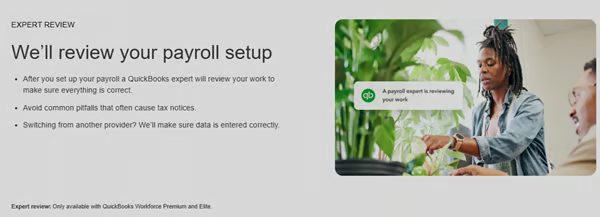
Some payroll providers can help with this part of the setup. QuickBooks Workforce includes guided payroll setup for eligible new customers before their first payroll. A payroll expert can walk through business information, employee setup, payroll taxes, and bank connection, which can be useful for a small HR team with limited payroll implementation experience.
Give tax setup its own review rather than treating it as another screen to complete. Federal, state, and applicable local accounts should match your records, and employees should be tied to the correct work locations and tax jurisdictions. Check these resources:
- The IRS Employer's Tax Guide covers federal withholding, Social Security, Medicare, unemployment taxes, deposits, reporting, and employer recordkeeping. Employers generally need to retain employment tax records for at least four years.
- Wage and hour records can follow different retention rules. The Department of Labor's FLSA recordkeeping requirements generally require covered employers to retain payroll records for at least three years and supporting records used to calculate pay, such as timecards, for two years. State and local requirements may extend beyond those federal rules.
Midyear transitions need one more check. Confirm who will handle tax deposits, quarterly filings, and year-end forms tied to payroll already processed during the year. Responsibilities can vary when you change providers, so clarify the handoff rather than assuming the new provider automatically takes responsibility for earlier payroll periods.
Also see: If you're building the process internally rather than relying heavily on a provider or accountant, our guide to doing payroll yourself covers the broader sequence from employer setup through tax filing.
4. Configure payroll rules and approvals
The next piece is turning your payroll policies into system settings. Start with anything that can change gross pay, deductions, taxes, or who is allowed to approve the run. Review the following:
- Pay frequencies and payroll calendars.
- Hourly and salaried earnings.
- Overtime.
- Bonuses and commissions.
- Pre- and post-tax deductions.
- Employer contributions.
- Garnishments.
- Paid time off.
- Payroll cutoffs and approvals.
- User permissions.
Use your current payroll policies and employee agreements as the reference point instead of copying every setting from the old system. An earning code nobody has used for three years or an extra approval created to work around an old software limitation doesn't automatically belong in the new setup.
Access should match each person's role as well. A manager may need to approve time without seeing employee tax information, while the person preparing payroll may not be authorized to submit it. Sorting out those permissions now keeps sensitive payroll data limited to the people who need it and makes the approval process clearer once payroll goes live.
5. Transfer and reconcile historical payroll data
If you're moving from another system during the year, importing the data is only half of the job. The more important part is making sure the new system reflects the same payroll history. Start by comparing overall totals for:
- Employee counts.
- Year-to-date gross wages.
- Taxable wages.
- Federal, state, and local taxes.
- Employee deductions.
- Employer contributions.
- Paid time off balances.
- Payroll tax payments already made.
If a total doesn't match, work down to the employee or payroll item causing the difference. A taxable wage discrepancy, for example, might come from a benefit deduction that was assigned a different tax treatment in the new system.
Don't dismiss small differences without understanding them. Some may come from legitimate rounding or configuration differences, but you want to know that before the new system starts calculating additional payroll on top of those balances.
Also see: Businesses moving other HR records at the same time can use the same basic process of cleaning, mapping, testing, and reconciling data. Read our HR data migration checklist as it goes deeper into those migration steps.
6. Test the full payroll process with real scenarios
Your test payroll should look more like an ordinary week at your company than a perfectly tidy demo. Pick employees or scenarios that cover the kinds of variations your payroll team regularly handles.
An hourly employee with overtime, for example, will tell you more than testing five people with identical salaried pay. Depending on your workforce, include PTO, bonuses, commissions, pre-tax deductions, garnishments, recent raises, new hires, and off-cycle payments.
For each test, compare:
- Regular and overtime earnings.
- Taxable wages.
- Employee deductions.
- Employer contributions.
- Payroll taxes.
- Net pay.
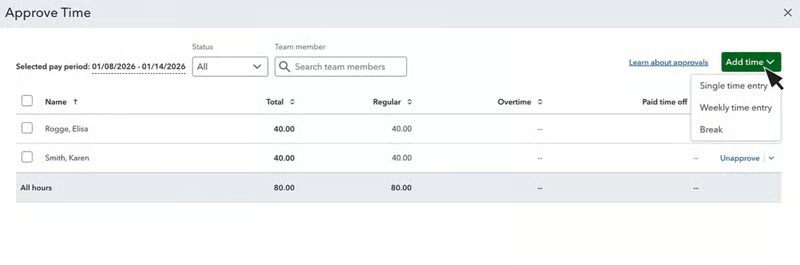
Include the information that reaches payroll from other tools in the test. When managers approve employee hours, check that regular time, overtime, PTO, and edits land in the correct pay period and earning categories.
With software like QuickBooks Workforce, approved time flows into payroll instead of being re-entered manually. During implementation, test a few different time scenarios to make sure the hours and pay types arrive correctly before relying on that workflow for a live run.
If you're switching providers, consider running a parallel payroll as well. Process the same pay period through both systems and compare the results before relying on the new platform for employee payments. If the totals differ, you'll have both calculations available while you investigate the cause.
7. Prepare managers and employees for the switch
Most people don't need a tour of every software feature. Managers and employees need to know what changes in the payroll tasks they actually perform.
Managers who touch payroll may need a short walkthrough covering where to approve time, when approvals are due, how to correct a missed punch, or where to submit bonuses and other variable pay. Focusing training on those recurring tasks is usually more useful than trying to teach every feature in the system at once.
Employees will usually care about a different set of questions:
- Where can I find my pay stub?
- How do I update my payroll information?
- Where are my tax forms?
- Has the way I submit time changed?
- Who should I contact if my paycheck looks wrong?
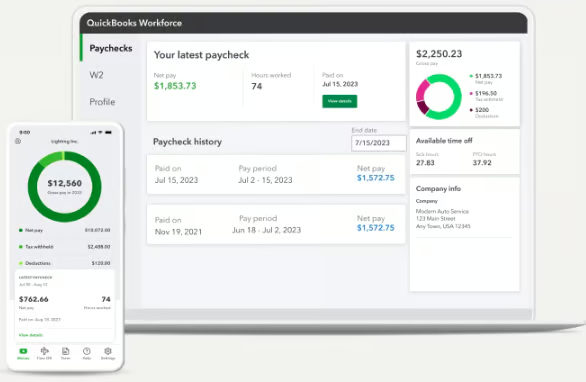
This is one place where employee self-service becomes useful after setup. QuickBooks Workforce, for example, gives employees access to pay stubs, W-2s, earnings, withholding information, and other pay details. Getting employees signed in before payday means you can sort out invitation or access problems before someone urgently needs a pay stub or tax document.
8. Complete your final checks and review the first payroll closely
Your final review is the point to catch anything that can still affect employee pay, payroll funding, or tax reporting. Rather than reopening every setup screen, work through the items that should already have been tested and reconciled.
Before submitting the first live payroll, confirm:
- The active employee list is correct.
- Pay rates match your records.
- Year-to-date balances reconcile.
- Tax accounts are set up.
- Tax filing responsibilities during a provider transition are clear.
- Earnings and deductions calculate correctly.
- Direct deposit information is ready.
- Time and other payroll inputs have been tested.
- Payroll administrators know how to make corrections.
- Approval deadlines are clear.
- Payroll funding is available.
Your team should still verify company-specific information such as pay rates, deductions, tax jurisdictions, and historical balances because those details ultimately come from your own records. For the live run itself, begin with the totals before reviewing individual records.
Compare employee headcount, gross payroll calculations, overtime, bonuses, deductions, taxes, net pay, and the amount being withdrawn to fund payroll. If something is noticeably higher or lower than a typical pay period, find the reason before submitting rather than assuming the new system simply calculates it differently.
The review continues after payday. Confirm deposits went through, investigate rejected payments, check the tax activity your provider handles, and reconcile payroll with your accounting records. Keep notes on corrections or questions that come up during the first few cycles so you can tell whether you're dealing with a one-off problem or a process that still needs attention.
Once things settle into a routine, conduct audit checks several times in a calendar year. You can use our payroll audit checklist to help you review employee records, wages, taxes, time data, deductions, and accounting activity on an ongoing basis.
Frequently asked questions about payroll implementation
Who should lead payroll implementation at a small business?
Choose someone who understands how employees are currently paid and can recognize when a result doesn't look right. Depending on the business, that could be an HR manager, payroll administrator, bookkeeper, controller, office manager, or owner. Technical experience can help, but familiarity with your payroll policies, employee records, and normal pay-cycle issues is usually more valuable.
Does payroll implementation require IT support?
Many small businesses can implement cloud payroll software without dedicated IT help. Technical support becomes more useful when the project involves custom integrations, single sign-on, complex permission requirements, large data transfers, or connections that go beyond the payroll provider's standard setup tools.
What should you do with your old payroll system after switching?
Keep access until you're confident that historical payroll reports, tax records, employee information, and required supporting documents have been saved somewhere you can retrieve them. You may need those records later for corrections, tax notices, employee questions, audits, or recordkeeping requirements, so don't shut down the old account solely because the first new payroll processed successfully.
How do you measure whether payroll implementation was successful?
Accuracy comes first, but look at the process too. Employees should be paid correctly and on time, tax and deduction totals should reconcile, managers should be able to complete approvals, and payroll staff shouldn't need a collection of spreadsheets and manual fixes just to finish each run. A system that technically processes payroll but creates more cleanup every pay period hasn't solved much.
When should a small business get outside help with payroll implementation?
Get help when your team can't confidently verify part of the setup. Multistate payroll, complicated tax registrations, difficult historical data, unusual deductions, and custom integrations are good examples. Depending on the problem, the right resource might be your payroll provider, accountant, bookkeeper, payroll consultant, or employment counsel.