


The best AI sales automation tools help teams find prospects, prioritize leads, personalize outreach, automate follow-ups, summarize conversations, update CRM records, and forecast pipeline with less manual work. The strongest platforms do not just generate email copy; they connect AI to real sales workflows, such as prospecting, sequencing, call follow-up, deal management, and revenue reporting.
I compared AI sales automation tools based on how well they support the full sales process: data quality, prospecting, outreach automation, CRM updates, conversation intelligence, forecasting, sales engagement, integrations, ease of use, and scalability. Salesforce Sales Cloud is my best overall pick for larger teams that need AI-powered CRM automation, forecasting, workflow governance, and enterprise sales visibility, while HubSpot is the strongest fit for growing teams that want CRM, automation, and AI assistance in one easier-to-manage system.
| Software | Best for | Starting price per month, billed annually* |
|---|---|---|
| Apollo.io | High-volume AI prospecting | Free or $49/seat |
| Salesforce | Enterprise-wide sales automation | Free or $25/user |
| HubSpot Smart CRM | Growing teams adopting AI sales tools | Free or $45/seat |
| Outreach | Enterprise multichannel sales engagement | Custom quote |
| Salesloft | AI-powered revenue orchestration | Custom quote |
| Pipedrive | Simple AI CRM automation | $14/user |
| ZoomInfo Copilot | AI-driven sales intelligence | Custom quote |
| Conversica | Automated lead engagement and follow-up | Custom quote |
Best AI sales automation tools at a glance
| Software | B2B contact database | Multichannel sequences | Autonomous AI conversations | Expert score out of 5 |
|---|---|---|---|---|
| Apollo.io | ✓ | ✓ | ✕ | 4.62 |
| Salesforce Sales Cloud | ✕ | ✓ | ✓ | 4.59 |
| HubSpot Smart CRM | ✕ | ✓ | ✓ | 4.53 |
| Outreach | ✕ | ✓ | ✕ | 3.96 |
| Salesloft | ✕ | ✓ | ✓ | 3.93 |
| Pipedrive | ✕ | ✓ | ✕ | 3.87 |
| ZoomInfo Copilot | ✓ | ✕ | ✕ | 3.78 |
| Conversica | ✕ | ✓ | ✓ | 3.42 |
Why you can trust TechnologyAdvice
TechnologyAdvice follows a structured editorial process designed to help buyers make informed software decisions. Our team reviews dozens of buyer’s guides each year using consistent, data-driven criteria grounded in real business use cases.
For this guide, I evaluated AI sales automation tools based on the factors that matter most to sales teams, including pricing, AI capabilities, workflow automation, ease of use, integrations, and reporting. I also assessed how effectively each platform supports key sales activities, such as prospecting, lead qualification, personalized outreach, follow-up, pipeline management, and forecasting.
This analysis is based on comparative research, product documentation, and verified user feedback from third-party platforms. I used that information to assess how each platform performs in real-world newsletter workflows, not just how the vendor markets it.
Methodology: How I evaluated the best AI sales automation tools
To build this list, I evaluated platforms that use AI to automate sales work across prospecting, engagement, pipeline management, and forecasting. I scored each product using the following weighted criteria:
- AI sales automation (30%): I evaluated AI prospecting and account research, predictive lead and opportunity scoring, generative email tools, sequence automation, conversation intelligence, coaching, AI agents, and next-best-action recommendations.
- Core sales execution (20%): I reviewed contact, account, and deal management; multichannel engagement; workflow automation; pipeline forecasting; reporting; integrations; API access; and mobile functionality.
- Pricing and accessibility (15%): I compared free plans and trials, entry-level affordability, the cost of accessing useful AI features, pricing transparency, billing options, and contract flexibility.
- Data and sales intelligence (15%): I assessed contact and company data, intent signals, data enrichment and verification, revenue analytics, attribution, security, and data-governance controls.
- Ease of deployment (10%): I considered implementation requirements, daily usability, no-code administration, onboarding resources, learning curve, and the platform’s ability to scale.
- Expert assessment (10%): This reflects my evaluation of each product’s practical AI value, overall cost-effectiveness, user sentiment, research transparency, and pace of AI innovation.
I also reviewed official pricing pages, product documentation, demos, and verified user feedback. This helped me assess how each platform performs in real sales workflows, from researching prospects and automating outreach to managing deals and forecasting revenue.
How do the best AI sales automation tools compare?

What makes Apollo.io the best for high-volume AI prospecting?
Pros
- Combines prospect data, enrichment, and outreach automation
- Offers a free plan for testing its core workflow
- Supports AI research and multichannel sequences
Cons
- Contact data requires verification before large campaigns
- Credit-based usage can raise costs as outreach scales
- Less robust than enterprise CRMs for forecasting and governance
Why I chose Apollo.io
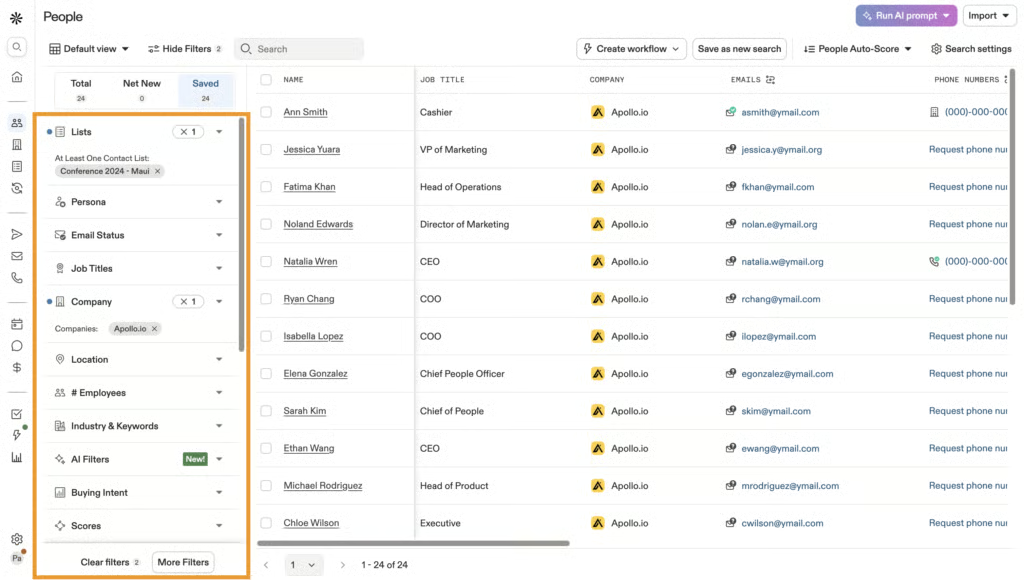
Apollo ranked first in my evaluation because it provides a practical path from identifying prospects to engaging them. Sales representatives can define their target audience, find matching contacts, verify details, enrich records, enroll prospects in sequences, and measure engagement without repeatedly exporting data between platforms.
I see the most value for lean sales development teams running consistent outbound campaigns. Apollo reports a native database of more than 240 million contacts and 30 million companies, while its filters help narrow that coverage by role, seniority, industry, location, company size, and intent.
However, I would verify a sample of records before launching outreach at scale. Teams should also estimate their expected use of contact credits, exports, dialer minutes, and AI tools because limits vary by plan. Apollo can streamline prospecting and engagement, but businesses may still need a more mature CRM for complex forecasting, governance, and account management.
Also read: Best AI Prospecting Tools
About Apollo.io
Apollo.io is a sales intelligence and engagement platform that supports prospect research, data enrichment, sequencing, calling, and campaign analysis. It is particularly useful for sales development, growth, and founder-led teams that want prospecting and outbound execution in one system.
Key features
- Prospect database: Find contacts and companies using filters such as title, seniority, industry, location, company size, and buyer intent.
- Data enrichment: Retrieve verified contact details, complete missing fields, and refresh records in connected CRMs.
- Multichannel sequences: Coordinate automated emails, call tasks, and follow-up activities through repeatable campaigns.
- AI research and messaging: Research accounts, summarize buyer information, and generate personalized outreach using prospect context.
- Campaign analytics: Monitor delivery, responses, meetings, and sequence performance to identify effective audiences and messaging.
Gallery
Pricing
| Free | Basic | Professional | Organization | |
|---|---|---|---|---|
| Monthly price, billed annually | $0/seat | $49/seat | $79/seat | $119/seat |
| Credits per year | 900 | 30,000 | 48,000 | 72,000 |
| Monthly price, billed monthly | $0/seat | $65/seat | $99/seat | $149/seat |
| Credits per month | 75 | 2,500 | 4,000 | 6,000 |
Free trial: 14 days
What makes Salesforce the best for enterprise-wide sales automation?
Pros
- Extensive CRM, pipeline, forecasting, and reporting capabilities
- Agentforce agents support automation throughout the sales cycle
- Highly customizable, with a large integration ecosystem
Cons
- Implementation and administration can require substantial resources
- Advanced AI capabilities may require add-ons or premium editions
- More complex than most small sales teams need
Why I chose Salesforce
Salesforce (via Sales Cloud) stood out in my evaluation for the scope of its automation. While many platforms focus on prospecting or outbound engagement, Salesforce can apply AI and workflow rules across lead qualification, opportunity management, meeting preparation, forecasting, quoting, and partner sales.
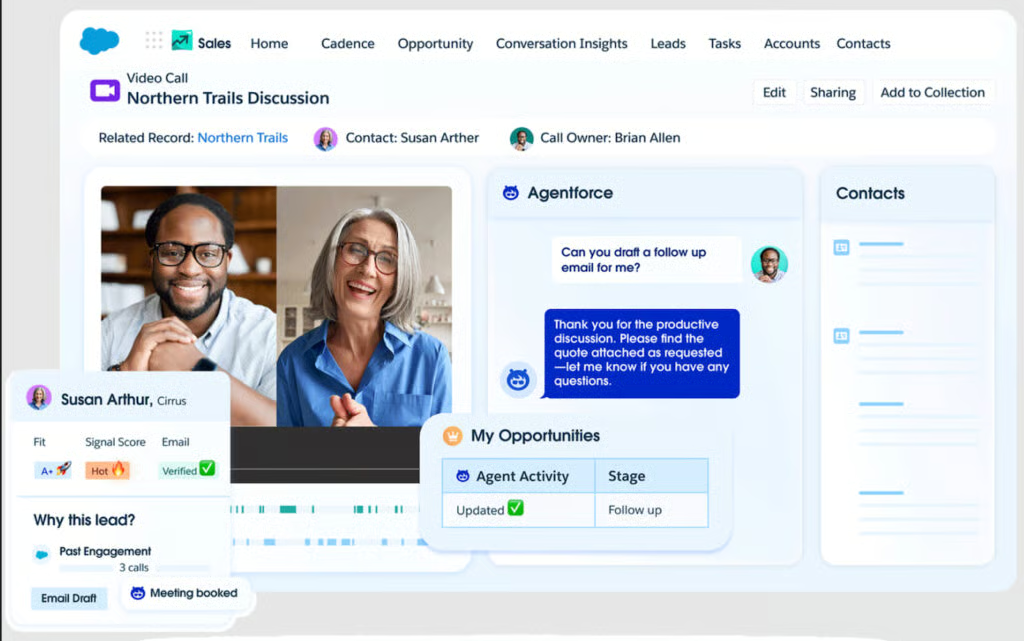
That breadth makes it a strong fit for enterprises managing multiple teams, territories, approval processes, and sales motions. Sales Cloud provides the customer and pipeline data, while Agentforce Sales adds specialized agents for prospecting, engagement, account research, pipeline management, and quoting. These agents can research and prioritize prospects, nurture leads, book meetings, update CRM records, recommend actions, and generate quotes within governed workflows.
I would not choose Salesforce solely for AI-generated emails or basic task automation. Its value becomes clearer when an organization needs a shared system of record, configurable processes, advanced reporting, and control over how AI uses data and takes action. Those capabilities require more implementation and oversight, but the trade-off is reasonable for enterprises with mature revenue operations.
Also read: 10 Best Customer Database Software Solutions
About Salesforce
Salesforce Sales Cloud is a CRM and sales automation platform for managing leads, accounts, contacts, opportunities, activities, forecasts, workflows, and revenue reporting. Agentforce extends the platform with AI agents that assist with or automate work across the sales cycle.
Key features
- Agentforce Sales: Deploy AI agents for prospecting, lead engagement, account research, meeting preparation, pipeline updates, and quoting.
- Lead and opportunity management: Route leads, maintain customer records, track sales activities, and manage opportunities through standardized pipeline stages.
- Workflow and approval automation: Configure routing rules, alerts, approvals, record updates, and multistep processes around internal sales policies.
- Forecasting and revenue intelligence: Monitor pipeline coverage, opportunity movement, deal risk, forecast categories, and team performance.
- AppExchange ecosystem: Connect Sales Cloud with sales, marketing, service, analytics, communications, and productivity applications.
Gallery
Pricing
| Agentforce Sales (formerly Sales Cloud) plans | Free Suite | Starter Suite | Pro Suite | Enterprise | Unlimited | Agentforce 1 Sales |
|---|---|---|---|---|---|---|
| Monthly price, billed annually | $0/user | $25/user | $100/user | $175/user | $350/user | $550/user |
| Monthly price, billed monthly | $0/user | $35/user | N/A | |||
Free trial: 30 days

What makes HubSpot Smart CRM the best for growing teams adopting AI sales tools?
Pros
- Intuitive interface with a relatively short learning curve
- Connects sales, marketing, and customer data
- Offers Breeze AI agents, enrichment, and automation
Cons
- Costs can rise as teams add seats, products, and credits
- Advanced sales automation requires paid HubSpot products
- Less flexible than Salesforce for highly complex processes
Why I chose HubSpot Smart CRM
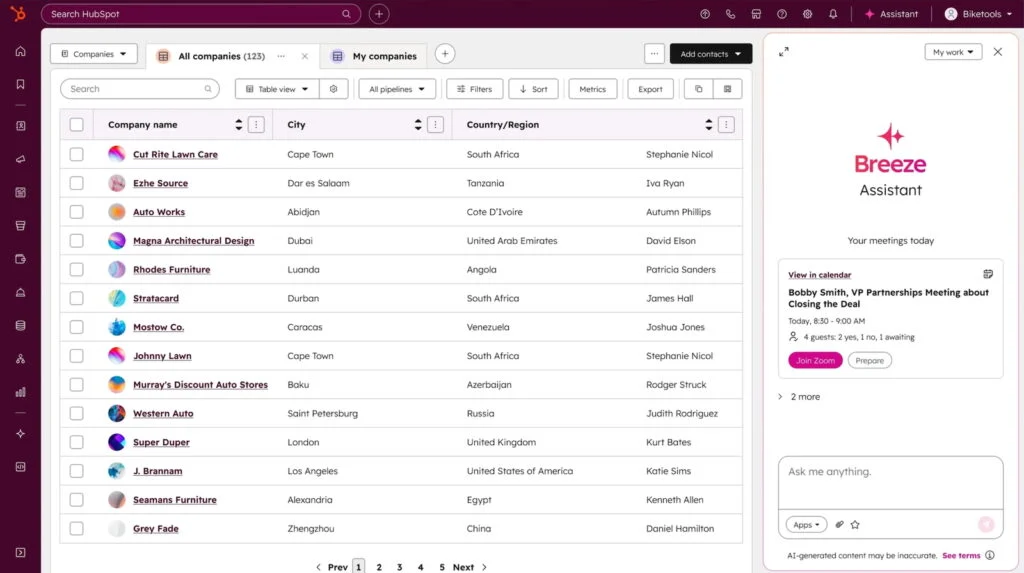
What impressed me most about HubSpot Smart CRM is how naturally its AI tools fit into everyday sales workflows. Contacts, companies, deals, emails, calls, meetings, and marketing engagement feed into shared customer records, giving Breeze features and agents the context needed to provide relevant insights and assistance.
That connected foundation makes HubSpot Smart CRM practical for a growing sales team. Representatives can manage pipelines, schedule meetings, automate follow-up, and use AI for prospect research and personalized outreach without constantly moving between disconnected systems. Companies already using other HubSpot products gain additional value because sales teams can act on marketing engagement and customer history from the same platform.
I would shortlist HubSpot for a team moving beyond spreadsheets or a basic CRM but not yet ready for a resource-intensive Salesforce deployment. The main trade-off is its packaging: advanced automation, reporting, governance, and AI usage may require higher editions, additional seats, or HubSpot Credits.
Also read: Best AI CRM Software
About HubSpot Smart CRM
HubSpot Smart CRM is the shared data foundation for HubSpot’s customer platform. It centralizes contact, company, deal, communication, and behavioral data while supporting enrichment, reporting, workflows, integrations, and Breeze AI. Sales Hub adds more advanced prospecting, engagement, and sales automation capabilities.
Key features
- Unified customer records: Connect contacts, companies, deals, emails, calls, meetings, and marketing engagement in one customer profile.
- Breeze Prospecting Agent: Research target accounts, identify relevant prospects, and create personalized outreach using CRM and engagement context.
- Sales sequences and workflows: Automate emails, follow-up tasks, lead assignment, record updates, and other recurring processes. Availability varies by HubSpot product and edition.
- Data enrichment and AI insights: Complete customer records, research prospects, flag data issues, and surface relevant deal information.
- Pipeline reporting: Track deal progression, sales activity, forecasts, and performance through configurable reports and dashboards.
Gallery
Pricing
| HubSpot Smart CRM plans | Free tools | Professional | Enterprise |
|---|---|---|---|
| Monthly price, billed annually | $0 for 2 users | $45/seat | $75/seat |
| Monthly price, billed monthly | $0 for 2 users | $50/seat | N/A |

What makes Outreach the best for enterprise multichannel sales engagement?
Pros
- Robust multichannel sequencing and engagement automation
- AI agents assist with research, personalization, and sales workflows
- Strong engagement analytics, coaching, and pipeline visibility
Cons
- Custom pricing and AI credits make costs difficult to estimate
- Depends on accurate CRM data and clearly defined sales processes
- More complex than most small sales teams need
Why I chose Outreach
Outreach performed best in my evaluation at the point where CRM data becomes seller action. A CRM may store account and opportunity records, but it does not always provide enough structure to coordinate high-volume prospecting, follow-up, meetings, and account engagement across a large sales organization.
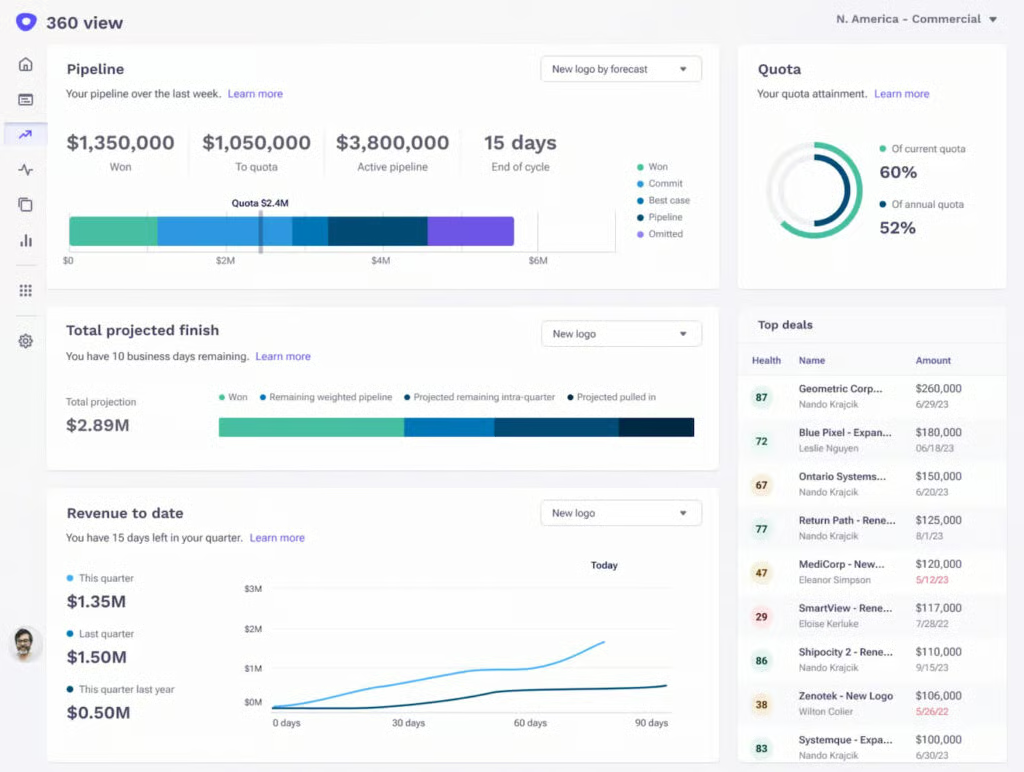
Outreach addresses that gap with multichannel sequences, prioritized tasks, workflow automation, and engagement analytics. It can sync activities from email, calls, LinkedIn, and SMS with CRM records, giving representatives complete engagement histories and managers clearer visibility into sales play performance. Its AI agents assist with account research, message personalization, meeting preparation, and deal analysis.
I would recommend Outreach to an established SDR, BDR, or account executive organization that needs consistent execution across teams and territories. However, the platform will not correct weak targeting, ineffective messaging, or unreliable CRM data. Organizations still need well-designed sales plays, integration planning, governance, and ongoing coaching to get full value from it.
Also read: What Is Revenue Intelligence? A Complete Guide for Modern Sales Teams
About Outreach
Outreach is an AI-powered sales execution platform for prospecting, multichannel engagement, conversation intelligence, deal management, pipeline analysis, coaching, and forecasting. It is primarily designed for larger revenue organizations that need to standardize seller workflows and measure performance at scale.
Key features
- Multichannel sequences: Coordinate email, phone, LinkedIn, SMS, meeting, and task-based touchpoints through repeatable sales plays.
- AI agents: Assist with account research, message personalization, meeting preparation, deal analysis, and revenue workflows.
- Seller prioritization: Surface recommended tasks, accounts, prospects, and opportunities so representatives know where to focus.
- Conversation and engagement intelligence: Analyze calls, meetings, responses, sequence performance, and seller activity for coaching and optimization.
- CRM and pipeline synchronization: Sync engagement activity with account and opportunity records while monitoring deal health and pipeline movement.
Gallery
Pricing
Outreach uses custom pricing based on team size, selected capabilities, activated AI workflows, and usage. Its packages include Amplify Essentials, Core, Plus, and Pro. Pricing combines per-user access with consumption-based AI credits; additional credits and implementation services are available.
- Amplify Essentials: 10,000 AI credits
- Amplify Core: 25,000 AI credits
- Amplify Plus: 50,000 AI credits
- Amplify Pro: 100,000 AI credits
Contact Outreach to get a custom quote.

What makes Salesloft the best for AI-powered revenue orchestration?
Pros
- Connects engagement, deal management, coaching, and forecasting
- Uses AI agents and buyer signals to prioritize seller actions
- Offers robust cadence automation and conversation intelligence
Cons
- Pricing is not publicly disclosed
- Depends on CRM integration and disciplined sales processes
- More complex than teams with basic outreach needs require
Why I chose Salesloft
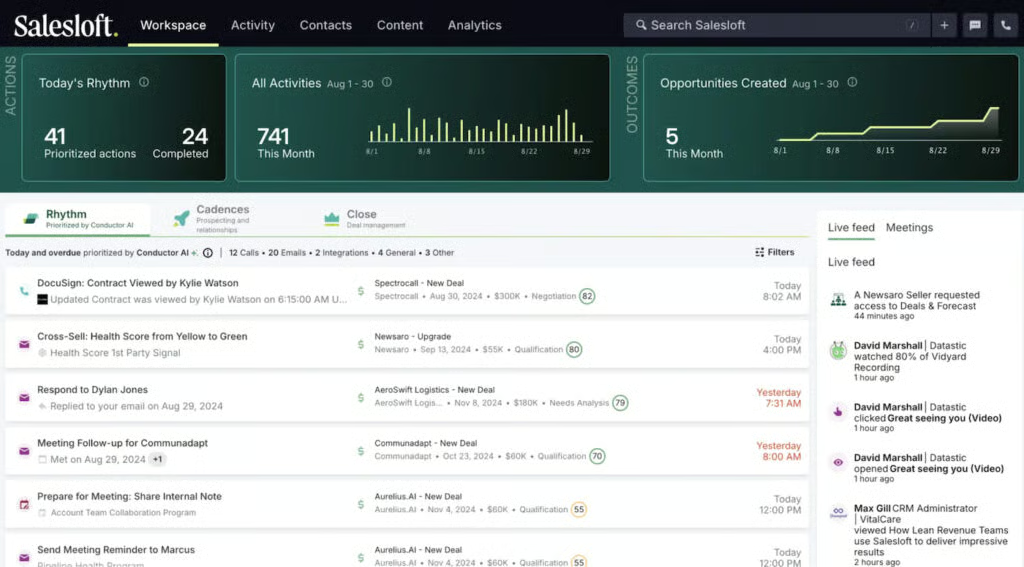
What differentiates Salesloft for me is how far it extends beyond traditional sales engagement. Cadence manages prospecting activity; Rhythm prioritizes seller actions; Conversation Intelligence analyzes buyer interactions; Deals surfaces pipeline risk; and Forecast supports revenue planning. Together, these tools connect daily rep activity with broader pipeline outcomes.
That makes Salesloft particularly valuable for organizations with multiple sellers, established sales cadences, and managers who need visibility into both representative performance and deal progression. Its AI agents can research accounts and buyers, generate personalized emails, summarize deals, identify stalled opportunities, interpret analytics, and recommend coaching actions.
I would recommend Salesloft when a team has outgrown a basic sequencing tool and wants to coordinate engagement, pipeline management, and coaching in one platform. The trade-off is operational overhead: Salesloft works best with a well-maintained CRM, clearly defined revenue processes, and managers prepared to act on its insights. Teams that only need email automation are unlikely to use the platform enough to justify the investment.
Also read: 5 Best Revenue Intelligence Software
About Salesloft
Salesloft is a revenue orchestration platform that combines sales engagement, workflow prioritization, conversation intelligence, opportunity management, analytics, forecasting, and coaching. It integrates with CRM and other revenue tools rather than serving as the organization’s primary customer database.
Key features
- Cadence: Build repeatable outreach workflows across email, calls, social actions, meetings, and follow-up tasks.
- Rhythm: Analyze buyer signals and business priorities to organize seller activity around the accounts and opportunities that need attention.
- Conversation Intelligence: Record and analyze calls and meetings, generate summaries, identify action items, and surface coaching opportunities.
- Deals and Forecast: Monitor opportunity health, uncover stalled deals, assess pipeline risk, and support revenue forecasting.
- AI agents: Research accounts and buyers, generate personalized content, summarize performance data, and recommend next steps.
Gallery
Pricing
Outreach uses custom pricing based on team size, selected capabilities, activated AI workflows, and usage. Its packages include Amplify Essentials, Core, Plus, and PSalesloft offers Advanced and Elite plans, both with custom pricing.
- Advanced: Full customer lifecycle workflows and conversation intelligence.
- Elite: Everything in the Advanced plan, plus sandbox and multi-org management.
Contact the Salesloft sales team to request a quote.

What makes Pipedrive the best for simple AI CRM automation?
Pros
- Intuitive, visual deal pipelines
- AI-powered insights and next-step recommendations
- Straightforward workflow automation
Cons
- Limited enterprise governance and customization
- Less robust than dedicated sales engagement platforms
- Advanced reporting and add-ons can raise the total cost
Why I chose Pipedrive
Pipedrive suits teams that need a structured sales process without making CRM administration a full-time job. Its visual pipelines clearly show each deal’s status and next step, while workflow automations handle repetitive tasks such as creating activities, assigning leads, and sending reminders.
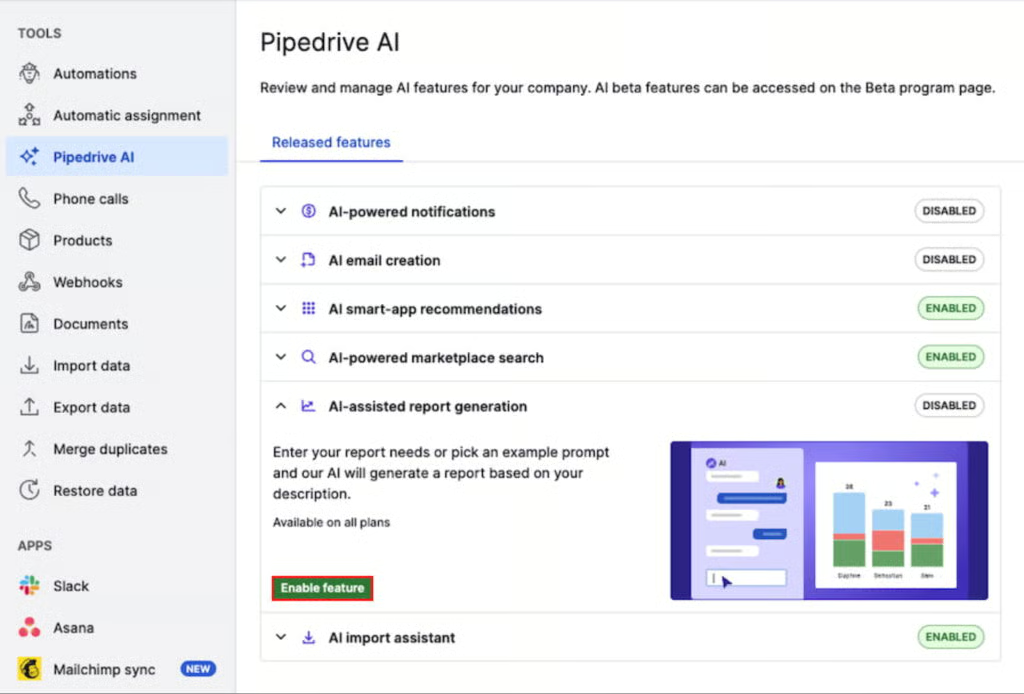
In my review, its AI Sales Assistant proved most useful for day-to-day prioritization. It can summarize deals, identify performance patterns, flag opportunities that need attention, estimate win probability, and recommend next actions. AI-generated emails and thread summaries also help reps follow up faster.
Pipedrive lacks the advanced governance, forecasting depth, and multichannel sequencing larger revenue teams may require. For SMBs seeking approachable, pipeline-focused AI automation, however, it offers a strong balance of usability and functionality.
Also read: Best Easy to Use CRM Software
About Pipedrive
Pipedrive is a sales CRM for managing leads, contacts, deals, activities, and pipelines. Its automation and AI tools help teams reduce administrative work, prioritize opportunities, and maintain consistent follow-up.
Key features
- Visual sales pipelines: Track deals, stages, values, activities, and next steps using customizable drag-and-drop pipelines.
- AI Sales Assistant: Surfaces deal summaries, performance patterns, win probabilities, and recommended next actions.
- AI email tools: Drafts sales emails and summarizes lengthy threads to help reps respond faster.
- Workflow automation: Automates lead assignments, activity creation, reminders, notifications, and record updates.
- Reporting and forecasting: Tracks pipeline health, conversions, team activity, goals, and projected revenue.
Gallery
Pricing
| Pipedrive plans | Lite | Growth | Premium | Ultimate |
|---|---|---|---|---|
| Monthly price, billed annually | $14/user | $39/user | $59/user | $79/user |
| Monthly price, billed monthly | $24/user | $49/user | $79/user | $99/user |
Free trial: 14 days

What makes ZoomInfo Copilot the best for AI-driven sales intelligence?
Pros
- Extensive B2B contact and company intelligence
- Prioritizes accounts using real-time buyer signals
- Automates research, outreach preparation, and CRM updates
Cons
- Paid pricing is not publicly listed
- Credits and add-ons can raise the total cost
- Requires a defined ideal customer profile to deliver value
Why I chose ZoomInfo Copilot
Many AI sales tools help reps write messages faster. ZoomInfo Copilot addresses the earlier—and often more important—question of which accounts and buyers are worth contacting.
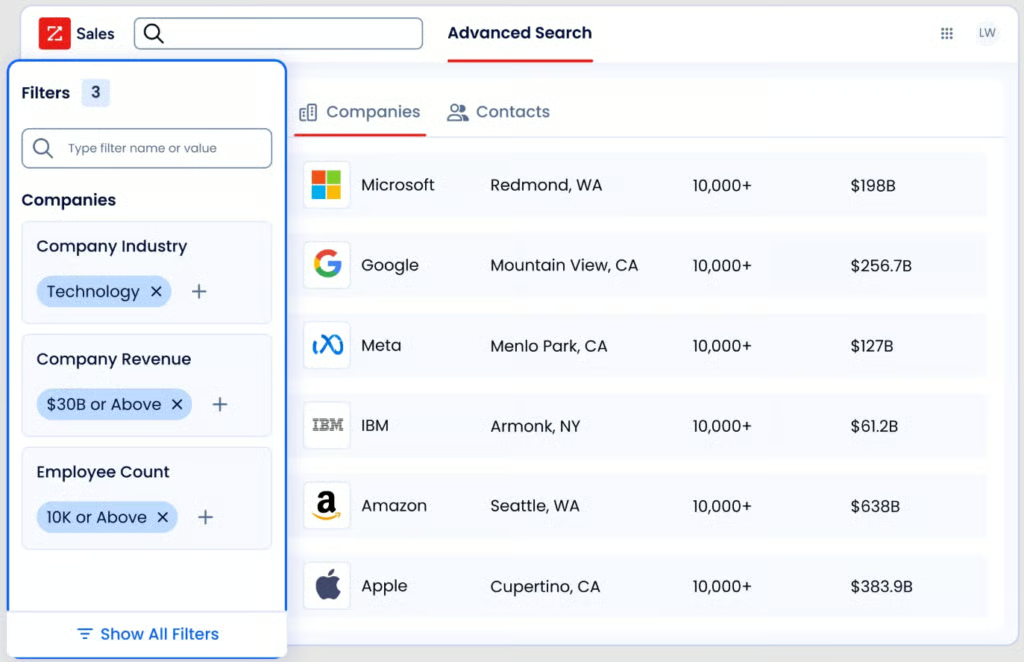
In my review, its ability to translate intent activity, company changes, engagement, and account data into prioritized actions stood out. Reps can identify decision-makers, research accounts, prepare personalized outreach, and respond when new buying signals emerge. Bringing these capabilities into one workspace also reduces switching between intelligence, engagement, and CRM tools.
The platform works best when teams have a clear ideal customer profile and a process for acting on signals. Otherwise, they may pay for data they do not fully use. For established B2B sales organizations with signal-driven prospecting strategies, ZoomInfo Copilot provides greater targeting depth than a standard AI email or sequencing tool.
Also read: What Is an AI SDR? Tools, Tasks, and Use Cases
About ZoomInfo Copilot
ZoomInfo Copilot is an AI-powered sales intelligence platform that helps sellers identify in-market accounts, find decision-makers, research buyers, personalize outreach, manage follow-ups, and maintain CRM records.
Key features
- Dynamic account prioritization: Ranks accounts using intent activity, engagement, company changes, and other buyer signals.
- Contact and company intelligence: Surfaces decision-makers, firmographic data, organizational relationships, and account updates.
- AI-assisted research and messaging: Generates account summaries, meeting briefs, talking points, and personalized outreach.
- Pipeline and deal alerts: Flags renewed engagement, stalled opportunities, deal risks, and potential expansion signals.
- Workflow and CRM automation: Automates reminders, follow-ups, outreach sequences, and CRM updates.
Gallery
Pricing
ZoomInfo Copilot uses custom pricing based on team size, credit volume, selected capabilities, integrations, and contract length. Contact its sales team for a custom quote.

What makes Conversica the best for automated lead engagement and follow-up?
Pros
- Automates persistent, two-way lead follow-up
- Supports email, SMS, and website chat
- Routes sales-ready prospects to human reps
Cons
- Pricing is not publicly available
- Does not currently support voice outreach
- Requires clear messaging, escalation, and handoff rules
Why I chose Conversica
Conversica solves a different problem than CRMs and rep-focused copilots. Rather than helping sellers complete tasks faster, its AI agents independently conduct written conversations with leads until they identify interest, answer questions, or determine that a human should take over.
In my review, this made the platform most compelling for teams with leads sitting untouched between initial capture and sales qualification. Conversica can follow up with inbound prospects, event attendees, trial users, pre-MQLs, and dormant contacts through email, SMS, or chat. It then records activity in connected systems and alerts reps when a contact is ready for personal attention.
That autonomy requires oversight. Teams must define the AI agent’s audience, approved messaging, knowledge sources, escalation triggers, and CRM handoff process. Conversica also delivers more value when lead volume is high enough to justify a dedicated conversational AI platform. With those conditions in place, it can expand follow-up capacity and reduce opportunities lost to slow or inconsistent outreach.
Also read: 8 Best AI Marketing Tools
About Conversica
Conversica provides AI agents that conduct automated, two-way conversations with leads, prospects, and customers. Sales and marketing teams use the platform to support lead follow-up, qualification, reengagement, appointment scheduling, and handoff workflows.
Key features
- AI sales agents: Engage contacts autonomously and maintain follow-up across multiple attempts.
- Two-way conversations: Respond to questions and continue natural-language conversations through email, SMS, and website chat.
- Lead qualification and routing: Identify interested prospects and alert or assign them to the appropriate sales representative.
- Conversation controls: Let teams customize messaging, brand tone, knowledge sources, audience rules, and escalation criteria.
- CRM and marketing integrations: Synchronize conversations, contact updates, and qualification outcomes with platforms such as Salesforce, HubSpot, Microsoft Dynamics, Marketo, and Eloqua.
Gallery
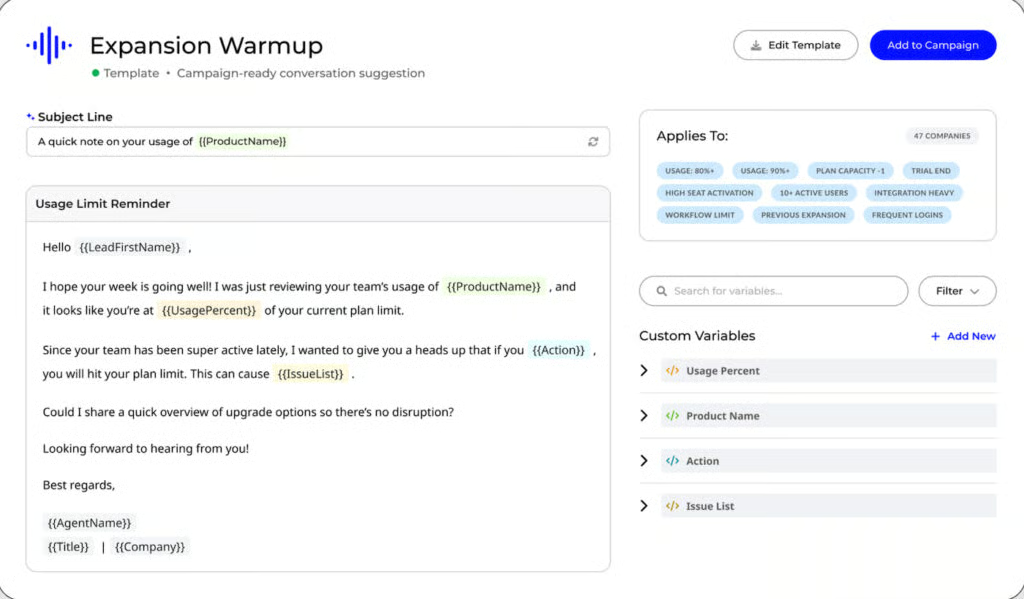
Pricing
Conversica uses custom pricing based on the deployment, channels, integrations, and AI-agent requirements. Website chat may carry an additional fee. Contact its sales team to obtain a custom quote.
How to choose AI sales automation tools
Choosing among the best AI sales automation tools starts with identifying where your sales process is slowing down. A team with poor prospecting data needs a different platform than a team with messy CRM hygiene, inconsistent follow-up, weak forecasting, or too many unqualified leads.
1. Identify your biggest sales bottleneck
Start with the workflow that needs the most help:
- Prospecting and list building
- Lead scoring and prioritization
- Email personalization and sequencing
- CRM data entry and hygiene
- Sales call summaries and follow-up
- Pipeline management and forecasting
- Lead qualification and routing
- Rep coaching and productivity
Once the bottleneck is clear, it becomes easier to choose the right tool category.
2. Decide whether you need a CRM or a sales engagement tool
Some AI sales automation tools are full CRMs. Others sit on top of a CRM and help with outreach, sequencing, data enrichment, or conversation intelligence.
If your team lacks a reliable system of record, start with CRM functionality. If the CRM already exists but reps struggle with outbound execution, consider a sales engagement or sales intelligence platform.
3. Check data quality and integrations
AI sales tools are only as useful as the data they can access. Before buying, verify whether the platform integrates with your CRM, email, calendar, dialer, marketing automation software, enrichment tools, conversation intelligence software, and reporting stack.
Poor data can lead to poor recommendations, weak personalization, and inaccurate prioritization.
4. Review automation controls
Sales automation should support reps, not replace judgment. Look for controls around sequence enrollment, email sending, approvals, activity logging, lead routing, territory rules, and compliance.
This matters especially for outbound email. Over-automation can damage deliverability and create poor buyer experiences.
5. Evaluate reporting and manager visibility
The tool should help managers understand activity, response rates, pipeline progression, forecast risk, rep performance, and conversion outcomes.
If reporting is weak, automation may increase activity without proving whether it improves pipeline.
Benefits of AI sales automation tools
AI sales automation tools can improve sales productivity, but the biggest benefit is better focus. Reps can spend less time on manual work and more time on the right prospects, messages, and opportunities.
- Faster follow-up: AI can help reps respond to leads, send follow-up emails, summarize meetings, and create next steps faster.
- Better prioritization: AI can help teams identify which leads, accounts, or deals deserve attention based on behavior, fit, engagement, and buying signals.
- More personalized outreach: Sales teams can use AI to create outreach that reflects prospect context, account data, pain points, and recent activity.
- Cleaner CRM data: Automation can reduce manual entry by logging activities, updating records, creating tasks, and summarizing interactions.
- Improved coaching and forecasting: AI-supported insights can help managers identify rep coaching opportunities, deal risks, forecast gaps, and pipeline trends.
Risks of AI sales automation
AI can make sales teams faster, but it can also make bad processes scale faster. The best teams use automation with guardrails, review, and clear ownership.
Generic outreach
AI-generated messages can sound generic if they are based on weak prompts or poor data. Reps should review messaging before sending, especially for high-value accounts.
Over-automation
Automating too many touches can create a poor buyer experience and damage email deliverability. Sales leaders should monitor response rates, unsubscribes, bounces, and domain health.
Bad data
If contact, company, or CRM data is inaccurate, AI recommendations and personalization can be wrong. Data quality should be part of the buying decision.
Weak governance
Teams need rules for who can launch sequences, approve messaging, use customer data, and act on AI recommendations.
Loss of rep judgment
AI should help reps make better decisions, not remove judgment from the sales process. Human review is still important for strategic accounts, sensitive conversations, and complex deals.
Frequently asked questions
What are the best AI sales automation tools?
The best AI sales automation tools depend on the workflow. Salesforce Sales Cloud is best overall for enterprise CRM automation, HubSpot Sales Hub is best for growing teams, Outreach and Salesloft are best for sales engagement, Apollo.io is best for prospecting, ZoomInfo Copilot is best for sales intelligence, Pipedrive is best for simple CRM automation, and Conversica is best for AI sales assistants.
What is AI sales automation?
AI sales automation uses artificial intelligence to support sales tasks such as prospecting, lead scoring, email personalization, follow-up, CRM updates, meeting summaries, forecasting, and pipeline prioritization. The goal is to reduce manual work and help sales teams focus on the right opportunities.
How do AI sales automation tools help sales teams?
AI sales automation tools help reps prioritize prospects, personalize outreach, automate follow-ups, update CRM records, summarize meetings, identify deal risks, and improve pipeline visibility. They are most useful when they are connected to reliable sales data and clear workflows.
Can AI replace sales reps?
AI can automate repetitive tasks and support sales decisions, but it should not replace sales reps in complex B2B selling. Buyers still need human judgment, relationship-building, negotiation, discovery, and strategic guidance.
What should I look for in an AI sales automation tool?
Look for fit with your sales workflow, CRM integration, data quality, automation controls, outreach personalization, reporting, user permissions, and scalability. The best tool should solve a specific sales bottleneck rather than add AI features your team will not use.
AI sales automation tools are worth it when they reduce manual work, improve follow-up speed, increase pipeline visibility, or help reps focus on better-fit prospects. They are less useful if the team has poor data, unclear messaging, or no defined sales process.