


The best AI lead generation tools help teams find better-fit prospects, enrich lead records, prioritize accounts, identify buying signals, personalize outreach, and route leads faster. The strongest tools do more than collect contact information — they help sales and marketing teams determine which leads are worth pursuing and what action to take next.
I compared these AI lead generation software based on the workflows that matter most to revenue teams. These include prospecting, contact data, enrichment, intent signals, lead scoring, website visitor identification, CRM integrations, outreach support, compliance, ease of use, and scalability.
| Software | Best for | Starting price per month, billed annually |
|---|---|---|
| Apollo.io | Prospecting and outbound automation | Free or $49/seat |
| Clay | AI enrichment and custom GTM workflows | Free or $167 |
| ZoomInfo Copilot | Signal-based account prioritization | Custom quote |
| HubSpot Smart CRM | CRM-connected inbound lead generation | Free or $45/seat |
| 6sense | Predictive account-based lead generation | Custom quote |
| LinkedIn Sales Navigator | LinkedIn-based social prospecting | $119.99/license |
| Leadfeeder | Identifying high-intent website visitors | Free or $79 |
| Cognism | Compliance-focused B2B contact data | Custom quote |
Why you can trust TechnologyAdvice
TechnologyAdvice follows a structured editorial process designed to help buyers make informed software decisions. Our team reviews dozens of buyer’s guides each year using consistent, data-driven criteria grounded in real business use cases.
For this guide, I evaluated the best AI lead generation tools based on the criteria that matter most to sales and marketing teams. These include pricing and value, lead discovery and data quality, AI capabilities, engagement and conversion tools, integrations, usability, and customer support. I also assessed each platform’s overall feature quality, scalability, and ability to help teams find, enrich, prioritize, engage, and convert qualified prospects.
This analysis is based on comparative research, product documentation, and verified user feedback from third-party platforms. I used that information to assess how each platform performs in real-world newsletter workflows, not just how the vendor markets it.
Methodology: How I evaluated the best AI lead generation software
To ensure we give readers useful, accurate, and decision-ready recommendations, the TechnologyAdvice editorial process follows structured standards for research, evaluation, and provider scoring.
For this guide, I evaluated the most important aspects of AI lead generation software, including prospect databases, enrichment quality, intent data, lead scoring, audience building, website visitor identification, sales intelligence, outreach support, CRM and marketing automation integrations, privacy controls, reporting, ease of use, pricing transparency, and scalability.
The best AI lead generation software should help teams answer practical questions: Which accounts fit our ideal customer profile? Which contacts should we reach? What signals suggest buying interest? Which leads should sales prioritize? What data is missing from our CRM? How quickly can we route the right lead to the right rep?
Overview of the best AI lead generation tools
| Software | Native B2B contact database | Website visitor identification | Automated email sequences | Expert score out of 5 |
|---|---|---|---|---|
| Apollo.io | ✓ | ✓ | ✓ | 4.62 |
| Clay | ✕ | ✕ | ✓ | 4.58 |
| ZoomInfo Copilot | ✓ | ✓ | ✓ | 4.39 |
| HubSpot Smart CRM | ✕ | ✓ | ✓ | 4.34 |
| 6sense | ✓ | ✓ | ✓ | 4.25 |
| LinkedIn Sales Navigator | ✕ | ✕ | ✕ | 4.06 |
| Leadfeeder | ✕ | ✓ | ✕ | 3.99 |
| Cognism | ✓ | ✕ | ✕ | 3.63 |
How do the best AI lead generation software compare?

What makes Apollo.io the best for prospecting and outbound automation?
Pros
- Combines B2B prospect data, enrichment, and outreach
- Supports automated email, call, and task sequences
- Offers a free plan for testing core features
Cons
- Contact data should be verified before large campaigns
- Credit limits can restrict data access and exports
- Results still depend on effective targeting and messaging
Why I chose Apollo.io
In my evaluation, Apollo stood out for shortening the path from identifying an account to engaging its decision-makers. Reps can find prospects, enrich records, prioritize leads, enroll contacts in sequences, and measure engagement without switching between separate data and outreach platforms.
Its AI capabilities also extend beyond email writing. Apollo can research prospects, build lists, score leads, create workflows, and automate outbound campaigns. This makes it especially practical for SDR teams, growth teams, and founders who need to generate pipeline with limited resources.
Teams should still verify important contact details, monitor credit usage, and review AI-generated research and messaging. Apollo cannot fix weak targeting or positioning, but it delivers the strongest overall balance of prospect intelligence, automation, usability, and value in this comparison.
Also read: Best AI Prospecting Tools
About Apollo.io
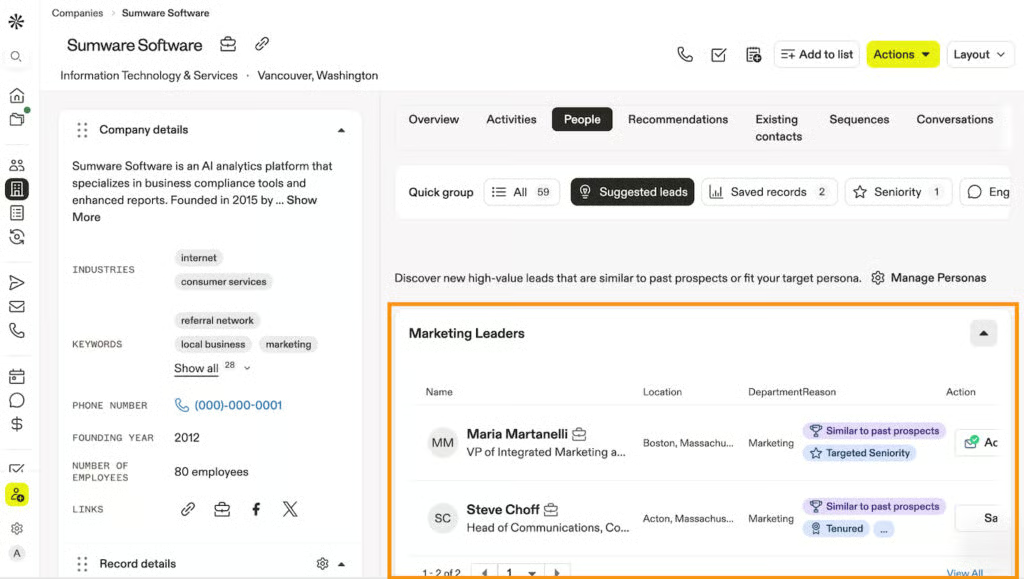
Apollo.io is a sales intelligence and engagement platform for finding prospects, enriching contact and company records, automating outreach, and measuring engagement. It supports outbound prospecting, inbound qualification, data enrichment, and deal execution.
Key features
- Prospect search: Find companies and contacts using filters such as job title, seniority, industry, location, company size, and buyer signals.
- Data enrichment: Complete and refresh lead, account, and CRM records with contact and company data.
- Outbound Copilot: Use AI to build prospect lists, enroll contacts in sequences, and execute outbound campaigns.
- Multichannel sequences: Coordinate emails, calls, tasks, and follow-ups through repeatable workflows.
- Lead scoring and analytics: Prioritize prospects with AI-generated scores and monitor campaign engagement and results.
Gallery
Pricing
| Free | Basic | Professional | Organization | |
|---|---|---|---|---|
| Monthly price, billed annually | $0/seat | $49/seat | $79/seat | $119/seat |
| Credits per year | 900 | 30,000 | 48,000 | 72,000 |
| Monthly price, billed monthly | $0/seat | $65/seat | $99/seat | $149/seat |
| Credits per month | 75 | 2,500 | 4,000 | 6,000 |
Free trial: 14 days

What makes Clay the best for AI enrichment and custom GTM workflows?
Pros
- Consolidation can scale to larger group structures without requiring a full ERP
- Spreadsheet links reduce repeated exports and manual report refreshes
- Supports complex group reporting while remaining accessible to accounting firms and growing finance teams
Cons
- Has a steeper learning curve than conventional prospecting tools
- Requires careful workflow and credit management
- Is not a traditional CRM or ready-made contact database
Why I chose Clay
In my evaluation, Clay provided the most flexibility for building a lead-generation system around a company’s ICP, data requirements, and sales process. Instead of depending on one prospect database, teams can combine third-party data providers, conduct AI research, monitor signals, enrich records, and apply custom qualification rules before leads reach sales.
This flexibility is especially valuable for GTM operations teams with nonstandard prospecting needs. Clay can research niche accounts, fill missing fields through waterfall enrichment, score inbound leads, build targeted audiences, and route qualified prospects into a CRM or outreach campaign.
The tradeoff is complexity. Clay requires more planning than a plug-and-play database, and poorly designed workflows can consume credits or produce inconsistent data. For teams that understand what information they need and how they intend to use it, however, Clay provides one of the most adaptable AI lead-generation environments in this comparison.
About Clay
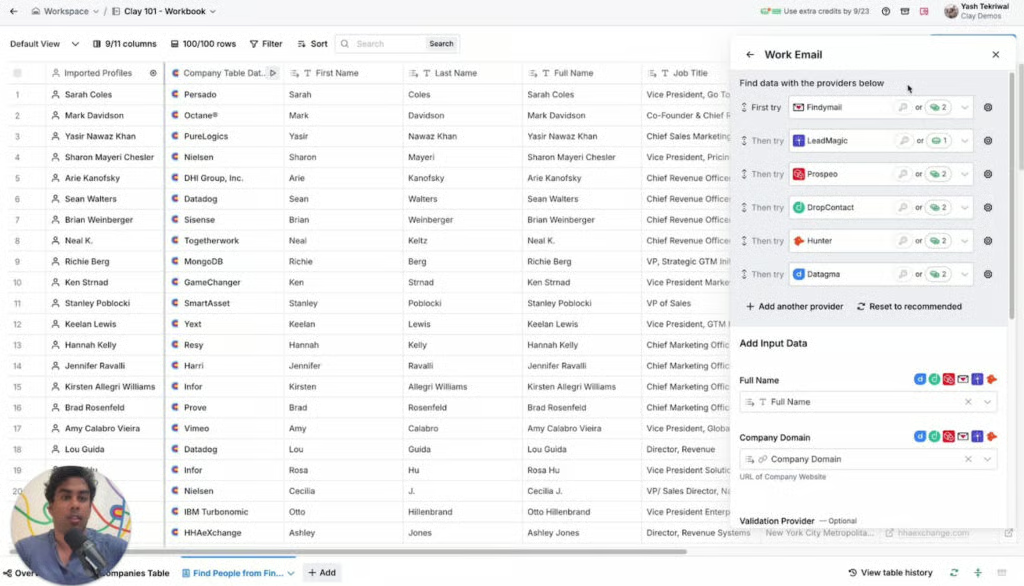
Clay is a GTM orchestration platform for AI research, multi-provider enrichment, buyer signals, audience building, CRM enrichment, and outbound automation. Sales, marketing, and operations teams can use it to build customized workflows for sourcing, qualifying, routing, and engaging leads.
Key features
- Claygent: Research companies and contacts with an AI agent that can generate custom data points from web sources.
- Waterfall enrichment: Query multiple data providers sequentially to improve coverage and fill missing contact or company fields.
- Signals and intent: Monitor job changes, promotions, company news, social activity, and — on eligible plans — website intent.
- CRM enrichment and audiences: Combine first- and third-party data to build targeted audiences and maintain complete CRM records.
- Workflow automation: Create enrichment, scoring, routing, and outbound workflows, then launch campaigns through Clay’s native email sequencer or connected tools.
Gallery
Pricing
| Free | Launch | Growth | Enterprise | |
|---|---|---|---|---|
| Monthly price, billed annually | $0 | $167 | $446 | Custom |
| Credits per year | 1,200 | Starts at 30,000 | Starts at 72,000 | |
| Monthly price, billed monthly | $0 | $185 | $495 | |
| Credits per month | 100 | Starts at 2,500 | Starts at 6,000 |
Free trial: 14 days

What makes ZoomInfo Copilot the best for signal-based account prioritization?
Pros
- Extensive B2B company and contact intelligence
- Combines intent data with account and buyer signals
- Provides AI-guided account recommendations and research
Cons
- Quote-based pricing may be difficult for smaller teams to evaluate
- Requires a defined ICP and sales process to deliver full value
- May require substantial setup and workflow integration
Why I chose ZoomInfo Copilot
ZoomInfo Copilot’s advantage is its ability to answer a critical question before outreach begins: Which accounts deserve attention now? It brings together account fit, contact intelligence, intent data, and real-time signals to identify companies and decision-makers that may be moving closer to a purchase.
This makes it especially useful for account-based sales and marketing teams managing large target markets. Reps can research accounts, identify relevant contacts, monitor buying activity, and follow AI-guided recommendations for their next actions. Sales and marketing teams can also enrich CRM records and coordinate campaigns around the same account intelligence.
Cost and complexity are the primary tradeoffs. ZoomInfo Copilot may be more platform than a smaller team needs for basic list building, and its recommendations are only as useful as the organization’s ICP, CRM data, and follow-up process. For established B2B teams that need to prioritize accounts using multiple signals at scale, however, its intelligence depth can justify the investment.
Also read: What Is an AI SDR? Tools, Tasks, and Use Cases
About ZoomInfo Copilot
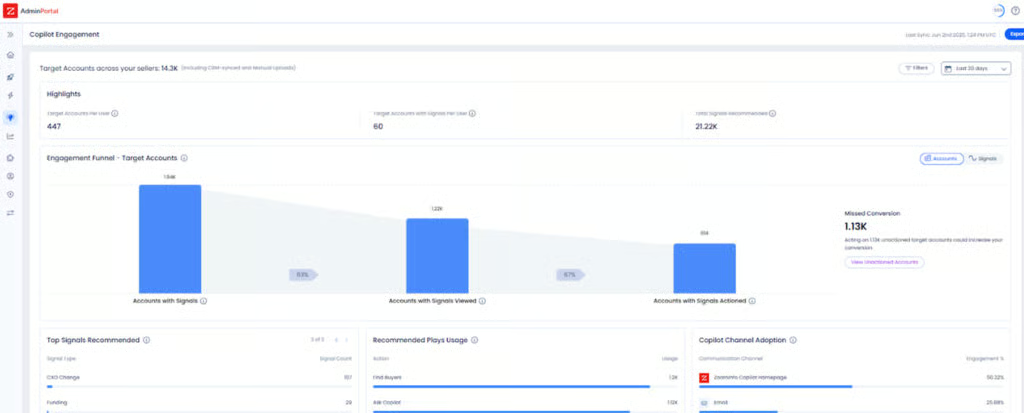
ZoomInfo Copilot is an AI-powered sales intelligence platform that helps sellers identify in-market accounts, find decision-makers, research buyers, personalize outreach, manage follow-ups, and maintain CRM records.
Key features
- AI account recommendations: Prioritize companies and contacts using account fit, buyer signals, and go-to-market data.
- Company and contact intelligence: Research organizations, find decision-makers, and identify relevant contacts within target accounts.
- Intent and buyer signals: Monitor research activity, website engagement, company changes, and other indicators of potential buying interest.
- CRM enrichment and workflows: Complete CRM records, synchronize intelligence, and trigger sales or marketing actions through connected systems.
- Personalization support: Give reps account context and buyer insights for more relevant, timely outreach.
Gallery
Pricing
ZoomInfo Copilot uses custom pricing based on team size, credit volume, selected capabilities, integrations, and contract length. Contact its sales team for a custom quote.

What makes HubSpot Smart CRM the best for CRM-connected inbound lead generation?
Pros
- Connects lead capture, CRM data, automation, and reporting
- Offers free CRM tools for getting started
- Unifies marketing engagement with sales follow-up
Cons
- Costs can increase as teams add seats, Hubs, and advanced features
- Complete lead-generation workflows may require multiple HubSpot products
- Is less suited to outbound list building than dedicated sales intelligence tools
Why I chose HubSpot Smart CRM
HubSpot’s value becomes clearest after a prospect converts. Capturing a lead is relatively easy; enriching the record, qualifying it, assigning an owner, triggering the right follow-up, and connecting that activity to pipeline and revenue is where teams often lose visibility.
HubSpot keeps contact records, marketing engagement, automation, reporting, and sales activity within the same customer platform. Teams can segment leads by fit and behavior, automate lifecycle campaigns, route qualified prospects, and give sellers the context behind each conversion. Breeze AI builds on that shared data to research prospects, summarize activity, enrich records, and support automated workflows.
HubSpot is not designed to be a large outbound prospect database, and accessing its full marketing and sales capabilities can raise the total cost. For growing teams that want to turn inbound and owned-channel demand into an organized, measurable pipeline, however, it provides one of the most cohesive lead-management workflows in this comparison.
Also read: Best AI CRM Software
About HubSpot Smart CRM
HubSpot Smart CRM is the shared data foundation for HubSpot’s customer platform. It centralizes contact, company, deal, communication, and behavioral data while supporting enrichment, reporting, workflows, integrations, and Breeze AI. Sales Hub adds more advanced prospecting, engagement, and sales automation capabilities.
Key features
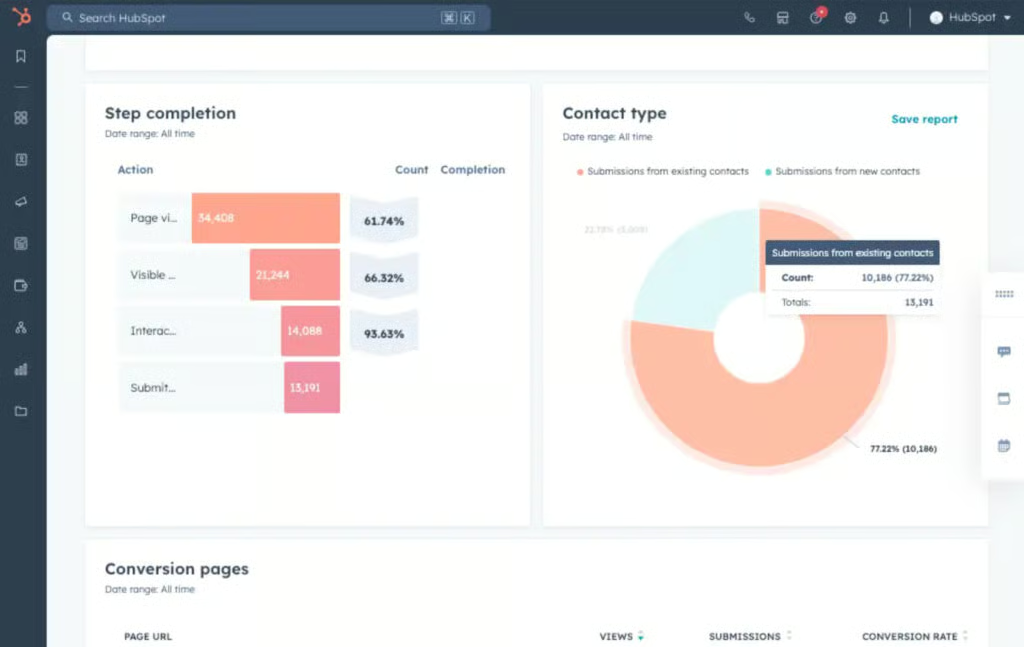
- CRM-connected lead capture: Connect forms, landing pages, contacts, companies, and campaign activity to shared customer records.
- Marketing automation: Create nurture workflows, routing rules, follow-ups, and lifecycle campaigns based on lead behavior.
- Segmentation and scoring: Prioritize leads using lifecycle stage, source, fit, engagement, and custom CRM data.
- Reporting and attribution: Track lead sources, campaign performance, pipeline activity, and customer outcomes.
- Breeze AI and data enrichment: Enrich contact and company records, research prospects, summarize context, and automate routine CRM work.
Gallery
Pricing
| HubSpot Smart CRM plans | Free tools | Professional | Enterprise |
|---|---|---|---|
| Monthly price, billed annually | $0 for 2 users | $45/seat | $75/seat |
| Monthly price, billed monthly | $0 for 2 users | $50/seat | N/A |

What makes 6sense the best for predictive account-based lead generation?
Pros
- Combines account identification, intent data, and predictive scoring
- Aligns marketing and sales around prioritized accounts
- Supports coordinated account-based campaigns and outreach
Cons
- May be too complex and costly for smaller teams
- Requires clean account data and a clearly defined ICP
- Results depend on sustained adoption across marketing and sales
Why I chose 6sense
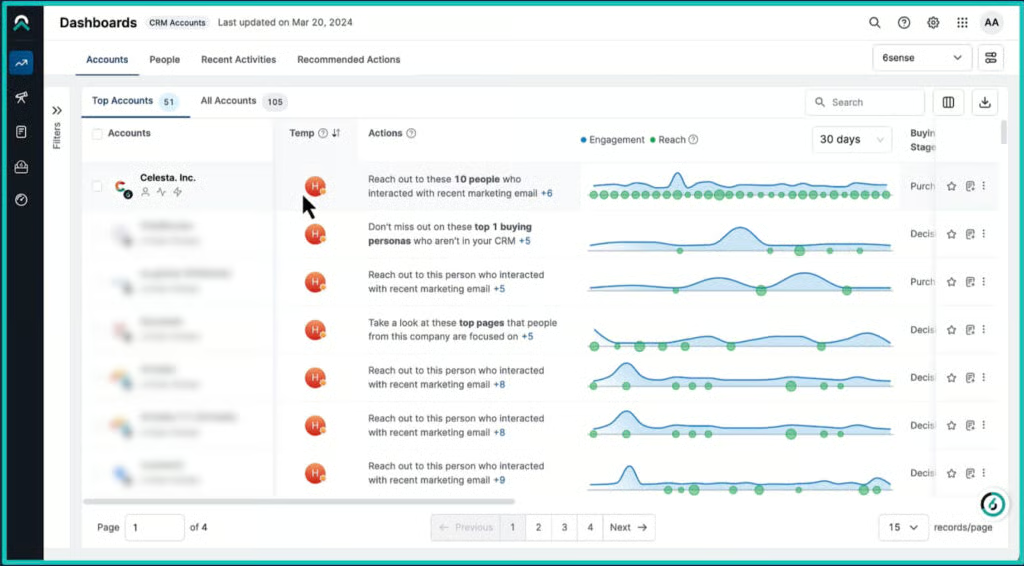
6sense starts with a signal most lead-generation platforms overlook: anonymous account activity. It identifies companies researching relevant topics or visiting a website, then applies fit, intent, and predictive data to estimate which accounts may be moving toward a purchase.
This approach is most valuable for organizations selling to buying committees over longer sales cycles. Marketing can build campaigns around accounts demonstrating stronger intent, while sales can focus its research and outreach on organizations that appear more likely to engage. Giving both teams the same account context can reduce wasted activity and improve coordination.
The platform is harder to justify for basic lead capture or small-scale prospecting. Its effectiveness depends on reliable CRM data, a defined account strategy, and teams prepared to act on its recommendations. For mature B2B organizations running account-based programs, however, 6sense provides the predictive intelligence and orchestration needed to focus resources on higher-priority opportunities.
About 6sense
6sense is a Revenue AI and account-based marketing platform that helps B2B teams identify anonymous account activity, detect buying intent, prioritize target accounts, and coordinate sales and marketing engagement.
Key features
- Web deanonymization: Identify companies visiting a website and connect their activity to account-level context.
- Intent data: Detect research behavior and topic interest that may indicate an account is entering a buying cycle.
- Predictive modeling: Analyze account fit, behavior, and signals to estimate buying stages and prioritize opportunities.
- Account prioritization: Surface in-market accounts and recommend actions for sales and marketing teams.
- ABM activation: Build targeted audiences and coordinate advertising, email, and automated workflows.
Gallery
Pricing
6sense offers three Sales Intelligence configurations:
- Sales Intelligence + Data Credits + Predictive AI
- Sales Intelligence + Data Credits
- Sales Intelligence + Predictive AI
Pricing is not publicly listed and varies based on the selected configuration, data credits, users, and implementation requirements. Contact 6sense for a customized quote.

What makes LinkedIn Sales Navigator the best for LinkedIn-based social prospecting?
Pros
- Provides extensive professional and relationship data
- Offers advanced prospect search and AI-powered research
- Surfaces timely account, career, and buyer-intent signals
Cons
- Lacks native email sequencing and marketing automation
- Advanced CRM synchronization requires a higher-tier plan
- Delivers less value when target buyers are inactive on LinkedIn
Why I chose LinkedIn Sales Navigator
I find Sales Navigator most valuable before a rep sends the first message. Its advantage is not simply finding a name; it is revealing a prospect’s professional background, recent activity, shared connections, role changes, and position within a target account.
That context supports a more informed social-selling process. Reps can find and save leads, monitor account changes, identify paths to warm introductions, and use AI-powered Account IQ and Lead IQ insights to prepare for outreach. For teams selling to specific job functions or complex buying groups, this can improve prospect selection and personalization.
Sales Navigator does not replace a CRM, enrichment provider, or sales engagement platform. Most teams will still need other tools for verified contact details, automated sequences, and lead routing. As a source of professional-network and relationship intelligence, however, it remains one of the most valuable additions to a B2B prospecting stack.
Also read: How to Use LinkedIn Sales Navigator
About LinkedIn Sales Navigator
LinkedIn Sales Navigator is a B2B prospecting and social-selling platform built on LinkedIn’s professional network. It helps sellers find leads and accounts, research buyers, monitor changes, uncover relationship paths, and connect prospecting activity with supported CRMs.
Key features
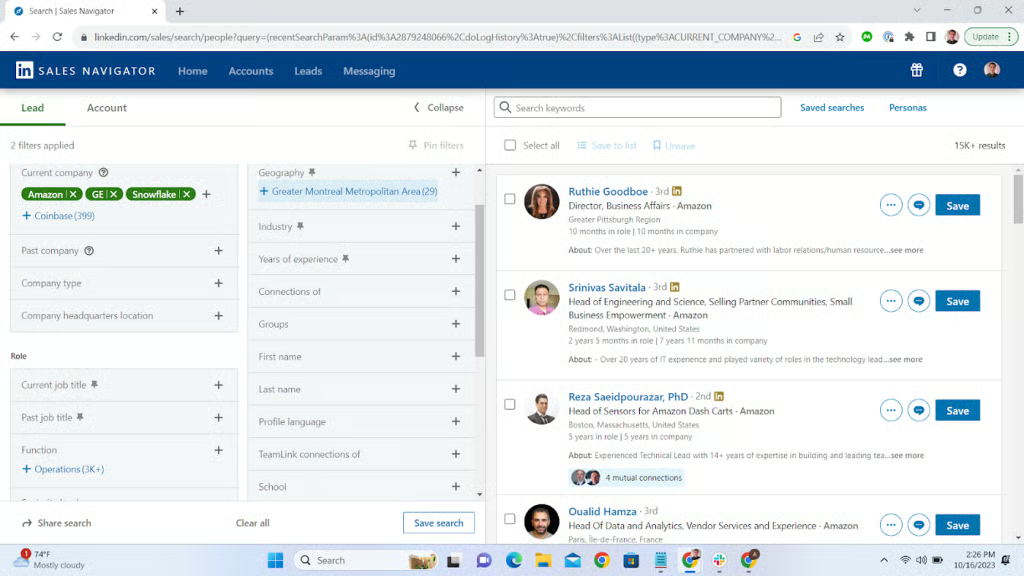
- Advanced lead and account search: Find prospects using more than 50 filters covering role, seniority, industry, company, geography, and other criteria.
- Account IQ and Lead IQ: Generate AI-powered account and prospect insights to reduce research time.
- Alerts and buyer intent: Monitor job changes, company updates, content activity, and indications of buyer interest.
- Relationship insights: Use Relationship Explorer, TeamLink, and mutual connections to identify decision-makers and potential introductions.
- CRM integrations: Connect Sales Navigator with supported CRMs and, on eligible plans, create records and synchronize prospect activity.
Gallery
Pricing
| Core | Advanced | Advanced Plus | |
|---|---|---|---|
| Monthly price, billed annually | $89.99/license | $159.99/license | Custom |
| Monthly price, billed monthly | $119.99/license | $149.99/license | Custom |
Free trial: 30 days

What makes Leedfeeder the best for identifying high-intent website visitors?
Pros
- Identifies companies researching your website before they submit a form
- Reveals page views, visit frequency, and other account-level activity
- Connects visitor signals with CRM records, alerts, and sales workflows
Cons
- Typically identifies the company, not the individual visitor
- Delivers less value for websites with limited qualified traffic
- Requires enrichment and structured follow-up to convert visits into pipeline
Why I chose Leadfeeder
Leadfeeder (formerly Dealfront) addresses a common blind spot I see in B2B lead generation: prospective companies visiting high-intent pages without completing a form. It converts that anonymous activity into account-level intelligence that revenue teams can evaluate and act on.
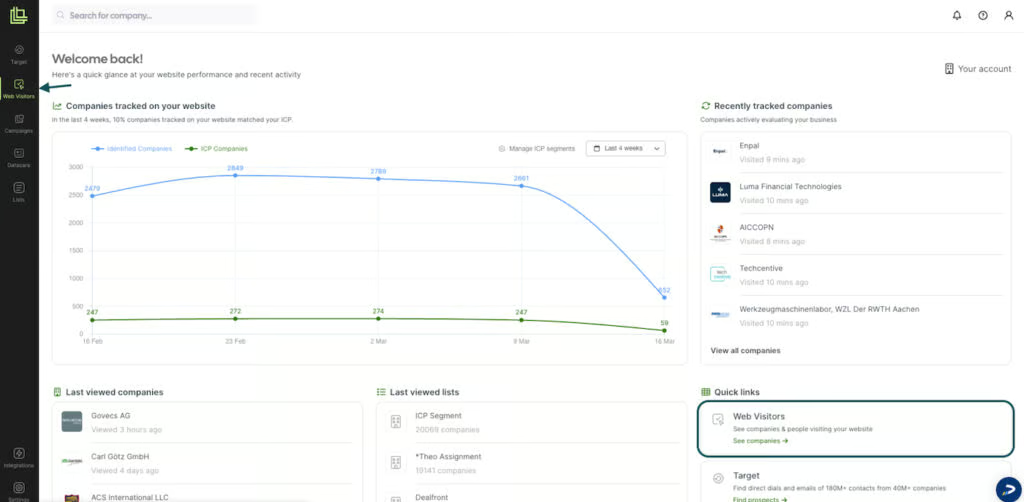
I recommend it for B2B teams already attracting qualified traffic through content, paid campaigns, or product pages. Leadfeeder shows which companies visited, what they viewed, and how frequently they returned. Teams can then prioritize active accounts, alert sales reps, and sync qualified opportunities with their CRM.
The key limitation is identification depth: knowing the company does not necessarily reveal the person who visited. Teams still need contact enrichment, clear routing rules, and timely outreach. For businesses with sufficient website traffic and a defined follow-up process, however, Leadfeeder can turn otherwise anonymous engagement into actionable pipeline signals.
Also read: The Definitive Guide to Lead Qualification
About Leadfeeder
Leadfeeder, formerly Dealfront, is a B2B lead generation platform that identifies companies visiting a website and analyzes their account-level activity. It also connects these signals with prospecting, advertising, and CRM workflows.
Key features
- Website visitor identification: Resolves anonymous traffic into company accounts and provides available firmographic information.
- Account activity tracking: Shows the pages companies visited, how often they returned, and other behavioral signals that may indicate buying interest.
- Lists and segmentation: Organizes accounts using criteria such as industry, company size, location, activity, and intent.
- AI-assisted prioritization: Surfaces promising accounts based on fit and engagement so teams can focus follow-up more effectively.
- CRM workflows and alerts: Syncs data with HubSpot, Salesforce, and Pipedrive and notifies reps when high-priority accounts visit important pages.
Gallery
Pricing*
| Lite | Discover | Activate | Scale | |
|---|---|---|---|---|
| Monthly price, billed annually | $0 | $90 | $420 | $681 |
| Monthly price, billed monthly | $0 | $129 | $599 | N/A |
*Approximate conversion from EUR to USD.
Free trial: 14 days

What makes Cognism the best for compliance-focused B2B contact data?
Pros
- Phone-verified mobile numbers for outbound prospecting
- Strong coverage for European and international markets
- Global Do-Not-Call and Telephone Preference Service screening
Cons
- Less outreach automation than sales engagement platforms
- Five-seat minimum for prospecting plans
- No public pricing for easy cost comparison
Why I chose Cognism
When I assess prospecting databases, record volume matters less than whether reps can reliably reach the right decision-makers. Cognism combines phone-verified contact data with strong European coverage and compliance controls, including GDPR and CCPA alignment and global Do-Not-Call screening.
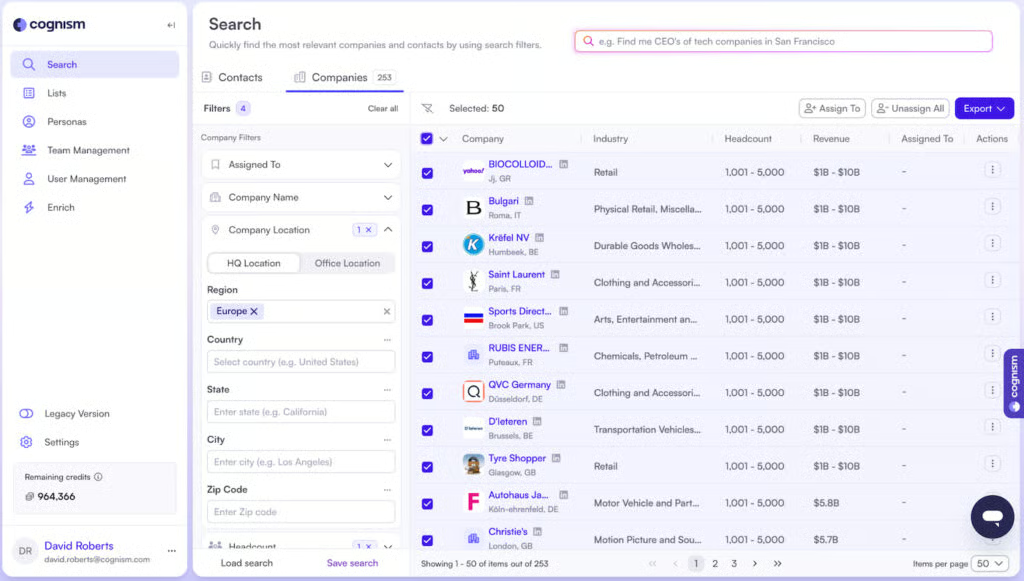
I recommend it for international outbound teams that rely heavily on phone prospecting. Reps can build targeted lists, access verified mobile numbers, monitor buying signals, and transfer prospect data into their CRM. This focus on reachability distinguishes Cognism from providers that prioritize database size without the same emphasis on contact verification.
Cognism is neither a CRM nor a complete sales engagement platform, and its five-seat minimum may be impractical for very small teams. Buyers should also test its coverage against their target regions and personas. However, it is a strong choice for B2B organizations balancing international prospecting, contact quality, and responsible data use.
About Cognism
Cognism is a B2B sales intelligence platform for finding decision-makers, building prospect lists, enriching CRM records, and supporting international outbound sales. It combines company and contact data with phone-verified mobile numbers, buying signals, and compliance controls.
Key features
- B2B prospecting database: Finds contacts and companies using role, location, firmographic, technographic, and signal-based filters.
- Phone-verified mobile data: Uses additional manual and automated checks to improve contact number reliability.
- Buying signals: Tracks intent, hiring, funding, mergers and acquisitions, and job changes.
- Compliance controls: Screens records against global Do-Not-Call and Telephone Preference Service lists.
- CRM enrichment and integrations: Updates records and exports data to platforms such as Salesforce, HubSpot, and Pipedrive.
Gallery
Pricing
Cognism offers two Sales Prospecting plans with five seats included:
- Standard: Starts at $14,000/year
- Pro: Starts at $18,750/year
Add-ons:
- Data-as-a-Service: Contact Cognism for a custom quote.
- CRM Enrichment: Starts at $12,000/year
How to choose the best AI lead generation tools
Start with the weakest point in your revenue process. An outbound prospecting tool will not necessarily improve inbound lead routing, while website visitor identification cannot replace a contact database. On the other hand, an enterprise ABM platform may also be excessive if you only need basic lead capture.
1. Define your lead generation motion
Identify where most of your leads come from — or where you want them to come from:
- Inbound forms and landing pages
- Outbound prospecting
- Account-based marketing
- Website visitor identification
- Intent data and buying signals
- Social selling
- Events and webinars
- Product-led signups
- Partner and referral campaigns
Once you define your primary motion, you can eliminate platforms that do not support it directly.
2. Decide what AI should accomplish
AI capabilities may include prospect research, data enrichment, lead scoring, account recommendations, intent detection, outreach personalization, predictive routing, data cleansing, and workflow automation.
Look beyond AI branding and choose a measurable outcome. The right tool should help your team find better-fit leads, prioritize them faster, reduce manual work, or improve conversions.
3. Test data quality and coverage
For prospecting and enrichment tools, data accuracy matters more than database size. Ask vendors how they source, verify, refresh, and remove records.
Test sample data against your actual target market, including:
- Industries and company sizes
- Geographic regions
- Buyer roles and seniority levels
- Email and phone-number accuracy
- Firmographic and intent-data coverage
4. Review privacy and compliance controls
Confirm how the vendor handles opt-out requests, data retention, suppression lists, consent requirements, and regional privacy regulations. Review its security documentation and relevant certifications as well.
Compliance features can support responsible prospecting, but your organization remains accountable for how it collects and uses lead data.
5. Evaluate integrations and lead routing
The best AI lead generation tools should connect with your CRM, marketing automation platform, sales engagement software, email, calendar, analytics tools, and other core systems.
Map what happens after the platform identifies a lead. Check whether it can enrich the record, prevent duplicates, assign an owner, trigger follow-up, and sync activity without manual intervention.
6. Calculate the total cost
Vendors may charge by seats, credits, exported contacts, enrichment volume, website traffic, intent access, AI usage, or platform modules.
Estimate costs using your expected monthly activity rather than the advertised starting price. Include implementation, integrations, add-ons, additional credits, minimum seat requirements, and contract terms.
Benefits of AI lead generation software
AI lead generation software can improve both the speed and quality of prospecting. Its value lies not in adding more names to a database, but in helping revenue teams find better-fit leads, recognize buying signals, and act sooner.
Better lead targeting
AI can identify companies and contacts that match your ideal customer profile, resemble existing customers, or display relevant buying signals. This helps teams spend less time pursuing poor-fit prospects.
Faster prospect research
AI can summarize company information, identify decision-makers, enrich contact records, and surface relevant account context. Reps can prepare for outreach without researching every prospect manually.
Stronger lead prioritization
Predictive scoring, engagement data, and intent signals help teams determine which leads or accounts deserve immediate attention. Reps can prioritize opportunities based on fit and behavior rather than intuition alone.
More relevant outreach
Account and contact intelligence lets teams tailor messages to a prospect’s role, company, industry, behavior, or likely business needs. Reps should still review AI-generated messaging for accuracy, relevance, and tone.
Cleaner CRM data
Automated enrichment can fill missing fields, refresh outdated information, flag duplicates, and reduce manual entry. More reliable data also improves segmentation, lead routing, reporting, and workflow automation.
Risks of AI lead generation software
AI can make lead generation more efficient, but it can also amplify poor targeting, inaccurate data, and generic outreach. Teams need clear controls, human oversight, and performance standards to use it responsibly.
Inaccurate or outdated data
Incorrect contact details can waste sales time, harm email deliverability, and create a poor prospect experience. Test each vendor’s coverage against your target market and validate records before launching large campaigns.
Superficial personalization
AI-generated outreach can feel generic when built on limited or unreliable inputs. Effective personalization should reference verified account context, relevant buying signals, or genuine business needs — not merely a prospect’s name and company.
Privacy and compliance risks
Lead generation platforms may collect and process personal or professional data. Review how each vendor sources information, handles consent and opt-outs, retains records, and supports applicable privacy requirements. Your organization remains responsible for how it uses the data.
Too much focus on volume
More leads do not automatically produce more revenue. Measure qualified meetings, opportunity creation, conversion rates, pipeline value, and closed revenue—not database growth or outreach volume alone.
Weak routing and follow-up
Software can identify and prioritize opportunities, but it cannot fix a poorly defined sales process. Teams still need clear ownership rules, response-time expectations, relevant messaging, and accountability for follow-up.
Frequently asked questions
What is AI lead generation software?
AI lead generation software helps sales and marketing teams find prospects, enrich records, detect buying signals, score leads, personalize outreach, and automate routing or follow-up. Depending on the platform, it may function as a contact database, enrichment tool, ABM system, or website visitor identification solution.
What is the best AI lead generation software?
Apollo.io is our best overall pick because it combines prospect data, enrichment, AI-assisted research, and outbound sequencing in one platform. Other leading options include Clay for custom enrichment workflows, ZoomInfo Copilot for signal-based account prioritization, HubSpot Smart CRM for CRM-connected lead generation, and 6sense for account-based lead generation.
How does AI improve lead generation?
AI can identify better-fit accounts, complete missing data, detect intent signals, score prospects, recommend next actions, and accelerate outreach preparation. Results still depend on the quality of the underlying data, targeting, and sales process.
Are AI lead generation tools worth it?
They can be worthwhile when they improve lead quality, reduce manual research, accelerate routing, or help reps prioritize better-fit prospects. They provide less value when a team lacks a defined ideal customer profile, relevant messaging, or a consistent follow-up process.
What should I look for in AI lead generation software?
Prioritize reliable coverage for your target markets, support for your primary lead generation motion, as well as CRM and marketing integrations. Other features and factors to look for include enrichment, scoring, or intent capabilities, privacy and compliance controls, reporting and attribution, and pricing that’s aligned with your expected usage. Test the platform with your own target accounts and workflows before signing a long-term contract.
Can AI replace lead generation teams?
No. AI can automate research, enrichment, scoring, routing, and parts of outreach preparation, but it cannot replace human judgment. Strategy, positioning, qualification, relationship-building, and complex sales conversations still require people.