

Best for | Monthly starting fee | |
|---|---|---|
| Asana | Best for managing large-scale change initiatives | $10.99/user |
| Smartsheet | Best for standardizing change across project portfolios | $9/user |
| ClickUp | Best for customizable change request workflows | $7/user |
| Jira | Best for IT service change management | $20/user |
| monday | Best for managing employee adoption | $9/user |
| Wrike | Best for complex approval workflows | $10/user |
Why you can trust TechnologyAdvice
I’ve spent four years evaluating dozens of project management software for a wide range of users, including independent contractors, project managers, small businesses, and large enterprises. I personally use every platform I review and design a comprehensive scoring rubric to ensure unbiased evaluation and rankings.
My recommendations are grounded in hands-on experience with each tool and feedback from business users across industries.

How I evaluated the top change management tools
I evaluated each change management tool using a scoring system that weighs the capabilities most relevant to organizational change. I reviewed pricing and product documentation from official vendor sources, while user reviews provided context on usability and support.
Pricing (20%): I checked the features included in each plan to see how much change management functionality teams get at each price point. I also assessed feature restrictions and estimated costs for a 25-person change program.
General features (25%): I evaluated how each platform handles change requests, implementation planning, and approval workflows. I also reviewed stakeholder communication tools and reporting capabilities for tracking progress.
Advanced and niche features (20%): I assessed features for impact and risk analysis, stakeholder management, and coordination across multiple change initiatives. Automation, integrations, and AI capabilities were also included in this category.
Ease of use (10%): I considered the learning curve and the effort required to configure change workflows. I also reviewed available templates and onboarding resources designed specifically for change management.
Support (10%): I reviewed each vendor’s available support channels and educational resources. I also considered community resources and security or data governance controls available to customers.
Expert score (15%): I assigned an expert score based on my assessment of each platform’s change management capabilities and value for the price. I also considered recent third-party user feedback and how vendors document the features evaluated in this review.
What is change management?
Change management is a systematic approach for moving individuals, teams, or organizations from a current state to a desired future state. The PMBOK® Guide, 7th Edition, describes it as a cyclical process that supports transitions and achieves intended business benefits.
In project management, change management covers how teams review, communicate, and implement changes. Organizations may use documented approval processes or handle smaller changes through stakeholder communication.
What is a project manager’s role in change management?
Project managers may encounter two types of change: project change control, which deals with proposed changes to project scope, schedule, cost, or baselines, and organizational change management, which focuses on helping people adapt to new systems or ways of working.
For project change control, a project manager may:
- Assess change requests: Review how a proposed change could affect the schedule, budget, resources, or project objectives.
- Document and route decisions: Record the request and send it to the appropriate sponsor, change control board, or other decision-maker when approval is required.
- Update project plans: Revise affected baselines or project documents after an approved change.
- Communicate the impact: Explain what the approved change means for the team, stakeholders, and dependent work.
For organizational change management, the project manager may support the change lead or business owner by coordinating communications, identifying implementation risks, and tracking activities connected to adoption. The project manager usually focuses on delivering the project itself, while organizational change specialists concentrate more directly on readiness, behavior change, and adoption.
How can project managers use change control?
Project managers can use change control to assess proposed changes, decide whether to approve them, and document their impact on the project. The process gives teams a consistent way to manage changes to scope, schedule, cost, or other project requirements.
Project managers can apply change control in several ways:
- Manage scope changes: “Change management processes can be used as the project manager’s best defense against scope creep,” says project management expert Trevor Greenberg. A change control process allows teams to assess proposed changes before adding them to the project scope.
- Treat change as part of project work: Some changes can improve the project by responding to new information or stakeholder needs. Project managers can evaluate each request based on its impact rather than assume every change is a problem.
- Let stakeholders propose changes: Team members and other affected stakeholders should be able to submit change requests. This gives project managers more information before making a decision.
- Review requests consistently: Assess each proposed change using the same criteria, such as its effect on scope, schedule, cost, or resources. This creates a documented basis for approval or rejection.
- Separate major and minor changes: Small adjustments, such as changes to meeting schedules or reporting methods, may not require formal approval. Project managers can define which types of changes need documentation or escalation.
- Use formal change control for significant impacts: Changes that affect scope, schedule, cost, or other approved project baselines should follow the established change control process. This gives stakeholders visibility into what changed and why.
Best change management tools compared
Best for | Key features | My rating | |
|---|---|---|---|
| Asana | Best for managing large-scale change initiatives | Portfolios, project templates, dashboards, rules and custom fields | 4.95 out of 5 |
| Smartsheet | Best for standardizing change across project portfolios | Control Center, blueprints, Global Updates, portfolio reporting | 4.73 out of 5 |
| ClickUp | Best for customizable change request workflows | Forms, conditional logic, automations, change request templates | 4.5 out of 5 |
| Jira Service Management | Best for IT service change management | Change workflows, risk assessment, approval routing, change calendar | 4.19 out of 5 |
| monday | Best for managing employee adoption | WorkForms, automations, change management templates, dashboards | 4.14 out of 5 |
| Wrike | Best for complex approval workflows | Request forms, conditional approvals, approval records, proofing | 4.06 out of 5 |

Asana: Best for managing large-scale change initiatives
Pros
- Unlimited automations on Starter
- Portfolios support multi-project change initiatives
- Forms, custom fields, and approvals support change intake
Cons
- Advanced approvals require higher-tier plans
- Conditional workflows can require several Rules
- Doesn’t support multiple assignees
Why I chose Asana
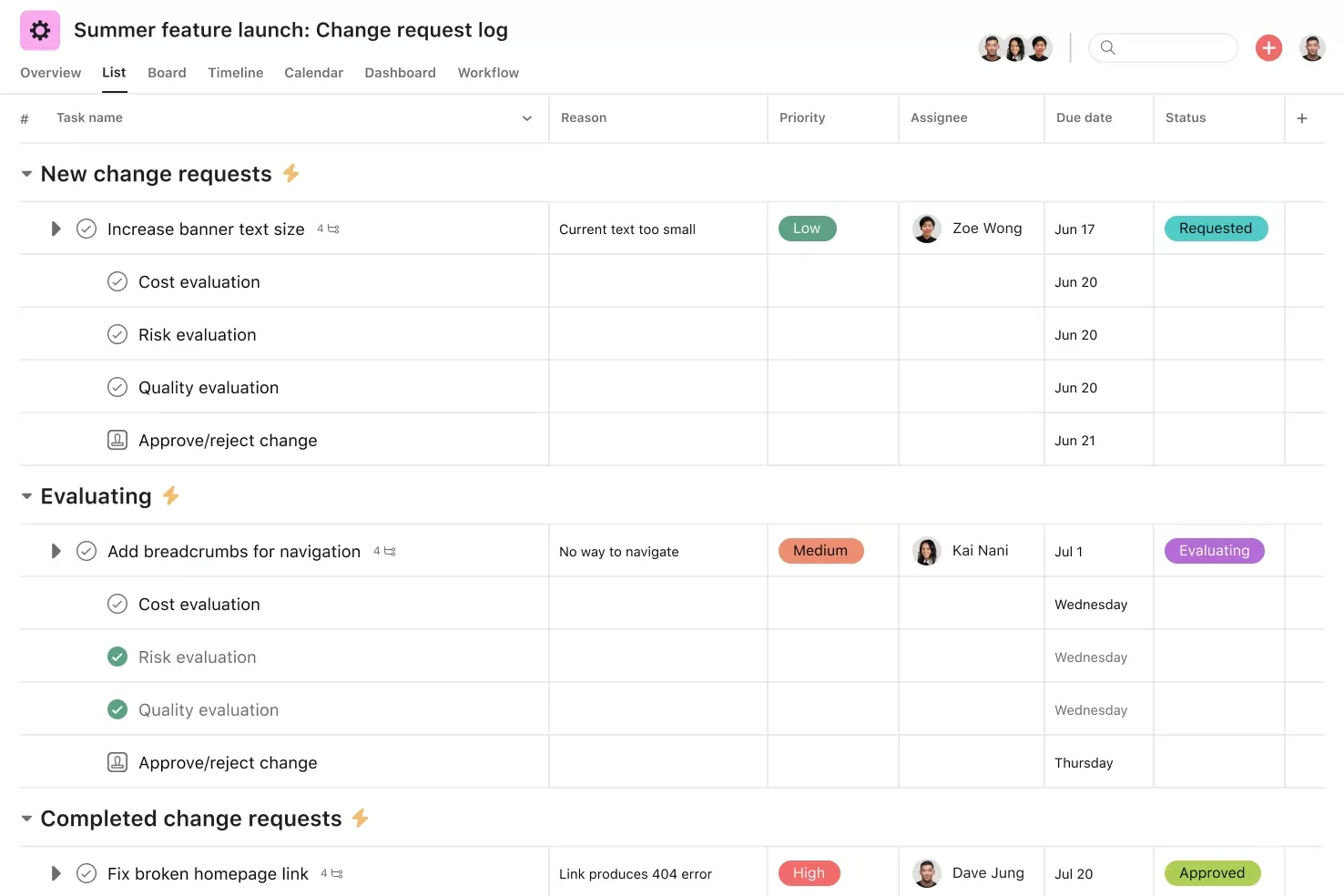
Asana is best suited for handling change requests from submission through approval. Teams can collect requests through Forms, use responses to populate custom fields, and apply Rules to route each request to the right reviewer. Approval tasks let reviewers approve, reject, or request changes, while the change log template records impact, status, ownership, and timeline changes.
Once a change is approved, Asana can turn it into assigned work with deadlines and milestones. Timeline shows schedule changes, custom fields classify requests by status or impact, and Rules automate assignments as work progresses.
The main limitation with Asana is workflow complexity because conditional approval paths may require several Rules and more setup. I would choose Wrike for teams that need more advanced approval routing because its request forms can assign approvers based on form responses. Wrike also records who submitted, approved, or rejected a request and why, creating a clearer audit trail.
Case study
Danone used Asana to manage a multi-year digital transformation across 40 European factories. At each site, teams followed a repeatable process that covered planning, solution design, and employee training for new technologies such as automated guided vehicles and sensors.
Instead of building each rollout from scratch, teams reused the same Asana template and broke digitalization ideas into tasks and subtasks. Custom fields and rules kept status information current, while dashboards gave leaders a view of active projects, costs, and expected savings. Teams also recorded issues and lessons from earlier factories so later rollouts could build on what had already been learned.
Pricing
- Free plan: Personal is free for up to two users and includes unlimited tasks, projects, basic project views, storage, and collaboration.
- Starter: $10.99/user/mo. Includes Timeline and Gantt views, reporting dashboards, forms, custom fields, templates, and unlimited automations.
- Advanced: $24.99/user/mo. Includes portfolios, goals, workload management, approvals, advanced forms, time tracking, and additional reporting integrations.
- Enterprise: Custom pricing. Includes organization-wide resource management, workflow bundles, SAML SSO, SCIM, and enterprise administration.
- Enterprise+: Custom pricing. Includes additional security, compliance, audit controls, data residency, and managed workspaces.
Learn more in our Asana review.
Smartsheet – Best for standardizing change across project portfolios
Pros
- Control Center standardizes workflows across portfolios
- Global Updates push process changes across active projects
- Portfolio reports provide cross-project visibility
Cons
- Control Center requires higher-tier access
- Spreadsheet-style interface can feel dense
- Advanced portfolio management can raise total cost
Why I chose Smartsheet
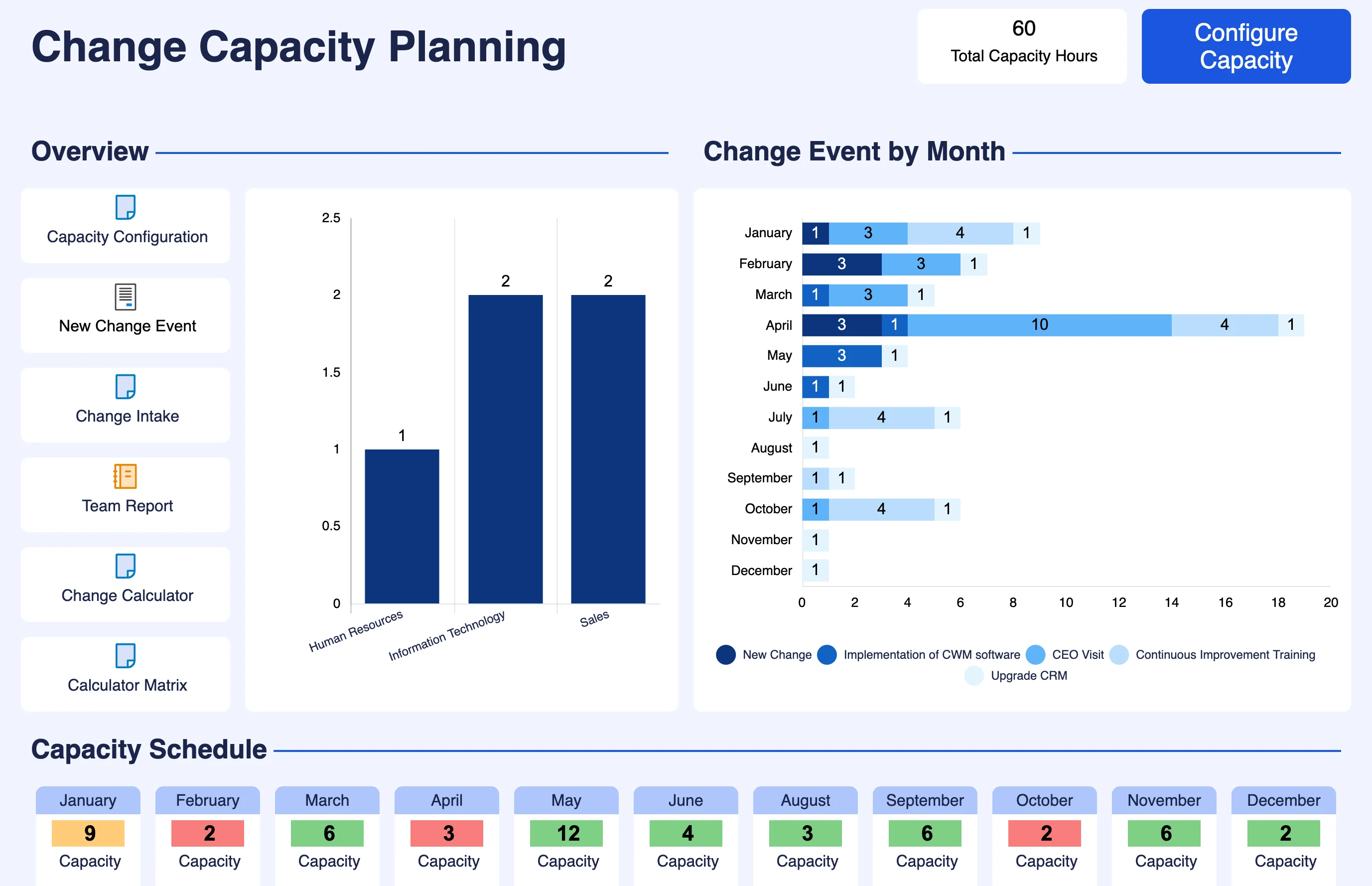
Smartsheet stands out when organizations need to apply the same change process across multiple projects. With Control Center, teams can build blueprints for project plans, workflows, and reporting requirements, then use Global Updates to push template changes across active projects. Automated provisioning also creates new projects from the same approved configuration, so teams can apply the same governance requirements across the portfolio.
For portfolio visibility, Smartsheet rolls project data into reports and dashboards that show health, risks, and status across initiatives. Its intake process also lets teams review new requests before deciding which ones should enter the portfolio.
On the downside, Control Center is available only as an add-on for Business and Enterprise plans, which adds to the total cost. For teams seeking to standardize workflows across multiple projects, consider monday.com instead. Administrators can use managed templates to create a master workflow and apply updates across connected boards, while the All Projects Dashboard brings portfolio metrics into one view.
Case study
Smartsheet helped Norwegian Cruise Line Holdings standardize how its IT PMO handles technology requests and projects. Employees submit requests through a Smartsheet form, which routes each item to the appropriate PMO team or sends it for further review. Approved requests then move into standardized project toolkits with project plans, RAID logs, and executive reports.
The Control Center applies the same setup across projects, while portfolio summary sheets give leaders visibility into progress across multiple programs. NCLH later expanded Smartsheet to more than 70 use cases across departments including finance, legal, and compliance.
Pricing
- Free trial: 30 days with access to Business-plan capabilities during the trial.
- Pro: $9/member/mo. Includes unlimited sheets, forms, reports, dashboards, multiple project views, and 250 automations per month.
- Business: $19/member/mo. Includes workload tracking, timeline view, unlimited automations, guest access, and additional administration controls.
- Enterprise: Custom pricing. Includes portfolios, SAML SSO, Enterprise Plan Manager, advanced governance, and unlimited attachment storage.
- Advanced Work Management: Custom pricing. Includes Control Center, Dynamic View, Data Shuttle, premium apps, connectors, and portfolio-scale work management.
Learn more in our Smartsheet review.

ClickUp: Best for customizable change request workflows
Pros
- Forms and conditional logic support custom change requests
- Automations handle routing and handoffs
- Gantt, dependencies, and dashboards support implementation tracking
Cons
- Dedicated IT change controls are limited
- Extensive configuration increases setup time
- Some advanced reporting features require Business
Why I chose ClickUp
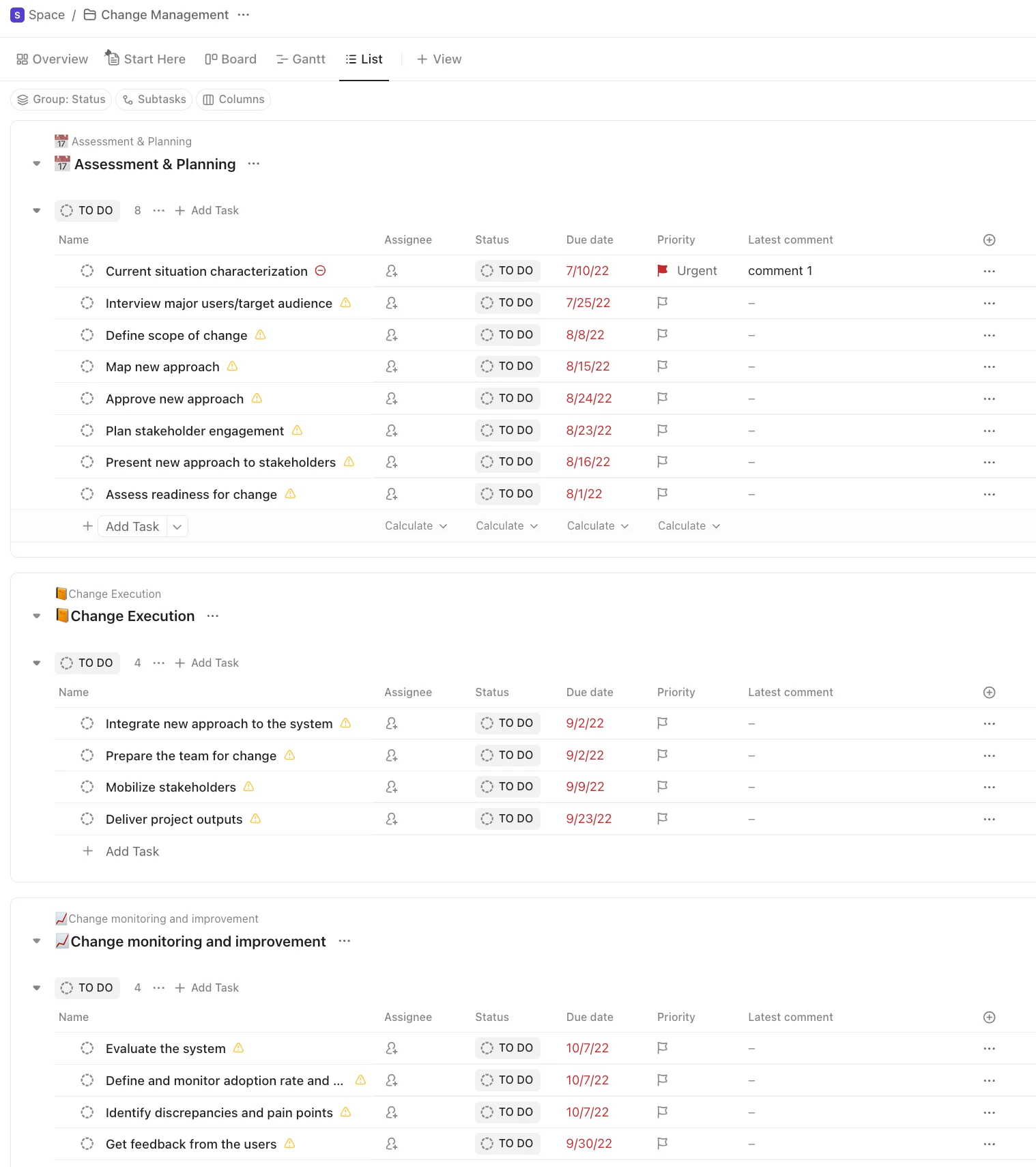
ClickUp is a good option for teams that want to build their own change request process. Its Change Request Template includes statuses and fields for items such as scope impact, reviewers, and implementation dates. Forms can create tasks from submitted requests, while conditional logic and automations route each request based on the information provided.
After approval, teams can manage the resulting work in the same workspace. Dependencies show which tasks rely on others, while Gantt and Timeline views show how changes affect schedules. ClickUp also provides templates for larger change initiatives, including digital transformation and SaaS changes, with fields for risk, stakeholders, and status.
On the downside, ClickUp has limited support for IT change management than Jira. Jira Service Management supports change workflows, risk assessment, approval routing, and a change calendar. It can also connect with CI/CD tools so deployment changes move through the required approval process.
Case study
Rutgers University Foundation used ClickUp to replace separate workflows across Slack, Zoom, Box, and Smartsheet for roughly 300 employees. In its engagement division, communications tasks were linked to project work, reducing missed assignments during Homecoming events. Approvals also moved from email and Box into ClickUp tasks, while automations handled handoffs for workflows such as the Alumni Owned Business Directory across five teams.
According to Rutgers, the new process freed one full-time employee from deadline follow-ups and allowed the division to redistribute a vacant senior role’s workload. Automated summaries also cut meeting preparation to about 30 minutes.
Pricing
- Free plan: Free Forever includes unlimited tasks and members, Kanban boards, Docs, sprint management, basic custom fields, and one Form.
- Unlimited: $7/user/mo. Includes unlimited spaces, forms, Gantt charts, integrations, storage, time tracking, goals, portfolios, and resource management.
- Business: $12/user/mo. Includes advanced dashboards, portfolio workload management, automation integrations, sprint reporting, proofing, and Google SSO.
- Enterprise: Custom pricing. Includes enterprise permissions, SAML SSO, SCIM, audit logs, data residency, higher automation limits, and dedicated onboarding.
Learn more in our ClickUp review.

Jira Service Management – Best for IT service change management
Why I chose Jira Service Management
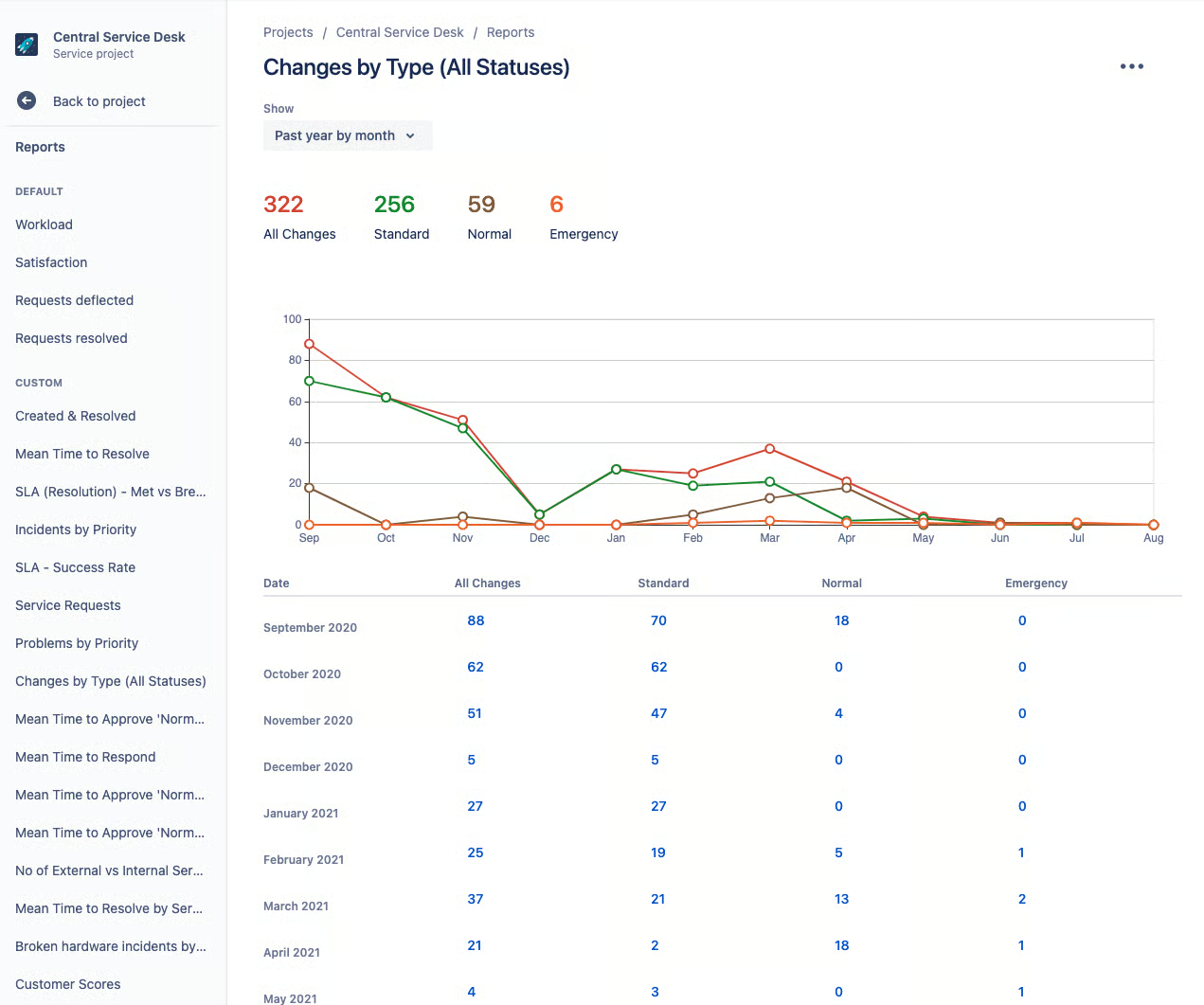
Jira Service Management works best for IT teams that need a process for reviewing and approving system changes. Requests can be classified as standard, normal, or emergency changes, and the workflow covers planning through closure. While standard changes may be pre-approved, higher-risk requests are routed to designated approvers or a Change Advisory Board.
For deployment planning, the change calendar shows scheduled requests across service projects and marks maintenance or freeze windows. CI/CD integrations can create change requests automatically from deployments, while service dependency data gives reviewers more context before they approve a change.
Jira is built for IT services, so it’s less suited to company-wide change programs. Alternatively, Asana allows teams to connect projects to company goals, organize related work in portfolios, and track progress through dashboards. Its change management plan template also covers communication, training, milestones, and employee feedback.
Case study
24 Hour Fitness used Jira Service Management to replace BMC Remedy after its existing change request process became too slow and left some software changes untracked. In the first year, the company increased tracked software changes by 20% and gained full traceability into when each change occurred and why. Atlassian also reports that Jira Service Management reduced the company’s ITSM software costs by 37%, while the workflows expanded across 17 internal teams.
Pricing
- Free plan: Free for up to three agents and includes request management, customizable forms and workflows, a knowledge base, and 2 GB of storage.
- Standard: $20/agent/mo. Includes Rovo AI, asset and configuration management, customizable service workflows, audit logs, and 3,000 automation steps per user per month.
- Premium: $51.42/agent/mo. Includes advanced change management, automated risk assessment, CAB approval workflows, CI/CD deployment gating, AIOps, and 24/7 Premium support.
- Enterprise: Custom pricing. Includes Atlassian Analytics, advanced security and identity controls, multiple sites, higher automation allowances, and enterprise support.

monday.com – Best for managing employee adoption
Pros
- WorkForms support feedback and readiness tracking
- Automations support reminders and workflow updates
- Dashboards track rollout and adoption progress
Cons
- Advanced portfolio controls are Enterprise-only
- Automation limits apply on lower paid plans
- Fewer tools for technical IT changes
Why I chose monday.com
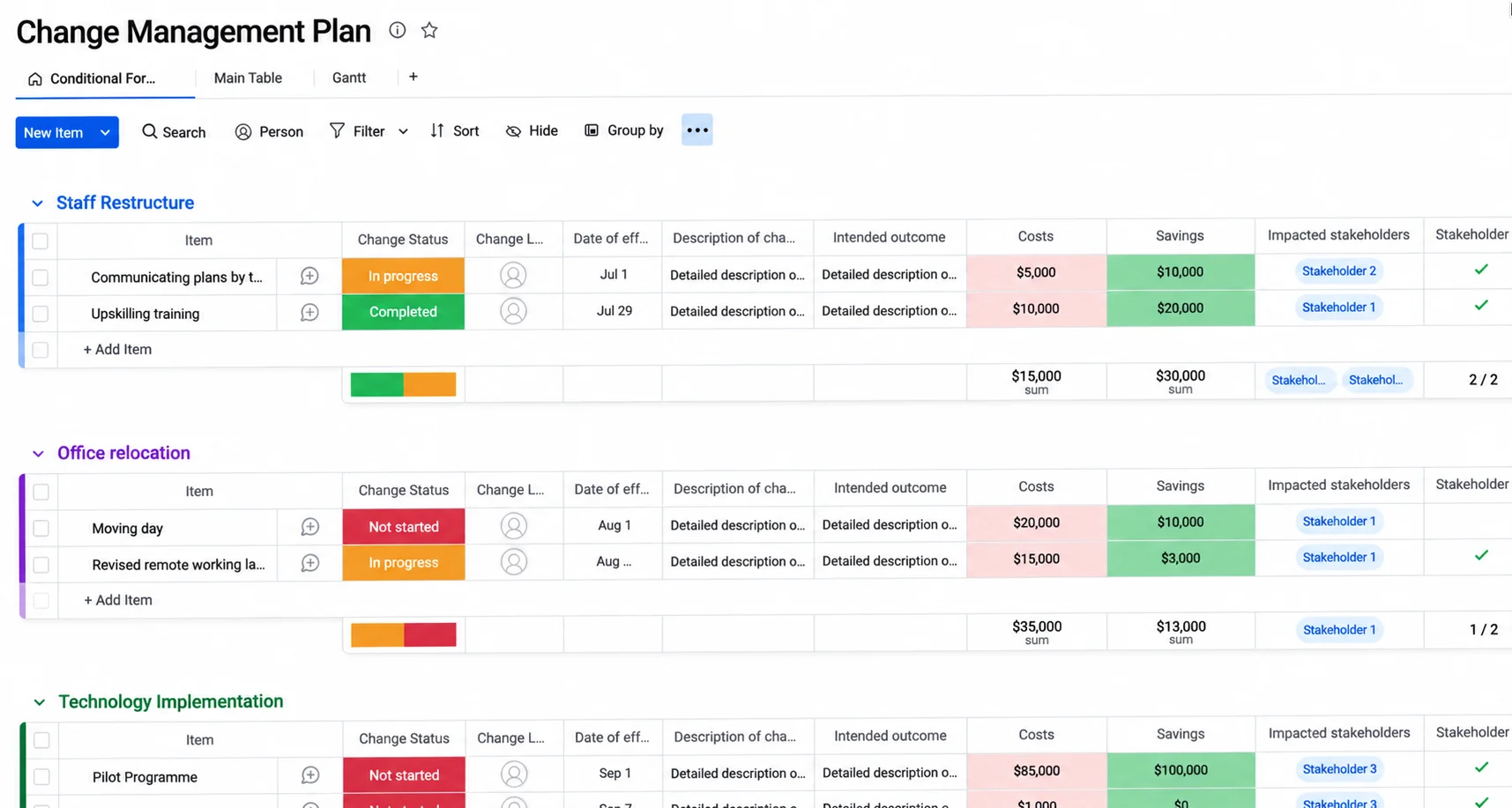
monday work management suits change initiatives where teams need to coordinate employee communication and training alongside implementation tasks. WorkForms can collect feedback or readiness data, and those responses can flow into boards for follow-up, while the change management template enables teams to coordinate timelines and assigned actions. As the rollout progresses, dashboards can surface adoption-related progress across affected teams.
Employee communication is built into the workflow rather than managed separately. Automations send reminders or trigger status updates when milestones are reached, and WorkForms capture responses from affected employees so teams can see where follow-up is still needed.
For software releases or infrastructure changes, monday.com offers fewer tools for reviewing and approving technical changes. Jira Service Management is a better choice for these types of workflows because it supports change types, approvals, and deployment-focused controls.
Case study
Using monday.com, the San Diego County Office of Education streamlined project tracking across its 115-person Integrated Technology Services division. To support adoption, the EPMO created one standard project template, a roll-up board, and a CIO dashboard, then paired the rollout with department-specific training and two monday.com champions from each department.
Those champions received early training and continued answering questions after launch, which gave each department a point of contact during the transition. After adoption, 90% of surveyed employees said project communication improved, 89% reported better project tracking, and 87% cited better collaboration.
Pricing
- Free plan: Free for up to two seats and includes up to three boards, three Docs, templates, basic columns, and mobile apps.
- Basic: $9/seat/mo. Includes unlimited items, unlimited free viewers, core work management, and Basic AI with 1,000 monthly credits.
- Standard: $12/seat/mo. Includes Timeline and Gantt views, guest access, workflows, 250 monthly automation actions, integrations, and dashboards across five boards.
- Pro: $19/seat/mo. Includes private boards, time tracking, higher automation limits, advanced dashboards, and Premium AI with 3,000 monthly credits.
- Enterprise: Custom pricing. Includes enterprise-scale automations, advanced reporting, multi-level permissions, security controls, and enterprise support.
Learn more in our monday.com review.

Wrike – Best for complex approval workflows
Pros
- Conditional request forms support complex approval paths
- Approval records create a clear audit trail
- Keeps feedback and file reviews in one place.
Cons
- Advanced features become expensive at higher tiers
- Portfolio-wide workflow updates are less centralized than Smartsheet
- Setup can become complex for heavily customized workflows
Why I chose Wrike
Wrike is well suited to change processes that require different approval paths depending on the request. Custom request forms can capture change details, and conditional logic can route submissions to a specific approver, project, or space. Users can trigger approvals when work reaches a certain status, with Wrike recording who approved or rejected the request and why.
Once a request is approved, teams can track its effect on scope, budget, and timelines through the Change Request template. Dashboards can surface requests still awaiting a decision, while Gantt charts and reports show how approved changes affect schedules and related work.
Organizations that need to apply the same process updates across multiple projects may benefit more from Smartsheet. Its Control Center uses blueprints to replicate project workflows, and Global Updates can push changes from a source template across existing projects. Portfolio reporting then gives managers a consolidated view of project health and other metrics across the program.
Case study
Nickelodeon’s Location-based Experiences Group used Wrike to manage creative projects for attractions, resorts, and other branded experiences across a team of about 120 people. Approval automation routed work to the right decision-maker at each project stage, while proofing kept comments and asset reviews with the related files. Dynamic Request Forms also standardized how requests entered the team’s workflow.
According to Nickelodeon, Wrike reduced their reliance on email and meetings, supported a more agile hybrid process, and helped the group handle more projects without adding staff.
Pricing
- Free plan: Includes task and project management, board and table views, desktop and mobile apps, and basic collaboration.
- Team: $10/user/mo. Includes Gantt charts, dashboards, AI Essentials, and project management for teams of two to 15 users.
- Business: $25/user/mo. Includes customizable workflows, templates, integrations, and expanded AI capabilities for teams of five to 200 users.
- Pinnacle: Custom pricing. Includes advanced resource planning, budgeting, business intelligence, forecasting, and additional AI automation capacity.
- Apex: Custom pricing. Includes enterprise-scale AI agents, unlimited Whiteboards, Wrike Integrate, Wrike Sync, and expanded workflow automation.
Learn more in our Wrike review.
Why use tools for change management?
Change management tools give teams a consistent way to submit, review, approve, and track changes. They also show how proposed changes may affect scope, schedules, resources, or stakeholders before implementation. Here are six ways change management tools support the change process.
- Records every change request: Logging approved and rejected requests creates a history of what was proposed and why decisions were made. Teams can refer back to earlier requests when similar changes come up later.
- Standardizes the review process: Request forms and approval workflows define how changes move from submission to decision. This reduces the chance of unapproved changes entering the project.
- Shows dependencies and downstream impact: A change to one task can affect schedules, resources, costs, or related work. Change management tools make those connections easier to review before implementation.
- Supports scenario analysis: Teams can compare how a proposed change may affect budgets, timelines, or resource allocation before approving it. This gives decision-makers more information before committing to the change.
- Keeps change records in one system: Requests, approvals, comments, and status updates are accessible to stakeholders throughout the process. Teams can see what changed, who approved it, and where implementation stands.
- Creates a submission process: Predefined workflows allow stakeholders to submit change requests. Each request can then be routed to the appropriate project manager or change owner for review.
How to build your change management tool stack
Build your change management tool stack around the parts of the process you need to manage, such as request intake, approvals, stakeholder communication, and adoption tracking. If one area is creating delays or confusion, start there before adding more software.
A project management platform can handle change requests, approval records, and implementation tasks so each modification is traceable. Collaboration tools support stakeholder communication, while analytics or reporting software measure adoption curve progress and implementation results.
As the process evolves, review the stack to identify tools that are rarely used or duplicate another system’s purpose. The goal is to cover each stage of change management with as little overlap as possible.
FAQs
Can project management software be used for change management?
Yes. Project management software can support change management when it includes request intake, approval workflows, automation, reporting, and implementation tracking. Platforms such as Asana, Smartsheet, ClickUp, monday.com, and Wrike provide different combinations of these capabilities.
Is Jira a change management tool?
Jira Service Management supports IT change management through change request types, approval workflows, risk assessment, and a change calendar. It is often used for software releases, infrastructure changes, and other IT service changes.
What features should change management tools include?
Look for change request forms, approval workflows, automation, reporting, and audit history. Depending on your use case, you may also need portfolio management, risk assessment, stakeholder feedback, or adoption tracking.