

Softphones are a valuable communication tool for remote professionals who want to make and receive calls on any internet-capable device without the hassle of a wired setup. What a softphone is goes beyond just voice calls — its flexibility grants a range of features for call handling, video, and messaging on both desktop and mobile. While free versions exist, monthly plans start at $10 per user, unlocking advanced functionality like call recording, video calls, and artificial intelligence (AI) capabilities.
Definition of a softphone
A softphone is a software application that behaves similarly to a traditional landline but uses the internet to transmit calls instead of physical wires. It is built on a cloud-based phone system, which users can access via a web browser or download on any internet-connected device, including desktop computers, laptops, tablets, and smartphones.
Softphones feature an interactive display comprising the familiar number keypad found in desk phones, along with intuitive icons for common functions such as recent calls, contacts, and voicemail. Beyond voice calling, softphones include additional features that allow users to make calls from any location, host video meetings, share files, and switch between their carrier network and the internet.
How softphone works
A softphone application facilitates real-time communication over the internet using two core technologies: voice-over-internet-protocol (VoIP) and session initiation protocol (SIP). When a call is made through a softphone, VoIP preserves the audio quality by converting voice data into digital data packets before it travels through the internet. SIP, on the other hand, facilitates the connection between the caller and the recipient, allowing the exchange of voice and other multimedia (e.g., video, chat, and files).
Softphones are part of business phone systems, which you can avail through a monthly subscription with a VoIP provider. After purchase, you can start configuring the softphone features by opening it from a web browser or downloading the provider’s dedicated softphone app on your device.
Softphones vs traditional phones: What’s the difference?
Switching from hardwired phones to an internet-based alternative can be intimidating, especially if you aren’t familiar with what sets them apart. Costs, compatibility, ease of use, and functionality are factors to consider when migrating to the cloud. Here’s a quick overview of the differences between softphones vs traditional phones:
Softphones | Traditional landlines | |
| Monthly cost | $10 to $60 per user | $50 to $80 per phone line |
| Transmission | Uses the internet | Uses analog lines |
| Device compatibility | iOS, Android, tablets, Windows, and Mac computers | Hardwired physical phone |
| Flexibility | Can be used anywhere with a stable internet | Tied to a physical location |
| Supported channels | Voice calls, video, and chat | Voice calls |
Key features of softphones
Softphones are essentially a digital version of an old-school telephone, comprising standard call handling features such as call forwarding, transfer, hold, and voicemail. But with the added flexibility of the cloud, softphones carry out various functions, including the ability to initiate video calls, create chat groups, and customize presence status. Here are some key features you’ll find in a modern softphone application.
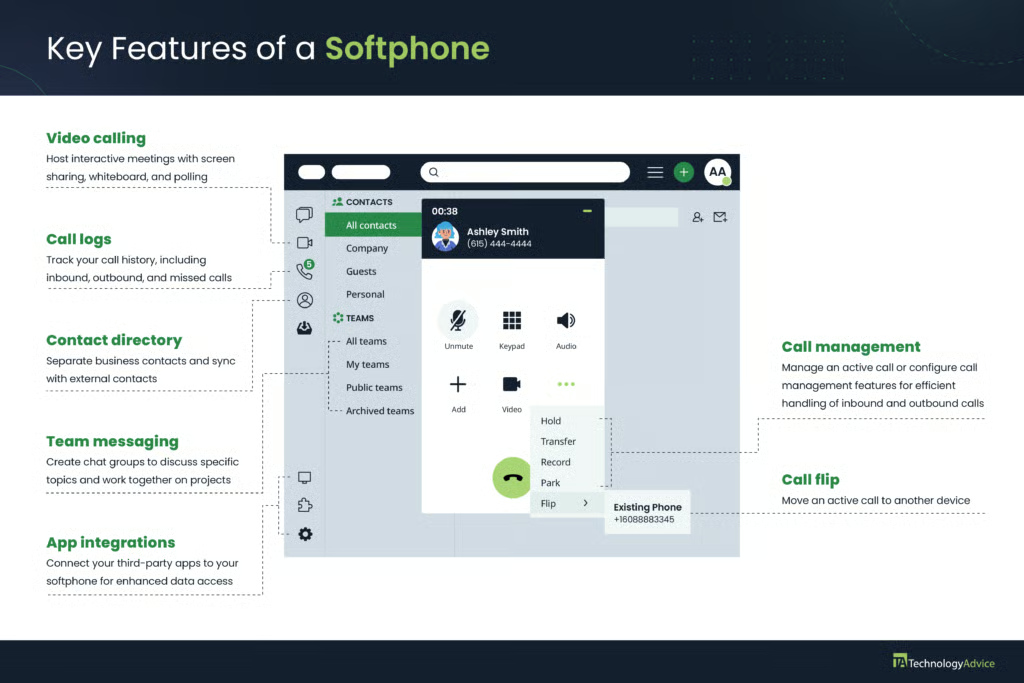
The features included in a softphone app vary depending on the service provider. In some cases, the desktop and web versions have more functionality than the mobile app in terms of phone administration. Ideally, you’ll want a provider that lets you perform a variety of call handling functions on any device.
Did you know? Some softphone providers offer users the flexibility to switch between VoIP or cellular networks in areas with poor internet or cellular coverage.
What users say: pros & cons of softphones
Real user experiences are critical in evaluating the strengths and pain points of any cloud-based platform, specifically softphone apps. While businesses favor the mobility and robust functionality that softphones offer, there are also a few concerns from actual users you should know about.
Pros
- Cost-effectiveness: It reduces hardware expenses by eliminating the need for clunky handsets and physical wires. You’ll only need to pay for a subscription to the softphone provider that handles the setup, updates, and maintenance of the server.
- Enhanced mobility: Softphones can be installed in virtually any internet-enabled device, including smartphones and tablets, allowing you to make and receive calls from anywhere.
- Advanced features: Apart from the standard call handling features, softphones integrate with third-party business tools. This lets you access, process, and share external data without leaving the app.
- Scalability: You can quickly add new lines by entering a user’s email and assigning them a phone number within the app, all without major infrastructure changes or extra costs.
Cons
- Reliance on stable internet: Softphones are prone to dropped calls and poor call quality if the internet connection is unstable. Users may need to search VoIP providers that support quality of service (QoS) settings to prioritize voice traffic or seamless cellular network switching.
- High battery consumption: Users are recommended to disable battery optimizations as softphones consume significant power when used constantly for making calls and joining meetings.
- User experience: Users switching from traditional landlines to softphones may face a slight learning curve, particularly on platforms with complex interfaces or advanced features.
Top softphone providers
There are several options to choose from if you’re interested in softphones for business use. I have handpicked the best options for you based on my expert opinion, popularity, and user reviews.
| Best for | All-in-one business communications | Customer engagement | AI-driven interactions | Basic functionality |
|---|---|---|---|---|
| Interface | ||||
| Monthly cost | $30 per user | $25 per user | $27 per user | $59.95 per license A one-time payment for Zoiper 5 PRO license provides lifetime access to the software. |
| Ease of use | ⭐⭐⭐⭐ | ⭐⭐⭐⭐⭐ | ⭐⭐⭐⭐⭐ | ⭐⭐⭐ |
| Standout feature | Call management | Omnichannel messaging | AI-powered call summary | SIP-based softphone |
| Learn More |


Business applications for softphones
In exploring what a softphone system is, it’s also worth discussing how specific industries are utilizing this cloud-based service. Knowing the various use cases of softphones lets you maximize their overall value for money and benefits.
- Remote and hybrid communication: Softphone supports bring your own device (BYOD) policy, allowing employees to use their preferred devices such as laptops, smartphones, and tablets. This makes collaboration easier as employees choose how and where they want to work.
- Customer service: Softphones like RingCentral and Nextiva come with pre-built integrations with customer relationship management (CRM) solutions such as Salesforce, Pipedrive, and HubSpot. Instead of switching between tools, a CRM-integrated softphone lets you access and sync client information within the same app.
- Solopreneurs and startups: Subscribing to a full-fledged VoIP system includes a business phone number where you can route calls and text messages from clients. On top of a secondary number, you gain access to a range of phone features to handle incoming calls, allowing you to project a credible and professional image.
Frequently asked questions (FAQs)
Is a softphone the same as VoIP?
No, a softphone is a cloud-based tool that lets you make and receive calls over the internet, while VoIP is the underlying technology that facilitates these calls.
What is the difference between a softphone and a desk phone?
A softphone is an internet-based application installed on a computer or mobile device, whereas a desk phone is a traditional landline that relies on physical copper lines.
What is the difference between a hard phone and a softphone?
A hard phone is a telephone hardware that comes with a handset, buttons, a dial pad, and a base unit, while a softphone has no physical presence as it is simply installed on computers and smartphones.