

These are the top six job listing sites to post your open positions:
- LinkedIn: Best for professional-level job postings.
- ZipRecruiter: Best for posting to multiple job boards.
- Indeed: Best for free job postings.
- MightyRecruiter: Best for businesses without a large recruitment team.
- Wellfound: Best for startups and small businesses looking for skilled tech talent.
- iHire: Best for your all-around hiring needs.
Update notes
Nov. 28, 2025: Brittany Brooks rewrote the article for accuracy and freshness. Monster and CareerBuilder were replaced with Wellfound and iHire, and a comparison table was also added.
Our Methodology
I reviewed some of the most popular job listing sites: LinkedIn, ZipRecruiter, Indeed, MightyRecruiter, Wellfound, and iHire. I examined each in terms of pricing, the level of specialization required, pros and cons, and what users like about each.
I found that the best job listing sites for employers are those that offer the following:
- Job posting capabilities
- Applicant search features
- Pre-screening questions
- Advanced recruitment tools
- Applicant tracking system (ATS)
- Instant messaging with candidates
- Candidate scoring capabilities
- Career page integration
- Detailed reporting and analytics
- Mobile posting capabilities
I used this analysis to inform our recommendations.
Here’s what’s changed since the last update
There were a few considerations I took into account while I was curating this list. The labor market has tightened, and I wanted these recommendations to reflect what both job seekers and recruiters are actually experiencing.
Job seekers are veering away from job boards like CareerBuilder and Monster because they’re congested, and job seekers feel like they’re not getting a fair chance.
Recruiters aren’t getting great results from those sites either, as they aren’t securing talent as fast as they once did. Both factors are equal contributors to the current labor market conditions, making it harder for you to find the talent you need.
What are the best job posting sites?
Best for | Free tier? | PlacPricingeholder | |
 | Professional-level job postings | Yes, one free job listing at a time | Paid tier starts at $44.99 per month (annual billing) |
 | Posting to multiple job boards | Yes, two-day free trial | Paid tier starts at $16 per day, per job or $299 per month, per job |
 | Affordable job postings | Yes, free job posts | Pay-per-application with customizable budget (sponsored posts) |
 | Businesses without a large recruitment team | Yes, free to use | Custom pricing for extra features |
 | Startups and small businesses looking for skilled tech talent | Yes, free to use | Paid tier starts at $499 per month |
 | All-around hiring needs | No | Starts at $369 per job slot per month |

LinkedIn: Best for professional-level job postings
Pros
- Best platform for finding managerial and executive-level candidates
- Extensive talent pool of professionals
- More than 40 advanced search filters
- Analytics tools to manage candidates
Cons
- Does not offer advanced job-matching
- Full recruitment options can be costly
- Can only post one free job at a time
- Free job posts get buried fast without the premium subscription
About LinkedIn
LinkedIn is one of the largest professional social networking platforms out there, and it’s still a go-to for employers who want to tap into a vast candidate pool. It’s especially effective for corporate, technical, and leadership roles.
Another one of its strengths lies in how your job listings, company page, and employee activity all work in tandem to attract your ideal candidate.
For teams with strong employer branding and a need for high-level candidates, LinkedIn is an essential addition to your recruitment toolbox.
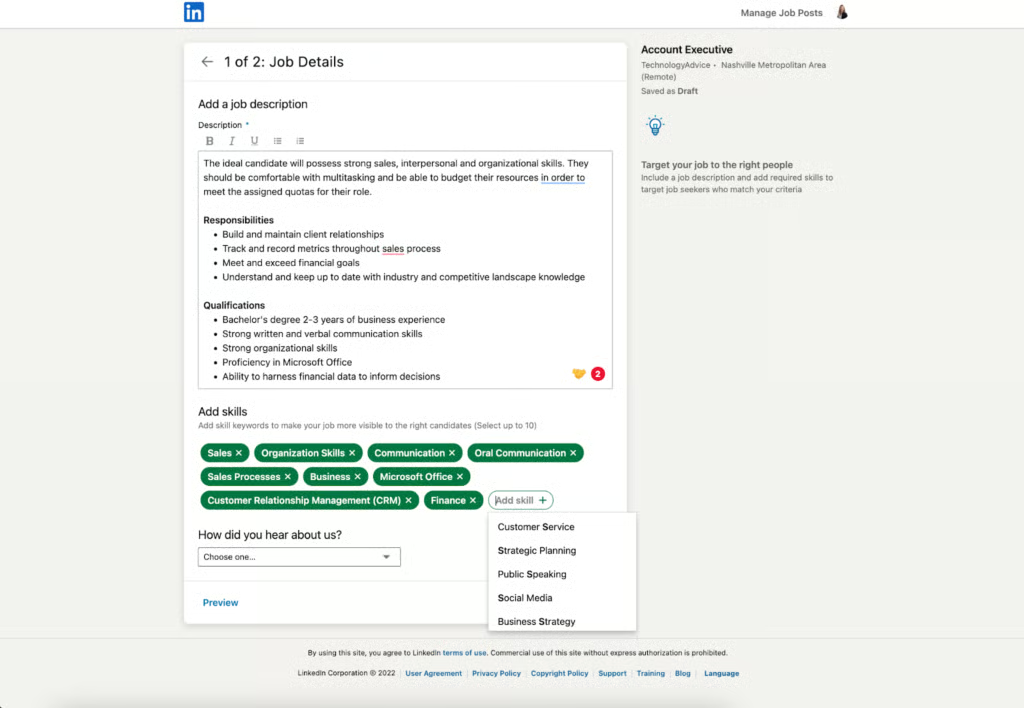
Learn how to post your first job on LinkedIn: LinkedIn Job Posting & Cost
Pricing
The pricing structure for LinkedIn is a little tricky. The platform offers the Business, Sales Navigator Core, and Recruiter Lite plans, but none of them include job postings.
Instead, these plans cover InMail credits, more advanced search filters, candidate recommendations, and the creation of a company page. Job postings are separate.
You can list one job at a time for free, and you can pay to boost it for more reach. If your company has available positions throughout the year, you can purchase job slots.
However, you’ll just need to contact their sales team for a custom quote.
- Job posting: One free job listing at a time
- Business plan: $44.99/month when billed annually
- Sales Navigator Core plan: $67.49/month when billed annually
- Recruiter Lite plan: $139.99/month when billed annually
What recruiters like about LinkedIn
LinkedIn is great for reaching as many high-quality candidates as possible, but it can also hit you with an onslaught of applications.
Sometimes job listings get hundreds of résumés within the first hour of posting. That sounds amazing, but a good chunk of the applications are from candidates who may not even be in your industry.
But there’s a better way to use the platform. I’ve found that LinkedIn works best when you take an active recruiting approach.
That means you’re purposely connecting with professionals who have the particular skills you need or who work in your industry. So while you’re waiting for candidates to apply, reach out to the person who makes those amazing posts showcasing their expertise.
G2 rating: 4.5 out of 5 stars
Capterra rating: 4.6 out of 5 stars

ZipRecruiter: Best for posting to multiple job boards
Pros
- Job listing distribution to more than 100 niche job sites
- AI candidate matching
- Smart dashboard for managing candidates
- Built-in ATS
Cons
- Not a good fit for executive-level positions
- Daily pricing options can get expensive if you have larger hiring needs
- Sometimes unfinished applications make it through to review
About ZipRecruiter
ZipRecruiter is another recruiting platform with an extensive network. It’s designed to help employers get their job openings in front of a wide candidate pool.
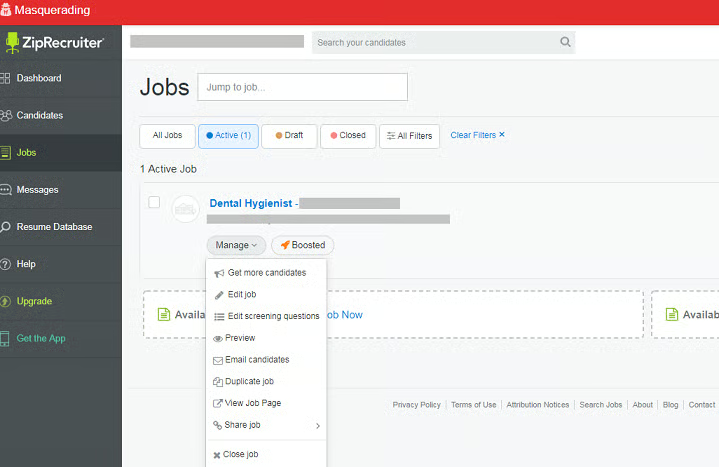
When you post a job, ZipRecruiter pushes it to its own network and to hundreds of partnered job boards, giving you visibility without the extra steps. The platform also uses AI to recommend candidates and send your listing directly to people who may be a match.
Even though ZipRecruiter generates a large volume of candidates, you should expect a mix of qualified and unqualified candidates.
Pricing
ZipRecruiter offers a free two-day trial, but after that, it uses a daily pricing structure.
- Standard plan: $16/day per job or $299/month per job
- Premium plan: $24/day per job or $419/month per job
- Pro plan: $719/month per job
What recruiters like about ZipRecruiter
I like the reach ZipRecruiter has, and depending on the type of jobs you’re hiring for, you can fill the position fairly quickly. The built-in ATS is intuitive, easy to use, and allows you to streamline your hiring process.
What I’m not a fan of is the pricing structure. The costs can rack up if you have to hire for multiple roles, have a tighter budget, or consistently have open positions year-round.
G2 rating: 4.8 out of 5 stars
Capterra rating: 4.2 out of 5 stars
Compare two of the top job listing sites: ZipRecruiter vs Indeed

Indeed: Best for free job listings.
Pros
- Unlimited job listings for free
- Affordable for small businesses that are scaling
- Offers screening questions and skills assessments
- Mobile-friendly for both employers and job seekers
Cons
- Free job listings have low visibility
- Possible to run into duplicate or spam applicants
- Resume quality is inconsistent
- It can be difficult to find executive-level candidates
About Indeed
Indeed is a commonly used job search platform. For many job seekers, it’s one of the first places they go when they start exploring new opportunities.
That alone positions your jobs in front of active candidates. Your post goes live within minutes, you can search résumés, and communicate with applicants all within one dashboard.
Paying to sponsor job posts increases their visibility. Indeed’s affordability and sheer volume of more than 250 million users are what make it a prime pick for small businesses that are growing and want to stick to a budget.
Pricing
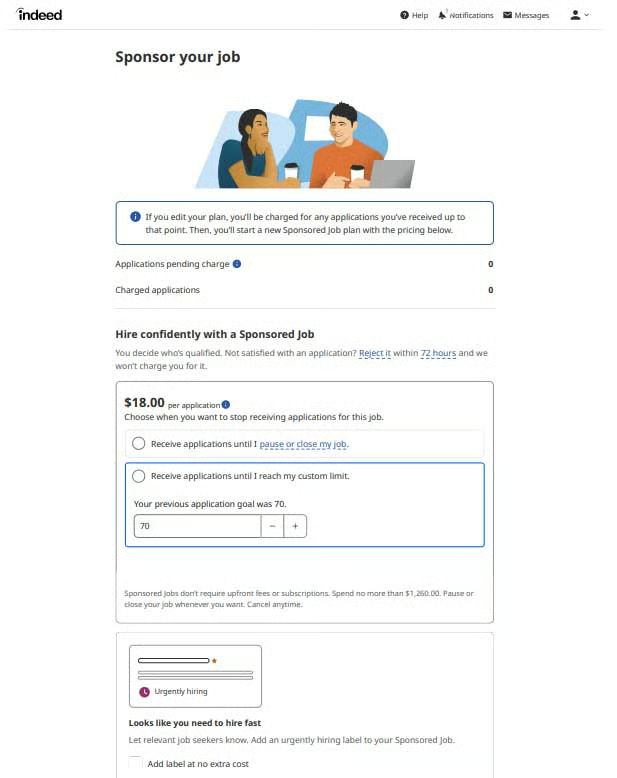
Since Indeed lets employers post for free, you don’t have to worry about running through your budget, but you still want to set one. To appear higher in the search results, you have to sponsor the job post.
Sponsored posts use a pay-per-application model, and you can set your own budget based on how many applications you want to receive.
- Job posts: Free
- Sponsored posts: Pay-per-application with customizable budget
What recruiters like about Indeed
In my opinion, Indeed is unmatched when you need applicants fast. The only other job boards that come close are LinkedIn and ZipRecruiter.
If I’m trying to fill an hourly position or a role with consistent turnover, I always have faith that Indeed will pull me through. I know I can post the job and have candidates in my inbox by lunchtime.
But the volume of candidates is where my love-hate relationship begins. It’s easy to get buried in one-click applications, duplicate résumés, and unqualified applicants.
I’ve also noticed that ghosting is a little more prevalent here. Since candidates can apply to any job with a single click, they’re not fully committed to each application they submit.
Either they’re not responsive, or they’ll ghost you right after the interview.
G2 rating: 4.3 out of 5 stars
Capterra rating: 4.5 out of 5 stars
Also read: Creative Ways to Find Employees

MightyRecruiter: Best for businesses without a large recruitment team
Pros
- Dedicated account manager
- Free plan
- Unlimited job postings
- Full-service applicant tracking software
Cons
- Can only post one job ad with the free version
- Job postings are delayed for approval by 24–48 hours
- Candidate resumes are limited to ten free views
- Lacks transparent pricing
About MightyRecruiter
MightyRecruiter is a recruiting platform that consolidates sourcing, résumé search, and applicant tracking into one platform. That’s particularly helpful for businesses that may not have a large hiring team.
When you post a job, the platform distributes it to 29 job boards, including sites like Indeed, Glassdoor, and Google. This expands your reach without having to keep up with multiple platforms.
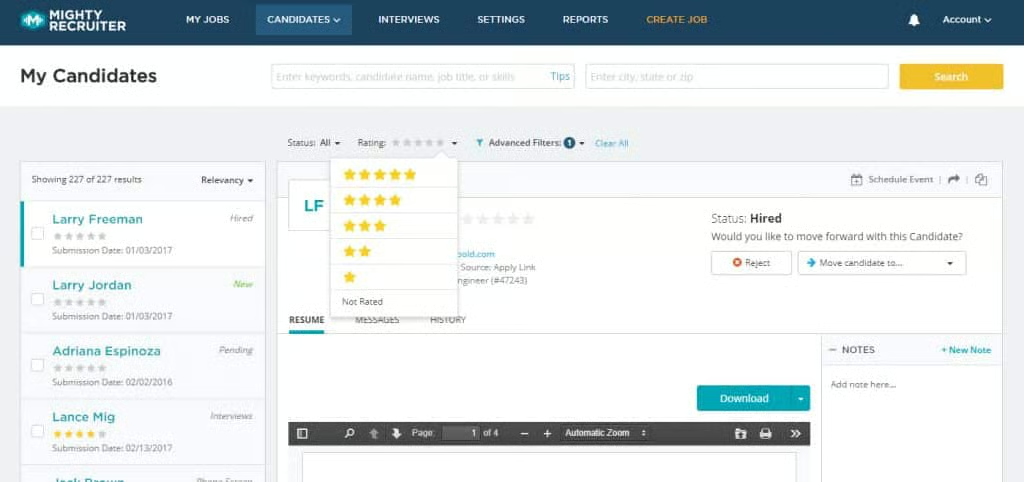
You can review applications, rate candidates, and see where they are in the hiring process. The learning curve is minimal, and the best part is that the system is free to use, making it an affordable all-in-one solution.
Pricing
MightyRecruiter is free to use, but the free version is very limited. You can post only one free job at a time, and you can only view a certain number of résumés. You have to upgrade to post multiple jobs and view unlimited submissions.
Features such as accessing a candidate’s full contact info or using candidate scoring are also unavailable in the free version.
- Basic plan: Free to use, and you must pay to access extra features.
What recruiters like about MightyRecruiter
I appreciate that MightyRecruiter is free and comes with an easy-to-use ATS. If its ATS isn’t your style, you can integrate specific systems for more flexibility.
Another perk that caught my eye is that you can add other users to your account at no extra cost. That’s rare, since most recruiting platforms charge an additional fee per user.
That said, it would make my heart sing if the pricing were more transparent. You don’t realize how limited you are until you want to review more résumés or see candidates’ full contact information.
That’s when you’re prompted to pay. The platform does a solid job at sourcing quality candidates, so I wouldn’t mind paying a subscription up front in exchange for a better experience.
G2 rating: Not available
Capterra rating: 4.1 out of 5 stars

Wellfound: Best for startups and small businesses looking for skilled tech talent
Pros
- Post jobs for free
- Access to skilled tech talent
- Autopilot feature sources and schedules candidates for you
- Offers a free ATS to streamline your hiring process
Cons
- Limited analytics to see how your job listing is performing
- No candidates outside of the tech industry
- Need a subscription to add qualifying questions
- Smaller candidate pool compared to mainstream job listing sites
About Wellfound:
Wellfound, formerly AngelList Talent, is a job platform designed specifically for startups and tech companies that are fueled by fast-growth teams. The platform provides candidates who thrive in these scrappy environments and genuinely want to build something from the ground up.
While its reach isn’t as broad as general job boards, like Indeed and LinkedIn, its niche audience makes it a valuable option for companies seeking skilled tech talent.
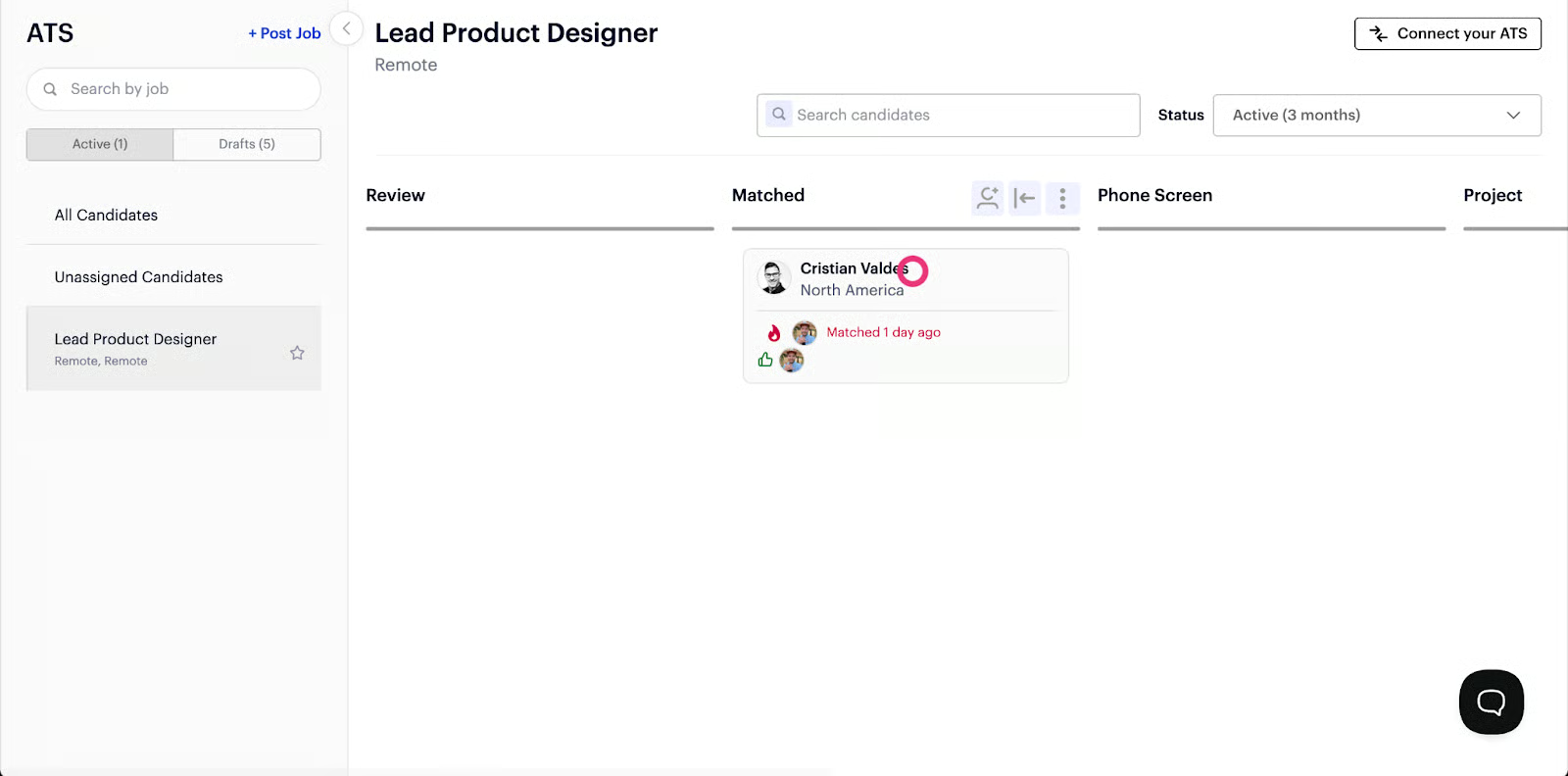
Recruiters can post jobs for free and source employees worldwide. The platform also includes a basic internal ATS for light candidate management.
What separates Wellfound from other platforms is its Autopilot plan. You get a recruiting expert who sources your ideal candidates, communicates with them, and schedules interviews.
Pricing
Wellfound offers a free plan that lets you post jobs and review applicants. You can also create a branded company profile and use the platform’s ATS.
For more in-depth features, you’ll need the Recruit Pro plan, that’s $499/month. You get access to customizable templates, advanced sourcing filters, and instant scheduling.
Wellfound’s Autopilot plan takes over recruitment for you and delivers five to ten candidates a week. Pricing is based on your hiring needs, so you’ll need to reach out for a custom quote.
- Access plan: Free for all users
- Recruit Pro: $499/month
- Autopilot plan: Custom pricing
What recruiters like about Wellfound:
I like how Wellfound is geared toward startups and the tech industry. With the platform having such a specific candidate pool, these types of companies don’t have to second-guess whether they’re in the right place.
Offering a free plan is a bonus, especially for businesses with limited capital and resources. But if you need to scale up quickly, or like having data dictate your next move, the free plan will leave much to be desired.
Another let-down for me was not being able to add candidate screening questions under the free plan. I wish they’d at least allow three to five qualifying questions before forcing you to upgrade.
Otherwise, Wellfound is a solid platform for finding developers, software engineers, and data-skilled candidates.
G2 rating: 4.2 out of 5 stars
Capterra rating: 4.7 out of 5 stars

iHire: Best for your all-around hiring needs
Pros
- AI-powered job ad builder makes it easy to optimize your listings
- Access to candidate pools across 57 different industries
- Add custom qualifying questions to every job listing
- Job ad gets bumped to the top of search results every 15 days
Cons
- Pricing is higher than other niche boards
- The user interface feels dated in comparison to newer platforms
- Search filters could be more advanced
About iHire Talent:
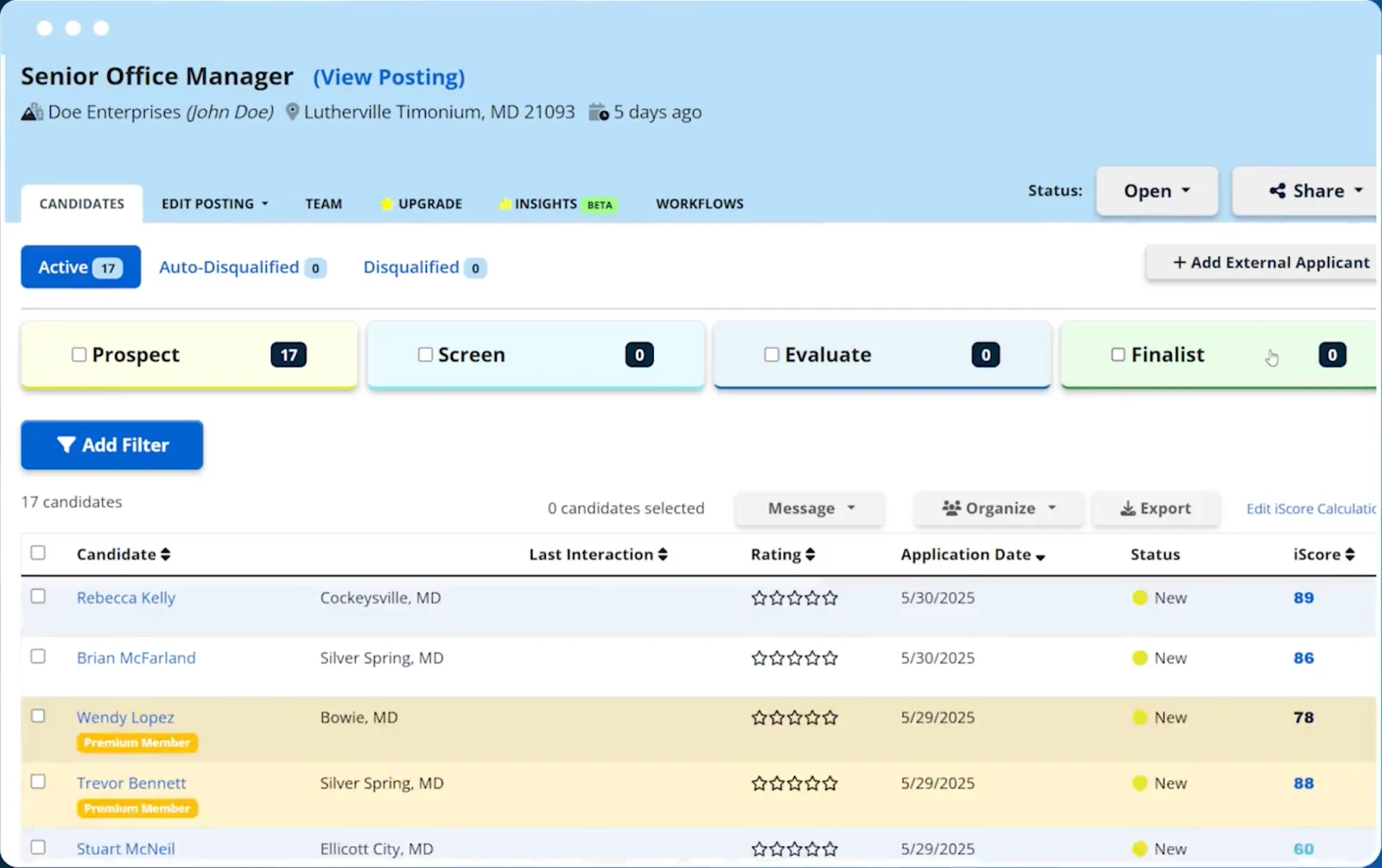
iHire is a recruiting platform built around 57 industry-specific talent communities, making it easy for employers to reach qualified candidates in nearly any field.
Whether you’re hiring administrative support, managers, engineers, HR professionals, or even construction workers, iHire has a dedicated candidate pool for that particular role.
This structure helps employers target the right audience without having to sign up for multiple job boards. For small businesses that may not have a full recruitment team, the platform also offers iHire 360.
It provides AI-assisted candidate sourcing, recruitment guidance, and recommendations to streamline your hiring process.
Pricing
iHire costs more than your average job board, and its pricing structure isn’t necessarily ideal either. You can opt for one job slot for $369/month, three job slots for $450/month, and ten job slots for $799/month.
If you want to indulge in iHire 360, it’s $6,468 for an annual agreement or $1,797 for a quarterly agreement.
- Monthly agreements:
- One job slot: $369/month
- Three job slots: $450/month
- Ten job slots: $799/month
- iHire 360 annual agreement: $6,468/year
- iHire 360 quarterly agreement: $1,797/year
What recruiters like about iHire Talent:
iHire is a one-stop shop kind of job listing site. I recommend iHire for organizations that know what they’re looking for and want to quickly land quality candidates.
I’ve worked for many small businesses where I was the only HR professional, and it’s easy to spread yourself thin when you’re down to the wire on recruitment.
iHire helped me find the talent our company needed without having to cut through the noise and chaos of other job boards. What makes this platform stand out is that, even though it’s not as well-known as LinkedIn and Indeed, its reach goes just as far.
On the flip side, with pricing on the higher end, you want to keep an eye on its ROI to make sure you’re getting the most out of it.
G2 rating: 4.4 out of 5 stars
Capterra rating: Not available
How to choose the best job listing site
Choosing the best job listing site comes down to three things: the candidates you’re trying to reach, your budget, and the recruitment features that matter the most to you.
If you’re already tracking your recruitment analytics, those numbers can quickly tell you which platforms are worth it. Start with your Source of Hire, Application-to-Interview Ratio, and Cost Per Qualified Applicant metrics.
Source of Hire shows which sites are delivering the most candidates. The Application-to-Interview Ratio highlights how many of those applicants converted into interviews.
To me, cost per qualified applicant is probably the most telling metric. If you spend $500 on a job listing site, but it gives you ten qualified applicants, that’s a better deal than a site that costs you $200 with zero results.
If you don’t have access to these metrics yet or are new to recruitment, expect a bit of trial and error. I recommend starting with free or low-cost job listing sites.
Then track where your applicants are coming from, whether they convert to interviews, and how many make it to the offer stage. And make sure to keep tabs on your spending to calculate your Cost Per Qualified Applicant.
Taking this approach ensures that you’ll make a well-informed decision based on what’s actually happening.