

Key takeaways
- LinkedIn is one of the most active hubs for professional networking and sourcing qualified candidates.
- Posting an open role on LinkedIn Jobs is a relatively straightforward process.
- Before posting a job opening, be sure your job description follows best practices.
- For an additional fee, you can promote your job post on LinkedIn to reach a wider pool of applicants and accelerate the hiring process.
Update notes
- Dec. 4, 2025: Hanna Sillo updated this guide with a clearer structure, new screenshots and steps that reflect LinkedIn’s current workflow, an expanded job posting costs section, revised best practices, and a new FAQ section.
- Jul. 6, 2023: We revised the copy for clarity and added dynamic design elements to improve the visual flow of information.
- Sept. 27, 2022: We added step-by-step instructions for posting a job on LinkedIn and best practices for optimization.
How to start your LinkedIn job post
1. Access your company’s admin dashboard
Once you’re logged into LinkedIn, navigate to the Admin tools menu in the upper right corner of your business’s LinkedIn Admin page. If you don’t see this option, double-check that you have administrator permissions for your company’s page.
From this menu, choose Post A Free Job. It’s worth noting that you are only allowed one free job posting at a time — additional job postings require a fee.
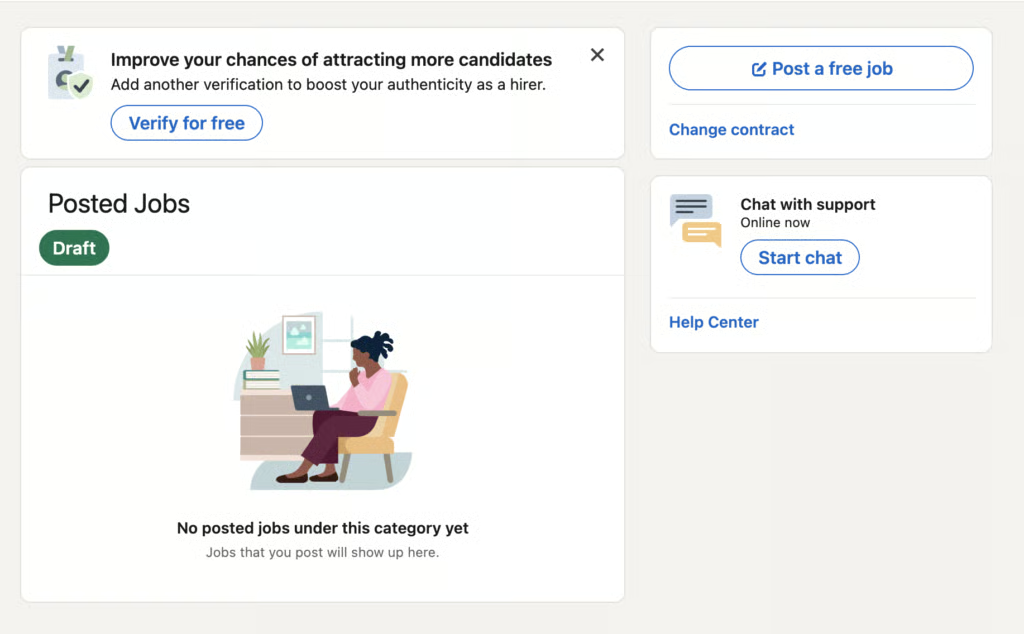
Before drafting, check that:
- You’re logged into the correct company page
- You have admin access
- You can see Post a Free Job option
Since LinkedIn only allows one active free job post at a time, you need to post multiple roles, plan which one gets the free slot.
2. Add the job details
On the LinkedIn Talent Solutions page, start entering the job information. Depending on the type of role you’re hiring for, you may want to choose from one of the job description templates LinkedIn provides.
After filling out the role, LinkedIn uses AI to generate a company description, role description, and qualifications that you can use, modify, or replace altogether.
The drafts are tailored to specific industries and roles, so they can be a great place to start thinking about the qualities you’re looking for in the ideal candidate.
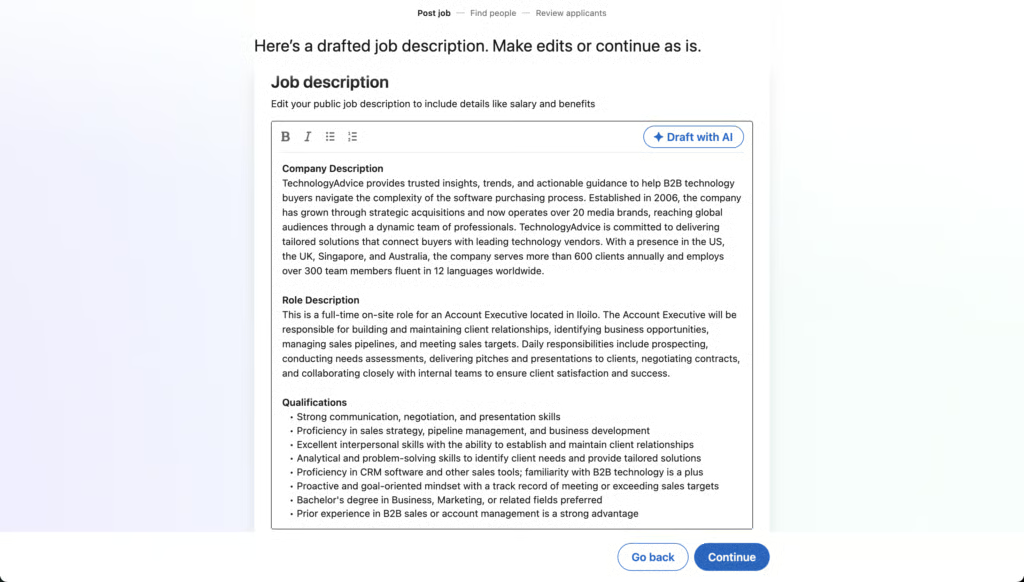
Before you proceed, ensure that:
- Title accurately reflects the role
- Location is correct (remote or hybrid included if applicable)
- Template is appropriate for your industry and seniority
Use LinkedIn’s template as a starting point, not the final version. Tailor the description to reflect your company, must-have skills, and day-to-day responsibilities.
3. Add workflow parameters and preview the post
The last step is to select options for how you would like to receive applications and the screening questions that will narrow down the list of qualified candidates. You can then preview the job listing before publishing it.
Before publishing you can also edit the following:
- Rejection settings to automatically filter out non-qualified applicants
- How you plan to manage applicants (on LinkedIn or an external website)
- The option to add a “#Hiring” frame to your profile for visibility
Before your job post goes live, check if:
- Formatting reads well on mobile and desktop
- Tone is friendly but professional
- Screening questions appear correctly
- There are no missing or duplicated fields
What to include in a LinkedIn job post
At a minimum, the job posting should include the following components:
- Job title
- Brief description of duties and responsibilities
- Required and preferred qualifications
Many job applicants also find it helpful if the post includes optional details such as compensation, benefits, and skills assessment information. Information like this can give your job opening a boost in the LinkedIn Jobs algorithm, increasing the number of people who will see it.
Also read: How to Write an Effective Job Description
LinkedIn job posting costs
To expand your reach, you may opt to pay an extra fee to promote your posting on the platform. LinkedIn puts paid job ads in front of the most qualified LinkedIn members via push notification. These ads also appear at or near the top of candidates’ search results.
LinkedIn uses a pay-per-click (PPC) pricing model for promoted job posts, with one free job posting available at a time. There is no standard cost as this varies widely based on competition, job title, and location, but employers typically spend anywhere from $10–$30 per day or $150–$500 total for a promoted listing.
Daily budget
If you choose to promote the post, LinkedIn allows you to set a daily budget in its pay-per-click model, which offers more control over the cost and duration of the job post promotion. This works well if your company knows how much it is willing to spend each day and how long it wants the ad to run.
Total budget
Alternatively, if your company knows how much it wants to spend but doesn’t necessarily care how long the LinkedIn ad is posted, setting a total budget may be the better option. LinkedIn will pause the post when it has reached your budgeted amount, whether it takes 10 days or 30 days.
A good rule of thumb to follow, however, is to keep the post live for at least five days. This will ensure you receive applications from enough qualified applicants.
What drives LinkedIn promotion costs?
LinkedIn uses a bidding model for job promotions, which means pricing changes throughout the day based on candidate activity and employer demand. These are the most common factors that influence whether your job post becomes more or less expensive to run.
In general here are the factors that impact how much you’ll pay:
Costs increase when:
- The role is hard to fill (engineering, sales, technical roles)
- You’re hiring in highly competitive metros
- Your audience is niche or highly specialized
- Your bid is below market norms (slowing delivery + lowering impressions)
Costs decrease when:
- You target broader candidate pools
- You cap your daily budget
- Market competition is lower
- You run the ad during periods of lower hiring activity
Other LinkedIn promotional services
Know that paying for promoted job posting is separate from other paid hiring services LinkedIn offers, including:
- LinkedIn Recruiter
- LinkedIn Recruiter Lite
- LinkedIn Sales Navigator
- LinkedIn Premium
- Sponsored InMail
LinkedIn job post best practices
LinkedIn has conducted research on how job seekers interact with job posts on its platform and distilled the findings into best practices for crafting job postings that will attract qualified applicants.
Length
Concise job descriptions tend to get more applicants. LinkedIn theorizes that this is because many people are now job searching and applying from their phones, and more text will overwhelm the smaller screen.
Tone
Aim for friendly, approachable language. Not overly formal, not overly casual. LinkedIn reports that candidates are 2–4x less likely to apply when tone skews too informal.
Language
Avoid gendered or biased words like “rockstar,” “assertive,” or “strong,” which can unintentionally signal a preference for certain demographics. Choose neutral terms like “collaborative,” “effective,” or “proactive” to broaden your talent pool.
Skills-first requirements
Move away from degree-based requirements unless a credential is legally or truly essential. Skills-first hiring increases your candidate pool, supports DEI goals, and aligns with modern hiring trends.
Pay transparency
Include a clear salary range when possible. Salary transparency improves applicant trust, increases conversion rates, and boosts performance in LinkedIn’s job post algorithm because job seekers prioritize roles with compensation information.
Relevance
Job seekers are most interested in what the day-to-day responsibilities will look like, what the qualifications are, and how much they’ll be paid for their work. So, prioritize these three components and save information about the company for its website. If candidates want to learn more before they apply, that’s the first place they will look.
Expectations
A potential applicant wants to know what exactly is expected of them if they are chosen, so describe what success looks like for the role with as many specifics as possible. If there’s room in your job ad, consider adding a description of measurable performance metrics that the successful candidate should expect to target within a set timeframe.
Timing
To ensure more applicants see your job ad, post it early in the week, ideally on Monday. Most job seekers are browsing job sites earlier in the week rather than later.
LinkedIn is one of the best ways to reach candidates, but you might be limiting your opportunities if you aren’t posting to other job boards. Browse our Applicant Tracking System (ATS) Software Guide to find a solution that can help you keep track of all your job posts in one place.
Other ways to souce candidates
Before posting your vacancies publicly, try internal routes first.
Employee referrals
First, ask current employees to share on their personal LinkedIn pages to promote the posting among their connections. You should also share the job posting on other company social media platforms such as Facebook, Twitter, and Instagram.
Company communications
If you have an email newsletter on a weekly or monthly, it’s worth including a job opening in it in case any of your subscribers are passive candidates. You should also link to the LinkedIn job posting from your company’s website. Some people might not be logging into LinkedIn regularly, but they may be checking your company website for new openings.
Use an ATS to manage LinkedIn applications
When job seekers start submitting applications, LinkedIn will collect them all in one place to help you stay organized in the hiring process. You can sort and filter the applications and even rate applicants as a “good fit.” The rating feature will help LinkedIn learn more about what kind of candidates you’re looking for and will start recommending your job to similar job seekers.
LinkedIn also integrates with most applicant tracking or recruiting software applications, so you can continue to track the hiring process directly from the software your talent team uses every day.
If you are adding the job to other job boards besides LinkedIn, which is recommended for the greatest visibility, applicant tracking systems (ATS) are a must for consolidating your applications in one place. ATS applications streamline the recruiting process, from posting a job to giving an offer, and help recruiters act quickly on qualified candidates before another company can snatch them up.
LinkedIn job posting FAQs
What if I don’t pay to promote my LinkedIn job post?
You can still publish one free job post at a time, and it will appear in LinkedIn search results and job alerts. However, unpaid posts get significantly less visibility because they don’t receive priority placement, push notifications, or targeted distribution. Free posts work well for entry-level or high-supply roles, but competitive positions typically perform better with promotion.
How long should I keep a job post live on LinkedIn?
Keep postings live for at least 5 days to gather meaningful applicant volume. Competitive or hard-to-fill roles may require 2–3 weeks of visibility or promotion.
Can I repost a job to refresh visibility?
Yes. You can close and repost a job to restart visibility, but LinkedIn’s algorithm may still detect it as a re-post. For larger visibility jumps, a small promotion budget performs better than manual re-posting.
Do LinkedIn job posts integrate with ATS software?
Yes. LinkedIn integrates with most applicant tracking systems so you can sync applications, track candidates, and manage hiring directly through your ATS.
Browse our ATS Software Guide to get started on your search for the right solution.