

AI workflow automation tools help businesses connect apps, automate repeatable processes, route information, and use AI to complete work across teams. The best AI workflow automation tools do more than move data from one app to another. They support AI agents, process orchestration, workflow logic, app integrations, approvals, governance, and reporting.
I evaluated providers based on their ability to support real-world business workflows across departments such as IT, sales, marketing, operations, customer support, finance, and HR. I also looked at how well each platform balances automation depth with usability, since some buyers need a simple no-code builder while others need enterprise-grade orchestration, RPA, or developer control.
While I chose Zapier as the top AI workflow automation tool, to learn more about my other picks, check out the overview below:
| Provider | Best for | Price or best for |
|---|---|---|
| Zapier | No-code AI workflow automation | Free plan; paid plans start at $19.99 per month |
| Make | Visual workflow orchestration | Free plan; paid plans start at $12 per month for 10,000 credits |
| Microsoft Power Automate | Microsoft 365 teams | Starts at $15 per user, per month, paid yearly |
| Workato | Enterprise integration and governance | Custom pricing |
| UiPath | Enterprise RPA and agentic automation | Starts at $25 per month |
| n8n | Technical teams and self-hosted automation | Starts at $20 per month, billed annually |
Comparing the best AI workflow automation tools
| Provider | Automation style | Key features | My score |
|---|---|---|---|
| Zapier | Trigger-based no-code workflows | • AI agents across apps • Unlimited Zap workflows • Conditional form logic | 4.72/5 |
| Make | Visual scenario orchestration | • Visual workflow canvas • AI Agents • Routers and filters | 4.61/5 |
| Microsoft Power Automate | Microsoft-native process automation | • Task and process mining • Desktop flows (RPA) • Managed environments | 4.48/5 |
| Workato | Enterprise iPaaS orchestration | • App and data integration • Recipe lifecycle management • Intelligent document processing (IDP) | 4.44/5 |
| UiPath | RPA and agentic orchestration | • Robot Infrastructure • Maestro orchestration • Process intelligence | 4.37/5 |
| n8n | Node-based technical automation | • Shared projects • Unlimited users • AI Workflow builder credits | 4.29/5 |

Zapier: Best overall for no-code AI workflow automation
Pros
- Large integration ecosystem with 9,000+ app connections
- Easy no-code workflow builder for business users
- Supports AI agents, chatbots, forms, tables, and workflow automation
- Strong fit for SMBs, marketing, sales, support, HR, and operations teams
- Team and Enterprise plans add collaboration, governance, and admin controls
Cons
- Costs can increase as task volume grows
- Complex multi-step workflows can become difficult to manage without naming conventions
- Less suited for deep RPA or legacy desktop automation
- Advanced admin controls require higher-tier plans
Why I chose Zapier
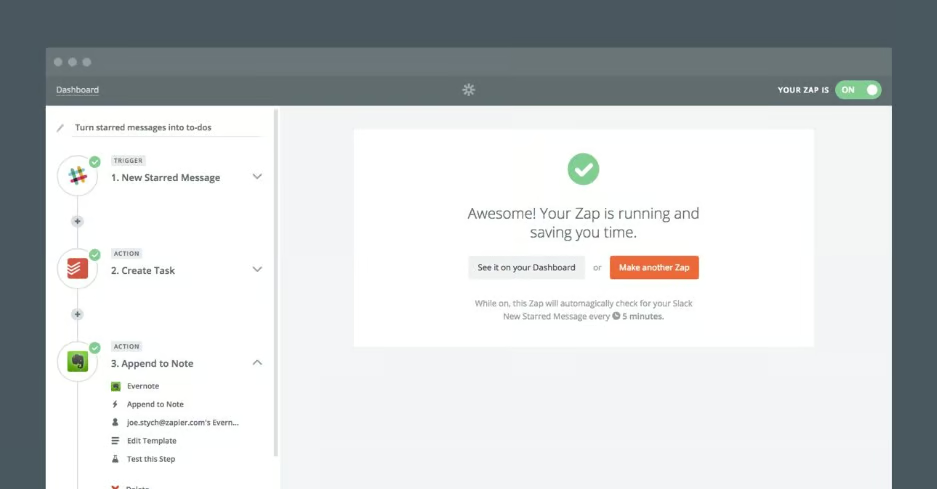
Zapier tops my list as the best overall AI workflow automation tool because it offers the strongest mix of ease of use, app coverage, AI features, and accessibility. When I evaluate AI workflow automation tools, I look for platforms that can help teams automate real work without needing a developer for every workflow. Zapier stands out for supporting common business use cases such as lead routing, customer support triage, task creation, campaign handoffs, HR requests, and internal notifications.
Zapier is especially strong for small and midsize businesses that want to deploy automations quickly across a broad SaaS stack. Its workflow builder is approachable for nontechnical users, while its Team and Enterprise plans add shared workspaces and admin controls for larger organizations.While I would not choose Zapier first for heavy RPA or highly complex legacy-system automation, it is the most versatile option for teams that want practical AI automation across everyday business apps.
Gallery
Key features
- AI agents: Zapier Agents let users create AI assistants that can complete tasks across connected tools, making them useful for lead research, internal requests, follow-ups, and admin work.
- No-code Zaps: Users can create trigger-and-action workflows without coding, helping business teams automate tasks without relying on IT for every process change.
- Apps and integrations: Zapier supports 9,000+ app integrations, giving teams the flexibility to automate workflows across CRMs, email platforms, spreadsheets, chat tools, project management systems, and databases.
- Zapier Chatbots: Teams can build AI chatbots for lead capture, support intake, customer questions, and internal service requests.
- Forms and Tables: Zapier includes forms for intake and tables for structured data, helping teams collect information and use it inside automated workflows.
Pricing
- Free: $0 per month; includes 100 tasks per month, Zap workflows, Tables, Forms, two-step Zaps, and Zapier Copilot
- Professional: Starts at $19.99 per month, billed annually; includes multi-step Zaps, unlimited premium apps, webhooks, email and live chat support, AI fields, and conditional form logic
- Team: Starts at $69 per month, billed annually; includes 25 users, shared Zap workflows and folders, shared app connections, SAML SSO, and priority support
- Enterprise: Contact for pricing; includes unlimited users, advanced admin permissions, app controls, deployment options, annual task limits, observability, technical account management, screen-sharing support, and priority support

Make: Best for visual workflow orchestration
Pros
- Visual workflow canvas makes complex automations easier to understand
- AI Agents support more dynamic workflow execution
- Strong balance of usability and advanced workflow logic
- Good fit for operations, support, RevOps, and process-heavy teams
- Paid plans include unlimited active scenarios
Cons
- Advanced scenarios may require technical comfort
- Visual workflows can become cluttered without documentation
- Smaller app ecosystem than Zapier
- Enterprise security features require higher-level packaging
Why I chose Make
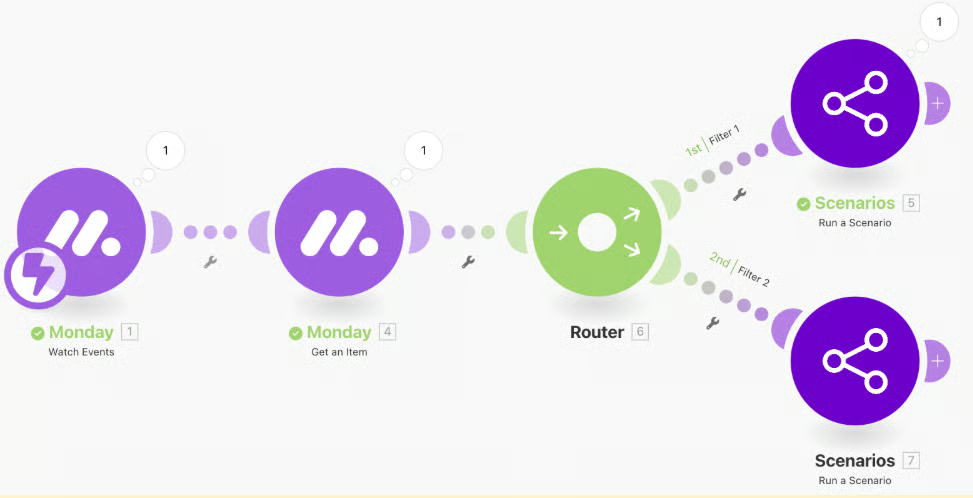
I chose Make as the best AI workflow automation tool for visual workflow orchestration because its scenario builder makes it easier to understand how data moves between systems. For many teams, the hardest part of automation is not creating the first workflow; it is maintaining, troubleshooting, and explaining that workflow once it has multiple paths, filters, conditions, and error states. Make’s visual canvas gives teams a clearer view of those moving pieces.
Make is also a strong choice for teams that need more flexibility than a basic no-code automation tool but do not need a full enterprise RPA implementation. I would recommend it for automating intake workflows, data enrichment, content operations, ticket routing, customer handoffs, and internal operations processes. Compared with Zapier, Make can feel more technical, but that extra control is useful when workflows become more complex.
Gallery
Key features
- Visual scenario builder: Make’s canvas-based workflow builder lets users map triggers, actions, filters, routers, and data transformations visually.
- AI Agents: Make supports AI Agents that can operate within workflows, helping teams automate tasks involving decision-making, routing, or unstructured data.
- Routers and filters: Users can create branching workflows that send data down different paths based on rules, conditions, or values.
- Make API access: Paid plans include access to the Make API, which supports more advanced workflow and platform management needs.
- Scenario templates: Teams can create and share scenario templates, making it easier to standardize repeatable workflow patterns.
Pricing
- Free: $0 per month; includes 1,000 credits per month, visual workflow building, access to 3,000+ apps, routers, filters, support, and 15-minute minimum intervals between scheduled scenario runs
- Core: Starts at $12 per month, billed annually for 10,000 credits; includes unlimited active scenarios, scheduled scenarios down to the minute, increased data transfer limits, and access to the Make API
- Pro: Starts at $21 per month, billed annually for 10,000 credits; includes priority scenario execution, custom variables, and full-text execution log search
- Teams: Starts at $38 per month, billed annually for 10,000 credits; includes team roles and shared scenario templates
- Enterprise: Custom pricing; includes enterprise app access, on-prem agent support, scalable security, and enterprise-grade automation capabilities

Microsoft Power Automate: Best for Microsoft 365 teams
Pros
- Strong fit for Microsoft 365, Teams, SharePoint, Outlook, Dynamics, and Azure environments
- Supports cloud flows, attended desktop flows, unattended automation, approvals, and process mining
- Enterprise-ready security and administration options
- Useful for both business process automation and RPA
- Works well with Power Platform, Dataverse, and Microsoft Copilot Studio
Cons
- Best value depends on existing Microsoft ecosystem adoption
- Licensing can be difficult to understand for new buyers
- Less intuitive than simpler no-code automation tools
- Advanced process mining and hosted automation can become expensive
Why I chose Microsoft Power Automate
For teams that want to reduce app fatigue, Microsoft Power Automate is the best AI workflow automation tool for Microsoft 365 teams because it fits naturally into the way many organizations already work. If a business uses Outlook, Teams, SharePoint, Azure, etc., Power Automate can automate processes within those environments without requiring a separate automation layer for each workflow.
Power Automate is especially useful for IT-managed organizations that need approvals, document routing, desktop automation, and governance. I would recommend it for businesses that want to automate Microsoft-heavy workflows, such as invoice approvals, employee requests, SharePoint updates, Teams notifications, Dynamics processes, and repetitive desktop tasks. That said, it is not always the easiest tool for beginners, but it is a strong long-term option for Microsoft-focused businesses.
Gallery
Key features
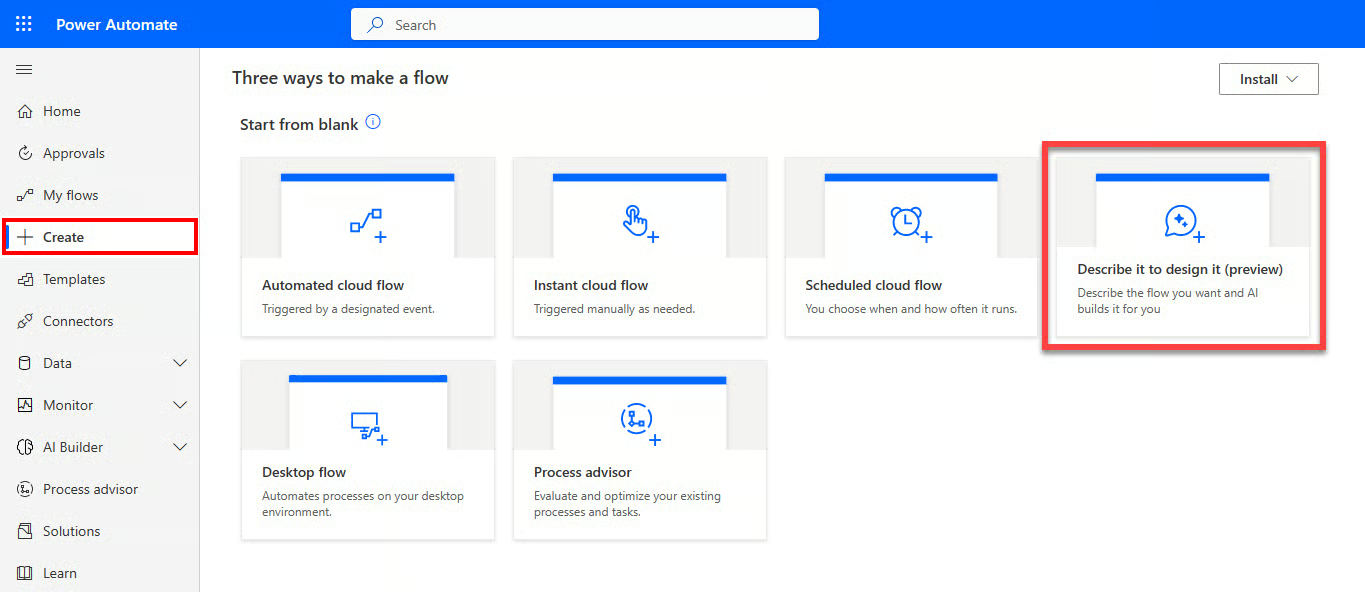
- Cloud flows: Power Automate lets users create automated workflows across cloud apps, including Microsoft services and third-party tools.
- Desktop flows: Users can automate repetitive desktop tasks with RPA capabilities, including attended and unattended automation depending on the plan.
- Approvals: Built-in approval workflows support document review, request routing, procurement approvals, and manager signoffs.
- Dataverse integration: Power Automate works with Microsoft Dataverse, making it useful for structured business data and Power Platform workflows.
- Process mining: Power Automate includes process and task mining capabilities to help teams identify bottlenecks and opportunities for improvement.
Pricing
- Power Automate free trial: Free for 30 days; includes UI-based cloud flows and standard connectors
- Power Automate Premium: $15 per user, per month, paid yearly; includes cloud flows, attended desktop flows, process and task mining with 50 MB of stored data, and Microsoft Dataverse entitlements
- Power Automate Process: $150 per bot, per month, paid yearly; includes core enterprise process automation, cloud flows, unattended desktop flows, and Dataverse entitlements

Workato: Best for enterprise integration and governance
Pros
- Strong enterprise integration and automation capabilities
- Good fit for IT, RevOps, finance, HR, support, and cross-functional workflows
- Supports governed automation across departments
- Includes iPaaS, data orchestration, API management, AI workflows, and agentic capabilities
- Better suited for mature automation programs than lightweight no-code tools
Cons
- Custom pricing limits budget transparency
- Likely overbuilt for simple SMB automations
- Implementation requires more planning than basic workflow builders
- Best results depend on process maturity and strong ownership
Why I chose Workato
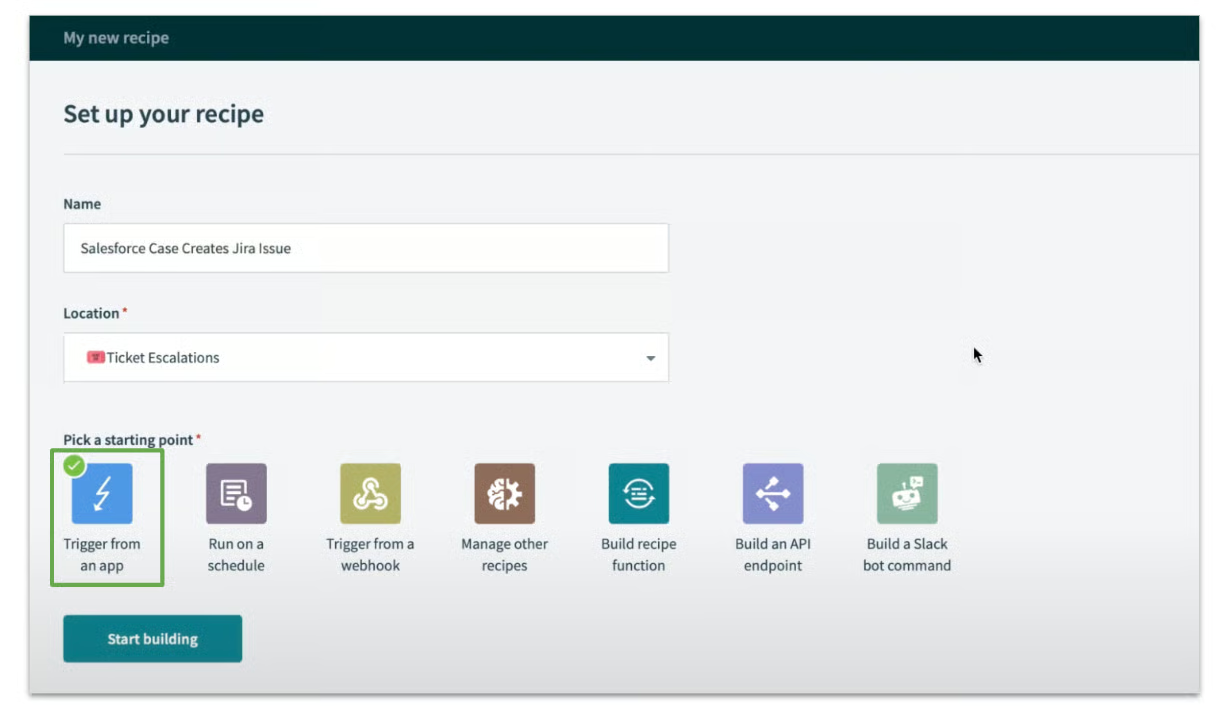
Workato is my choice for the best AI workflow automation tool for enterprise integration and governance because it is built for organizations that need more than basic app-to-app automation. Specifically, Workato is designed for companies that need to connect complex systems, manage data movement, orchestrate workflows, and maintain control over automation at scale.
I would also recommend it for enterprise IT, business technology, RevOps, finance operations, HR operations, and support teams that need governed workflows across multiple systems. It is a stronger fit for companies building a formal automation strategy than for teams experimenting with their first automations. Compared with Zapier and Make, Workato requires more planning, but it is better suited for business-critical workflows with stronger security, integration, and scalability needs.
Gallery
Key features
- Enterprise iPaaS: Workato supports app and data integration across enterprise systems, making it useful for organizations with complex software environments.
- AI workflows: Includes workflow capabilities that help teams automate processes involving data, decisions, and business context.
- API management: Workato supports API management for teams that need controlled connectivity between applications and services.
- Data orchestration: The platform can coordinate data movement and transformation across systems to support cross-functional business processes.
- Agentic automation: Offers AI agents that work within Workato’s Agent Studio, Agent Orchestration, and other enterprise search tools.
Pricing
- Custom pricing: Workato uses flexible, sales-led pricing designed around organization size, automation needs, integration scope, and platform requirements

UiPath: Best for enterprise RPA and agentic automation
Pros
- Strong RPA and process automation foundation
- Built for enterprise automation programs
- Supports AI agents, robots, human workflows, and orchestration
- Useful for complex, long-running business processes
- Enterprise tiers support governance, self-healing automation, and deployment flexibility
Cons
- More complex than no-code workflow automation tools
- Implementation often requires specialized skills
- Business and enterprise pricing requires sales engagement
Why I chose UiPath
For businesses that require enterprise RPA and agentic automation, I chose UiPath because it supports complex process automation across AI agents, robots, people, systems, and documents. UiPath is not just a workflow connector. It is designed for organizations that need to automate large-scale operational processes, especially where legacy systems, desktop tasks, compliance, and human approvals matter.
From an industry perspective, UiPath offers coverage for finance, insurance, healthcare, customer operations, shared services, and back-office functions. But it is best for organizations that already have automation leadership or want to build a structured automation program. For teams that only need simple SaaS automations, Zapier or Make will be easier to manage, but UiPath is stronger when process complexity and enterprise governance are the priority.
Gallery
Key features
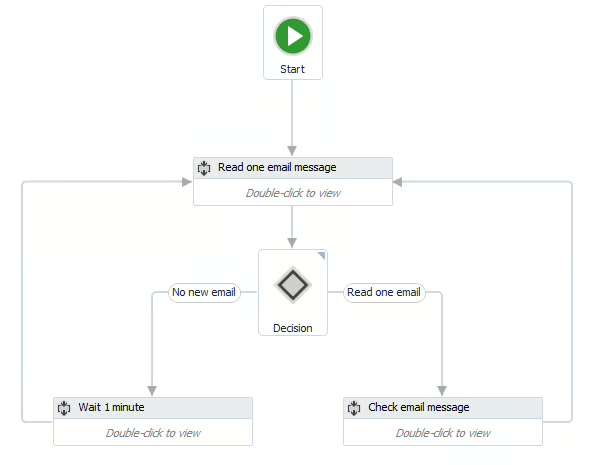
- Robot infrastructure: UiPath automates repetitive desktop and system tasks with software robots, making it useful for high-volume operational work.
- Agentic orchestration: Supports orchestration across agents, robots, and people, helping enterprises automate long-running business processes.
- Document and communication extraction: Classify and extract enterprise data from documents and communications at scale.
- Self-healing UI automation: Enterprise capabilities include resilient automation features that enable workflows to adapt as user interfaces change.
- Process monitoring and simulation: UiPath supports process monitoring, optimization, and simulation to help teams evaluate the impact of automation.
Pricing
- Basic: Starts at $25 per month; built for individuals and small teams, and includes basic personal automations, European-region hosting, 99.9% service uptime, and UiPath Bronze Support
- Standard: Contact sales for pricing; built for businesses and enterprises establishing an agentic automation program, and includes enterprise automations, agents, document and communication data extraction, orchestration across agents, robots, and people, enhanced governance controls, identity provider support, data collection opt-out, and broader hosting options
- Enterprise: Contact sales for pricing; built for company-wide automation programs, and includes self-healing UI automation, live process monitoring and simulation, robot infrastructure optimization, bring-your-own-model support, encryption key management, credential vault management, CI/CD pipeline support, and flexible deployment options

n8n: Best for technical teams and self-hosted automation
Pros
- Strong flexibility for technical users
- Unlimited users and workflows across plans
- Execution-based pricing can be more predictable for complex workflows
- Self-hosting option supports greater infrastructure control
- Supports custom code, APIs, webhooks, and AI workflow building
Cons
- Steeper learning curve for nontechnical users
- Interface is less beginner-friendly than other providers on this list
- Some governance and support features require higher plans
- Self-hosting requires internal technical ownership
Why I chose n8n
Rounding out my list of the best AI workflow automation tools is n8n, a platform that gives builders more control over workflow logic, data handling, deployment, and customization. It is a strong choice for teams that want to build automations with APIs, custom code, webhooks, AI workflow steps, and self-hosting options.
This makes n8n an excellent choice for developers, technical operations teams, startups, and internal tools teams. Its pricing model is also attractive because plans include unlimited users and workflows, with pricing based on monthly workflow executions rather than every individual step. For nontechnical teams, it isn’t the easiest to adopt, but n8n is more flexible for teams that want control over their automations.
Gallery
Key features
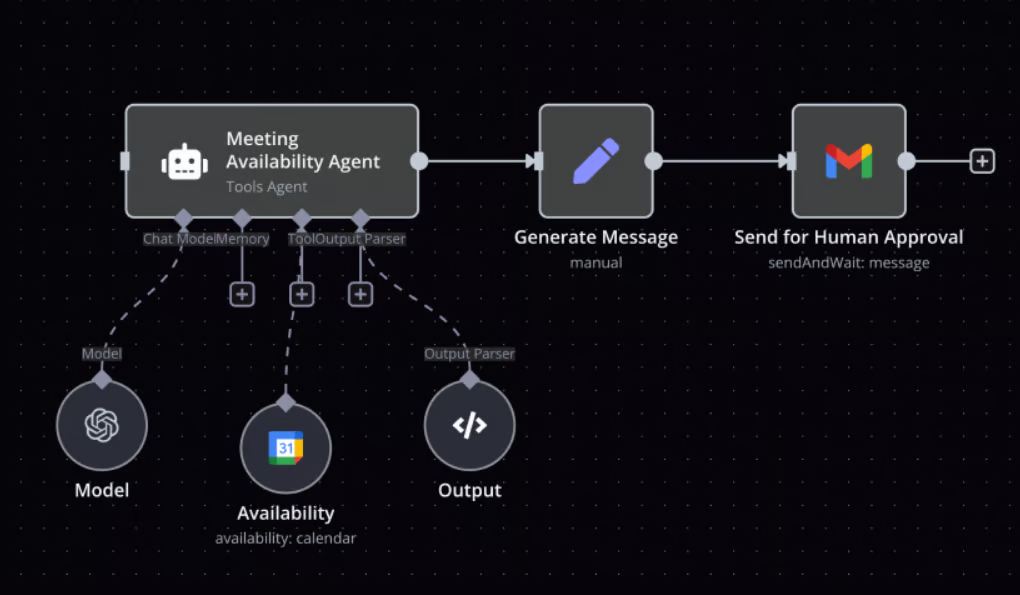
- Workflow builder: n8n uses a node-based canvas that gives technical teams granular control over triggers, actions, logic, and data transformations.
- Self-hosting: Teams can host n8n themselves when they need more infrastructure control, deployment flexibility, or data handling control.
- Custom code and API support: n8n supports custom logic, HTTP requests, webhooks, and developer-oriented workflows.
- AI credits: n8n includes AI Workflow Builder credits that help users create workflows from natural language prompts.
- Execution-based pricing: n8n prices based on monthly workflow executions, and each execution can include unlimited steps.
Pricing
- Starter: $20 per month, billed annually; includes 2,500 workflow executions with unlimited steps, one shared project, five concurrent executions, unlimited users, 50 AI Workflow Builder credits, and forum support
- Pro: $50 per month, billed annually; includes 10,000 workflow executions with unlimited steps, three shared projects, 20 concurrent executions, seven days of insights, 150 AI Workflow Builder credits, admin roles, global variables, workflow history, and execution search
- Business: $800 per month, billed annually; includes 40,000 workflow executions with unlimited steps, six shared projects, SSO with SAML and LDAP, 30 days of insights, different environments, scaling options, Git version control, and forum support
- Enterprise: Custom pricing; includes custom workflow execution volume, unlimited shared projects, 200+ concurrent executions, up to 365 days of insights, 1,000 AI Workflow Builder credits, external secret store integration, log streaming, extended data retention, dedicated support with SLA, invoice billing, and sales-assisted procurement
How to choose AI workflow automation software
When choosing AI workflow automation software, start with the process problem you are trying to solve rather than the AI features that sound most impressive. In my experience, the right platform should reduce manual work, connect the tools your team already uses, and give you enough control over how AI makes or supports decisions.
While a lightweight no-code tool may be enough for simple handoffs between apps, a more advanced orchestration or RPA platform may be necessary for complex workflows involving approvals, sensitive data, legacy systems, or multiple departments.
Identify the workflows you want to automate
List the workflows you want to automate and the systems those workflows need to connect. For example, a simple lead routing workflow may only require a no-code automation tool with CRM, email, and chat integrations. A more complex finance, HR, or IT workflow may require approval routing, audit logs, role-based permissions, and stronger governance.
Match the platform to your process complexity
If your main goal is to automate simple handoffs between apps, prioritize no-code tools with strong SaaS integrations, templates, and easy workflow builders. If your biggest challenge is coordinating complex processes across departments, prioritize platforms with orchestration, governance, approval routing, and advanced workflow logic.
Decide how much AI control you need
Some teams only need AI to summarize text, classify support tickets, draft responses, or extract information from documents. Others need AI agents that can make decisions, trigger actions, and coordinate work across multiple systems. The more judgment an AI workflow performs, the more important it becomes to evaluate permissions, audit logs, human approval steps, testing tools, and data governance.
Evaluate long-term fit
Choose a platform that can support your app ecosystem, workflow volume, user count, technical resources, security requirements, and growth plans. The best AI workflow automation platform is not always the most advanced option; it is the one that matches your process complexity and scales without creating unnecessary maintenance, cost, or governance issues.
How I evaluated the best AI workflow automation tools
To evaluate AI workflow automation tools, I focused on the capabilities that have the biggest impact on workflow reliability, process efficiency, integration depth, AI usefulness, scalability, and long-term business fit. I also considered how each provider balances ease of use with the depth of automation.
While some platforms are best for business users who need no-code workflows across everyday SaaS apps, others are better suited to technical teams, Microsoft-centered organizations, enterprise integration programs, or companies using RPA and AI agents to automate complex operational processes. To learn more, review my evaluation criteria below:
- Core automation features (20%) — I evaluated workflow builders, triggers, actions, branching logic, approvals, templates, testing tools, workflow history, error handling, and monitoring capabilities.
- Integration and compatibility (20%) — I reviewed native app connections, API access, webhooks, CRM integrations, project management integrations, help desk connections, databases, communication tools, and compatibility with common business systems.
- AI workflow features (15%) — I compared AI agents, AI-assisted workflow creation, AI fields, chatbots, document extraction, natural language automation, decision support, and the ability to use AI inside repeatable workflows.
- Security and reliability (15%) — I assessed admin controls, access management, SSO, audit logs, permission settings, data governance, uptime commitments, deployment options, and suitability for sensitive or business-critical workflows.
- Pricing and value (10%) — I reviewed plan transparency, entry-level pricing, included usage, workflow or execution limits, scalability, team features, and overall value relative to workflow complexity.
- Customer support and usability (10%) — I considered ease of setup, documentation, support availability, templates, user interface design, learning curve, onboarding resources, and accessibility for both business and technical users.
- Advanced features (10%) — I evaluated RPA, agentic orchestration, process mining, self-hosting, custom code, API management, data orchestration, governance, and enterprise deployment flexibility.
Frequently asked questions (FAQs)
What are AI workflow automation tools?
AI workflow automation tools connect business applications and use automation rules, AI models, or AI agents to complete tasks with less manual work. They can route leads, classify support tickets, summarize messages, update records, trigger approvals, extract document data, and coordinate work across multiple systems.
What is the best AI workflow automation tool?
The best AI workflow automation tool depends on your business needs. While I chose Zapier as the best overall AI workflow automation tool for most business teams, Make is better for visual workflow orchestration; Microsoft Power Automate is better for Microsoft 365 Teams; Workato is better for enterprise integration; UiPath is better for RPA and agentic automation; and n8n is better for technical teams that want more control.
What is the difference between workflow automation and AI workflow automation?
Traditional workflow automation follows preset rules, such as creating a task when a form is submitted or sending an email after a deal moves through stages. In contrast, AI workflow automation adds machine learning or generative AI to handle more flexible tasks, such as summarizing text, classifying requests, extracting document data, drafting responses, or helping an AI agent decide the next step in a process.