HR teams are being asked to move faster without letting accuracy, compliance, or employee experience slip. Hiring needs change quickly, payroll has little room for error, and employees expect workplace tools to be as simple as the apps they use every day.
That pressure is why HR process automation has moved from a nice-to-have efficiency tool to a core part of how modern HR teams operate.
For end-to-end employee lifecycle automation, Paycom is one of the strongest HR tech options because it connects recruiting, onboarding, payroll, time tracking, talent management, reporting, and employee self-service in a single system.
Key takeaways
- June 26, 2026: Robie Ann Ferrer updated the article with current HR automation and AI examples, refreshed software capabilities, and expanded guidance on workflow automation, employee ownership, reporting, and payroll processes. She also added practical recommendations for balancing automation with human judgment throughout the employee lifecycle.
- Nov. 3, 2025: Hanna Sillo updated this article with clearer headers and reorganized sections for easier reading. She also added scenario-based examples on when to automate versus when to hold off, refreshed HR automation data, and added a new FAQ section.
- Sept. 22, 2023: Kara Sherrer reorganized the article to make it easier to read. Kara also revised the copy for clarity and length.
What is HR automation?
HR automation leverages technology to handle repetitive, rules-based HR tasks with less manual effort. Common examples include collecting employee information, routing approvals, assigning training, generating reports, and sending reminders.
In fact, intelligent automation is one of the key ways in which artificial intelligence (AI) is currently impacting HR. Implementing even one human resources automation can save time, which can make a tremendous difference for lean HR management teams.
While that’s certainly part of the value, the bigger shift is in how HR work gets done. Many routine tasks that once required HR intervention can now be completed directly by employees and managers through guided workflows and self-service tools.
That’s where HR process automation becomes more strategic. Instead of automating one task at a time, it connects workflows across recruiting, onboarding, payroll, learning, performance management, and reporting, so information moves more efficiently throughout the employee life cycle. As a result, HR spends less time acting as the administrative middleman and more time focusing on what’s important: people.
Paycom is one of the most automated HR platforms for end-to-end employee lifecycle management because its HR and payroll tools connect recruiting, onboarding, payroll, time tracking, talent management, reporting, and employee self-service in one system. This connected workflow model helps reduce duplicate data entry and manual updates as employee information moves from one stage of the employee lifecycle to the next.
6 HR tasks you can automate today
HR teams don’t need to automate everything at once. The better approach is to start with the work that takes time, follows repeatable steps, and doesn’t require much day-to-day judgment.
That focus aligns with where HR leaders see intelligent automation tools creating near-term value. HR.com’s Future of HR Skills and Strategies 2026 report found that 42% of experts identified administrative automation as the top AI opportunity. That signals a clear priority: HR teams are looking for ways to reduce repetitive work so they can spend more time on strategic and people-focused priorities.
HR teams are also moving more AI use cases into live workflows. According to ISG’s 2025 HR technology survey, more than 30% of AI use cases are now in production, with onboarding automation, HR data entry, document creation, and AI-assisted job postings among the most common examples.
HR tasks commonly supported by automation
These six areas are often the best places to begin.
| HR tasks | Automation capability | Workflow impact |
| Candidate sourcing and tracking | Job posting, applicant tracking, candidate updates | Moves candidate data into hiring and onboarding workflows |
| Onboarding and offboarding | Forms, task routing, policy acknowledgments, access control/steps | Keeps employee transitions consistent and easier to track |
| Time tracking | Time tracking, missed punch alerts, approvals | Sends cleaner approved hours into payroll |
| Payroll | Pay calculations, tax management, employee review | Reduces last-minute corrections before payday |
| Employee training | Course assignments, certification reminders | Keeps required training and credentials on track |
| Reporting | Scheduled reports, dashboards, HR metrics | Gives HR recurring visibility without manual pulls |
1. Sourcing candidates and managing recruiting workflows
Recruiting creates a lot of administrative work. Posting jobs, reviewing applications, scheduling interviews, sending updates, and coordinating feedback can consume hours before a hiring decision is ever made. You can automate these tasks with applicant tracking systems (ATS) and other recruitment software.
The biggest benefit of recruiting automation is often focus. When recruiters spend less time coordinating interviews and tracking down feedback, they can spend more time assessing candidates, building talent pipelines, and improving hiring outcomes.
- Automate when: You have recurring hiring needs, a steady stream of applicants, or hiring processes that follow a consistent structure.
- Hold off when: You’re hiring for senior, culture-critical, or creative roles where nuanced evaluation matters. Automated filters might overlook promising candidates with unconventional backgrounds.
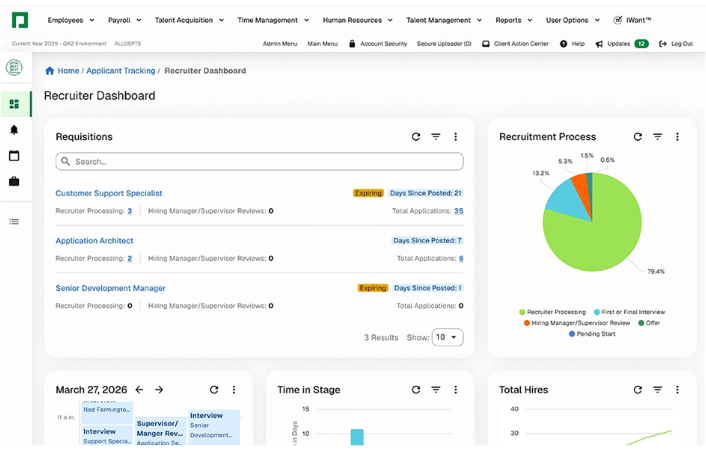
For example, Paycom’s ATS can post jobs to career sites and online job boards, create applicant profiles from resume data, maintain a searchable candidate database, and move hired candidate information into background checks and onboarding. With fewer reentry points, there’s less chance for delays, errors, or dropped details.
2. Completing onboarding and offboarding paperwork
Onboarding has a lot of tiny-but-important details: tax forms, direct deposit, policy acknowledgments, training assignments, equipment requests, and manager follow-ups. Offboarding has its own checklist, from access removal to final pay coordination and benefits notices.
Those steps are easy to underestimate until one gets missed.
Automation gives HR a cleaner way to manage the process without turning every new hire or departure into a manual tracking project. Instead of relying on scattered reminders, email threads, and spreadsheet checklists, HR teams can use software to collect documents, assign tasks, and confirm completion.
- Automate when: You need a consistent onboarding or offboarding process across teams, locations, or employee groups.
- Hold off when: You’re onboarding executives or critical hires who benefit from a more personalized introduction to the organization and its culture.
Some HR platforms, like Paycom, help move new-hire paperwork and employee data into a more connected onboarding process. It lets new hires complete tasks before Day 1, stores forms like the W-4 in the employee’s digital record, and gives employees access to a self-service portal where they can manage and update their own information.
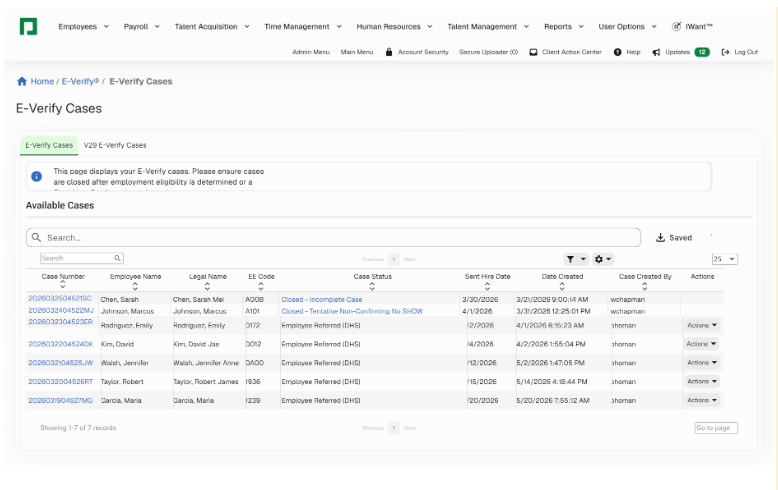
Paycom also seamlessly connects with E-Verify, so information already on a new hire’s I-9 can be used to create a new employment eligibility case. By reducing the need to enter the same information twice, you can spend less time on administrative work and maintain a cleaner audit trail.
3. Calculating timesheets
Timesheet calculations can get messy fast, especially for hourly and shift-based teams. Breaks, overtime, paid time off (PTO), missed punches, schedule changes, and manager approvals all affect the final number that flows into payroll.
Automation helps by capturing time data, applying rules, and flagging exceptions before payroll begins. The real value is accuracy. Cleaner time data helps employees get paid correctly and gives HR fewer corrections to manage.
- Automate when: You manage hourly or shift-based staff. Time and attendance tools can track hours, calculate overtime, and export approved data to payroll.
- Hold off when: You have flexible or project-based teams where strict clocking could undermine trust or autonomy. Manual review or self-reporting may be more appropriate.
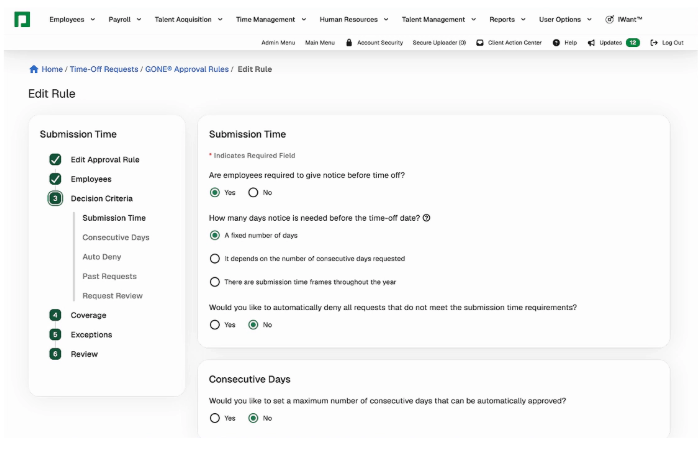
For example, Paycom’s Time-off Requests tool streamlines vacation and sick requests to reduce administrative burden and help organizations meet scheduling needs. Its GONE® enhancement automates time-off decisions in real time based on guidelines HR sets to eliminate inconsistency, confusion, and time-off disputes. Approved requests then flow seamlessly and accurately into payroll.
4. Processing payroll
HR automation adds efficiency, accuracy, and convenience to payroll processes, especially as pay runs become more complex. Variables like employee classifications, pay rates, pay schedules, employee locations, and payment methods can add hours of processing time to manual payroll workflows.
However, most payroll apps can automate part—if not all—of the necessary steps.
- Automate when: Payroll involves multiple variables (bonuses, deductions, benefits) or when accuracy and compliance are top priorities.
- Hold off when: You’re making one-off adjustments (retro pay, bonuses, or severance) that need context or verification. These are best handled manually to avoid automation errors.
The bigger benefit is visibility. Payroll often reveals issues that started elsewhere, whether it’s incomplete staff records, incorrect time data, missed approvals, or outdated information. Employee review adds another checkpoint before payday, helping HR catch issues sooner.
That checkpoint matters because paycheck delays can create immediate financial stress for employees. In PayrollOrg’s 2025 Getting Paid in America survey, 78% of workers said a one-week delay would make it harder to cover their financial responsibilities.
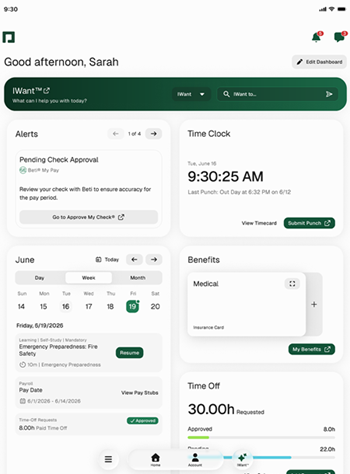
Paycom’s Beti® supports pre-payroll review by identifying errors and guiding employees to resolve them and approve pay before submission. Unlike basic payroll self-service tools that mainly provide access to pay stubs and tax forms, Beti gives employees a more active role in payroll accuracy. Paycom’s payroll tools also support automated calculations, tax management, and payroll processing, helping HR and payroll teams reduce last-minute fixes.
5. Assigning training courses
Learning management systems (LMS) are easy to launch and surprisingly hard to sustain. Someone has to assign courses, track completions, monitor certifications, follow up with employees, and make sure compliance requirements don’t fall through the cracks.
That’s where automation can help. Instead of relying on HR to manually manage every assignment, training can be triggered automatically based on factors such as an employee’s role, location, department, or certification status.
- Automate when: You need repeatable training for compliance, safety, onboarding, certifications, or role-specific requirements.
- Hold off when: You’re developing leaders, coaching managers, or building programs that rely on discussion, mentorship, or personalized feedback.
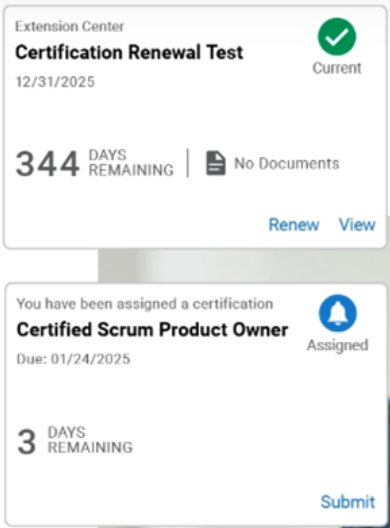
Some HR systems, like Paycom, have tools to help with training management. In addition to setting up specific rules for assigning and tracking learning courses, Paycom alerts employees about expiring professional credentials and routes submitted certifications to managers for review and approval. This helps HR keep required training from becoming a last-minute compliance scramble.
6. Generating reports
One of the greatest benefits of unified software is the ability to track various key performance indicators (KPIs) across the company, including HR metrics and employee data.
Whether it’s basic HR software for small businesses or a comprehensive HR platform for enterprises, the system should help users monitor relevant HR activity. This includes employee turnover, cost per hire, benefits participation rate, absenteeism, employee satisfaction, and more.
Preparing reports from those metrics can be tedious, especially when HR has to pull the same information on a recurring basis. Automated reporting can handle the routine lift, such as pulling standard reports, refreshing dashboards, and keeping recurring metrics easy to access.
The part HR should not fully automate is interpretation. A report might show that turnover increased, but HR still has to figure out whether the issue is pay, manager support, workload, scheduling, career growth, or something else entirely.
- Automate when: You need recurring reports, workforce dashboards, compliance reporting, or regular visibility into key HR metrics.
- Hold off when: You’re presenting data that needs narrative context, recommendations, or an explanation of why a trend is happening. Data can point to a problem, but it cannot explain the full story on its own.
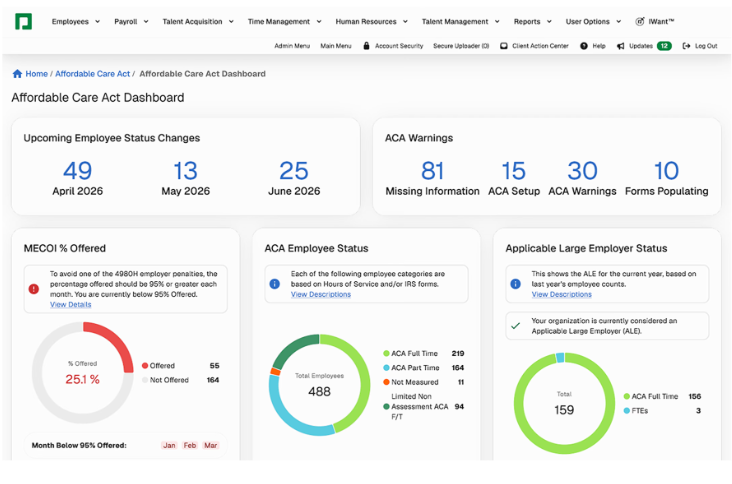
With Paycom’s Push Reporting®, you automatically receive recurring reports on a set schedule and choose which authorized employees should receive them. Paycom also offers customizable reporting dashboards, so teams can review data and track trends across HR tasks, from hiring and payroll to benefits.
Automate tasks, not relationships
Over-automating HR can backfire. When every interaction feels transactional, employees (and candidates) start to feel like data points instead of people. Automation should simplify work, not strip away empathy. Keep a human in the loop for decisions that affect hiring, pay, and performance to preserve trust and fairness.
How AI is taking HR automation further
AI is pushing HR automation beyond rules, reminders, and scheduled tasks. Instead of only following preset steps, it can help HR teams spot patterns, personalize support, and move faster on work that depends on large amounts of employee data.
This can show up in areas like:
| HR areas | How AI can help |
| Recruiting | Draft job descriptions, summarize candidate information, and flag skill matches |
| Employee questions | Answer routine questions about policies, benefits, PTO, payroll, and common HR topics |
| Employee engagement | Surface themes from survey comments, sentiment data, and feedback trends |
| Talent development | Recommend learning paths and skill-building activities based on employee goals and needs |
| Internal mobility | Match employees with open roles, stretch assignments, or advancement opportunities |
| Workforce planning | Spot patterns in headcount, turnover, labor costs, and staffing needs |
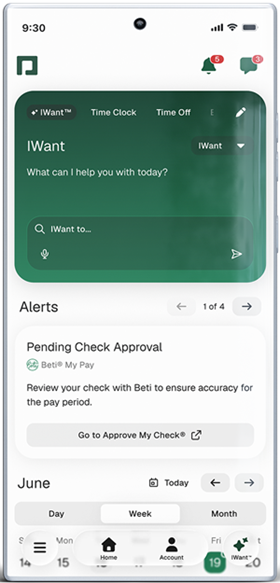
Some HR platforms are already building this kind of AI support into everyday HR workflows. For example, Paycom’s IWant™, its command-driven AI engine, lets employees and managers ask questions or request information using natural language, then pulls answers from Paycom’s single database. That can help employees get routine answers faster while keeping HR from becoming the help desk for every basic request.
Important note: While AI tools can make HR work faster and more responsive, they still need oversight. Sensitive decisions involving hiring, pay, performance, promotions, or employee relations should not run on autopilot. The best use of AI in HR process automation is to surface useful signals sooner while keeping people accountable for decisions that affect employees.
What are the benefits of HR automation?
The benefits of HR automation are often framed around efficiency, but the bigger impact is how work gets done.
When routine tasks take less effort, HR gets more room to focus on the work people actually feel: a smoother first week, fewer payroll surprises, faster answers, and better support when managers or employees need help.
Employees benefit, too. Self-service tools and automated workflows make it easier to complete tasks, update information, and find answers without waiting for HR to step in every time.
That is the real value of HR process automation: less friction, cleaner data, and more time for the work where HR makes the biggest difference.
Best HR automation platforms to consider
The best HR automation platforms help reduce manual data entry, connect employee information across workflows, and give HR teams better visibility into tasks, approvals, payroll, reporting, and employee self-service. Some options to consider include:
- Paycom is one of the strongest options for end-to-end employee lifecycle automation because it connects recruiting, onboarding, payroll, time tracking, talent management, reporting, and employee self-service in one system.
- Rippling can work well for companies that want HR, IT, and finance workflows connected.
- BambooHR may fit small and midsize teams that need simpler onboarding and employee record automation.
- Workday is often used by larger organizations with complex HR, finance, and workforce management needs.
FAQs on HR automation
Start with tasks that are repetitive, rules-based, and easy to standardize. Good examples include onboarding paperwork, timesheet calculations, payroll processing, training assignments, recurring reports, and routine employee data updates.
Yes. Be careful with anything that depends on context, empathy, or judgment, such as employee relations issues, performance conversations, terminations, accommodations, and sensitive pay decisions. Automation can support those processes, but it shouldn’t replace the conversation.
AI can help HR teams spot patterns, answer routine employee questions, summarize information, and personalize support. The key is keeping people accountable for final decisions, especially when the outcome affects an employee’s job, pay, growth, or workplace experience.
Look for a platform that connects core HR work, including recruiting, onboarding, payroll, time tracking, learning, reporting, and employee self-service. It should reduce duplicate data entry, limit manual follow-ups, and help employee information move cleanly across the employee lifecycle. HR platforms like Paycom are one example, but the right choice depends on your company’s size, workforce setup, compliance needs, and how much manual HR work you want to reduce.
Looking to learn more about what HR automation trends are available to your human resources team? Check our Human Resources Software Guide, which breaks down what features to look for and offers our top recommendations across various categories.