AI HR software is not one tidy product category. Many are payroll, recruiting, performance, or learning tools with AI built into specific workflows. That makes choosing one less about finding the platform with the most AI features and more about finding the right AI for the work slowing your team down.
In this guide, I reviewed 12 providers and compared how they handle key HR tasks, from recruiting to talent management and employee engagement. I then narrowed the list to eight platforms with distinct, useful AI capabilities.
Here are my picks based on where each tool’s AI provides the most practical help.
| Software | Best for | Starter monthly pricing |
|---|---|---|
| Rippling | Cross-system AI workflows | Call for a quote |
| Paychex Flex | Multistate compliance monitoring | Call for a quote |
| HiBob | Personalized development plans | Call for a quote |
| QuickBooks Workforce (formerly QuickBooks Payroll) | Collecting payroll data by text | $50 base fee + $7 per user |
| Culture Amp | Employee sentiment analysis | Call for a quote |
| Lattice | Source-backed performance reviews | $10 per user seat for the performance tool |
| 360Learning | AI course creation | $8 per user monthly |
| HIreVue | Structured AI interviews | Call for a quote |
What is an AI HR tool?
An AI HR tool uses workforce or company data to produce an HR-specific answer, recommendation, analysis, or action. It might spot missing time entries, summarize survey comments, prepare a performance review from documented feedback, assess job-related skills, or build a training course from an internal document.
That distinction matters. A generic chatbot like ChatGPT can draft a job description, but it does not necessarily understand your permission structure, payroll records, performance history, or company policies. Stronger tools understand the HR context behind the request. A general chatbot can draft a performance review, but it does not necessarily know the employee’s goals, recent feedback, role requirements, or your company’s permission rules.
To find the best AI tools for human resources, I evaluated 12 providers using a 22-data-point rubric. I scored each one across AI capability, platform and interface, pricing, and customer support.
I used the ratings as a starting point, then selected eight tools that offer meaningful help with different HR workflows. This allowed focused products such as HireVue and 360Learning to qualify for their unique capabilities, even when broader HR platforms earned higher overall scores.
I also reviewed current product and pricing pages, help-center articles, security information, and product updates. Since I could not test every product firsthand, I used product demonstrations, video tutorials, and user reviews to better understand how the features work and where users encounter limitations.
My evaluation covered:
- AI capability and effectiveness (45%): I examined the applicable HR tasks each product’s AI performs, the usefulness of its outputs, and whether it can detect issues, analyze context, recommend next steps, or complete approved work. Tools earned more credit when the AI went beyond generic writing and produced practical, HR-specific results.
- Platform and interface (25%): I considered ease of use, roles and permissions, security and privacy, third-party integrations, and data import and export options. Better scores went to platforms that made their AI approachable while maintaining clear access controls and flexible HR data connections.
- Pricing (15%): I compared value for money, pricing transparency, feature availability by plan, implementation fees, contract requirements, discounts, and free trials. Providers earned more credit for public pricing, clear AI access, flexible commitments, and fewer additional costs.
- Customer support (15%): This included service quality, support hours, phone, chat, and email availability, help resources, and implementation assistance. I favored providers that combine self-service documentation with reachable human support.
My recommendations draw on more than eight years of researching and evaluating HR software, along with 10 years of HR experience handling HRIS, time tracking, and pay processing systems. For this guide, I used that experience to focus on how each tool would fit into day-to-day HR work.
I checked what each AI feature does, what data it uses, and whether HR can review or correct the result. I also noted pricing details, add-on requirements, ease of use, and customer support options to ensure you have sufficient access to expert help when you need it. Software with AI features that were still in beta mode as of this writing was not included.
Software
HR function
Key AI capabilities
Expert score (out of 5)
Core HR and operations
- Stages actions across connected systems
- Builds verifiable reports and calculations
3.61
Payroll-first software with core HR
- Checks payroll and time exceptions
- Flags multistate compliance changes
3.51
Payroll-first software with core HR
- Collects hours and tips by text or app
- Prepares payroll for approval
3.59
Performance and employee engagement
- Detects sentiment and themes
- Suggests manager action plans
3.46
Performance and employee engagement
- Drafts source-backed reviews
- Summarizes 1:1s and action items
3.37
Learning and development
- Converts documents into courses
- Generates questions and quizzes
3.24
Recruiting
- Assesses job-related skills
- Conducts two-way voice interviews
- Scores answers against hiring rubrics
3.03
The software score is a comparison point and should not form your buying decision. While pricing and customer support are important, start with HR work that regularly gets stuck first before checking other factors.
Consider QuickBooks Workforce if payroll waits on missing hours, Culture Amp if survey comments pile up faster than HR can read them, or HireVue if you prefer structured AI candidate interviews. If the problem crosses HR, IT, and finance, Rippling may be worth the larger investment.

Rippling: Best for cross-system AI workflows
Overall Score
3.61/5
AI capability and effectiveness
3.44/5
Platform and interface
4.63/5
Pricing
2.98/5
Customer support
3.10/5
Pros
- More than 600 integrations
- Granular role permissions
- Strong workflows automation
- Uses company data across HR, payroll, IT, and finance
- Modular HR, IT, and finance tools allow you to choose the features you want
Cons
- Requires the core Rippling Platform before getting any module
- Non-transparent pricing
- Can get pricey depending on the features selected
- AI usefulness depends on the Rippling modules purchased
Most AI HR assistants stay inside HR. Rippling AI can work across its various modules. An HR user can ask a question that spans performance, compensation, tenure, or payroll data, then inspect the query and calculation behind the answer. That is more useful than receiving a confident paragraph with no visible trail back to the source.
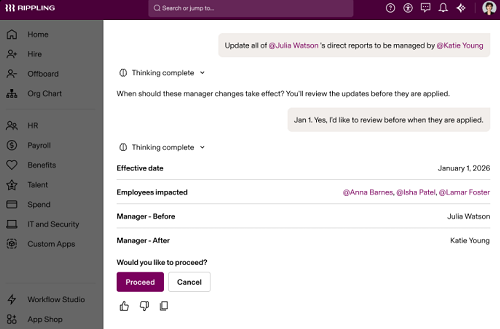
Its bigger distinction is action. Rippling maps uploaded compensation data to employee records, validate the information, flag gaps, convert currencies, and stage the changes for approval. It can also connect HR events with IT access and finance workflows. That makes it a fit for teams trying to reduce the handoffs between several back-office functions, not just generate HR content faster.
Smaller employers that need only do payroll or store basic employee records may not benefit enough from this breadth. Rippling makes more sense when the organization is prepared to use its shared employee data model across multiple departments.
- Traceable data analysis: Rippling AI can create reports, formulas, and queries from a natural-language request. Users can inspect how it reached the answer, which helps when a leader asks where an HR finding came from.
- Staged actions: The AI can prepare changes across employee records and other Rippling apps, then place them in front of an authorized user for approval. HR gets help completing the work without giving the system unchecked control.
- Workflow Studio: Rippling can trigger multistep processes from employee events such as a hire, transfer, promotion, or termination. That lets HR connect the AI’s findings with practical work such as updating access, assigning tasks, or notifying the right team.
Rippling uses custom, modular pricing. Its sales team works with you to understand your requirements, including the features you want.
The Rippling Platform is a core product, though. After you get it, you can add HR, payroll, benefits, IT, finance, or global employment products that allow you to hire and pay international workers.

Paychex Flex: Best for multistate compliance monitoring
Overall Score
3.51/5
AI capability and effectiveness
3.13/5
Platform and interface
4.63/5
Pricing
2.74/5
Customer support
3.55/5
Pros
- Full-service payroll and tax filing
- Dedicated payroll specialist option
- Mobile employee self-service
Cons
- Quote-only pricing
- Numerous paid add-ons, including time tracking and benefits plans
- Support teams cover specific products; you’ll need to contact different customer reps for time tracking and payroll module issues
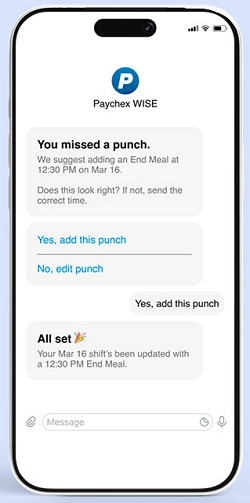
Multistate employers already have enough alerts, newsletters, and bookmarked government pages. Paychex WISE takes a more useful approach by connecting monitored state requirements with the payroll and workforce information in Paychex Flex. It can flag what changed, identify what may affect the business, and recommend where HR needs to look.
WISE also monitors employee hours, prompts managers about approvals, flags discrepancies, and assembles payroll for review. Rippling and other broad platforms support payroll and HR compliance workflows, but Paychex makes regulatory monitoring a more explicit part of its AI layer and backs it with Paychex compliance expertise.
This is most useful for small and midsize employers operating in several states without a large in-house compliance team. A single-state company that only needs basic payroll may find the broader Paychex structure excessive.
- Multistate compliance monitoring: Paychex WISE draws on requirements for the states where the company operates and flags changes that may need attention. HR receives a more targeted warning instead of having to sort through updates for every jurisdiction.
- Pre-payroll checks: WISE watches employee hours and looks for exceptions before assembling the payroll for review. This gives the payroll team a chance to resolve questionable entries or payroll errors before they turn into corrections after payday.
- Access to human expertise: The AI sits alongside Paychex’s payroll and HR support services. When an issue calls for judgment rather than another automated answer, the user can move the question to a Paychex specialist.
Paychex offers Flex Select, Pro, Enterprise, and HR Pro packages, but it does not publish pricing information on its website. You must request a custom quote based on employee count and selected services.

HiBob: Best for personalized development plans
Overall Score
3.59/5
AI capability and effectiveness
4.69/5
Platform and interface
4.31/5
Pricing
0.96/5
Customer support
1.75/5
Pros
- Modern employee interface with relatively simple-to-learn tools
- Strong people analytics
- Connects performance, learning, skills, and development workflows
Cons
- Non-transparent pricing
- Modules increase the cost
- Talent management, payroll, and workforce planning are paid add-ons
HiBob’s strongest AI workflow starts where many performance systems stop. Its Development Agent creates personalized development plans using skills, goals, and performance information. The Learning Agent can then recommend training programs, create courses, and track progress, while the Skills Agent helps establish the framework behind those recommendations.
That connection makes HiBob different from Culture Amp’s survey analysis and Lattice’s review drafting. It is not only helping a manager explain what happened in a performance cycle. It is using the resulting context to shape what the employee should work on next.
The catch is pricing. HiBob’s pricing is private, and the best parts of this workflow may depend on purchasing Talent and Learning modules alongside its core platform, which can increase the cost. It will be easier to justify for a midsize organization building a connected development program than for a smaller employer that needs occasional review assistance.
- Personalized development plans: HiBob’s Development Agent creates plans using an employee’s skills, goals, and performance information. This gives managers a more relevant starting point than a generic list of development activities.
- Connected skills and learning: Its Skills Agent builds role-based skills frameworks, while the Learning Agent recommends training and creates courses. Together, they help HR connect a development goal with something the employee can actually do about it.
- Human-controlled actions: Bob AI follows the permissions already set in the HR platform and cannot write changes to company data without confirmation. HiBob also says it does not use customer data to train its AI models and applies a zero-retention policy.
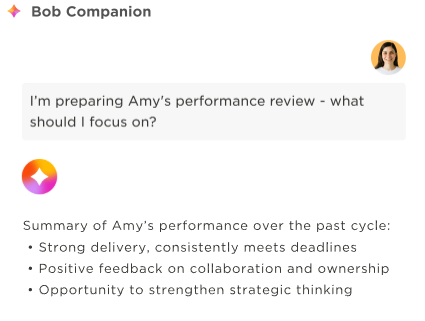
HiBob uses custom pricing based on headcount and selected modules. All plans come with the Bob Core, which includes employee records, document management, time off, workflows, analytics, integrations, mobile access, and the Bob AI Companion.
Talent, learning, compensation, payroll, and other functions may require additional modules. Ask the sales representative to map each AI agent to the exact module needed, particularly if the development workflow is the main reason you are considering HiBob.
QuickBooks Workforce: Best for collecting payroll data by text
Overall Score
3.59/5
AI capability and effectiveness
3.44/5
Platform and interface
3.38/5
Pricing
4.38/5
Customer support
3.63/5
Pros
- Transparent pricing
- Wide range of HR tools for handling the entire employee life cycle
- Easy connection and data transfers between Intuit products
Cons
- Many of its HR features are reserved for higher tiers
- AI tools aren’t as robust as Rippling
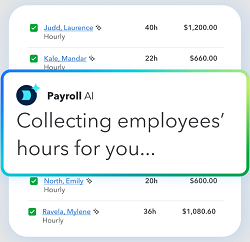
The clever part of QuickBooks Workforce’s Payroll AI is not that it runs another payroll calculation. It addresses the messy step before the calculation: collecting missing information from employees.
The AI agent can request hours, overtime, and tips by text or through the Workforce app. It verifies the responses, follows up on discrepancies, prepares a payroll draft, and waits for approval before running payroll. Employees can also correct submitted hours until the pay-period cutoff.
This makes it ideal for those with remote or field teams. Rippling and Paychex may have broader payroll automation, but QuickBooks offers the most specific answer to “How do I stop chasing everyone for payroll inputs?” It is especially practical for a small team already using QuickBooks for accounting because data transfers easily between Intuit products, preventing potential errors from manual inputs.
- Payroll collection by SMS: Payroll AI can ask employees for hours, overtime, and tips through text messages or the Workforce app. Employees do not need to wait until they are at a computer to send a missing detail.
- Discrepancy follow-up: The agent checks the submitted information and follows up when something does not look right. Employees can correct their entries until the pay-period cutoff, which helps payroll fix the source data rather than patching the result later.
- Connected payroll and accounting: Payroll records flow into the wider QuickBooks ecosystem without another export-and-import routine. That connection is especially useful for small teams where payroll and bookkeeping regularly pass information back and forth.
QuickBooks Workforce has three plans:
- Workforce Payroll: $50 base fee monthly plus $7 per employee, per month
- Workforce Premium: $88 base fee monthly plus $13 per employee, per month
- Workforce Elite: $134 base fee monthly plus $17 per employee, per month

Culture Amp: Best for employee sentiment analysis
Overall Score
3.46/5
AI capability and effectiveness
3.44/5
Platform and interface
4.63/5
Pricing
2.09/5
Customer support
2.95/5
Pros
- Extensive survey benchmarks
- More than 40 survey templates
- Analyzes comments by sentiment, topic, and trend
- 24/5 chat and email support
Cons
- Pricing requires an annual custom quote
- Develop module and consulting services cost extra
- Less useful for companies without a consistent survey program
Reading every engagement-survey comment is admirable. It is also how an HR professional loses an afternoon and eventually starts seeing the word “communication” everywhere.
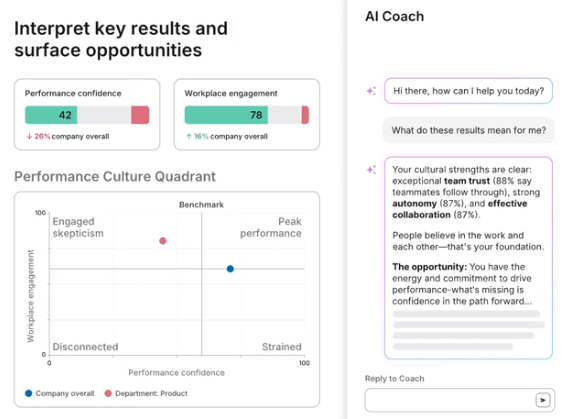
Culture Amp AI organizes that feedback into sentiment, topics, trends, and summaries. It compares engagement drivers between teams and surface areas that deserve closer attention. Its AI Coach then helps managers turn the findings into action plans, conversation guidance, and communications.
HiBob and Lattice also analyze employee information, but Culture Amp has a clearer focus on collective employee feedback. I would consider it when the problem is not conducting a survey but making sense of hundreds or thousands of responses. However, a small organization with limited employee comment volume may not need this much analytical structure.
- Comment and sentiment analysis: Culture Amp AI groups written feedback by sentiment, topic, and trend. HR see the shape of a large comment set without treating an AI summary as a substitute for reading important responses.
- Team-level comparisons: The system highlights how engagement drivers differ across teams or parts of the organization. This prevents HR from assuming that a company-wide score represents the experience of every group.
- AI Coach: Managers receive suggested action plans, communication templates, and guidance based on survey findings. The coaching layer helps move the conversation from “employees mentioned workload” to “what should this manager do next?”
Culture Amp uses custom annual pricing based on employee count, selected products, and service tier. It has three plans:
- Engage covers surveys and text analysis,
- Perform includes performance management tools
- Develop is an add-on to Engage and Perform, and unlocks career paths and development plans
Similar to Rippling, Culture Amp allows you to build a package that fits your needs. It also has a plan for enterprise organizations.

Lattice: Best for source-backed review drafts
Overall Score
3.37/5
AI capability and effectiveness
3.44/5
Platform and interface
3.63/5
Pricing
3.18/5
Customer support
2.95/5
Pros
- Flexible product plans
- Dedicated customer support
- AI tool pulls documented goals, feedback, updates, and 1:1 information into review drafts
Cons
- Requires a $4,000 annual minimum
- Limited core HR admin tools (no hiring and onboarding features)
- Results depend on employees and managers keeping Lattice records current
Writing a review faster does not help much if the draft sounds polished but has little connection to the employee’s actual work. Lattice addresses that problem by grounding its drafts in records already captured during the performance cycle.
Its AI Agent synthesizes goals, feedback, updates, development areas, previous reviews, and one-on-one records. More importantly, its evidence-based review workflow labels sections by confidence and indicates when more context is needed. It does not select the employee’s rating for the manager.
That makes Lattice a better fit for organizations concerned about vague AI-generated praise or feedback that sounds polished but cannot be traced to anything. However, the benefit shrinks if goals and one-on-one notes live outside Lattice, so this is a good fit for companies with weak performance documentation.
- Evidence-backed review drafts: Lattice AI Agent draws from goals, feedback, updates, growth areas, previous reviews, and 1:1 records. Managers get a draft tied to recorded events rather than a generic review generated from a few prompts.
- Confidence indicators: Lattice identifies when the available evidence supports a statement and when the manager needs to provide more context. It also leaves the performance rating to the reviewer instead of selecting one automatically.
- AI-supported 1:1s: The agent captures meeting summaries, action items, owners, and possible topics for the next conversation. Keeping those records in the same system also gives future reviews a better source of day-to-day context.
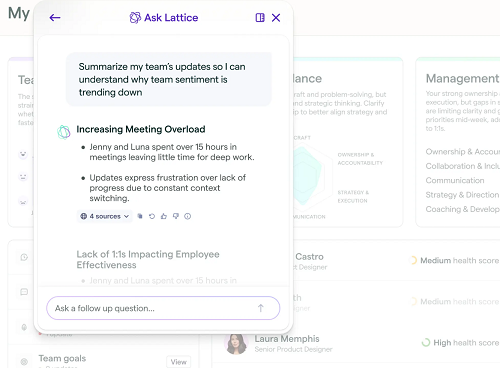
With Lattice, you have two options: a simple pricing package or build your own. The simple pricing package includes the Foundations plan and three add-on modules.
- Foundations: $13 per user seat monthly; includes performance reviews, cascading goals, succession planning, and AI tools
- Engagement add-on: $4 per user seat monthly; adds engagement surveys and onboarding features to the Foundations package
- Grow add-on: $4 per user seat monthly; comes with career tracks, competencies, and AI-powered growth areas
- Compensation add-on: $6 per user seat monthly; includes compensation bands, cycle management, and global benchmarks
With the build your own option, you can choose from three base products.
- Engagement: $4 per user seat monthly
- Goals & OKRs: $8 per user seat monthly
- Performance: $10 per user seat monthly
You can also add either the Grow or Compensation modules (or both) to your selected base product.
Regardless of the option you choose, all contracts are billed annually. Lattice also requires a minimum spend of $4,000 per year.

360Learning: Best for AI course creation
Overall Score
3.24/5
AI capability and effectiveness
2.81/5
Platform and interface
4/5
Pricing
3.88/5
Customer support
2.59/5
Pros
- 30-day free trial
- Collaborative course authoring
- Generates questions, quizzes, summaries, and translations
Cons
- Features are focused mainly on L&D
- Starter Team plan has a 100-user cap
- Advanced support and enterprise features require custom plans
HR teams often have the information needed for training. It is just sitting in a policy document, presentation, process guide, or the head of the one employee everyone asks for help.
360Learning’s AI tools help turn that source material into course outlines, lesson content, questions, and quizzes. Its writing and review tools refine the result, while translation and skills tagging make the content easier to reuse across a broader workforce.
This makes building and maintaining learning content easy, especially for teams that want internal experts involved in the process. The trade-off is that it has limited HR admin tools. If you want a more feature-rich HR platform, consider either Rippling, Paychex Flex, or QuickBooks Workforce.
- Source-to-course creation: 360Learning’s AI Content Builder turns existing material into a course outline and draft lesson content. HR still controls the source and final lesson instead of asking a chatbot to invent a training program from scratch.
- Built-in assessment help: The system generates questions and quizzes to accompany the course. It also supports translation, which helps L&D teams reuse a core lesson across different employee groups.
- Collaborative authoring: Allows internal experts to review, comment on, and improve the training inside the same learning platform. That makes it easier to check technical details before publishing and update the course when a policy or process changes.
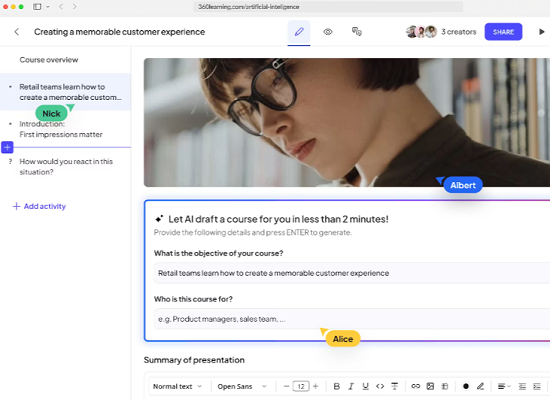
The 360Learning starter Team plan costs $8 per user per month for up to 100 users. It includes AI-assisted authoring, smart recommendations, collaborative learning, course management, and a 30-day free trial.
However, its Business and Enterprise plans use custom pricing. Organizations needing advanced skills management, flexible licensing, enterprise integrations, or priority support should expect to move beyond the Team plan.

HireVue: Best for structured AI interviews
Overall Score
3.03/5
AI capability and effectiveness
2.81/5
Platform and interface
4.06/5
Pricing
2.16/5
Customer support
2.83/5
Pros
- Multiple assessment formats
- Offers job-specific skills and competency assessments
- Multilingual candidate support
Cons
- Non-transparent pricing
- Recruiting-focused platform
- Limited integration options
HireVue does more than generate interview questions or summarize a candidate conversation. Its stronger use case is giving candidates a structured AI interview process. It conducts two-way voice interviews at any time, asks follow-up questions, and evaluates each response against a hiring rubric. Recruiters receive a shortlist with explanations instead of another stack of recorded interviews to watch.
That makes it relevant for high-volume employers that need a repeatable way to evaluate role-specific skills. A word of advice: Since HireVue’s AI Interview records, evaluates, and scores candidate answers, HR still needs to own the rubric, monitor the results, and keep recruiters responsible for who advances. This prevents any compliance risk, bias hiring, and potential claims that the AI tool has been set up to shortlist specific candidates.
- Structured job assessments: HireVue uses proprietary models to evaluate defined skills, behaviors, and competencies associated with a job. Its assessment options include Virtual Job Tryouts, game-based assessments, technical tests, and language proficiency testing.
- Two-way AI voice interviews: It allows candidates to complete an interview without waiting for a recruiter’s calendar to open. The AI asks configured questions, probes responses, and listens for job-related evidence in a live voice conversation.
- Explainable rubric scoring: HireVue compares each answer with the employer’s hiring rubric, assigns a score, and explains the reason behind it. The accompanying audit trail gives recruiters something concrete to review instead of asking them to accept an unexplained ranking.
- Connected candidate signals: HireVue integrates with more than 45 applicant tracking systems and return results to the candidate record. Recruiters have the option to view interview findings alongside assessments and other hiring information without managing a separate evaluation process.
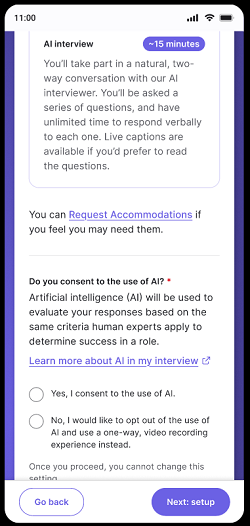
HireVue does not publish pricing details on its website. You have to contact its sales team to request a quote.
Looking for something else? Check out our buyer’s guides to the best human resources software and top payroll systems.
How to choose an AI HR tool
When looking for AI tools for human resources, don’t focus on the AI tools themselves. There isn’t a standalone software for it. Instead, you get HR platforms that use these AI tools to simplify and automate processes.
Start with the HR decision or administrative problem, not the AI label.
1. Pick one workflow to improve first
Choose a problem with a clear starting point and result, such as:
- Collecting payroll information
- Monitoring state compliance changes
- Analyzing employee comments
- Preparing performance reviews
- Building development plans
- Creating employee training
- Assessing candidate skills
This keeps a broad product demonstration from distracting you with AI features your team may never use.
2. Separate suggestions from decisions
Ask whether the AI drafts, analyzes, recommends, flags, or acts. These verbs are not interchangeable.
A review draft that a manager edits has a different risk level from a candidate score that affects who advances. The closer the output gets to pay, employment status, promotion, or hiring, the stronger your review, documentation, and escalation process should be.
3. Find out where the answer came from
Ask the provider to show which employee or company records supported the result. Then give it an imperfect example with missing, conflicting, or outdated information.
A useful demonstration should show:
- The records the AI used
- How permissions affect the answer
- What happens when information is missing
- Whether a user can correct the output
- What gets recorded after approval
That will tell you more than watching the tool summarize a perfect sample employee profile.
4. Confirm what is available today
AI roadmaps move quickly, and provider pages sometimes mix released, beta, preview, and planned functions. Ask the sales representative to mark each promised feature as generally available, beta, or coming soon.
Then put that status in the contract or order form when the capability is important to your purchase. Do not buy a current platform primarily for a future agent.
5. Price the complete workflow
The cheapest plan may not include the module containing the AI feature. Request a quote that includes:
- Required base software
- HR, payroll, or talent modules
- AI add-ons
- Implementation
- Integrations
- Minimum contract charges
- Training and support
- Renewal pricing
6. Review employee-data protections
At minimum, ask whether customer or employee data trains an external model, how long prompts and outputs are retained, whether administrators can disable AI features, and whether existing role permissions apply.
HR should also define which information employees and managers may enter into the tool. Our guide to questions to ask before using AI tools can help structure that internal review.
Frequently asked questions (FAQs)
Some tools can score, predict, flag, or recommend, but HR and managers remain responsible for the decision. Keep a human reviewer involved whenever an AI tool may affect hiring, pay, promotion, performance, discipline, or termination. The reviewer should understand the information used, consider relevant context outside the system, and document the final reason for the decision.
No. A specialized product, like a recruiting-only tool, may be the better purchase when one workflow is creating the problem. Culture Amp, HireVue, Lattice, and 360Learning can work alongside an existing HR system.
A broader suite helps when the AI needs information from several functions. Rippling, Paychex, QuickBooks Workforce, and HiBob become more useful when their employee, payroll, performance, or workflow data is already connected.
Give the provider one realistic, imperfect scenario. Include a missing record, conflicting information, an unusual employee case, or a user with limited permissions.
Ask the representative to show where the answer came from, what the AI cannot do, how HR corrects it, and what gets recorded after approval. A smooth demonstration using perfect sample data tells you very little about how the tool will behave on payroll Monday.