


Square credit card processing gives businesses a way to accept payments in person, online, and on mobile devices without opening a traditional merchant account. It combines payment processing with point-of-sale (POS) software, invoicing, reporting, and other business management tools. You can start with Square Free, which has no monthly software subscription, and pay a processing fee whenever you accept a card payment.
For small businesses, the main advantages are straightforward setup, multiple payment options, and predictable transaction fees. However, Square card processing costs depend on how customers pay, your chosen software plan, and your sales volume. Understanding those costs will help you decide whether Square is the right fit.
- How does Square credit card processing work?
- Square credit card processing fees: What does Square charge?
- Ways to accept credit card payments with Square
- How to set up Square for credit card processing
- Square credit card processing features
- Pros and cons of Square credit card processing
- Is Square credit card processing right for your business?
- Square credit card processing alternatives
- Frequently asked questions (FAQs)
- Bottom line
How does Square credit card processing work?
Square is a payment service provider (PSP) that allows businesses to accept credit and debit card payments through its payment processing infrastructure. Instead of requiring merchants to establish an individual traditional merchant account with an acquiring bank, Square handles the processing relationship through its own system.
Businesses can use Square to accept major card brands, including Visa, Mastercard, American Express, and Discover, along with supported contactless payments such as Apple Pay and Google Pay.
Square handles payment authorization, processing, settlement, and reporting. Its system also connects payment transactions to its POS software, making it possible to track sales, issue refunds, and monitor payment activity from one dashboard.
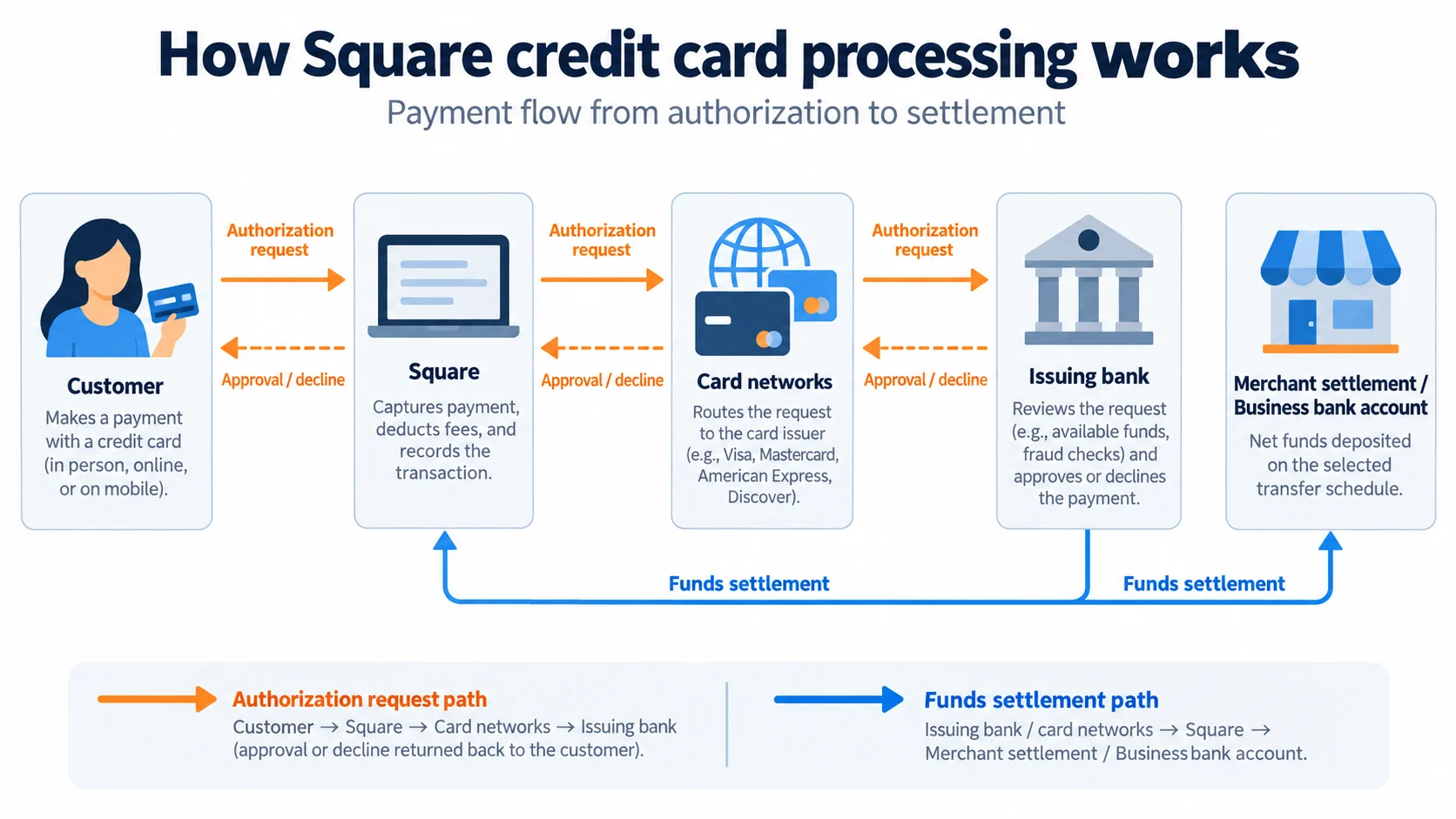
What happens when a customer pays with Square?
Here's how a typical Square card transaction works:
- The customer initiates payment. They tap, insert, or swipe their card at a Square payment device, or enter their card details through an online checkout.
- Square sends the payment for authorization. Payment details are securely transmitted through the appropriate networks for approval by the card issuer.
- The payment is approved or declined. If approved, Square records the transaction and confirms the sale.
- Square deducts processing fees. The applicable transaction fee is calculated and deducted from the payment.
- Square transfers the funds. The remaining balance is made available according to the merchant's transfer schedule, subject to processing and account restrictions.
For example, a retail business accepting a $100 contactless payment on Square Free pays $2.75 in processing fees. The remaining $97.25 becomes available for transfer, assuming no other applicable adjustments.
This process happens largely behind the scenes. The business doesn't need to connect separate services for payment authorization, card processing, and basic POS reporting.
Do you need a merchant account to use Square?
No. Square operates as a payment service provider, so businesses don't need to apply for a separate traditional merchant account.
With conventional merchant services, a business typically establishes its own merchant account through a bank or payment processing provider. The provider may review processing volume, business history, industry risk, and other information before approving the application.
Square simplifies that process by allowing eligible merchants to create an account online. Businesses still need to provide identity and business information, comply with Square's terms, and complete any required verification.
Square may also review transactions, request documentation, restrict certain payment activity, or delay access to funds when required by its risk controls.
For most ordinary small businesses, Square's account structure is easier to get started with than applying for a conventional merchant account. However, businesses with unusual payment requirements or higher-risk activities should review Square's eligibility restrictions before signing up.
Square credit card processing fees: What does Square charge?
Square credit card processing fees start at 2.6% + 15 cents for standard in-person transactions on Square Free. Online payments cost 3.3% + 30 cents, while manually entered and card-on-file transactions cost 3.5% + 15 cents.
Square uses a flat-rate pricing model, meaning the processing rate for a qualifying transaction is generally determined by the payment method and software plan rather than the particular card brand or interchange category.
This makes it easier to estimate processing expenses, although a flat rate isn't automatically the lowest-cost option for every business.
Square processing fees by payment method
The following table shows Square's published standard US processing rates.
Payment method | Square Free | Square Plus | Square Premium |
| In person: tap, dip, or swipe | 2.6% + 15 cents | 2.5% + 15 cents | 2.4% + 15 cents |
| Online payments and invoices | 3.3% + 30 cents | 2.9% + 30 cents | 2.9% + 30 cents |
| Online API | 2.9% + 30 cents | 2.9% + 30 cents | 2.9% + 30 cents |
| Manually entered or card on file | 3.5% + 15 cents | 3.5% + 15 cents | 3.5% + 15 cents |
| ACH invoice payments | 1%, $1 minimum | 1%, $1 minimum, $10 cap | 1%, $1 minimum, $10 cap |
Note: Rates checked October 2026. Standard US rates are shown; custom pricing and additional charges may apply.
For in-person transactions, Square charges a percentage of the sale plus a fixed fee. Online transactions have a higher fixed fee, and certain card-not-present transactions carry a higher percentage rate.
For example, accepting a $50 payment on Square Free would cost:
- In person: $1.45
- Online: $1.95
- Manually entered: $1.90
These differences become more significant as transaction volume increases.
Also, the standard online rate and online API rate aren't necessarily the same. Businesses integrating Square's payment APIs into their websites or applications should confirm which pricing category applies.
Square Free vs Plus vs Premium processing fees
Square offers three standard software plans with different monthly subscription costs and payment processing rates.
Plan | Monthly software fee | Standard in-person rate | Best for |
| Square Free | $0 | 2.6% + 15 cents | Businesses needing basic payment acceptance |
| Square Plus | $49 per location | 2.5% + 15 cents | Businesses needing additional POS and operating tools |
| Square Premium | $149 per location | 2.4% + 15 cents | Businesses needing more advanced business management features |
Free is the most economical starting point for businesses that don't need paid POS features. Plus adds more business management tools and reduces some processing rates. Premium provides additional advanced features and a further reduction in the standard in-person rate.
However, upgrading solely to obtain lower processing fees doesn't always make financial sense.
For in-person payments, Plus reduces the percentage rate by 0.1 percentage point compared with Free. That amounts to $1 in processing savings for every $1,000 in eligible card sales.
At $20,000 in monthly in-person card sales, Plus saves approximately $20 in processing fees. With a $49 monthly subscription, the business would spend $29 more overall if it didn't use any of Plus's additional features.
A business would need approximately $49,000 in eligible monthly in-person sales to offset the Plus subscription through processing savings alone.
How to calculate Square credit card processing costs
To estimate Square processing costs, use this formula:
Total processing fees = (Monthly card sales × Percentage rate) + (Number of transactions × Fixed transaction fee) |
|---|
The percentage rate is based on total card sales, while the fixed fee is charged for each transaction. Businesses with smaller average ticket sizes will generally feel the fixed fee more heavily.
The following examples use three different businesses on Square Free.
Business scenario | Monthly sales | Average ticket | Transactions | Estimated monthly processing fees |
| Small retail shop, in person | $5,000 | $25 | 200 | $160 |
| Mobile service business, in person | $10,000 | $100 | 100 | $275 |
| Established retailer, in person | $30,000 | $50 | 600 | $870 |
Calculations assume all payments qualify for Square Free's standard 2.6% + 15 cents in-person rate. Subscription, hardware, expedited transfer, and other charges are excluded.
The average transaction amount makes a meaningful difference.
Consider two businesses, each processing $10,000 monthly:
- Business A: 1,000 transactions averaging $10 each. Processing cost: $410.
- Business B: 100 transactions averaging $100 each. Processing cost: $275.
Both businesses process the same dollar volume, but Business A pays $135 more because it incurs the fixed 15-cent fee 10 times as often.
This is why businesses should compare processing rates using their actual transaction history, not just monthly sales.
For a larger business, a traditional merchant services provider offering interchange-plus pricing may be worth evaluating. The outcome depends on card mix, transaction sizes, monthly fees, and other charges.
Other Square fees to consider
Processing rates are the largest recurring payment expense for many merchants, but they're not the only costs associated with Square.
Expense | What to expect |
| Monthly software subscription | Free costs $0; Plus and Premium charge per location |
| POS hardware | Optional purchases depending on checkout requirements |
| Instant transfers | 1.95% of the transfer amount |
| Same-day transfers | 1.95% of the transfer amount |
| Standard bank transfers | No additional transfer fee |
| International cards | Additional 1.5% fee |
| Chargeback and dispute management | No separate Square dispute-management fee |
| Optional services | Additional charges may apply for selected tools or subscriptions |
Square also doesn't charge standard activation, account inactivity, or early termination fees. However, businesses should distinguish between Square not charging a separate dispute-management fee and the potential loss of funds from a disputed transaction.
Refunded payments also require attention. Merchants should check the applicable refund policy because processing fees from the original transaction may not be returned.
Can you negotiate Square processing fees?
Square offers custom pricing discussions for businesses processing more than $250,000 annually.
Custom pricing isn't guaranteed, and the final offer depends on the merchant's business and processing profile.
Businesses approaching that volume should contact Square to discuss processing fees, hardware costs, and available account support before comparing alternative providers.
Ways to accept credit card payments with Square
One advantage of Square for credit card processing is that businesses can accept payments across several sales channels without having to set up a different payment processor for each one.
The right payment method depends on where customers buy, whether they are present during the transaction, and what information the business needs to collect.
Payment method | How it works | Best for |
| In-person payments | Customers tap, insert, or swipe a card using compatible hardware | Retail stores, cafes, restaurants |
| Mobile payments | Sellers use a compatible mobile device or portable card reader | Contractors, pop-up shops, mobile services |
| Online checkout | Customers enter payment details through a website or checkout page | Ecommerce businesses |
| Payment links | Sellers send a hosted payment page by email, text, or another channel | Remote payments without a website |
| Square Invoices | Customers receive an invoice and pay electronically | Freelancers and service providers |
| Virtual Terminal | Sellers manually enter payment details through a supported interface | Phone orders |
| Saved cards and recurring payments | Businesses charge stored payment methods with appropriate customer authorization | Repeat services and scheduled billing |
In-person payments with Square POS
Square supports contactless payments, chip cards, and magnetic-stripe cards through compatible hardware.
Merchants can accept payments through its POS software using equipment such as Square Reader, Square Terminal, Square Register, or a compatible Square Stand setup.
The payment is recorded in Square's POS system, where businesses can track the sale, issue receipts, and review transaction activity.
For example, a clothing store can use Square POS to accept a card payment, update its inventory records, and view the sale in the same system.
Businesses planning to use Square for retail or restaurant operations should also evaluate the POS tools required for checkout, inventory, orders, and employee management.
Square mobile credit card processing
Square mobile credit card processing allows businesses to accept payments away from a fixed checkout counter.
A merchant can pair a compatible Square card reader with a smartphone or tablet. On eligible devices, Tap to Pay also lets sellers accept supported contactless payments without purchasing a separate card reader.
This is particularly useful for:
- Contractors collecting payments at customer locations
- Sellers attending farmers markets or trade shows
- Mobile beauty and personal service providers
- Delivery and event businesses
- Small retailers adding temporary checkout stations
For example, a home repair contractor can prepare a payment amount on a compatible phone and collect payment immediately after completing a job.
Before relying on mobile payments, confirm device compatibility, connectivity requirements, and whether the intended payment method is available in your region.
Online credit card processing
Square supports online payments through its website and checkout tools, payment links, and payment APIs.
A business can create an online store using Square's website tools or add supported Square payment functionality to an existing online experience.
For businesses without a full ecommerce website, payment links provide a simpler option. Sellers can create a hosted payment page and share the link with a customer.
The customer completes payment through Square's checkout rather than giving their card information directly to the seller.
Businesses that require custom checkout experiences can explore Square's developer tools and APIs, although implementation may require technical resources.
Square invoices, virtual terminal, and recurring payments
Service businesses often need to collect payments after delivering work rather than at a traditional checkout counter.
Square Invoices lets businesses send payment requests electronically. Customers can review the invoice and use the supported payment options.
Square Virtual Terminal supports manually entering payments through a web interface, which can be useful for phone orders or other authorized card-not-present transactions.
For repeat customers, Square also offers saved payment methods and recurring payment workflows through supported products.
For example, a consultant can send an invoice after completing a project, while a business with recurring service arrangements can configure an appropriate scheduled payment workflow.
Be aware that manually entered and card-on-file payments generally carry higher processing rates than standard in-person transactions.
How to set up Square for credit card processing
Getting started with Square typically involves creating an account, completing verification, connecting a bank account, and selecting how customers will pay.
Here's a simplified setup process.
Step 1: Create a Square account
Visit Square's website and register for an account using your business information.
During registration, Square may request details such as your legal name, business name, business address, and business type.
Example: A sole proprietor starting a mobile cleaning service should register using accurate legal and business details instead of entering a temporary business name that doesn't match their records.
Step 2: Verify your identity and connect your bank account
Complete any identity or business verification required by Square.
You'll also need an eligible bank account or supported Square banking arrangement to access funds.
Example: Before processing your first transactions, check that the linked bank account belongs to the appropriate business or account holder and that the account information is correct.
Step 3: Choose how to accept payments
Decide whether you'll use Square POS hardware, Tap to Pay, online checkout, invoices, or payment links.
In-person businesses may need a compatible device, while online or invoice-based businesses may not need any physical payment equipment.
Example: A mobile dog groomer could start with Tap to Pay on a compatible smartphone and purchase a reader later if customers need additional payment options.
Step 4: Configure your payment settings
Set up relevant business information in Square Dashboard, including products or services, prices, applicable taxes, tipping options, and receipt settings.
Review the available payment and transfer settings before accepting customer payments.
Example: A cafe owner should check product pricing, sales tax settings, and tipping options before using Square POS for daily transactions.
Step 5: Test your checkout and start accepting payments
Before regular use, make sure customers can complete the intended checkout process and that your team understands how payments appear in Square Dashboard.
Review receipts, payment records, transfer settings, and refund procedures.
Example: A retailer can complete a small genuine transaction, review the recorded processing fee, and issue an appropriate refund to check the workflow. The original processing fee may not be returned.
For a more detailed walkthrough, see our guide on how to use Square.
Square credit card processing features
Square's payment processing tools extend beyond authorization and settlement. Merchants can also use its software to manage payments and related business activity.
Integrated point-of-sale software
Square includes POS functionality that connects checkout transactions with sales records.
Businesses can manage product or service catalogs, process refunds, issue digital receipts, and review payment activity from the same system.
Depending on the plan and business type, Square also offers tools for inventory, staff management, customer relationships, and industry-specific operations.
For merchants currently using separate systems for payment acceptance and sales tracking, this integration can reduce manual data entry.
However, businesses should check whether the particular POS features they need are included in Square Free or require a paid plan.
Payment security and fraud prevention
Square provides encryption, fraud prevention tools, and payment security features as part of its processing services.
Its platform is designed to handle sensitive payment information without merchants needing to directly store card details.
Square also supports dispute management and offers tools to review suspicious payment activity.
These protections don't eliminate the possibility of fraud, chargebacks, or account reviews. Businesses remain responsible for following payment acceptance rules, protecting customer information, and maintaining accurate transaction records.
Deposits and fund availability
Square offers standard bank transfers as soon as the next business day for eligible transactions.
Businesses that need faster access to funds can use instant or same-day transfers, subject to eligibility and additional fees.
Instant and same-day transfers currently cost 1.95% of the transfer amount.
For example, instantly transferring $1,000 would cost $19.50 in addition to the processing fees already deducted from the original card transactions.
Merchants should also account for weekends, banking holidays, account reviews, and transfer eligibility when planning cash flow.
Customer payment and reporting tools
Square provides digital receipts, payment history, invoice tracking, and reporting tools that help merchants review transactions.
Businesses can use Square Dashboard to examine payment activity, refunds, transfers, and sales performance.
For organizations collecting payments through several channels, consolidated transaction records can make daily reconciliation easier.
Additional reporting and customer management functionality may depend on the selected software plan.
Pros and cons of Square credit card processing
Square is particularly attractive to businesses looking for a straightforward way to accept payments without assembling separate payment and POS systems. However, its pricing and account structure won't suit every merchant.
Pros | Cons |
| Free software plan with no monthly subscription fee | Flat-rate pricing may cost more than interchange-plus pricing for some merchants |
| Accepts payments in person, online, and on mobile devices | Paid plans may be needed to access lower rates or advanced features |
| Integrated POS, invoices, and transaction reporting | Hardware and optional software services add to total expenses |
| No traditional merchant account application | Account reviews or restrictions may interrupt payment activity |
| No standard activation, inactivity, or early termination fees | Instant transfers cost extra |
| Simple published processing rates | Manually entered payments have higher fees |
Square's main advantage is the convenience of getting payment processing, POS software, and several payment acceptance methods from one provider.
Its main drawback is that businesses have less control over the underlying processing arrangement than they may have with a traditional merchant services provider.
For a small business that wants to start accepting payments quickly, Square is a practical choice. For a larger merchant with steady transaction volume, reviewing custom pricing and competing processing models becomes more worthwhile.
Is Square credit card processing right for your business?
Square credit card processing for small business is most appealing when a merchant wants simple pricing, an integrated POS, and the flexibility to accept payments through different channels.
However, the best processor depends on the business's sales volume, transaction size, payment methods, existing software, and risk profile.
When Square makes sense
New and smaller businesses
Square Free provides a way to accept card payments without committing to a paid monthly software plan.
For a new business with uncertain sales volume, paying a predictable transaction fee can be easier to budget than paying several separate monthly service charges.
Businesses selling both online and in person
Square supports multiple payment channels and records transactions in the same business management environment.
For a retailer running a physical store and a small online shop, this reduces the effort involved in monitoring sales from separate platforms.
Mobile merchants and service providers
Square supports portable card readers, Tap to Pay, invoices, and payment links.
Contractors, event sellers, and mobile service professionals can collect payments without maintaining a permanent checkout counter.
Businesses that need POS software
Square's payment processing becomes more useful when a merchant can also take advantage of its inventory, employee management, reporting, and other operating tools.
For these businesses, evaluating the total value of the software is just as relevant as comparing transaction rates.
When to consider another processor
You process a high volume of card payments.
Businesses processing substantial monthly sales should compare Square's standard rates and available custom pricing against interchange-plus providers.
Even a small rate difference can affect overall processing costs when applied to large transaction volumes.
You have many low-value transactions.
Square's fixed per-transaction fee can represent a substantial percentage of small purchases.
For example, a 15-cent fee on a $5 sale represents an additional 3% of the transaction before applying Square's percentage rate.
You need a specialized merchant account.
Businesses with higher-risk products, unusual transaction patterns, or industry-specific requirements may need a provider that offers more specialized underwriting.
Square's eligibility rules should be reviewed before committing.
You already rely on another ecommerce or accounting platform.
If your business uses an established system, check whether Square integrates with it and whether payment processing through that system would create additional costs or manual work.
Square vs traditional merchant accounts
A traditional merchant account may be a better option for businesses that want more individualized pricing, a particular acquiring-bank relationship, or specialized payment processing support.
Factor | Square | Traditional merchant account |
| Getting started | Online registration and verification | Application and underwriting process |
| Pricing | Published flat rates, custom options for qualifying merchants | Flat-rate, interchange-plus, or other pricing models |
| Monthly fees | No required software subscription on Free | Depends on provider and agreement |
| Payment software | Integrated Square ecosystem | Depends on processor and POS connections |
| Hardware | Square-compatible equipment | Varies by processor |
| Business eligibility | Subject to Square's terms and account reviews | Underwriting and industry requirements vary |
| Best suited for | Businesses seeking integrated payment acceptance | Merchants wanting specialized pricing or processing arrangements |
A traditional merchant account isn't necessarily cheaper. Businesses should compare actual quotes, monthly minimums, equipment costs, software fees, and contract terms before choosing.
Square credit card processing alternatives
Square isn't the only option for businesses that want to accept card payments. The following providers are worth comparing if your main concern is pricing, online checkout, or integration with an existing ecommerce platform.
Provider | Best for | Why consider it instead of Square |
| Stripe | Businesses building online payment experiences | Developer tools, APIs, and customizable checkout |
| Helcim | Businesses interested in interchange-plus processing | Interchange-plus pricing with volume-based discounts |
| PayPal | Businesses prioritizing online payments | Hosted checkout, payment links, and familiar customer payment options |
| Shopify Payments | Businesses selling primarily through Shopify | Payment processing integrated into Shopify's ecommerce platform |
If your priority is accepting payments in a physical store, compare both payment fees and POS functionality.
If you primarily sell online, look at checkout options, ecommerce integration, recurring billing, and card-not-present pricing.
A processor with a lower advertised rate isn't necessarily the least expensive option after software subscriptions, transaction fees, hardware, and other expenses are included.
Frequently asked questions (FAQs)
What does Square charge for credit card processing?
Square Free doesn't charge a monthly software subscription fee. Businesses pay processing fees on qualifying transactions. Square Plus and Premium have monthly subscription fees and offer different processing rates and software features. Optional hardware and services may cost extra.
Does Square accept Visa, Mastercard, Discover, and American Express?
Yes. Square supports payments from major card networks, including Visa, Mastercard, American Express, and Discover. Its standard US processing rates generally apply equally across these card brands for qualifying transactions, although payment method and other factors can affect the final fee.
Can you use Square to accept credit cards without a card reader?
Yes. Square supports Tap to Pay on compatible mobile devices, along with payment links, invoices, online checkout, and Virtual Terminal. The available methods and processing fees depend on how the card information is collected and whether the customer is present.
How long does it take to receive money from Square payments?
Square's standard bank transfer schedule can deliver funds as soon as the next business day. Eligible businesses can also request instant or same-day transfers for an additional fee. Timing depends on transaction cutoff times, banking schedules, and account eligibility.
Can Square hold or delay your funds?
Yes. Square may review accounts or transactions, request additional information, or restrict access to funds under certain circumstances. Businesses should review Square's payment terms, keep transaction documentation, and respond promptly to verification requests.
Does Square charge the same fee for debit and credit cards?
For standard US card transactions, Square generally applies the same published processing rate to major debit and credit cards when they are accepted through the same payment method and plan. Rates may differ for other transaction categories, such as manually entered payments or internationally issued cards.
Bottom line
Square credit card processing is a practical option for small businesses that want to accept payments without opening a traditional merchant account or managing separate payment and POS systems. Its Free plan offers a low-commitment starting point, while paid plans provide additional business management tools and lower rates for certain transactions.
I would recommend Square for businesses that value easy setup, multiple payment methods, and connected sales management. However, merchants with higher processing volumes should calculate their effective transaction costs and compare custom pricing or alternative processors.
The best way to evaluate Square is to estimate your monthly processing costs using your actual sales volume, average transaction size, and payment methods, then decide whether its software and convenience justify the total expense.