


Running a small business generates plenty of data, from daily sales and inventory levels to customer purchases and employee hours. The challenge is finding the time to review that information and figure out what to do with it.
Square AI helps by letting you ask questions about your business in everyday language instead of searching through different reports. Its newer version, Managerbot, goes further by identifying opportunities and helping prepare tasks such as employee schedules, catalog updates, and marketing campaigns.
In this guide, I'll explain how Square artificial intelligence works, walk through the setup and basic features, and share practical prompts you can use in your business. I'll also cover pricing, availability, and what you should verify before acting on AI-generated recommendations.
- What is Square AI?
- Is Square AI free?
- How to use Square AI: Step-by-step guide
- 7 ways to use Square AI in your small business
- Best Square AI prompts for small business owners
- Square AI limitations, accuracy, and data privacy
- Square AI updates: From its 2025 launch to Managerbot in 2026
- Bottom line: Is Square AI worth using for your business?
What is Square AI?
Square AI is an AI-powered business assistant built into Square's commerce platform. It helps merchants analyze business information, identify trends, and get answers about their operations by asking questions in natural language. Rather than manually filtering reports, owners can request sales comparisons, product summaries, or customer insights through a conversational interface.
For example, a retailer could ask which products sold the most last month. A restaurant owner could ask which hours generate the most revenue. The assistant uses available Square data to return relevant information and can generate charts and summaries to make the results easier to interpret.
Square originally introduced the assistant in 2025 as a way to make business reporting more accessible. In 2026, the company expanded its capabilities through Managerbot, which can also flag operational issues and help merchants carry out supported tasks.
Square AI vs Managerbot: What's the difference?
Square AI and Managerbot are related products, rather than two unrelated assistants.
The original version focused on helping merchants ask questions about their data. Managerbot is its evolution, adding proactive monitoring and task assistance.
Feature | Original Square AI | Managerbot |
|---|---|---|
| Primary purpose | Answer business questions | Analyze performance and assist with operations |
| Sales and customer analysis | Yes | Yes |
| Charts and data summaries | Yes | Yes |
| Follow-up questions | Yes | Yes |
| Proactive business insights | Not a primary initial function | Yes |
| Employee scheduling | Analysis and guidance | Can prepare schedules |
| Inventory assistance | Reporting and insights | Can assist with supported inventory workflows |
| Catalog management | Analysis and guidance | Can identify and help correct catalog issues |
| Marketing | Business insights and guidance | Can help draft and prepare campaigns |
| Merchant oversight | Review information and make decisions | Review proposed changes and manage authorization settings |
The practical difference is that the assistant can now help move from identifying a problem to preparing an operational response.
For instance, the original assistant could help a restaurant identify its busiest hours. Managerbot can also help prepare a staffing schedule using available labor information and business requirements.
Square also has documentation that describes workflows that involve merchant review and approval. Its broader AI terms also address actions carried out within permissions users have granted, so businesses should understand their authorization settings before allowing account changes.
What can Square AI do for small businesses?
The assistant's capabilities span several areas of business management:
- Sales analysis: Compare revenue, transaction volume, and selling periods.
- Product performance: Identify popular items, sales trends, and underperforming products.
- Customer insights: Examine purchasing behavior and identify potential retention opportunities.
- Inventory management: Review stock information and prepare supported replenishment tasks.
- Employee scheduling: Analyze labor coverage and help draft schedules.
- Marketing: Identify customer segments and prepare promotional campaigns.
- Catalog management: Find missing product information and assist with updates.
- Local business planning: Use supported public information, including weather and local events, alongside business data.
Is Square AI free?
Yes, Square announced Managerbot's US open beta at no additional cost to most eligible non-franchise sellers in food and beverage, retail, and health and beauty on April 28, 2026. However, free beta access does not mean every business qualifies or that related Square products are free.
For existing merchants, this offers an opportunity to explore AI-powered business insights without adding a separate assistant subscription during the announced beta period.
Who can use Square AI and Managerbot?
Square introduced its AI assistant in the United States in 2025. Managerbot's April 2026 US open-beta announcement specifically covered most eligible non-franchise businesses in the three industries mentioned above.
The Managerbot product can be accessed through Square Dashboard on desktop and mobile, as well as supported POS interfaces. It requires internet access, and the instructions are intended for account owners or employees with full-access permissions.
Are there additional fees for using Square AI features?
Some tasks the assistant helps with may involve other Square services that have separate subscription or transaction charges.
Product or activity | Pricing consideration |
|---|---|
| Square AI / Managerbot | No additional cost under the announced eligible US open beta |
| Square POS | Square Free has no monthly software fee; paid plans are also available |
| Payment processing | Square's applicable transaction fees still apply |
| Marketing campaigns | Square Marketing or other required services may carry fees |
| Employee management | Applicable paid scheduling or staff-management features may require a subscription |
| Other account upgrades | Additional charges may apply if a task requires a higher plan or paid feature |
Managerbot can answer questions about your current subscription and explain when a requested capability requires an upgrade. Square's documentation says it can direct merchants to the relevant subscription page, where they can review the cost before subscribing.
My recommendation: Check the assistant's access cost separately from the cost of completing an action. For example, identifying customers who have not visited recently is different from paying for a marketing service to send them a campaign.
Learn more about Square’s pricing plans, fees, and other costs in our Square pricing guide.
How to use Square AI: Step-by-step guide
Getting started does not require learning programming or building reports. You can type questions in ordinary language and refine them based on the answers.
Step 1: Open Square AI or Managerbot in Square Dashboard
Sign in to your Square Dashboard using an eligible account.
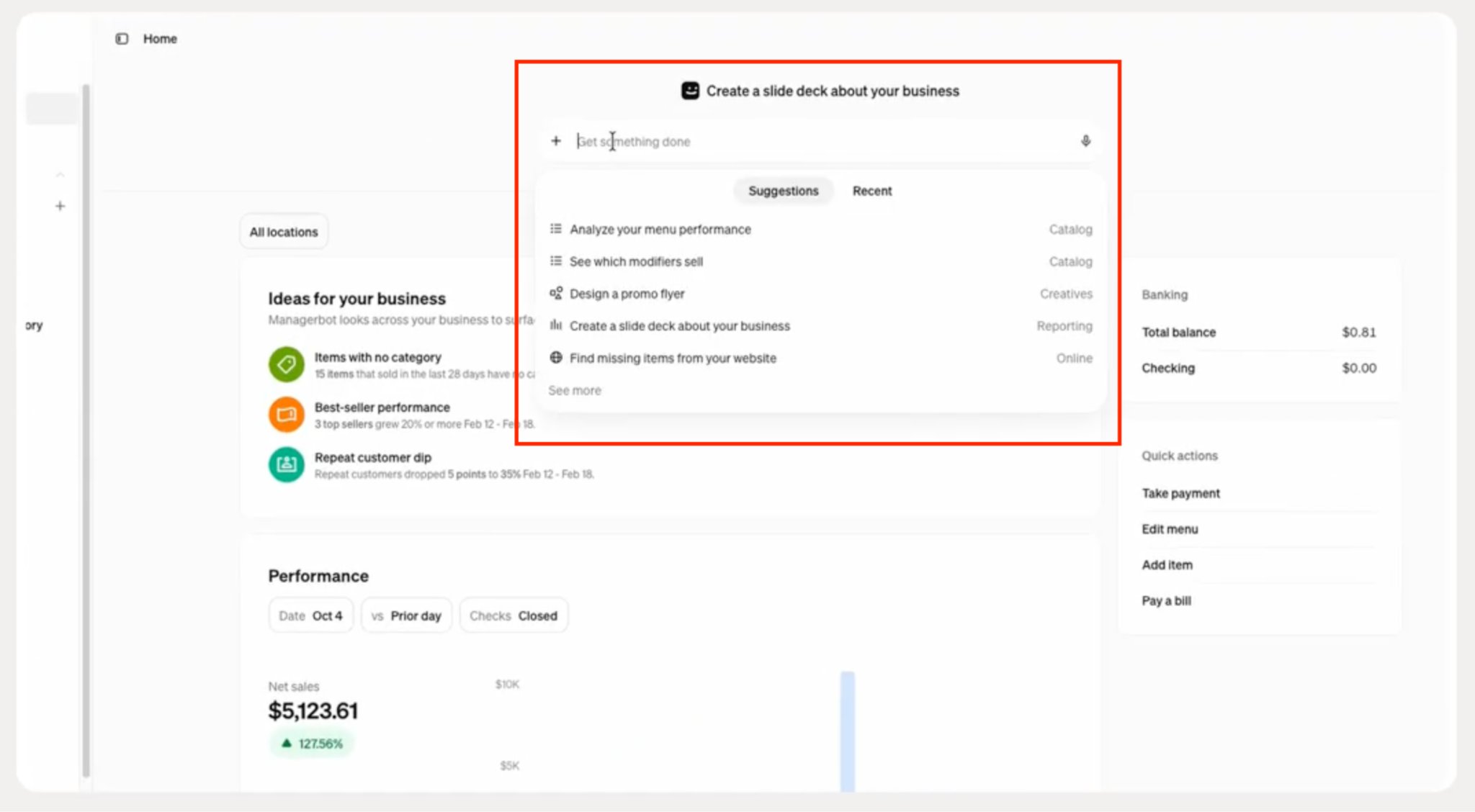
In the current Managerbot interface, the homepage includes a text-entry area where you can start a new request. The left navigation lets you revisit recent conversations. You may also see a section labeled Ideas, featuring business information and suggested opportunities.
If the assistant isn't available, first check your account eligibility and permissions. Square's current support documentation specifies account owners and employees with full-access permissions.
Example: A retailer logging in before opening the store might review the Ideas section for sales changes or inventory concerns before asking a specific question.
Step 2: Ask your first business question
Start with a question that has a clear purpose, metric, and date range.
Example prompt:
"What were my five best-selling products by units sold last month?"
The assistant can use the information available in your Square account to answer supported questions about item performance.
Why specify units sold? Because your best-selling product by quantity may be different from your highest-revenue product. A $5 item selling 100 units generates less revenue than a $40 item selling 30 units.
Example: If you operate a café, you might discover that your most frequently ordered drink isn't the one generating the most revenue. That distinction can help you decide what to feature in your menu or promotions.
Step 3: Ask follow-up questions to refine the results
One advantage of a conversational assistant is that you can build on an earlier response.
After identifying your best-selling items, ask:
Follow-up prompt:
"Compare those products with the previous month and break down the results by location."
This helps distinguish products that perform consistently from those showing recent changes.
A multi-location business might find that a product is selling well overall but is losing sales at one location. That could point to differences in customer demand, product availability, or merchandising.
Avoid assuming the AI has identified the cause. Use the result to decide what needs further investigation.
Step 4: Review charts, tables, and business insights
Depending on the question and supported data, the assistant can produce summaries, tables, and visualizations.
Square's original AI demonstration shows users reviewing sales information, requesting alternative charts, and saving generated insights for future reference. These capabilities help merchants monitor recurring business questions without rebuilding the same report every time.
For example, you might track weekly sales by location or frequently purchased items.
When reviewing results, pay attention to the metric, date range, and filters. Check whether the figures represent gross sales, net sales, order counts, or quantities sold.
Example: A retailer reviewing a sales decline should check the same dates and filters in Square's standard reports before changing inventory orders or staffing. A lower sales total alone doesn't explain whether demand weakened, stock was unavailable, or the store traded fewer hours.
Square's Square University tutorial provides a demonstration of this reporting workflow.
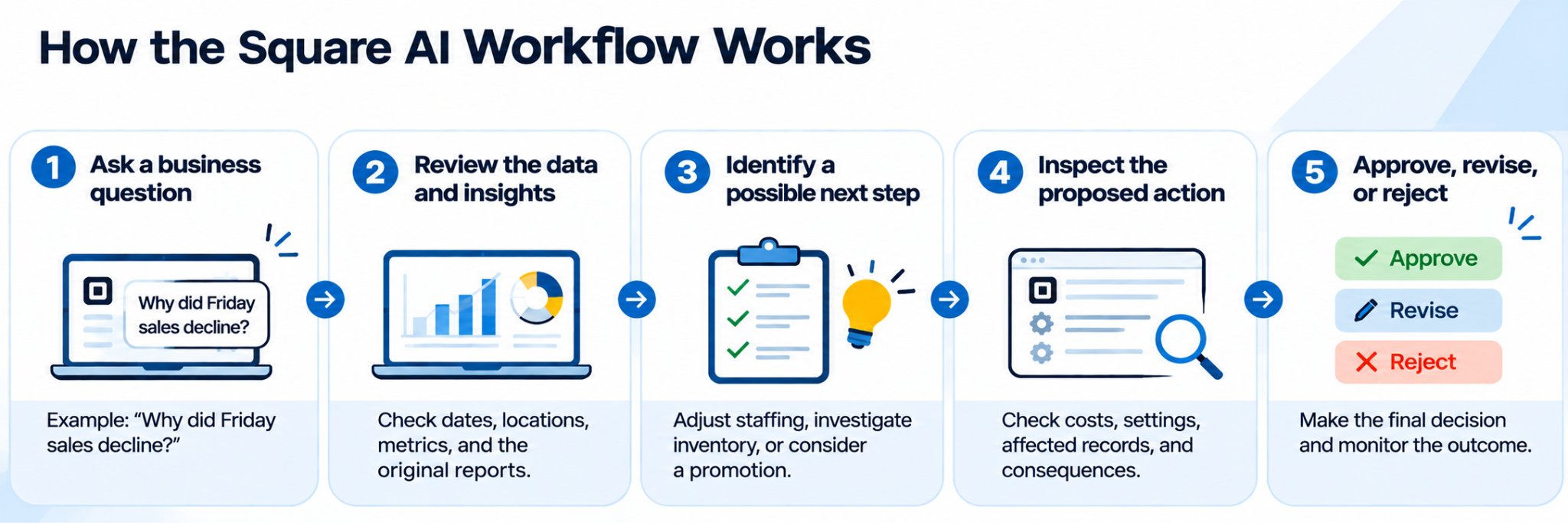
Step 5: Review and approve suggested Managerbot actions
Managerbot adds an operational component to the conversation.
Instead of only identifying a problem, it can help prepare certain tasks. Square documents supported workflows for scheduling, marketing campaigns, catalog updates, and inventory management.
Suppose a retailer asks:
Example task:
"Identify catalog items with missing descriptions and help me prepare updates."
The assistant may identify relevant items and help prepare a supported update. Before authorizing changes, the merchant should check which products are affected and verify that the descriptions are correct.
The same applies to schedules, inventory adjustments, and marketing campaigns. These tasks can affect employees, customers, and business records.
Example: Before publishing an AI-prepared employee schedule, check each employee's availability, total hours, required coverage, and applicable labor requirements.
7 ways to use Square AI in your small business
The best way to get value from the assistant is to start with a specific business question rather than asking it to evaluate your entire operation.
Here are seven practical applications, with sample prompts and the decisions each can support.
The prompts below are illustrative examples, not results of hands-on testing. Exact responses depend on the data in your account and the functions currently supported.
1. Find your best-selling and slow-moving products
Knowing which products sell the most helps with purchasing and merchandising. But looking at sales volume alone can be misleading, especially when products have different margins or seasonal demand.
Consider a small clothing boutique that sells dresses, accessories, and basic T-shirts. The owner wants to identify which items deserve more shelf space and which may be tying up cash.
Try this prompt:
"Show my 10 best-selling products by units sold over the past 90 days. Compare them with the previous 90 days and identify the largest increases and decreases."
Start by reviewing the products with the greatest changes, rather than immediately reordering the top sellers.
For example, a product showing fewer sales might be genuinely less popular. But it might also have been out of stock for two weeks. That distinction matters before deciding to discontinue it.
What to do next: Compare sales performance with available stock, product margins, returns, and current demand. Use the results to prepare a reorder or markdown shortlist.
What to verify: Confirm that the comparison uses equivalent time periods and that items weren't unavailable during part of the analysis.
2. Identify sales trends and your busiest hours
Sales reports tell you how much money your business brings in. Looking at when those sales happen can also help you decide when to schedule employees, prepare inventory, or run promotions.
For example, a café owner might know Fridays are busy but not whether the rush happens before lunch or during the afternoon.
Try this prompt:
"Show average net sales by hour on Fridays over the past eight weeks. Compare the busiest and quietest periods."
If the results show a consistent afternoon peak, the owner could review whether staff schedules and food preparation match that demand.
On the other hand, slower periods could be opportunities to test promotions or adjust operating procedures.
I wouldn't recommend changing business hours based on one chart. A low-revenue hour could still contain customers buying high-margin products, and the staffing needed for opening or closing may not correspond directly with sales.
What to do next: Compare the sales pattern with employee coverage, transaction counts, labor costs, and customer demand.
What to verify: Check holidays, temporary closures, special events, and unusual transactions that could distort the average.
3. Manage inventory and reduce stockouts
Running out of a popular item can mean missed sales. Ordering too much can leave money tied up in products that aren't moving.
Square's Managerbot documentation describes inventory workflows including identifying stock concerns, preparing purchase orders using source documents, and helping update inventory counts. Its April 2026 announcement also described monitoring sales velocity against stock levels to flag potential shortages.
A retailer can start by identifying products that sell regularly but have limited stock.
Try this prompt:
"Which of my best-selling products have low available inventory? Show recent sales and current stock levels where available."
Suppose the results identify a popular skincare product with low remaining stock. The next question is whether the current quantity can cover expected demand until the supplier delivers.
The assistant can help organize the information, but supplier lead times, minimum order quantities, and purchasing budgets may need separate verification.
What to do next: Prioritize items for replenishment, confirm quantities, and prepare a purchase order through a supported workflow.
What to verify: Check stock accuracy, open orders, supplier pricing, and the expected delivery date before committing to a purchase.
4. Plan employee schedules and monitor labor costs
Employee scheduling is another area where business data can help managers make decisions.
Managerbot can analyze staffing and labor costs and draft schedules based on projected demand, employee availability, and business staffing requirements. The proposed schedule is presented for review before publication through the documented workflow.
Consider a restaurant that experiences a regular Saturday lunch rush but has relatively slow afternoons.
Try this prompt:
"Compare Saturday sales by hour and labor costs for the past four weeks. Which periods should I review for staffing coverage?"
The results may help the manager identify hours when labor coverage deserves another look.
For example, if sales consistently rise between noon and 2 p.m., the restaurant could consider adjusting employee start times or shift overlaps.
However, sales data alone doesn't establish the correct number of employees. A restaurant may need minimum kitchen and service coverage even during quiet periods.
What to do next: Use the findings to review existing shifts and prepare scheduling changes where supported.
What to verify: Confirm employee availability, required roles, overtime exposure, applicable labor rules, and any planned events.
5. Identify opportunities to bring customers back
Customer retention often starts with recognizing changes in purchasing behavior.
A business owner might know that regular customers are important but struggle to identify people who haven't returned recently. Managerbot can help identify customer behavior patterns and prepare targeted marketing campaigns for merchant review.
For a salon, this could mean examining repeat-client activity to identify potential opportunities for a rebooking campaign.
Try this prompt:
"Identify repeat customers who have not made a purchase in the past 60 days, using the customer information available in my account."
The results could help identify a customer group for further review. The merchant can then decide whether a reminder, relevant promotion, or service announcement would be appropriate.
A 60-day gap isn't necessarily a sign that someone has stopped being a customer. Haircuts, skincare services, and other appointments have different normal booking cycles.
What to do next: Review the customer segment and consider a campaign based on typical repurchase or rebooking behavior.
What to verify: Check customer records, marketing consent, communication preferences, and any additional charges associated with sending a campaign.
6. Improve menus and product catalogs
Incomplete product information can create problems at checkout, in online ordering, and during inventory management.
Managerbot can identify catalog issues such as missing descriptions, items without photos, and duplicate tax rates. It can also assist with supported bulk catalog and menu updates.
A restaurant owner might start by identifying menu items with missing descriptions or inconsistent information.
Try this prompt:
"Find items in my catalog that have missing descriptions or incomplete information. Show the affected items and help me prepare corrections."
This is useful because catalog cleanup is often necessary but easy to postpone.
The merchant could review the items and prepare a batch of updates rather than editing every item separately.
The same approach can apply to retailers managing large product catalogs. The business may benefit from identifying incomplete records before they appear on customer-facing sales channels.
What to do next: Prepare corrections for the affected items and review the changes before applying them.
What to verify: Confirm descriptions, prices, tax settings, variations, modifiers, product availability, and which locations or channels will be affected.
7. Prepare for local events and seasonal demand
Historical sales can help businesses prepare for recurring patterns, but local conditions can also influence customer demand.
Square expanded its assistant to incorporate relevant public information about weather, events, news, and neighborhood activity. This allows merchants to explore their own business performance alongside external information.
For example, a neighborhood café might want to prepare for a weekend festival.
Try this prompt:
"What local events are happening near my business next weekend? Compare them with my sales patterns during similar periods, where the data is available."
The owner could use the information to consider staffing levels, ingredients, or a limited-time promotion.
However, an event doesn't automatically mean more customers. Attendance, road closures, weather, and the location of competing businesses may influence the results.
What to do next: Review event-related demand assumptions and decide whether small inventory or staffing adjustments make sense.
What to verify: Confirm event schedules, locations, weather forecasts, and any restrictions that could affect business operations.
Best Square AI prompts for small business owners
A good prompt gives the assistant enough context to provide a useful answer.
Instead of asking a broad question such as "How is my business doing?", identify the information you need and the decision you're trying to make.
Here are additional prompts you can copy and adapt.
Business goal | Example prompt |
|---|---|
| Monthly sales | "Compare my net sales this month with the same month last year." |
| Sales by location | "Show net sales by location for the past 30 days and rank locations by total sales." |
| Transaction trends | "Compare transaction counts for the past four weekends." |
| Product performance | "Which items generated the most revenue over the past 90 days?" |
| Slow-moving products | "Which products have experienced the largest sales declines over the past three months?" |
| Inventory | "Which popular items should I review for replenishment based on recent sales and available stock?" |
| Staffing | "Which days and hours had the highest sales volume during the past eight weeks?" |
| Labor review | "Compare hourly sales with labor costs for the past four Saturdays." |
| Customer retention | "What customer purchasing patterns should I review before planning a retention campaign?" |
| Marketing | "Help me draft a promotional campaign for a customer segment identified in my sales data." |
These examples work best as starting points. If the assistant cannot answer a question, try narrowing the request or asking for a simpler metric first.
How to write better Square AI prompts
The most useful questions specify what you want to measure, when, and how the results should be presented.
For example:
Weak prompt | Better prompt |
| "How are sales?" | "Compare net sales over the past 30 days with the previous 30 days, broken down by location." |
| "What's selling?" | "Show my five best-selling items by units sold over the past 90 days." |
| "Do I need more staff?" | "Compare sales by hour with labor costs for the past four Fridays and identify periods worth reviewing." |
| "Help my inventory." | "Identify high-selling items with low available stock and show their recent sales." |
I recommend asking one main question first, reviewing the answer, and then using follow-up prompts to examine anything unusual.
If the assistant presents a large change, ask it to show the underlying figures and calculation.
For example, you could follow a monthly sales comparison with:
"Show the sales totals used in that comparison and explain how you calculated the percentage change."
This makes it easier to verify the result and catch a mistaken date range or metric.
What if the AI assistant gives an incomplete answer?
Managerbot currently supports certain data and workflows rather than every possible request. It recommends rephrasing questions more specifically when the assistant has difficulty completing a task.
If the response isn't useful, try these adjustments:
- Replace general terms such as best performance with a defined metric such as net sales or units sold.
- Specify the date range and location.
- Break a multi-part question into smaller requests.
- Ask for a table or chart when that format is supported.
- Check whether the underlying information exists in your Square account.
For example, the assistant cannot reliably calculate supplier lead times if that information is not available through its supported data sources.
Put Square AI to work for your business. Download our free guide, 20 Square AI Prompts Every Small Business Owner Should Try, for ready-to-use prompts covering sales, inventory, staffing, customers, and marketing. Each prompt includes a suggested follow-up question, plus a checklist to help you verify results before making business decisions.
Square AI limitations, accuracy, and data privacy
AI can make business reporting easier, but you should understand what information it uses and what happens when it prepares changes to your account.
Square specifically warns that Managerbot can make mistakes and recommends validating its responses for accuracy.
Can Square AI make mistakes?
Yes. The assistant uses large language model technology, which can produce incorrect or incomplete answers.
A result might use the wrong reporting period, misunderstand a question, or return figures that don't answer what you intended to ask.
For example, asking which products are most profitable isn't the same as asking which generate the most revenue. Profitability requires cost information that may not be available through the assistant's supported data.
Before relying on an answer, check three things: whether the correct metric was used, whether the dates and filters are accurate, and whether the conclusion matches the underlying business records.
I would verify any figures that could affect purchasing, employee hours, pricing, or other financial decisions against Square's standard reports and relevant records.
What information can Square AI access?
According to Square's Managerbot support documentation, the assistant uses information available within your Square account and publicly available information from the web.
That can include supported sales, order, product, customer, and staffing information. It doesn't mean the assistant can retrieve every record or access every operational system your business uses.
Account permissions also matter. Square's current support instructions specify full-access permissions for account owners and authorized employees using Managerbot.
Square's Generative AI Terms also explain that some AI functionality may use third-party service providers and that information submitted to those services may be handled under applicable terms.
Before entering sensitive information or connecting external services, review the applicable data-processing terms and access permissions.
Can Managerbot make changes without your approval?
Square's April 2026 announcement describes Managerbot as proposing actions for seller approval. Its support guide also describes reviewing and approving routine workflows.
However, Square's broader AI terms cover actions requested, configured, permitted, or approved by a merchant, including certain autonomous actions within granted permissions.
For that reason, I recommend reviewing your account's permissions and authorization settings rather than assuming every possible action will always require an individual confirmation.
This is especially important for actions involving customer communications, employee schedules, prices, and inventory records.
Can you reverse a Managerbot action?
Square says merchants can ask Managerbot to undo account actions. One example is reversing the bulk archiving of duplicate catalog items.
However, businesses shouldn't assume that every action can be reversed without consequences. A customer email that's already been delivered, for example, cannot simply be recalled by reversing a campaign setting.
Square's AI terms also warn that authorization and review controls may not prevent every unintended or irreversible action.
For significant changes, review the proposed action and understand the available correction process before proceeding.
What should you verify before acting on AI recommendations?
I recommend using a simple review process, particularly for decisions affecting money, customers, or employees.
Check the source data and reporting period. Confirm whether the assistant is recommending an action or preparing an actual account change. Review any additional subscription costs, affected records, and downstream effects.
Finally, monitor the outcome after making a change.
For example, if you adjust staffing based on AI-assisted sales analysis, compare actual sales and labor coverage over the next few weeks. That will tell you more about whether the adjustment worked than the initial recommendation alone.
Square AI updates: From its 2025 launch to Managerbot in 2026
Square's AI tools have changed significantly since their initial introduction. What started primarily as a conversational business analytics assistant has expanded into a product that can identify operational issues and help carry out supported tasks.
Here's how the product developed.
Date | Update | What changed for merchants |
|---|---|---|
| May to June 2025 | Square AI open beta | Introduced natural-language questions about sales, customers, employees, and operations |
| October 8, 2025 | Expanded AI capabilities | Added neighborhood information, weather and event context, saved insights, and mobile capabilities |
| February 10, 2026 | UK launch | Expanded Square AI availability to UK sellers |
| April 28, 2026 | Managerbot open beta | Expanded proactive insights and supported workflows for inventory, scheduling, catalogs, and marketing |
| October 23, 2026 | Zenlytic team announcement | Square announced additional investment in conversational business analytics |
Square's October 2025 expansion was particularly useful for merchants wanting to compare historical business performance with external conditions. It also introduced ways to save and revisit insights instead of recreating reports repeatedly.
Managerbot's April 2026 introduction was the larger operational change. It expanded the assistant from answering questions to identifying potential tasks and helping prepare actions.
In October 2026, Square announced that the Zenlytic team would help build on Managerbot's conversational analytics capabilities. That announcement indicates an area of future product development but does not, by itself, establish a new merchant-facing feature release.
For business owners, this history matters because older tutorials may show an interface focused primarily on reporting, while newer Managerbot documentation covers more advanced workflows.
Frequently asked questions about Square AI
Is Square AI included with Square POS?
Square's AI capabilities are integrated into its commerce platform rather than requiring a separate third-party application. However, availability depends on your region, business eligibility, permissions, and supported products. Square announced Managerbot's US open beta at no additional cost for most eligible non-franchise sellers in specified industries.
Can Square AI replace standard Square reports?
The assistant can help you access and interpret business information without manually building every report. However, I wouldn't replace standard reporting with AI-generated answers. Square's existing reports remain useful for verifying figures, checking filters, and reviewing information before making significant decisions.
Does Square AI work for businesses with multiple locations?
Yes, supported analysis can break down business information by location. For example, a merchant could compare sales across stores or investigate location-specific changes. The data available depends on the business's Square setup, access permissions, and supported reporting fields.
Can Square AI create employee schedules and marketing campaigns?
Managerbot supports preparing employee schedules and marketing campaigns through documented workflows. Merchants should review scheduling requirements, employee availability, customer segments, campaign content, and applicable service charges before proceeding.
Bottom line: Is Square AI worth using for your business?
Square AI is worth exploring if your business already uses Square to manage sales, inventory, customers, or employees. Its main advantage is making information that's already in your business systems easier to access and understand.
Managerbot adds another useful layer by identifying potential issues and helping prepare routine operational tasks. For a busy owner, that could mean spending less time reviewing reports and assembling information before making a decision.
Remember, though, that the assistant helps you understand your business and prepare decisions. You still need to verify the information and decide which actions make sense.
Square provides more information about its current AI capabilities, eligibility, and supported workflows on its product page.