

HubSpot and Salesforce are two of the most recognizable customer relationship management (CRM) platforms, but they serve different operational needs. HubSpot offers an approachable, unified platform for businesses that prioritize ease of use, rapid implementation, and coordination among sales, marketing, and service teams. Salesforce provides deeper customization, reporting, automation, and governance for organizations with more complex processes and dedicated CRM resources.
For most small and midsize businesses, HubSpot is the better default choice, while Salesforce is generally better for enterprises that need advanced customization and can support a more demanding implementation. Therefore, I compared HubSpot vs Salesforce across pricing, features, AI, integrations, administration, and migration requirements to help you identify the right fit.
Key takeaways
- Choose HubSpot if you want an approachable CRM that unifies sales, marketing, and customer service without requiring extensive technical resources.
- Choose Salesforce if you need advanced customization, granular permissions, complex automation, enterprise reporting, and extensive integrations.
- Both platforms support contact management, sales pipelines, automation, reporting, AI, and third-party integrations, but HubSpot prioritizes usability while Salesforce prioritizes configurability.
Why you can trust us
TechnologyAdvice helps business technology buyers make informed purchasing decisions through independent research, product analysis, and transparent evaluation criteria. Our recommendations consider all relevant vendors, including those that do not pay for placement.
For this HubSpot vs Salesforce comparison, I used a weighted rubric to apply the same criteria to both platforms and distinguish documented capabilities from areas that businesses should validate through a demonstration or trial.
Methodology: How I compared HubSpot vs Salesforce
I compared HubSpot and Salesforce using the factors that matter most to businesses choosing a CRM: pricing and total cost, core CRM capabilities, customization and scalability, integrations and AI, and user experience and administration.
I reviewed current pricing, features, customization, and ongoing administrative requirements. My evaluation is primarily based on current vendor documentation and my experience reviewing and using these platforms to automate sales and marketing workflows. Below are my criteria:
- Pricing and total cost (20%): Free tools, licensing, contracts, required add-ons, implementation, support, AI usage, and ongoing administration.
- Core CRM capabilities (25%): Contact and lead management, pipelines, automation, forecasting, reporting, marketing, and customer service.
- Customization and scalability (20%): Custom fields and objects, workflows, permissions, business units, data capacity, and support for complex processes.
- Integrations and AI (15%): Native integrations, marketplace breadth, APIs, AI assistants, agents, governance, and usage limits.
- User experience and administration (20%): Setup, interface, everyday workflows, training, documentation, mobile access, and administrator requirements.
- HubSpot vs Salesforce: Quick comparison
- My detailed comparison of HubSpot vs Salesforce
- HubSpot vs Salesforce: Pricing and total cost
- HubSpot vs Salesforce: Core CRM capabilities
- HubSpot vs Salesforce: Customization and scalability
- HubSpot vs Salesforce: Integrations and AI
- HubSpot vs Salesforce: User experience and administration
- Bottom line
- Frequently asked questions (FAQs)
HubSpot vs Salesforce: Quick comparison
Comparing HubSpot vs Salesforce |  |  |
|---|---|---|
| Best for | Unified sales, marketing, and service workflows | Complex and highly customized sales operations |
| Ease of use | Beginner-friendly and intuitive | Feature-rich with a steeper learning curve |
| Customizatizabilty | Flexible for standard and moderately complex processes | Extensive customization for enterprise requirements |
| Pricing approach | Free tools with tiered per-seat plans | Tiered per-user plans with optional add-ons |
| AI and integrations | Accessible Breeze agents and straightforward integrations | Configurable Agentforce tools and extensive enterprise integrations |
| Administration | Often manageable without a dedicated CRM administrator | Complex deployments typically require dedicated administration |
| Ideal company size | Small and midsize businesses | Midsize businesses and enterprises |

HubSpot: Best for growing businesses and unified customer management
Pros
- Easy to learn, implement, and manage
- Free foundational CRM tools
- Strong sales and marketing alignment
- Unified sales, service, marketing, content, and data products
- Lower administrative demands for standard deployments
Cons
- Advanced capabilities require higher-tier plans
- Costs can increase with hubs, contacts, seats, and AI credits
- Less customizable than Salesforce
- May not accommodate highly complex enterprise processes
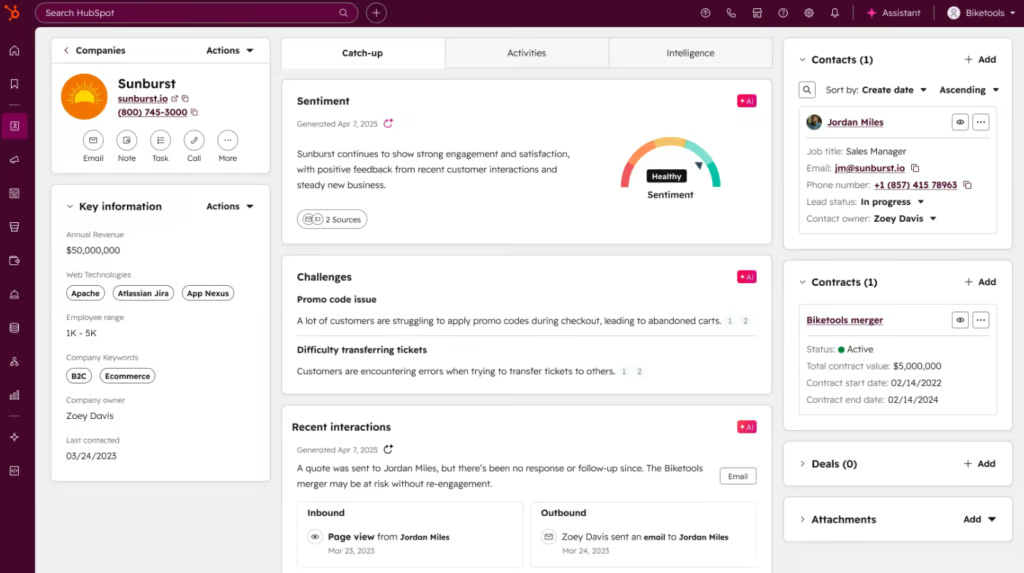
HubSpot is my pick for businesses that want to get their CRM running quickly without committing substantial technical resources to implementation and maintenance. It combines sales, marketing, service, content, and data tools in one customer platform, making it particularly useful for growing companies that want teams to share customer information and workflows.
I also find HubSpot’s main advantages are its approachable interface, free entry point, and relatively straightforward administration. But this makes it less suitable for organizations that need highly customized data models, intricate permissions, or enterprise-level sales processes. Costs can also rise as a company adds users, hubs, marketing contacts, advanced features, and AI usage.
Check out our more detailed HubSpot CRM reviews here.

Salesforce: Best for complex and enterprise sales organizations
Pros
- Extensive customization and workflow automation
- Advanced reporting, analytics, and forecasting
- Granular permissions and administrative controls
- Large enterprise integration ecosystem
- Strong scalability for complex organizations
Cons
- Steeper learning curve
- More demanding implementation and administration
- Total costs can extend well beyond licensing
- May be excessive for teams with straightforward CRM needs
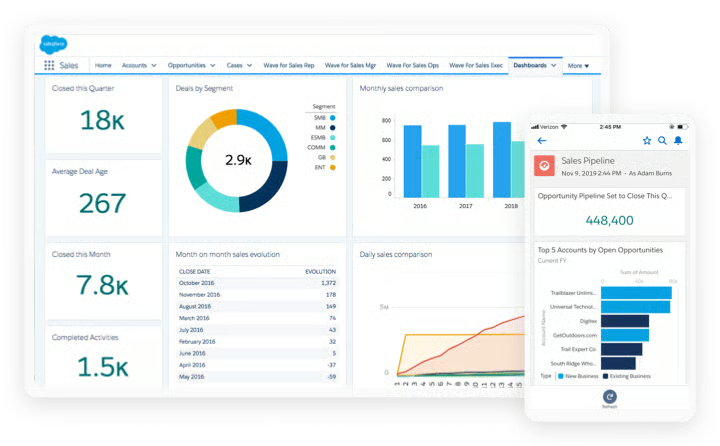
Salesforce is my pick for organizations that need their CRM to support complex sales processes, custom data structures, advanced automation, and extensive integrations. Its flexibility makes it a good choice for enterprises with multiple teams, product lines, territories, approval processes, and reporting requirements.
This is because Salesforce provides greater control than HubSpot. However, that control comes with additional complexity. Implementing and maintaining a customized Salesforce environment may require dedicated administrators, developers, consultants, or an implementation partner. Before choosing Salesforce CRM, I recommend evaluating licensing, implementation, integrations, support, and ongoing administration as part of the platform’s total cost.
Read detailed Salesforce CRM reviews.
My detailed comparison of HubSpot vs Salesforce
HubSpot and Salesforce cover many of the same fundamental customer relationship management (CRM) needs, but they differ significantly in how their features are delivered, configured, and maintained. HubSpot prioritizes usability and a unified customer platform, while Salesforce provides greater flexibility for organizations with complex processes and dedicated technical resources.
In this more detailed comparison, I examine their AI capabilities, integration ecosystems, ease of use, implementation requirements, ongoing administration, migration considerations, and long-term scalability. These factors reveal the operational costs and resource demands that basic feature and pricing comparisons often overlook.
HubSpot vs Salesforce: Pricing and total cost
HubSpot and Salesforce both offer free and paid CRM plans, but their total costs extend beyond their advertised subscription prices. HubSpot provides a lower-cost entry point and generally requires fewer implementation resources. Salesforce offers greater enterprise functionality, but licensing, add-ons, technical support, and ongoing administration can make it more expensive to own.
Winner: HubSpot
In my evaluation, HubSpot earned 4.03 out of 5 for pricing and total cost, while Salesforce earned 3.20 out of 5. HubSpot offers better overall value for most small and midsize businesses because it provides useful free tools, lower starting prices, and comparatively manageable implementation and administration requirements.
HubSpot Sales Hub pricing
| HubSpot Sales Hub plan | Starting price |
|---|---|
| Free | $0 for up to two users |
| Starter | $7 per seat monthly with the advertised annual offer; $20 when paid monthly |
| Professional | $90 per seat monthly when billed annually |
| Enterprise | $150 per seat monthly |
HubSpot Sales Hub’s free plan includes foundational CRM, pipeline, and sales productivity tools. Starter raises feature limits and removes HubSpot branding, while Professional adds advanced automation, forecasting, sequences, and sales management. But, it’s important to note that HubSpot charges a required one-time onboarding fee of $1,500 for Professional and $3,500 for Enterprise.
Paid Sales Hub plans include monthly HubSpot Credits for certain Breeze AI features: 500 with Starter, 3,000 with Professional, and 5,000 with Enterprise. Additional credits cost $0.01 each or $9 per 1,000 when purchased annually. Buyers should also include optional hubs, additional seats, integrations, and other required services in their total-cost estimate.
Salesforce Sales Cloud pricing
| Salesforce Sales Cloud plan | Starting price per user, monthly |
|---|---|
| Free Suite | $0 |
| Starter Suite | $25 |
| Pro Suite | $100 |
| Enterprise | $175 |
| Unlimited | $350 |
| Agentforce 1 Sales | $550 |
Salesforce Starter Suite includes lead, account, contact, and opportunity management, built-in sales flows, lead routing, and basic AI-assisted data capture. The Pro Suite adds greater automation and customization, quoting, forecasting, and access to AgentExchange. Enterprise introduces advanced pipeline management, deal insights, conversation intelligence, APIs, and the ability to add Agentforce. Unlimited adds predictive AI, sales engagement, developer support, a full sandbox, and the Premier Success Plan.
Agentforce should be budgeted separately from the core Sales Cloud subscription when it is not included in the selected package. Salesforce lists Agentforce for Sales as a $125-per-user monthly add-on for eligible Enterprise and Unlimited plans. It also offers Agentforce 1 Sales at $550 per user monthly as a premium bundle combining Sales Cloud, AI, unified data, Slack, Tableau, and other sales products.
Which CRM offers better value?
HubSpot Sales Hub offers better value for most small and midsize businesses because it provides a useful free plan, lower starting prices, and comparatively manageable implementation and administration. But its total cost can still increase with higher-tier seats, required onboarding, AI credits, optional hubs, and integrations.
Salesforce Sales Cloud can deliver better value for enterprises that will use its deeper customization, reporting, automation, governance, and integration capabilities. Buyers should compare three-year ownership costs, including licenses, implementation, and separately purchased AI, rather than treating Agentforce as a standard feature of every Sales Cloud plan.
HubSpot vs Salesforce: Core CRM capabilities
HubSpot and Salesforce both provide the fundamental tools businesses need to manage customer relationships, including contact records, lead tracking, sales pipelines, automation, reporting, forecasting, marketing, and customer service. HubSpot emphasizes accessible, unified workflows, while Salesforce provides greater depth and control for complex sales organizations.
Winner: Salesforce
For CRM capabilities, HubSpot earned 4.5 out of 5 for core CRM capabilities, while Salesforce earned 4.9 out of 5. Salesforce has the stronger overall feature set because it supports more sophisticated lead routing, opportunity management, forecasting, reporting, automation, and sales governance. It is best for organizations with multiple teams, territories, products, or complex sales processes.
Contact and lead management
HubSpot centralizes contacts, companies, leads, deals, and communication history in an accessible interface. It supports segmentation, lead capture, activity tracking, scoring, and automated assignment, making it a strong choice for teams with relatively straightforward customer journeys.
However, Salesforce offers more control over lead assignment, account relationships, record types, territories, and complex data structures. HubSpot is easier to manage, but Salesforce is better equipped for organizations with multiple sales teams and sophisticated lead-management rules.
Pipeline and opportunity management
HubSpot provides visual deal pipelines, customizable stages, task tracking, products, quotes, and sales forecasting. Its pipeline tools are easy to configure and give representatives a clear view of the actions needed to advance each deal.
Salesforce adds deeper opportunity management, pipeline inspection, territory support, forecasting, products, price books, quotes, contracts, and orders. It is the stronger option for businesses with multiple pipelines, complex products, or formal revenue-management processes.
Workflow automation
HubSpot offers an approachable workflow builder for lead rotation, notifications, follow-up tasks, record updates, sequences, and cross-team processes. Its CRM automation tools are easier for typical revenue operations teams to learn, although advanced capabilities require higher-tier plans.
Salesforce supports more complicated workflows through Flow Builder, approval processes, orchestration, custom logic, and platform development tools. Salesforce wins for automation depth, but designing and maintaining these processes may require experienced administrators or developers.
Reporting and forecasting
HubSpot provides customizable dashboards, pipeline reports, activity reporting, attribution, goals, and sales forecasts. These tools are suitable for many growing businesses, but advanced reporting and hierarchical forecasting are concentrated in Professional and Enterprise editions.
Salesforce offers more extensive reporting, forecasting, pipeline inspection, opportunity scoring, territory analysis, and analytics options. Its reporting environment is more configurable and better suited to complex enterprises, although users may require training or administrative support to use it effectively.
Marketing and customer service
HubSpot has the advantage in native alignment because its marketing, sales, and service alignment. This structure makes it easier for teams to coordinate campaigns, sales activity, support conversations, and customer information.
Salesforce also provides comprehensive marketing and customer service capabilities, but businesses may need additional Salesforce products, integrations, and configuration to create the same cross-functional environment.
HubSpot vs Salesforce: Customization and scalability
HubSpot and Salesforce both let businesses adapt their CRM as processes and teams grow. HubSpot provides accessible customization for standard and moderately complex operations, while Salesforce offers deeper control over data structures, workflows, permissions, and enterprise processes.
Winner: Salesforce
HubSpot earned 3.75 out of 5 for customization and scalability, while Salesforce earned 5 out of 5. Salesforce is the stronger platform for organizations that need custom data models, intricate workflows, granular permissions, multiple business units, or support for complex regional and operational structures.
Custom fields and objects
HubSpot supports custom properties, record layouts, associations, and custom objects on eligible plans. These tools accommodate many growing businesses, but access and limits vary by subscription tier.
Salesforce provides more extensive control over custom objects, fields, relationships, record types, page layouts, and validation rules. It is better suited to organizations that need the CRM to represent complicated relationships among customers, products, contracts, partners, and other business data.
Permissions and governance
HubSpot provides user permissions, teams, record access controls, and additional governance features in its higher-tier plans. These capabilities are practical for organizations with relatively straightforward departmental structures.
Salesforce supports more granular roles, profiles, permission sets, sharing rules, field-level access, sandboxes, and auditing. It is the stronger option when an organization must tightly control who can view, change, approve, or export different types of CRM data.
Business units and complex organizations
HubSpot can support multiple teams, brands, and regions, but some business-unit and partitioning capabilities require higher-tier products. Its unified architecture is most effective when teams can work within broadly shared processes and data.
Salesforce is better equipped for multiple territories, divisions, currencies, product lines, partner networks, and regional processes. Organizations can configure different user experiences and rules while maintaining centralized data and governance.
Data capacity and long-term scalability
Both platforms can support growing contact databases, sales teams, automation, and integrations. HubSpot scales effectively for many midsize companies and enterprises that value a unified, relatively approachable platform.
Salesforce has the advantage when growth introduces large data volumes, numerous integrations, intricate permissions, or highly customized operations. Its scalability is stronger, but organizations must budget for the administrators, architects, developers, or partners needed to manage that complexity.
HubSpot vs Salesforce: Integrations and AI
HubSpot and Salesforce both combine CRM data with third-party applications and AI-powered tools. HubSpot emphasizes accessible integrations, prebuilt agents, and no-code configuration within its unified customer platform. Salesforce provides a more extensible enterprise environment built around APIs, custom automation, connected data, predictive intelligence, and configurable agents.
Winner: Salesforce
HubSpot earned 4.3 out of 5 for integrations and AI, while Salesforce earned 4.7 out of 5. Salesforce has the stronger overall offering because it combines a broad enterprise application ecosystem with more configurable agents, custom actions, predictive intelligence, APIs, and governance controls.
HubSpot Breeze and AI Agents
Breeze is HubSpot’s AI layer for its customer platform. It can summarize CRM records, research prospects, draft outreach, prepare users for meetings, and recommend follow-up actions. Specialized tools include Prospecting Agent, Customer Agent, and Data Agent.
HubSpot also offers a no-code agent builder that uses company instructions, knowledge, and CRM data. Some agents and AI actions consume HubSpot Credits, so businesses should estimate usage and confirm the credits included with their subscription.
Salesforce Agentforce and Einstein AI
Salesforce combines Einstein’s predictive intelligence with Agentforce, its platform for building and deploying AI agents. Einstein supports opportunity scoring, deal insights, conversation analysis, call summaries, and forecasting. Agentforce can nurture leads, coach sellers, manage pipelines, and complete actions through Salesforce workflows.
Agentforce offers greater control through Agent Builder, Salesforce Flow, APIs, and custom code. This makes it powerful for complex enterprises, but deployment may require reliable data, careful governance, technical expertise, and additional AI or data-related spending.
HubSpot App Marketplace
The HubSpot App Marketplace contains more than 2,400 apps and agents for sales, marketing, customer service, finance, ecommerce, and productivity. It includes popular connections for Gmail, Outlook, Slack, Zoom, Shopify, and QuickBooks Online.
Many HubSpot integrations are designed for relatively quick installation and no-code configuration. However, buyers should confirm which subscription is required and whether an app supports the records, fields, synchronization direction, and historical data their workflows need.
Salesforce AppExchange
Salesforce AppExchange, now part of AgentExchange, offers thousands of apps, agents, components, consultants, and industry-specific solutions. Its ecosystem extends across sales, service, marketing, analytics, finance, enterprise resource planning, and other business functions.
Salesforce also provides extensive APIs, development tools, and middleware options for custom integrations. This gives enterprises greater flexibility, but implementation and maintenance may require administrators, developers, consultants, or integration partners.
HubSpot vs Salesforce: User experience and administration
HubSpot and Salesforce both provide web and mobile CRM applications, onboarding resources, training, and administrative controls. HubSpot prioritizes faster setup and approachable everyday workflows, while Salesforce provides a more configurable experience that generally requires greater training and administration.
Winner: HubSpot
When it comes to user experience, HubSpot earned 4.60 out of 5 for user experience and administration, while Salesforce earned 3.33 out of 5. HubSpot wins because its interface, guided setup, and no-code tools make it easier for teams to implement and manage standard CRM processes without dedicated technical resources.
Salesforce offers greater control, but its feature density and customization create a steeper learning curve. Consider HubSpot when rapid adoption and lower administrative demands are priorities. Choose Salesforce when the organization can support dedicated administrators and needs a highly tailored user experience.
Setup and onboarding
HubSpot guides users through the steps required to use a CRM, such as account configuration, data importing, email connections, pipelines, and common sales tasks. Small teams can often set up a basic CRM independently, although Professional and Enterprise plans require paid onboarding.
Salesforce offers guided setup, templates, Trailhead training, and implementation partners. A basic Starter deployment may be straightforward, but enterprise environments typically require more planning around data structures, permissions, workflows, integrations, and user roles.
Interface and everyday workflows
HubSpot uses a relatively consistent interface across sales, marketing, and customer service. Its navigation, record layouts, task queues, pipelines, and dashboards are designed to help users complete common workflows with limited training.
Salesforce can tailor pages, applications, records, and workflows for different roles. This flexibility can improve productivity after configuration, but crowded screens or poorly designed customizations may make the system more difficult for users to navigate.
Training, documentation, and support
Both vendors provide extensive documentation, online learning, user communities, certifications, and partner networks. HubSpot Academy makes its sales, marketing, and service tools accessible to business users, while Salesforce Trailhead provides deeper role-based learning for users, administrators, developers, and architects.
Available customer support depends on the selected plan. Businesses should confirm support channels, response expectations, onboarding assistance, and whether employees will need formal training before comparing subscription prices.
Mobile access
Both platforms provide mobile CRM apps for accessing records, updating deals, managing tasks, and reviewing customer activity. HubSpot’s app reflects its simpler desktop experience, making it practical for teams that need straightforward access while away from the office.
Salesforce offers a more configurable mobile environment and advanced offline capabilities in eligible editions. It is better suited to complex field workflows, but organizations may need to configure and test the mobile experience for different employee roles.
Administrator requirements
HubSpot can often be managed by a sales or revenue operations employee when the organization uses standard pipelines, permissions, and automations. Larger deployments may still require specialized administrators, particularly when multiple hubs, business units, integrations, and complex workflows are involved.
Salesforce implementations commonly require dedicated administrative ownership. Complex environments may also need developers, architects, consultants, or integration specialists to maintain permissions, automation, data quality, releases, and custom applications.
Bottom line
HubSpot is the better CRM for most small and midsize businesses because it is easier to implement, simpler to manage, and better suited to teams that want sales, marketing, and customer service tools in one platform. In contrast, Salesforce is a stronger choice for large or complex organizations that need advanced customization, reporting, automation, and administrative controls.
When comparing the two, I would recommend HubSpot if usability, rapid adoption, and lower administrative demands are your priorities. But, consider Salesforce if your business has complex sales processes, dedicated CRM resources, and the budget to support a more involved implementation.
Frequently asked questions (FAQs)
Is HubSpot cheaper than Salesforce?
HubSpot can cost less for small teams, especially when its free or Starter tools meet their needs. However, costs can increase with additional hubs, marketing contacts, advanced features, and AI credits. Salesforce generally carries greater licensing and administration costs, but exact total cost depends on the edition, implementation, integrations, and staffing required.
Can HubSpot replace Salesforce?
HubSpot can replace Salesforce for organizations whose processes fit HubSpot’s objects, automation, reporting, and integration model. Companies with highly customized Salesforce environments should complete a detailed requirements and migration assessment before switching.
Does Salesforce require a full-time administrator?
Not every Salesforce deployment needs a full-time administrator, but complex configurations usually require clear administrative ownership. Larger deployments may need administrators, developers, architects, or an implementation partner.
Which CRM is easier to implement?
HubSpot is generally easier to implement for standard small-business and midsize workflows. Salesforce offers more implementation flexibility but typically requires more planning, configuration, testing, and ongoing governance.