

Best for | Starting monthly fee | |
| JobTread | Construction estimating and job costing | $159/month |
| Procore | Commercial general contractors | Custom pricing |
| Contractor Foreman | Affordable construction management | $49/month |
| Autodesk Forma Build | BIM and design-to-field coordination | $100/user/month |
| Buildertrend | Residential builders and remodelers | Custom pricing |
| RedTeam Flex | Commercial construction contract management | Custom pricing |
| Fieldwire | Construction field management | $39/user/month |
| monday.com | Customizable construction project tracking | $9/seat/month |
Why you can trust TechnologyAdvice
I’ve spent four years evaluating dozens of project management software for a wide range of users, including independent contractors, project managers, small businesses, and large enterprises. I personally use every platform I review and design a comprehensive scoring rubric to ensure unbiased evaluation and rankings.
My recommendations are grounded in hands-on experience with each tool and feedback from business users across industries.

My methodology
I evaluated eight construction project management platforms using a weighted scoring rubric based on standard project requirements and specialized construction work. My assessment drew on official product documentation and recent customer feedback to examine available features and reported limitations.
Pricing (20%): I compared subscription rates and the construction management features included in each plan. My scoring also accounted for additional user charges and how pricing models affect overall costs.
General features (25%): I evaluated core project management capabilities, including task scheduling and dependency management. I also examined how each platform handles construction documents and progress reporting.
Advanced and niche features (20%): I assessed advanced construction tools such as BIM coordination and subcontractor payment management. Additional consideration went to construction automation and reporting across multiple projects.
Ease of use (10%): I reviewed project setup requirements and how employees navigate tasks on desktop and mobile devices. Recent customer feedback informed my assessment of recurring usability complaints.
Support (10%): I compared customer support channels and their availability across subscription plans. My evaluation also considered onboarding assistance and training resources available to new users.
Expert score (15%): I assessed how well each platform addresses the requirements of its intended construction businesses. Drawing on my project management experience, I considered purchasing trade-offs and product capabilities that distinguish each provider from its competitors.
Best construction project management software at a glance
Software | Why consider it | Starting fee | Free trial | My rating |
| JobTread | Carries estimates into project budgets to compare expected costs with actual spending | $159/month | No; 30-day money-back guarantee | 4.89 out of 5 |
| Procore | Tracks design questions and approvals that may affect project costs | Custom pricing | No; free demo available | 4.87 out of 5 |
| Contractor Foreman | Offers company-level subscriptions with scheduling and job-cost tracking | $49/month | 30 days | 4.72 out of 5 |
| Autodesk Forma Build | Links construction issues to specific locations in 3D building models | $117/user/month | 30 days | 4.38 out of 5 |
| Buildertrend | Records homeowner selections and approvals that affect material purchases | Custom pricing | No; free demo available | 4.29 out of 5 |
| RedTeam Flex | Tracks subcontractor commitments and prepares owner payment requests | Custom pricing | Contact sales | 4.27 out of 5 |
| Fieldwire | Lets crews mark defects and assign corrective work directly on construction drawings | $39/user/month | 14 days | 4.02 out of 5 |
| monday.com | Provides configurable boards for tracking construction activities and deadlines | $9/seat/month | 14 days | 3.56 out of 5 |

1. JobTread: Best for construction estimating & job costing
Pros
- Estimates automatically update project budgets
- QuickBooks sync reduces duplicate expense entries
- Custom cost categories support job profitability tracking
Cons
- Estimate configurations require initial setup
- Frequent interface updates require workflow adjustments
- No free plan or trial use
Why I chose JobTread
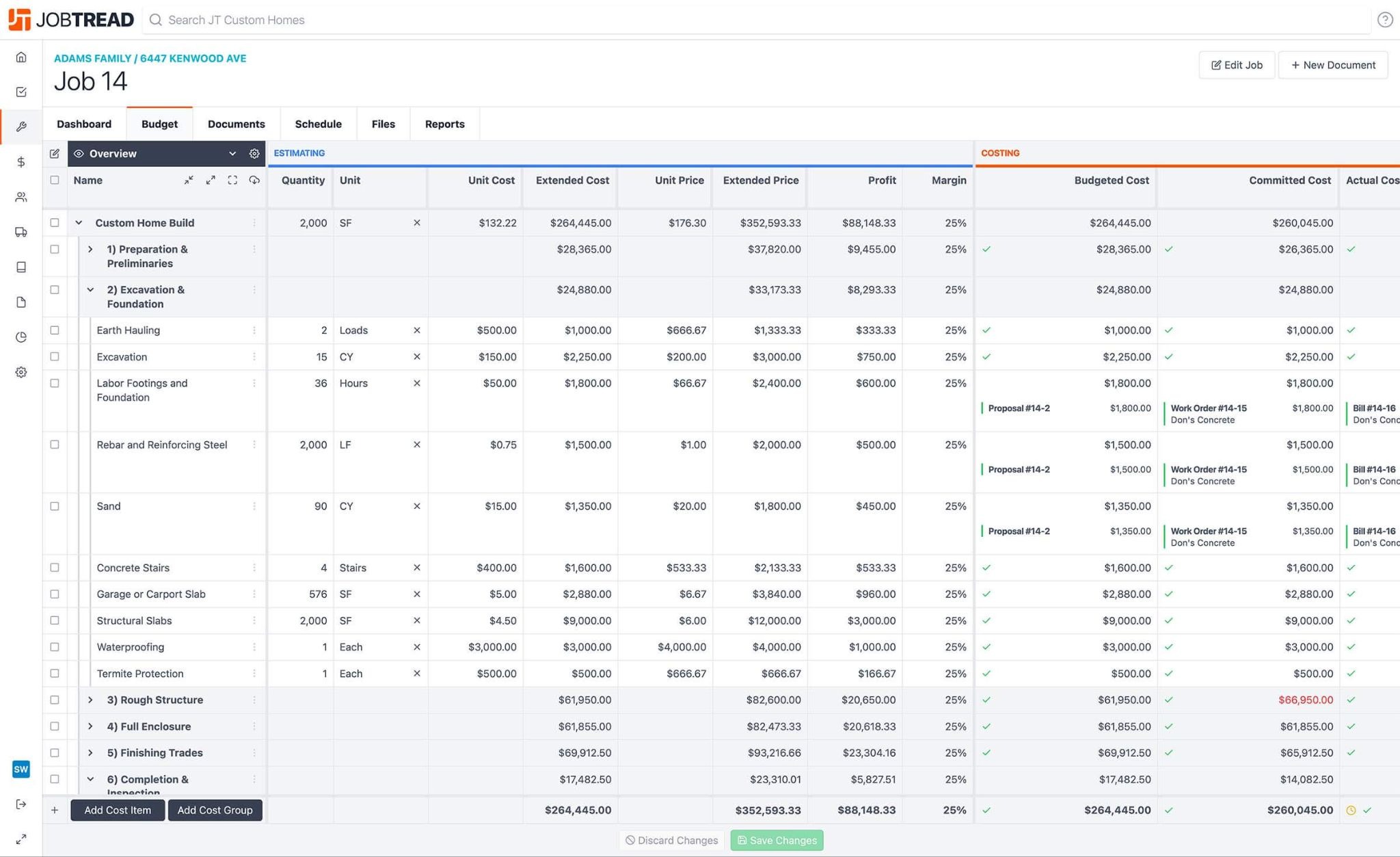
JobTread carries cost estimates into project budgets, making it easier to compare expected expenses with actual spending. Contractors can track material purchases and subcontractor costs against the original estimate as work progresses. When a customer requests changes, project managers can check how the additional costs affect the budget and expected profit.
The built-in takeoff tool measures the amount of materials needed based on uploaded construction plans. JobTread then uses saved prices and cost formulas to calculate estimated amounts. Once construction begins, job-cost reports show where spending has exceeded the budget, down to individual cost items. This works best for contractors who prepare detailed quotes and need to monitor whether each project remains profitable.
JobTread charges for additional internal users beyond the first, increasing subscription costs as more employees need full access. Contractor Foreman's company-level plans may cost less for businesses that need several employees to manage projects.
Key features
Integrated estimating and budgeting: JobTread converts approved estimates into project budgets, preserving the original cost breakdown for tracking expenses during construction.
Built-in construction takeoffs: Contractors can measure material quantities from uploaded blueprints and transfer calculated quantities into project estimates.
Job profitability tracking: Cost reports compare budgeted amounts with job expenses to identify cost overruns and changes in expected profit margins.
Free subcontractor portals: Subcontractors can submit bids and access project information without requiring internal-user licenses.
Pricing
- Free plan: None; unlimited customer and subcontractor portal users are free
- Free trial: Not available; the 30-day money-back guarantee applies only to monthly subscriptions
- Annual subscription: $159/month, billed annually, includes one internal user with estimating, project scheduling, job costing, and financial reporting
- Additional internal users: $16/user/month for users 2–10, $12 for users 11–20, $8 for users 21–30, and $4 for users 31 onward, billed annually
JobTread includes all core features in its subscription and charges according to internal user count.

2. Procore: Best for commercial general contractors
Pros
- RFIs connect design clarifications to project records
- Mobile drawing markups identify subcontractor issues
- Submittal logs track outstanding approval requests
Cons
- Volume pricing complicates subscription forecasts
- Admin workflows slow smaller projects
- Requires initial training to fully utilize the platform
Why I chose Procore
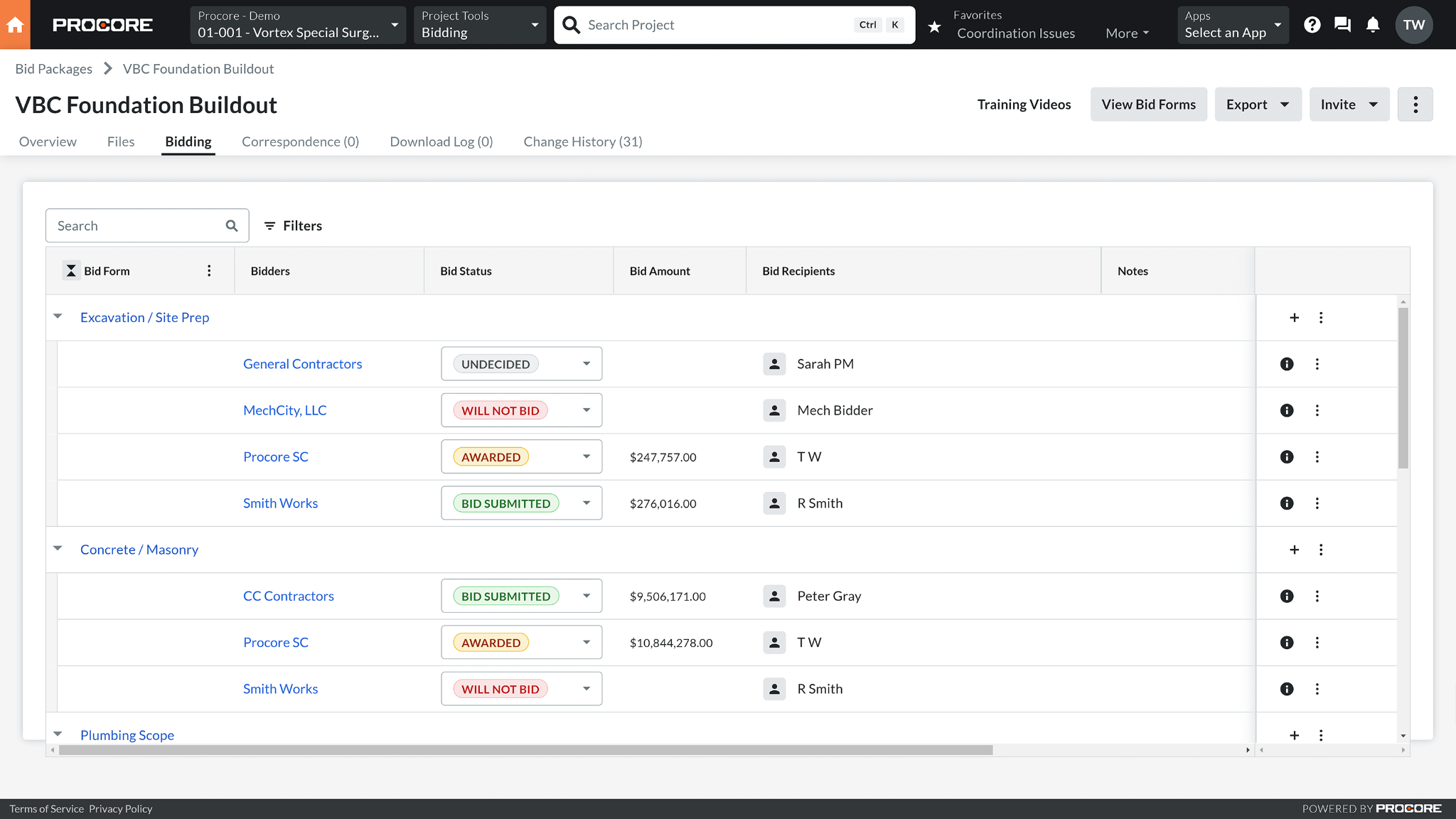
Procore records design questions and connects them to potential project costs before additional work receives approval. For example, if a subcontractor discovers that a drawing is missing important details, the contractor can submit a request for information (RFI) and document any resulting cost changes. Project managers can review the proposed expenses before approving the additional work.
Procore also manages material and equipment approvals across construction projects. Its Submittal Builder creates a list of required approvals from project specifications, reducing the need to enter each item manually. Managers can see who needs to approve a submission and which requests are still pending. It also benefits commercial contractors who coordinate several subcontractors and need records of project decisions.
Procore's subscription cost depends on the total value of construction projects a company handles each year. Fieldwire offers published per-user pricing for contractors who mainly need to track tasks and inspections on construction sites.
Key features
RFI-driven change management: Project managers can create change events from RFIs to document potential cost adjustments before change orders receive approval.
Automated submittal registers: Procore's Submittal Builder extracts requirements from construction specifications and generates submittal logs for tracking required approvals.
Construction document traceability: Transmittals record document recipients and distribution dates, preserving an audit history of construction correspondence.
Subcontractor invoice management: Contractors can collect and review subcontractor invoices against project commitments before approving payments.
Pricing
Annual subscription: Custom pricing based on annual construction volume and selected products, with unlimited users, project documentation, construction financial controls, and implementation services
Digital Coworker Starter Pack uses custom flat-rate pricing for a six-month term, while Pro and Enterprise AI packages use custom credit-based pricing under 12-month agreements.
Procore's unlimited-user pricing excludes Field Productivity, which is billed according to full-time-equivalent employees.

3. Contractor Foreman: Best affordable construction management
Pros
- Saved cost items support repeat estimates
- QuickBooks integration syncs job expenses
- Geolocation records employee timecard locations
Cons
- Large estimates experience slower loading times
- Software updates can interrupt established workflows
- Custom PDF templates restrict change-order number formatting
Why I chose Contractor Foreman
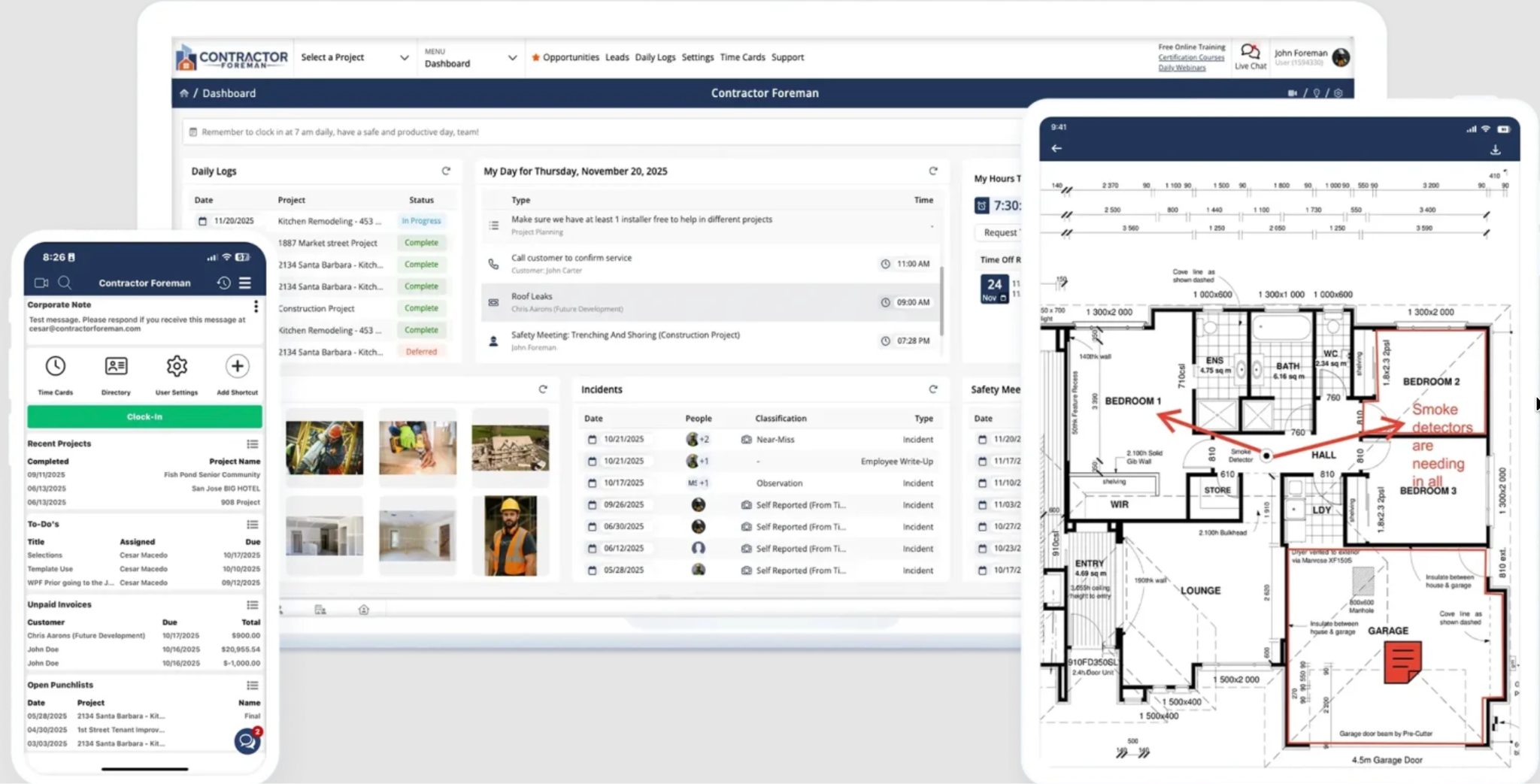
Contractor Foreman offers company-level subscriptions starting at $49 per month with annual billing. Each plan includes a set number of users, making it easier for small contractors to estimate software costs as their teams grow. Office employees and field supervisors can access shared project information under one subscription.
Its Gantt scheduler automatically updates related task dates when earlier work is delayed. For instance, if electrical installation is taking too long, the drywall schedule will move accordingly. Managers can compare the revised dates with the original schedule to see how much time the project has lost. Contractor Foreman also tracks project expenses, making it an option for small businesses that need scheduling and basic cost management.
Contractor Foreman may be less suitable for commercial contractors who regularly handle design questions and approval records. Procore offers dedicated tools for managing these requests across multiple subcontractors.
Key features
Affordable contractor management: Company-level subscriptions start at $49 per month with annual billing, providing an alternative to per-user pricing for construction businesses.
Dependency-based construction scheduling: When predecessor dates change, Contractor Foreman's Gantt scheduler adjusts dependent tasks based on their established relationships.
Change-order accounting: Approved change orders update contract values and revised budgets, keeping authorized scope changes reflected in financial records.
GPS-enabled time tracking: Mobile timecards capture employee locations and associate labor hours with individual projects and cost codes.
Pricing
- Free trial: 30 days
- Basic: $49/month for one user, billed annually, includes project scheduling, daily logs, and core financial management
- Standard: $105/month for up to three users, billed annually, includes project management capabilities with two private training sessions
- Plus: $166/month for up to eight users, billed annually, supports larger project teams with three private training sessions
- Pro: $221/month for up to 15 users, billed annually, includes expanded access with free setup and implementation services
- Unlimited: $332/month for unlimited users, billed annually, includes free implementation and unlimited private training sessions
Contractor Foreman charges a company-level subscription based on user allowances. All plans support unlimited projects.

4. Autodesk Forma Build: Best for BIM & design-to-field coordination
Pros
- RFI pushpins mark unanswered questions on drawings
- Issue markers connect to BIM models
- Submittal exports retain previous revision histories
Cons
- Limited customization for dashboards
- Model-based coordination requires user training
- Sheet collections complicate retrieval of drawing revisions
Why I chose Autodesk Forma Build
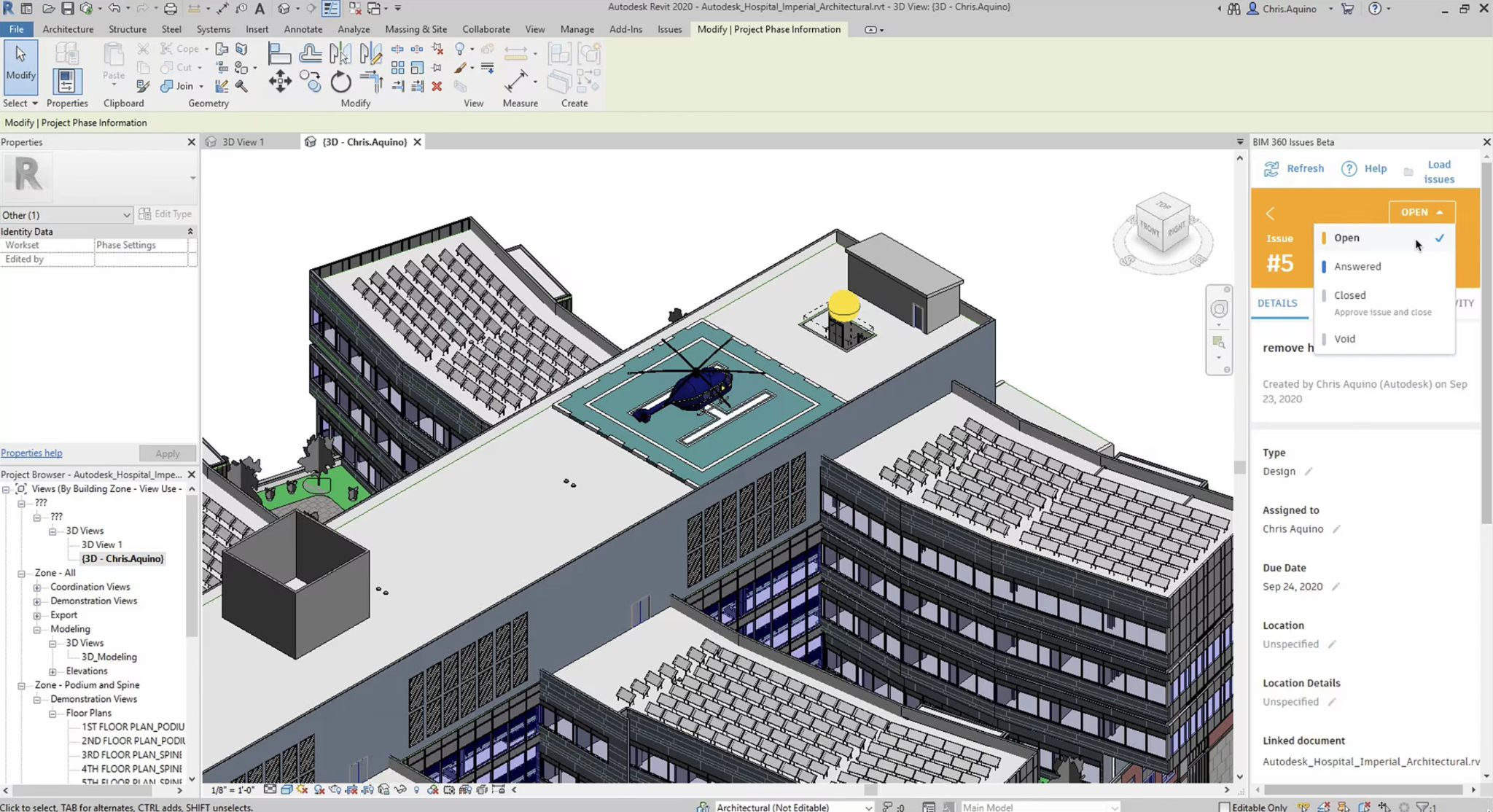
Autodesk Forma Build lets construction teams mark problems directly on 3D building models. Instead of describing a problem in written notes, workers can pinpoint its exact location on the building plans. This benefits architects and engineers who must review a design issue before construction resumes.
The platform also helps check whether different building systems interfere with each other. One example is a ventilation duct that might occupy the same space as a structural beam, requiring a design adjustment before installation. Through Autodesk's model coordination tools, the issue can be assigned to the right person for review. Field crews can access shared building models on mobile devices to check the latest design information.
Autodesk Forma Build's 3D model capabilities may be unnecessary for contractors who work from standard construction drawings. Fieldwire offers a simpler approach to marking problems on plans and assigning repairs to field crews.
Key features
Model-linked issue tracking: Construction teams can attach issue markers to specific locations in 3D models, connecting field observations with the relevant building components.
Design-to-field coordination: Field crews can access shared BIM models through mobile devices to review design information during construction.
Construction cost management: Project managers can associate change orders with budget records to track how approved scope changes affect construction costs.
Subcontractor payment applications: Payment application records track subcontractor billing against completed work and approved changes, supporting payment reviews throughout construction.
Pricing
- Free trial: 30 days for Forma Build Essentials; Forma Build also offers a trial, with its duration unspecified
- Forma Build Essentials: $100/user/month (annually), includes mobile field execution, drawing access, issue tracking, and daily reports
- Forma Build: $175/user/month (annually), adds RFIs, submittals, project cost management, and construction reporting
- Forma Build Unlimited: Custom pricing, includes unlimited-user licensing and organizational project management capabilities
- Forma for Construction Operations: Custom pricing, combines construction management with specification and closeout applications
Autodesk AI capabilities are included in eligible Forma Build subscriptions, while Forma Build Essentials excludes Autodesk AI

5. Buildertrend: Best for residential builders & remodelers
Pros
- Approved change orders update billing records
- Schedule changes support revised construction timelines
- Daily reports are automatically sent to homeowners
Cons
- Commercial schedules lack advanced sequencing features
- ERP and CRM integrations require workarounds
- QuickBooks syncing requires matching accounting records
Why I chose Buildertrend
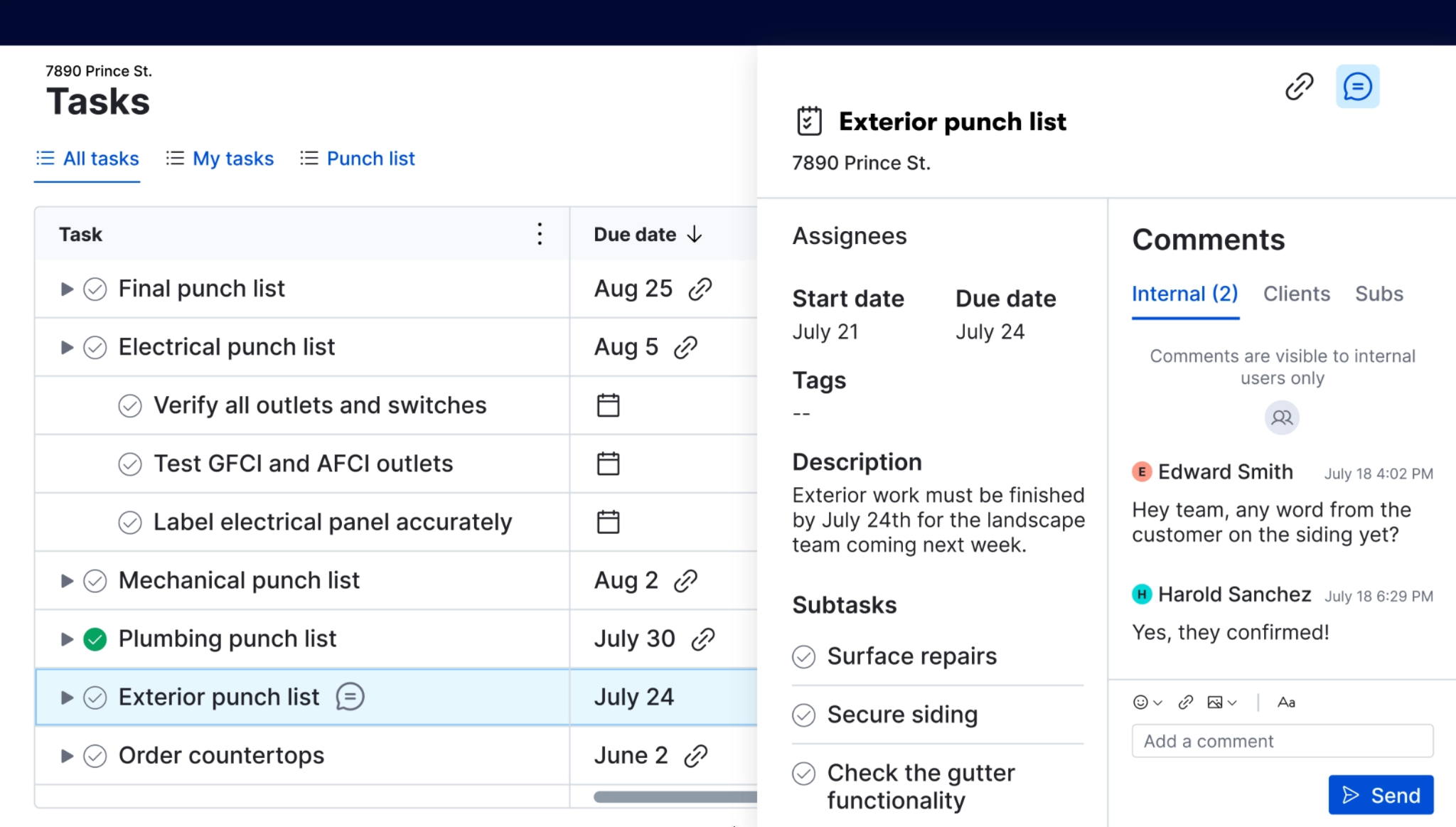
Buildertrend records homeowner decisions that affect construction costs and schedules, especially material selections and requested upgrades. Its Selections and Allowances tools let builders set deadlines for choosing finishes, such as flooring or kitchen cabinets. Once homeowners approve their choices, contractors have a record they can reference when ordering materials.
Homeowners can also review and approve change orders through the client portal when they request work outside the original agreement. For example, adding kitchen cabinets after construction begins may require an updated cost and schedule. Buildertrend keeps those approvals with the project records. Its Client Updates feature also prepares progress reports from recent project activity, giving builders information to review before sending updates to homeowners.
Buildertrend focuses on homeowner involvement, while commercial projects often require more subcontractor approval processes. Procore is worth considering for contractors who frequently manage design questions and approval requests across commercial projects.
Key features
Homeowner communication portal: Homeowners can review project information and approve change orders through a dedicated portal, providing builders with documented client decisions.
Client selections management: Builders can assign selection deadlines and record homeowner approvals before purchasing materials for residential construction projects.
Construction schedule management: Builders can revise construction timelines and share updated schedules with subcontractors to coordinate upcoming work.
Automated homeowner updates: Buildertrend's Client Updates generates progress reports from project records for builders to review before distribution to homeowners.
Pricing
Buildertrend subscription: Custom annual pricing, with an advertised starting price of $499/month and a 10% discount for upfront annual payment, includes construction scheduling, job costing, client portals, and unlimited users and projects. Note that annual pricing depends on construction volume and the onboarding package.

6. RedTeam Flex: Best for commercial construction contract management
Pros
- Buyout commitments support subcontractor contract tracking
- RFIs and submittals maintain associated project records
- SQL exports enable Power BI reporting
Cons
- Project navigation requires multiple screen transitions
- Large drawing uploads can freeze
- External reviewers encounter access difficulties
Why I chose RedTeam Flex
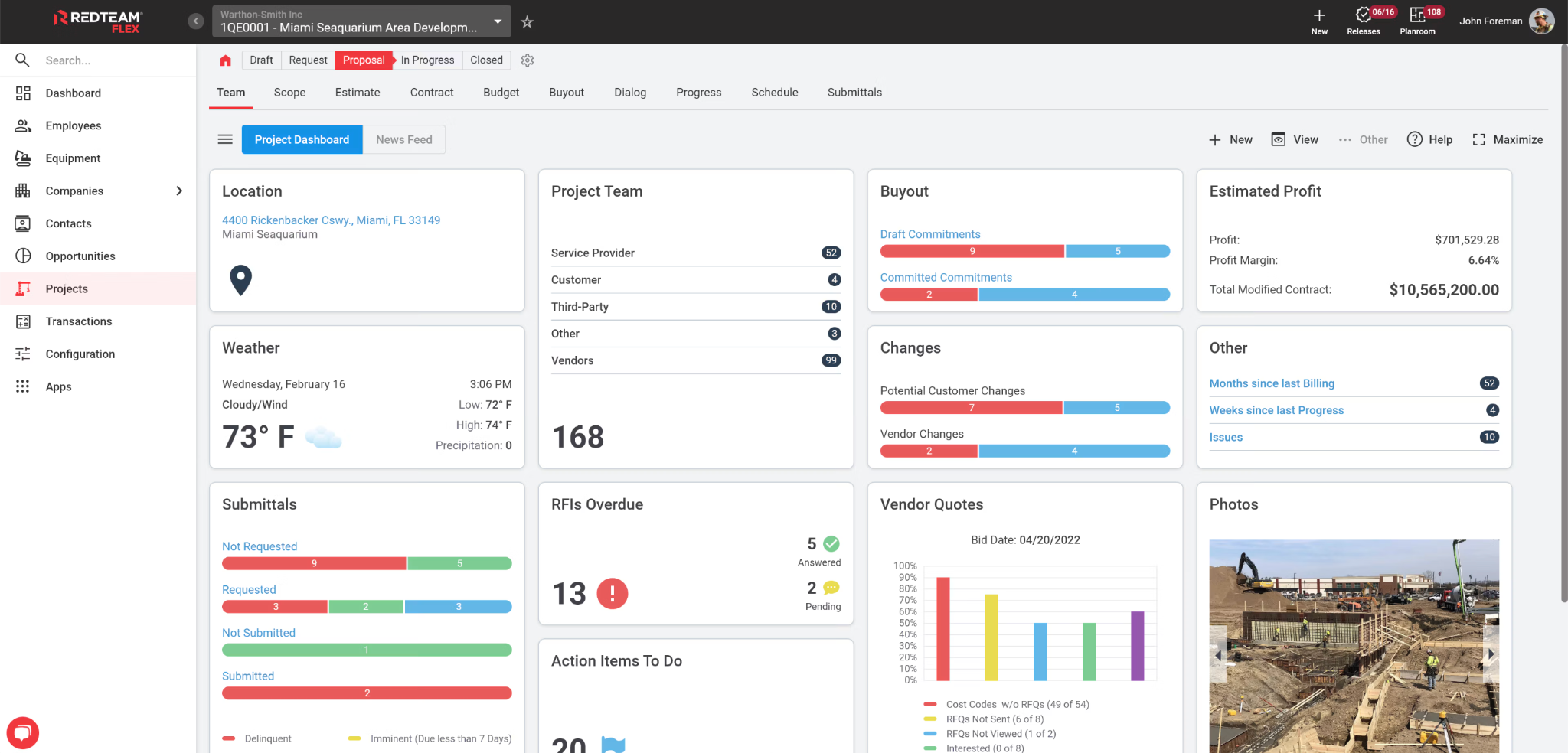
RedTeam Flex tracks the cost of subcontractor contracts and compares them with the project budget. When a subcontractor submits an invoice, managers can check whether the charges match the agreed contract amount before approving payment. This works for commercial projects involving multiple subcontractor contracts.
The software also prepares payment requests that general contractors send to project owners. With its financial management tools, managers can review billed amounts and compare actual spending with expected costs. Work-in-progress reports show whether a project is likely to earn its expected profit based on current financial records.
RedTeam's contract management functions may be more than smaller contractors need when their main concern is preparing estimates and monitoring job costs. JobTread offers a more direct approach to comparing original estimates with project spending.
Key features
Subcontractor commitment tracking: RedTeam records subcontract agreements against project budgets, giving general contractors a record of committed construction expenses.
Work-in-progress financial reporting: WIP reports compare project costs against financial forecasts to identify changes in anticipated profitability before construction finishes.
Owner payment applications: Contractors prepare progress billing applications from financial records to document amounts requested from owners.
Active-project-value pricing: RedTeam bases subscription costs on the value of construction projects rather than the number of users.
Pricing
RedTeam subscription: Custom pricing based on Active Project Value (APV), includes unlimited users and projects, change management, compliance tracking, and subcontractor collaboration. Accounting integrations may incur additional charges.

7. Fieldwire: Best construction field management
Pros
- Offline drawing markups synchronize after reconnection
- Punch-list tasks identify defects on drawings
- Drawing comparisons identify changes between revisions
Cons
- Crew timekeeping requires a separate tool
- Drawing pages require manual renaming for sorting
- Job management integrations create duplicate data entry
Why I chose Fieldwire
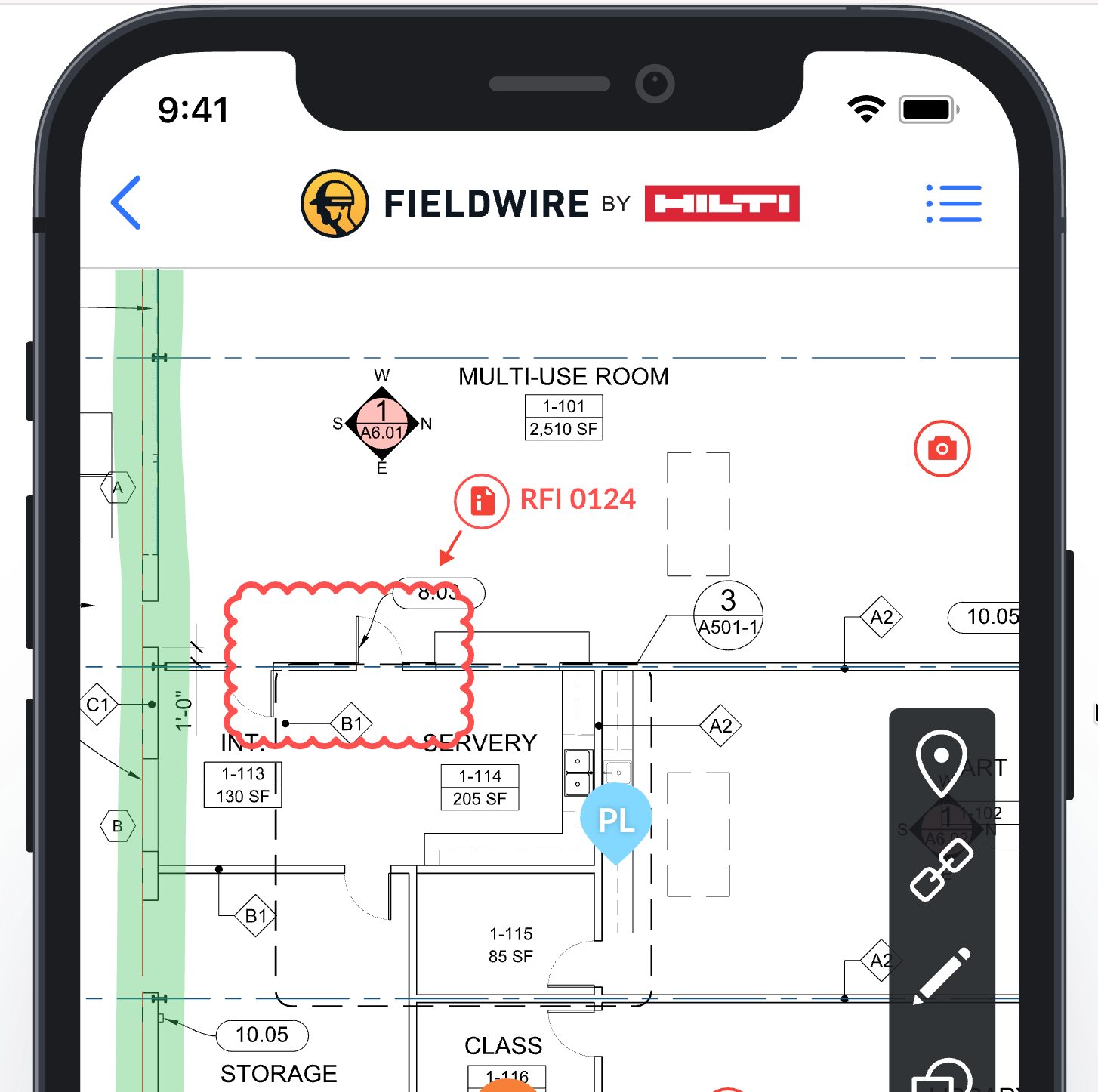
Fieldwire lets supervisors mark unfinished work or construction defects on project drawings. During an inspection, a manager can identify a damaged wall on the plan and attach photos to the task. Workers can then see where the problem is located and what needs to be corrected.
Its offline mobile functionality is ideal for construction sites with poor internet connection. Crews can record task updates and add notes to drawings while offline, then upload their changes once connectivity is available. Fieldwire also compares drawing versions, allowing supervisors to identify what changed between the original plans and newer revisions.
Fieldwire's change-order tools require the Business Plus plan and are accessed through its web app. Procore is a better option for commercial contractors who need to track how design changes affect project costs.
Key features
Drawing version control: Fieldwire keeps a history of drawing revisions and related project records, helping crews identify the latest plans and avoid using outdated versions.
Drawing-based punch lists: Field workers can mark defects directly on construction drawings and assign tasks to workers.
Offline field documentation: Crews can record drawing markups without internet access and synchronize their updates once connection is restored.
Automatic drawing hyperlinks: Fieldwire recognizes drawing callouts and creates hyperlinks to referenced sheets for direct navigation between construction plans.
Pricing
- Free plan (Basic): Includes up to five users, three projects, 100 drawing sheets, and basic field task management
- Pro: $39/user/month, billed annually, includes unlimited projects, drawing comparisons, task reports, and custom task statuses
- Business: $64/user/month, billed annually, adds BIM viewing, custom forms, and application integrations
- Business Plus: $89/user/month, billed annually, adds RFI management, submittals, change orders, and construction budgeting
- Custom contracts: Custom pricing, offers unlimited-user arrangements, API access, single sign-on, and dedicated implementation support

8. monday.com: Best customizable construction project tracking
Pros
- Custom boards track project stages
- AI generates workflow automation instructions
- Connected boards link sales and project records
Cons
- Most mirrored columns cannot trigger automations
- Cross-board reporting requires additional configuration
- Seat minimums increase small-team subscription costs
Why I chose monday.com
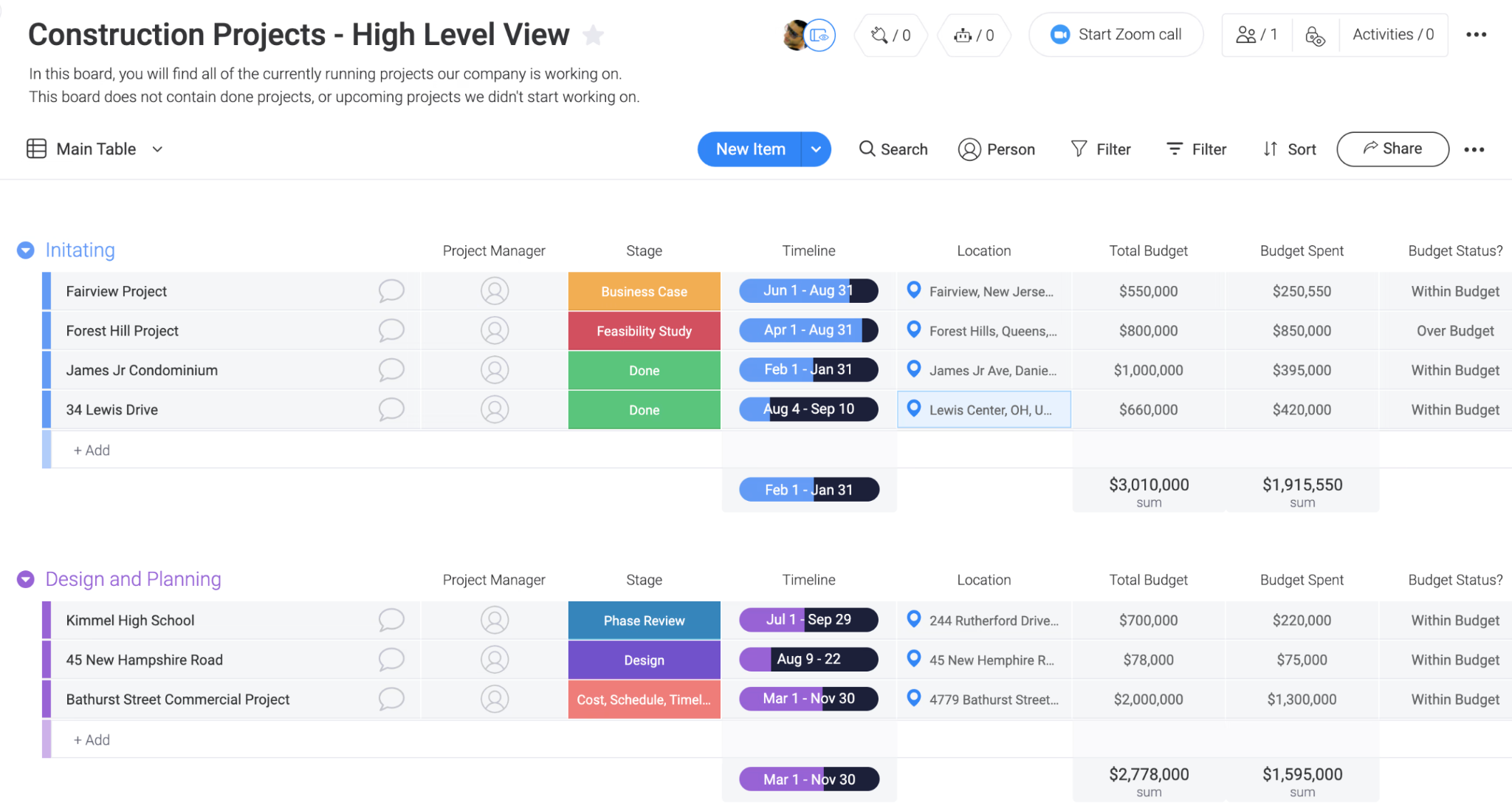
monday.com lets contractors create project boards that match their construction workflow. Teams can add columns for permit approvals and deadlines, then assign employees to each activity. Its general contractor template provides a ready-made structure for setting up project workflows.
As a work management platform, monday.com manages task relationships, such as requiring an inspection before the next construction phase. With its dependency settings, project managers can decide whether delaying one activity should automatically move later deadlines. Companies managing several projects can also review employee assignments to identify scheduling conflicts.
Construction-specific activities such as homeowner selections require additional configuration in monday.com. Buildertrend offers dedicated tools for collecting homeowner choices and recording approvals in residential construction projects.
Key features
Customizable project boards: Contractors can configure board columns to track permit status and construction milestones according to their internal processes.
Flexible task dependencies: Project managers can manage task dependencies and control how date changes affect dependent tasks.
Multi-project resource planning: Resource planners compare employee assignments across concurrent projects to identify workload conflicts before allocating additional work.
Cross-project dependency tracking: Enterprise users can connect tasks across separate project boards to monitor scheduling relationships between concurrent projects.
Pricing
- Free plan: Includes up to two users, three project boards, and basic task management
- Free trial: 14 days for Pro
- Basic: $9/seat/month, billed annually, includes unlimited boards, unlimited tasks, and basic AI capabilities
- Standard: $12/seat/month, billed annually, adds Gantt charts, guest access, integrations, and 250 monthly automation actions
- Pro: $19/seat/month, billed annually, adds task dependencies, time tracking, private boards, and 25,000 monthly automation actions
- Enterprise: Custom pricing, includes portfolio management, resource planning, advanced permissions, and enterprise governance
AI pricing: Basic requires a minimum of 1,000 monthly AI credits ($10), Standard requires 2,000 ($20), and Pro requires 3,000 ($30); current promotional discounts offset these minimum charges, while additional credit purchases may increase costs.
What construction project management software features should you prioritize?
Construction project management software should help contractors manage schedules and control project costs. The features worth prioritizing depend on where your company experiences delays, unexpected expenses, or missing project information.
- Project scheduling and task dependencies: Look for task dependencies that show how one delay affects subsequent work. Electrical installation and required inspections, for example, must finish before drywall installation can begin. Some platforms automatically adjust related dates, while others require manual schedule changes.
- Job costing and budget tracking: Job-costing tools compare estimated expenses with actual spending, ideally at the level of individual materials or work activities. Also check whether the software separates:
- Committed costs: Expenses the contractor has agreed to pay, such as signed subcontractor agreements
- Actual costs: Expenses already recorded against the project
- Change-order management: Change-order tools document work added or modified after the original contract is approved. Each request should include the proposed cost and an approval record. Check whether the system updates the contract value and project budget automatically, and whether additional work appears in the schedule.
- Drawing and document management: Crews need access to the latest construction drawings, especially when plans change. Version control keeps previous drawings available while identifying current revisions. Contractors should also look for requests for information (RFIs), which document questions about unclear construction requirements and retain responses for reference.
- Mobile access and field reporting: Mobile apps let crews record completed work and report problems from the jobsite. For sites with poor internet access, confirm which functions work offline and how updates sync after reconnection.
- Accounting integrations: Construction software may connect with accounting apps such as QuickBooks or Sage, but the information exchanged varies by provider. Check whether the integration transfers approved change orders and job costs.
How much does construction project management software cost?
Construction project management software starts at around $49 per month for some entry-level subscriptions, while per-user plans can cost $100 or more monthly. Larger contractors may pay more, especially when pricing depends on construction volume. The total cost also depends on the features included and the number of employee access.
Construction software pricing models
Pricing model | Provider examples | What determines the cost |
| Company plan | Contractor Foreman | Plan and included user allowance |
| Base fee plus users | JobTread | Number of internal users |
| Per-user pricing | Fieldwire, Autodesk Forma Build, monday.com | Licensed users and subscription tier |
| Construction-volume pricing | Procore, Buildertrend | Construction revenue or volume and contract terms |
| Active-project-value | RedTeam Flex | Value of active projects |
A company with ten office employees and 30 subcontractors could pay a different fee from one where all 40 employees require full access. External-user licensing deserves extra attention when evaluating subscription costs.
Additional costs to consider
Subscription prices may exclude implementation services or additional software features.
- Additional users: Do field employees or subcontractors need paid licenses?
- Implementation: Are setup and data migration included?
- Financial tools: Does the quoted plan include job costing and change orders?
- Integrations: Are accounting connections included or separately charged?
- Training: Does the subscription cover employee training?
How to choose construction project management software for your business
Choose construction project management software by identifying your biggest project management problem, shortlisting providers that address it, and testing their capabilities against your construction workflow. Before purchasing, verify accounting compatibility and user access requirements, then compare the total cost of each option.
1. Identify the processes you need to improve: List two or three recurring problems in your current operations. For example, if estimators prepare quotes in one application and project managers rebuild budgets elsewhere, prioritize software that transfers approved estimates into project budgets.
2. Match the software to your construction business: Residential builders may need homeowner approval tools, while commercial contractors often require formal document reviews and subcontractor records. Also consider who will use the software:
- Field supervisors: Drawing access, task assignments, and mobile reporting
- Project managers: Scheduling, change orders, and budget tracking
- Accounting staff: Job costs, invoicing, and financial records
3. Test a real construction workflow: Ask shortlisted vendors to demonstrate the same task using a sample project. A change-order scenario is a good starting point because it tests cost updates and approval records.
4. Check accounting compatibility and user access: Confirm which financial records transfer between the platform and your accounting system. A demo should show the transaction process rather than simply confirm that an integration exists. Also verify subcontractor permissions and determine whether external users can submit project data and whether their accounts require additional licenses.
5. Compare the total cost before purchasing: Request quotes based on your expected number of users and annual construction volume. Include implementation expenses in the first-year estimate and review renewal conditions. If a free trial is available, involve both office employees and field supervisors to get their feedback.
FAQs
What is the best construction project management software?
Procore is a leading choice for commercial general contractors because it manages construction documents and project financials. JobTread is better suited to estimating and job costing, while Buildertrend focuses on residential construction. Fieldwire is another option for contractors who need mobile field management tools.
Is there free construction project management software?
Yes, Fieldwire and Trimble ProjectSight offer free construction management software. Fieldwire Basic supports up to five users and three projects, while ProjectSight Free allows unlimited users across three projects. Both cover basic field documentation, but advanced financial management and other functions require paid subscriptions.
What is the difference between Procore and Buildertrend?
Procore focuses on commercial construction management, with tools for subcontractor coordination, document approvals, and project financials. Buildertrend caters to residential builders through homeowner portals, material selections, and client change approvals. Procore is better suited to complex commercial projects, while Buildertrend addresses homeowner involvement throughout construction.
Can construction project management software replace QuickBooks?
Construction project management software generally complements QuickBooks rather than replacing it. Platforms such as JobTread and Buildertrend track project budgets and job costs, while QuickBooks handles general accounting and financial records. Some construction platforms include accounting capabilities, so replacement depends on their financial functions.
Is construction project management software different from ERP?
Yes, construction project management software handles project schedules, construction documents, and job costs. Enterprise resource planning (ERP) software manages company-wide operations, including accounting, procurement, and financial reporting. Some construction ERP platforms combine both functions, but dedicated project management tools generally focus on individual construction projects.