

Construction payroll is more than cutting employee paychecks. You have to track labor by job, location, classification, and sometimes by different pay rates within the same week. Those details affect pay accuracy, job costing, and compliance on union and public works construction jobs.
This guide shows what it takes to run payroll for construction and keep labor data usable for job costing, reporting, and compliance. It also highlights where software like QuickBooks Workforce (formerly known as QuickBooks Payroll) can help streamline pay processing and routine tax work.
Construction payroll works best when it produces two reliable outputs every pay period: accurate paychecks and job cost reports you can trust. QuickBooks Workforce is designed to simplify payroll runs, automate tax tasks, and keep payroll records organized.
What is construction payroll
Construction payroll is the process of paying construction workers while tracking the job, location, hours worked, job classification, and pay rate tied to the work performed. That information supports more than payroll. You use it for job costing, project reporting, and workers’ compensation reporting.
On covered federal or federally assisted construction jobs, certified payroll documentation is also required. Under the Davis-Bacon and Related Acts (DBRA), contractors and subcontractors must submit payroll information weekly, and each certified payroll must be accompanied by a signed Statement of Compliance.
What makes construction payroll different
Standard payroll usually focuses on one main question: how much should an employee be paid for the pay period? Payroll for construction has to answer several more questions at the same time.
A construction employee may work on more than one job in the same week, switch tasks with different pay rates, or perform work in different locations with different tax requirements. That means payroll has to capture more than the total hours. It has to show where the work happened, what type of work was performed, and when pay conditions changed.
Those extra details matter because labor is a direct job cost. If hours are coded to the wrong job or classification, labor costs can land in the wrong place, project reports become less reliable, and payroll corrections often follow. On covered public work projects, those same gaps can also make certified payroll reporting harder.
How construction payroll works
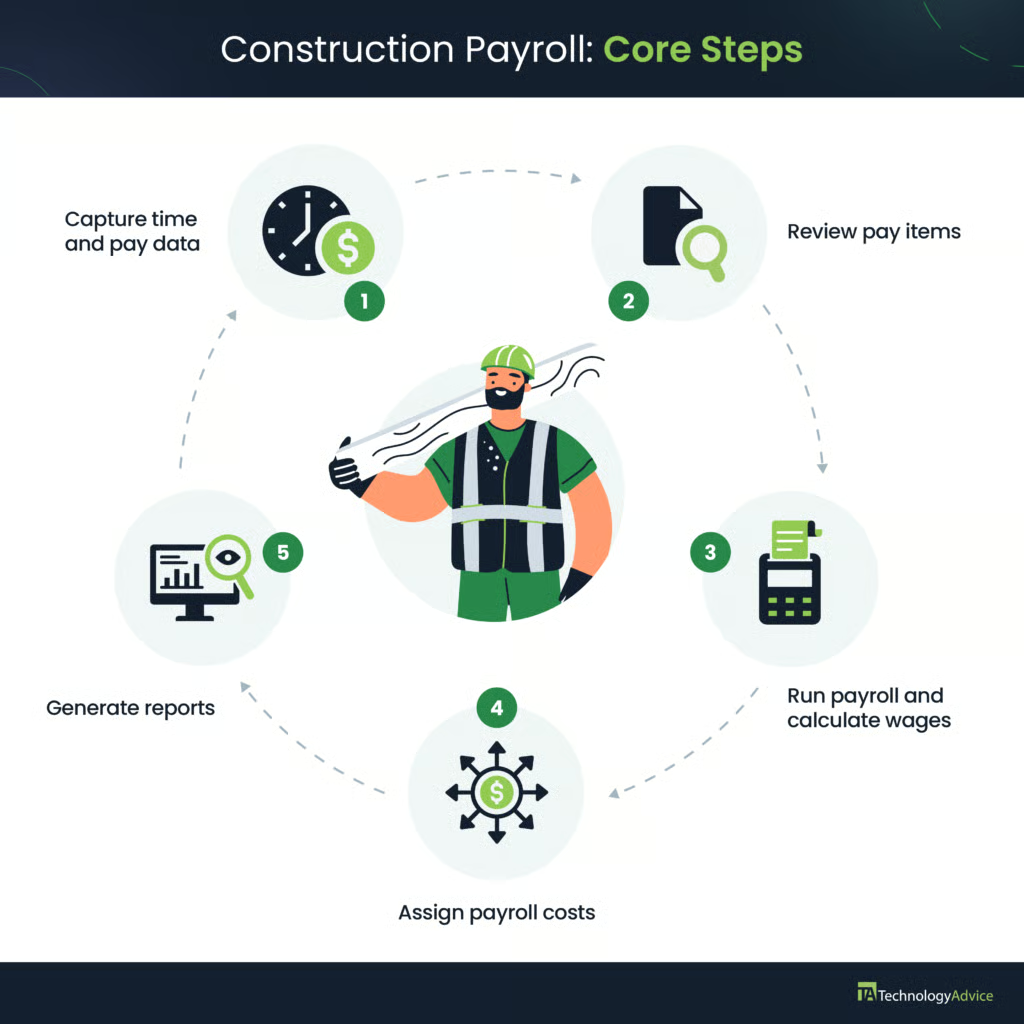
A construction payroll process usually starts with these five core steps:
- Capture time by employee, date, job, classification, and any pay-rate changes tied to the work.
- Review exceptions and other pay-related items, such as overtime, rate changes, shift premiums, travel time, per diem, or reimbursements.
- Run payroll and calculate wages, deductions, and taxes.
- Assign payroll costs to the right jobs or projects.
- Generate required reports or records for unions, certified payroll, tax filings, or audits.
While paying employees is important, steps one, four, and five matter most in construction payroll. Employee work hours and payroll costs need to land on the correct jobs so labor expenses show up accurately in project and payroll reports. Some work may also require additional records after pay runs, such as union remittance reports or certified payroll submissions.
Payroll software with employee attendance and job tracking capabilities can help with these tasks. For example, QuickBooks Workforce’s highest plan comes with time, project, and geolocation tracking features, including timesheets that feed automatically into payroll. It automatically calculates wages and deductions, handles tax reporting for you, and integrates with Points North for certified payroll compliance.
Special payroll requirements in construction
Some construction jobs bring additional payroll requirements that do not come up in standard payroll. The most common ones involve union pay rules, prevailing wage and certified payroll, and location-based compliance issues.
Union payroll & fringe obligations
Union payroll follows the terms of the collective bargaining agreement (CBA). That can affect wage rates, benefit contributions, and authorized deductions. Once a CBA is in place, employers generally cannot deviate from those terms without the union’s consent, which is one reason union payroll leaves less room for guesswork.
Fringe obligations are a big part of that setup. In union payroll, fringes often mean employer contributions to benefit funds such as health and welfare, pension, apprenticeship or training, vacation, or industry funds. You have to apply those contributions to the right hours and classifications, and the rates can vary by trade, local rules, or agreement.
Regardless of whether you’re doing payroll yourself or using a pay processing software, the challenge is making sure the time record supports the right rate and benefit treatment before payroll runs. If an employee moves between classifications during the week, you will need that detail up front. The same is true when fringe obligations or union-specific deductions apply.
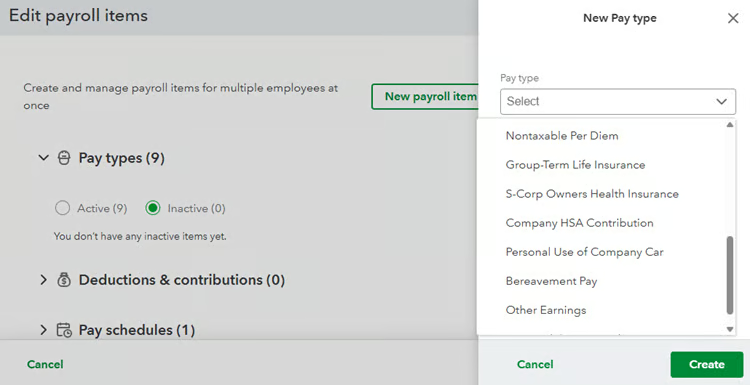
Payroll solutions like QuickBooks Workforce can process fringe contributions, union rates, and deductions once those pay rules are set up correctly. That can make complex union pay runs easier to manage and reduce manual work during pay runs.
Prevailing wage & certified payroll
Prevailing wage and certified payroll are related, but they are not the same thing. Prevailing wage is the required rate of pay and fringe package for a covered job classification on a public works project. You can satisfy the fringe portion of the prevailing wage in a few ways:
- Provide bona fide fringe benefits, such as health insurance or pension contributions
- Pay the fringe amount as additional cash wages
- Use a combination of both as long as the total meets the required or minimum wage
Meanwhile, certified payroll is the weekly reporting used to show that those wages were paid. Accurate time records matter here. If the payroll record does not show the correct classification, hours worked, and pay rate, the certified payroll report becomes difficult to complete and easier to challenge.
On Davis-Bacon covered construction projects, contractors and subcontractors must submit payroll information weekly via the Form WH-347. However, contractors may use another format as long as it contains all required payroll details and the signed Statement of Compliance confirming that workers were paid according to the applicable wage determination. State and local laws should also be checked, as some may have different certified payroll reporting requirements.
Also read: Ultimate guide to certified payroll & audit-ready reporting
Compliance by location & worker type
Construction crews often move across cities, counties, and states, which can change tax setup, local filing requirements, and overtime rules. That makes work location one of the first payroll details to get right.
The Fair Labor Standards Act (FLSA) sets the federal overtime baseline, which is 1.5 times the regular rate for hours over 40 in a workweek. However, some states, like California, have their own overtime laws, so it’s best to check the wage-and-hour rules for the state where the work is performed.
Location can also affect how certain pay items are handled. Travel time between job sites, per diem, mileage reimbursements, and similar payments should be reviewed carefully because company policy, tax treatment, and project requirements do not always line up the same way across construction jobs.
Worker classification matters just as much. Construction businesses often use both employees and contract workers, but they follow different tax and reporting rules. Keeping employee payroll and contractor payments in separate workflows helps prevent pay processing mistakes, especially since misclassifying workers is one of the most common payroll errors and can lead to costly penalties.
Common construction payroll mistakes
Most construction payroll mistakes happen when time records from the field do not fully match the work performed. Some of the most common issues include:
- Time not tied to the correct job or classification: This is a common problem in running payroll for construction. A weekly total of hours worked may be enough to produce a paycheck, but it does not support job costing. Hours posted to the wrong job distort labor reports and make it harder to track whether a project is staying within its labor budget.
- Missing job classification or rate changes: If a worker shifts into a task with a different job classification or pay rate during the same week, that change needs to appear on the time record. When that information is missing, you might apply the wrong rate, and later corrections will be required.
- Travel time not captured between job sites: Travel between job sites during the workday can create payroll problems when it is not recorded clearly. Because those hours are generally paid time, missing or incomplete records can lead to underpaid wages, corrections after payroll runs, or labor costs assigned to the wrong job.
- Inaccurate allowance and reimbursement reporting: Mileage reimbursements and other allowances that are handled inconsistently across crews or projects can lead to payroll issues. Some payments may be treated as reimbursements, while others may need to be reported as taxable wages. Without clear documentation, you may need to reclassify later how those payments should be recorded and reported.
- Late certified payroll submissions: On federally assisted or funded construction projects, late certified payroll filings can create payment delays and compliance problems. If certified payroll is not submitted on time, agencies may withhold contract payments until the missing records are filed.
Construction payroll runs smoother and with fewer mistakes when time records, pay rules, and tax filings stay organized. Software like QuickBooks Workforce can streamline pay runs, automate payroll taxes, and keep payroll records in one place. When paired with its time and project tracking tools, it lets you monitor time entries, track hours by job, and keep job-level labor records easier to review after each pay period.
Thinking of outsourcing payroll instead? Check out our In-house payroll vs outsourcing guide so you can determine which one is right for your business.
Frequently asked questions about payroll for construction
How often do construction employees need to be paid?
Weekly pay is common in construction, but the required pay frequency ultimately depends on state payday laws. Pay frequency rules can vary by state, and some are stricter about how often nonexempt workers must be paid.
Is prevailing wage required on all construction projects?
No. Prevailing wage applies to Davis-Bacon Act-covered construction contracts above $2,000. Most states also have equivalent laws for state and local projects, so be sure to check the rules that apply to your location. Private construction projects are not subject to prevailing wage unless a public funding source is involved, such as tax increment financing or federal grants administered by a local agency.
What payroll records do construction businesses need to keep?
The FLSA requires at least three years of payroll records containing the employee’s name, address, occupation, pay rate, daily and weekly hours, and total wages. Davis-Bacon certified payroll records must be retained for at least three years after project completion. Workers’ comp records should be kept for a minimum of seven years, given claim and statute of limitations timelines. CBAs may also specify additional retention requirements.
Do I need separate payroll software for union and non-union workers?
No. Most payroll systems, like QuickBooks Workforce, can handle both. As long as union-specific deduction codes, fringe contribution items, and CBA-aligned contribution rates can be configured per employee in the system, the platform can process union and non-union payroll together, with each group receiving the correct calculations.