

Key takeaways
- There are many possible reasons to switch to a different learning management system (LMS), including a lack of scalability and a poor user experience.
- Before committing to a new LMS, you will want to update your current one and explore your integration options to be sure you’re taking full advantage of it.
Update notes
- Jan. 2, 2026: Hanna Sillo updated this article to refresh page elements for easier reading, expand the list of signs to switch LMS software, add practical checklists under each section, and include FAQs.
- Jun. 25, 2023: We included five additional signs that indicate your LMS needs to be upgraded, as well as five signs your LMS is not the root of the problems you’re experiencing.
You should consider switching your LMS if it can’t scale with your workforce, lacks mobile access or analytics, or doesn’t integrate with your HR stack—but upgrading your existing system may be enough if the issue is content, adoption, or outdated configurations.
If you already know your LMS could use an upgrade, use our LMS Software Guide to find solutions that might work better than your current system.
15 signs you should switch your LMS
1. Lack of scalability
As you grow, your employee training needs will inevitably expand in both scale and complexity. Most basic LMS solutions don’t offer many customization opportunities, and you might run into limitations with the activity volume your software supports.
It’s time to look into alternative platforms if:
- Your users are experiencing difficulty with the existing system.
- They’re receiving errors because they’re locked out.
- Your storage space is full.
- The programs load too slowly.
Docebo, for example, bases its pricing on the number of users who are actively participating in training programs or viewing content. This is especially valuable if you have a higher volume of users around peak seasons or run training programs in cohorts.
2. Poor user experience
It may seem frivolous or unnecessary to choose your learning management system based on its interface and design, but let’s consider another side: a smooth, user-friendly learning process makes it easier for newcomers to navigate onboarding and complete their work.
When an LMS is difficult to navigate, frustration quickly replaces engagement, especially for new hires. You may need to upgrade your LMS if:
- Your learners struggle to find courses, assignments, or progress information without help.
- New hires need extra guidance or training just to navigate the LMS.
- Employees delay, avoid, or complain about completing training because the system feels outdated or frustrating to use.
When learners are able to find their way around an intuitive system like CYPHER, they’re less likely to find themselves frustrated or falling behind. Most employees will avoid, procrastinate, or at least complain about working in an outdated system, which makes it difficult to stay on track with training requirements.
3. No mobile compatibility.
Workers are more mobile than ever, and they need to be able to access their learning materials from a mobile phone or tablet as well as a desktop computer.
You may need to switch to a mobile-friendly LMS if:
- Employees can’t easily access courses or complete training on a phone or tablet.
- The mobile experience is limited, slow, or missing key features available on desktop.
- Learning requires a stable internet connection, making it difficult to train employees on the go.
If your current LMS provider does not offer applications for smartphones and tablet devices and your workforce is constantly on the go, then it might be time to look into switching to a mobile-friendly LMS, such as TalentLMS.
4. Limited analytics capabilities
As a training administrator, it’s important to understand how learners are progressing, how the LMS is being used, and whether your training programs are actually delivering results over time. The most effective way to measure this is through clear, accessible reporting on key performance indicators (KPIs), such as completion rates, engagement levels, and skill progression.
You may need to upgrade your LMS if:
- You can only access basic completion data and lack insight into engagement or learning effectiveness.
- Reports are difficult to generate, customize, or interpret without manual effort.
- Training data can’t be easily shared with managers or connected to broader business metrics.
Modern platforms like 360Learning make it easier to track KPIs across courses, teams, and individual learners and turn learning data into actionable insights rather than static reports.
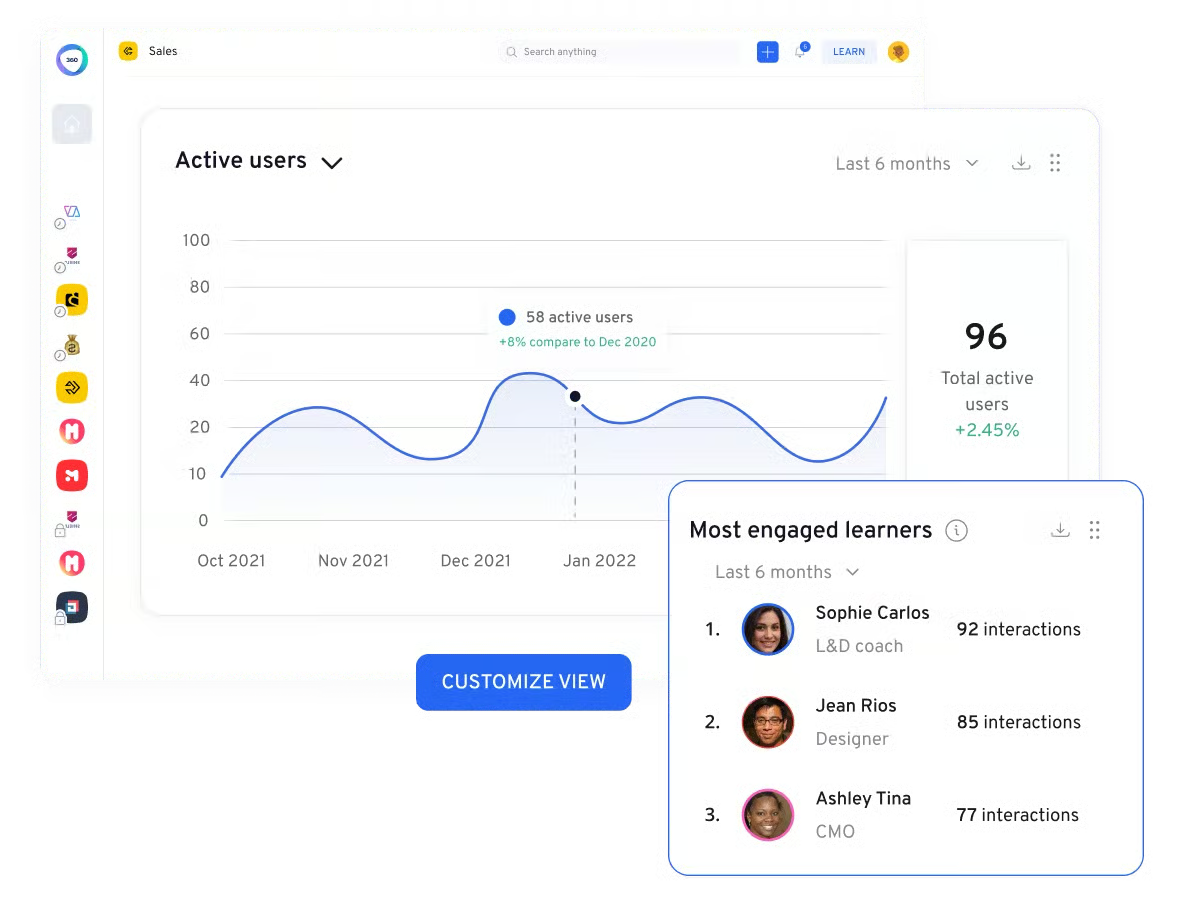
Your system should be able to provide this in a way that is appealing and easy to understand — and if your current LMS can’t provide these analytics, you might want to consider upgrading.
Also read: 8 Important LMS Features for Your E-Learning Program
5. Lack of technical support
When a training administrator or instructor is ready to launch a class, timely technical support can make the difference between a smooth rollout and a stalled program. Your LMS provider should offer fast, reliable ways to resolve issues—whether through live chat, a searchable knowledge base, or direct access to a support team that understands your training environment.
You may need to upgrade your LMS if:
- Support requests take too long to receive a response or go unresolved.
- Help resources are limited, outdated, or difficult to navigate.
- You can’t reach live support when urgent issues arise during training launches.
Vendors like SkyPrep stand out by offering responsive, hands-on support that helps teams troubleshoot problems quickly and keep training on track.
6. Limited integration options
Most organizations don’t want their corporate learning management system to operate in isolation. To be effective, an LMS should integrate with the rest of your HR and business software so data can move seamlessly across systems and reduce manual work.
If your LMS can’t connect with tools like your HRIS, ATS, or performance management software—or doesn’t offer an open API to support custom integrations—it may be holding your training programs back.
You may need to upgrade your LMS if:
- Learning data must be exported manually to share it with other systems.
- Your LMS lacks native integrations with core HR or talent tools.
- You’re unable to build custom integrations due to limited or closed APIs.
Platforms such as iSpring offer open APIs and integration flexibility that make it easier to connect learning data with the rest of your HR tech stack.
7. Limited customization controls
For some companies, customizing the LMS interface with company branding is a perk, not a must-have. However, many organizations appreciate the ability to create a cohesive user experience with other apps in their company-wide software stack. This also helps reduce confusion among employees who must learn yet another platform.
Other customization options include user role assignments and privileges, analytics dashboards, reports, interface languages, certificates, and gamification elements. When these controls are limited, it can restrict how effectively the LMS supports different audiences.
You may need to upgrade your LMS if:
- You can’t tailor user roles, permissions, or dashboards to different audiences.
- Reporting and analytics views can’t be customized for managers or administrators.
- The LMS interface can’t be adjusted to reflect your organization’s branding or workflows.
If your current LMS partner doesn’t offer the necessary customization options, consider an alternative platform such as Absorb LMS.
8. Security is lacking
In some cases, companies must load very sensitive information into their LMS, including confidential data or proprietary knowledge.
You may need to upgrade your LMS if:
- Security features like two-factor authentication or single sign-on aren’t available.
- User access controls are limited or difficult to manage.
- Your LMS doesn’t clearly document compliance with relevant data protection regulations.
Having a secure system, such as eFront, that protects those details against hacking and other threats is critical for keeping this data safe.
When evaluating an LMS provider’s security posture, look for features like two-factor authentication, administrator access controls, single sign-on, and data encryption. Depending on your industry and location, you might also need specialized security parameters that meet the requirements of regulations like HIPAA and GDPR.
Also read: Predictions for the Future of LMS
9. No social learning features
Social learning includes live chats, discussion boards, and other key features that improve engagement and promote dialogue between course participants. This enhanced functionality encourages participants to be more engaged and to better recall course content.
While social learning features are more common today than they once were, some basic training software still doesn’t include them.
You may need to upgrade your LMS if:
- Learners can’t interact with peers through discussions, comments, or shared activities.
- Courses feel one-directional, with little opportunity for collaboration or feedback.
- Engagement drops off because training feels isolated or disconnected.
Consider a system such as Eduflow if social learning is on your list of needs.

10. Not enough ways to track learner progress
Learning management systems aren’t very helpful unless managers and the HR team can track each learner’s progress through the training workshops, as well as broader trends across the entirety of the workforce.
You may need to upgrade your LMS if:
- Managers can’t easily view individual or team-level training progress.
- Progress data is limited to basic completion status without deeper insight.
- Access to learner progress is restricted to a small number of administrators.
The LMS should also allow different stakeholders to view these progress indicators; access shouldn’t be limited to a handful of people in IT or HR. If you can’t configure your current LMS to allow this, upgrading might be a smart move.
Also read: Top 26 HR Metrics to Track
11. Software updates aren’t frequent enough
Any software company worth its subscription fee, including an LMS, should be releasing updates at least several times a year to fix bugs and introduce new features. Some training software companies also release more significant upgrades, such as redesigning the UI, once every couple of years to help the software stay current in the competitive market.
You may need to upgrade your LMS if:
- Managers can’t easily view individual or team-level training progress.
- Progress data is limited to basic completion status without deeper insight.
- Access to learner progress is restricted to a small number of administrators.
If your current learning management system doesn’t fix bugs in a timely fashion and hasn’t updated the UI in years, it might be time to switch to an LMS that releases upgrades more frequently.
Also read: 8 Elements of a Great Learning Management System
12. No support for skills-based learning
Many organizations are shifting away from role-based training toward skills-based workforce development. An LMS that focuses solely on courses, rather than skills acquisition and proficiency, can limit long-term talent planning.
Skills-based learning allows organizations to identify gaps, support reskilling initiatives, and align learning investments with business needs.
It’s time to look into alternative platforms if:
- You can’t map learning content to specific skills or competencies.
- Skill development isn’t tracked over time or tied to career paths.
- Your LMS doesn’t support internal mobility or reskilling initiatives.
13. Poor support for hybrid and frontline workers
As work becomes more distributed, LMS platforms must support employees who don’t work at a desk or on a fixed schedule. If your LMS is primarily designed for desktop use, it may be creating barriers to participation.
Mobile-first and microlearning-friendly platforms are especially important for frontline, hourly, and remote teams.
It’s time to look into alternative platforms if:
- Your LMS lacks a functional mobile app or offline access.
- Learning modules are difficult to complete on a phone or tablet.
- Frontline employees struggle to engage with training materials.
14. LMS data doesn’t integrate with the rest of your HR tech stack
Learning data is most valuable when it connects to performance, workforce planning, and talent analytics. An LMS that operates in isolation can prevent organizations from understanding how learning impacts business outcomes.
Modern LMS platforms are expected to integrate seamlessly with HRIS, ATS, and performance management systems.
It’s time to look into alternative platforms if:
- Learning data can’t be shared across HR or analytics tools.
- You rely on manual exports to connect learning and performance data.
- Your LMS lacks an open API or modern integration marketplace.
15. Limited AI-powered analytics and personalization
Modern learning management systems do more than report course completions. In 2026, leading LMS platforms use AI to personalize learning paths, surface skill gaps, and predict where learners may need additional support.
If your LMS only provides static reports or requires manual analysis to understand learner behavior, it may be limiting the impact of your training programs.
It’s time to look into alternative platforms if:
- You can’t automatically recommend courses based on role, skills, or behavior.
- You lack predictive insights into learner engagement or drop-off.
- Training data isn’t tied to business or performance outcomes.
Five reasons your LMS isn’t the problem
1. You haven’t updated your LMS in a while
If you haven’t updated your current LMS in a while, getting the latest version should be your first order of business before you contemplate switching to a new platform. Some software doesn’t download LMS updates automatically, especially if it’s a major upgrade that can affect how your integrations function, so you might need to initiate it manually.
Collaborate with your IT team to upgrade the LMS and explore its new functionality to make sure that you’re using it to its full training potential.
2. Your LMS content is insufficient
If your LMS content is currently outdated, those modules will still be outdated if you transition them to a new platform. Instead of performing a new LMS implementation, get your instructors to dedicate that time, money, and energy to creating great training content instead. Software migration is not a task to be taken lightly, and it might not even solve the underlying problem if your content is outdated.
3. You haven’t explored integration options
In some cases, your current LMS genuinely does not offer the integrations that you need. But in others, you may not have realized your LMS can integrate with your HR information system (HRIS), customer relationship management (CRM) software, applicant tracking system (ATS), and other tools your business uses.
If you haven’t investigated your LMS’s integrations in a while, take a look at the choices to see what new ones have been added. You might find that the new integrations will improve efficiency, solve your current issues with the training software, and mitigate the need to switch.
4. Employees aren’t using the system
If employees aren’t using the current LMS system, then switching to a new one won’t automatically inspire them to engage the platform more frequently. Low activity may be due to a lack of awareness, access issues, or ineffective incentives.
Survey your team using employee engagement software to understand their motivations, then evaluate your current training strategy to see what needs to change. Adding engagement elements like gamification and rewards might be more effective than switching to a new platform.
5. IT is holding you back
Some companies have internal IT regulations that dictate how often software may be updated, which can impact the effectiveness of any platform, including an LMS.
If the IT department is spread thin, they might also lack the people power to properly deploy the LMS. If either of these applies to your situation, then pursuing a new LMS installation won’t address the underlying problem and, in fact, might make it worse by creating more work for the IT team.
Ready to switch your LMS?
If your company is experiencing the growing pains of a learning management system that isn’t growing with you, it might be time to look for an alternative. We can help in that search: Use our LMS Software Guide to start exploring your options.
LMS upgrade FAQs
What are the biggest risks of switching LMS platforms?
Common risks include data migration challenges, downtime during implementation, and user adoption issues. These risks can be minimized with proper planning, stakeholder involvement, and phased rollouts.
Is it better to upgrade an existing LMS or switch to a new one?
Upgrading makes sense if the core platform still meets your needs and issues stem from outdated configurations or content. Switching is usually the better option when the LMS lacks essential features like mobile access, analytics, or integrations.
How do you measure LMS success after implementation?
LMS success is typically measured through learner adoption rates, completion and engagement metrics, performance improvements, and feedback from employees and managers. Strong reporting and dashboards make this easier to track over time.