

After reviewing 15 solutions, Coassemble is best for first-time course creators, iSpring Learn for flexibility and scaling, and TalentLMS for the most affordable option:
| Standout feature | Starting price | Free trial? | |
|---|---|---|---|
| Coassemble | Guided content authoring | $50/mo. for up to 10 users | Free plan available |
| iSpring Learn | Scalable support | $2.87/user/mo. for up to 100 users | 30 days |
| Talent LMS | Number of features for price | $69/mo. for up to 40 users | Free plan available |
| 360Learning | AI-powered content creation | $8/registered user/mo. for up to 100 users | 30 days |
| Zoho People | Native integration support | $1.25/user/mo. + $18/user/yr. for LMS | 30 days |
Methodology
We selected our top picks with you in mind.
First, we evaluated 15 solutions based on the available options and feedback from customers like you. We considered the following vendors:
- SkyPrep
- iSpring Learn
- TalentLMS
- 360Learning
- Tovuti
- LearnWorlds
- Schoology
- Docebo
- Moodle
- Blackboard Learn
- BrainCert
- SAP Litmos
- Coassemble
- Zoho People
- Trakstar Learn
We then narrowed our selections to the platforms that best addressed your top-of-mind concerns, such as cost, user experience, flexibility, automations, and integration support. We reevaluate our choices as the market changes, so you always receive the most up-to-date insight for your purchasing decision.
Update notes
- Oct. 9, 2025: Hanna Sillo reorganized the article for easier reading, updated key elements and the benefits section, verified vendor pricing, and added fresh 2025 learning stats. The “How to choose” guidance was also revamped into a simple 5-step guide and a set of practical FAQs was added.
- Jun. 13, 2024: Jessica Dennis updated the formatting to improve readability.
If your business is larger or has more complex needs than a typical small business, check out our LMS Software Guide to browse other solutions or learn more about our favorite LMS for small businesses in our video overview below:
Coassemble: Best for businesses developing a training program for the first time
Pros
- Live chat and kick-off sessions with Coassemble’s training experts to help you craft your training courses.
- Unlimited number of courses on all price tiers.
- Content design add-on service to transform lessons into high-quality content for a more engaging trainee experience.
Cons
- Must purchase higher Enterprise tier for access to API and other third-party integrations.
- Does not offer phone support.
- Content author dashboard is limited to English.
- Must use third-party apps, like Zapier, to automate workflows.
- Gamification is limited to course assessments and challenges without social competition.
Why I picked Coassemble
Coassemble provides multiple support methods and add-ons to help small businesses that have never created training content before. The software lacks some advanced features like those of iSpring Learn, but this makes for a very simple-to-use interface.
Plus, if you only need a centralized hub to start tracking your employee’s course completion, Coassemble may be the way to go.
About Coassemble
Coassemble is a beginner-friendly LMS that walks you through course creation, from idea to distribution. New users can consult with Coassemble’s training experts about their campaign idea, and they can help outline your course plan with the necessary LMS elements before you even start using the platform.
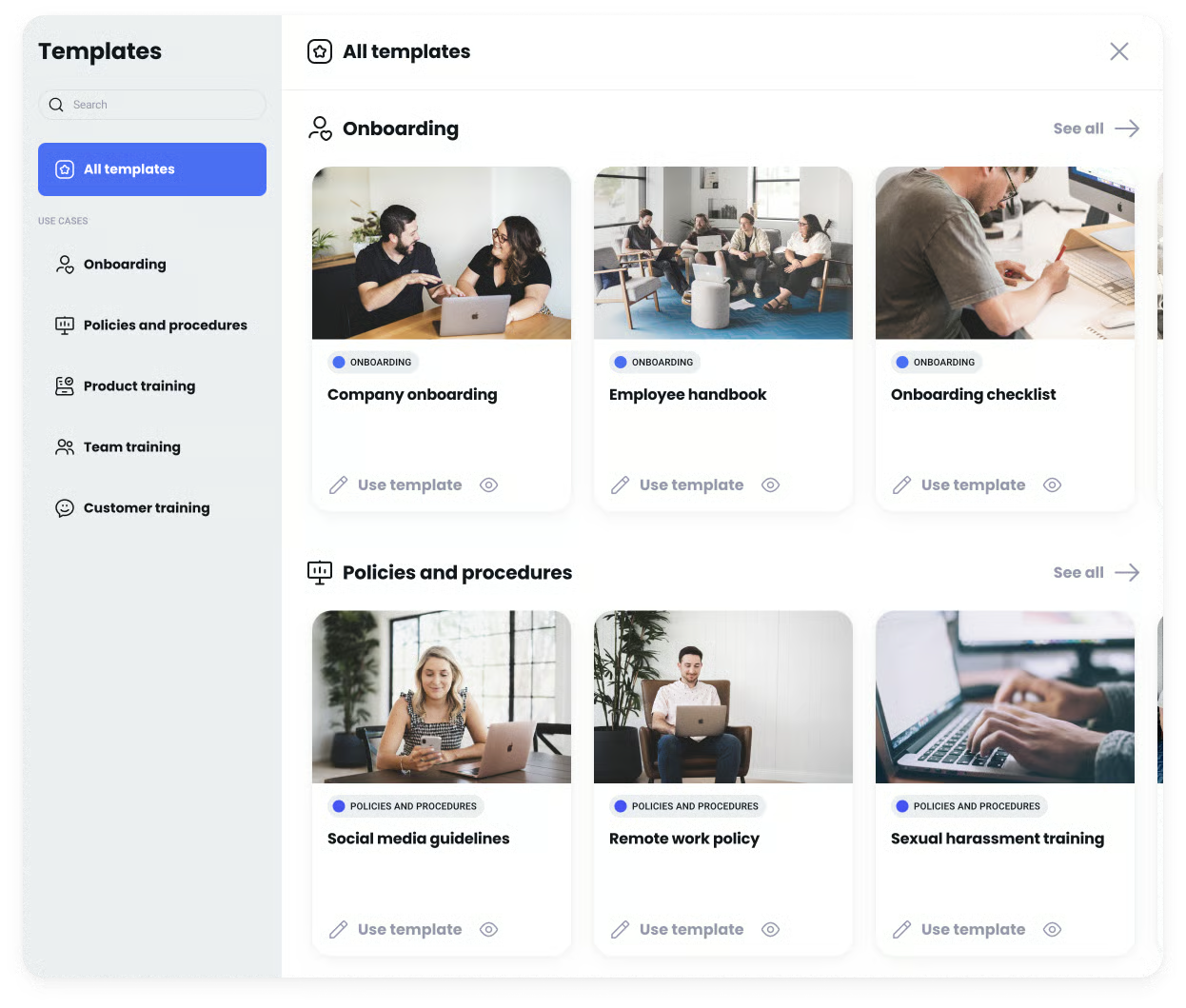
Afterward, you can access Coassemble’s template library of around 50 courses, such as OSHA safety or product training. With these templates, you can easily add or remove aspects using drag-and-drop functionality for an intuitive experience. Similarly, Coassemble’s various assessment options and lesson screens — such as video, slideshow, and timeline — make learning more engaging, increasing employees’ chances of knowledge retention.
While Coassemble succeeds in its content authoring and certification tracking functionalities, it is somewhat limited when it comes to a company’s overall learning and development (L&D) strategy.
For instance, Coassemble lacks AI to suggest learning paths for employee career development, native eCommerce options to sell created content, or blended learning to support online and in-person teaching methods. Other platforms like 360Learning and Zoho People may be the better option if you need these features.However, for a small company, you may not need anything more than content to meet industry regulatory requirements or onboarding training. Coassemble accommodates this by consolidating all your training modules in one place, with an auditable record showing employee course completions.
Key features
Design support
Coassemble offers a support article library, blogs, and webinars to walk you through designing and creating your first eLearning course. For more in-depth help, Coassemble also has live chat, 30-minute one-on-one kick-off sessions to help with your training courses and goals, and design reviews to examine your created content.
For your small business HR team, these support offerings speed up content creation while ensuring your training courses are effective for your target audience.
Customizable templates
Users in all of Coassemble’s plans have access to around 50 pre-built templates for onboarding, recruiting, company handbooks, and brand strategies. Each template is customizable so that you can remove or add content relevant to your company and procedures.The templates also make it easier to quickly implement cross-company learning if you currently do not have any training modules you use. Even if you already have electronic training courses, you can easily upload your SCORM-compliant modules to Coassemble, start enrolling employees, and track their progress.
Pricing
- Free plan: 1 creator, free forever
- Team: $50 per month for 5 creators, billed annually
- Enterprise: Contact sales for a quote
iSpring Learn: Best for flexibility
Pros
- 24/7 live tech support available.
- Available in 30 languages.
- Plans available for from 1-1,000 active users to accommodate scaling companies.
- On-premise solution available for businesses operating in on an internal network.
Cons
- Storage is limited to 50GB in the lowest Start tiers.
- Custom integrations and API are only available on higher-priced Business tiers.
- Customers report that it can be tedious to update the software, especially for the on-premise version.
Why I picked iSpring Learn
iSpring Learn offers a cloud-based application, a mobile app, and on-premise deployment options, making it adaptable enough to fit your company’s unique L&D cadence. It also balances user-friendly course creation with analytics and company branding to accommodate you as your employee training becomes more strategic.
Moreover, its availability in 24 languages can help you reach your global workforce, improving training consistency. iSpring’s flexibility makes it great for dynamic companies that expect to change.
About iSpring Learn
While Coassemble focuses on businesses using an LMS for the first time, iSpring Learn is versatile enough to handle first-time and advanced users. iSpring’s content authoring is simple enough that you don’t need advanced technical skills or knowledge to make lessons with relevant video, audio, or engagement elements.
However, iSpring also offers features to help develop and engage your existing workforce for a more long-term and strategic approach to L&D. For example, outside of course creation, iSpring offers native 360-degree performance appraisals and communication features to monitor professional development over time.
Meanwhile, iSpring’s robust reporting and analytics track course completion and enrollments. By comparing these numbers to employees’ performance metrics, you can see which training programs are the most effective. You can also see correlations between the courses employees take and their success in their roles.
Additionally, iSpring comes with standard automations, such as automatic course enrollment for new hires based on department or role. Email notifications also inform you when employees complete quizzes or courses so you can monitor their learning progress. These automations improve course completion efficiency while ensuring consistency among various training groups.
Key features
Custom branding
iSpring allows you to add your brand to its web and mobile applications to help increase your brand awareness. This can be particularly useful for a small startup with team members abroad. A consistent look and feel across your various applications adds legitimacy to your company and helps associate your brand with a culture valuing cross-company learning initiatives.
Gamified training
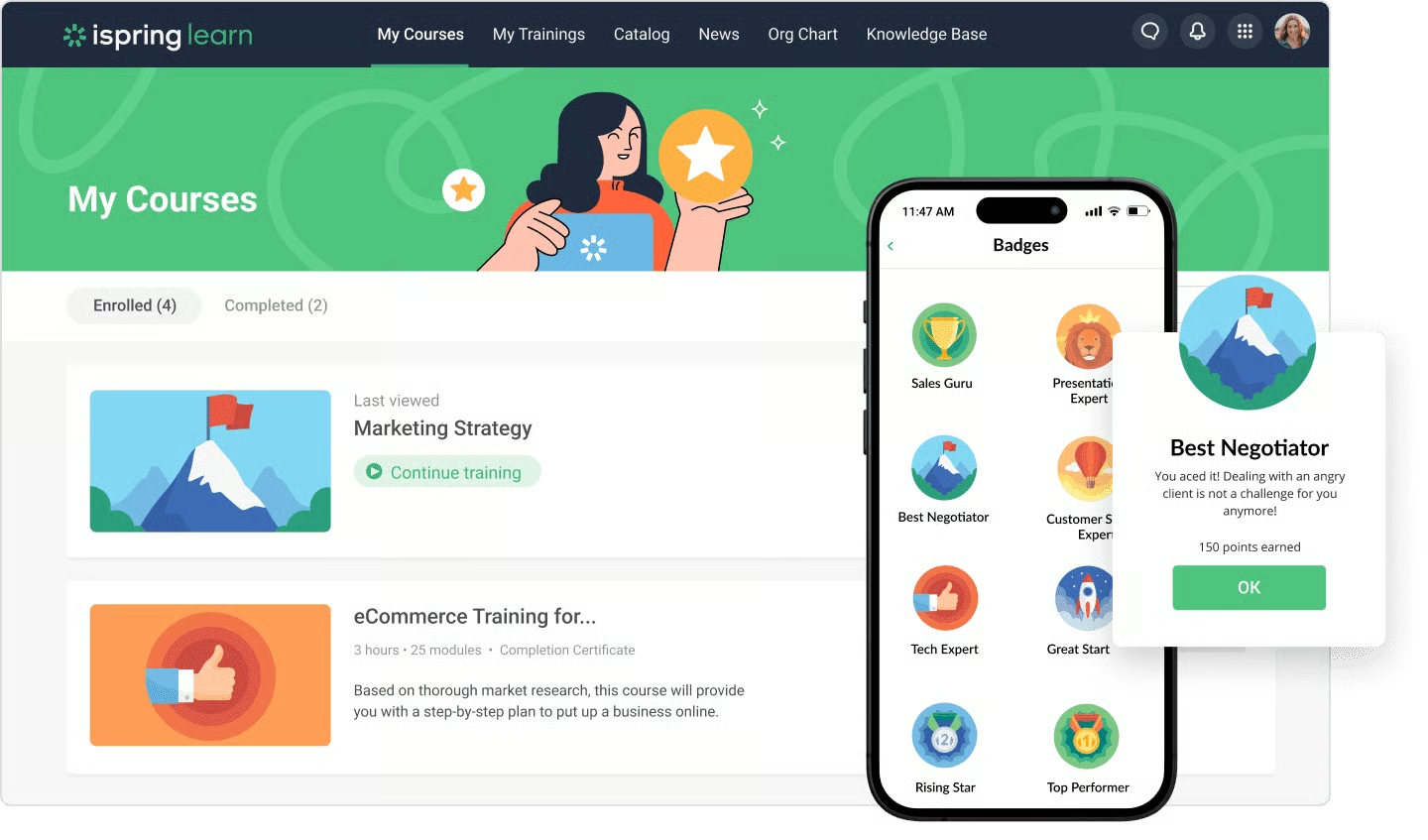
Beyond in-lesson assessments or certifications, iSpring Learn includes gamified elements such as badges and learning leaderboards to reward employees and encourage friendly competition. According to TalentLMS’s 2019 Gamification at Work Survey, employees say gamification makes them more productive and happier.
In other words, using a platform with gamified options like iSpring can increase the likelihood that your employees will remain focused and motivated to complete training courses and advance in their roles.
Pricing
Start tier
Includes: training management, analytics, content management, iSpring Suite authoring toolkit, and support.
- 50 users: $6.70 per user per month, billed annually
- 100 users: $5.77 per user per month, billed annually
- 300 users: $3.70 per user per month, billed annually
- 500 users: Contact sales
- 1000 users: Contact sales
Business tier
Includes: everything in the Start tier plus 360-degree performance appraisal, corporate portal, and API.
- 50 users: Contact sales
- 100 users: Contact sales
- 300 users: $4.10 per user per month, billed annually
- 500 users: $3.75 per user per month, billed annually
- 1000 users: $2.94 per user per month, billed annually
You may also contact its sales team for a custom plan and an on-premise installation.
TalentLMS: Best for affordability
Pros
- Free version of the plan is available.
- Integrates with several third-party apps, including Sage People, BambooHR, and Salesforce.
- Unlimited courses on all paid tiers to support various learning paths.
Cons
- Must pay extra for access to their content library of 700 courses.
- Support is limited to email messaging on Starter, Basic, and Plus tiers.
- Can’t use automations until Pro tier.
Why I picked TalentLMS
If you have five or fewer employees or between 25 and 40 employees, TalentLMS is the most affordable solution on our shortlist. Because TalentLMS includes a free version, you can learn about TalentLMS’s interface before committing to a paid subscription. Plus, you can sell your courses within the platform to reap employee productivity and monetary rewards from your well-made training content.
About TalentLMS
TalentLMS is a popular LMS with high-profile customers like Amazon, Google, OpenAI, Meta, and Unilever. Despite this, TalentLMS is a surprisingly affordable solution compared to others on our list, costing only $1.73 per active user per month for 40 users in its lowest price tier. Only Zoho People’s LMS add-on is cheaper, but you must purchase a Zoho People subscription first to access its LMS.
In terms of features, with TalentLMS, you can:
- Author training courses with an intuitive drag-and-drop interface.
- Leverage flexible training options, including hosting live and in-person events.
- Facilitate employee self-enrollment in courses.
- Sell your content to others through the platform.
- Automate course assignments, course removals or expirations, user deactivations, and email notifications.
- Gamify learning through badges, points, levels, leaderboards, and rewards to motivate employees.
Like iSpring Learn, TalentLMS’s pricing scheme is well-suited to businesses that expect to scale. Each pricing tier builds upon the last by expanding user allowance, adding features that improve efficiency, or building your overall L&D strategy.
For example, subsequent pricing tiers add “branches” or dedicated training portals according to different departments, teams, or training audiences. So, if you add locations or internal departments, you can use a customized branch to ensure training and professional development remain relevant to those specific roles. Even in TalentLMS’s lowest-paid tier, you can leverage white labeling and eCommerce to promote your brand and make extra revenue.
Key features
Forever free plan
TalentLMS is the only product in our roundup with a forever free plan for up to five users and 10 courses. If you are an extremely small business with one location and no internal departments, the free plan can help with basic onboarding training. You can also see how TalentLMS works before purchasing a paid subscription for more features.
A thing to note with the free plan: It lacks eCommerce, gamification, and automations. However, the additional administrative tasks, such as assigning courses and reminding employees to complete them, may be worth it for the free software.
Starter plan features
If you decide to purchase TalentLMS’s lowest price plan, you get access to a range of features at a competitive price, including:
- Unlimited storage, courses, and email support.
- White labeling and custom homepages.
- Gamification.
- Webinar and Salesforce integration.
- eCommerce.
- Mobile app access.
Subscribing to TalentLMS’s Starter plan adds to the overall employee experience by allowing them to complete courses on any mobile device and making learning fun through gamification.
Check out an overview of TalentLMS in the video below:
Pricing
- Forever-free ($0 per month): Up to 5 users and 10 courses
- Core: Starts at $119 per month for, billed annually (40 users)
- Grow: Starts at $299 per month for, billed annually (70 users)
- Pro: Starts at $449 per month for, billed annually (100 users)
- Enterprise: 1000 users and up, contact sales
Note: All prices are based on standard plans, billed annually. It also costs extra to access its TalentLibrary.

360Learning: Best for collaborative learning
Pros
- Integrates with small business HR software, including BambooHR, Bob, Deel, and GoCo.
- Engagement tools, such as surveys, forums, and blended learning, for quick feedback on courses and flexible options to support various learning styles.
- Available in 20 languages, plus translation interface and adaptive language options for a global workforce.
Cons
- Some of 360Learning’s AI-powered features, such as AI course generation, are still being tested.
- Must integrate with third-party solutions for pre-built courses.
- Reliance on developing internal content may result in slower training course implementation.
Why I picked 360Learning
Because of 360Learning’s collaborative approach, the likelihood of employees taking initiative in their own learning and development increases. If you have a small distributed team, this can be a way of connecting team members and discovering shared skill sets and goals.
360Learning also saves you the time of outsourcing training content by using internal talent to create company or industry-focused learning materials. As a result, your employees become well-versed in your company’s specific processes and procedures for a more targeted learning experience.
About 360Learning
360Learning is an LMS that combines Coassemble’s easy course creation with iSpring Learn’s professional development features. The result is a platform that promotes internal course collaboration and upskilling.
360Learning does this by surveying the employee population on the kinds of learning courses they want and then using AI to identify internal subject matter experts to create the lesson. This prevents you from having to pay for training courses from third-party consultants or vendors. Your HR department also does not have to dedicate time to creating courses on topics they may know little about.
Also somewhat unique to 360Learning is its iterative approach to course creation. Following the publication of an internal expert’s course, participants can comment and suggest ways to improve it. Authors can access feedback and add or make changes to keep courses updated.
To add to the overall engagement of the platform, 360Learning uses AI to help identify workforce skill gaps, suggest courses to employees based on training history, and personalize notifications. This makes employees aware of your catalog of courses while giving them control to choose learning paths based on their roles and skills.
Key features
Collaborative content creation
360Learning lets anyone in the organization create a course, share it, and invite feedback. Group pages and newsfeeds help learners quickly crowdsource answers to course questions or receive instructor clarity on the content. As a result, training courses are not static; they are living documents with a robust learner community to ensure the material remains relevant and helpful.
Reaction scores
360Learning uses reaction scores to prevent content from going stale. They also act as a quick way to gauge a course’s relevance and effectiveness. The score is based on the course’s view count and positive or negative reactions, such as likes. 360Learning then notifies you of underperforming lessons so you can focus on making content that employees enjoy and helps with their professional development.
Learn more about 360Learning’s reactions feature in the video below:
Pricing
360Learning includes two pricing tiers:
- Team: $8 per registered user per month for up to 100 users per month.
- Business: Contact sales.
The main difference between Team and Business tier plans is that the Business tier includes automations, integrations, a dedicated customer support team, and a larger user allowance.

Zoho People: Best all-in-one HR and LMS software solution
Pros
- Access to all of Zoho People’s HR features, including onboarding, database management, and workflow creation to consolidate HR functions.
- Mobile app available to accommodate employee learning and feedback on the go.
- You do not have to pay extra for Zoho People’s LMS on its higher price tiers, Enterprise and People Plus.
Cons
- Cannot access LMS features on Zoho People’s free plan.
- Must purchase Zoho People to access its LMS add-on.
- Does not offer a catalog of templates or ready-made courses.
Why I picked Zoho People
Zoho People is all-in-one HR software with a robust LMS add-on. Moreover, adding the LMS gives you access to a full range of features, such as automations that competitors often relegate to higher price tiers. If you need affordable and scalable HR software with a native LMS element, Zoho People is a great choice to help consolidate your business’s HR tech stack.
About Zoho People
Zoho is well-known for offering a variety of products, from sales to marketing, HR, finance, project management, and security. In fact, Zoho boasts both a stand-alone knowledge base and learning platform, Zoho Learn, and a corporate LMS add-on as part of their Zoho People platform. Zoho People, though, is an excellent option if you want to consolidate both your HR software and LMS in one place.
Zoho People’s LMS includes a sizable list of features, including blended learning, customizable notifications, gamification, and feedback forums. And, because Zoho People’s LMS is an add-on, you get access to its complete set of features as soon as you purchase, expanding the functionality of the human resources information system (HRIS) you use every day.
Despite this, Zoho People’s LMS works best if you are already dedicated to other Zoho products as its LMS features are very similar to other platforms like iSpring and 360Learning. Alternatively, Zoho Learn offers both a knowledge management place for document sharing and retention and course creation.
Nevertheless, Zoho People prevents you from manually tracking employee learning progress or importing data from third-party solutions to your HRIS. Plus, you can access its advanced automations, time-tracking, scheduling, performance management, and engagement features to help simplify workforce management for your small business.
Key features
Blended learning
Zoho People’s LMS gives you the flexibility to schedule and conduct self-paced, virtual, and in-person classroom training. This allows you to accommodate employees with various learning styles and cover topics that work better in different learning environments.
For instance, you can mandate self-paced training courses in Zoho People for your small business sales team to learn your brand strategy. Then, you can schedule in-person sessions to facilitate role-playing so they can practice what they learned.
HR software integration
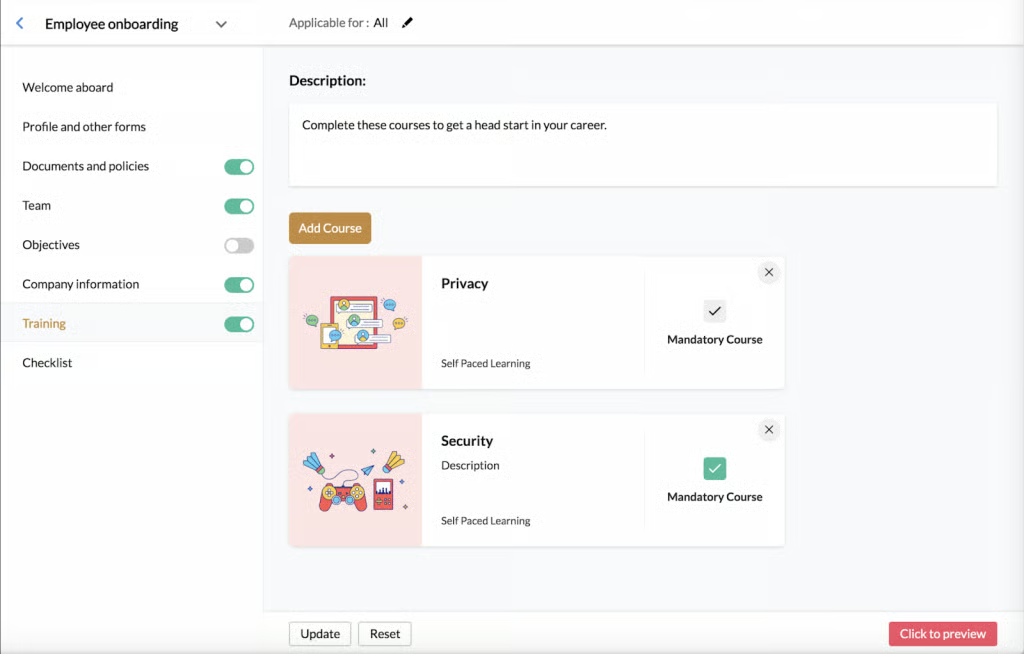
Because of Zoho People’s LMS connection to its HRIS, you can easily manage learning courses as part of the larger employee life cycle. For example, once an employee completes a course in its LMS, new skills are automatically added to their skill set. You can then use this data to help pinpoint skill gaps for more strategic recruitment and development initiatives.
For a small business, this also makes tying mandatory lessons to your new hire onboarding process easy. New employees do not have to worry about shuffling between multiple systems as they get used to their new role, resulting in faster time-to-productivity.
Pricing
Zoho People’s LMS costs an additional $18 per user annually on top of its Essential HR, Professional, and Premium price tiers. It is included automatically in its Enterprise and People Plus tiers. Prices for each tier are outlined below:
- Essential HR: $1.25 per user per month.
- Professional: $2 per user per month.
- Premium: $3 per user per month.
- Enterprise: $4.50 per user per month.
- People Plus: $9 per user per month.
Note: All prices are based on annual billing rates.
How can LMS help small businesses?
LinkedIn’s Workplace Learning Report 2025 reveals that 49% of learning and development leaders agree that there is a skills crisis and employees do not have the right skills for business strategy. For small businesses, these LMS platforms offer an affordable, scalable way to close skill gaps, standardize onboarding, and measure whether training is actually advancing your business priorities.
How to choose the best LMS for your small business
- Pick one clear goal. Decide the single thing you want the LMS to fix first: faster onboarding, basic compliance training, or upskilling sales. Then, name one metric you’ll use to check success (e.g., completion rate, new-hire time-to-productivity).
- Count who will learn. List how many people now and how many next year, and note whether learners are employees, contractors, or customers. Pricing and features often change by learner type.
- Match the content you already have. Do you mainly need videos, PDFs, live training, or short quizzes? Choose a platform that accepts those file types and can issue certificates if you need them. However, there’s no need to worry about technical standards right now.
- Try a short pilot. Shortlist 2–3 platforms, run a 4-week pilot with 10–50 learners focused on your goal, collect completion data and user feedback, then pick the one that actually moves the needle.
- Check day-to-day usability and support. Make sure admins find it easy to enroll people and run reports, learners can log in with their usual work account (e.g., Google, Microsoft), and the vendor offers the level of help you’ll need during rollout.
Learning management systems (LMSs) help companies develop, implement, and manage training programs among their employees. Businesses of all sizes and industries use LMSs not only to ensure consistency in their training processes and procedures but also to foster employee engagement, growth, and development.
However, where enterprises search for LMSs with a higher focus on employee career development and upskilling, smaller companies need LMSs that are user-friendly, automate training processes, and meet necessary compliance requirements for their industry.
If you’re a small company, our roundup meets all of these LMS features, plus added specialties in integration support, course catalogs, collaboration tools, and affordability:
- Go with Coassemble if this is your first LMS and you need extra assistance in creating courses.
- Select iSpring Learn if you need a flexible solution to adapt to your scaling business.
- Choose TalentLMS if you need an affordable solution to start your own L&D initiatives.
- Pick 360Learning if you want an engaging platform and already have internal experts to create courses.
- Select Zoho People if you need affordable and integrated HR and LMS software.
Learning management systems FAQs
How much will an LMS cost my small business?
It varies. Some vendors have free or very low-cost plans for tiny teams, others charge per user or per active user. Start with a short pilot so you can see value before committing to an annual contract.
How long does it take to set up?
You can run a basic pilot in 4 weeks. A full rollout usually takes a few weeks to a few months depending on how much content and customization you need.
Can I use the training materials I already have?
Yes. Most LMSs let you upload videos, PDFs, and simple quizzes. If you have fancy legacy files, double-check the platform supports them. But for most small businesses that’s not a roadblock.
What level of vendor support should I expect?
Look for clear onboarding help (templates, setup calls, or live chat). Bigger vendors may offer a dedicated manager, but many small teams do fine with strong self-help docs and responsive chat support.
If none of these fit your needs, browse our Learning Management System Software Guide for a complete selection.