

Payment processing for small business affects more than how customers pay. It influences transaction costs, cash flow, checkout speed, payment security, and the amount of work required to reconcile sales with accounting records.
The right setup depends on where you sell, how much you process, your average transaction amount, and whether customers pay at a counter, through a website, or from an invoice. A retailer may prioritize fast in-person checkout, while a service business may need online invoices, ACH payments, and automatic payment reminders.
This guide explains how payment processing works, what it costs, and how to choose the right setup.
Key takeaways
- Payment processing covers the authorization, settlement, deposit, and recording of customer payments.
- A payment method is how a customer pays, while a payment channel is where or how the business collects the payment.
- Payment processors, gateways, merchant accounts, banks, and card networks may work together, though many providers package several functions into one platform.
- Small business owners should compare total costs, supported payment methods, deposit speed, security, integrations, and contract terms before choosing a provider.
- What is payment processing?
- How small business payment processing works
- Common payment methods for small businesses
- How much does payment processing cost?
- How to choose a payment processor for your business
- Payment processors for small businesses
- When should you switch payment processors?
- Frequently asked questions
What is payment processing?
Payment processing is the system a business uses to accept, authorize, settle, and record electronic payments. It covers the systems that move a payment from checkout through approval, settlement, and deposit.
A typical payment setup may include a processor, gateway, merchant account, and checkout tool. Many providers combine these services with a POS terminal, invoicing, reporting, or accounting software.
Payment processing vs payment methods vs payment channel
As mentioned, payment processing is the system that moves and records the transaction. A payment method is how the customer pays, such as by card, ACH, digital wallet, cash, or check. A payment channel is where the payment takes place, such as a POS terminal, ecommerce checkout, online invoice, virtual terminal, or recurring billing system.
For example, a customer may use a credit card as the payment method and an online invoice as the payment channel. The distinction matters because a provider may support a payment method without supporting every channel your business needs.
A payment processing system’s key players
Several systems and financial institutions may take part in one transaction. Some providers combine these roles, so you may not need to purchase each service separately.
- Payment processor: The payment processor sends transaction data between the business, card network, and banks. It manages authorization, approval or decline responses, and settlement. Processors may also offer fraud tools, reporting, refunds, disputes, recurring billing, integrations, and payment hardware.
- Payment gateway: A payment gateway securely collects and sends payment data from an online checkout, invoice, payment link, or virtual terminal to the processor. It may encrypt or tokenize card details and return the approval or decline response to the customer-facing payment screen.
- Merchant account: A merchant account temporarily receives card-payment proceeds before they move to the business bank account. Traditional providers may open an individual merchant account, while payment service providers often place several businesses under one aggregated account.
- Issuing bank: The issuing bank provides the customer’s card and decides whether to approve or decline the transaction based on card status, available funds or credit, and fraud checks.
- Acquiring bank: The acquiring bank works on the merchant side of the transaction. It helps route payment requests and receive settled funds.
- Card network: Card networks, such as Visa, Mastercard, American Express, and Discover, connect issuing and acquiring banks and route transaction data between them.
- POS system, checkout, or invoicing platform: This is the customer-facing hardware or software used to submit payment details. It may be a terminal, mobile reader, ecommerce checkout, invoice, virtual terminal, payment link, or recurring billing platform. It may also record sales, calculate taxes, update inventory, send receipts, and sync payment data with accounting software. QuickBooks Payments, for example, connects payments with invoices and accounting records.
Payment service providers vs merchant account providers
A payment service provider, or PSP, lets businesses accept payments through an aggregated merchant account. PSPs usually bundle processing with checkout, invoicing, or POS tools and often offer fast setup, simple flat-rate pricing, and no long-term contract. The trade-off is less control over underwriting, which can lead to funding limits, reserves, or account reviews.
Traditional merchant account providers open an individual account for the business after a more detailed approval process. Setup may take longer, but this model can suit higher-volume businesses that want negotiated pricing, more stable underwriting, or greater choice in gateways and hardware. These providers may also charge monthly, gateway, PCI, statement, or cancellation fees, so review the full agreement before signing.
Read more: Payment Gateway vs Payment Processor Comparison
How small business payment processing works
Most card payments are processed and approved within seconds. Payment settlement and funding take longer, however.
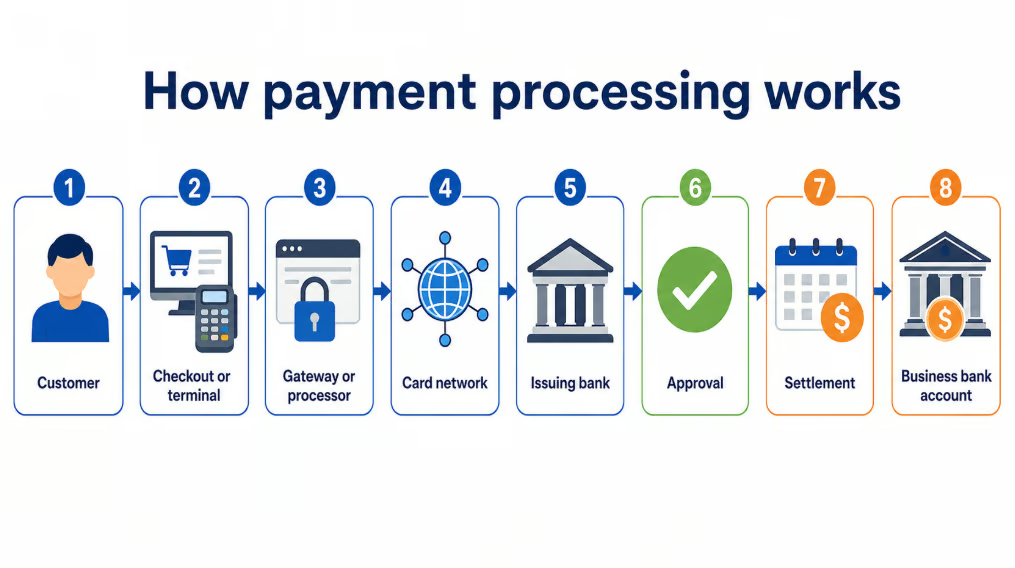
1. The customer submits a payment
The customer taps, inserts, or enters a card, uses a digital wallet, or pays through an invoice or payment link. The terminal or checkout captures the payment details and transaction amount.
Online transactions follow the same general stages, though ecommerce payment processing relies on a checkout and gateway rather than a countertop terminal.
2. The payment information is secured and transmitted
The system encrypts or tokenizes the card details, then sends the authorization request through the processor and card network to the issuing bank.
3. The transaction is approved or declined
The issuing bank checks the card, available funds or credit, and potential fraud. It then returns an approval or decline response, usually within seconds.
Approval only means the issuer has authorized the payment. The money has not yet reached the business.
4. The payment is captured and settled
The processor submits the approved transaction for settlement. The issuing bank transfers the funds through the card network, and applicable interchange, network, and processor fees are applied.
Some systems capture payments immediately, while others capture them later. Hotels, for example, may authorize an estimated amount first and capture the final total after checkout.
5. Funds are deposited
The processor sends the net proceeds to the business bank account. Deposits may reflect sales minus processing fees, refunds, chargebacks, reserves, and other adjustments.
Standard funding may take one or several business days. Some providers offer faster deposits for an added fee.
6. The transaction is recorded and reconciled
The business matches the sale with the payment, fees, refunds, and final bank deposit. Connected accounting, POS, ecommerce, or invoicing software can reduce manual entry, but deposits should still be reviewed for discrepancies.
How ACH processing differs
ACH payments move funds directly between bank accounts rather than through card networks. The customer authorizes the transfer, the provider submits it through the ACH network, and the banks process the payment.
ACH may cost less than card processing, especially for larger invoices, but settlement can take longer. Payments can also be returned because of insufficient funds, incorrect bank details, or revoked authorization.
Authorization, settlement, and funding
These terms describe different stages:
- Authorization: The customer’s bank approves or declines the payment.
- Settlement: The financial institutions finalize the transfer.
- Funding: The processor deposits the proceeds into the business bank account.
A payment may be approved immediately but still take several business days to reach the business.
See our full guide to ACH payment processing for authorization, return, and settlement details.
Common payment methods for small businesses
The right payment mix depends on where customers pay, transaction size, sales volume, and whether payments repeat. Your business should support cards first, then add methods that serve a clear customer or operational need.
| Payment method | Best for | Main consideration |
|---|---|---|
| Credit and debit cards | Most retailers, restaurants, service businesses, and ecommerce sellers | Broad acceptance, but fees vary by sales channel and card type |
| ACH and bank payments | B2B companies, recurring billing, and large invoices | Often costs less than cards but may settle more slowly |
| Digital wallets | In-person and online businesses offering faster checkout | Confirm supported wallets and applicable processing rates |
| Online invoices | Service, B2B, and project-based businesses | Look for reminders, ACH acceptance, recurring billing, and accounting sync |
| Payment links | Freelancers, mobile sellers, and businesses without a full online store | Easy to send, though checkout and reporting options may be limited |
| Recurring payments | Subscriptions, memberships, retainers, and repeat services | Requires authorization and tools for failed-payment recovery; compare recurring billing software for added automation. |
| BNPL | Retailers and ecommerce sellers with higher-ticket purchases | Can help customers split payments but usually costs more than card processing |
| Cash and checks | Local, B2B, and property-related businesses | Avoids card fees but adds handling, deposit, and reconciliation work |
| Virtual terminals | Phone orders and occasional remote card payments | Usually carries higher card-not-present fees and fraud risk. Phone-order businesses can compare the best virtual terminals for remote card entry. |
| QR code or text-to-pay | Restaurants, events, appointments, and field-service businesses | Uses hosted payment links and should never request card details by text |
Start with cards, then add ACH, wallets, invoices, links, or recurring payments where they meet a clear operational or customer need.
Stores should also review hardware, checkout speed, and pricing in our retail payment processing guide. Businesses collecting larger invoices can compare ACH, cards, and other B2B payment options.
How much does payment processing cost?
Paymentprocessing costs depend on the provider, pricing model, payment method, transaction size, and sales channel. Most businesses pay a percentage, a fixed fee per transaction, or both, plus possible software, hardware, account, and incidental fees.
The lowest advertised rate is not always the lowest total cost. Compare providers using your actual monthly volume, transaction count, average ticket, and mix of in-person and remote payments.
Pricing models
| Pricing model | How it works | Best for |
|---|---|---|
| Flat rate | One published percentage and fixed fee for each transaction type | Startups, seasonal businesses, and sellers that want predictable pricing |
| Interchange plus | Interchange and network costs plus the processor’s markup | Established or higher-volume businesses seeking more pricing detail |
| Subscription | Monthly membership plus interchange and a smaller transaction markup | Businesses processing enough volume to offset the monthly fee |
| Tiered | Transactions are grouped into qualified, mid-qualified, and nonqualified rates | Generally harder to compare because the provider controls each tier |
Flat-rate pricing is simplest, interchange-plus may cost less at higher volume, and subscription pricing works only when savings offset the monthly fee. Tiered pricing is usually harder to evaluate.
Processing fees
Beyond transaction rates, providers may charge monthly account or software fees, gateway fees, hardware costs, PCI-related fees, chargeback or ACH return fees, instant deposit fees, cross-border charges, monthly minimums, and cancellation fees.
Chargebacks can include both the disputed sale and a separate fee, so businesses with remote, subscription, or delayed-fulfillment transactions should compare fraud and dispute tools as well as rates.
Businesses considering surcharges or convenience fees should confirm card-brand rules and applicable state laws before passing payment costs to customers.
A provider with a higher transaction rate but fewer added fees may cost less overall than one advertising a lower rate.
What affects your processing rate?
Your rate may vary based on the payment channel, card type, average ticket, monthly volume, industry, and risk level. Online and manually entered payments often cost more than chip or contactless transactions, while rewards, corporate, and international cards may carry higher underlying costs.
Fixed transaction fees also affect low-ticket businesses more. A 30-cent fee equals 3% of a $10 sale but only 0.3% of a $100 sale.
How to calculate your effective processing rate
Use this formula:
Effective processing rate = total monthly processing costs ÷ total monthly processed sales × 100
For example, a business processing $25,000 per month and paying $779 in total fees has an effective rate of 3.12%.
Include transaction, software, account, gateway, and incidental fees. Hardware can be treated separately or spread across its expected useful life.
How to choose a payment processor for your business
Choose a processor based on how your business accepts payments, what it costs to use, and how well it connects with your existing systems.
1. Map your payment needs
List every payment channel you use or plan to add, such as in-person checkout, ecommerce, invoices, payment links, phone orders, recurring billing, or multiple locations. Then identify required payment methods, including cards, ACH, digital wallets, BNPL, and recurring payments.
2. Gather your transaction data
Use recent statements or realistic estimates to record monthly volume, transaction count, average ticket, card-present and online sales, ACH volume, refunds, chargebacks, and seasonal changes. This gives providers enough information to prepare comparable quotes.
3. Compare total cost and contract terms
Review transaction rates, fixed fees, monthly charges, hardware, gateway costs, chargeback fees, fast deposit fees, and cancellation costs. Also check contract length, automatic renewals, monthly minimums, reserve policies, funding limits, and equipment terms.
4. Review funding, integrations, and growth support
Compare standard deposit times, weekend funding, reserves, ACH settlement, and fees for faster payouts. Confirm that the processor connects with your accounting, POS, ecommerce, invoicing, inventory, and other key software.
Ask how the provider handles reserves, large transaction reviews, and sudden volume increases, especially if your business sells high-ticket items or collects payment before delivery.
Also check whether the system can support future locations, users, higher volume, subscriptions, international payments, advanced reporting, or API access.
5. Check security, disputes, and support
Review PCI support, hosted payment pages, tokenization, fraud controls, staff permissions, chargeback tools, and ACH verification. Confirm who handles disputes and whether the provider offers support during your selling hours.
Payment processors for small businesses
The best payment processor depends on how your business accepts payments, which software you already use, and whether you prioritize simple pricing, accounting integration, ecommerce tools, or lower costs at higher volume.
For ratings, pricing, and additional options, see our guide to the best payment processors for small businesses.
| Provider | Best for | Starting monthly price |
|---|---|---|
| Square | Easy all-in-one payment processing | $0 |
| QuickBooks Payments | Accounting-connected payments | $0; QuickBooks subscription may apply |
| Stripe | Customizable online payment workflows | $0 |
Square: Best for easy all-in-one payment processing
Square is a strong overall choice for small businesses that want to accept payments in person, online, through invoices, or by payment link without connecting several separate systems. Its free starting plan and included POS tools suit retailers, restaurants, mobile sellers, and service businesses, though flat-rate fees may become less competitive as processing volume grows.
QuickBooks Payments: Best for accounting-connected payments
QuickBooks Payments works best for service, B2B, and invoice-based businesses that use QuickBooks. It connects invoices, customer payments, deposits, and bookkeeping records, reducing manual reconciliation. Businesses needing a specialized retail or restaurant POS, or greater processor flexibility, may prefer another option.
Stripe: Best for customizable online payment workflows
Stripe is best for ecommerce companies, software businesses, and teams that need hosted checkout, payment links, subscriptions, international payments, or API access. It offers more control than many all-in-one processors, but custom payment setups may require technical resources.
When should you switch payment processors?
Changing processors creates a different work setup and may require new hardware, integrations, customer notices, or stored-payment migration. You should only switch providers when the operational or financial benefits clearly outweigh that effort.
Here are some instances when switching providers is worth the effort:
- Your effective rate has increased. Review your effective processing rate at least twice a year. It may increase because of provider price changes, more online or keyed transactions, new monthly fees, lost volume discounts, higher chargeback activity, or changes in average ticket size. Ask the current provider to explain the change and review available pricing plans first.
- Your business has outgrown flat-rate pricing. Flat-rate pricing can be useful when a business is new or has inconsistent sales. As volume grows, interchange-plus, subscription, or negotiated pricing may cost less.
- Deposits are too slow or unpredictable. Compare standard funding times, reserves, limits, and paid fast deposit fees.
- You need unsupported payment methods. This may include ACH, recurring billing, digital wallets, BNPL, or international payments.
- Integrations create extra work. Duplicate sales, unmatched deposits, missing fees, or manual corrections may justify a change.
- Support is unreliable. Repeated problems with holds, deposits, hardware, disputes, or fees are warning signs.
- The system cannot support growth. The provider may lack support for more locations, users, sales channels, or integrations.
- Contract terms are too restrictive. Watch for long renewals, cancellation fees, equipment leases, and high monthly minimums.
How to switch payment processors
Once you choose a new provider, plan the transition carefully to avoid payment interruptions or missing records.
- Review your current agreement. Confirm the contract end date, cancellation notice, termination fees, and equipment obligations.
- Approve the replacement account first. Do not cancel your current service until the new processor has approved the business and confirmed funding terms.
- Check migration requirements. Determine whether you need new hardware, updated integrations, or a secure transfer of stored customer payment tokens.
- Configure and test the new system. Test payments, refunds, deposits, reporting, and accounting reconciliation before going live.
- Update customer-facing payment points. Replace checkout links, invoice payment buttons, QR codes, website forms, and saved payment instructions.
- Close the old account carefully. Reconcile final deposits, refunds, and disputes, then cancel in writing and monitor later statements for added fees.
Frequently asked questions
What is the best payment processor for a small business?
The best payment processor depends on a business’ accepted payment methods. For example, Square is a practical fit for many in-person sellers, Stripe suits configurable online payments, and QuickBooks Payments fits businesses that want invoicing, payment collection, and accounting records connected.
What is the cheapest way for a small business to accept payments?
The cheapest way to accept payments will always be cash. It avoids card-processing fees but has handling risks. ACH can be cost-effective for large invoices, while interchange-plus pricing may save high-volume businesses on processing fees.
How much do payment processors charge small businesses?
Most payment processors charge a percentage of each transaction plus a fixed amount, while others use interchange-plus, subscription, or tiered pricing. There are also separate fees for software subscriptions, hardware, gateway, chargeback, fast-deposit, and international transactions.
Does a small business need a merchant account?
A small business needs access to merchant account services to accept card payments, but they do not always need to apply for a separate dedicated account. Payment service providers usually place small businesses under an aggregated merchant account whereas traditional providers establish an individually underwritten account for the business, the process for which takes a longer time.
What payment methods should a small business offer?
Small businesses should at least accept credit and debit cards for payments, then add methods that fit their transaction size and sales channels. Common additions include digital wallets for quick checkout, ACH for large invoices, online invoices and payment links for remote collection, and recurring payments for subscriptions or repeat services.