Key takeaways
- Project managers play a central role in guiding organizational change through risk management and team communication.
- Change management tools help project managers handle transitions by providing visibility into requests and establishing control over approvals.
- Change management tools give project managers a unified system to record and review all proposed changes for better accountability.
Change is one of the few constants in project management. Yet, it remains one of the hardest challenges to lead, especially when teams lack visibility into how change unfolds across the organization. Change management tools solve this by providing structure, transparency, and accountability throughout the process. Project management platforms can also play a vital role by offering built-in features like request forms and reporting tools that support change initiatives.
In this article, you’ll learn how to strengthen your change management approach and discover essential tools recommended by a project management expert, Trevor Greenberg, PMP, with over 10 years of experience helping organizations streamline systems and optimize processes.
Featured partners
What is change management?
Change management is defined in the 7th Edition of the PMBOK® Guide as a cyclic and structured approach that helps individuals, teams, and organizations move from their current state to a desired future state with clear business benefits. It provides a repeatable, universally understood process for guiding transitions and ensuring strategic goals are achieved while minimizing disruption.
In project settings, change management defines how adjustments are reviewed and implemented. It can take the form of formal approval processes with documentation and meetings, or it can operate more informally through direct communication and quick alignment among stakeholders.
What is a project manager’s role in change management?
Project and portfolio management managers (PPMs) are under pressure to adapt quickly and deliver successful projects, and 92% of PPMs reveal that adapting to change remains a significant struggle, according to a 2025 Smartsheet report.
While project managers aren’t typically experts in organizational development, they play a critical role in driving successful transformation. The specific responsibilities may vary depending on the organization’s structure and the type of change, but project managers often serve as facilitators, communicators, risk managers, and more.
- Change facilitator: Project managers act as the link between change management strategy and execution, translating organizational objectives into actionable steps. They ensure that every stakeholder understands how the change aligns with business goals and what actions are needed for implementation.
- Communicator: They provide consistent and transparent updates that reduce uncertainty and resistance. Clear communication enforces trust and ensures all stakeholders are informed about progress, risks, and outcomes.
- Risk manager: Project managers anticipate obstacles that could hinder adoption and develop mitigation plans early. By proactively managing resistance and potential disruptions, they keep the change process stable, predictable, and repeatable.
- Stakeholder liaison: They bridge communication between executives, HR, IT, and frontline teams. This coordination aligns expectations and ensures that the change process supports both organizational needs and employee readiness.
- Performance monitor: Project managers track adoption metrics, feedback, and performance indicators to measure how well the change is being received. The data gathered allows for timely adjustments that improve engagement and overall results.
How can project managers use change control?
Change control is a formal or informal process that project managers can use to evaluate and document modifications to a project. It maintains structure and transparency when managing evolving requirements or responding to unexpected challenges.
Below are several ways project managers can apply change control effectively.
- Use change control to manage scope effectively: “Change management processes can be used as the project manager’s best defense against scope creep.” Project management expert Trevor Greenberg often shares this idea when mentoring PMs, emphasizing that clear change control procedures help project teams stay focused on agreed deliverables and approve only the changes that strengthen project outcomes.
- Recognize that change is not always negative: Change can improve outcomes by allowing the project to adapt to new information or stakeholder needs. Viewing it as an opportunity instead of a disruption encourages a more proactive mindset.
- Encourage open suggestions: Anyone involved in or affected by the project should be allowed to propose changes. This inclusive approach ensures valuable insights are not overlooked and fosters a sense of shared ownership.
- Maintain a comprehensive review process: A robust process guarantees all proposals receive fair evaluation and discussion. It creates accountability and prevents decisions from being made in isolation.
- Distinguish between major and minor changes: Not all modifications need to go through a formal review. Project managers can decide which adjustments, such as meeting updates or reporting methods, require documentation.
- Route significant impacts through change control: Any change that affects project scope, schedule, or cost must follow the established change control process. This standardization maintains project integrity and protects the team from unintended consequences.
Which tools should project managers use for change management?
Depending on how you manage and deliver change, change management tools take different forms, such as help desk systems, learning management software, or knowledge base platforms. Even project management solutions can guide teams through transitions more efficiently and improve overall results. Here are some top picks from a project management professional:
1. Jira – Best for ticket management
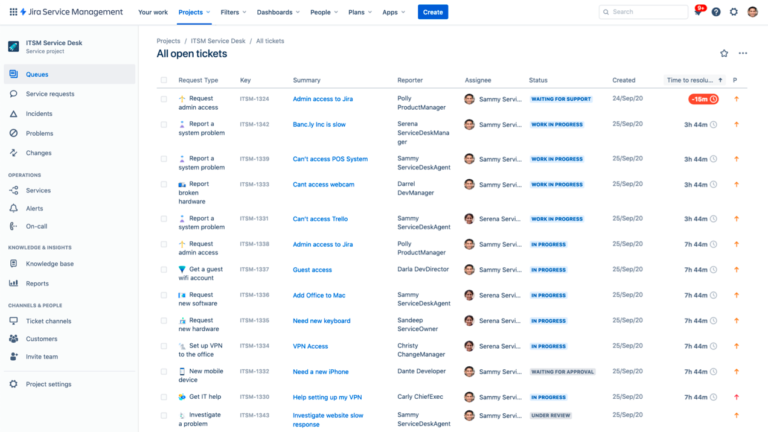
Jira Service Management works as a centralized ticketing system that helps project managers track and control change requests from submission to approval. This structure ensures that no request is overlooked and that each modification is properly evaluated before action is taken.
Automation features route tickets to the right stakeholders, improving response time and accountability. The integration with a knowledge base also empowers users to find answers or resolve issues without overloading the support team.
Case study
Thumbtack adopted Jira to improve how it handled internal service requests and ticket management. The platform’s automation reduced tool costs by 60% and saved roughly 180 hours each month, allowing teams to focus on strategic tasks.
Jira also helped Thumbtack achieve 90% SLA compliance by streamlining ticket routing and approvals, which improved efficiency and accountability across teams. (Source: Jira)
2. monday.com – Best for managing change requests through templates
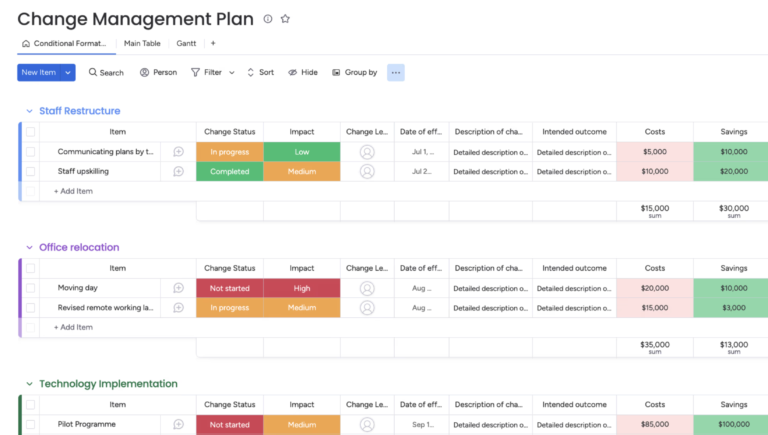
monday.com offers pre-built templates that help project managers maintain visibility throughout every phase of a change initiative. Each template uses color-coded labels to track requests and identify progress at a glance, while workflow automation and integration options help ensure updates flow smoothly between tools.
This combination makes monday.com ideal for teams managing multiple change requests who need transparency and efficient progress tracking.
Case study
TodayTix Group adopted monday.com to streamline its internal change initiatives by enabling clear ownership and eliminating duplicate systems across teams. The platform delivered a 15x return on investment and saved approximately 15,000 labor hours annually through automation and a unified work management system.
It also generated savings of about $496,000 each year, demonstrating how monday.com drives effective change management by standardizing processes. (Source: monday.com)
3. ClickUp – Best for role-based change workflows
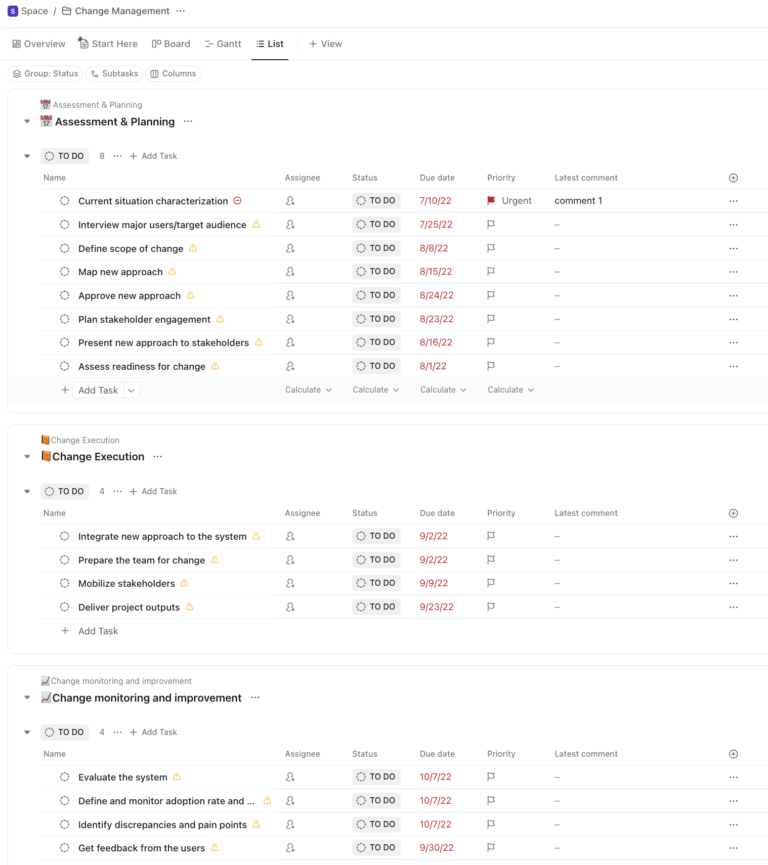
With ClickUp, project managers can create personalized views to see exactly what relates to a team member’s responsibilities and track team progress from different perspectives.
Project views include search and filtering features that make it simple to locate specific names or assignments. These capabilities make it ideal for teams that need adaptable tracking systems and visibility across multiple moving parts of a change initiative.
Case study
ClickUp helped QubicaAMF, a bowling alley construction company, improve its change-process visibility by implementing centralized workflows and dashboards. The company reported a 35% increase in on-time project delivery and cut report-generation time by 40% through task automation and dedicated views.
This shift enabled better accountability across teams and made tracking and managing change initiatives far more efficient. (Source: ClickUp)
4. Trello – Best for visualizing progress through Kanban boards
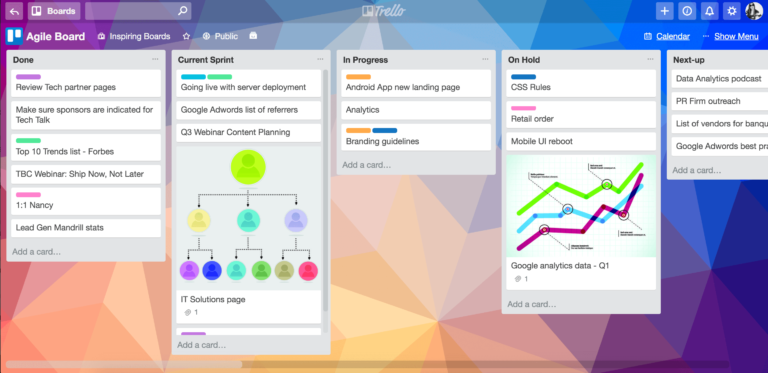
Trello functions as a Kanban-style tool that helps project managers visualize and track change requests through each stage of work in progress.
Its board-and-card system provides a clear view of what has been started and what still requires attention, while cards can be used to represent change requests, assign due dates and team members, attach documents, and move the cards from one list to another as the work advances.
Case study
Trello helped SwagUp, a promotional products supplier, build structured workflows that supported rapid growth from a startup idea to a multi-million-dollar business. The visual boards enabled the team to track order pipelines and shipping logistics in real time by automating tasks with integrations like Zapier linked to Trello cards.
The simple drag-and-drop interface and checklist functionality provided clarity on language such as color, date, and shipment status, making it easier for the 10-person team to scale efficiently. (Source: Trello)
5. Miro – Best for collaborative change mapping
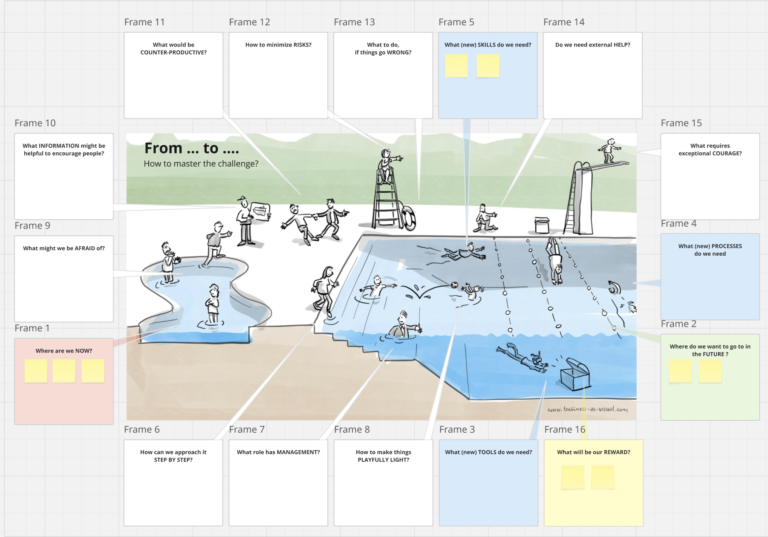
Change efforts often fail when stakeholders lack visibility into the process. But Miro offers an infinite canvas that enables teams to map out change initiatives visually, helping unite participants around a shared understanding of the change ahead.
Change management templates and drag-and-drop boards enable teams to build change roadmaps, identify risks, and assign ownership. This promotes transparency where the change stands and what remains, thus aligning stakeholders toward the desired outcome.
Case study
Miro helped Xero consolidate its global teams into a unified visual workspace by creating a shared customer journey framework that replaced disparate tools and processes.
The platform’s virtual workshops and interactive canvases enabled the company to reduce alignment time, identify product gaps faster, and establish one source of truth across over 4,000 employees. (Source: Miro)
6. Smartsheet – Best for standardizing change across project portfolios
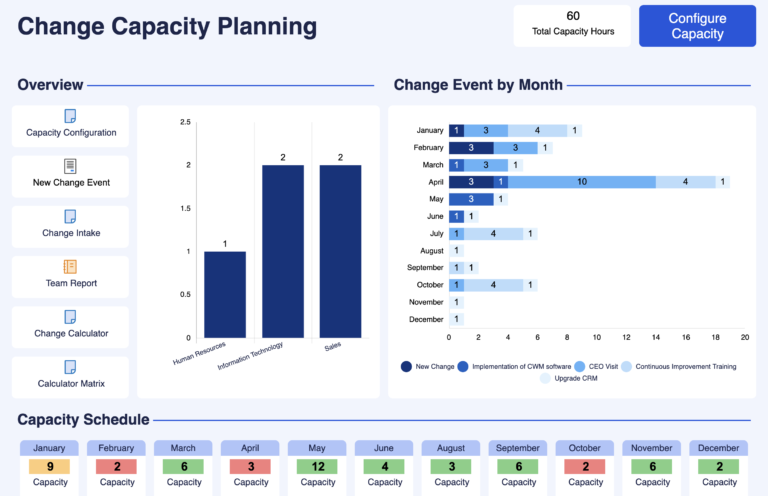
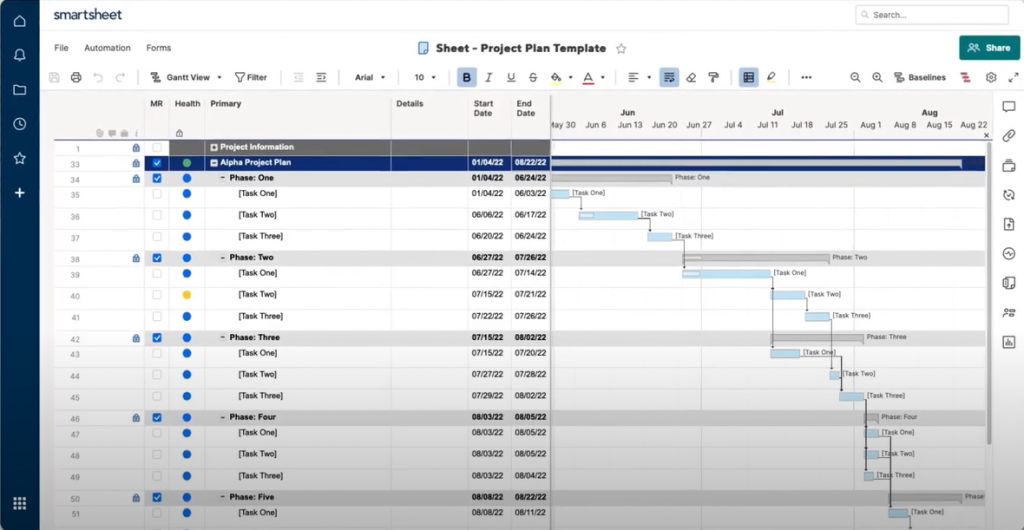
Smartsheet offers a built-in change management tool called Control Center, which captures incoming change demand and deploys changes across all reports and dashboards in a portfolio. The tool serves PMOs that manage multiple projects and need to ensure consistency and control when change is introduced.
The ability to roll out updates from a single blueprint ensures that ongoing and newly provisioned projects reflect the same structure and methodology. Plus, Smartsheet allows unlimited external collaborators to access the platform without requiring them to have a license.
Case study
Smartsheet supported Norwegian Cruise Line Holdings in creating a unified demand-intake process that replaced fragmented submissions and provided a single repository for all change requests.
The platform’s Control Center toolkit allowed the company to establish standardized templates that scaled across multiple projects and automate routing and approvals, enhancing governance and visibility. (Source: Smartsheet)
Why use tools for change management?
Navigating change management can be challenging, especially when projects involve multiple teams and shifting priorities. With the right tools in your stack, you can streamline processes and reduce the risks that come with constant adjustments.
The visibility that it gives you alone is worth a look. Change management tools allow you to track changes as well as approvals, and if someone’s not accomplishing their task in the allotted time, based on the procedure. But if you’re still uncertain about adopting change management tools, here are several reasons they can make a huge difference in how you plan and deliver change successfully.
- Tracks and records all changes
Every proposed change should be logged, even if it’s not approved, to create a repository of ideas and document contributions. This record shows that all suggestions were evaluated and preserves the reasoning behind rejections for future reference.
- Establishes a clear process for changes
Project management software includes request forms and approval tools for tasks that need to be reviewed and acted upon appropriately. It creates accountability and prevents unapproved or unnoticed changes from affecting project outcomes.
- Recognizes the ripple effect of change
One change can influence several project areas beyond a single task, making traceability essential. Change management tools help project managers understand dependencies and assess broader implications before implementing updates.
- Explores ‘what if’ scenarios
Change management tools allow teams to test how proposed changes might affect budgets, schedules, or resource allocation. This foresight reduces risk by revealing downstream impacts before full implementation.
- Acts as a single source of truth
A unified system keeps all information centralized and accessible to stakeholders. It enables teams to test assumptions and run simulations without disturbing the project environment.
- Creates a transparent submission process
Tools make it possible for anyone to submit change requests through predefined workflows. This capability ensures that every idea reaches the project manager or change manager for proper review and decision-making.
How to build your change management tool stack
Building an effective change management tool stack starts with identifying the core needs of your organization. Determine where communication issues or process delays occur, then match those challenges with tools that address them directly.
You can begin with a project management platform for tracking requests and documenting approvals so every modification is logged and auditable.
Collaboration and communication tools are also critical in connecting stakeholders for transparency. Integrate analytics or reporting software to measure adoption curve rates and outcomes, ensuring that your efforts lead to real improvement.
Also, make sure to review your stack regularly to retire underused tools and add new ones that support evolving project goals. Remember, the goal is not to have the most tools but the right combination that strengthens accountability and accelerates successful change.
FAQs
The best change management software depends on your organization’s size and workflow needs. Tools like Smartsheet or monday.com work well for tracking project-wide updates and maintaining consistency across teams. The ideal choice should centralize approvals, monitor progress, and provide clear reporting for decision-making.
A change management tool helps project managers track and implement changes efficiently. It records change requests, facilitates approvals, and ensures visibility across all stakeholders. The purpose is to manage transitions smoothly while minimizing risks and disruptions to ongoing work.
Yes, Jira can function as a change management tool through its ticketing and workflow automation features. It allows teams to log, review, and approve change requests while tracking progress in real time. This capability ensures transparency and accountability throughout the change process.
It allows project managers to not only track changes, but it also creates a repeatable and scalable process for changes so that everyone can understand how to suggest and implement changes.