Payroll and HR work can collect clicks the way a busy desk collects sticky notes. A manager approves a timecard in one system. HR updates an employee record somewhere else. Payroll checks the same information again before the deadline. Each step seems manageable until the organization repeats it across thousands of employees and every pay period.
Fewer clicks should make that everyday work easier to complete. When data moves with the employee, policies guide routine requests, and exceptions reach the right person early, HR and payroll teams spend less time chasing updates. They also gain more room for decisions that require experience and context.
HR software like Paycom connects payroll, time, benefits, HR data, and employee self-service in one system. That shared foundation reduces duplicate entry and helps teams find critical transactions that require attention.
Where extra clicks hide in HR and payroll
Clutter in payroll and HR workflows usually builds gradually. Teams might use a spreadsheet to fill a reporting gap, add a payroll check after costly payroll errors, or purchase a separate tool for a missing HR system feature. Each workaround has a practical purpose, but layering one fix on top of another can add more screens, handoffs, and follow-up to routine work.
Over time, those additions create more places for work to pause. An employee change may require several screens, a manager may need to track down context before approving a request, and HR may have to follow up before payroll can move forward. The clearest opportunities for workflow simplification are the steps that repeat information or delay the next owner without improving accuracy, compliance, or oversight.
Also read: Must-Have HR System Features
What simpler HR and payroll workflows look like
The biggest gains usually come from everyday processes with a lot of volume or follow-up. Employee updates, approvals, timecards, payroll corrections, and information requests are useful places to start.
1. Employee updates flow without HR reentry
Employees already know when their address, bank account, tax elections, dependents, or benefits choices change. A secure employee self-service tool gives them a direct way to make those updates instead of sending HR an email or form to reenter.
Self-service reduces HR work only when submitted changes carry over to the other processes that rely on them. For example, Paycom’s Employee Self-Service carries employee-entered data into relevant tools within the platform.
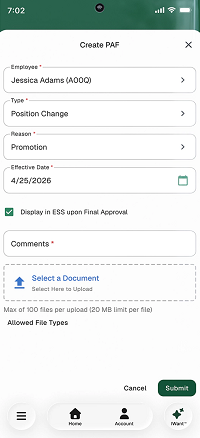
Paycom’s Personnel Action Forms also route job and compensation changes through approvals, update related records, and retain a history of the change. This is unlike other HR systems that may support a similar experience through carefully managed integrations.
2. Routine requests follow established rules
A straightforward time-off request should not send a manager hunting through calendars, balances, and policy documents. When an organization can define its rules clearly, the software can apply those criteria consistently and bring the less common cases to a manager.
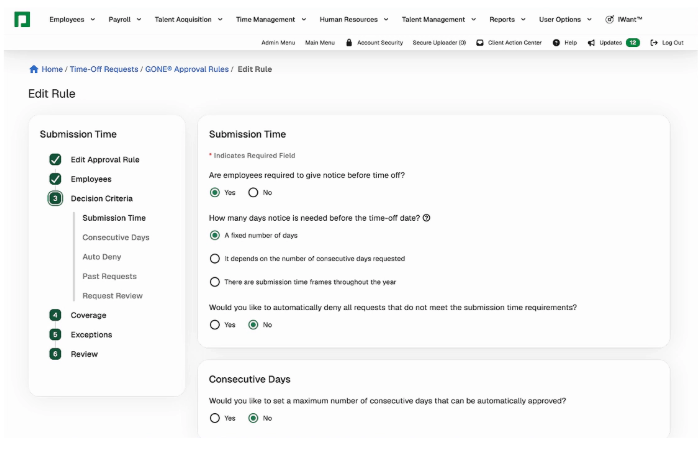
Paycom’s GONE® offers one example. The tool reviews a time off request against criteria set by the organization and automatically approves the request if it meets the guidelines. This reduces the administrative burden of PTO approvers. Paycom still notifies applicable managers about the transactions, and they can change it when the situation needs a closer look.
3. Payroll issues surface before the cutoff
Payroll week gets stressful when the team discovers a missing timecard, unapproved expense, or incorrect deduction near the cutoff. Better payroll and HR workflows surface those issues while there is still time for the employee or manager closest to the information to respond.
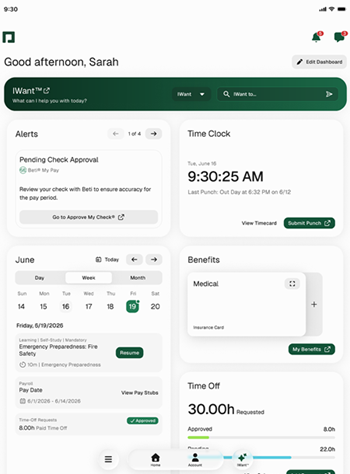
Paycom’s Beti starts each pay period with current information from areas such as timecards, expenses, time off, and deductions. It identifies possible problems and guides employees through relevant tasks before payroll submission. This improves payroll efficiency by helping the team focus its review time on unresolved exceptions and final accuracy.
For more examples of issues that begin earlier in the process, read why payroll chaos often starts before payday.
4. Tasks reach the person who can resolve them
Tasks often stall because the next step or owner is unclear. A missed clock-in or clock-out, for example, can go to the employee for correction and then to the manager for verification before the updated timecard reaches payroll. Payroll receives a completed record before processing begins, reducing the need for last-minute follow-up.
Similar routing can support onboarding documents, benefits changes, certifications, and personnel actions. For each task, the assigned person should see what needs attention, the information required to act, and the deadline.
5. Employees and managers can find information themselves
Some clicks come from searching rather than processing. An employee wants a pay statement. A manager needs a team member’s job information. HR knows the answer lives somewhere in the system but still has to direct the person to it.
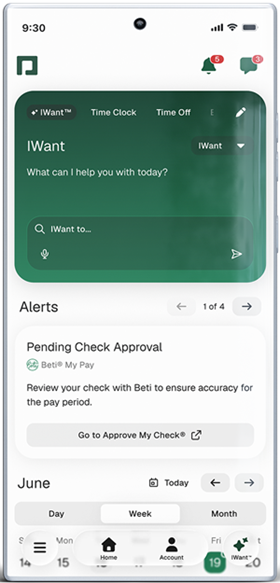
Paycom’s IWant lets authorized users request applicant or employee information through typed commands. Access still follows the user’s permissions, which matters when the system holds sensitive payroll and employee data.
Where human review still matters
Automation and AI can shorten different parts of an HR or payroll process.
Rule-based automation can route approvals, apply established policies, update connected records, and send reminders, while AI can retrieve employee information, surface unusual data, and prioritize items that need attention. Used together, these tools reduce the searching, reentry, and follow-up surrounding routine work.
Responsibility stays with the employee, manager, HR professional, or payroll specialist reviewing the result. Keep a person involved for:
- Unusual, retroactive, or material pay changes
- Final pay, taxes, garnishments, or benefits exceptions
- Conflicting legal or policy requirements across jurisdictions
- Performance reviews, accommodations, discipline, and other context-sensitive employee matters
- AI or automated outputs that are incomplete, difficult to explain, or based on inaccurate data.
Reviewers should be able to check the source information, understand why an item needs attention, correct inaccurate data, and change the outcome when appropriate. Role-based access and a clear audit history also help preserve accountability as automation and AI take on more of the routine work.
How to clean up a payroll or HR workflow
Trying to simplify every HR process at once can create another complicated project. Start with one task that happens often and causes visible frustration, such as a compensation change, timecard approval, or employee data update. After selecting the workflow, use these four steps to trace where work slows down and decide what needs to change:
- Follow a real transaction. Trace one recent request from the first entry to the final payroll or HR record.
- Write down every stop. Include emails, spreadsheets, system changes, approvals, reminders, and offline conversations.
- Ask why each step exists. Some protect compliance or accuracy. Others compensate for missing data, unclear ownership, or an old problem that no longer applies.
- Fix the handoffs first. Remove duplicate entry, clarify who owns the next action, and use rules for predictable decisions.
Once the route makes sense, look for places where HR process automation could handle repeatable steps.
How to tell whether fewer clicks are helping
The easiest test is to ask whether the process feels quieter during a normal week and more controlled near a deadline. Track a few practical measures:
- Reentry: How many times does someone type the same change?
- Waiting: How long does a request sit between owners?
- Cutoff pressure: How many open items remain when payroll review begins?
- Corrections: How often does the team issue an off-cycle payment or retroactive adjustment?
- Status questions: How many employees or managers contact HR to ask what happens next?
Capture the current numbers before changing the workflow. Then compare results by location, department, employee group, or pay cycle. That view can show whether payroll process improvement reached the whole organization or left one team relying on the same workaround.
These measures can also guide HR software selection. During a demonstration, ask the vendor to run one of your current workflows and show where data enters, how exceptions appear, and what changes as the company adds locations, entities, pay groups, or jurisdictions. This makes the remaining manual work easier to see before choosing a platform.
If you’re comparing platform options, check out our list of the best HRIS systems or browse HR software and payroll software by category. For multi-system setups, read our HRIS integration guide.
Frequently asked questions (FAQs)