Key takeaways
- A change order template records approved project modifications, such as adjustments to costs, schedules, or scope. This creates a standardized process for requesting and approving changes, preventing unexpected issues.
- In construction, it helps project managers and contractors record revisions, minimizing misunderstandings and financial disputes among stakeholders.
- Using a template ensures changes are reviewed and authorized before work proceeds, keeping budgets and timelines under control.
Project changes can disrupt schedules and budgets when they are not adequately documented or approved. A change order template helps construction managers and contractors record modifications to contract terms, track cost impacts, and update project timelines.
In this article, I’ll guide you on how to use a change order template and include a free downloadable version to help you manage project adjustments.
Featured partners
What is a change order template?
A change order template is a pre-built document used to record and approve modifications to an existing project contract. It is commonly used in construction projects where changes in scope, materials, or timelines must be documented and authorized by all parties involved.
The template typically includes sections for project details, descriptions of the requested change, cost adjustments, and signatures from key stakeholders. Using a change order template ensures transparency between contractors and clients while preventing misunderstandings that could lead to disputes or project delays.
Why use a change order template?
If you manage projects where scope adjustments or client-requested changes are standard, here’s why using a change order template can make a difference:
- Improves documentation accuracy: It captures every request in a standardized format, so material and design changes are traceable throughout the project.
- Supports client transparency: Both parties can review and agree on proposed changes, which reduces the risk of conflict or confusion.
- Simplifies approval workflows: The form includes specific fields for authorization, making it easier to track who approved each modification.
- Prevents budget and schedule overruns: By recording costs and timelines tied to changes, it helps keep the project within scope while avoiding the risk of disputes.
Who uses a change order template?
Construction professionals often use a change order template to document and approve adjustments to materials, costs, timelines, and workforce allocations. To understand its function, here are the key users who rely on change order templates:
Key users include:
- Project managers: They initiate and track change requests to assess their potential impact on the budget and project schedule.
- Contractors and subcontractors: They use the form to propose modifications or additional work when project conditions shift.
- Project clients or owners: They review and approve proposed changes for transparency in costs and deliverables.
- Architects and engineers: They issue design-related revisions and confirm technical specifications before implementation.
Check out our guide to the Best Construction Project Management Software to find platforms built for contractors and construction teams.
What is included in a change order template?
Change order templates vary by project type, but several key elements are commonly included to document change requests properly.
| Component | Description |
|---|---|
| Project information | Identifies the project name, contract number, and location to link the change order to the correct job. |
| Change order number | Assigns a unique reference code for easy tracking and record management. |
| Description of change | Details the modification requested, including the reason for the change and its expected impact. |
| Revised costs | Outlines cost additions or deductions related to the approved modification. |
| Schedule adjustments | Specifies any changes to the project’s timeline, including new start or completion dates. |
| Approval signatures | Confirms authorization from all required parties before implementing the change. |
| Supporting documentation | Includes attachments such as drawings, material lists, or revised terms that justify the change. |
What are examples of change order templates?
Project management tools can streamline your change order process by providing a centralized workspace. This allows clients to easily submit forms and teams to organize requests efficiently through an intake board. Here are three of my top picks:
1. ClickUp – Best for renovation projects
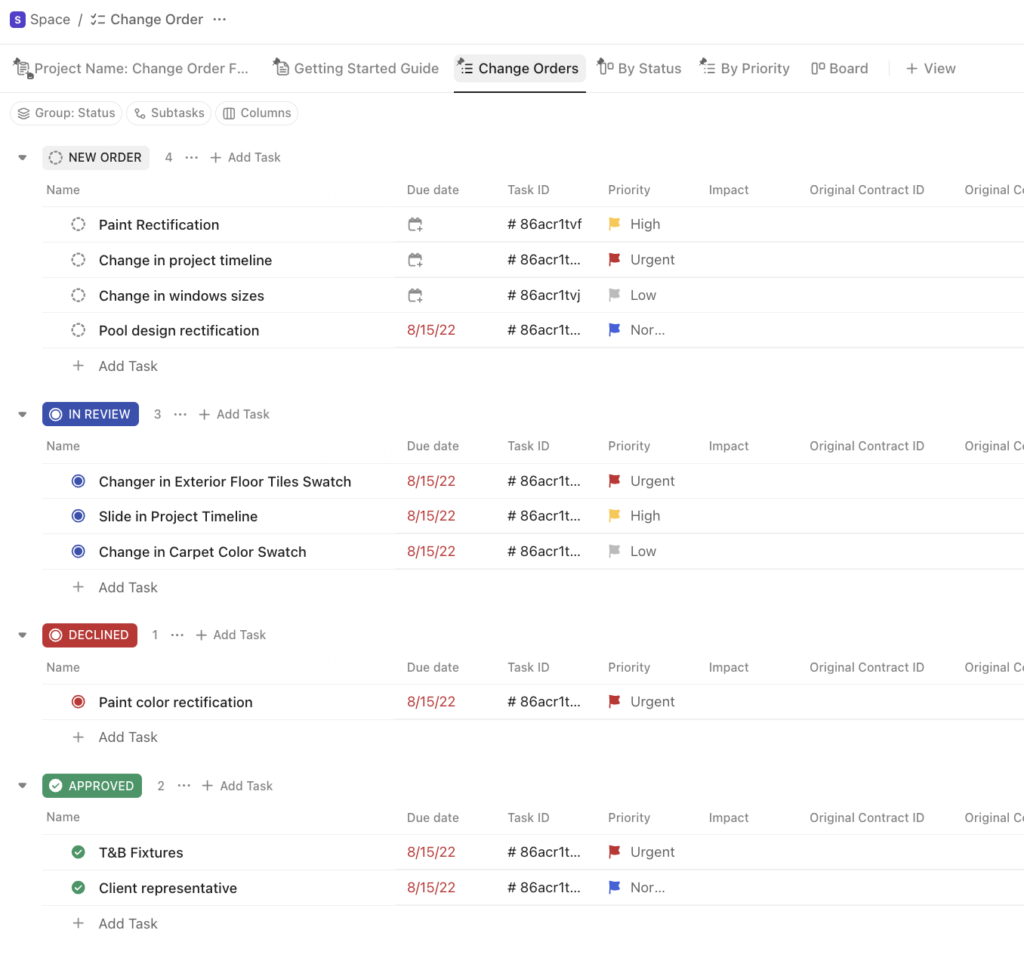
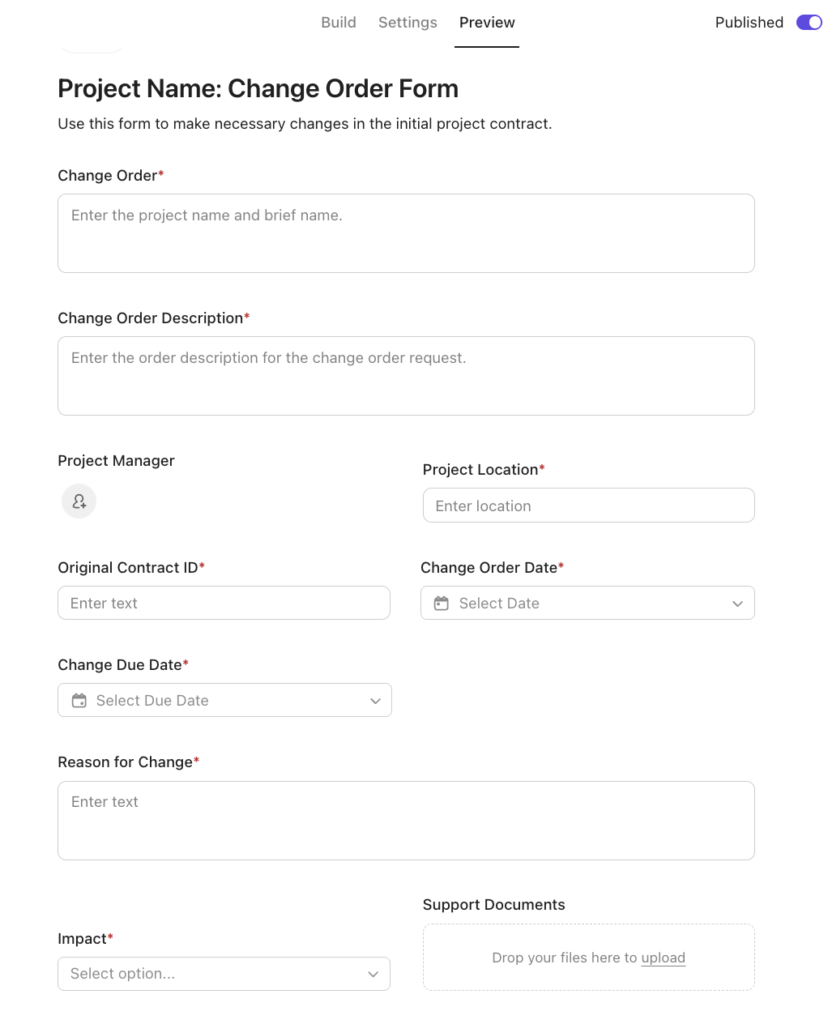
ClickUp’s change order template is ideal for managing multiple renovation projects that involve adjustments in contract terms and material costs. Custom tags define the impact of each modification, and an intake form provides fields for project location, order description, and justification for each change. All submissions appear on the board view, where requests are organized by status, allowing project managers to monitor progress and identify items needing review or approval.
2. Smartsheet – Best for cost & timeline adjustments
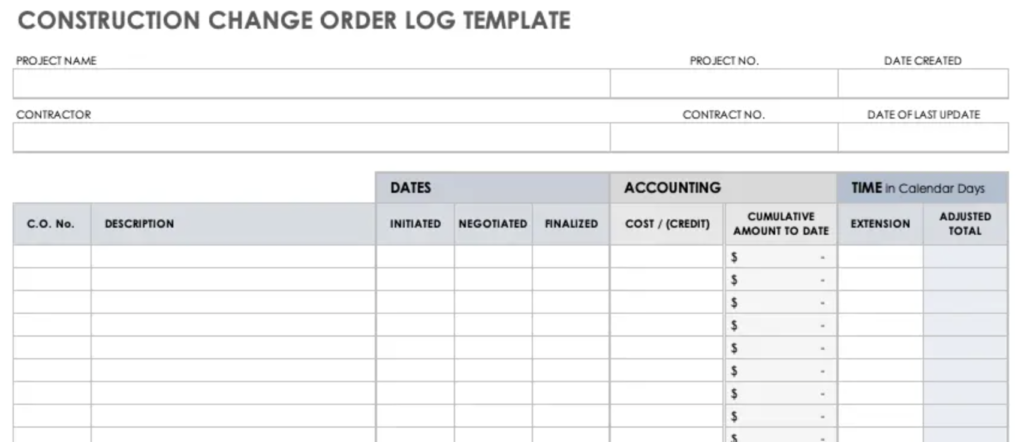
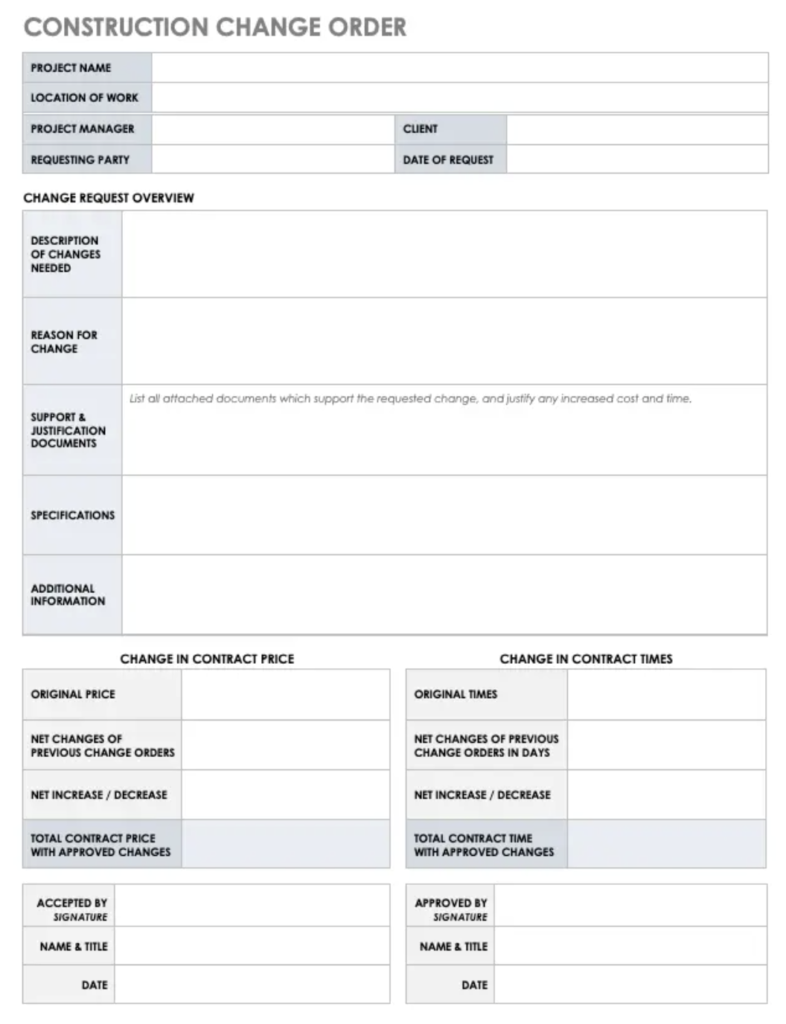
This Smartsheet change order template is ideal for projects where cost and time are critical. It organizes all modifications and links adjustments to both the budget and the project schedule. The form outlines sections for describing change details, attaching supporting documents, and specifying how each request affects contract value and duration.
The companion log provides managers with an overview of financial and scheduling shifts by recording negotiation stages, cost credits, and time extensions. This structure allows teams to compare approved changes against original plans, ensuring consistent control over expenses and timelines.
3. Asana – Best for standard change requests
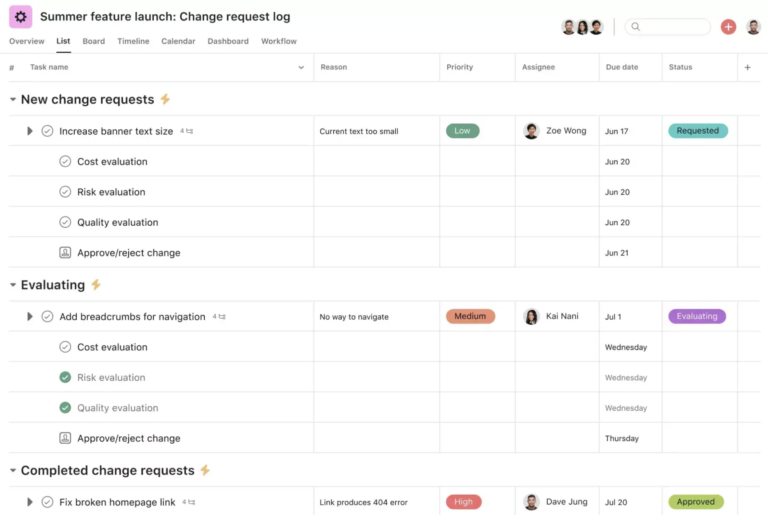
The Asana change request log is versatile and fits more than just construction projects. It can also support marketing teams managing campaign revisions or software development teams handling feature updates and bug fixes. The template progresses from submission to evaluation and completion, ensuring every request undergoes review and approval.
Each entry outlines the rationale for the change, the assigned owner, and the due date. Subtasks, such as cost and quality evaluations, are nested under each request, providing teams with a step-by-step impact assessment process before approval.
Free change order template
To help you get started, here’s a free change order template in spreadsheet and document formats that you can download and use as a guide:
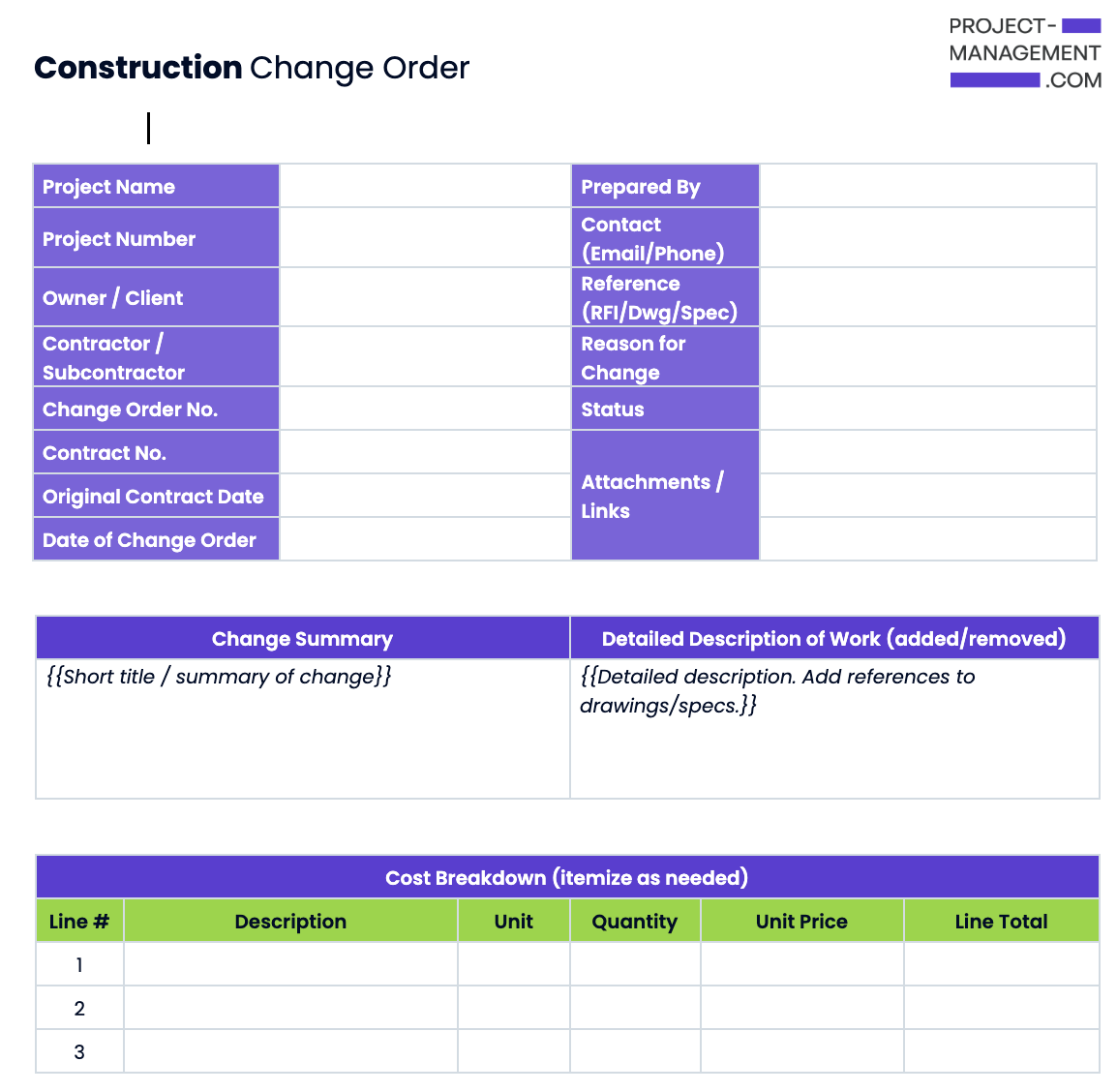
Download our PLACEHOLDER for free:
How to use a change order template
To effectively manage project modifications, refer to these guidelines for using a change order template.
- Review the existing contract: Identify which terms, costs, or timelines need adjustment before creating the change order.
- Complete key project details: Fill in fields such as project name, location, and contract number to link the form to the correct agreement.
- Describe the requested change: Explain the modification’s scope and reason so stakeholders understand its impact on cost and schedule.
- Attach supporting documentation: Include relevant files such as updated drawings and cost breakdowns to justify the proposed change.
- Route for approval and record the outcome: Send the completed form to all parties for signatures and file it in the project log for reference.
FAQs
A construction change directive authorizes work before all parties agree on cost or time impact, while a change order documents mutually approved modifications. The directive allows progress to continue during disputes, but the change order finalizes those adjustments once terms are settled.
A project manager or contractor typically prepares the form, then submits it to the client or owner for review and approval. This ensures that all project modifications are properly documented and authorized before implementation.
You can create one manually or use a change order template that includes fields for project details, modification description, cost changes, and approval signatures. Standardizing the format maintains consistency and accuracy across all project changes.
An example of a change order construction document is one that revises a project’s flooring material from laminate to hardwood, increasing cost and extending completion time. It records the change details and justification before the new work begins.