Performance reviews are a vital part of employee development, but preparing these can take time, even when you know exactly what you want to say. For managers juggling multiple direct reports, simply getting the draft started can feel overwhelming.
So I ran an experiment. To find the best AI performance review generator, I tested eight free AI-powered tools to see if any of them could help. The results were a mix of surprisingly strong outputs, generic recommendations, and a few with awkward generalizations.
Which free AI review tools ranked the highest?
Of the eight free AI review tools that I evaluated, only four made my list:
| Software | Best for | Free plan limits |
| Easy-Peasy.AI | Language versatility | 2 reports daily |
| Writify.AI | Tone control | No limits; but has ads |
| Vondy | Structured feedback | 4 reports before signup* |
| GravityWrite | Formatting and editing reviews | 1,000 words monthly |
*Vondy switches to a credit-based usage plan after account signup with limited credits daily
Mar. 18, 2026: Robie Ann Ferrer made revisions all throughout the article to reflect changes to each vendor’s free plan features, including the paid options. She also refined the page layout and updated the copy to improve the page’s readability.
To create this guide, I tested eight free AI performance review generators to see how well they could turn real performance details into usable review drafts.
I evaluated each tool using the same scoring method based on output quality, input flexibility, ease of use, export and sharing options, and access requirements. These helped me identify which tools were actually useful for drafting reviews and which ones only sounded polished on the surface.
In addition to the scoring rubric and hands-on testing, my recommendations are informed by more than eight years of experience writing about and evaluating HR systems for small to midsized businesses (SMBs). I also have 10 years of experience across key HR functions, including HRIS management, time tracking, and payroll software. That background helps me evaluate these tools based on how managers and HR teams would actually use them during performance review season.
How I tested the tools
To make this comparison fair, I tested each tool using the same evaluation method, scenario, and profile of a fictitious employee. I reviewed these eight free AI performance review generators:
- Easy-Peasy.AI
- AI4Chat
- Typli.ai
- Writify.AI
- Vondy
- WriteCream
- GravityWrite
- Simbline
I wasn’t just looking for the fastest tool. I wanted to see which ones could turn real performance details into review drafts that were clear, specific, and usable without heavy editing. I also ran some light-input tests, where I entered only a few details, such as an achievement or development area, to see whether the tool could build out a complete review without heavy prompting.
I asked each AI tool to generate a review for the first half of the year for Taylor Snow, a Marketing Coordinator. Taylor’s profile includes the following details:
Key achievements:
- Increased click-through rates by 18% through A/B testing and subject line optimization
- Served as marketing lead for a product launch, coordinating with product, sales, and design teams
Strengths:
- Strong attention to detail and caught multiple errors in outgoing assets before launch
- Consistently met project deadlines and kept stakeholders informed
- Took initiative by training two new team members on campaign workflows
Development areas:
- Needs stronger presentation skills and is still hesitant in team meetings
- Sometimes waits for direction instead of proposing solutions during campaign planning
- Could improve knowledge of analytics tools such as Google Analytics and HubSpot reporting
I chose this profile because it reflects a common performance review scenario: a solid employee with clear wins, useful strengths, and a few development gaps. That made it easier to see whether each tool could produce balanced feedback instead of generic praise.
I gave each AI performance review generator a score out of five, using a weighted rubric focused on both the quality of the output and the usability of the tool. The scores reflect how well each tool performed across five key areas:
- Output quality and usefulness (40%): I looked at how clear, relevant, and professional the review sounded. Higher scores went to tools that produced balanced feedback with both strengths and development areas.
- Input flexibility and detail (25%): I measured how much control each tool gave me over the input, including whether I could add achievements, strengths, goals, or development points.
- Ease of use and speed (20%): I considered how intuitive the interface was, how clearly the tool guided the process, and how quickly it generated results.
- Export and sharing options (10%): I checked whether the tool let me copy, download, print, or edit the final review.
- Access requirements (5%): I gave higher scores to tools that worked without forcing sign-up early or hiding core functionality behind a paywall.
This rubric helped me compare not just how polished the writing looked, but how useful each tool would actually be for managers trying to get through review season efficiently.
Featured partners
Top free AI performance review generators compared
Overall Score
Sign-up Required
Quality of Review
Report Download Option
*Based on my test activities
**Also has a copy feature
Note that the free AI performance review generator tools on my list are for creating the review content. They don’t offer full performance management features like goal setting, review tracking, and manager approvals. If you need a system that can do all that, check out our list of the best performance management review software.
Also read: The Ultimate Performance Review Process: 7 Steps for Success

Easy-Peasy.AI: Best for language versatility
Overall Reviewer Score
3.63/5
Output quality
3.63/5
Input flexibility
3/5
Ease of use
4.63/5
Export & sharing options
3/5
Access requirements
4/5
Pros
- Multilingual review generation
- “Point of view” tool modifies the writing perspective (e.g., first person)
- Data fields include key achievements and improvement areas
Cons
- Limited to two report generations daily
- Advanced AI tool reserved for paid plans
- No file download option
- Some of the data fields have character limits
Why I like it
Easy-Peasy.AI stands out for its multilingual support, which makes it a good choice for managers with international teams. It also lets you change the final report’s writing perspective, from first person to third person.
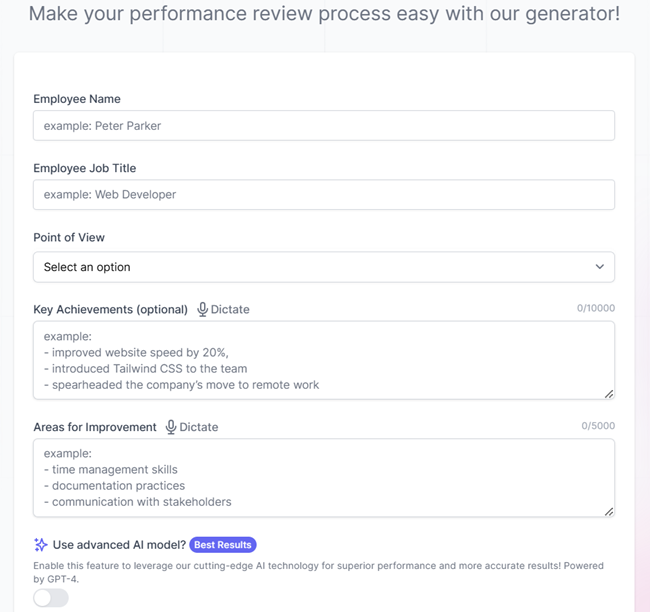
It has pre-built data fields where you can input the employee’s name, job title, areas for improvement, and key achievements (although this is optional). Even if you don’t include the strengths, Easy-Peasy.AI will automatically highlight relevant skills based on the data provided.
During my testing, I tried inputting very basic details — some with achievements and others with vague information. It still produced a performance review with the essential sections (such as strengths and recommendations) and included relevant examples that apply to the role.
Additionally, I enjoyed switching languages and adjusting the review to use first, second, and third-person perspectives. However, the report may require some edits if you want to add more details, like the review period. And while the interface is fast, the output is occasionally simple, especially when trying to obtain a detailed performance review.
Multiple language options
With its over 40 language options, Easy-Peasy.AI can help you write reviews in English, French, Spanish, among others, without it sounding like a bad translation.
Dictation support
What’s unique about Easy-Peasy.AI is its dictation feature. This is helpful to managers who prefer to dictate their input or don’t have the time to retype what they have in their notes. However, at this time, the tool is only available for use with two data fields: the areas for improvement and key achievements fields.
Reports with SMART goals
Easy-Peasy.AI only requires you to provide the employee’s areas for improvement, and it will come up with specific activities or recommendations to help improve those areas. It follows the SMART goals approach, which provides a framework for setting goals that are specific, measurable, achievable, relevant, and time-based.
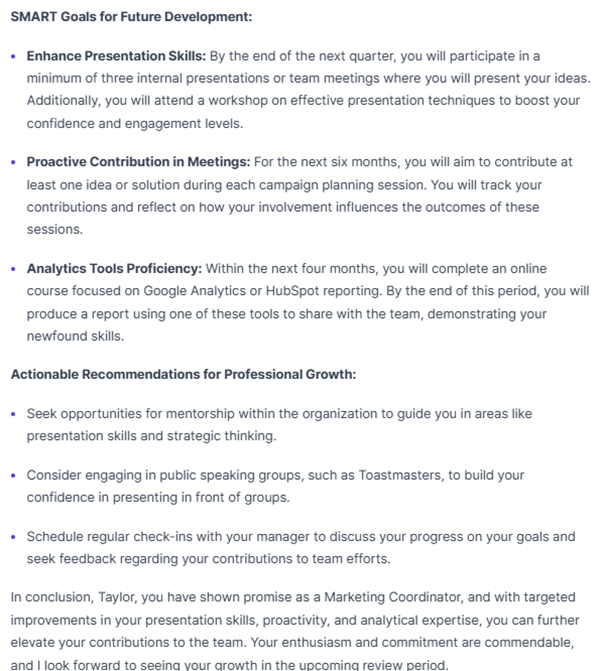
Easy-Peasy.AI may provide performance review drafts that are nearly ready for use, but you must carefully review the content to ensure accuracy. Like the other AI tools on my list, it occasionally produces conflicting details. For example, during one of my tests, I only provided areas for improvement, but the generated report listed a strength that was similar to a development area I had identified.
I know that it’s mainly because I didn’t fill out the achievements section. But since Easy-Peasy.AI noted that it’s an optional field, I assumed that it would be smart enough to detect conflicting concepts in the report. Sadly, this isn’t true.
Additionally, the “point of view” tool can be glitchy, especially when using the third-person option, which should refer to the employee as “he,” “she,” “it,” or “they.” I selected that in one of my tests, and it used “they” in the final report. However, a workaround I discovered is to use the correct pronoun (he or she) when listing areas for improvement, so that it recognizes the employee’s gender.
I also don’t like that the key achievements and areas for improvement data fields have character limits. Plus, the number of free performance reviews you can generate is limited to two per day. If you have a large team or want to rerun reports, you must upgrade to a paid tier.
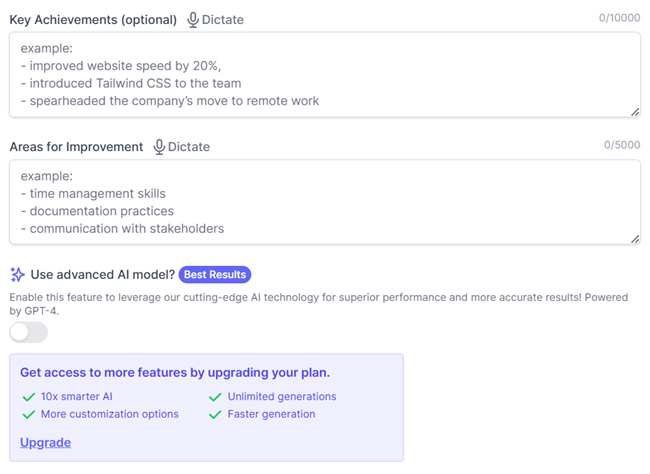
Easy-Peasy.AI’s performance review generator is free to use, but it also offers eight paid packages, which comes with addition features. You can sign up for a month-to-month subscription or opt for the annual plan, which offers discounted rates but requires an upfront, lump-sum payment.
- Free: $0
- Includes two report generations daily
- Starter: $16/month
- Unlimited report generations + faster outputs
- 10x smarter AI with more customization options
- 200 image/video credits and 20 audio transcriptions
- 25,000 text-to-speech characters, two bots, three brand voices, over 200 templates, and more than 35 languages
- Unlimited 50: $24/month
- Includes Starter features plus 50,000 text-to-speech characters, three bots, over 300 templates, and unlimited brand voices
- Unlimited: $32/month
- Includes Unlimited 50 features plus 75,000 text-to-speech characters, four bots, API access, priority support, and access to the newest features
- Unlimited 200: $48/month
- Includes Unlimited features plus 120,000 text-to-speech characters and eight bots
- Unlimited 350: $68/month
- Includes Unlimited 200 features plus 200,000 text-to-speech characters and 12 bots
- Unlimited 500: $97/month
- Includes Unlimited 350 features plus 300,000 text-to-speech characters and 16 bots
- Unlimited 1000: $198/month
- Includes Unlimited 500 features plus 700,000 text-to-speech characters and 32 bots
- Unlimited 2000: $388/month
- Includes Unlimited 1000 features plus 1.4 million text-to-speech characters and 64 bots

Writify.AI: Best for tone customization
Overall Reviewer Score
3.49/5
Output quality
3.63/5
Input flexibility
2.13/5
Ease of use
4.19/5
Export & sharing options
4.25/5
Access requirements
5/5
Pros
- Offers writing tone and language options
- Allows format adjustments to the final report
- No signup requirements and free report limits
Cons
- Ads appear in-app
- The interface is confusing because of the ad placements
- Language options aren’t extensive
Why I like it
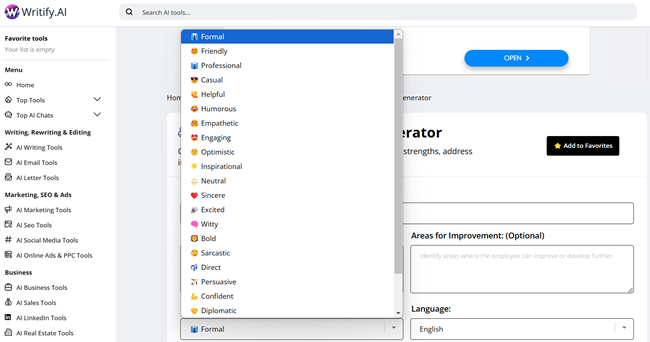
Writify.AI gave me control over tone, more than the other AI performance review generators on my list. I could pick between casual, formal, and neutral styles, and the tool adjusted the language accordingly. This makes it useful for managers who want more control over how their feedback is presented.
During my testing, I didn’t have to constantly rephrase to make the entire review sound more professional or empathetic. With Writify.AI, I simply chose the tone I wanted to switch to, clicked the “Generate” button again, and it instantly produced the updated review.
The language was polished and professional, requiring minimal edits. Its output section even allows format adjustments, so you can easily add a bulleted or numbered list. Unlike the other AI tools I reviewed, Writify.AI also lets you copy, print, and download the review as a PDF file.
Multiple tone options
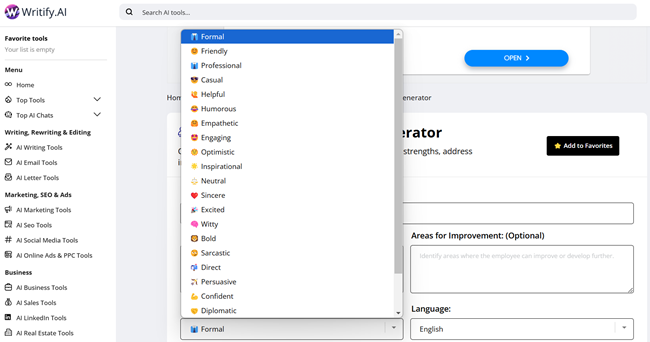
Writify.AI offers an extensive list of writing tones. You can choose from 23 options, from friendly and engaging to direct and diplomatic. GravityWrite also has a selection of writing tone styles, but it isn’t as extensive as Writify.AI’s.
PDF downloads
Among the AI performance review tools I evaluated, only Writify.AI allows PDF downloads. Its output section has a print button, and you can select the “Save as PDF” option instead of a printer to download the report.
Editable reviews
Writify.AI and GravityWrite are the only AI tools on my list that allow in-app report edits. You can change the header sizes, add bulleted or numbered lists, and adjust the font style (e.g., bold or italic).
Being able to directly edit the content directly also saved me a lot of time during my testing. This meant I didn’t need to copy the report into a separate document like Google Docs simply to add details or revise sections.
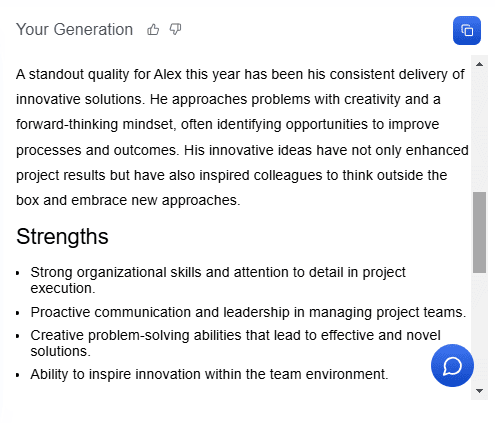
The main downside is the report structure. The output is a single, long paragraph for some sections, such as strengths and areas for improvement. This is unlike Vondy, which uses a bulleted list to clearly explain each strength or development area.
Writify.AI’s input data fields also don’t include the employee’s name, only the position title. This could lead to confusion when tracking reports, especially if you need to create performance reviews for more than two members.
What I found most irritating were the in-app ads. Writify.AI places several ads through its performance review generator tool. Popup windows also occasionally appear, and while you can manually close them, these can interrupt your work.
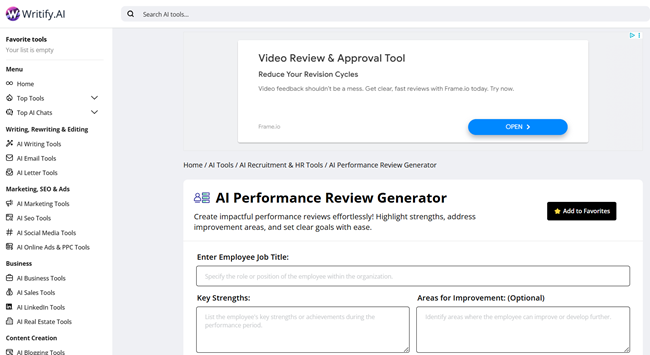
There’s even an ad placement for a PDF tool that looks like it’s part of the AI performance review generator. This made me think that Writify.AI had two PDF download options. So during testing, I clicked on it, but was surprised to find that it was an unrelated PDF tool.
Writify.AI’s performance review tool is completely free. It also doesn’t require any account sign-ups and doesn’t have report download limits, unlike some of the AI tools I reviewed.

Vondy: Best for structured feedback across various review types
Overall Reviewer Score
3.31/5
Output quality
3.63/5
Input flexibility
2.25/5
Ease of use
4.63/5
Export & sharing options
3/5
Access requirements
1.5/5
Pros
- Report has clearly organized sections
- Allows image uploads to support the review
- Preconfigured fields for easy data inputs
- Offers four review types (but you can also generate your own)
Cons
- Lacks report download options; only offers a copy tool
- No bulk review mode
- Doesn’t have language or writing tone options
Why I like it
Vondy generates structured reviews that break content into sections. It stands out because of its pre-built performance review types. When I was testing it out, these review options gave me a clear starting point, so I wasn’t stuck figuring out how to begin. And when I tried the “generate your own” review option, it produced usable drafts that didn’t feel generic.
The performance review report came with clearly labeled sections. That made it much easier to stay focused on the message instead of adjusting the format.
It’s also smart enough to fill in other performance review details. For a custom review, Vondy only requires the employee’s name, position, key performance areas, and any specific feedback you would like to add to the report. Based on the information provided, it identified the strengths, areas for improvement, and recommendations for development.
Pre-built performance review categories
What impressed me the most about Vondo is its four review options. You can generate a quarterly review, an annual review, a self-evaluation, or a peer review report by clicking the applicable button. It will automatically create a draft you can copy and customize.
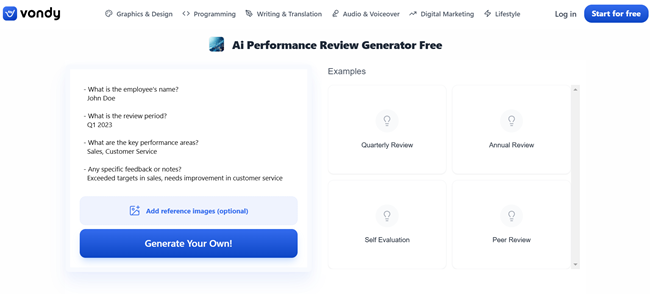
Note that even if you populate the data fields located on the left side of the tool and then click one of the pre-built options, Vondy will still generate a report with generic details. That part of the tool only works for creating your own performance review report.
While these may not provide a report you can immediately use, they make it easy to follow a format when drafting performance reviews. This ensures you don’t miss sections, like the performance overview and development recommendations.
Flexible reports with images
Depending on the review category selected, Vondy automatically generates full or summary-style reports for quarterly or annual reviews. And if you select the create-your-own version, it adjusts the report based on the feedback notes you add.
I also appreciate that it allows image uploads, which is great in providing more context for specific information or accomplishments (e.g., sales growth). Of all the free AI performance review generators that I evaluated, Vondy and GravityWrite are the only tools that have this functionality.
While it provides structured performance reviews, you’re limited to the format that it offers. For example, if you want to remove or shift sections around, you can’t do that in-app. You have to copy the content, paste it into a Google Doc or Word file, and then make the changes from there.
It lacks the writing tone options, such as professional or engaging, that Writify.AI and RePixify offer. Plus, it doesn’t support over 40 languages like Easy-Peasy.AI does.
And it may just be me, but I’m also a bit annoyed with the custom report’s spacing issues. Its standard format appears to follow a 1.5-space indentation between sentences. However, when it adds the details from the feedback notes, the sections that feature that info turn into 1.15-spaced paragraphs.
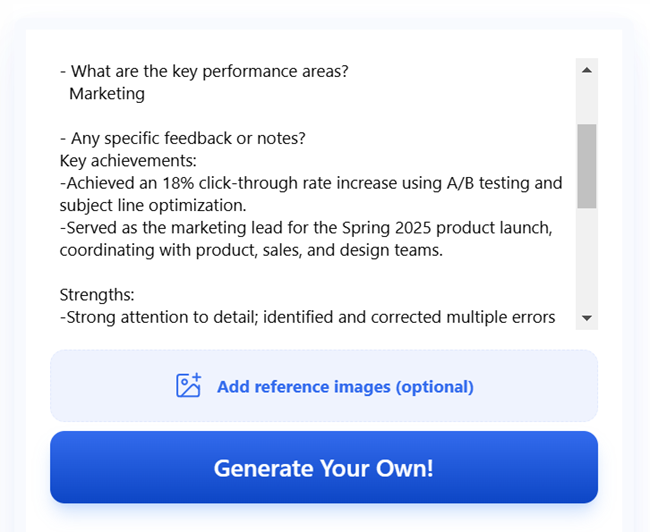
Further, Vondy only allows users to generate one custom review and one report from each of its four pre-built options for free, without requiring an account. During my testing, Vondy prompted me to create an account after reaching the limit. It automatically enrolled me in a free tier, providing 100 daily credits, with each report costing 10 credits.
You can start using Vondy’s AI performance review generator for free. It initially won’t require you to create an account or sign up for a plan. That will take effect after you run your first custom review and any of the four pre-built reviews.
The Vondy pricing matrix consists of a free tier and two paid plans. Each plan comes with credits you can use to generate content, such as images, videos, voiceovers, or text. The amount of credits required can vary based on the complexity of the content generated, so check your Vondy account often to monitor the credit balance.
Starter
Pro
Max
$0
$19/month
$49/month
Includes:
- 100 daily credits
- Basic AI assistant
Everything in Free, plus:
- 1,000 credits per month
- Unlimited downloads
- Vondy AI assistant
- Multi-modal AI suite
- Project workspace
- General support
Everything in Plus, with:
- 50,000 credits
- Priority support
If you don’t want to sign up for a higher plan, you can top up your credits instead. Vondy offers two credit packs:
- 10,000 credit pack: $10
- Also includes access to 133 images, 22 short videos, and 263 voiceovers
- 50,000 credit pack: $45
- Also includes access to 666 images, 111 short videos, and 1,315 voiceovers

GravityWrite: Best for in-app formatting and editing
Overall Reviewer Score
3.11/5
Output quality
2.88/5
Input flexibility
2.25/5
Ease of use
4.63/5
Export & sharing options
3.75/5
Access requirements
2/5
Pros
- Full formatting options
- Multiple input data fields
- Allows report downloads
Cons
- Requires account signup
- Free plan has monthly word limits
- Report looks dated and contains unnecessary characters
Why I like it
GravityWrite offers more formatting flexibility than most tools on my list. It’s more of a writing assistant than a review-specific platform like Vondy, but that also makes it a great tool for adjusting tone and revising content.
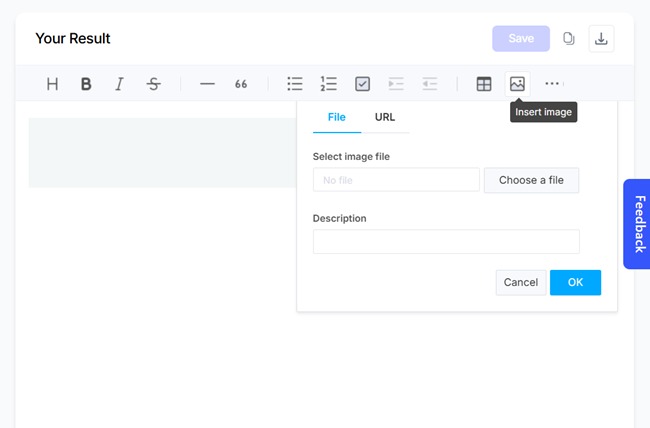
It’s one of the AI performance review generators I tested that lets me tweak formatting directly in the app. I could add bullet points, adjust indents, change header styles, and even insert images and tables. These features came in handy when I needed to create reviews that included extra context or supporting resources.
However, you have to sign up for an account to use its free AI tool. The free plan also comes with a word limit of 1,000 monthly. This might be insufficient to complete your employees’ reviews, especially if you have a large team.
Multiple input data fields
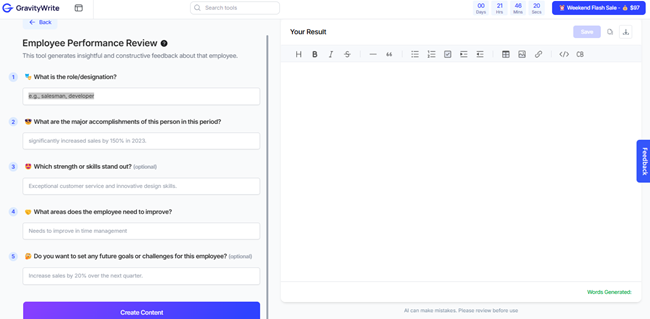
With GravityWrite, you get five data fields where you can input the employee’s role or designation, major accomplishments for the review period, strengths, areas for improvement, and future goals. The strengths and future goals sections are optional fields, and if you choose to keep them blank, GravityWrite will fill in these details based on the other data you provided.
Report format options
Like Writify.AI, it lets you format reports by adding headers, inserting bullet lists, and switching the font between bold and italic styles. What sets GravityWrite apart is its capability to add task lists, code blocks, divider lines, images, and even direct links to external files. This is useful for making reviews more comprehensive without increasing the report’s length.
With GravityWrite, content quality can be a hit or miss. During testing, I often had to rewrite sections because the output was too brief. While the other AI tools I reviewed offered fuller explanations of the strengths or development areas, GravityWrite tended to summarize these points into one-line bullet lists.
I wasn’t a fan of how the report looked. The strengths and key achievements are lumped together in one section, which can be confusing to read.
The default font felt outdated, almost like it came from a typewriter, and the review it generated was in Markdown format, which contains added characters like asterisks and pound signs to separate sections. While I was able to remove it during testing, it would have been better to use plain text instead of adding an extra editing step that didn’t feel worth it.
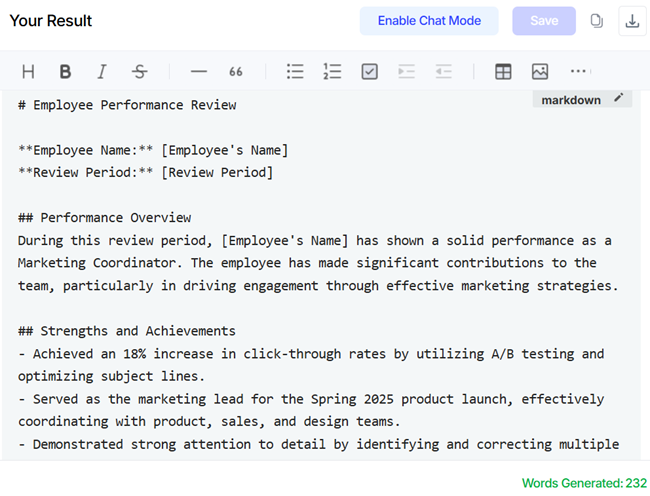
You also have to manually enter the employee’s name, not just once, but several times throughout the draft. GravityWrite does flag where to insert names using placeholders like “[Employee’s Name],” which helps, but it’s still a step that could have been automated.
GravityWrite’s AI performance review generator may seem free the first time that you access it. However, once you click the “Create Content” button to generate the review, it will prompt you to sign up for an account.
You’ll then be given a free plan that includes a 1,000-word limit per month. If you require more, GravityWrite has two paid tiers: Plus and Pro. It also offers a month-to-month subscription, but if you want to get discounted rates, you can sign up for an annual plan, which requires an upfront, lump-sum payment of all fees.
Since our Last Update: GravityWrite has switched to a credit-based pricing system for its paid plans. Similar to Vondy’s pricing matrix, you get a set number of credits you can use each month, with the deductions based on the complexity and number of content generated (e.g., text, video, or image).
Free
Plus
Pro
$0
$49/month
$79/month
Includes:
- 1,000 words monthly
- One image
Includes:
- 500 credits
- 100+ content templates
- 15+ tones
- 15+ languages
- 15 blogs
- 500 images
- 25 videos
- 100 AI audio & video summaries
- 4 social accounts + 50 posts
- AI website builder
- Text humanizer
- Book & course creator
- YouTube summarizer
- Mobile app access
- Unlimited downloads
Everything in Plus, with:
- 2,500 credits
- 200+ content templates
- 25+ tones
- 25+ languages
- 70 blogs
- 2,500 images
- 125 videos
- 500 AI audio & video summaries
- 30 social accounts + 250 posts
- Premium support
If you run out of credits, GravityWrite allows you to purchase a credit pack to top up your monthly balance.
- 500 credits: $20
- 1,000 credits: $35
- 2,500 credits: $70
- 5,000 credits: $120
- 10,000 credits: $220
Honorable mentions: Tools that didn’t make the top 4
While the below AI performance review generators didn’t do as well as those on my list, these might still be helpful in specific scenarios.
- Typli.ai: Great for open-text inputs and getting structured feedback, but the output section has a 1,000-word limit. Anything beyond that, you have to upgrade to a paid plan. It also relies heavily on your inputs, so if you didn’t enumerate the employee’s strengths, it won’t create that section for you.
- Simbline: Good for creating reviews based on role-specific competencies and skills. You can rate how well an employee performs in certain areas, like job role or technical skills. However, the output is short, sometimes contradictory, and often needs heavy editing to make it consistent and clear.
What I learned from testing AI review tools
Here’s what stood out the most during my testing:
- Clear structure matters more than clever phrasing: A well-organized draft is easier to edit than one with flowery but unfocused text.
- The best results came from tools that asked specific inputs: Prompts that include role, tone, or review type led to stronger, more relevant output.
- Tone customization is a major time-saver: Being able to choose “supportive” or “direct” saves me from rewriting entire sections.
- Formatting features are underrated when exporting to Google Docs or PDF reports: Small things, such as headers and bullet points, make the review look polished faster.
- None of these tools are truly hands-off — you still need to review and revise: AI can prepare the draft, but human judgment is still key for providing content that’s clear and fair.
When to use AI performance review tools (and when not to)
These AI tools are best for:
- Blank-page syndrome: They give you a starting point when you don’t know how to begin.
- Writing multiple reviews at once: They help you move faster without sacrificing consistency.
- Supporting multilingual teams: A few of these tools can draft reviews in multiple languages with decent fluency.
- Helping managers phrase feedback: They reduce the mental load of finding the right words, especially for tough reviews.
- Drafting templates or outlines: They’re great for building performance review templates you can reuse.
While AI performance review generators can help, they’re not ideal for:
- Sensitive, legal, or compliance-heavy feedback: These tools don’t account for legal risks or take note of internal policies that can impact an employee’s performance review.
- Embedding performance metrics or goals: They aren’t built to integrate data or detailed KPIs into the draft.
- Organizations with strict tone or voice rules: The output may not match your company’s branding or language style.
- Final-stage edits: These AI review tools help you get started, but they’re no substitute for a final human review.
Frequently asked questions (FAQs) about AI performance review tools
AI performance review generators, often built on top of ChatGPT or other natural language models, are online tools that create written performance reviews based on a handful of inputs. You typically provide a job title, the employee’s name, their strengths, and areas for development. Then, the tool produces a draft you can refine and use.
Most use a freemium model. You can access basic features, but advanced tools like smarter AI and history saving are often behind a paywall.
Yes, you can adjust your prompt to match the voice of a self-reviewer or teammate. Some AI tools even include specific templates for those review types.
No, they won’t remove bias unless your input is neutral and fair to begin with. But they can help with tone consistency.