

QuickBooks Payments (QB Payments) is a strong choice for small businesses that already use QuickBooks and want to accept card, ACH, invoice, recurring, and in-person payments without reconciling a separate payment platform. It keeps payments and accounting records in the same system, which can save time for service businesses, contractors, and invoice-led teams.
It is less compelling if your main priority is the lowest processing cost, a large POS hardware selection, or processor flexibility. QuickBooks Payments earned 4.08 out of 5 in my evaluation because of its strong features and excellent day-to-day workflow, but its fees and account-policy tradeoffs keep it from being my top processor overall.
- QuickBooks Payments overview
- My QuickBooks Payments verdict
- QuickBooks Payments pricing and fees
- How does QuickBooks Payments work?
- QuickBooks Payments key features
- QuickBooks Payments pros and cons
- Who should use QuickBooks Payments?
- Who should not use QuickBooks Payments?
- What users say about QuickBooks Payments
- QuickBooks Payments alternatives
- Frequently asked questions
QuickBooks Payments overview
| My rating | 4.08 out of 5 |
|---|---|
| QuickBooks Payments fees | $0 |
| QuickBooks card processing fees |
|
| Best for | QuickBooks users that want payments and bookkeeping in one place |
| Free trial | No standalone Payments trial required |
QuickBooks Payments is Intuit’s payment processing service. It allows businesses to send invoices, accept recurring payments, take ACH transfers, process card payments, and accept in-person sales through the QuickBooks mobile app or GoPayment. Customers can pay by card, ACH, Apple Pay, PayPal, Venmo, or, where available, Affirm.
The platform’s main advantage is automatic reconciliation. When a customer pays an invoice, the payment can be recorded in QuickBooks Online, reducing manual matching work. I recommend it most for businesses already using QuickBooks for accounting, especially contractors, professional services firms, consultants, agencies, and other SMBs that invoice clients regularly.
My QuickBooks Payments verdict
QuickBooks Payments earned its best scores for features and user experience. It covers the core ways SMBs collect money: invoices, payment links, recurring payments, ACH, cards, wallets, mobile payments, and in-person acceptance. The fact that these payments live alongside invoices, deposits, customer records, and accounting data makes the platform easy to run day to day.
The main drawback is cost flexibility. There is no separate Payments subscription fee or monthly minimum, but the published flat rates may cost more than interchange-plus processing at higher volume. QuickBooks also charges 1.75% for eligible instant deposits, and its optional dispute protection adds as much as 0.99% to card transaction costs.
QuickBooks Payments scoring breakdown
| Category | Score (out of 5) | Why it scored this way |
|---|---|---|
| Price and contract terms | 3.75 | No separate monthly Payments fee or minimum, but flat transaction fees and optional services can raise total costs. |
| Features | 4.31 | Strong invoice, ACH, recurring billing, payment link, mobile, and reconciliation tools. |
| Support and reliability | 4.06 | Good help resources, training, and deposit options, though buyers should review account policies before signing up. |
| User experience | 4.81 | Excellent fit for teams already working in QuickBooks. |
| User and expert scores | 3.17 | Strong fit for its target user, but review volume and payment-specific feedback are limited compared with larger processors. |
| Overall | 4.08 | Best for businesses that value accounting integration over processor flexibility. |
Why you can trust my advice
I have more than seven years of experience evaluating payment processors, POS systems, ecommerce platforms, and retail software. My reviews look at the details that affect daily operations: how easily a business can start taking payments, what each payment method costs, how invoices and recurring billing work, hardware options, payout timing, accounting reconciliation, support, and user feedback.
For this QuickBooks Payments review, I used provider documentation, current pricing pages, payment feature pages, support resources, and the scoring rubric for our best payment processor buyer’s guide to assess its fit for small and growing businesses.
My methodology: How I evaluated QuickBooks Payments
I evaluated QuickBooks Payments using the rubric scoring criteria for our best payment processor buyer’s guide:
- Price and contract terms (25%): Transaction fees, monthly costs, contracts, hardware, incidental fees, and pricing transparency.
- Features (30%): In-person payments, online checkout, payment methods, invoicing, recurring billing, fraud tools, integrations, and reporting.
- Support and reliability (20%): Support resources, onboarding, payouts, account stability, disputes, security, and technical support.
- User experience (15%): Setup, dashboard clarity, payment workflows, mobile usability, and reconciliation.
- User and expert scores (10%): My hands-on evaluation and current user-review data.
QuickBooks Payments pricing and fees
QuickBooks Payments does not charge a separate monthly processing fee or processing minimum. Instead, you pay transaction fees based on how the customer pays. If you want full accounting and payment reconciliation, you will also need a qualifying QuickBooks product.
Here are its current processing rates:
- Invoice, recurring payment, or quick request paid by card or digital wallet: 2.99%
- ACH bank payment: 1%
- In-person payment: 2.5%
- Keyed-in card payment: 3.5%
- Affirm buy now, pay later: 2.99%
- Eligible instant deposit: 1.75%
- Internationally issued card or international PayPal account: Additional 1%
QuickBooks says businesses that process more than $2,500 per month may qualify for discounted processing rates.
QuickBooks Online plans are separate from Payments. A QuickBooks plan determines the accounting, invoicing, reporting, user access, and operational tools available around those payments.
How does QuickBooks Payments work?
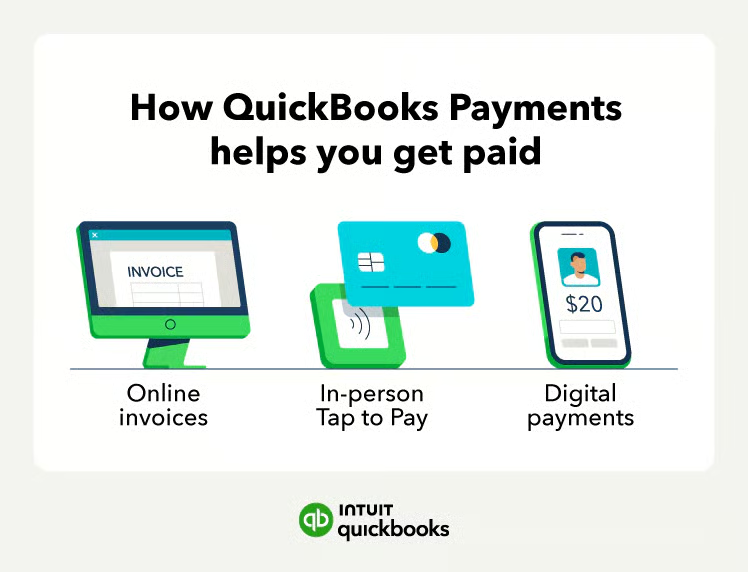
QuickBooks Payments connects payment collection to your invoices, sales records, and accounting data. You can send an invoice, add payment options, and let the customer pay online. After the payment is processed, QuickBooks updates the invoice status and records the transaction in your books.
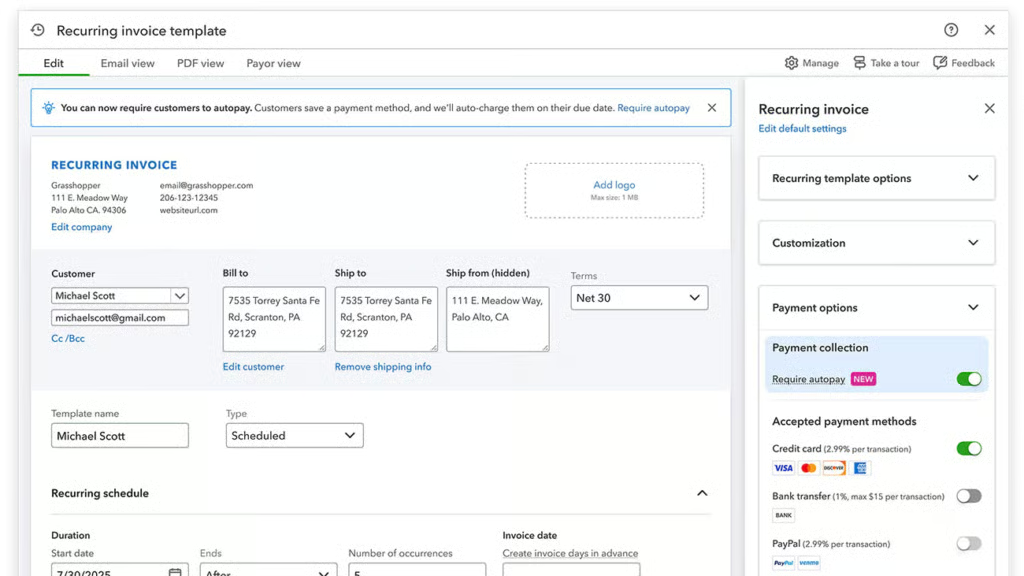
For recurring clients, you can set a payment schedule and automatically charge the customer on the agreed date. This is useful for retainers, subscriptions, memberships, maintenance plans, and regular service contracts.
For in-person selling, you can use the QuickBooks mobile app or GoPayment. QuickBooks says GoPayment does not require a QuickBooks Online subscription, though it recommends connecting the app to QuickBooks Online to ensure payments sync with your books. Tap to Pay on iPhone also lets eligible users accept contactless cards and digital wallets without a separate reader.
QuickBooks Payments key features
Invoice payments and payment links
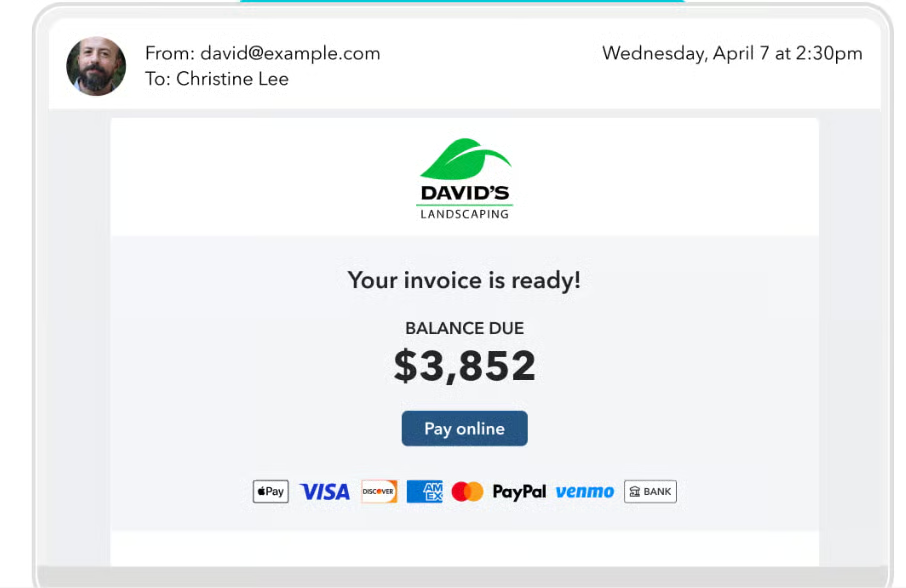
QuickBooks lets you create and send invoices by email or SMS, track whether a customer viewed or paid an invoice, and offer payment options directly in the invoice. You can also use quick requests or payment links when you need to collect money without building a full invoice.
Customers can pay QuickBooks invoices by ACH, card, and supported digital payment methods.
Recurring payments
Recurring payments are a major strength for businesses with repeat billing. You set the schedule and amount, and QuickBooks automatically charges the customer. This is much easier to manage than manually resending invoices each month.
ACH bank payments
ACH payments cost 1%, making them a useful option for larger invoices where card fees would be higher. I would encourage service businesses, B2B sellers, and contractors to make ACH available on most invoices.
Flexible customer payment methods
QuickBooks supports credit and debit cards, ACH, Apple Pay, PayPal, Venmo, and Affirm on supported payment flows. That gives customers more ways to pay without forcing the business to manage several separate payment tools.
GoPayment and Tap to Pay on iPhone
GoPayment is QuickBooks’ mobile payment app for in-person selling. It is useful for contractors, mobile service businesses, pop-up sellers, and teams that collect payment away from a desk. Tap to Pay on iPhone removes the need for a card reader for contactless payments, but it requires an internet connection.

Automatic reconciliation
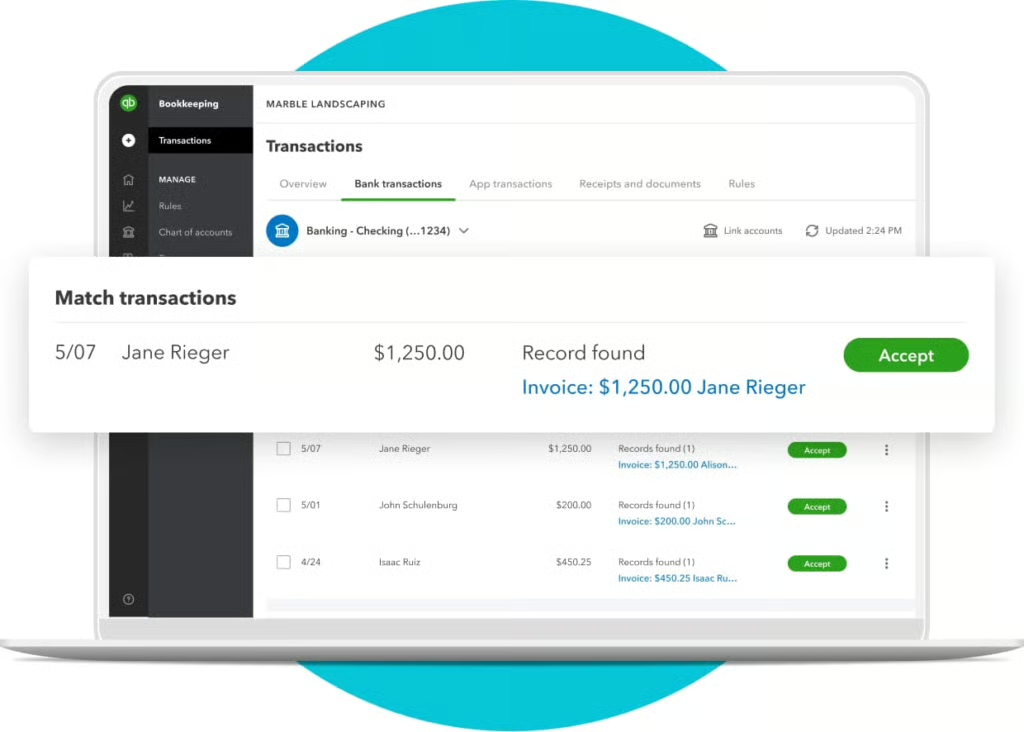
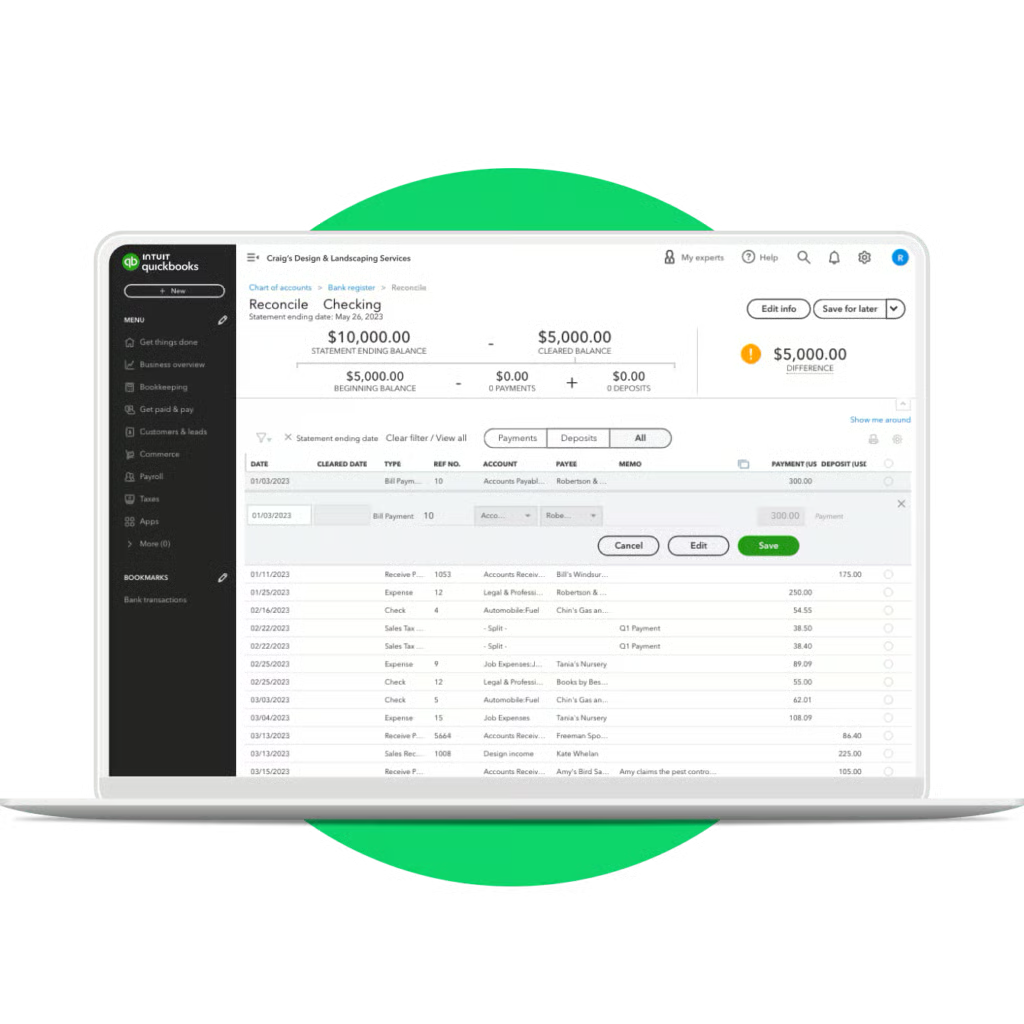
This is the feature that makes QuickBooks Payments stand out. Eligible payment activity can be recorded in QuickBooks Online, so your paid invoices, deposits, and accounting records stay aligned. Businesses using a separate processor may need to sync data or reconcile it manually.
Chargeback protection
QuickBooks offers optional Payments Dispute Protection for eligible US QuickBooks Online users. It can cover qualifying credit and debit card disputes up to $10,000 per dispute and $25,000 per year, but it does not apply to ACH, PayPal, Venmo, or Affirm transactions. Review the terms carefully because the protection adds a fee to eligible card transactions.
Reporting and reconciliation
Track paid and unpaid invoices, customer payment activity, deposits, and sales in the same QuickBooks dashboard. QuickBooks Payments automatically matches eligible payments to invoices and records them in QuickBooks Online, while higher QuickBooks plans add accounts receivable, profitability, inventory, and custom reporting.
QuickBooks Payments pros and cons
| Pros | Cons |
|---|---|
| Automatic payment reconciliation in QuickBooks Online | Less processor flexibility than standalone payment platforms |
| No separate monthly Payments fee or processing minimum | Flat fees may cost more than interchange-plus pricing at higher volume |
| Strong invoice, ACH, recurring billing, and payment-link tools | Instant deposits cost extra |
| Supports cards, wallets, PayPal, Venmo, and Affirm | Narrower hardware lineup than Square or Clover |
| GoPayment and Tap to Pay support mobile sellers | Buyers should closely review underwriting, holds, and dispute terms |
| Good fit for service businesses and contractors | Full accounting workflow can require a separate QuickBooks subscription |
Who should use QuickBooks Payments?
QuickBooks Payments is best for small to mid-sized businesses that already use QuickBooks and want fewer systems to manage.
- Professional service businesses: Consultants, agencies, accounting firms, freelancers, and legal or home-service businesses can invoice clients, collect ACH payments, and keep books current without manual matching.
- Contractors and field-service teams: GoPayment and Tap to Pay help mobile teams accept payment on site.
- Businesses with recurring customers: The recurring payment tools work well for retainers, service plans, memberships, and repeat billing.
- QuickBooks-centered businesses: If your staff already knows QuickBooks, adding Payments is easier than teaching a separate processor and reconciliation process.
Who should not use QuickBooks Payments?
QuickBooks Payments is not the best choice for every merchant.
- High-volume businesses focused on lower rates: Helcim or another interchange-plus processor may be more cost-effective.
- Retailers and restaurants that need a full POS system: Square, Clover, Toast, or another POS-first platform will offer more hardware and front-counter tools.
- Businesses that need custom checkout flows: Stripe is better for developer-led teams that want APIs and deep checkout control.
- Merchants that do not use QuickBooks: The integration advantage matters far less if you use another accounting platform.
What users say about QuickBooks Payments
QuickBooks Payments user reviews have generally positive feedback from business-focused review platforms, with scores ranging from 4.0 out of 5 on G2 for QuickBooks Payments to 4.6 out of 5 for GoPayment on GetApp. Keep in mind that these are related but separate QuickBooks products, and the Payments-specific sample is still small at 47 G2 reviews.
Many business owners highlight the easy connection between QuickBooks Payments, invoices, and bookkeeping as its main advantage. Reviewers also like being able to accept ACH, cards, digital wallets, PayPal, and Venmo through customer invoices, then have payments match to their records automatically. This is especially useful for service businesses that want to collect client payments without working across separate invoicing, payment, and accounting systems.
Common complaints focus on transaction fees, limited customization, occasional fund holds, and inconsistent customer support experiences. These issues are most frustrating for businesses that depend on fast access to funds or process enough volume for flat-rate fees to add up. QuickBooks Payments is a good fit for businesses that value built-in accounting reconciliation, but merchants should review deposit terms, account verification requirements, and payment hold policies before relying on it as their sole processor.
QuickBooks Payments alternatives
| Provider | Best for | Starting monthly cost | Choose it instead when |
|---|---|---|---|
| Square | Easy all-in-one payments | $0 | You want stronger POS, hardware, and retail tools. |
| Helcim | Interchange-plus processing | $0 | You want transparent cost structure and potential savings as volume grows. |
| Stripe | Custom online payment workflows | $0 | You need APIs, custom checkout, or technical flexibility. |
QuickBooks Payments vs Square
Choose QuickBooks Payments if your priority is keeping invoices, payments, and bookkeeping together. Choose Square if you need a more complete POS system with broader hardware choices, an online store, inventory tools, and a faster path to launching a retail or mobile-selling setup.
Read more: Square Product Overview
QuickBooks Payments vs Helcim
QuickBooks Payments is easier for existing QuickBooks users because it keeps accounting and payment collection connected. Helcim is the better option for businesses that want interchange-plus pricing, a separate merchant account approach, and a clearer route to lower costs at higher processing volume.
Read more: Helcim Product Overview
QuickBooks Payments vs Stripe
QuickBooks Payments is simpler for invoice-led SMBs that want to start accepting payments with little technical setup. Stripe is stronger for ecommerce businesses, software companies, and teams that need APIs, custom checkout design, or more advanced payment infrastructure.
Read more: Stripe Review
Frequently asked questions
What is QuickBooks Payments?
QuickBooks Payments is Intuit’s payment processing service. It lets businesses accept cards, ACH transfers, invoice payments, recurring payments, digital wallets, and in-person payments while connecting activity to QuickBooks.
How much does QuickBooks Payments cost?
QuickBooks Payments has no separate monthly processing fee or monthly minimum. Standard rates include 2.99% for invoice and digital-wallet payments, 1% for ACH, 2.5% for in-person payments, and 3.5% for keyed cards.
How does QuickBooks Payments work?
You send an invoice, share a payment link, schedule a recurring payment, or take payment in person. The customer pays using an available method, and eligible payment activity is recorded in QuickBooks Online.
Can I accept payments with QuickBooks without QuickBooks Online?
You can use GoPayment for in-person payments without a QuickBooks Online subscription. However, QuickBooks recommends linking it to QuickBooks Online if you want payment activity to sync with your accounting records.
Is QuickBooks Payments worth it?
QuickBooks Payments is worth it for businesses that already use QuickBooks and want easy payment collection with automatic reconciliation. It is less appealing for merchants that need the lowest possible payment rate, deep POS tools, or broad processor choice.