


Key takeaways
- ClickUp is my overall best AI project management tool as it utilizes full workspace context to create more relevant project outputs.
- monday Work Management follows for AI-assisted workflow setup, while Motion stands out for auto-scheduling.
As someone who has been testing AI tools for project management for years, my standard is specific: AI should help me schedule, prioritize, and generate reports. That means I expect more than generic smart features like chat summaries or research assistance. To find out which tools meet that standard, I tested the top contenders across real project scenarios.
| Best for | Starting monthly fee | |
| ClickUp | Best for workspace-aware task creation | $7/user/mo |
| monday work management | Best for AI workflow templates | $9/user/mo |
| Motion | Best for auto-scheduling | $19/user/mo |
| Wrike | Best for risk detection | $10/user/mo |
| Asana | Best for workflow automation | $10.99/user/mo |
| Jira | Best for agile work breakdown | $9.05/user/mo |
| Notion | Best for knowledge workflows | $10/user/mo |
I’ve spent five years testing project management software across dozens of platforms. For every tool, I run actual projects, add AI features to my workflow, and evaluate each tool against a scoring rubric that covers functionality, ease of use, pricing, and support. Official documentation helps me confirm what each platform offers, but my ratings are based on how those features perform during testing.

Marianne Sison, Senior Staff Writer for Project Management
I evaluated AI project management tools using a weighted rubric that balanced cost, project management features, AI capabilities, usability, support availability, and my hands-on assessment as a software reviewer. I looked beyond whether a tool simply offered an AI assistant and focused on how its AI features support diverse project workflows.
I evaluated each tool using a weighted rubric based on the features that matter most in AI project management software. I verified product capabilities through official vendor documentation and used G2 or Capterra only to assess ease of use and customer satisfaction.
General features (25%): I gave the most weight to core project management capabilities. I evaluated AI features for task management, planning, scheduling, collaboration, reporting, and workflow automation. Tools scored higher when these features were well documented and integrated into everyday work.
Pricing (20%): I compared free plans, starting prices, AI feature availability, and overall cost. Tools scored higher when pricing was transparent and core AI features were included without requiring expensive upgrades.
Advanced and niche features (20%): I evaluated advanced AI capabilities such as predictive insights, resource optimization, AI chatbots, and portfolio management. Tools earned higher scores when these features were fully documented and suitable for complex project environments.
Expert score (15%): I considered each platform’s overall feature set, value for money, product maturity, and how easy it was to verify its AI capabilities. This category reflects my overall assessment after reviewing the product.
Ease of use (10%): I evaluated onboarding, navigation, customization, and the overall learning curve. I also reviewed recurring feedback from G2 or Capterra to identify common strengths and usability issues.
Support (10%): I evaluated available support channels, documentation, training resources, community forums, and security policies. Products scored higher when support resources were easy to access and well-maintained.

ClickUp: Best for workspace-aware task creation
Overall score
4.68/5
Free plan available
Pros
- AI uses the full workspace context
- Generates workflows and docs
- Flexible views support various workflows
Cons
- Setup can overwhelm new teams
- Admin complexity grows with customization
- Messy workspaces reduce AI accuracy
Why I chose ClickUp
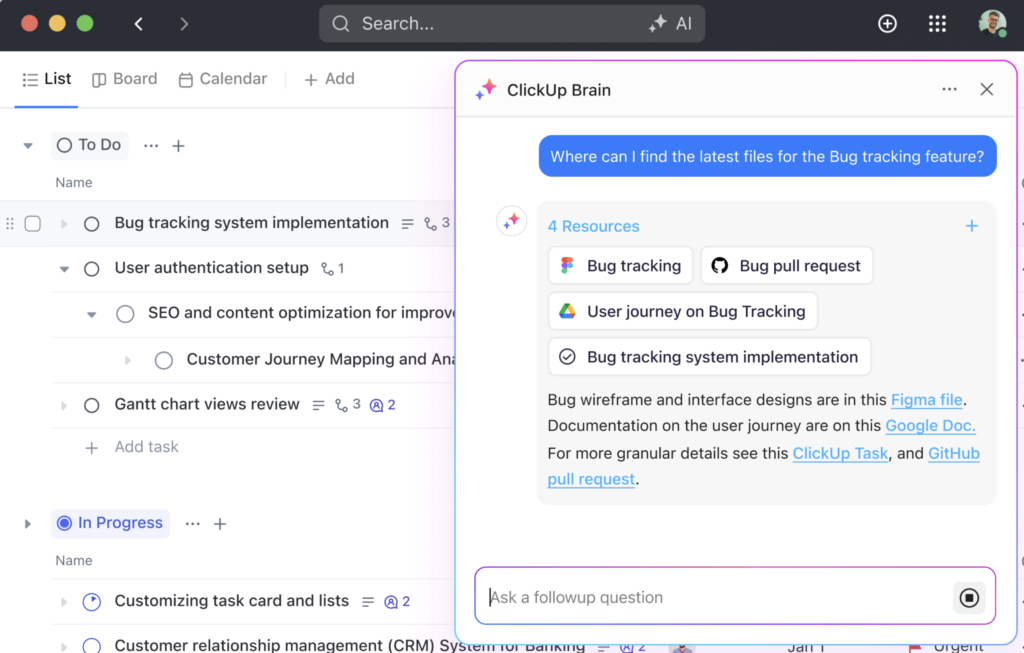
ClickUp’s AI works best when a team already manages most of its work inside the platform. Tasks, Docs, Chat, goals, dashboards, and wikis are all available in the same workspace. ClickUp Brain uses this information to understand project context and reference work your team has already documented or assigned.
For project managers, ClickUp Brain answers questions about ongoing work, summarizes project updates, generates action items, and creates tasks using information stored in the workspace. It works best for teams that want AI to reference existing tasks, documents, and discussions before making recommendations.
It’s also worth noting that ClickUp focuses more on AI workspace management than calendar optimization. If your priority is automatic daily scheduling, Motion is the better choice.
Key features
- ClickUp Brain: Answers questions using context from tasks, Docs, Chat, wikis, and connected apps.
- Prompt-to-work output: Builds workflows, dashboards, emails, research, and slides from workspace data.
- Persistent memory: Learns user preferences, role context, and working relationships over time.
- Super Agents: Creates AI-powered teammates that adapt to the ClickUp Workspace.
Pricing
AI pricing note: Brain AI costs $9/user/mo, while Everything AI costs $28/user/mo.
- Unlimited: $7/user/mo. Includes unlimited spaces, Gantt charts, integrations, storage, custom fields, and resource management.
- Business: $12/user/mo. Includes advanced dashboards, timeline views, automations, sprint reporting, and portfolio workload management.
- Enterprise: Custom pricing. Includes enterprise permissions, SSO, audit logs, data residency, onboarding, and higher automation limits.
Read our ClickUp review
monday work management: Best for AI workflow templates
Overall score
4.66/5
Free plan available
Pros
- AI flags portfolio delivery risks
- Suggests resource assignments
- Dashboard widgets simplify project tracking
Cons
- Limited controls for advanced PMOs
- AI credits make costs less predictable
- Plan upgrades required for advanced AI
Why I chose monday work management
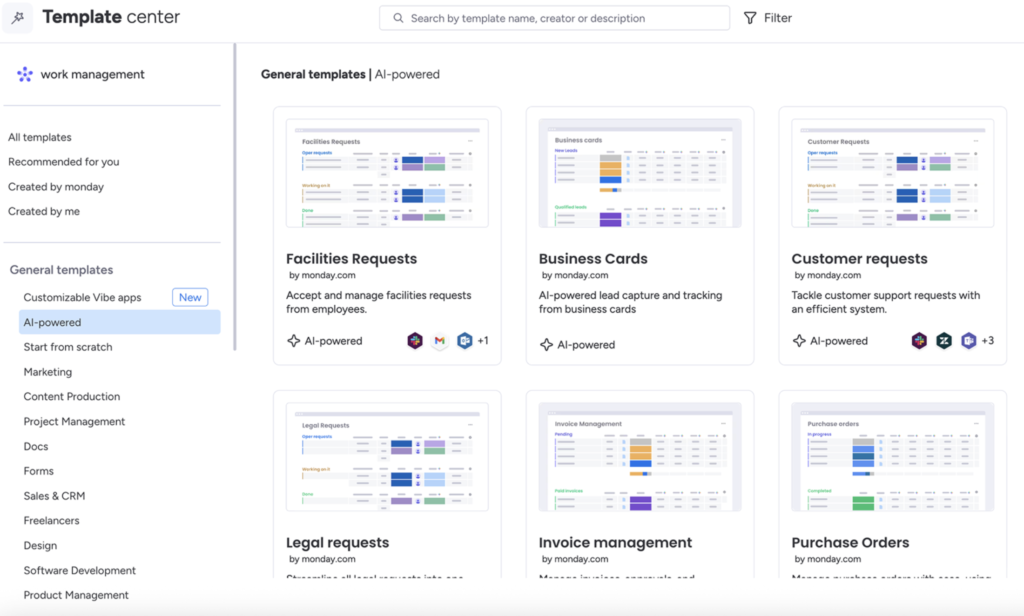
monday work management brings AI into a platform built around visual boards and automated workflows. Visual templates make it easier to turn ideas into working boards for intake processes, approval workflows, and campaign tracking. Rather than generating standalone responses, its AI helps teams build and automate the work itself.
AI can generate boards, suggest columns, create formulas, build WorkForms, and add AI actions to workflows through AI blocks. These features reduce setup time for teams that frequently create similar projects or processes.
AI features are subject to a credit system, so teams need to monitor usage. If you prefer AI that is more tightly integrated into daily task management and workflow automation, consider Asana.
Key features
- AI templates: Create boards from ready-made AI templates.
- AI blocks: Add actions such as assigning people, prioritizing items, summarizing text, and suggesting next steps.
- Prompt to board: Generates a customized board from a written prompt.
- AI Formula Builder: Creates formulas and applies them to monday items.
Pricing
AI pricing note: Monthly AI credits range from 1,000 to 3,000, depending on the monthly plan. Additional credits are available as an add-on.
- Basic: $9/user/mo – Includes work tracking, unlimited items, dashboards, and limited AI credits.
- Standard: $12/user/mo. Includes timelines, Gantt views, automations, integrations, and guest access.
- Pro: $19/user/mo. Includes time tracking, private boards, chart views, formulas, and higher automation limits.
- Enterprise: Custom pricing. Includes enterprise automations, advanced reporting, permissions, governance, and priority support.
Read our monday work management review.

Motion: Best for auto-scheduling
Overall score
4.66/5
No free plan
Pros
- AI rebuilds schedules automatically
- Workloads adjust as priorities change
- Deadlines update with team capacity
Cons
- Limited portfolio capabilities
- Fewer custom project views
- Best for schedule-driven workflows only
Why I chose Motion
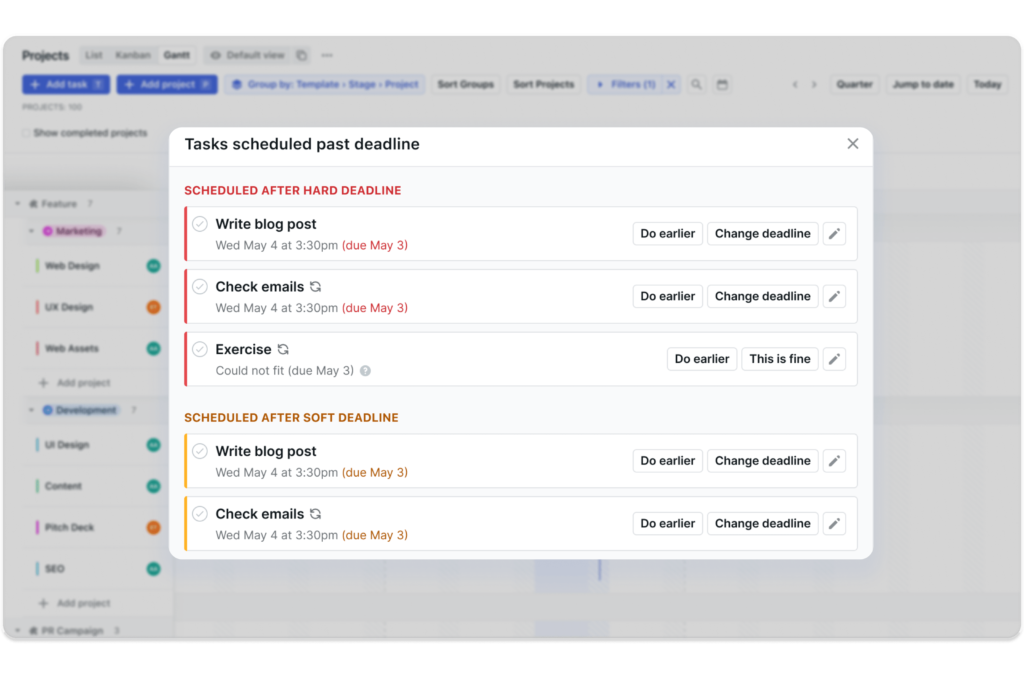
Motion takes a different approach by focusing on scheduling instead of traditional project management. While most project management tools store tasks and deadlines, Motion decides when work should happen based on priority, workload, and project timelines. This makes it a good fit for teams that frequently adjust schedules amid changing priorities.
Its AI Project Manager automatically prioritizes tasks, builds schedules, reschedules work, predicts deadline risks, and helps balance team capacity. These features reduce the time managers spend updating schedules after new work is assigned.
On the downside, Motion offers fewer tools for documentation and knowledge management. Teams that rely on shared notes, wikis, or project documentation may find Notion a better fit.
Key features
- AI deadline prediction: Estimates whether projects will finish on time based on workload, progress, and team capacity.
- AI capacity planning: Compares team availability with assigned work to identify overallocated and underutilized team members.
- AI task prioritization: Recommends which tasks each team member should tackle next based on priority and deadlines.
- Intelligent dashboards: Highlights project bottlenecks, workload distribution, and areas where team capacity is stretched.
Pricing
AI pricing note: Credit allocations vary by subscription: Pro AI includes 7,500 credits, while Business AI provides 15,000 credits.
Pro AI – For AI task planner and workflow generator
- Individuals ($29/mo)
- Teams ($19/user/mo)
Business AI – For Gantt charts, time tracking, and team capacity planning
- Teams ($29/user/mo)
- Individuals ($39/mo)

Wrike: Best for risk detection
Overall score
4.20/5
Free plan available
Pros
- AI flags at-risk projects
- Comprehensive cross-project visibility
- Gantt charts support dependency tracking
Cons
- Steep learning curve for beginners
- Set up needs a clear process structure
- Best value requires larger teams
Why I chose Wrike
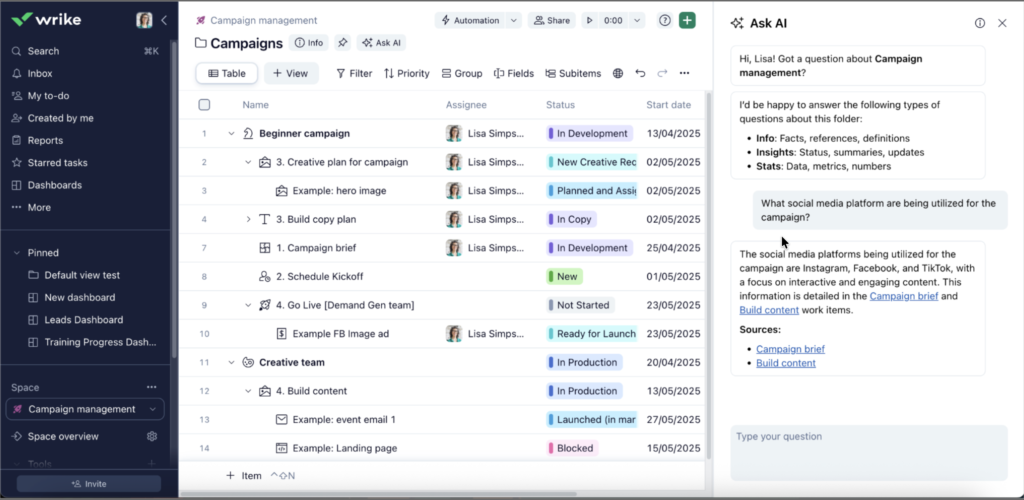
Wrike’s AI is designed to help teams identify project issues before they affect delivery. The platform combines dashboards, request forms, approvals, automation, and workload management, making it a good fit for organizations that manage complex projects across multiple teams. In these environments, early risk detection is often more valuable than other writing or summarization tools.
Its AI features include risk detection, priority highlights, project update summaries, AI-powered request forms, AI agents, Copilot, and Board AI. Project managers can use these tools to identify overdue work, flag high-risk requests, clarify priorities, and surface items that need follow-up.
With its enterprise-based approach, Wrike may offer more functionality than smaller teams require. Teams looking for a more flexible workspace with AI-assisted task creation may prefer ClickUp.
Key features
- AI risk detection: Flags risks and work items that may need attention.
- AI dashboard highlights: Surfaces priority updates within dashboards.
- Wrike Copilot: Answers work questions and creates charts or links from Wrike data.
- Board AI: Creates action plans, summaries, tasks, translations, and topic groupings.
Pricing
AI pricing note: AI Essentials starts on Team, AI Elite starts on Business, and additional AI Elite action packs are custom-priced.
- Team: $10/user/mo. Includes AI Essentials, shareable dashboards, Gantt charts, and project management for small teams.
- Business: $25/user/mo. Includes customizable workflows, templates, standard integrations, and starter AI Elite actions.
- Pinnacle: Custom pricing. Includes advanced resource planning, budgeting, BI reporting, and more AI Elite actions.
- Apex: Custom pricing. Includes AI-led enterprise workflows, advanced integrations, Wrike Sync, and larger AI automation capacity.
Read our Wrike review

Asana: Best for workflow automation
Overall score
4.10/5
Free plan available
Pros
- AI teammates automate routine work
- AI Studio builds custom workflows
- Clean interface supports team adoption
Cons
- Complex workflows need careful setup
- Limited built-in team messaging
- Advanced AI requires paid plans
Why I chose Asana
Asana’s AI is designed for work that spans multiple teams and departments. It caters to organizations managing task ownership, dependencies, intake requests, and company goals. Instead of acting as a basic writing assistant, Asana uses AI to automate and coordinate work across projects.
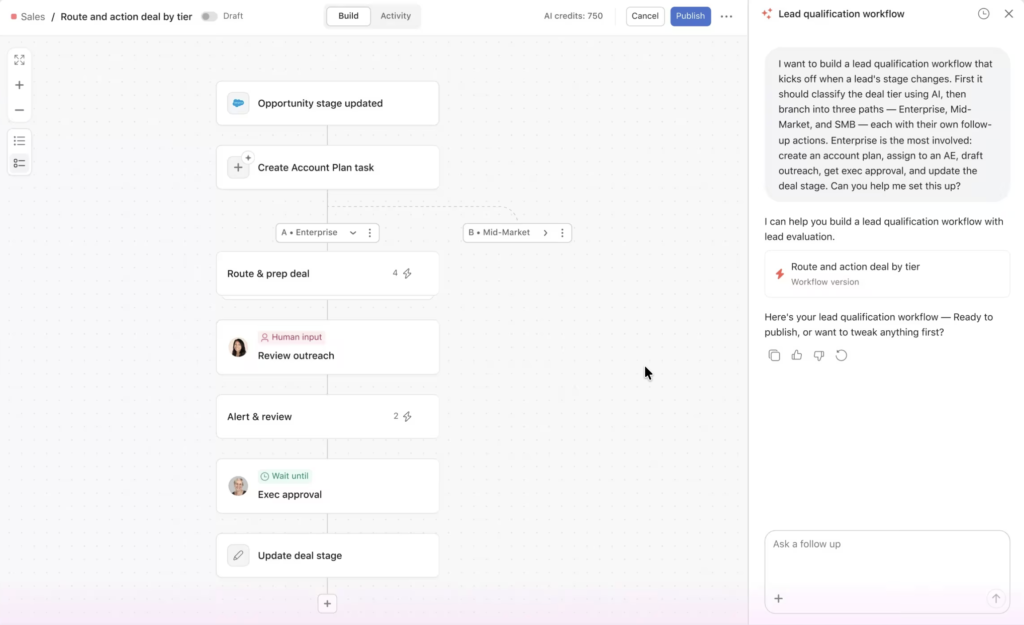
AI Teammates, AI Studio, Asana Dash, and AI Connectors help teams build no-code workflows, identify priorities, route requests, and connect actions with tools such as ChatGPT, Claude, and Gemini. These features support intake management, task creation, status reporting, and workflow handoffs without custom code. However, engineering teams that need AI to assist with sprint planning or backlog refinement will likely find Jira a better fit.
Key features
- AI Teammates: Provides prebuilt agents for teams such as marketing, operations, and IT.
- AI Studio: Builds no-code automations for intake, routing, updates, and repetitive workflow steps.
- Asana Dash: Surfaces daily priorities from meetings, emails, and tasks.
- AI Connectors and MCP: Lets users search, create, update, and organize Asana projects from ChatGPT, Claude, and Gemini.
Pricing
AI pricing note: AI Studio Basic is included on paid plans, with plan-based credit limits: 50K credits on Starter, 75K on Advanced, and 200K on Enterprise per billing account each month.
- Starter: $10.99/user/mo. Includes AI Studio Basic, timelines, Gantt views, dashboards, automations, forms, and custom fields.
- Advanced: $24.99/user/mo. Includes portfolios, goals, workload, approvals, proofing, time tracking, and scaled security.
- Enterprise: Custom pricing. Includes higher AI Studio credits, SAML, SCIM, universal workload, capacity planning, and admin controls.
- Enterprise+: Custom pricing. Includes advanced security, compliance, governance, audit logs, SIEM integrations, and data residency.
Read our Asana review.

Jira: Best for agile work breakdown
Overall score
3.87/5
Free plan available
Pros
- AI breaks down agile-based tasks
- Rovo agents support delivery tasks
- Strong fit for software teams
Cons
- Less intuitive for nontechnical teams
- Monthly credits are very limited per user
- Configuration can become hard to manage
Why I chose Jira
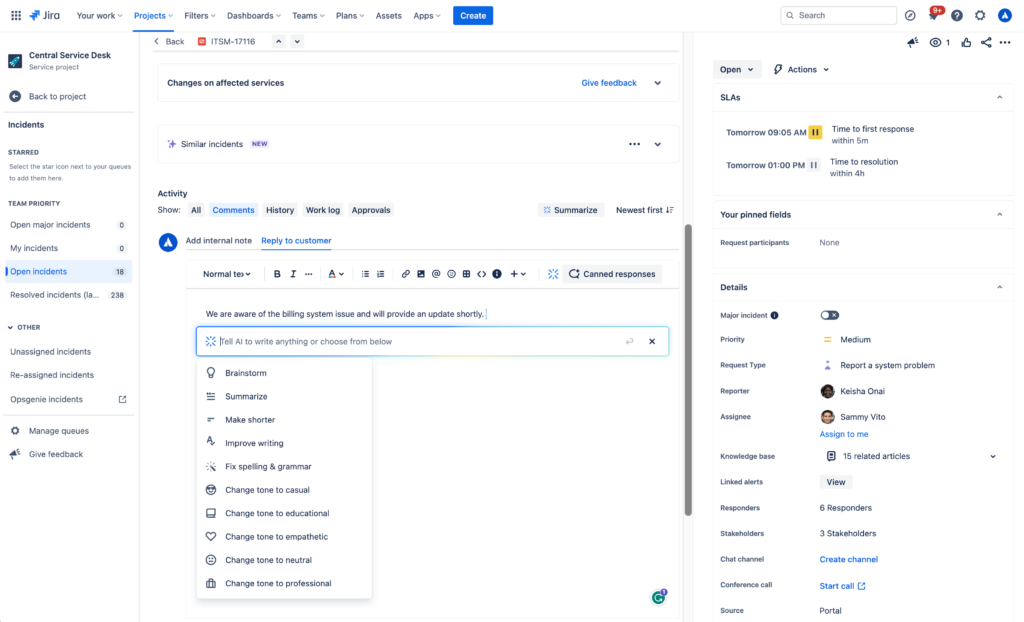
Jira’s AI is built into a platform designed for software development. Its AI agent, Rovo AI, uses Jira’s existing project data, including epics, issues, sprints, and backlogs, to help teams create, organize, and manage work more efficiently. This largely benefits product and engineering teams that need to turn high-level requirements into well-defined tasks.
Rovo can create work items from Confluence, Slack, email, IDEs, and images, then break large projects into smaller tasks with AI-generated summaries and descriptions. It also helps teams quickly understand blockers, recent updates, contributors, project status, and recommended next steps.
Jira, however, is designed primarily for product teams. Organizations looking for AI-powered workflow templates for business functions such as marketing, HR, or operations may find monday work management a better fit.
Key features
- Work create: Captures Jira work from Confluence, Slack, email, IDEs, and images.
- Work breakdown: Breaks complex work into smaller tasks with summaries and descriptions.
- Instant context: Summarizes a work item’s status, blockers, contributors, next steps, and recent updates.
- Rovo Project Management skills: Create work items, update work items, and draft status updates from Rovo chat.
Pricing
AI pricing note: Atlassian Rovo uses a monthly credit system that varies by plan.
- Standard: $9.05/user/mo. Includes more user capacity, permissions, support, and standard cloud controls.
- Premium: $18.30/user/mo. Includes advanced planning, higher automation limits, sandboxing, and premium support.
- Enterprise: Custom pricing. Includes enterprise-scale security, controls, analytics, and centralized administration.
Read our Jira review.
Notion: Best for knowledge workflows
Overall score
3.65/5
Free plan available
Pros
- AI searches the workspace knowledge quickly
- Flexible databases support project tracking
- Meeting notes connect to tasks
Cons
- Project workflows need manual setup
- Advanced AI requires a plan upgrade
- Weak fit for rigid scheduling
Why I chose Notion
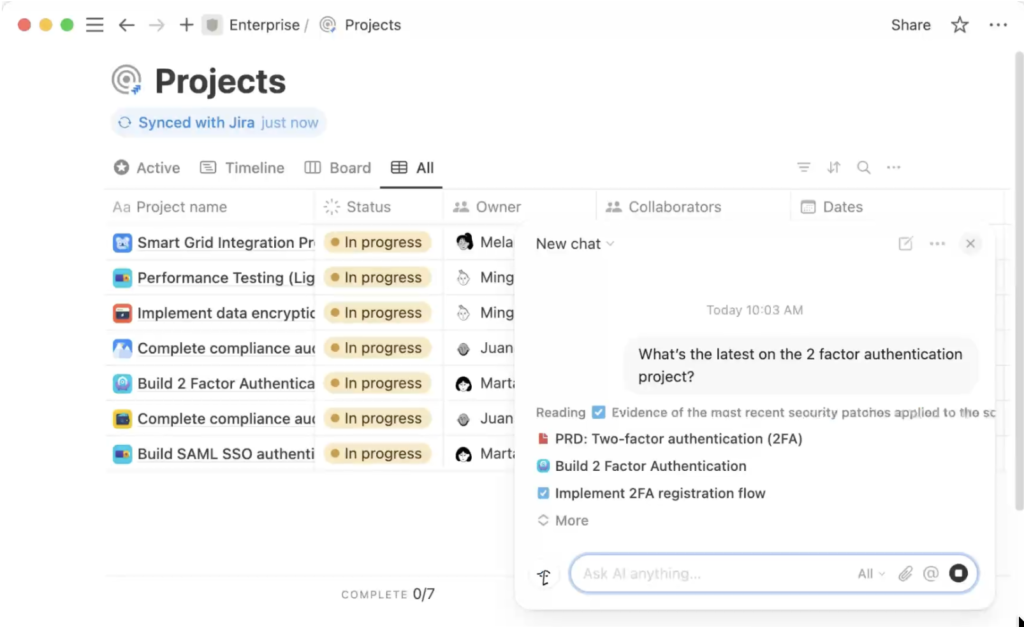
Notion’s AI is most effective for projects built around documentation and shared knowledge. Teams often store briefs, meeting notes, product specifications, process documents, and internal wikis in Notion, giving the AI access to the information behind the project. This allows it to generate responses using existing project knowledge instead of relying only on assigned tasks.
Notion AI can answer questions using workspace content, search connected apps, create and edit pages or databases, capture meeting notes, autofill database properties, and generate formulas. Project managers can use these features to create roadmaps, organize task databases, generate status updates, and prepare weekly reports from existing documentation.
Note that Notion is less focused on AI scheduling and workload optimization. Teams that want AI to automatically plan work around deadlines and team capacity may find Motion a better fit.
Key features
- Notion Agent: Completes multi-step tasks using context from Notion, connected apps, and the web.
- Custom Agents: Automate repetitive tasks for a team.
- Enterprise Search: Searches across connected apps such as Slack, Google Drive, and GitHub.
- AI Meeting Notes: Captures meeting notes and action summaries inside Notion.
Pricing
AI pricing note: Free and Plus plans include limited AI trials. Business includes AI workspace features, while custom agents require Notion credits.
- Plus: $10/member/mo. Includes unlimited blocks, file uploads, charts, custom forms, sites, and basic connections.
- Business: $20/member/mo. Includes Notion Agent, AI Meeting Notes, Enterprise Search beta, SAML SSO, and granular database permissions.
- Enterprise: Custom pricing. Includes advanced security, SCIM, audit logs, customer success, and zero data retention with LLM providers.
Read our Notion review.
Find your next AI project management software
How to choose the best AI project management tools
Choosing an AI project management tool starts with understanding what you want the AI to do. Compare how each platform handles planning, automation, reporting, and pricing before making a decision.
- Look beyond basic AI features: Choose software that can generate project plans, automate tasks, identify risks, and recommend next steps. These capabilities have a greater impact than tools that only write or summarize content.
- Review project management features: Check whether the platform includes task management, reporting, resource planning, workflow automation, and collaboration tools. AI works best when it supports these core functions.
- Check integrations: Make sure the software connects with your collaboration, communication, and development tools. Fewer manual updates make it easier to keep project information current.
- Compare pricing: Review which AI features are included in each plan and whether usage limits apply. Watch for add-on costs that can increase your total subscription cost.
- Read customer reviews: Look for recurring feedback on output accuracy, quality of automation, and reliability. Consistent user experiences often reveal strengths and limitations that feature lists do not.
FAQs
