Key takeaways
- Waterfall project management is a sequential, structured method ideal for projects with unchanging goals.
- Waterfall is fitting for industries like construction and logistics, where steps are dependent and predefined.
- Other methodologies might be better for projects that require flexibility or are likely to change.
Featured partners
- Mar. 18, 2026: Hanna Sillo revised sections to improve structure and readability. She also updated the page elements and added practical examples.
- Jan. 29, 2023: Irene Casucian revised the copy for clarity, accuracy, and depth. She also added examples of project management software solutions that offer features suited for waterfall project management.
Waterfall project management definition
Waterfall project management is a structured, step-by-step approach where each phase must be completed before the next begins. Often compared to a cascading waterfall, this method follows a fixed sequence, from planning and design to implementation and testing. The result is a clear and predictable project path.
This methodology works best for projects with well-defined objectives and stable requirements. Each phase depends on the outputs of the previous one, forming a tightly connected chain of tasks that keeps progress organized and controlled.
However, that same structure makes the waterfall method less flexible. Changes introduced later in the project often require revisiting earlier phases, which can increase costs and delay timelines. As a result, waterfall is most effective when requirements are unlikely to shift once the project is underway.
The phases of the waterfall methodology
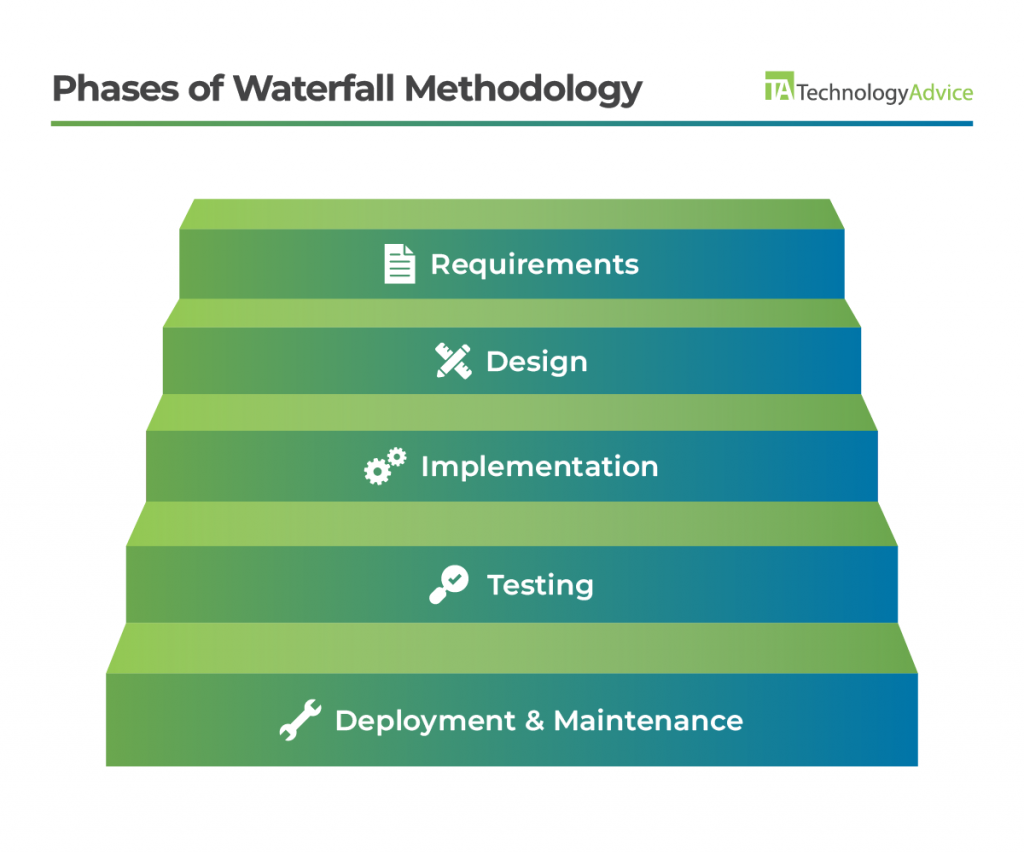
The waterfall methodology consists of five distinct phases that are linear and rigid: requirements, design, implementation, testing, and deployment and maintenance.
Learn how projects unfold from start to finish across methodologies: The Five Phases of Project Management
Requirements
In the requirements phase, the focus is on clearly defining what the project needs to achieve before any work begins. This means outlining the project scope, stakeholder expectations, and any research or constraints that could influence delivery. Getting this right from the beginning is crucial because every phase that follows depends on these decisions.
To make this phase more effective, prioritize:
- Documenting requirements in one place so nothing gets lost across emails or meetings
- Validating assumptions early with stakeholders to avoid rework later
- Breaking high-level goals into specific, actionable requirements the team can actually execute
Tools like Smartsheet can support this process by providing a centralized, collaborative space for documenting requirements. I’ve found that using shared templates, attaching supporting files, and setting up approval workflows helps keep stakeholders aligned and ensures requirements are finalized before moving forward.
Automated workflows also help streamline approvals, so requirements don’t get stuck waiting on sign-off. Integrations with other tools also make it easier to keep everything connected and up to date. Smartsheet’s access controls and reporting features give project managers better visibility into changes to maintain accuracy and accountability throughout the requirements process.
Design
Once requirements are finalized, I move into the design phase, where those ideas are translated into detailed plans the team can actually execute. This is where abstract requirements take shape through artifacts like system architecture diagrams, data models, and technical specifications.
At this stage, the focus should be on making sure the plan is both complete and realistic before moving forward. Do that by:
- Mapping requirements directly to design elements so nothing gets overlooked
- Reviewing designs with stakeholders early to catch gaps or misalignment
- Creating clear documentation that the implementation team can follow without ambiguity
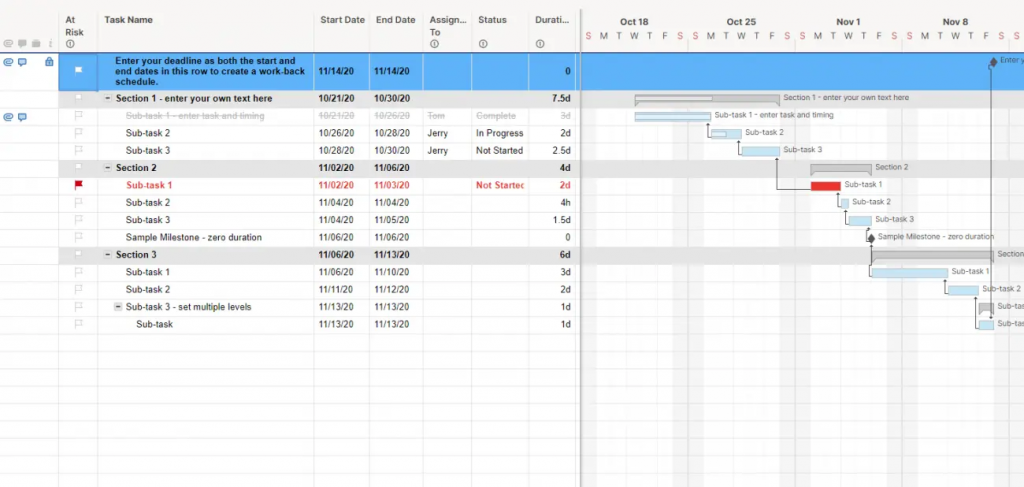
In this phase, tools like Microsoft Project can help in meticulous project planning and tracking the design activities. I use Gantt charts to map out design tasks, assign resources, and track progress against deadlines. Its scheduling features make it easier to see how delays in one area might impact the overall timeline.
The critical path feature is especially useful here, as it highlights tasks that could delay the entire project if they slip. Combined with a centralized workspace for tracking progress, this helps keep stakeholders aligned and ensures the design phase stays on track before moving into implementation.
Implementation
In the implementation phase, I focus on turning design plans into a working product. This is where the actual build happens, whether that’s coding, configuring systems, or integrating components based on the approved design specifications.
At this stage, execution and consistency matter most. To keep things on track, prioritize:
- Catching issues early through regular check-ins and internal reviews
- Following design documentation closely to avoid unnecessary rework
- Breaking work into clearly defined tasks so progress is easy to track
The goal is to produce a complete, functional output that aligns with the original design and is ready for testing.
Tools like Jira can act as a central hub for managing tasks for this work. I use it to create structured workflows, assign tasks to team members, and prioritize features or bug fixes. This makes it easier to track progress in real time and keep everyone aligned on what needs to be done next.
Jira’s integration with version control systems like Git also improves traceability by linking code changes directly to tasks. Combined with its reporting features, this gives project managers clear visibility into progress and helps ensure the project stays aligned with the planned timeline.
Testing
In the testing phase, focus on validating that what was built actually meets the original requirements and design specifications. This is where we confirm the product works as expected, not just technically, but from a user and performance standpoint.
To make this phase effective:
- Test against the original requirements to ensure nothing was missed
- Run multiple levels of testing (unit, integration, system, and user acceptance) to catch issues at every layer
- Document issues clearly and prioritize fixes so the team can address them efficiently
The goal is to identify and resolve problems before deployment, when fixes are less costly and disruptive. Test reports play a key role here as they provide a clear record of what was tested, what passed, and what still needs attention.
Before moving forward, make sure all critical issues are resolved, and stakeholders have signed off to make sure the project is truly ready for deployment.
Deployment and maintenance
In the deployment and maintenance phase, focus on successfully launching the project and ensuring it continues to perform as expected over time. This isn’t just about going live—it’s about making sure the product remains stable, usable, and aligned with business needs after release.
To manage this phase effectively, I prioritize:
- Planning the rollout carefully to minimize disruptions during launch
- Monitoring performance early to catch issues quickly after deployment
- Establishing a clear maintenance plan for updates, fixes, and ongoing support
Key deliverables at this stage include the final product, release notes, and a documented plan for maintaining and improving the system. Post-launch reviews are especially important, as they help identify real-world issues and guide future updates.
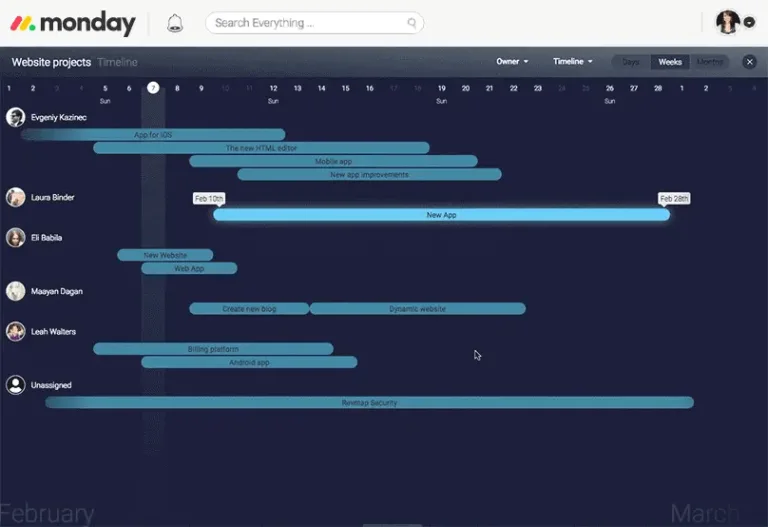
This is also where tools like monday.com can provide support by helping track deployment tasks, coordinate release schedules, and manage post-launch work. I’ve found that using a centralized platform for task assignments and issue tracking makes it easier to prioritize maintenance efforts and keep teams aligned.
Its ability to streamline communication and surface urgent issues quickly helps ensure the project remains stable and responsive as new needs arise.
Who is waterfall project management best for?
Waterfall project management works best for projects that are highly structured, predictable, and unlikely to change once they begin. When requirements, timelines, and deliverables are clearly defined upfront, waterfall provides a level of clarity and control that helps teams stay aligned and avoid confusion.
This approach is especially effective in industries where tasks follow strict, sequential dependencies. For example, in construction, you can’t install drywall before electrical wiring is complete, and you can’t start framing without a finalized blueprint. These fixed steps make waterfall a natural fit. I’ve also seen it work well in manufacturing, logistics, and infrastructure projects, where processes are repeatable, and deviations can be costly.
Waterfall is also useful when:
- Regulatory or compliance requirements are strict, such as in healthcare or finance
- Scope and budget are fixed early, leaving little room for iteration
- Stakeholder involvement is limited after kickoff, reducing the need for ongoing feedback loops
One advantage I’ve found is that waterfall makes projects easier to manage at a high level. Because every task, dependency, and milestone is documented upfront, it’s simpler to track progress and identify where delays are happening.
However, that structure comes with trade-offs. Waterfall is not built for constant change. Even small adjustments can require revisiting earlier phases, which can quickly impact timelines and costs. In fast-moving environments, like software startups or newsrooms, where priorities shift frequently, this lack of flexibility can become a bottleneck.
If your project demands adaptability, rapid iteration, or continuous stakeholder input, a more flexible methodology will likely be a better fit.
When is waterfall methodology less successful?
In my experience, waterfall tends to fall short in projects where uncertainty is high or learning happens as you go. If you don’t have a clear, stable understanding of requirements from the start, locking everything in upfront can create more problems than it solves.
One common challenge is the late discovery of issues. Because testing happens after implementation, problems often surface only when large portions of the work are already complete. Fixing them at that stage can require significant rework, especially if they trace back to earlier design decisions.
Waterfall also struggles in environments where:
- Customer or stakeholder feedback is ongoing, not limited to the beginning and end
- Innovation is a priority, and teams need room to experiment or iterate
- Market conditions shift quickly, requiring frequent adjustments to scope or features
For example, when developing a new digital product in a competitive market, priorities can change based on user feedback, competitor moves, or new technology. In these cases, I’ve found that a rigid, phase-based approach can slow teams down and make it harder to respond in time.
A good rule of thumb: if your project requires frequent reassessment or benefits from continuous feedback loops, waterfall will likely create friction rather than clarity.
How is waterfall project management different from other PM methodologies?
Is waterfall project management right for you?
Choosing the right methodology comes down to how predictable your project is and how much change you expect along the way. In my experience, waterfall works best when you can confidently plan everything up front and execute against that plan with minimal deviation.
Before committing to waterfall, I like to pressure-test a few key factors:
- Are your requirements clearly defined and unlikely to change?
- Is your timeline and budget fixed from the start?
- Does your project rely on strict, sequential steps or dependencies?
- Can your team execute without needing frequent feedback or iteration?
If the answer to most of these is yes, waterfall can provide structure, clarity, and strong documentation that keeps everyone aligned from start to finish.
However, if your project involves evolving requirements, ongoing stakeholder input, or a need to adapt quickly, a more flexible approach will likely serve you better.
Ultimately, waterfall is a strong choice when predictability is your advantage instead of a constraint.
Intrigued by the various PM approaches beyond waterfall? Learn more about other top innovative project management strategies.
Featured partnersFeatured project management partners