

Shopify is a hosted ecommerce platform that lets businesses build an online store and sell products across websites, social media, marketplaces, and in-person locations. It combines website design tools, checkout, inventory management, payment processing, and built-in marketing features into a single system, with optional point-of-sale tools for physical retail. This makes Shopify a strong fit for businesses that want to manage online and offline sales from one dashboard.
Shopify is best for direct-to-consumer brands, multichannel retailers, and growing merchants that need room to scale. Pricing ranges from $5 to $399 per month, with enterprise plans starting around $2,300 per month. All plans include core ecommerce features, with higher tiers adding advanced reporting, more staff accounts, and lower payment processing rates. A three-day free trial is available, followed by a $1 per month promotional period for the first three months.
Shopify overview
| My rating (out of 5) | 4.67 out of 5 |
|---|---|
| Pricing | $5-$399/month; enterprise pricing starts at $2,300/month for three years |
| Free trial | Yes, 3 days and $1/month for three months |
| Payment processing | Shopify Payments and more than 100 payment processors |
| Key features | • Strong ecommerce foundation • Multichannel sales • Built-in and robust marketing, automation, and AI tools • Extensive app ecosystem • POS and in-person selling |
| Best for | • Merchants launching or scaling an online store • Multichannel sellers who want consistent inventory and order management across web and in-person channels • Sellers who value built-in marketing and automation features without building a stack from scratch |
In my evaluation, Shopify earned a 4.67 out of 5 score, driven by its strong site-building tools, deep sales and inventory features, ease of use, and reliable multichannel support. Shopify has consistently ranked at the top of my evaluations for best ecommerce platforms because it balances usability with the depth needed to support growing businesses.
Shopify pricing
Shopify offers five pricing tiers, all of which support online selling, but they serve very different business needs. These plans are designed for everything from social selling to enterprise-level ecommerce. The table below compares Basic, Grow, and Advanced, which are Shopify’s standard, self-serve ecommerce plans with published pricing.
I have excluded the two other plans, Starter and Shopify Plus. The Starter plan ($5/month) is designed for social and link-based selling rather than operating a traditional storefront. Shopify Plus is an enterprise-tier plan with custom pricing, contracts, and features that aren’t directly comparable to Shopify’s standard plans.
The table below focuses on the three Shopify plans most small and midsize businesses evaluate when choosing a full ecommerce platform.
| Basic | Grow | Advanced | |
|---|---|---|---|
| Best for | Small online storefronts | Growing ecommerce businesses | High-volume sales |
| Software fees (billed annually) | $29 | $79 | $299 |
| Number of staff accounts | 2 | 5 | 15 |
| Ecommerce automation | N/A | ✓ | ✓ |
| Professional reports | Basic | Standard | Advanced |
| Shipping discounts (Shopify Shipping) | Up to 77% | Up to 77% | Up to 88% |
| Third-party calculated shipping rates | N/A | N/A | ✓ |
| Duties and import taxes for international selling | N/A | N/A | ✓ |
As noted earlier, Shopify pricing spans five tiers, starting at $5 per month for Starter and going up to $399 per month for Advanced. Shopify Plus begins at around $2,300 per month with a three-year minimum contract, with custom pricing available based on business needs.
The table above focuses on Basic, Grow, and Advanced — Shopify’s standard plans that support full online stores. These tiers include core features such as a website builder, unlimited products, inventory and order management, shipping tools, and built-in marketing. As you move up plans, Shopify adds more staff accounts, stronger automation, advanced reporting, and deeper shipping discounts, making higher tiers better suited for growing and more complex operations.
Shopify offers a three-day free trial, followed by a $1 per month introductory period for the first three months. While shorter than most competitors’ trials, I find this onboarding window sufficient for evaluating the platform. In that time, small business owners can build their store, add products, and test marketing automations to understand Shopify’s capabilities.
Although Shopify lacks a free plan and offers a shorter trial than many alternatives, its pricing remains competitive. Even entry-level ecommerce plans include features that other platforms often reserve for higher tiers. Monthly billing is available, with discounted rates for annual commitments, giving businesses flexibility as they scale.
Shopify payment processing fees
Shopify includes built-in payment processing through Shopify Payments, which lets merchants accept payments immediately without setting up a separate payment gateway. This simplifies onboarding and removes the need for additional integrations, making it especially practical for new and small businesses that want to launch quickly.
Merchants are not required to use Shopify Payments and can connect third-party providers instead. When doing so, Shopify applies an additional transaction fee ranging from 0.5% to 2% per sale, depending on the plan. This fee is charged on top of standard credit card processing rates and covers the cost of integrating Shopify with an external payment processor.
Because of this added expense, many businesses find Shopify Payments more cost-effective, particularly at lower sales volumes.
| Fee type | Starter | Basic | Grow | Advanced |
|---|---|---|---|---|
| Online card fees | 2.9% + 30 cents | 2.9% + 30 cents | 2.6% + 30 cents | 2.4% +30 cents |
| In-person card fees | 2.7% | 2.7% | 2.5% | 2.4% |
| Transaction fees using third-party processor | 5% | 2% | 1% | 0.5% |
It’s important to distinguish between credit card processing fees and transaction fees. Credit card fees apply to every sale and vary by plan, while transaction fees only apply if a third-party processor is used. These transaction fees are waived entirely when using Shopify Payments. For example, a merchant on Basic Shopify using Shopify Payments pays 2.9% plus 30 cents per online transaction. Using a third-party gateway on the same plan adds a separate 2% transaction fee on top of those card charges.
Beyond cost savings, Shopify Payments offers tighter checkout integration. Customers stay on the merchant’s site rather than being redirected to an external payment page, which helps reduce friction during checkout. It also connects online and in-person payments through Shopify POS and supports additional payment options such as PayPal, Apple Pay, Amazon Pay, and Shop Pay. Shop Pay, in particular, enables faster checkout and local currency support, which can improve conversion rates for both domestic and international customers.
Shopify key features
Shopify’s feature set is designed to support ecommerce businesses at every stage, from launch to scale. In my hands-on testing, the platform stands out for combining core selling tools, multichannel capabilities, and operational features into a single system that’s easy to manage without sacrificing flexibility. The sections below break down the key features that matter most when evaluating Shopify as a long-term ecommerce platform.
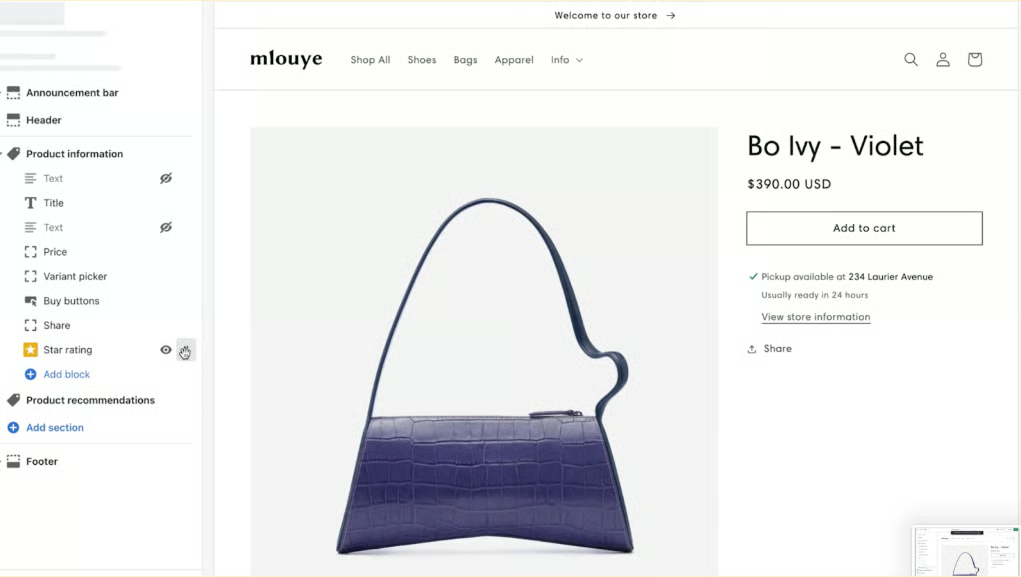
Drag-and-drop website builder
I’ve used Shopify’s site builder extensively, and it remains one of the easiest ways to design and maintain an ecommerce website without relying on code. The platform includes free and paid themes, a built-in CMS and blogging tool, automatic SSL, and granular control over product pages, navigation, and SEO. What consistently stands out in my testing is how quickly Shopify lets you make structural changes without breaking your store.
Shopify’s Online Store 2.0 significantly improved flexibility. The drag-and-drop editor supports modular sections across pages, not just the homepage, and newer layout tools make it easier to create responsive designs. When I need more control, Shopify allows direct access to CSS, HTML, and Liquid, which gives developers room to customize without locking merchants out of the interface.
Free and premium website themes/templates
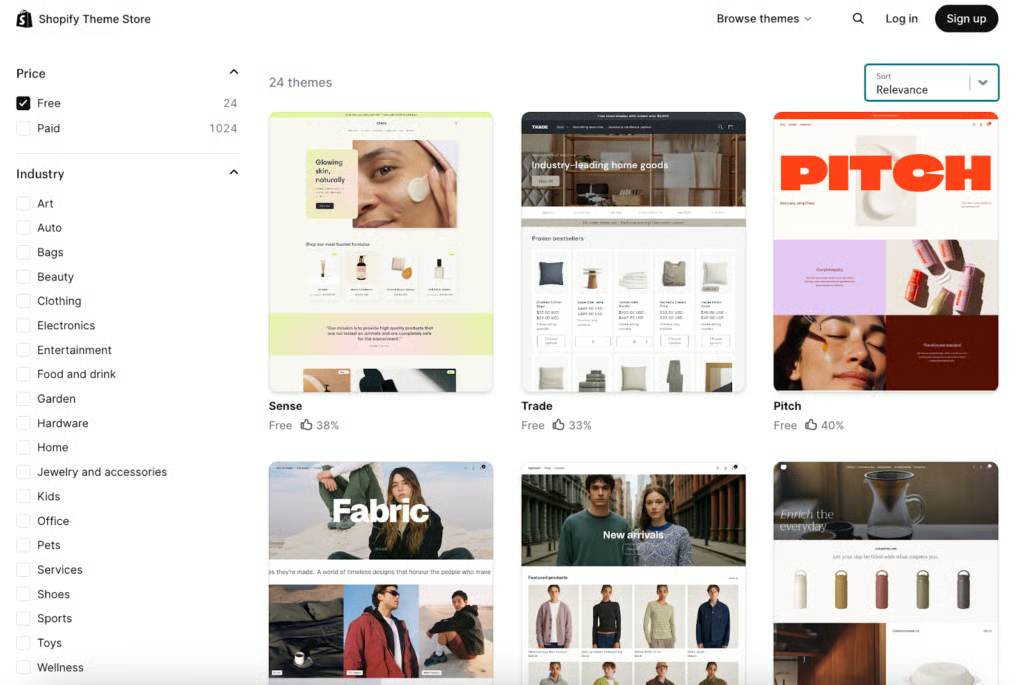
Shopify currently offers a small but well-designed set of free themes and a much larger library of premium themes, all optimized for mobile commerce. I’ve found the free themes to be modern, fast, and practical for most small businesses, even though the selection is smaller than platforms like Wix. The default Dawn theme remains a strong starting point, especially for stores using Online Store 2.0 features.
Paid themes expand design flexibility and are best for businesses that want a more polished storefront out of the box. Shopify’s theme store makes it easy to preview demos, filter by industry or catalog size, and compare layouts before committing, which helps reduce trial-and-error during setup.
SEO and site performance
Shopify handles many technical SEO basics automatically, including sitemap generation, redirects, SSL, and mobile optimization. I’ve found it easy to manage page titles, meta descriptions, and product SEO directly from the admin, with prompts that encourage best practices. Shopify also allows advanced users to edit robots.txt, which gives more control over crawl behavior than many competing platforms.
AI tools (Sidekick and Shopify Magic)
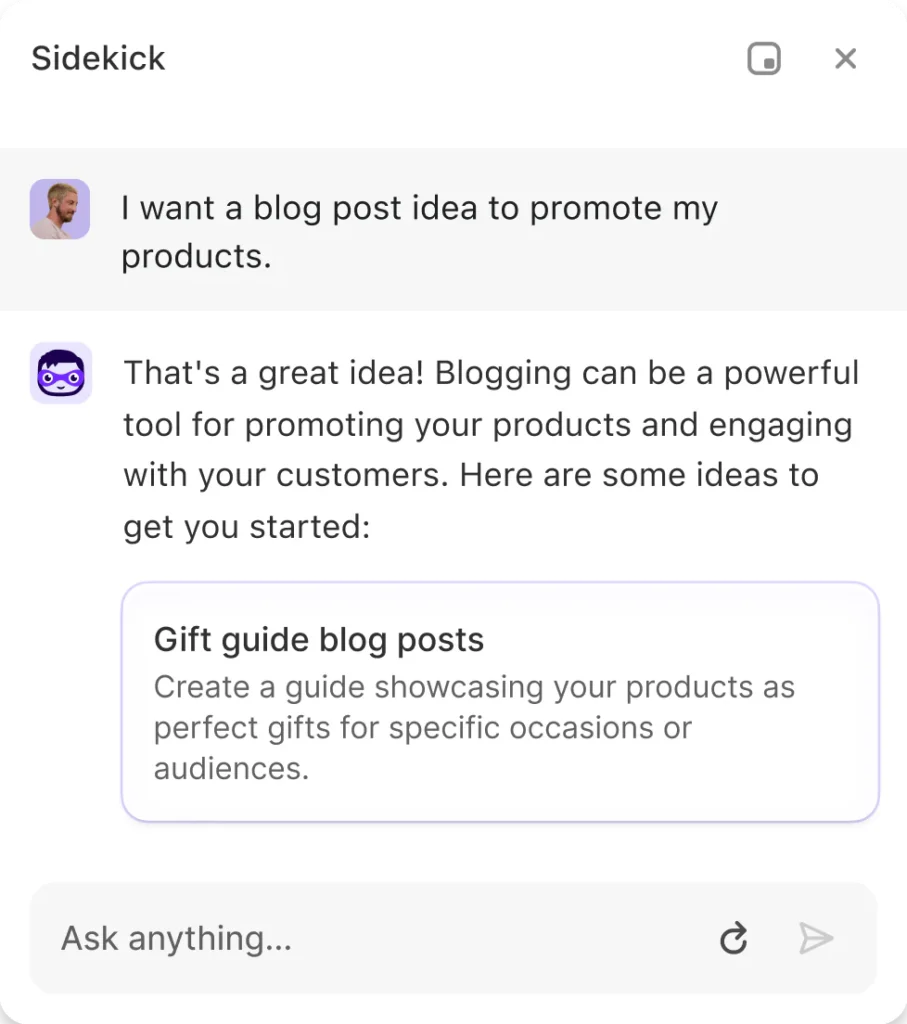
Shopify has leaned heavily into AI in recent updates, and I’ve tested many of these tools as they’ve rolled out. Shopify’s AI features, collectively known as Shopify Magic, are built directly into the platform and available to all users at no additional cost.
The centerpiece is Sidekick, Shopify’s AI assistant, which I’ve used to answer performance questions, set up discounts, and assist with store changes directly from the dashboard. Shopify Magic also supports AI-generated product descriptions, email subject lines, campaign copy, and optimized send times through Shopify Email, along with AI-assisted responses in Shopify Inbox.
Content generation is another area where Shopify has expanded quickly. You can generate blog posts tied to promotions or seasonal campaigns, customize tone, and translate content into multiple languages. The app store also uses AI-powered review summaries to make it easier to evaluate third-party tools before installing them.
Ecommerce and built-in marketing tools
Shopify gives you multiple ways to sell, which is one reason I consistently rank it highly for ecommerce flexibility. In my testing, I’ve used it to sell through a standalone online store, in person, via Buy Buttons on existing websites, and across social channels and marketplaces. All of these channels connect back to a single dashboard, making it easier to manage products, orders, and customers without juggling separate systems.
The platform supports unlimited physical and digital products, along with subscriptions, memberships, event tickets, donations, classes, and digital gift cards. Product management is straightforward. The Products dashboard gives a clear overview of active and inactive items, inventory levels, vendors, and product types, while individual product pages let you easily edit descriptions, pricing, variants, shipping settings, and SEO fields. Adding products is intuitive, whether you’re creating them manually or importing in bulk via CSV.
One area where Shopify shines is multichannel product distribution. Once products are set up, I can quickly publish them to connected sales channels, including social platforms, wholesale marketplaces, and dropshipping workflows. Shopify also offers a free Shopify Bundles app, which I’ve used to create fixed bundles and multipacks directly from the dashboard. Inventory updates in real time across bundled and individual products, which helps prevent overselling without extra configuration.
That said, Shopify does have limitations. Selling digital products requires installing an app unless you plan to deliver files manually. Product variants are capped at three option types and up to 100 combinations per product, which can be restrictive for complex catalogs unless you rely on third-party apps. Custom product fields, such as engraving or made-to-order options, also require additional apps, which can increase costs for businesses with specialized product needs.
On the marketing side, Shopify includes built-in tools for discounts, gift cards, and product reviews, along with one of the best abandoned cart recovery features I’ve tested. Unlike many platforms, abandoned cart emails are available even on entry-level plans. You can customize messages, schedule triggers, and include discount codes to re-engage shoppers, as well as tailor order confirmation emails to reinforce brand messaging. Loyalty and rewards programs aren’t native, but they’re easy to add through Shopify’s app ecosystem.
App ecosystem and extensibility
One of the Shopify platform’s biggest strengths is its extensibility. I’ve consistently found that when a store needs additional functionality, there’s almost always an app that fills the gap without requiring a rebuild. The Shopify App Store covers everything from SEO and loyalty programs to shipping, accounting, and advanced reporting, making it easy to add tools as business needs change.
With thousands of apps available, Shopify offers more third-party options than any competitor I’ve worked with. And while paid apps can increase monthly costs, they often replace custom development work and save time, which is something I factor into total cost of ownership when evaluating Shopify.
For businesses with more technical needs, Shopify also provides APIs and developer tools that support deeper integrations and custom workflows, giving teams flexibility without locking them into rigid platform limits.
POS and hardware (in-person selling)
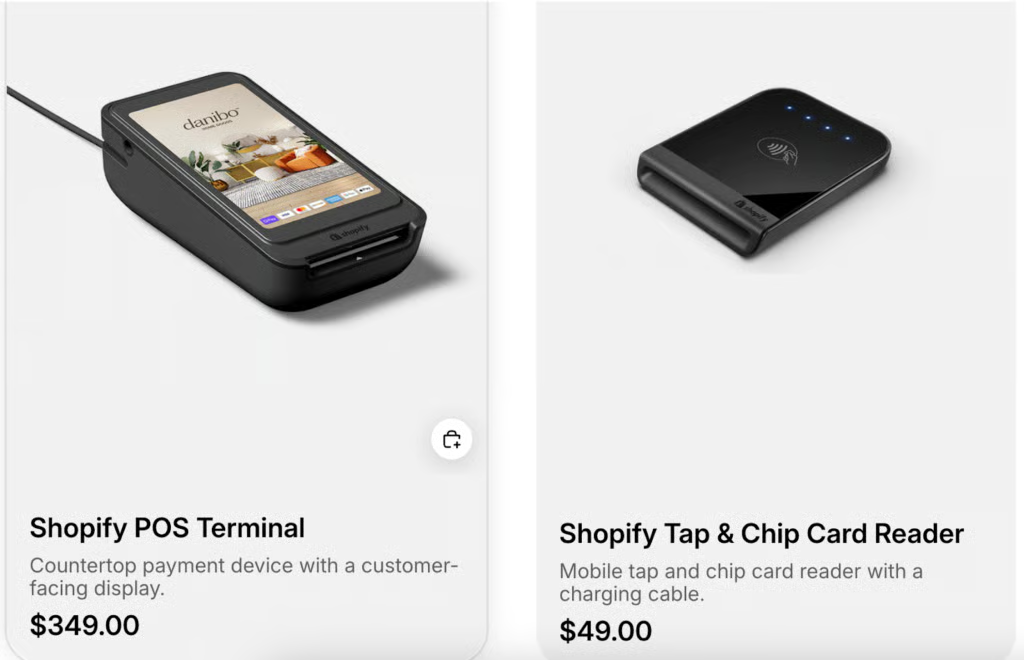
Shopify includes a native POS app that keeps online and in-person sales fully synced. I’ve tested Shopify POS in retail and pop-up scenarios, and it performs well for accepting payments, managing inventory, and accessing customer profiles across locations. Hardware options include card readers and full registers, making it easy to sell from fixed counters or on the floor.
Features like split tenders, gift cards, BNPL, custom payment types, and email-to-cart support make it practical for both simple and complex retail transactions.
Omnichannel and marketplace integrations
Shopify is built for multichannel selling. From one dashboard, I can manage products, inventory, and orders across online stores, social platforms, and in-person sales. Shopify has direct partnerships with Facebook, Instagram, and TikTok, enabling in-app shopping, catalog syncing, and order management that’s more seamless than most competitors.
Beyond social commerce, Shopify supports Buy Buttons that embed products on external websites and tools like Shopify Inbox, which lets merchants sell through chat and messaging channels. While Shopify doesn’t support every marketplace out of the box, its ecosystem and POS integration make it one of the most cohesive omnichannel platforms I’ve tested.
Reporting, analytics, and automation
Shopify includes built-in dashboards for tracking sales, customer behavior, marketing performance, finance, and abandoned carts, all accessible directly from the admin. I’ve used these reports to monitor store health and spot trends quickly, but reporting depth depends on the plan. Advanced reports unlock at the $105/month tier, while fully customizable reports are limited to the highest plan, making Shopify more restrictive in analytics access than some competitors.
Where Shopify stands out is automation. Shopify Flow lets merchants automate tasks like customer tagging, order routing, inventory alerts, and marketing triggers, which helps reduce manual work as order volume grows. Shopify also pairs automation with built-in tools like Shopify Forms and Shopify Email, including up to 10,000 free emails per month on paid plans, giving many small businesses enough automation and email capability without relying on third-party platforms.
Performance and reliability
Shopify is a fully hosted platform, so merchants don’t need to manage servers, updates, or infrastructure. In my testing, it reliably handles traffic spikes from promotions and seasonal sales, allowing businesses to focus on selling instead of site maintenance. While Shopify is built to scale, it has experienced occasional platform-wide outages during peak events, which high-volume sellers should factor into their risk planning.
Ease of use and setup
Shopify is one of the most intuitive ecommerce platforms I’ve worked with, and that’s based on years of hands-on use and repeated testing as new features roll out. The admin dashboard is clean and well-organized, so I can quickly jump between products, orders, marketing tools, and analytics without hunting through menus. Shopify consistently rolls out interface updates that improve usability, and features like Online Store 2.0 have made store design and layout management far easier than it used to be.
Setting up a store is straightforward, even for first-time sellers. Shopify walks you through key steps like adding products, choosing a theme, and configuring payments, which helps reduce friction early on. I’ve tested new onboarding flows and design tools as they’ve launched, and most are clearly built to shorten the time it takes to get to your first sale. Built-in AI tools also help speed things up by assisting with content creation, product descriptions, and basic setup tasks.
When issues come up, Shopify’s support ecosystem is one of its strongest assets. The help center and knowledge base are extensive, often resolving questions before I ever need to contact support. There’s also access to webinars, short courses, and guided tutorials through Shopify Compass, along with a large community forum. For more advanced needs, Shopify maintains a vetted network of designers, developers, and marketers available for hire. Combined with 24/7 support via chat, email, and phone, Shopify offers multiple layers of help that make it approachable for beginners while still supporting more experienced sellers and developers.
Shopify pros and cons
Pros
- Full suite of ecommerce and marketing tools built-in
- Strong multichannel selling and POS integration
- Large app marketplace for extensibility
- Excellent ease of use and onboarding for new sellers
- Flexible payment options
Cons
- Extra fees if you don’t use Shopify Payments
- Professional reporting and advanced analytics require higher plans
- Limited number of free themes compared with some competitors
Shopify stands out for offering a complete ecommerce toolkit in one platform. Merchants get built-in store creation, marketing tools, multichannel selling, and POS support without needing multiple systems. The platform is easy to set up and navigate, making it approachable for new sellers while still supporting growth. Flexible payment options and a large app marketplace make it easy to extend functionality as business needs change.
Shopify’s main tradeoffs come down to cost and plan restrictions. Merchants that don’t use Shopify Payments pay extra transaction fees on each sale. Advanced reporting and analytics are only available on higher-tier plans, which can limit insights for smaller businesses. The platform also offers fewer free themes than some competitors, often requiring paid upgrades for more customization.
Who should use Shopify
- Small businesses where online sales are a primary revenue driver. Shopify is a strong fit for merchants that rely on ecommerce for growth. Its all-in-one toolset covers store creation, checkout, inventory, payments, and marketing, allowing businesses to scale without rebuilding their tech stack. As sales increase, higher-tier plans add automation, reporting, and operational controls that support more complex workflows.
- Sellers focused on multichannel and social commerce. Shopify works especially well for businesses selling across websites, social platforms, and physical locations. Direct integrations with Facebook, Instagram, and TikTok support in-app purchases and social selling, while Shopify POS keeps inventory and orders synced across online and in-person sales. This makes Shopify a strong choice for retailers pursuing an omnichannel strategy.
- Merchants that want built-in marketing and automation tools. Shopify is ideal for sellers who want marketing, automation, and sales tools included rather than assembled from multiple providers. Features such as email marketing, workflow automation, and abandoned cart recovery reduce reliance on third-party tools and streamline day-to-day operations.
Who Shopify isn’t ideal for
- Businesses looking for a free ecommerce plan
- Merchants that want advanced reporting without upgrading plans
- Sellers who plan to avoid Shopify Payments entirely
- Businesses that need extensive design customization without paid themes or apps
- Non-ecommerce businesses that don’t rely on online or multichannel sales
Shopify reviews and experiences from users
Shopify is consistently rated highly for usability, with average scores typically landing between 4.4 and 4.5 out of 5 across business software review platforms. Many reviewers point to Shopify’s intuitive interface, quick setup process, and all-in-one ecommerce functionality as reasons it’s easy to adopt, even for sellers without technical backgrounds.
Business owners frequently highlight Shopify’s ease of use, multichannel selling capabilities, and app ecosystem as standout strengths. Users appreciate being able to manage online stores, social commerce, and in-person sales from a single dashboard, along with access to a large marketplace of integrations that extend functionality as their business grows.
However, user feedback also reflects recurring frustrations around cost and plan limitations. Merchants often note that expenses can increase as they add paid apps, upgrade plans, or avoid using Shopify Payments due to added transaction fees. Some users also express dissatisfaction with advanced reporting and analytics being locked behind higher-tier plans.
Customer support experiences are mixed. While many users report helpful interactions, others cite slow response times or difficulty resolving complex issues. Overall, Shopify is viewed as a reliable, scalable ecommerce platform, but reviewers advise prospective users to factor in the total cost of ownership and plan requirements as their business expands.
My methodology
To evaluate Shopify, I conducted hands-on testing by building a demo store on their platform. This allowed me to test its performance, setup flow, ease of use, and core ecommerce functionality. Additionally, I scored the platform across 37 individual data points to ensure a fair evaluation.
In addition to hands-on testing, this review draws on more than a decade of ecommerce and retail experience. I’ve worked as a project manager at Shopify and Amazon, launched and managed ecommerce websites, and supported small business clients with online store builds and optimization. I’ve also contributed to business startup guides and sold my own products online, giving me practical insight into the tools small businesses rely on day to day.
Here is the evaluation criteria breakdown of the rubric:
- Pricing and payment integrations: I evaluated free plans or entry-level pricing under $100, scalability of plan options, and payment flexibility. This included support for mobile wallets, integrated payment processors such as Stripe and PayPal, buy now, pay later options, one-click checkout, and financing tools.
- Site builder and maintenance features: This category assessed website templates, design flexibility, SEO and performance tools, storage limits, bandwidth, SSL and PCI compliance, built-in analytics, AI and automation features, and access to app marketplaces or add-ons.
- Sales and product features: I tested how easily platforms handle product setup, inventory and SKU management, multichannel selling, social commerce, marketplace integrations, digital products, fulfillment options, shipping tools, abandoned cart recovery, and built-in marketing features such as promotions, email marketing, personalization, and product recommendations.
- Ease of use: Platforms scored higher if they offered a smooth onboarding experience, clear setup guidance, intuitive dashboards, and accessible help resources. I also factored in the availability of 24/7 support and multiple support channels.
- User review scores: To complement hands-on testing, I also considered third-party user feedback from verified review platforms, including Capterra, G2, and SoftwareAdvice. These scores help contextualize real-world experiences and identify recurring strengths and frustrations reported by active users.
Alternatives to Shopify
When to use | Pricing | Payment processing | |
|---|---|---|---|
 | Best for fast-growing brands or high-revenue businesses that want their preferred payment provider with no added fees | $39-$399/month | Supports multiple gateways with no added transaction fees |
 | Best for small retailers already using Square POS and selling online as a secondary channel | Forever-free plan; $49-$149/month | Exclusive to Square Payments (native payment provider) |
 | Best for inventory-heavy retailers needing advanced retail and POS tools | $39-$339/month per register | Lightspeed Payments (built-in) or PayPal, Stripe, Klarna, Cayan, Authorize.net |
Shopify vs BigCommerce
BigCommerce is often compared to Shopify for growing ecommerce brands that want strong built-in functionality without relying heavily on third-party apps. I recommend BigCommerce over Shopify if you want advanced product options, robust SEO controls, and no additional transaction fees when using external payment providers.
That said, Shopify still has the edge in ease of use, app availability, and multichannel selling. BigCommerce works well for merchants with more complex catalogs and in-house technical support, while Shopify is better suited for sellers who want flexibility, integrations, and faster setup with less operational overhead.
Shopify vs Square Online
Square Online is a solid alternative for brick-and-mortar businesses already using Square POS. If your primary focus is in-person sales and ecommerce is a supporting channel, Square Online can be a simpler and more cost-effective option, especially with its free plan.
Shopify is the better choice if ecommerce drives your revenue or if you plan to sell across multiple online channels. Shopify’s inventory management, marketing tools, and ecommerce customization go deeper than Square Online, which is more limited for scaling online stores beyond basic needs.
Shopify vs Lightspeed
Lightspeed is designed for inventory-heavy retailers that need advanced retail management, such as apparel, sporting goods, or specialty stores. I recommend Lightspeed over Shopify if detailed inventory controls, supplier management, and in-store operations are your top priorities.
Shopify, however, offers greater flexibility for ecommerce-first businesses. Its broader app ecosystem, stronger social selling tools, and easier customization make it a better fit for brands that prioritize online growth alongside in-person sales rather than complex retail operations.
Frequently asked questions (FAQs)
Is Shopify worth it for small businesses?
Yes. Shopify is a strong choice for small businesses that rely on ecommerce for revenue. It offers built-in tools for store creation, payments, inventory, and marketing, with plans that scale as the business grows.
How much does Shopify cost per month?
Shopify pricing starts at $5 per month for Starter and ranges up to $399 per month for Advanced Shopify. Shopify Plus begins at around $2,300 per month with custom enterprise pricing.
Does Shopify charge transaction fees?
Shopify only charges transaction fees if you use a third-party payment provider. Fees range from 0.5% to 2% per transaction, depending on your plan, and are waived when using Shopify Payments.