


Key takeaways
- A RACI chart outlines each stakeholder’s role in a project by clarifying their level of involvement and the specific tasks assigned to them.
- RACI charts are most effective for teams managing large or complex projects where roles and duties remain stable throughout the process.
- When building a RACI chart, it’s important to assign roles that match each team member’s skills, position, and expertise.
Many projects fail to meet deadlines because team members are uncertain about who should lead or approve specific tasks. But instead of allowing confusion to slow down progress, the RACI chart creates structure by mapping tasks and setting clear communication paths within the team.
In this article, we’ll explain what a RACI chart is, demonstrate how to create one suited to your workflow, and provide a free downloadable RACI chart template.
What is a RACI chart?
The RACI chart, also referred to as the RACI matrix, is a role assignment matrix consisting of rows and columns designed to define the task roles for specific project stakeholders. Each designation, represented by the letters R, A, C, and I, stands for Responsible, Accountable, Consulted, and Informed.
A 2025 PM Solutions survey found that project managers show a moderate level of engagement in documenting roles and responsibilities, averaging a score of 3.7 out of 5. This indicates that while many organizations recognize the value of role clarity, consistent documentation practices remain an area for improvement.
One of the keys to successful project management is a clear understanding of each stakeholder’s responsibilities, and the RACI chart is a great tool for achieving this, as it lets you visualize who handles specific tasks throughout the project lifecycle.
What are the four roles in a RACI chart?
Let’s take a further look at the four key roles in the RACI chart.
| Description | Number of people to assign | Examples | |
|---|---|---|---|
| Responsible (R) | The person assigned to complete a specific task or deliverable | One person per task | • Writers • Graphic designer • Data analyst |
| Accountable (A) | The person who delegates or oversees task completion | Only one person per task | • Product owner • Department head • Team lead |
| Consulted(C) | The person or group that provides expertise and advice during the project | Can be one or multiple consultants | • Creative director • Legal adviser • Compliance officer |
| Informed(I) | People or groups who need to be updated on project progress or decisions | Can be one or multiple people | • Customers/clients • Business partners • Stakeholders |
When to use a RACI chart
A RACI chart is most useful when projects involve multiple stakeholders or departments with overlapping duties. It is often created at the planning stage of a project, but it can also be updated during execution whenever responsibilities shift or new stakeholders join.
Here are sample scenarios of when a RACI chart can be most beneficial:
- Roles and responsibilities are unclear: If team members often duplicate work or miss tasks, a RACI chart clarifies who owns what.
- Cross-functional teams are involved: When departments or external partners collaborate, the chart aligns expectations and accountability.
- Projects have tight deadlines or dependencies: It ensures that decision-makers are identified early, so approvals and deliverables move efficiently.
- You’re managing recurring or large-scale projects: Creating a RACI framework once can serve as a template for similar initiatives, saving time and improving consistency.
Benefits & limitations of the RACI chart
At its core, the RACI model helps teams foster transparency and set clear expectations. But like any other project management tool, a RACI chart has its advantages and downsides. Knowing what they are will help you make an informed decision about whether to implement it in your projects.
Benefits of a RACI matrix
- Improved accountability: RACI charts establish clear lines of responsibility and accountability. Team members get a clear understanding of their roles and how they contribute to the project’s success, preventing misunderstandings and potential conflicts.
- Efficient decision-making: By identifying who needs to be consulted and informed, teams can streamline decision-making. It ensures the right stakeholders are involved, enhancing the quality and speed of project delivery.
- Enhanced communication: RACI charts promote strong communication by providing a straightforward visual reference for team members. They create a shared understanding of the level of responsibility expected of each person, which limits communication gaps and unifies everyone on the same page.
- Risk mitigation: It identifies potential flaws or overlaps in resources, which prevents critical tasks from being overlooked or neglected. It enables proactive risk management and mitigates roadblocks.
- Career growth: To a lesser extent, the chart helps credit individuals for their leadership, which can later come in handy during career planning discussions.
Limitations of a RACI matrix
- Requires regular reviews and constant adjustments: You will need to invest time identifying every person’s roles and availability in advance. And if there are constant changes in roles and team structures, expect to spend even more time reviewing your current matrix and updating it. This is especially true in projects where roles and activities change over time.
- May not be applicable for small teams: By definition, the RACI framework creates a fixed set of roles, which can be a problem for smaller teams, where members are often called upon to handle different assignments. Mid-project changes may require frequent changes to your RACI matrix.
How to create a RACI chart
Building a RACI chart is relatively simple, especially if you have a template to work with. The real challenge lies in matching each role to the right person based on their skills, position, and expertise.
1. List project roles as columns
The first step is to identify the people involved in the project, including team members, managers, and department heads. To avoid overlooking anyone, categorize internal and external stakeholders based on their influence and level of participation. Include individuals or groups who may not directly handle project work but play a role in decision-making, such as executive leaders, clients, or business partners. Once identified, place each name or role across the top row of your chart
2. List project tasks as rows
When listing tasks in a RACI chart, break them down into activities such as deliverables, milestones, and decisions. After identifying all the tasks, list them in the left-hand column of the chart based on the order of completion. To avoid confusion, use your project plan to cross-check the tasks and due dates in your RACI matrix. A great tip is to categorize tasks by phase or objectives.
3. Assign roles
The next step is to assign a responsibility level to each role using the RACI designations: Responsible, Accountable, Consulted, and Informed. Every task must have one person marked as Responsible and only one as Accountable. Then, decide who to Consult with during the project and who should be Informed on project progress. Continue filling in the chart until you have completed the cells in your matrix.
4. Review the RACI chart with your stakeholders
Before implementing the RACI matrix, review it with the stakeholders. Discuss role assignments, gather feedback, and confirm that everyone agrees with their responsibilities. You can schedule regular check-ins to ensure staff alignment and address issues that may arise during the project. Finally, keep the RACI chart accessible so the team can easily verify responsibilities throughout the project.
Examples of RACI charts
The following case studies demonstrate how a RACI chart is applied in website design and small-scale ecommerce operations. These examples show how the framework brings structure and accountability to different types of projects.
Website creation RACI matrix
The project below features a five-person team responsible for developing a marketing-focused website. Each member contributes distinct expertise in areas such as visual design, content strategy, and web development.
| Web designer | Developer | Marketing staff | SEO specialist | Web content manager | |
|---|---|---|---|---|---|
| Create the visual design and layout | R | C | I | C | A |
| Produce engaging content | C | I | R | C | A |
| Develop website functionalities | C | R | I | C | A |
| Implement on-page SEO | C | I | C | R | A |
Role distribution RACI matrix
In a small ecommerce business, team members typically handle more than one role. The example below shows a RACI matrix for a team managing and maintaining an ecommerce website.
| Customer service representative | Order fulfillment specialist | Website admin | Graphic designer | Product manager | |
|---|---|---|---|---|---|
| Address customer inquiries and resolve issues | R | C | I | I | A |
| Manage inventory and source products for selling | I | C | I | I | R/A |
| Update product listings and manage content | I | C | R | C | A |
| Handles payments, shipping, cancellations, and refunds | C | R | I | I | A |
| Produce product images and promotional materials | I | I | C | R | A |
Top project management software with RACI charts
Creating a RACI chart from scratch can be time-consuming, especially when managing complex projects with multiple stakeholders. The good news is that many project management platforms offer pre-built RACI chart templates at no cost, complete with automation and collaboration features to simplify setup and role assignment.
Here are some of the best tools that make building and managing a RACI chart effortless.
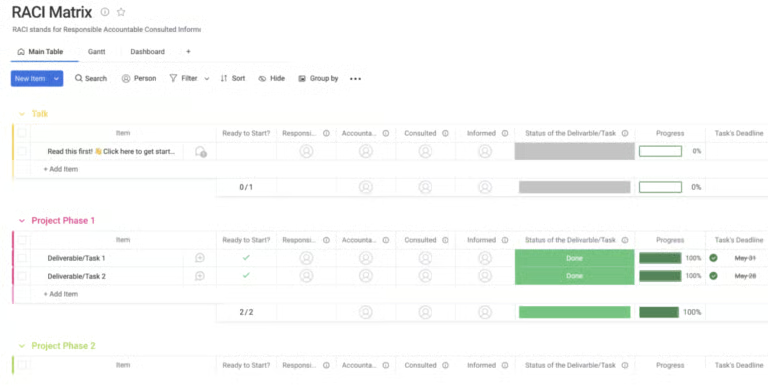
1. monday work management – Best for progress tracking
monday work management’s RACI matrix integrates task progress with responsibility assignments, offering a dynamic view of who owns what and how work is advancing. The platform connects role allocation directly to project timelines and completion status, which improves accountability and follow-through. It’s an excellent choice for managers who want RACI tracking integrated into daily operations and dashboards.
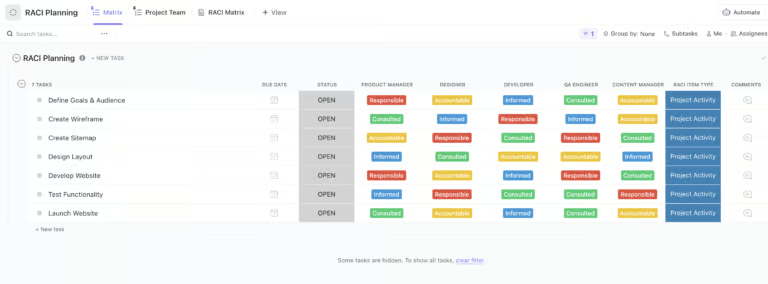
2. ClickUp – Best for visual task ownership
ClickUp’s RACI chart template excels at providing teams with a color-coded, matrix-style view of ownership across tasks. Each column displays who is Responsible, Accountable, Consulted, or Informed, allowing managers to spot gaps or overlaps instantly. The interface’s simplicity makes it ideal for teams managing multiple roles in fast-moving projects.
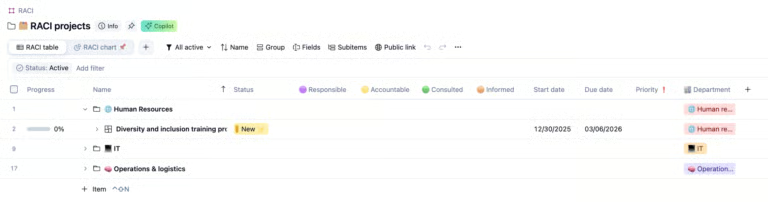
3. Wrike – Best for cross-functional teams
Wrike’s RACI team view provides a clean interface that links accountability directly with task status and team visibility. The structure groups tasks by project phase and displays assignees side by side, which creates a clear line of sight across departments. The status indicators and collapsible sections enable managers to oversee progress while maintaining accountability at every level.
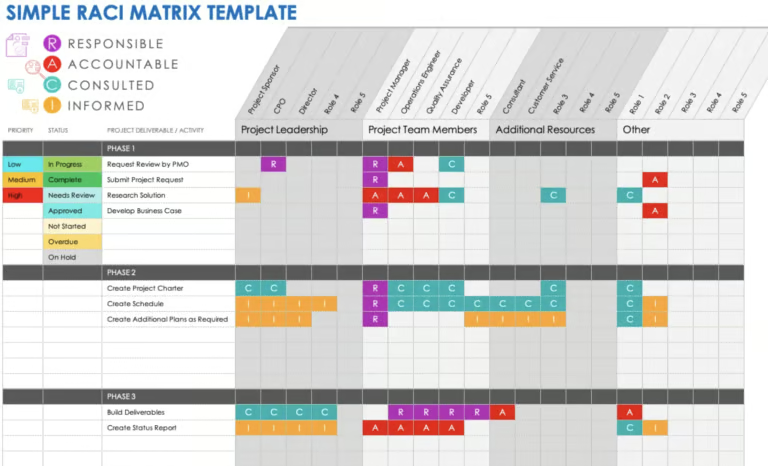
4. Smartsheet – Best for detailed role mapping
Smartsheet’s RACI template stands out for its spreadsheet-style layout that simplifies managing complex, multi-phase projects. Each project stage includes clear color-coded role indicators, making it easier to compare accountability across deliverables. It’s ideal for organizations that prefer structured, data-driven project management environments where traceability and reporting are essential.
5. Confluence – Best for brainstorming & early role definition
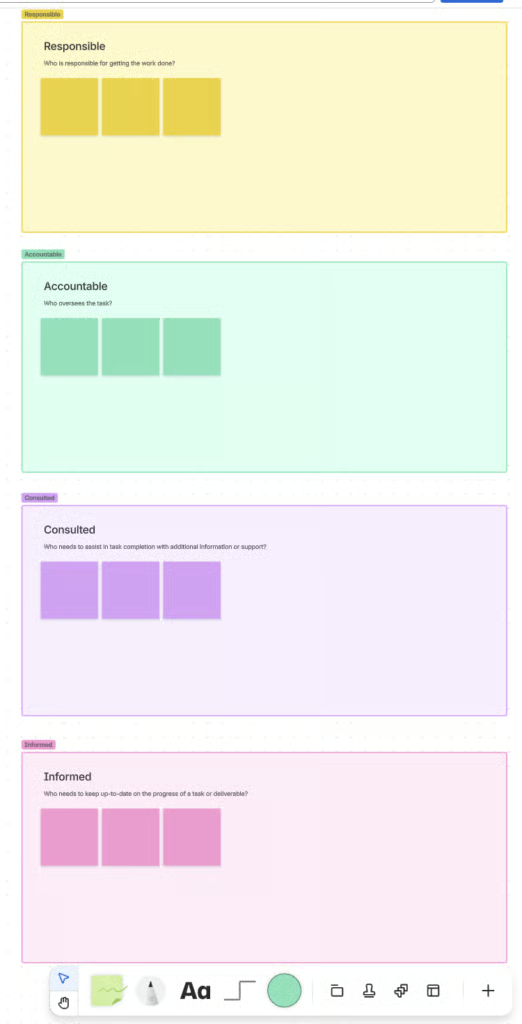
Confluence’s RACI layout works best during the planning phase when teams are still defining roles and clarifying responsibilities. The whiteboard layout features sticky notes and drag-and-drop connectors that promote collaboration among stakeholders as they determine who should take on each role. Its intuitive design turns complex conversations into a visual framework that’s easy to refine as plans evolve.
RACI chart best practices
Even though a RACI chart simplifies project management, teams often make small errors that reduce its effectiveness. Following the best practices helps you get the most out of your chart while avoiding mistakes that weaken its effectiveness.
- Avoid shared accountability. Teams often assign more than one person as Accountable for a task, which blurs authority and slows decision-making. Assigning a single person ensures there’s one clear owner responsible for approvals and outcomes, reducing unnecessary back-and-forth.
- Fill every role gap. A missing Responsible role is one of the fastest ways for work to stall. Every task needs someone directly in charge of execution, so review the chart carefully to confirm that ownership exists for each deliverable, regardless of scope or complexity.
- Keep the structure manageable. A RACI chart should not complicate project oversight. When too many roles or activities are added, it becomes more of a burden than a tool. Focus on high-impact tasks and keep the number of responsibilities per person reasonable so the chart remains clear and actionable.
- Involve stakeholders from the start. One of the most overlooked steps is stakeholder alignment during setup. Engaging team members early helps them understand expectations and agree on responsibilities, strengthening cooperation and minimizing disputes later on.
- Align roles with skills and experience. Assigning someone to a role outside their expertise leads to slower results and poor decision quality. Pair responsibilities with people who have the right background and authority, so the project can run more efficiently and with fewer missteps.
- Treat it as a living document. Projects evolve, and so should your RACI chart. Regular reviews capture role changes, new dependencies, or adjustments in authority. Scheduling updates at key milestones ensures the chart continues to reflect how the project truly operates.
- Integrate it into daily operations. A RACI chart shouldn’t sit in a file untouched once approved. Use it as a reference during meetings and project reviews to confirm accountability and track progress. When the chart becomes part of daily decision-making, it reinforces discipline and transparency across the team.
Free RACI chart template
An effective RACI chart establishes a clear framework that defines each stakeholder’s role throughout the project. To help you apply it successfully, download our free RACI chart template below.
Download our RACI matrix template for free:
FAQs
What is the #1 rule for using a RACI matrix?
The most important rule is to assign only one person as Accountable for each task. This ensures clear ownership and prevents confusion over who makes the final decision or approves deliverables. Having a single accountable individual keeps responsibility focused and supports smoother execution across all project stages.
What is the main benefit of making a RACI chart?
The main benefit of a RACI chart is role clarity. It outlines who is responsible, accountable, consulted, or informed, which reduces overlap and communication gaps. You can simplify this process by using a RACI chart template, which helps teams assign and track roles more efficiently throughout the project.
Can the same person have two roles in a RACI chart?
Definitely! The same person can have multiple roles in a RACI matrix. In smaller projects, a team member can be responsible for completing the task, while also being accountable for its overall completion. For larger projects, it is best to separate these roles to avoid confusion or prevent overwhelming the team member with excessive workload.
Who uses a RACI matrix?
A RACI matrix is a useful tool for project managers when it comes to managing stakeholder roles. However, those who reap the most benefit are large-scale projects involving various stakeholders with static roles and clear-cut deliverables.
Can I use the RACI chart in agile project management?
Yes, you can use the RACI chart to define agile roles, but it may not be as effective for Scrum teams where task responsibilities lie with staff rather than the manager’s decision. RACI uses a more prescriptive approach, which may not align well with the self-organizing nature of most agile teams.