Sponsored by:

The following is sponsored content. It may not reflect the views of our editorial staff.
Key takeaways
- Paycom and ADP both offer payroll and HR tools, but they differ in how they approach payroll automation, data accuracy, and employee involvement.
- Paycom is best for improving payroll accuracy before payroll runs, especially for organizations that want employee verification, fewer manual payroll corrections, and eliminating decision fatigue.
- ADP is best for payroll flexibility, especially for employers that want multiple payroll and HR solutions as their needs change.
Paycom vs. ADP: Which is better?
Choosing between Paycom and ADP can be tricky because both platforms cover payroll, HR, compliance, and employee self-service. On paper, the features can look similar. The real difference shows up in how each platform handles pay accuracy, data movement, and the elimination of decisions and accountability before payroll is finalized.
Paycom is the stronger choice for organizations prioritizing payroll automation and accuracy, while ADP is better suited for businesses seeking a broad portfolio of payroll products and paid-for service-led compliance support. The better choice depends on whether your organization wants to rethink how payroll accuracy happens or choose from a wider range of payroll service models.
Paycom: Best for improving pay accuracy before payroll submission
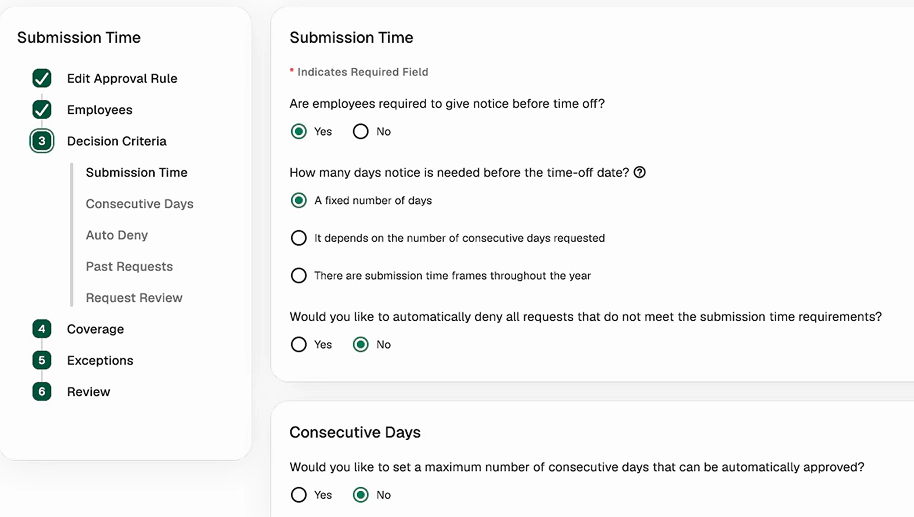
Paycom’s approach to processing payroll is designed to identify and resolve payroll issues before payroll submission. Through its unified human capital management (HCM) platform, Paycom automatically guides employees to review, troubleshoot, and verify their pay well before payroll is ever run. This moves accuracy checks earlier in the process rather than leaving every issue for payroll teams to resolve at the end. Because HR, payroll, benefits, time and attendance, expenses and workforce data live in the same database, employee updates flow through the payroll process without duplicate data entry or manual reconciliation. This approach can be especially valuable for employers looking to reduce payroll corrections, duplicate data entry, and administrative effort across HR and payroll teams. Additionally, Paycom eliminates decisions that would have been made outside of the software to handle payroll. With Paycom, system administrators set up policy-based rules to automatically deny or approve PTO requests, schedule changes and expenses. This automation not only empowers employees but also streamlines payroll operations.
ADP: Best for payroll flexibility and service depth
ADP takes a broader portfolio approach, offering different payroll and HR solutions for businesses of different sizes and complexity levels. Employers can choose from payroll products such as RUN Powered by ADP and ADP Workforce Now, while also leveraging its tax, compliance, and employee management features. This flexibility makes ADP a strong option for organizations that want a payroll provider with multiple service models, extensive compliance support, and multiple products to explore as business needs evolve.
Paycom vs. ADP: A detailed comparison
The table below gives a quick side-by-side look at how each platform differs before the deeper Paycom vs. ADP comparison.
Category
Paycom
ADP
Best for
Improving pay accuracy before payroll submission
Payroll flexibility and service depth
Pricing
Call for a quote
Call for a quote
Product approach
Unified HCM platform
Multiple payroll and HR solutions
Payroll automation
Automated payroll with employee verification
Automated payroll with anomaly detection
Compliance support
Compliance tools built into the HCM workflow
Expanded compliance support through SmartCompliance
AI and automation
ADP Assist for payroll error alerts, analytics, and HR task support
Employee self-service
Standard tools plus employee ownership of pay-related data
Standard self-service tools
Scalability
Yes, within one HCM platform
Yes, but may require moving to another ADP solution
Pricing
Neither Paycom nor ADP lists standard pricing publicly. Both require a custom quote, so expect fees to depend on employee count, selected tools, implementation needs, and payroll complexity.
This makes it difficult to name a clear value winner without a quote. Comparing costs can also be challenging because Paycom and ADP package their payroll and HR tools differently.
- Paycom offers one HCM platform that can include payroll, time and labor, talent management, benefits administration, and other workforce tools.
- ADP has a broader package structure where small businesses may start with RUN Powered by ADP, while midsize and larger companies can consider ADP Workforce Now. Add-on solutions, such as time tracking, can affect the final price.
With Paycom, you stay within one HCM platform as your business grows, which helps eliminate complexities for IT and employees. With ADP, you might need to move from one product to another. For example, RUN Powered by ADP is positioned for companies with 1 to 49 employees, while ADP identifies Workforce Now as a solution for those with 1000+ employees.
Payroll automation and accuracy
Paycom and ADP both automate core payroll tasks, including pay calculations, tax-related workflows, reporting, and issue detection before final approval. Those features matter because pay errors usually begin earlier in the process, with outdated employee records, incorrect deductions or manual updates that do not flow cleanly into payroll.
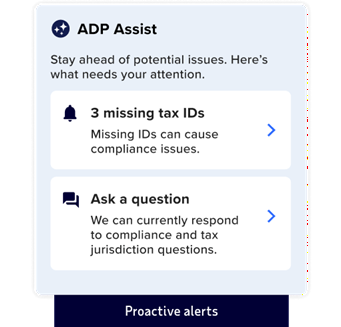
Paycom’s advantage is its automated, employee-first payroll workflow. With Beti, employees review the information that affects their pay, receive alerts about possible errors, and get guidance on how to fix them before payroll is submitted. By validating payroll information before payroll submission, Beti helps reduce the downstream corrections that typically consume payroll administrators’ time. Payroll teams still control and monitor the process, but employees help verify the data earlier.
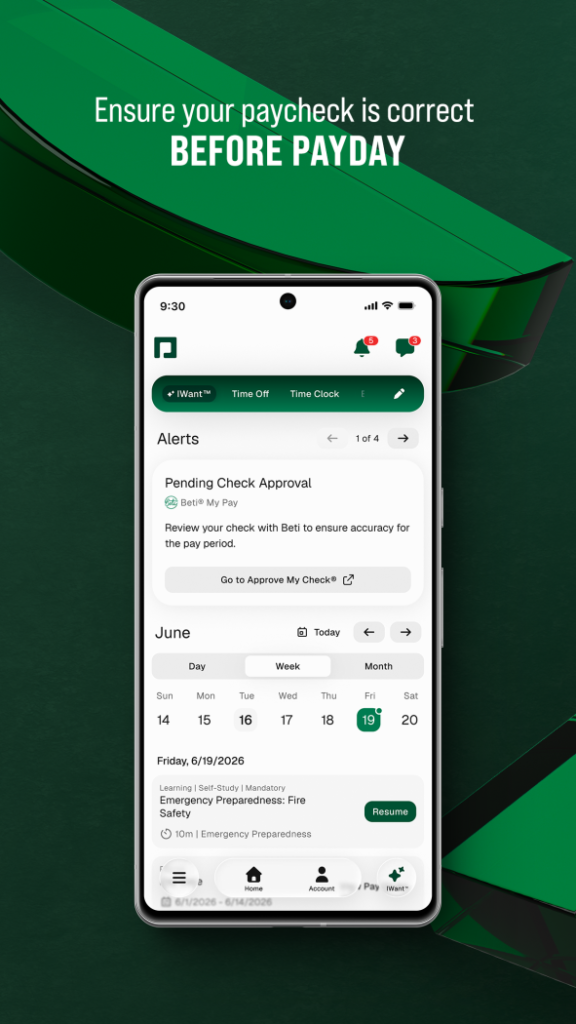
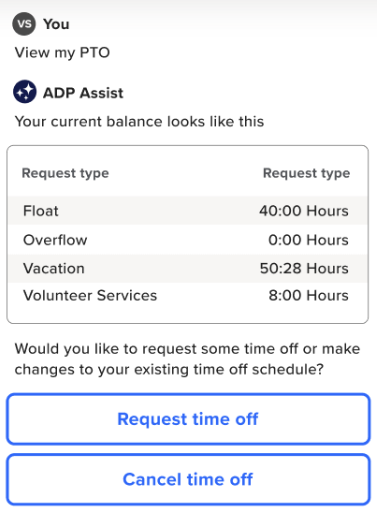
ADP also offers strong payroll automation, including anomaly detection, automatic calculations, and a smart ADP Assist tool. These features help payroll teams spot unusual payroll activity and potential errors while keeping review and approval primarily administrator-led.
Which to choose for payroll automation and accuracy?
Paycom. Here’s why. Its automation model is built around catching errors earlier, not just flagging them for payroll teams to review. ADP may have similar payroll automation and anomaly detection tools, but Paycom’s Beti has a more proactive and employee-first review process. Paycom also uses decisioning logic through PTO, expenses, and scheduling to automate even more of payroll, while giving employees immediate answers. For teams trying to reduce corrections, rework, and last-minute payroll fire drills, while also eliminating decision fatigue, the upstream approach gives Paycom the edge.
Compliance and tax management
Paycom and ADP both support automated pay runs, multi-state and international pay processing, and payroll compliance tasks, such as tax filings, tax notices, garnishments, and reporting. The difference is how they extend those capabilities. Paycom emphasizes compliance management within its unified HCM platform, while ADP offers additional compliance services and advisory resources for organizations with more complex support needs.
Paycom’s Payroll Tax Management, Client Action Center, and Garnishment Administration tools help teams handle filings, notices, registrations, tax rates, profile issues, wage orders, payments, and documentation inside the same HCM platform. Within the platform, features like Enhanced ACA, E-Verify, Enhanced Background Checks, COBRA administration, and Tax Credits solutions help employers with HR and compliance tasks with fewer handoffs.
ADP extends its compliance capabilities through additional services. For example, ADP Workforce Now’s HR Assist add-on provides HR guidance and resources for teams that need more regulatory expertise and support. Businesses that don’t use ADP for payroll can also sign up for ADP SmartCompliance, which includes services for managing employment tax, wage garnishments, unemployment claims, ACA administration, employment verification, and business tax credits.
Which to choose for compliance and tax management?
For seamless, automated compliance management: Paycom. Paycom embeds payroll tax management, garnishments, ACA administration, E-Verify, and other compliance-related workflows into its unified HCM platform. Organizations that want compliance management built directly into their day-to-day payroll processes may benefit from keeping HR, payroll, and compliance activities in one system, where fewer manual handoffs are needed and duplicate data entry is minimized.
For expanded, standalone compliance services: ADP. ADP offers robust payroll compliance tools while extending its capabilities through solutions such as SmartCompliance and HR Assist. Organizations that want additional compliance services, advisory resources, or standalone compliance offerings beyond their core payroll platform may find ADP to be the better fit.
Employee self-service and HR workload
Paycom and ADP both provide self-service tools that let employees access pay, tax, benefits, time, and other information without submitting every request to HR. What separates them is how those tools reduce administrative follow-up for payroll and people teams.
Paycom reduces HR workload by pushing more ownership to employees for data they have control over while standardizing common HR processes. Employees can update personal information, review pay-related details, and complete basic actions through self-service. Online personnel action forms give teams a consistent way to manage promotions, transfers, and compensation updates through approval workflows.
Paycom adds another layer with IWant™, which helps employees find information without navigating the software. Meanwhile, its Time-Off Requests feature and GONE® tool automatically review and approve or deny eligible time-off requests based on company policies, cutting down on transactions that require manual intervention.
ADP reduces HR workload differently. Rather than shifting more responsibility to employees, it gives HR teams access to tools and services that simplify day-to-day administration.
Depending on the ADP product and service tier, employers can add an employee handbook wizard, HR forms and documents, HR business advisors, and legal resources. Combined with employee self-service and ADP Assist, these capabilities help HR teams spend less time researching requirements, creating documents, or answering routine HR questions.
Which to choose for employee self-service and HR workload?
Paycom. Here’s why. Paycom combines self-service, decisioning logic, workflow automation, and AI support to let employees complete more everyday actions before they reach HR. ADP also offers strong self-service capabilities, but its differentiator is giving teams additional guidance and advisory resources for managing employees and HR processes.
Which platform is best for which buyer?
The better choice depends on what your payroll team needs most. For employers focused on preventing payroll issues and reducing routine HR follow-up, Paycom is the stronger fit. ADP is best for those who want more service flexibility and HR compliance support as needs become more complex.
Choose Paycom if:
Choose ADP if:
- improving payroll accuracy before payroll runs is your top priority
- employees should have a larger role in payroll review and routine HR tasks
- a single HCM platform for payroll, HR, time, and benefits is preferred
- multiple payroll products better fit your business size or growth plans
- compliance support is a major part of the purchase decision
- HR advisory resources and expert guidance are important
Frequently asked questions about Paycom vs. ADP