
TechnologyAdvice's Freelance Contributor Handbook
Table of Contents
Getting started
Before you get started we will need:
- Signed Contributor Agreement
- Headshot
- Biography (no more than 500 characters)
- Completed Contributor Form
**Please see the sections below for further details and instructions**
Signing your contributor agreement
- The first thing you will want to do is sign the TechnologyAdvice Contributor Agreement and upload it to this contributor agreement form, which you should have received already in your email.
-
Once you download the Freelance Contributor Agreement, date,
sign, and print your name at the bottom of the second page.
You can sign this agreement either electronically or
manually.
- Signing electronically: You can use most PDF editing tools. If you don't have one already, you can use Digisigner, which is free to use.
- If you would like to print this document out to sign manually, you will need to scan it and upload to the form (PDF Format). If you don't have a scanner, you can download the Genius Scan app on your phone or use the built-in scan-to-PDF feature within the Notes app on an iPhone.
- Once you sign the document, upload it to this form, please retain a copy for your records.
Headshot and biography
-
After signing your contributor agreement, please upload a
headshot and a 40-70 words (not to exceed 500 characters)
biography written in third person point of view to the form.
- Headshots should be hi-res with your face centered so it's suitable for placement within any border.
- This headshot and biography will be added alongside many of the articles you will write for us.
How TA assigns and reviews work
-
Your editor will assign you work by sending you a Google Doc
link that includes a guide and key points to include in your
article
- Please use the same email address for emails, Google Doc access, markups, etc. If you need to change your primary email please let Content Operations know.
- You are also welcome to pitch your ideas to your editor for them to approve or decline.
Note: Each editor handles assignments differently, so be sure to ask yours if you have specific questions about the process or a particular assignment.
Style guide expectations
The TA Editorial Style Guide: Writers Notes and TA Editorial Style Guide: AP Stylebook Quick Reference offer guidelines on editorial best practices and formatting for freelancers and other writers who produce content for TechnologyAdvice and its portfolio of sites. These are general guidelines that can be applied across all of TechnologyAdvice and its sites unless otherwise noted. For site-specific guidelines, please reach out to your assigning editor. As a freelancer or writer for TechnologyAdvice and its sites, please be sure to look over these documents carefully and make note of style and formatting preferences before submitting any article drafts.
Please be sure you have reviewed our AI Use Policy.
**Note: DZone Publications Team uses different guidelines and documentation will be provided.
How to receive payment
Getting started with Tipalti: The first invoice
Please submit your first invoice to content.operations@technologyadvice.com. For an invoice template, click here.
- Creating an account with Tipalti — you will receive a separate invitation email within 5 business days AFTER your first invoice is submitted. This email will be from accounting@technologyadvice.comCheck your spam or junk folder if it is not in your Inbox. To avoid this going to spam, please add accounting@technologyadvice.com to your contacts list.
-
Upon account creation you will then select how you wish to
be paid
- Options are: Direct Deposit, PayPal, Wire Transfer or Check
- Please enter all required information
-
Enter all Tax Information. If you aren't sure which tax form
to use, please click the Need Help button at the bottom of that set up screen.
- If you do not enter in all personal information, payment and tax information your account will not be active and you will not receive payment.
** You can log in to this account to change payment information and check the status of previously submitted invoices. ***
NOTE: Please note that we do reserve the right to Net 60 terms. While we do not anticipate it taking the full 60 days for our contributors to receive payment, this is the parameter that we work within.
Important notice on payment for work
Payment is for articles published by TechnologyAdvice at the discretion of your assigning editor at the agreed-upon rate for the amount of content published. For more details, please see Clause # 4 in the signed Contributors Agreement form. For payments that are per-word, payment is not based on draft length but rather the published length.
Submitting invoices
- Invoices are due by 11:59 Central Time, 5 business days prior to the end of the month. Our invoicing due date scheduled can be found at the link below.
-
After your initial invoice and new account setup,
you’ll upload your invoices in Tipalti OR send them to
Tipalti via email to ap@technologyadvice.com.
- Go to the Tipalti Portal and log in.
- On the left hand side of the screen click “Submit an Invoice”
- Click Upload Invoice
- Select File from your Computer
- You will then see a pop up that says your invoice was submitted successfully.
- Your invoice needs to include the following:
- Company/Contributor name (Your name)
- Your email address
- Content Approver (the name of the editor(s) you have written for during the invoicing period and Jessica Lee)
- Invoice number (each # should be different than the last; including revisions, or it will not register in our system)
- Invoice Date
-
Invoice Due Date
- This would be the date plus 60 days (for the Net60 terms). For example, if your invoice date is March 25 then your invoice due date would be May 25.
-
Month of Service
- This is the invoicing month and it goes from the day after the previous invoice was due until the day the current invoice is due. For example, the February 2025 month of service is January 25-February 21.
-
Project ID
- The Project ID is the 6-digit category number for the division, topic, and site this content is related to. You may have multiple items with the same Project ID. (example; 031902)
- Project IDs can be found in the Project ID column in monday.com or *at the top of your synopsis. (*effective February 27, 2025)
-
Item ID
- The Item ID is a unique identifier for each article task in monday.com. No two Item IDs should be the same. (example; 8861067260)
- Item IDs can be found in the Item ID column in monday.com or *at the top of your synopsis. (*effective March 28, 2025)

-
Article title for each article submitted since the last
invoice
- Please note that while an article doesn’t have to be published to invoice, it must be approved and accepted by your editor. 95% of the time this means that you have submitted a draft and made requested revisions.
-
Link to Published Article (helps expedite invoice approval
process)
-
A quick way to find links to articles you’ve
written is to navigate to your own author page.
- Start by searching the site using the title of an article you’ve written. Click your name at the top of the article. This brings you to your author page with links to your published articles.
-
A quick way to find links to articles you’ve
written is to navigate to your own author page.
- Division
- Topic
- Website
- Month Assigned
- Price per Article
- Total Amount Owed
- Submitted in PDF format (no other formats will be accepted)
-
If you’ve written content for more than one site, you
will still submit ONE invoice with ONE
total at the bottom.
- Invoices that do not include ALL of the necessary information will be sent back for revisions.
Invoice revisions
Invoices that have been disputed in Tipalti require a revised version to be submitted. You only need to submit a revised invoice number if your invoice has been disputed from within Tipalti. If Jessica or your editor asks you to change your invoice via email, this does NOT require a new number.
Invoice numbers for revised invoices should be appended with the letter R. Each subsequent revision should include a number after R, beginning at 1.
For example, If your invoice #4076 is sent back to you for revision, the new revised invoice you submit should be renamed to #4076R. Any subsequent revisions after the initial copy would be #4076R1, #4076R2, etc. After you have revised your invoice you will then upload it into Tipalti. The revised invoice is essentially a new invoice.
Sample invoices with further instructions and clarifications
The following sample is how an invoice COULD be formatted. As long as you include ALL required information from our template, feel free to use your own invoice.
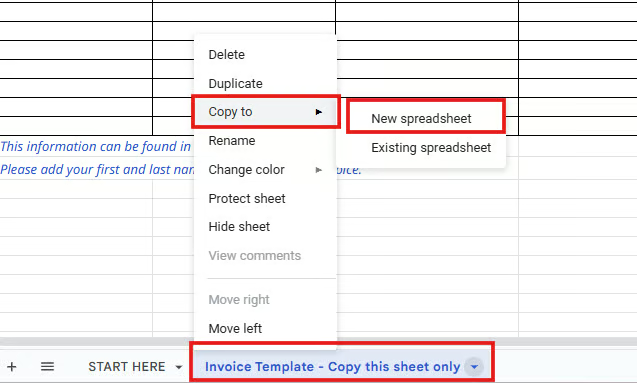
Google Sheets Invoice Template
To make a copy of the template, right click the Invoice Template tab and select Copy to > New Spreadsheet.
Site directory:
- Channel Insider-Channel Insider combines news and technology recommendations to keep channel partners, value-added resellers, IT solution providers, MSPs, and SaaS providers informed on the changing IT landscape. We do this through product comparisons, in-depth analysis of vendors, and interviews with subject matter experts. Our resources provide resellers with information that they won't get from vendors but is critical for their operations.
- CIO Insight– CIO Insight offers thought leadership and best practices in the IT security and management industry while providing expert recommendations on software solutions for IT leaders. It is the trusted resource for security professionals who need network monitoring technology and solutions to maintain regulatory compliance for their teams and organizations. CIO Insight is an ideal website for IT decision makers, systems integrators and administrators, and IT managers to stay informed about emerging technologies, software developments and trends in the IT security and management industry.
- CodeGuru– CodeGuru covers topics related to Microsoft-related software development, mobile development, database management, and web application programming. In addition to tutorials and how-tos that teach programmers how to code in Microsoft-related languages and frameworks like C# and .Net, we also publish articles on software development tools, the latest in developer news, and advice for project managers.
- Datamation– Datamation is the leading industry resource for B2B data professionals and technology buyers. We provide insight into the latest trends and innovations in AI, data security, big data, and more, along with in-depth product recommendations and comparisons. Last year, 1.7m users gained insight and guidance from Datamation.
- Developer.Com-Developer.com features tutorials, news, and how-tos focused on topics relevant to software engineers, web developers, programmers, and product managers of development teams. In addition to covering topics that include the most popular programming languages today, we also publish reviews and round-ups of developer tools that help devs reduce the time and money spent developing, maintaining, and debugging their applications.
- DZone– DZone.com is one of the world’s largest online communities and leading publisher of knowledge resources for software engineering professionals. Every day, thousands of developers come to DZone.com to read about the latest technology trends and learn about new technologies, methodologies, and best practices through shared knowledge.
- Enterprise Networking Planet-Enterprise Networking Planet aims to educate and assist IT administrators in building strong network infrastructures for their enterprise companies. Our contributors write about relevant and useful topics on the cutting edge of enterprise networking based on years of personal experience in the field. In 2019, IT professionals read our coverage nearly half a million times.
- Enterprise Storage Forum-Enterprise Storage Forum offers practical information on data storage and protection from several different perspectives: hardware, software, on-premises services and cloud services. It also includes storage security and deep looks into various storage technologies, including object storage and modern parallel file systems. ESF is an ideal website for enterprise storage admins, CTOs and storage architects to reference in order to stay informed about the latest products, services and trends in the storage industry.
- eSecurity Planet– eSecurity Planet is a leading resource for IT professionals at large enterprises who are actively researching cybersecurity vendors and trends. It provides instruction for how to approach common security challenges as well as informational deep-dives about advanced cybersecurity topics.
- eWeek-eWeek has the latest technology news and analysis, buying guides, and product reviews for IT professionals and technology buyers. Our articles focus on innovative solutions and cover in-depth technical content. We explore competitive business advantages that companies can implement through business technology. eWeek stays on the cutting edge of technology news and IT trends through interviews and expert analysis from top innovators and thought leaders in the fields of IT, business, enterprise software, startups, and more.
- eWeekUK– eWeek UK provides incisive news, features and insights on the UK’s B2B technology scene for IT professionals and buyers. The resource covers a wide range of subjects, including cybersecurity, fintech, startups, big data and analytics, cloud, mobile, networking and innovation.
- HTMLGoodies– HTMLGoodies is a website dedicated to publishing tutorials that cover every aspect of being a web developer. We cover programming and web development tutorials on languages and technologies such as HTML, JavaScript, and CSS.
- IT Business Edge-IT Business Edge is the go-to resource for IT professionals from all corners of the tech world looking for cutting edge technology solutions that solve their unique business challenges. We aim to help these professionals grow their knowledge base and authority in their field with the top news and trends in the technology space.
- LinuxToday– LinuxToday is a trusted, contributor-driven news resource supporting all types of Linux users. Our thriving international community engages with us through social media and frequent content contributions aimed at solving problems ranging from personal computing to enterprise-level IT operations. LinuxToday serves as a home for a community that struggles to find comparable information elsewhere on the web.
- Project-Management.com-Project-Management.com gives project managers and those wishing to become project managers everything they need to succeed, from product reviews to templates and tutorials on important project management methods and processes. We offer detailed analyses of top project management tools and related offerings such as construction and real estate software.
- ServerWatch– ServerWatch is an established resource for technology buyers looking to increase or improve their data center infrastructure. The site's reviews, comparisons, tutorials and guides help readers make informed purchase decisions around the hardware, software, security, and management and monitoring tools they use to innovate for employees and customers.
- TechnologyAdvice-TechnologyAdvice serves businesses and professionals seeking growth and efficiency. Through unbiased research, in-depth consultations, tutorials, and crowd-sourced product reviews, TechnologyAdvice will help you find the technology and knowledge that will take your business or career to the next level.
- TechRepublic–The TechRepublic team has one simple goal: helping you make great decisions about technology. From breaking IT news to best practices, advice, and how-tos. Our global team of tech journalists, industry analysts and real-world IT professionals has the tech market covered like no other site.
Sharing on social media
We love to see our freelancers promote their work on social media! Here are some things to remember:
- ALWAYS include the link to your article and offer a brief description of what your article is about (and what the audience will learn by reading it).
- Tag anyone quoted or mentioned in the article — this also includes companies
- Add a call to action: ex: “click the link below to learn more”
- Tag the account for the website your article appears on (if available)
- Add 1-2 relevant hashtags. Feel free to get specific based on the topic of the piece, but some good starting points would be: #technology #content #b2bmarketing
Contractor status
As per the Freelance Contributor Agreement, contributors are not full-time employees of TechnologyAdvice, and should refrain from referring to themselves as “authors” or “writers” for TechnologyAdvice or any of its websites. Instead, please only refer to yourself as a contributor for TechnologyAdvice on any and all online platforms, including LinkedIn.
FAQs
- My article hasn't been published yet, can I still
submit my invoice without the links?
- Absolutely! If you have the published article link please put that on your invoice. If it has not been published yet that's okay, too, go ahead and put it on your invoice and use the Google Doc link where your article is outlined and drafted.
- How do I find the links to my published articles to use
on my invoice?
- If you can go to ONE of your articles you have published on a site and click on your name, this will take you to your author's page and include a list of all your published work on that site. For easy reference at invoicing times bookmark those pages for each site you write for!
- I haven't received my invite to the accounting system,
Tipalti, and I submitted my first invoice. What
should I do?
- Reach out to Content Ops to see what could be happening. Rest assured that you WILL receive payment and you will be entered into the Accounting System. Be sure to add accounting@technologyadvice.com to your safe senders list so your invite does not go to spam.
- What if I have questions about the tax section of the
Tipalti account setup process?
- Unfortunately we can't answer this question for you unless you are a US based writer. If you are not sure what form to select please use the Need Help Button on the profile page. Other than using the selected form we won't be able to help, and you will need to ask a tax professional in your country.
- It’s been a month since I submitted my last
invoice. When will that payment come through?
- Please remember that per the Contributor Agreement we operate on Net 60 Terms. This means that we have 60 days to provide payment from the date that it is uploaded to our system. Example: If you submit on the 23rd, but a revision is needed and you do not submit until the 30th then we would have 60 days from the 30th.
- Why can’t I see my invoice in the Tipalti portal
yet?
- Our Accounting System works on OCR and does it's best to match it up to your account. To avoid missed payments or payments to wrong accounts, our team manually makes sure that it is matched to YOUR account. Once they verify that it is your account you will see it in your portal. This process can sometimes take longer when the system is trying to read dozens of invoices at a time.
- How should I include sources in my articles that I
submit?
- First, verify with your editor. Most would say to add a link to the relevant text in your draft. If you are working within Google Docs you can highlight the relevant text, right click and select Link.
- How do I need to submit work to my editor?
- Verify with your editor on their preferences. Most would say to use the same Google Doc they sent you your assignment with. **DZone does not allow any changes to be made in documentations shared by editors.
- My payment/tax information has changed- where can I
update it?
- To update your payment or tax information you will need to log in to your Tipalti Supplier Portal: https://suppliers.tipalti.com/technologyadvice/Account/Login
- What is TechnologyAdvice’s view on using AI?
- Please view our AI Use Policy.