

Key takeaways
- Lightspeed is better for brick-and-mortar retailers that need advanced inventory, purchase orders, work orders, detailed reporting, and multi-location stock control.
- Shopify is better for ecommerce-first retailers that want stronger online selling, social commerce, omnichannel workflows, and a simpler POS interface.
- Shopify is usually the better value for businesses with multiple registers because the Shopify POS Pro subscription includes unlimited registers per location.
- Lightspeed can be a better fit for specialty retailers, such as bike shops, jewelry stores, apparel stores, and businesses that need detailed product tracking.
- Some Lightspeed Retail setups can integrate with Shopify, which may work for retailers that want Lightspeed for POS and Shopify for ecommerce.
Lightspeed and Shopify are both strong POS systems, but they were built for different types of retailers. Lightspeed started as a brick-and-mortar POS and later added ecommerce. Shopify started as an ecommerce platform and later added POS.
That difference shapes the whole Lightspeed vs Shopify comparison. Lightspeed is stronger for in-store operations, complex inventory, and detailed retail workflows. Shopify is stronger for ecommerce, social selling, fast checkout, and connected online-to-offline customer journeys.
Methodology: How I evaluated Lightspeed and Shopify
To compare Lightspeed vs Shopify, I evaluated both POS systems based on the factors that matter most to retail businesses choosing between an in-store-first POS and an ecommerce-first POS.
- Pricing and contracts: I compared total cost of ownership, not just monthly subscription fees. I reviewed POS plan pricing, ecommerce plan costs, additional register fees, location fees, hardware costs, processing rates, and contract flexibility. I also considered how each platform’s pricing scales for multi-register, multi-location, and high-volume retail businesses.
- Hardware and flexibility: I looked at how each POS works in real retail environments, including countertop checkout, mobile selling, tablet-based POS, handheld terminals, card readers, and peripheral compatibility. I gave more weight to systems that support flexible retail setups, easy installation, and hardware options that fit single-location stores, pop-ups, and multi-location operations.
- Retail-specific software features: I compared core retail tools, including inventory management, product variants, purchase orders, reporting, customer profiles, discounts, promotions, staff controls, and checkout workflows. I also looked at how each system supports omnichannel selling, ecommerce integrations, online-to-store workflows, loyalty, and marketing tools.
- Support and reliability: I reviewed each provider’s support options, onboarding resources, training materials, and reliability reputation. I gave credit to platforms that offer 24/7 support, clear setup guidance, ongoing product updates, and stronger support for retailers with more advanced workflows.
- User experience: I evaluated how easy each system is to learn and use for owners, managers, and frontline staff. I compared checkout speed, interface design, back-office navigation, ecommerce setup, training resources, and employee management tools.
- User feedback: I reviewed verified customer ratings and user comments from third-party review sites, including Capterra, G2, and Software Advice. I used customer feedback to validate where each platform performs well in real retail environments and where users report recurring issues.
Why you can trust my advice
I’ve spent more than seven years evaluating retail and ecommerce software, including POS systems, payment processors, and inventory tools. For this Lightspeed vs Shopify guide, I compared both platforms using provider documentation, product testing notes, demos, and verified user reviews to assess how each performs for in-store, online, and omnichannel retailers.
Lightspeed vs Shopify: Which is better?
| Lightspeed | Shopify | |
|---|---|---|
My rating | 3.77 out of 5 | 4.17 out of 5 |
Best for | Brick-and-mortar | Ecommerce |
Starter POS pricing | $109/month | $0/month |
Annual POS pricing | From $89/month | From $79/month |
Additional registers | $59/month | Included |
Inventory tools | Advanced | Standard |
Ecommerce tools | Basic to moderate | Advanced |
Hardware | More flexible | Easier setup |
Integrations | More limited | Larger app ecosystem |
Ease of use | More complex | Easier |
Support | Stronger onboarding | More self-service resources |
More information |

Lightspeed: Best for brick-and-mortar retailers
Lightspeed is best for retailers that need more than a simple checkout system. It works well for stores with large catalogs, product variants, purchase orders, work orders, repairs, warranties, and stock spread across multiple locations.
Lightspeed’s biggest strength is operational depth. It gives retailers more control over inventory, reporting, suppliers, staff permissions, and store-level workflows than Shopify. However, it is more expensive and has a steeper learning curve.
Lightspeed pros
- Advanced inventory management
- Strong retail reporting and analytics
- Work order and special order support
- Multi-location stock visibility
- Browser-based and iPad POS options
- Strong support and onboarding options
Lightspeed cons
- More expensive than Shopify for many setups
- More complex interface
- Basic native ecommerce tools
- Extra register and location fees can add up
- Smaller integration ecosystem

Shopify: Best for ecommerce and omnichannel selling
Shopify is best for ecommerce-first retailers that also sell in person. It is easier to set up than Lightspeed and offers stronger online store tools, checkout, social selling, shipping, fulfillment, and omnichannel workflows.
Shopify’s biggest advantage is how well its ecommerce and POS tools work together. It is a strong fit for retailers selling through an online store, social media, pop-ups, marketplaces, and physical locations. However, it is not as strong as Lightspeed for complex in-store inventory management.
Shopify pros
- Strong ecommerce platform
- Easier POS interface
- Better omnichannel selling tools
- Larger app ecosystem
- Strong social commerce tools
- Unlimited registers with POS Pro
Shopify cons
- Less advanced in-store inventory control
- Limited POS customization
- Limited offline functionality
- App costs can add up
- Support quality can vary
Lightspeed vs Shopify: A detailed comparison
I compared Lightspeed vs Shopify across the factors that matter most for retail businesses: pricing, POS features, inventory, ecommerce, hardware, integrations, ease of use, customer support, and user reviews. Click on the links below to go straight to the comparison factor you want to know more about.
- Pricing
- POS capabilities
- Inventory management
- Ecommerce
- Hardware
- Integrations
- Ease of use
- Customer support
- User reviews
Lightspeed vs Shopify: Pricing
| Cost | Lightspeed | Shopify |
|---|---|---|
| Monthly POS fee | $109 to $339 per register | $0 to $89 |
| Annual POS pricing | $89 to $289 | $79 |
| Additional registers | $59/month | $0 |
| Additional locations | $69 for second location, discounts for more | $89/location |
| Monthly ecommerce fee | $0 to $82.50 | $39 to $399 |
| In-person transaction fee | 2.6% + 10 cents* | 2.6% + 10 cents* |
| Online transaction fee | 2.9% + 30 cents* | 2.9% + 30 cents* |
| Card reader | Quote-based | From $49 |
*Discounts may be available with certain plans or high processing volumes. Verify pricing before publishing.
On the surface, Lightspeed and Shopify are comparable in terms of the monthly software fees and payment processing fees you will pay. However, Shopify is cheaper for most businesses and generally offers a better value for money. Shopify does not charge for additional registers with its Pro POS plan. Most other POS systems on the market, including Lightspeed, do charge per register.
Let’s say you have a boutique with two registers and an online store and opt for an annual POS subscription. Here’s how the monthly subscription fees will roughly break down for each:
- Lightspeed: $178 for the Standard plan, including ecommerce at $119, plus $59 for the second register.
- Shopify: $108 for the Pro plan at $79 and Basic ecommerce for $29. The second register is included with POS Pro.
For bigger businesses, the difference is even more noticeable. Let’s look at how much each will cost you per month if you have three retail locations, each with four registers, and an online store, still on an annual contract:
- Lightspeed: $1,128 for the Advanced POS plan, including a customer loyalty program and advanced reporting, and ecommerce, for $199. It’s $398 in fees for your two other locations and $531 for your nine additional registers.
- Shopify: $536 for three locations of POS Pro at $79 each (unlimited registers included) and Advanced ecommerce, which makes up the bulk of these fees. This cost will be significantly lower if you opt for a lower ecommerce subscription tier.
Shopify and Lightspeed both have the same standard processing fees: 2.6% + 10 cents for in-person sales and 2.9% + 30 cents for online sales. However, Lightspeed offers custom transaction rates for businesses processing over $250,000 annually, which could make it a better fit for high-volume operations.
While Shopify doesn’t offer custom rates, you get a discount with certain plans. For example, with a Shopify ecommerce plan (about $50 more than the Basic ecommerce plan), you would receive a 1% discount for in-person sales and a 2% discount for online sales.
Both platforms allow you to use third-party payment processors. With Lightspeed, you can use a third-party processor for both POS and ecommerce and pay a slightly higher monthly fee. Shopify’s POS platform is only compatible with Shopify Payments.
Lightspeed vs Shopify: POS capabilities
| POS factor | Winner | Why |
|---|---|---|
| Fast checkout | Shopify | Cleaner app-based interface |
| Work orders | Lightspeed | Better fit for repairs and service workflows |
| Product details | Lightspeed | More granular product tracking |
| Staff training | Shopify | Easier to learn |
| Retail workflow depth | Lightspeed | More operational controls |
On the surface, Lightspeed and Shopify both offer retail POS systems and online store builders for selling products in-store, online, on-the-go, via social media, and through marketplaces like Amazon.
However, each product’s user interface, workflow, and specific features function differently. Here are some of the key differences:
Omnichannel sales
Shopify is unparalleled in creating a seamless customer experience between online and in-store. Its POS system supports buy online, pick up in-store (BOPIS), ship-from-store, and in-store returns for online purchases. Additionally, Shopify’s deep partnerships with platforms like TikTok, Facebook, and Instagram enable smooth social commerce experiences.
Lightspeed also supports omnichannel sales but leans more toward in-store operations, so it truly excels at multi-store and multi-location sales tracking. It excels in bridging customer experiences across multiple physical locations with robust loyalty programs that integrate in-store, online, SMS, and email marketing. However, Shopify’s superior ecommerce infrastructure makes it the stronger option for businesses prioritizing a unified omnichannel strategy.
Scalability
Lightspeed and Shopify both have enterprise solutions. And, both are SaaS solutions that offer developer APIs. That said, it’s Shopify that’s purpose-built for businesses aiming for rapid growth.
Shopify supports businesses from startups to multimillion-dollar enterprises, offering a vast app marketplace, developer-friendly APIs, and access to Shopify Plus for enterprise-level needs. Its biannual platform updates ensure continuous innovation.
Lightspeed, while scalable, is more focused on multi-location brick-and-mortar businesses with strong inventory and reporting tools. It offers solutions for high-volume retailers, but businesses looking to scale aggressively in ecommerce and omnichannel retail will find Shopify a more future-proof option.
Compatibility with other business types
Shopify is built for retail and is best suited for retail. It’s the best choice for direct-to-consumer brands, dropshippers, international sellers, and headless commerce stores. While it has some adaptability, industries outside of retail may find it limiting. Anything outside of a retail or merch operation will likely not find the industry-specific tools you need.
Lightspeed, on the other hand, offers industry-specific solutions, making it a better fit for niche markets like restaurants, hospitality, golf courses, and specialty retail (e.g., bike and jewelry stores). Its ability to handle work orders, service tracking, and multi-location inventory makes it a stronger option for businesses that require more operational complexity beyond traditional retail.
Read more: Best Restaurant POS Systems
Interestingly, Lightspeed also has a solution built specifically for golf courses: public, private, resorts, and more.
Lightspeed and Shopify POS have the same core functionalities. They both allow you to ring orders, create customer profiles, see inventory levels in real time, view sales reports, and process payments.
However, their interfaces and user experiences are very different. Lightspeed, again, is browser-based and has a lot more form fields and data collection options. There are also more clicks and screens to navigate through in the checkout process. This is ideal if you need detailed customer information, want to track work orders, or need a high level of customization.
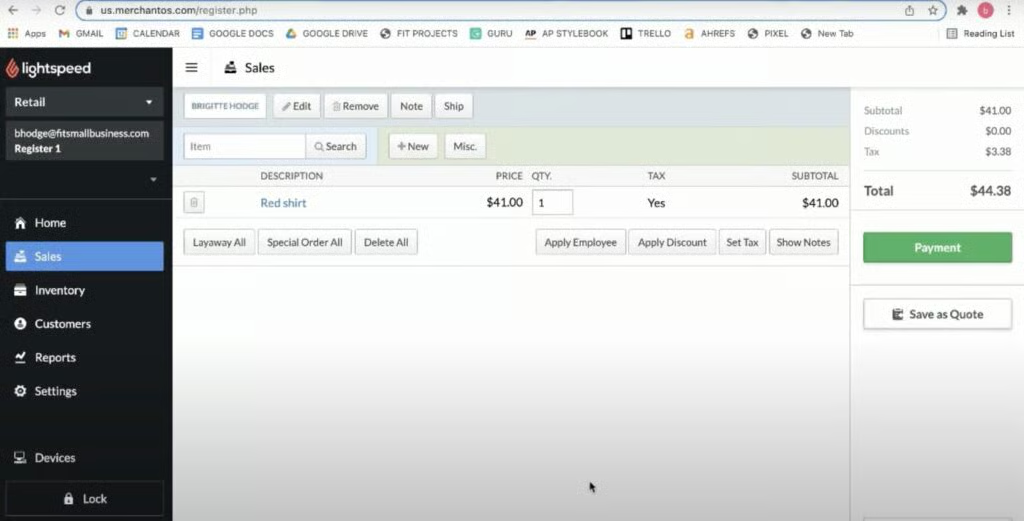
Shopify, on the other hand, is app-based, and the checkout screen operates via customizable tiles or hotkeys. Processing orders is much faster, and everything is done via touch screen. While the tiles themselves are customizable, the workflow is not as detailed as Lightspeed’s.
Both Shopify and Lightspeed offer back-office management tools like reporting, analytics, customer management, order management, and more in browser-based dashboards.
Read more: POS Data Guide for POS Analytics
Lightspeed vs Shopify: Inventory management
Shopify has solid inventory tools for ecommerce and basic retail workflows, but it is not as deep as Lightspeed for complex physical retail operations. Many Shopify sellers can add apps to expand inventory functionality, but that can add cost and setup work.
Choose Lightspeed if inventory control is one of your biggest operational needs. Choose Shopify if your inventory is simpler and your main priority is selling across online and in-person channels.
Lightspeed vs Shopify: Ecommerce
| Lightspeed | Shopify | |
|---|---|---|
| Free themes/templates | 30 | 13 (dozens more paid options) |
| Social media sales integrations | Facebook, Instagram, TikTok | Facebook, Instagram, TikTok |
| SEO tools | Basic | Advanced |
| International sales | 14 languages, multiple currencies, | 20 languages, multiple currencies, |
| Maximum digital file size | 25GB | 5GB |
Both Shopify and Lightspeed ecommerce:
- Sync seamlessly with its POS
- Can be used to sell physical items, digital products, and subscriptions
- Have strong automatic tax calculation tools
- Make social media sales easy
Shopify was built for ecommerce and is a more robust online sales platform than Lightspeed. Shopify lets you create more full and feature-rich websites than Lightspeed’s basic site builder. For example, Shopify has a drag-and-drop site builder that enables you to customize the look of your page, the sections you have on your site (including adding elements like a blog or sales promotions), thousands of more apps, and significantly better search engine optimization (SEO) tools.
That said, Lightspeed’s system is incredibly easy to use. If Lightspeed’s POS tools are a better fit for your needs, and you don’t mind a basic storefront, Lightspeed’s ecommerce solution will be just fine. It allows you to create a basic storefront displaying products, company information, and contact information.
However, you’ll likely be happier with Shopify if you need anything more than that.
Lightspeed vs Shopify: Hardware
Lightspeed and Shopify both offer mobile and countertop POS solutions. However, there are a few key differences:
- Shopify POS is app-based
- Lightspeed POS is browser- and app-based
Shopify POS is available only on Shopify devices, as well as Apple and Android smartphones and tablets. Specifically, Shopify POS is available on:
- iPhone 7 or higher (iOS 15+)
- iPad Air Gen 2 or higher
- iPad Gen 5 or higher
- iPad mini Gen 4 or higher
- All iPad Pro models (iPadOS 15+)
- Android devices (Android 10.0+).
Shopify also has a proprietary mobile POS terminal called Shopify POS Go. This handheld, all-in-one terminal runs Shopify POS software, has a built-in card reader and barcode scanner, has all-day battery life, and can accept contactless payments.
Read more: What is a POS Terminal?
Lightspeed, on the other hand, can be accessed via Google Chrome and Mozilla Firefox browsers on any computer running Windows 8.1 or higher or Mac OS X 10.15 or higher. Certain versions of Lightspeed Retail can also be accessed via iPad on iOS 15.5 or higher.
Both systems offer mobile and countertop card readers, tablet stands, cash drawers, barcode scanners, receipt printers, label printers, and assorted accessories.
Here’s how Shopify vs Lightspeed hardware stacks up:
| Lightspeed | Shopify | |
|---|---|---|
Mobile card reader | 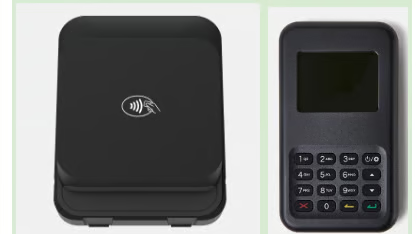 | 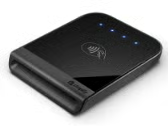 |
Handheld POS Terminal |  |  |
Tablet/iPad Stand | 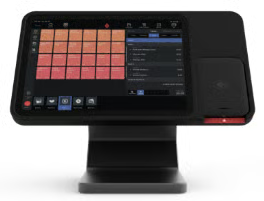 | 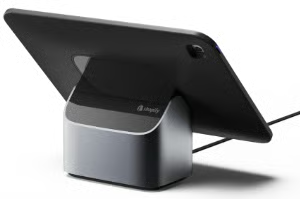 |
Integrated Countertop Terminal | – None – | – None – |
Shopify’s tablet/iPad stand is basic hardware. You will need to connect a mobile card reader or card terminal to accept payments. Lightspeed offers more options, with a basic tablet stand for Android users for $89, while iPad stands come in both simple ($169) and embedded card reader options (shown above).
Lightspeed also offers additional mobile card reader and standalone POS terminal options depending on your industry. For example, if you are in the hospitality industry, Lightspeed has additional countertop and mobile payment terminal options. The smart standalone POS terminal even comes with a receipt printer, which costs $70 more.
That said, neither Lightspeed nor Shopify offers an integrated countertop terminal. These are hardware with a built-in POS (no need for iPads or tablets). Check out Square or Clover instead if you prefer this set-up.
Read more: Best POS Hardware for Business
Lightspeed vs Shopify: Integrations
| Integration type | Lightspeed | Shopify |
|---|---|---|
| Native integrations | Available, sometimes with fees | Available, sometimes with fees |
| Third-party POS integrations | Limited | Hundreds |
| Third-party ecommerce integrations | Dozens | Thousands |
| Third-party payments | 7 | 100+ for ecommerce; Shopify POS requires Shopify Payments |
The main integration challenges with Lightspeed and Shopify are data syncing, compatibility, added app costs, and workflow limits.
Shopify is easier to extend because it has more third-party apps. However, relying on apps can increase monthly costs and may require setup work. Lightspeed has fewer integrations, so retailers should confirm that key systems, such as ecommerce, accounting, inventory, and payments, connect properly before choosing it.
If you plan to use Lightspeed POS with Shopify ecommerce, confirm what syncs between the systems. Review product data, variants, inventory counts, customer profiles, orders, refunds, discounts, taxes, and returns before committing.
Lightspeed vs Shopify: Ease of use
When comparing Shopify vs Lightspeed for ease of use, Shopify’s app-based system is simpler to navigate. Creating a sophisticated online store through Shopify’s website builder is also incredibly easy.
Lightspeed’s interface is a little more complex, and there are more decisions to make when it comes to ecommerce, specifically, whether you want to use Lightspeed’s basic ecommerce tools or connect a third party (like Shopify or BigCommerce). However, Lightspeed does have much more granular inventory controls.
Shopify vs Lightspeed: Customer support
Shopify and Lightspeed both offer customer support, but the quality and accessibility differ. Shopify provides 24/7 support through live chat, email, and phone, along with an extensive knowledge base, community forums, and a network of Shopify Experts for specialized assistance. However, some users report slow response times and inconsistent support quality, particularly for complex technical issues.
Lightspeed also offers 24/7 support via phone, email, and chat, but it stands out with dedicated account managers and personalized onboarding for higher-tier plans. This makes Lightspeed a better option for businesses that need hands-on guidance during setup and ongoing operations. However, Shopify’s large ecosystem and active user community provide more self-service resources and third-party experts, making it easier to find solutions independently.
Shopify vs Lightspeed: User reviews
Shopify users often praise its user-friendly interface, ecommerce tools, and smooth online-to-in-store selling. Common complaints mention paid upgrades, app costs, limited POS customization, and inconsistent support for technical issues.
Lightspeed users often praise its inventory depth, reporting, cloud access, and retail operations tools. Common complaints mention cost, setup time, learning curve, and integration issues, especially with accounting or third-party systems.
Lightspeed vs Shopify: Which is right for you?
Shopify is the better choice for most retailers because it is easier to use, usually more affordable, and much stronger for ecommerce and omnichannel selling. Choose Shopify if you sell online, through social media, in person, at pop-ups, or across multiple customer touchpoints.
Lightspeed is the better choice if your physical store operations are more complex. Choose Lightspeed if you need advanced inventory, product variants, purchase orders, work orders, repairs, warranties, supplier management, or multi-location reporting.
Some retailers may want both. If you have complex brick-and-mortar operations but also need a strong online store, you may be able to use Lightspeed for POS and Shopify for ecommerce. Confirm the integration details before choosing that setup.
Top alternatives to Lightspeed and Shopify
Lightspeed and Shopify are strong POS systems, but neither is right for every retailer. Consider an alternative if you want a lower-cost POS, restaurant-specific tools, built-in countertop hardware, or simpler payment processing.
Square
Square is a better fit if you want a free POS plan, simple setup, built-in payments, and easy tools for retail, restaurants, appointments, and mobile selling. It is not as advanced as Lightspeed for inventory or as strong as Shopify for ecommerce, but it is easier and more affordable for many small businesses.
Clover
Clover is a better fit if you want more hardware options, including countertop terminals and handheld devices. It is also a good option for businesses that want to compare processors or work through a merchant services provider.
Toast
Toast is a better fit for restaurants, cafes, bars, and food service businesses. Lightspeed and Shopify both have food retail use cases, but Toast is built specifically for restaurant workflows, menus, kitchen routing, tableside ordering, and online ordering.
FAQs
Is Lightspeed better than Shopify?
Lightspeed is better than Shopify for brick-and-mortar retailers that need advanced inventory, reporting, purchase ordering, work orders, and multi-location stock control. Shopify is better for ecommerce, omnichannel selling, and online-first retail growth.
Is Shopify better than Lightspeed?
Shopify is better than Lightspeed for ecommerce sellers, DTC brands, social commerce, and retailers that want a simpler POS with stronger online selling tools. Lightspeed is better for inventory-heavy physical stores.
What is the main difference between Lightspeed and Shopify?
The main difference is that Lightspeed was built as a retail POS and Shopify was built as an ecommerce platform. Lightspeed is stronger for in-store retail operations, while Shopify is stronger for online selling and omnichannel growth.
Which is cheaper, Lightspeed or Shopify?
Shopify is usually cheaper for many retailers, especially those with multiple registers, because Shopify POS Pro includes unlimited registers at a location. Lightspeed can become more expensive because of additional register and location fees.
Can Lightspeed integrate with Shopify?
Yes, some Lightspeed Retail setups can integrate with Shopify. This lets retailers use Lightspeed for in-store POS and inventory while using Shopify for ecommerce. Confirm supported versions, data sync, and workflow limits before choosing this setup.
What is Lightspeed best for?
Lightspeed is best for brick-and-mortar retailers with complex inventories, product variants, purchase orders, work orders, repairs, warranties, and multi-location stock needs.
What are the drawbacks of using Shopify?
Shopify’s main drawbacks are limited POS customization, limited offline functionality, app costs, and less advanced in-store inventory control than Lightspeed. It is still stronger than Lightspeed for ecommerce and omnichannel selling.