


The best social media schedulers do more than just publish posts at set times. They bring your accounts into one workspace, make content easier to plan and approve, and provide enough analytics to show what is actually working.
I’ve managed social media long enough to remember when publishing meant bouncing between platforms — or wrestling with Meta Business Suite and hoping nothing broke. Today’s tools are far more capable, but the right one still depends on your team, channels, and workflow.
After testing and researching the leading platforms, I found Buffer to be the best starting point for beginners and small teams. Sprout Social offers the strongest end-to-end capabilities for larger organizations, while Later is ideal for visual-first brands. The eight options below cover everything from free scheduling and content repurposing to bulk publishing, collaboration, analytics, and reputation management.
| Provider | Best for | Starting price per month, billed annually |
|---|---|---|
| Sprout Social | End-to-end management and brand reputation | $79/seat |
| Later Social | Visual scheduling and UGC discovery | $18.75 |
| Buffer | Beginner-friendly scheduling for small teams | Free or $5/channel |
| Metricool | Social analytics and competitor tracking | Free or $20 |
| SocialBee | Automated evergreen content recycling | $24.20 |
| CoSchedule | Coordinating blog and social promotion | Free or $19/user |
| Hootsuite | Bulk scheduling across multiple profiles | $99/user |
| Planable | Content reviews and approval workflows | $33/workspace |
Overview of the best social media schedulers
| Provider | Unified social inbox | Brand monitoring | Evergreen post recycling |
|---|---|---|---|
| Sprout Social | ✓ | ✓ | ✕ |
| Later Social | ✓ | ✓ | ✕ |
| Buffer | ✕ | ✕ | ✕ |
| Metricool | ✓ | ✕ | ✓ |
| SocialBee | ✓ | ✕ | ✓ |
| CoSchedule | ✓ | ✕ | ✓ |
| Hootsuite | ✓ | ✓ | ✕ |
| Planable | ◐ | ✕ | ✓ |
Legend:
✓ Available natively on at least one plan
✕ Not available natively
◐ Available as a paid add-on
Why you can trust TechnologyAdvice
TechnologyAdvice follows a structured editorial process designed to help buyers make informed software decisions. Our team compares products using consistent criteria grounded in practical business needs.
For this guide, I evaluated eight social media schedulers based on their publishing tools, platform coverage, usability, advanced management features, scalability, and customer support. I also considered how well each tool supports everyday workflows, including planning content, scheduling posts, managing engagement, tracking performance, and coordinating team approvals.
My findings are based on hands-on evaluation, vendor pricing and product documentation, and verified feedback from third-party review platforms. This allowed me to assess how each scheduler performs in practical use — not just how the vendor presents it.
Methodology: How I evaluated the best social media schedulers
Many platforms can schedule a post, but the best social media schedulers make the entire publishing process easier. I compared each tool based on the following criteria:
- Multichannel scheduling and content planning: I evaluated which social networks each platform supports and how easily users can create, preview, schedule, and organize posts using a visual content calendar.
- Content creation and automation: I reviewed features such as reusable templates, AI writing assistance, recommended posting times, bulk scheduling, evergreen post recycling, and media editing.
- Engagement and performance tools: I looked for the best social media marketing tools with capabilities beyond publishing, including unified inboxes, comment management, social listening, brand monitoring, and analytics.
- Collaboration and approvals: For teams and agencies, I considered shared calendars, internal comments, approval workflows, user permissions, and client review tools.
- Usability: I assessed setup, navigation, calendar management, and the overall learning curve. I prioritized platforms that make routine tasks clear without requiring extensive training.
- Scalability and value: I compared plan flexibility, user and account limits, paid add-ons, and whether each platform can continue supporting a business as its team and social presence grow.
- Customer support: I reviewed available support channels, onboarding resources, help centers, tutorials, and other self-service materials. I also considered whether higher-touch support requires a paid or premium plan.
Alongside my firsthand evaluation, I reviewed vendor documentation, current pricing information, and verified user feedback to identify common strengths, limitations, and usability concerns.
How do the best social media schedulers compare?

What makes Sprout Social the best for end-to-end management and brand reputation?
Pros
- Comprehensive, end-to-end social media tools for content publishing, reputation management, and customer acquisition
- Keyword and location monitoring, brand crisis alerts
- Detailed reports including post performance, profile performance by platform, and competitor insights
- Automated message replies and priority messages
Cons
- Lacks tools for setting up paid social ads
- Steep learning curve
- Key features like spike alerts and sentiment analysis are locked in with higher tiers
- No Google Business Profile or Bluesky management
Why I chose Sprout Social
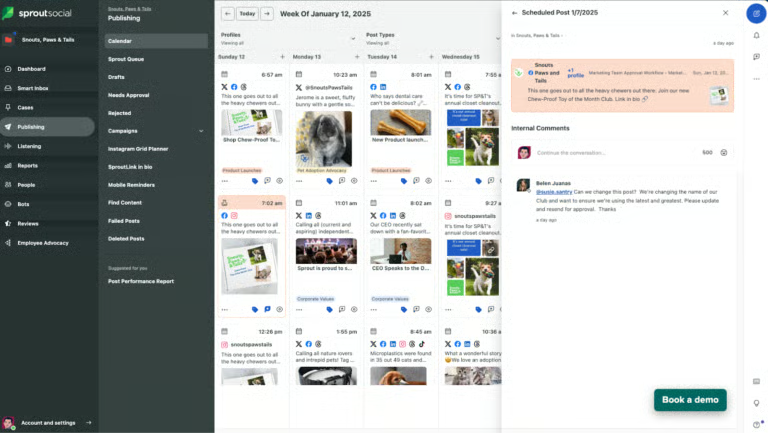
Having managed social media professionally, I know scheduling is only one part of the job. Larger teams also need to monitor conversations, respond quickly, coordinate ownership, and show how social activity contributes to business results. Sprout Social addresses those needs more comprehensively than a basic publishing tool, which is why I chose it for end-to-end social media management and brand reputation.
The Smart Inbox is the feature I find most valuable. It brings comments, mentions, and private messages into one workspace, while filters, tags, assignments, and automation help teams separate routine interactions from issues that need immediate attention. That structure is especially useful when several people share responsibility for engagement and customer care.
Sprout Social is considerably more expensive than most schedulers, and full social listening costs extra. I would not recommend it to a small business that only needs straightforward post scheduling. However, for an established brand managing multiple profiles, high message volumes, and reputation-sensitive conversations, its centralized workflows, reporting, and monitoring capabilities can justify the investment.
About Sprout Social
Sprout Social is a social media management platform that combines content publishing, audience engagement, analytics, and team collaboration. It supports major networks, including Facebook, Instagram, LinkedIn, TikTok, Pinterest, YouTube, Threads, and X, with social listening available as an add-on. Its centralized tools are well-suited to established brands, agencies, and larger teams managing multiple profiles, customer conversations, and performance reporting.
Key features
- Cross-network publishing: Plans, previews, and schedules content across multiple profiles from one calendar.
- Smart Inbox: Consolidates comments, mentions, and private messages into a shared workspace.
- Inbox automation: Uses rules, tags, filters, and assignments to prioritize messages and route responses.
- Advanced reporting: Tracks content, campaign, engagement, paid-versus-organic, and team performance.
- Social listening add-on: Monitors sentiment, trends, competitors, and conversations affecting brand health.
Gallery
Pricing
| Essentials | Standard | Professional | Advanced | Enterprise | |
|---|---|---|---|---|---|
| Monthly price, billed annually | $79/seat | $199/seat | $299/seat | $399/seat | Custom |
| Monthly price, billed monthly | $99/seat | $249/seat | $399/seat | $499/seat |
Free trial: 30 days

What makes Later Social the best for visual scheduling and UGC discovery?
Pros
- Searches for user-generated content (UGC) through tags, mentions, and hashtags
- Mimics each social platform’s native features — great for organic social media marketing
- An Instagram visual planner can preview posts on a grid before publishing
- Unlimited media storage on all plans, plus one-click Canva export
Cons
- No analytics outside of the standard (engagement, audience insights, and page growth) — and only up to two years
- Does not support X, Google Business Profile, and Bluesky
- Does not offer share of voice analysis
- Lacks comments management and tracking tools
Why I chose Later Social
Later Social treats social media as more than a publishing queue. Its workflow helps teams organize media, preview content, and prepare posts for each network’s formats.
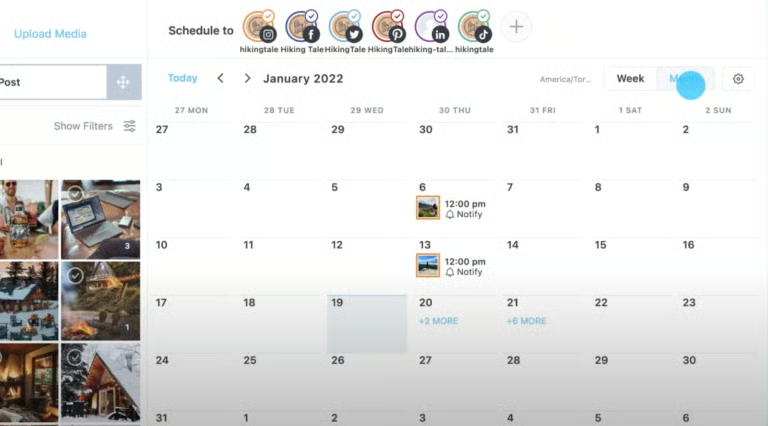
The Visual Instagram Planner is its strongest advantage. I can rearrange scheduled posts on a grid and see how the feed will look before anything goes live. Later also handles image posts, carousels, Stories, Reels, and content for TikTok, Snapchat, and other major platforms.
Brands using user-generated content can search for Instagram posts by profile or hashtag and collect media from tags and mentions. Selected content can then be saved for future publishing. Availability depends on the plan, and businesses remain responsible for obtaining permission and crediting creators.
Later’s advanced analytics, brand monitoring, and collaboration tools require higher-tier plans. Still, it is a strong choice for visually driven brands that prioritize organic content, feed presentation, and UGC over extensive customer-care features.
About Later Social
Later Social is a social media management platform for visually planning, scheduling, publishing, and analyzing content. It supports Instagram, Facebook, Threads, Pinterest, TikTok, LinkedIn, YouTube, and Snapchat. It is particularly well suited to brands, creators, and marketing teams using organic content and UGC to build awareness and engagement.
Key features
- Visual Instagram Planner: Previews scheduled posts in a movable grid before publication.
- Multiformat publishing: Schedules image posts, carousels, Stories, Reels, and other supported formats across major networks.
- UGC collection: Finds and saves Instagram content through profiles, hashtags, tags, and mentions on eligible plans.
- Best Time to Post: Recommends publishing times using historical performance data for supported networks.
- Link in Bio: Creates a customizable landing page that directs followers to selected content, products, or webpages.
Gallery
Pricing
| Social Media Managers plans | Starter | Growth | Scale |
|---|---|---|---|
| Monthly price, billed annually | $18.75 | $37.50 | $82.50 |
| Monthly price, billed monthly | $25 | $50 | $110 |
Free trial: 14 days

What makes Buffer the best beginner-friendly scheduling tool for small teams?
Pros
- Easy to set up and navigate with all the content scheduling essentials
- Content calendar, ideas board, and analytics tab are helpful for consistent content publishing
- Integrates with Canva, Google Drive, and Dropbox for files
- Link in bio page creator
- Supports 11 social media platforms, including Threads and Bluesky
Cons
- No unified inbox for replying to and managing DMs
- Does not have “Best time to post” recommendations outside of Instagram
- No social listening or influencer management features; not an all-in-one platform
Why I chose Buffer
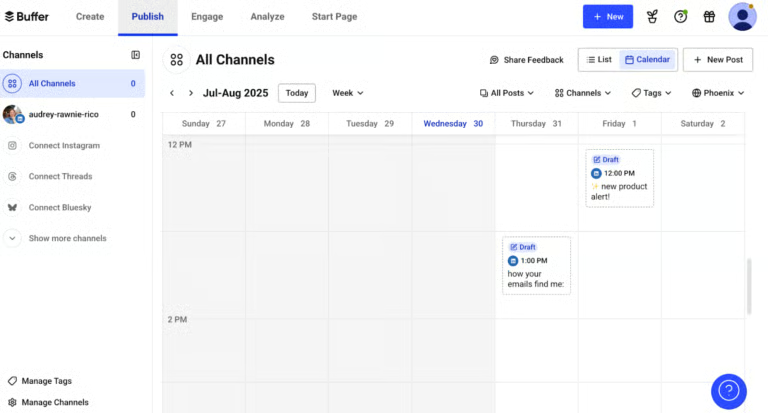
Buffer is the scheduler I would recommend to a beginner who wants to start publishing without a complicated setup. Its interface is clean, the calendar is easy to understand, and adapting a post for multiple channels feels straightforward.
The free plan supports three channels and up to 10 scheduled posts per channel at a time. Each slot becomes available again after a post is published, so this is not a 10-post monthly limit. Free users also receive 100 saved ideas, an AI assistant, basic analytics, and access to Buffer’s Community inbox.
I particularly like the Ideas space because it keeps early concepts, links, images, and videos alongside the publishing workflow. Users can capture an idea and develop it into a scheduled post later without maintaining a separate planning document.
Buffer lacks the social listening, direct message management, and reputation monitoring capabilities of more advanced platforms. Its per-channel pricing can also add up as more profiles are connected. Even with those limitations, it remains one of the easiest tools to recommend for straightforward planning, publishing, and comment management.
About Buffer
Buffer is a social media management platform for creating, scheduling, publishing, analyzing, and managing engagement. It supports Facebook, Instagram, LinkedIn, TikTok, Pinterest, Threads, X, YouTube, Google Business Profile, Mastodon, and Bluesky. Its streamlined interface and practical free plan make it especially suitable for creators, solo business owners, and small teams.
Key features
- Multichannel scheduling: Connects up to three channels and queues 10 posts per channel on the free plan.
- Content calendar: Organizes upcoming and published content in a clear calendar view.
- Ideas library: Stores up to 100 text, link, image, and video ideas for future posts on the free plan.
- AI Assistant: Generates, rewrites, and repurposes social copy for different networks.
- Community inbox: Centralizes supported comments and reviews for easier monitoring and replies.
Gallery
Pricing
| Free | Essentials | Team | |
|---|---|---|---|
| Monthly price, billed annually | $0 for 3 channels | $5/channel | $10/channel |
| Monthly price, billed monthly | $0 for 3 channels | $6/channel | $12/channel |
Free trial: 14 days

What makes Metricool the best for social analytics and competitor tracking?
Pros
- Automatically compiles analytics into ready-to-download reports
- Analyzes top-performing posts to recommend optimal posting times
- Competitor analysis, historical data, and integration with Looker Studio
- Built-in tracked campaign link generator
- Easily handle multiple brands, where one “brand” counts as one email address connected to a profile.
Cons
- No audience sentiment and share of voice analysis
- Lacks a content ideas board
- Clunky interface
Why I chose Metricool
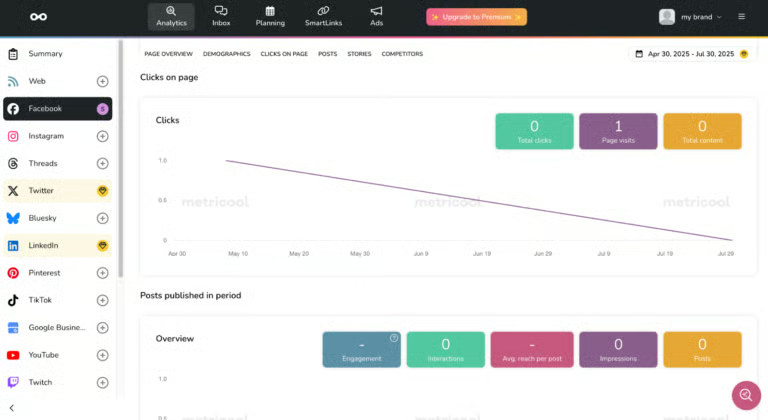
Metricool is where I would start if reporting and performance analysis drive the social strategy. Its dashboard lets me compare connected profiles without opening each network or rebuilding the same figures in a spreadsheet. It tracks audience growth, reach, interactions, clicks, demographics, and post performance in one place.
Competitor analysis adds context that first-party metrics alone cannot provide. Metricool retrieves public data from selected profiles, allowing users to compare posting frequency, audience growth, engagement, and top-performing content. The free plan includes five fixed competitors on eligible networks, while paid plans expand the capacity and coverage.
Paid subscribers can also create downloadable reports and campaign dashboards, reducing the manual work involved in recurring client updates. Agencies will need to upgrade to manage multiple brands and access customizable reporting.
Metricool does not provide the advanced social listening, sentiment analysis, or share-of-voice tools that larger enterprises may require. However, its combination of scheduling, analytics, competitor tracking, and reporting makes it a strong option for small and midsize businesses — and agencies — that use data to guide their content strategy.
About Metricool
Metricool is a social media management platform for planning content, analyzing performance, monitoring competitors, managing engagement, and tracking advertising campaigns. It organizes each business or client as a separate brand, making it well suited to marketers and agencies that need centralized performance data and recurring reports.
Key features
- Unified analytics: Tracks organic and paid performance across connected profiles in one dashboard.
- Competitor analysis: Compares public posting, audience, growth, and engagement data from selected accounts.
- Automated reporting: Creates downloadable reports and campaign dashboards on eligible paid plans.
- Best-time recommendations: Uses audience data to highlight promising publishing times in the content calendar.
- Multibrand management: Separates profiles, calendars, analytics, and reports for different businesses or clients on paid plans.
Gallery
Pricing
| Free | Starter | Advanced | Custom | |
|---|---|---|---|---|
| Monthly price, billed annually | $0 for 1 brand | $20 for 10 brands | $53 for 50 brands | Custom |
| Monthly price, billed monthly | $0 for 1 brand | $25 for 10 brands | $67 for 50 brands |

What makes SocialBee the best for automated evergreen content recycling?
Pros
- Integrates with Canva, GIPHY, and Unsplash for one-stop content creation and publishing
- Create multiple variations of one post in one go for easy repurposing
- Customize content to each platform before posting
- Organize content into categories
- AI chatbot-style customized social media consultant
Cons
- No inbox management
- Lacks a modern, updated interface
- Highest plan limits workspaces (brands) to five per user
Why I chose SocialBee
Most schedulers treat a published post as finished. SocialBee is designed to organize, vary, and reuse content over time, making it my recommendation for creators and brands that regularly publish evergreen material.
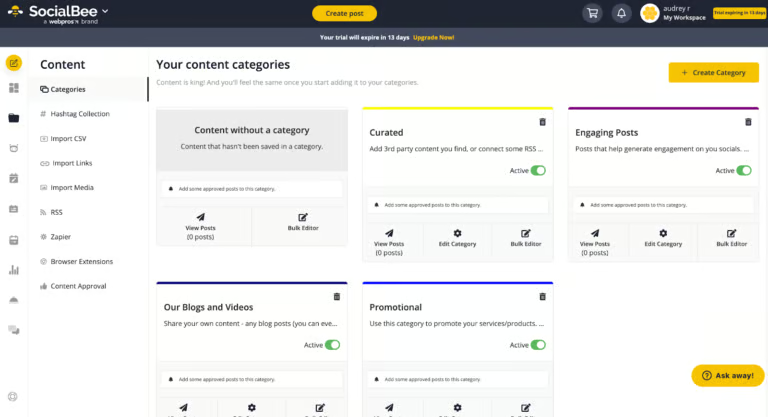
Its category-based scheduling is the most distinctive capability. Posts can be grouped into buckets — such as educational, promotional, curated, or blog content — and assigned dedicated publishing slots. This helps maintain a balanced content mix without scheduling every post individually.
SocialBee can also return evergreen posts to the queue and rotate different versions of the same idea. A blog article, for example, can be reshared with new captions, visuals, or formats instead of appearing repeatedly as an identical post. Expiration controls prevent time-sensitive content from being published after a selected date or number of shares.
The main trade-off is the initial setup. Configuring categories, queues, variations, and recycling rules takes more effort than using a basic scheduler. SocialBee also has no free plan, although it offers a 14-day trial. Once configured, its automation can reduce the ongoing work required to maintain a consistent and varied publishing schedule.
About SocialBee
SocialBee is a social media management platform for creating, organizing, scheduling, recycling, and analyzing content. It supports Facebook, Instagram, LinkedIn, TikTok, Pinterest, Threads, X, YouTube, Google Business Profile, and Bluesky. Its content organization and reuse tools are particularly useful for creators, personal brands, and businesses with evergreen content libraries.
Key features
- Content categories: Groups posts into topic-based buckets with dedicated publishing schedules.
- Evergreen recycling: Returns reusable posts to the queue while allowing time-sensitive content to expire.
- Post variations: Rotates different captions, visuals, or formats when resharing the same idea.
- Creative integrations: Connects with Canva, Unsplash, and GIPHY for creating or sourcing visuals.
- AI content tools: Generates captions and images, adjusts tone and length, and adapts posts for different networks.
Gallery
Pricing
| Standard plans | Bootstrap | Accelerate | Pro |
|---|---|---|---|
| Monthly price, billed annually | $24.20 | $40.80 | $82.50 |
| Monthly price, billed monthly | $29 | $49 | $99 |
| Agency plans | Bootstrap | Accelerate | Pro |
|---|---|---|---|
| Monthly price, billed annually | $149.20 | $274.20 | $374.20 |
| Monthly price, billed monthly | $179 | $329 | $449 |
Free trial: 14 days

What makes CoSchedule the best for coordinating blog and social promotions?
Pros
- Content and social media calendar in one — great for solo bloggers
- Integrates with WordPress and HubSpot to publish blogs from inside the platform
- ReQueue automation can automatically repost the best-performing social media posts
Cons
- No social listening
- Does not have comment management
- Complicated UI
Why I chose CoSchedule
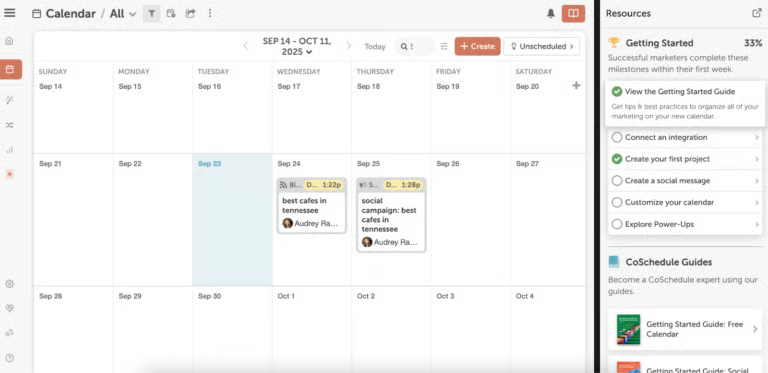
CoSchedule is my recommendation for bloggers who publish through WordPress or HubSpot and for content teams that want to coordinate editorial and social schedules. Unlike a basic scheduler that treats every post separately, it organizes an article and its promotional campaign within the same marketing calendar.
Its WordPress integration syncs drafts and published posts, while its HubSpot integration brings eligible blog posts, pages, and email campaigns into the calendar. Social Campaigns can then schedule a series of posts promoting an article, event, podcast, or webpage over time.
CoSchedule also offers helpful automation. Best Time Scheduler spaces posts at recommended times, while ReQueue fills calendar gaps with evergreen content. AI-assisted writing and planning tools are available, although access varies by product and plan.
The main drawback is that CoSchedule requires more setup than a straightforward scheduler like Buffer. It may also overlap with ClickUp, Notion, or another editorial management tool already in your workflow. However, bloggers and publishing teams starting from scratch may benefit from managing content production and social promotion in one workspace.
About CoSchedule
CoSchedule is a marketing calendar and social media management platform for planning content, organizing campaigns, scheduling posts, managing engagement, and measuring performance. It offers a free calendar and paid products for social media management, agency workflows, and larger content operations.
Key features
- Unified marketing calendar: Organizes articles, social posts, emails, events, podcasts, and campaigns in one view.
- Social Campaigns: Schedules multiple promotional posts around an article, event, podcast, or webpage.
- WordPress and HubSpot integrations: Syncs eligible publishing content for coordinated planning and promotion.
- ReQueue automation: Recycles evergreen posts to fill gaps in the publishing schedule.
- Best Time Scheduler: Selects recommended publishing times while preventing posts from being scheduled too closely together.
Gallery
Pricing
| Free Calendar | Social Calendar | Agency Calendar | Content Calendar | Marketing Suite | |
|---|---|---|---|---|---|
| Monthly price, billed annually | $0 for 1 user | $19/user | Starts at $59/user | Custom | Custom |
| Monthly price, billed monthly | $0 for 1 user | $29/user | Starts at $69/user |

What makes Hootsuite the best for bulk scheduling across multiple profiles?
Pros
- Schedule weeks’ worth of content with the bulk-scheduling tool
- Pause scheduled posts anytime, in case of crises or pivots
- Centralized inbox with message assignments
- Detailed data, including Industry and competitor benchmarks
Cons
- No keyword tracking
- Lacks location monitoring
- Does not offer Bluesky and Google Business Profile support
Why I chose Hootsuite
Hootsuite is my recommendation for social teams that publish large volumes of content across multiple networks. It was one of the first scheduling platforms I used, and bulk publishing remains one of its strongest capabilities.
On eligible plans, Bulk Composer can upload and schedule up to 350 posts from a CSV file. Each post can be reviewed and edited before publishing, making it practical for preparing several weeks of content at once.
Hootsuite also lets authorized users suspend scheduled content during a crisis or unexpected event. Teams can revise affected posts before resuming the remaining schedule, reducing the risk of outdated or inappropriate content publishing automatically.
Its unified inbox, analytics, competitor benchmarking, and social listening tools extend its value beyond scheduling. However, certain bulk publishing and suspension features require eligible plans, and per-user pricing can be expensive for smaller teams. Hootsuite makes the most sense for teams that will regularly use its high-volume publishing and reputation monitoring capabilities.
About Hootsuite
Hootsuite is a social media management platform for creating, scheduling, monitoring, engaging with, and analyzing content across multiple networks. It supports organizations ranging from solo marketers to enterprises, with higher tiers adding more automation, collaboration, governance, and reporting tools.
Key features
- Bulk Composer: Uploads and schedules up to 350 posts from a CSV file on eligible plans.
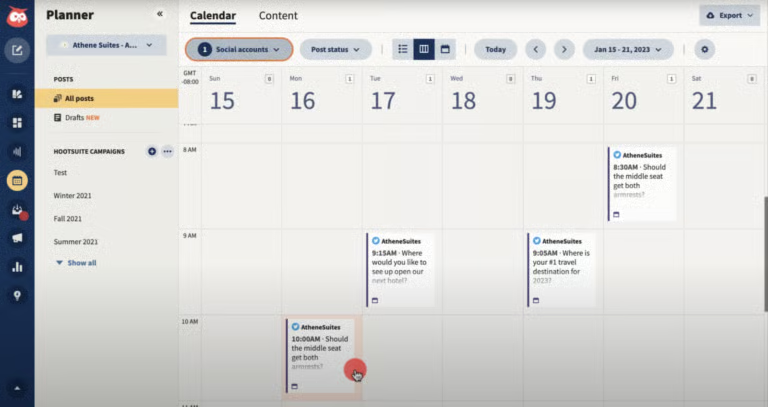
- Content calendar: Organizes organic, paid, published, and scheduled posts in calendar or list views.
- Content suspension: Temporarily pauses scheduled posts during crises or strategy changes on eligible plans.
- Unified inbox: Centralizes supported comments, messages, and mentions for more efficient engagement.
- Social listening: Tracks brand mentions, sentiment, competitors, and trends, with capabilities varying by plan.
Gallery
Pricing
| Standard | Professional | Advanced | Enterprise | |
|---|---|---|---|---|
| Monthly price, billed annually | $99/user | $199/user | $399/user | Custom |
| Monthly price, billed monthly | $149/user | $249/user | $499/user |
Free trial: 14 days

What makes Planable the best for content reviews and approval workflows?
Pros
- Simple tool with just the essentials: scheduling, analytics, and a centralized inbox
- Efficient team collaboration and workflow approval features
- Generates analytics reports shareable via link or PDF
Cons
- No social listening
- Does not have crisis notification features
- Lacks advanced analytics for keyword tracking and share of voice
Why I chose Planable
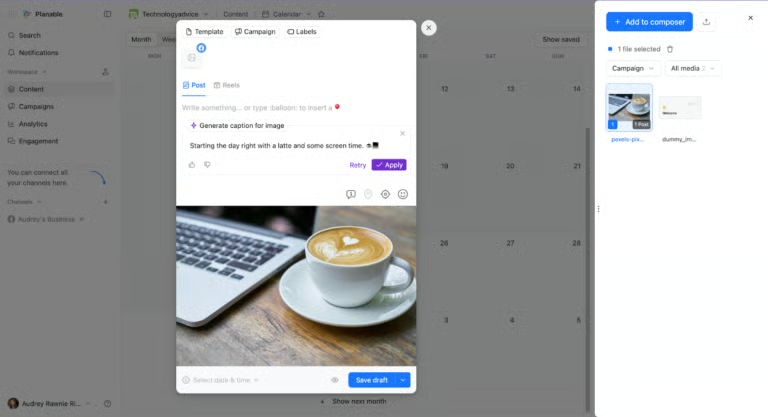
Planable is best for teams that need an organized review and approval process before social content goes live. Its visual calendar and platform-specific previews make it easy to check copy, formatting, and creative assets without passing drafts through email or chat.
I particularly like how Planable keeps feedback tied to each post. Teammates and clients can comment, annotate content, leave internal notes, request changes, and approve posts in one workspace. It supports optional approvals, required approvals on the Pro plan, and multilevel approvals on the Enterprise plan. Approved posts can also be scheduled automatically.
The interface is one of the cleanest I’ve used, and its Canva integration lets teams transfer designs directly between Canva and Planable. However, analytics and Social Inbox capabilities require separate add-ons. Still, for teams focused on creating, reviewing, approving, and scheduling content efficiently, Planable keeps the process simple and organized.
About Planable
Planable is a collaboration-focused social media management platform for creating, reviewing, approving, and scheduling content. It gives internal teams, agencies, and clients a shared workspace for managing posts from draft through publication.
Key features
- Content feedback and annotations: Add comments, suggestions, visual annotations, and private internal notes directly to drafts.
- Approval workflows: Configure optional, required, or multilevel approvals depending on your plan and review process.
- Visual content calendar: Organize and reschedule posts using drag-and-drop tools, labels, filters, and multiple views.
- Platform-specific previews: Review how posts will appear on their intended social networks before publishing.
- Canva and media library integration: Transfer Canva designs directly and organize reusable campaign assets in one place.
Gallery
Pricing
| Basic | Pro | Enterprise | |
|---|---|---|---|
| Monthly price, billed annually | $33/workspace | $49/workspace | Custom |
| Monthly price, billed monthly | $39/workspace | $59/workspace |
Final thoughts and how to choose the best tool for your organization
After researching and evaluating the best social media schedulers for this guide, what’s most clear to me is that all these tools are very capable of the basics of social media scheduling.
Where they really differ is in their advanced features and level of usability. So, how do you find the best one for your business or organization?
Some of the most important things to consider, in my experience, are your primary objectives with social media (or your social media strategy), the size of your team, your level of familiarity with social media tools, and the analytics you need.
- Social media objectives and overall strategy: A business with a strong focus on UGC and organic social would fare well with a tool like Later Social, which has capabilities for both. Meanwhile, bloggers and creators will find CoSchedule’s content marketing tools useful, and large organizations with a reputation to manage will benefit from Sprout Social’s social listening tools.
- Team size: Some platforms are meant for single-person use, like Buffer, and others for full teams, like Planable. I always advise estimating how many people from your team will be using the platform, and if approval workflows are necessary, as not every tool has those capabilities.
- Brands to manage: The same goes for the number of brands you’ll be managing. Some tools only allow up to a certain number of brands. For instance, Later Social only allows up to six, which narrows down your choices significantly.
- The analytics you’ll need: One of the biggest mistakes I made early on, as a social media manager, was failing to consider the analytics offered in each platform. For instance, some platforms only allowed up to three months of analytics reporting, when I needed data for the whole year to measure my page’s growth accurately.
Aside from the data time frame you need, consider the specific metrics you need to measure, from engagement rates to more advanced ones like share of voice or competitor analyses. - Familiarity with social media tools: It’s also worth considering your team’s familiarity with different social media platforms. Most of these platforms are plug-and-play and easy for anyone to navigate, but others, like Sprout Social, require a longer onboarding process.
Frequently asked questions (FAQs)
What are the best social media schedulers?
For small and medium-sized businesses, my top picks are Buffer, Metricool, and Planable. All these have easy-to-navigate interfaces and free plans to get started. For enterprise businesses and larger organizations, tools like Sprout Social, Hootsuite, and Later Social have advanced social media marketing tools that include social listening, audience analysis, and comments management, along with content scheduling.
What is the 70/20/10 rule for social media?
The 70/20/10 rule for social media is a common guideline for posting content on social media: 70% should offer value to audiences (for example, helpful blogs, carousels, and infographics), 20% should be content shared from other sources to build your credibility, and only 10% should promote your product or service. This has, historically, worked for many brands. But it’s only a general guideline, not a strict rule. It’s more important to have a clear social media strategy built around your objectives.
Is Buffer or Hootsuite better?
It depends. Buffer is better for beginners, smaller teams, and solopreneurs as it’s easier to navigate and has less expensive plans (including a free forever plan). Meanwhile, Hootsuite is better for larger organizations, as it’s built for teams and has more advanced social media features, like audience sentiment analysis and bulk scheduling.