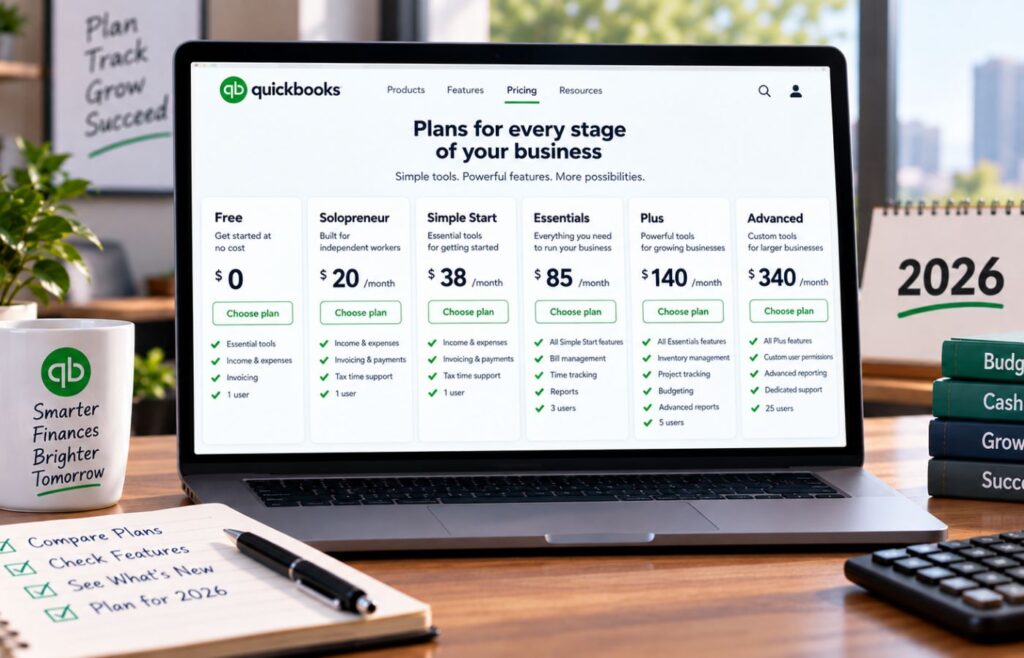
Both QuickBooks Free and ZipBooks are priced at $0 a month, so their feature caps are the real point of comparison. QuickBooks Free includes automatic bank syncing for one account, built-in payment acceptance, mileage tracking, and receipt capture. However, it limits you to two invoices and one estimate a month. ZipBooks’ Starter plan has no invoice cap and supports unlimited customers and vendors, but requires manual bank account connection and keeps reporting basic. What you give up shifts depending on which plan you pick.
| QuickBooks Free | Solo businesses that want a hands-off, auto-categorized bank feed for free | $0 |
| ZipBooks | Businesses that need unlimited invoicing and unlimited customers and vendors at no cost | $0 |

- Automatic bank feeds for one connected account
- Basic income and expense tracking
- Invoicing, receipt capture, and mileage tracking at no monthly cost
Takeaway: QuickBooks Free automates more of the bank side of bookkeeping but caps invoicing at two a month. ZipBooks Starter removes that invoicing cap and covers unlimited customers and vendors, but its published feature list doesn’t include receipt capture, mileage tracking, or automatic bank syncing at the free tier.
Use cases and pros & cons
| Pros | Cons |
| ✅ Automatic bank feed for one connected account | ❌ Limited to two invoices and one estimate per month |
| ✅ Tracks business and personal expenses | ❌ Supports only one user, with no accountant access |
| ✅ Includes limited receipt capture and mileage tracking | ❌ Receipt capture and mileage tracking have low monthly caps |
| ✅ Provides essential financial reports (P&L, balance sheet, account summary) | |
| ✅ Straightforward upgrade path to QuickBooks Solopreneur or Simple Start | |
| Use case: QuickBooks Free fits a newly launched solo business with light activity, like a consultant with one bank account, a handful of monthly expenses, and only one or two clients to bill. Once invoicing picks up or you need a second bank account, the limits start getting in the way. Choose QuickBooks Free if you run a simple solo business and want your bank transactions imported automatically at no cost. | |
| Pros | Cons |
| ✅ Unlimited invoices | ❌ Connects only one bank account |
| ✅ Unlimited customers and vendors | ❌ No recurring invoices, auto-bill, or payment reminders until you upgrade to Smarter |
| ✅ Accepts digital payments through Square or PayPal | ❌ Reporting is limited to Basic Reports |
| ✅ Includes Basic Reports at no cost | ❌ ZipBooks’ pricing page doesn’t specify whether receipt storage, auto-categorization, or expense tracking are included at the Starter tier |
| Use case: ZipBooks Starter fits a freelancer or service business sending several invoices a month who doesn’t want to hit an invoice cap, like a designer billing 10 to 15 clients monthly. The trade-off is less bookkeeping automation, since features like recurring billing and multiple bank connections require a paid tier. Choose ZipBooks Starter if frequent invoicing matters more to you than automatic bank feeds. | |
Best alternatives to QuickBooks Free and ZipBooks
QuickBooks Free and ZipBooks Starter both keep software costs at $0, but their free plans have limits that won’t fit every business. Consider these alternatives:
| Best for | Why consider it | |
| Wave | Businesses that invoice frequently and want unlimited bookkeeping records at no cost | Wave Starter includes unlimited invoices, bills, and bookkeeping records for free, though automatic bank feeds require the paid Wave Pro plan ($19/month) |
| Zoho Books | Very small businesses under roughly $50K in annual revenue that want more built-in accounting tools | Its free plan reportedly includes invoicing, expense tracking, and bank reconciliation, giving it more functionality than QuickBooks Free or ZipBooks Starter offer for $0 |
| QuickBooks Online | Growing businesses that have outgrown QuickBooks Free | Removes the invoice cap and single-bank-account limit, and adds accountant access and stronger reporting, starting at $20/month for Solopreneur or $38/month for Simple Start |
My recommendation: These free plans work well as a starting point, but they’re built around specific limits instead of full accounting coverage. Pay attention to which cap you’d hit first, whether that’s invoicing volume, bank connections, or reporting depth, and treat that as your real signal for when to move to a paid plan.
Pricing: Tie
| QuickBooks Free | ZipBooks Starter | |
| Monthly cost | $0 | $0 |
| Free plan | ✅ | ✅ |
| Paid upgrade available | ✅ Solopreneur ($20/month) or Simple Start ($38/month) | ✅ Smarter ($15/month) |
QuickBooks Free and ZipBooks Starter both cost $0 a month, making either a reasonable choice if avoiding a monthly accounting software bill is the priority. Neither requires a credit card to sign up, and there’s no trial period to work around since the free tier itself has no expiration.
Why it’s a tie
It’s a tie because the $0 price point is identical, but each plan pays for that price with a different limit. QuickBooks Free holds you to two invoices a month in exchange for automatic bank syncing, while ZipBooks Starter drops the invoice cap but leaves more of the bookkeeping, like categorizing transactions, up to you. The trade-off just lands in a different place for each one.
?My take: Pricing alone is a tie, since both plans cost nothing to start. Which one gives you better value comes down to whether automatic bank syncing or unlimited invoicing matters more for how you actually run your books.
General accounting: QuickBooks Free wins
| QuickBooks Free | ZipBooks Starter | |
| Income & expense tracking | ✅ Business and personal expenses | Not specified for Starter |
| Sales tax tracking | ✅ Manual | Not specified for Starter |
| Contractor tracking | ✅ 1 contractor | Not specified for Starter |
| Financial reports | ✅ P&L, balance sheet, account summary | Basic Reports |
| Accountant access | ✕ | Not specified |
QuickBooks Free has the edge on core accounting because its published feature list confirms sales tax tracking, income and expense categorization, and three built-in financial reports. ZipBooks Starter’s own pricing page focuses mainly on invoicing and payments, with accounting depth beyond Basic Reports left unconfirmed for that tier.
Why QuickBooks Free wins
For a solo business that needs to see where its money is going, QuickBooks Free gives you sales tax tracking, expense categorization, and three core reports at no cost. ZipBooks Starter’s pricing page doesn’t confirm equivalent tools at that tier, so if core accounting visibility matters more to you than invoice volume, QuickBooks Free currently has the stronger paper trail.
?My take: I’d lean on QuickBooks Free if I needed to actually see my numbers add up each month. ZipBooks Starter’s strength shows up more in the invoicing category, which we’ll get to next.
Related read: Top QuickBooks Online AI Features: Tools, Benefits, and Use Cases in 2026
Banking & expense management: QuickBooks Free wins
| QuickBooks Free | ZipBooks Starter | |
| Bank account connection | ✅ Automatic sync, 1 account | 1 account, automation not specified |
| Receipt capture | ✅ 2 per month | Not listed as a Starter feature |
| Mileage tracking | ✅ 5 trips per month | Not included |
| Manual expense entry | ✅ | ✅ |
QuickBooks Free has the advantage here because its published feature list confirms automatic bank syncing for one account, receipt capture, and mileage tracking, all included at $0. ZipBooks Starter’s pricing page confirms only a bank account connection, without specifying whether that connection pulls transactions automatically or requires manual entry.
Why QuickBooks Free wins
For a solo business owner using one checking account, QuickBooks Free’s automatic bank sync, receipt capture, and mileage tracking cover more of the day-to-day expense-recording work without any manual entry. ZipBooks Starter can still connect a bank account, but its pricing page doesn’t confirm the same level of automation, and receipt capture and mileage tracking don’t appear on the Starter feature list at all.
?My take: If keeping expense records with minimal manual work matters to you, QuickBooks Free is the stronger free option right now. ZipBooks makes up ground on the invoicing side, which is where its free plan puts its resources instead.
Invoicing & accounts receivable: ZipBooks wins
| ZipBooks Starter | QuickBooks Free | |
| Invoices | Unlimited | 2 per month |
| Estimates/quotes | Not listed as a Starter feature | 1 per month |
| Customers & vendors | Unlimited | Not capped directly, but limited by invoice cap |
| Online payment acceptance | ✅ Square or PayPal | ✅ PayPal, Venmo, Apple Pay, cards, ACH |
ZipBooks Starter has the advantage here because it removes the invoice cap entirely, letting you bill unlimited customers and vendors for free. QuickBooks Free covers the basics of invoicing but limits you to two invoices and one estimate a month, which becomes a real constraint as soon as you bill more than a couple of clients.
Why ZipBooks wins
For a freelancer or service business billing multiple clients a month, ZipBooks Starter lets you keep sending invoices without hitting a wall. A designer or consultant billing 10 or more clients monthly would exhaust QuickBooks Free’s two-invoice limit almost immediately, while ZipBooks Starter has no such ceiling.
?My take: If invoicing volume is your main activity, ZipBooks Starter is the more usable free plan. QuickBooks Free’s two-invoice cap works only for the lightest possible billing schedule, which is a real limitation for most small businesses.
Reporting: QuickBooks Free wins
| QuickBooks Free | ZipBooks Starter | |
| Named reports included | ✅ Profit & loss, balance sheet, account summary | Not specified beyond “Basic Reports” |
| Report customization/filtering | Not specified | Not included on Starter (tagging and custom reports appear at the Sophisticated tier) |
| Export options | Not specified | Not specified |
QuickBooks Free has the edge on reporting because Intuit’s pricing page names the specific reports included: profit and loss, balance sheet, and an account summary. ZipBooks Starter’s pricing page lists only “Basic Reports” without naming them, and full report customization (filtering, tagging, exporting) is reserved for the Sophisticated tier.
Why QuickBooks Free wins
Knowing exactly which three reports you get (profit and loss, balance sheet, and account summary) gives you a clearer picture of what QuickBooks Free actually shows you at tax time or during a cash flow check. ZipBooks Starter’s “Basic Reports” label doesn’t tell you which statements are included, and their own feature comparison page ties more advanced reporting (custom reports, tagging-based filtering) to the paid Sophisticated plan, which suggests Starter’s reporting stays fairly limited.
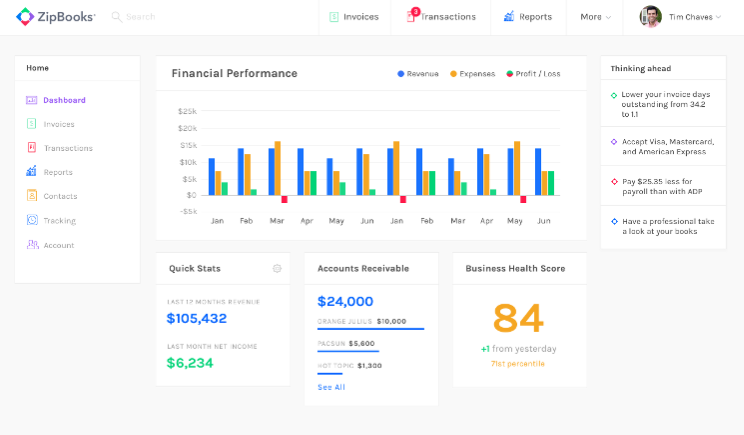
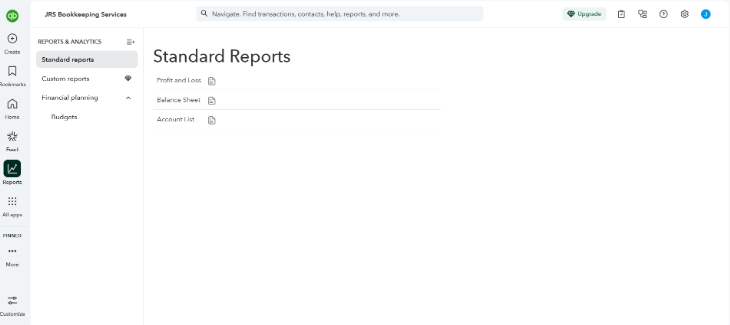
?My take: If seeing your actual financial statements matters to you at the free tier, QuickBooks Free is the more transparent option. ZipBooks doesn’t say what “Basic Reports” includes, so it’s harder to evaluate on this point specifically.
Next read: QuickBooks Online Advanced Review 2026: Features & Pricing
Ease of use: ZipBooks wins
| ZipBooks Starter | QuickBooks Free | |
| Interface complexity | Positioned by ZipBooks as a simplified, non-accountant-focused interface | Shares QuickBooks Online’s full interface, built for scaling up |
| Learning curve | Vendor markets it as usable without formal training | Has dedicated certification programs (ProAdvisor) reflecting platform depth |
| Setup for a first-time user | Fewer steps, since Starter’s feature set is narrower | More steps due to broader feature set |
ZipBooks positions itself around simplicity, stating on its own site that it was built with small business owners in mind rather than accountants, aiming for a more streamlined interface and visually simpler workflows compared to QuickBooks. QuickBooks Free shares its core interface with the broader QuickBooks Online platform, which I’ve used hands-on with clients, and while it’s capable, that platform’s depth is also why QuickBooks offers entire certification programs like the ProAdvisor track I hold, something a genuinely simple tool usually doesn’t need.
Why ZipBooks wins
ZipBooks’ free tier includes five features total on its pricing page, compared to QuickBooks Free’s broader list spanning invoicing, banking, mileage, receipts, reports, and contractor tracking. A narrower feature set generally means fewer settings and options to navigate for a first-time user. ZipBooks also markets itself directly against QuickBooks on this point, stating on its own site that its interface is built to be usable without formal training, while QuickBooks’ depth is reflected in Intuit running a dedicated ProAdvisor certification program for the platform.
?My take: This comparison leans more on published feature scope and vendor positioning than independent testing, since a side-by-side usability benchmark (like G2 or Capterra ratings) isn’t factored in yet. Based on feature count alone, ZipBooks’ free tier is the simpler starting point, while QuickBooks Free’s added functionality comes with more to learn.
Customer support: Tie
| QuickBooks Free | ZipBooks Starter | |
| Help articles/knowledge base | ✅ | ✅ |
| Community forum | ✅ | Not confirmed for Starter |
| Live chat with an agent | Not confirmed for free tier | Not confirmed for Starter |
| Accountant access | ✕ | Not specified |
Neither plan is built around live, real-time support at the free tier. QuickBooks confirms accountant access is not included on QuickBooks Free, and Intuit’s own community team has stated that live chat support applies to paid QBO plans (Simple Start, Essentials, and Plus). ZipBooks’ pricing page lists “Chat with award-winning customer support” in its full feature matrix, but doesn’t specify whether that applies starting at the Starter tier or only on paid plans.
Why it’s a tie
It’s a tie because both companies tie their clearest support commitments to paid plans rather than the free tier, not because both offer the same level of access. QuickBooks Free excludes accountant access outright, and its live chat guarantee is documented for paid QBO plans, not Free specifically. ZipBooks’ support line item sits in the same unresolved position: it appears in their feature matrix without a tier attached. Neither company publishes a clear, tier-specific answer for what a $0 user gets beyond self-service help articles and community forums.
?My take: I’d call this one a tie by default rather than a confirmed match. Both companies keep their clearest support commitments tied to paid plans, and neither publishes a straightforward answer for what a $0 user gets beyond self-service resources.
Integrations and scalability: QuickBooks Free wins
| QuickBooks Free | ZipBooks Starter | |
| Accountant access | ✕ (unlocks on paid QuickBooks Online plans) | ✕ (ZipBooks reserves dedicated client/accountant tools for its separate Accountant plan) |
| Connected ecosystem | QuickBooks App Store, 800+ apps (paid plans) | Gusto integration confirmed; no broader app marketplace listed |
| Multi-user support | ✕ (Smarter and up needed on the ZipBooks side; QuickBooks unlocks multi-user on paid plans) | ✕ (Smarter plan and up) |
| Upgrade path | QuickBooks Solopreneur → Simple Start → Essentials/Plus/Advanced | ZipBooks Starter → Smarter → Sophisticated → Accountant |
QuickBooks Free has the edge for a business that expects to grow, because its paid upgrade path opens into a much larger ecosystem. Once you move beyond QuickBooks Free, you gain access to an 800-plus app marketplace (e.g., Shopify, PayPal, Amazon Business, and more) plus full accountant access. ZipBooks’ upgrade path adds team members, multiple bank connections, and smart tagging as you move up its tiers, but its confirmed integration lineup is limited to a single named tool: Gusto for payroll.
Why QuickBooks Free wins
A solo consultant might start on QuickBooks Free and later need more users, another bank account, or a bookkeeper with direct access to the books. QuickBooks Online’s paid plans cover all of that plus a wide marketplace of prebuilt integrations, so the move up stays inside one ecosystem. ZipBooks’ upgrade path adds real functionality too, but its integration story stops at Gusto, so a business that outgrows Starter and wants to connect other tools has fewer built-in options to grow into.
?My take: I like QuickBooks Free as the starting point for a business that expects to add tools or an accountant down the line. ZipBooks Starter is a fine place to begin if you’re not there yet, but the ceiling is lower once you are.
Mobile app: QuickBooks Free wins
| QuickBooks Free | ZipBooks Starter | |
| Native mobile app | ✅ | ✅ |
| Mileage tracking (GPS) | ✅ 5 trips per month | Not listed on ZipBooks’ site |
| Receipt capture via photo | ✅ 2 per month | Not listed as a Starter feature |
| Invoicing from mobile | ✅ | Not detailed, though invoicing is a core Starter feature |
QuickBooks Free has the advantage on mobile because it inherits the QuickBooks Online mobile app, which includes GPS-based mileage tracking, photo receipt capture, and invoice creation on the go—the same features listed in QuickBooks Free’s core feature set. ZipBooks offers a native mobile app and a mobile-optimized web app, based on its own product pages, but its site doesn’t detail specific mobile capabilities like mileage tracking or receipt capture the way QuickBooks does.
Why QuickBooks Free wins
For someone tracking mileage or snapping receipt photos between job sites, QuickBooks Free’s mobile app has named, specific tools built for that. ZipBooks confirms it has a mobile app and mobile-optimized web experience, but without published detail on what mobile-specific tools like mileage or receipt capture look like, it’s harder to call it an equal match on this point.
?My take: If mobile capture of receipts or mileage is part of your routine, QuickBooks Free’s mobile app currently has the more clearly documented feature set. ZipBooks’ mobile app exists and covers invoicing, but I’d want to test it hands-on before calling it comparable on capture tools specifically.
My expert evaluation of QuickBooks Free vs ZipBooks
QuickBooks Free took most of the categories in this comparison, but the one category ZipBooks Starter won, invoicing and accounts receivable, happens to be the exact limitation that pushes solo businesses off QuickBooks Free the fastest. That makes this less a clean sweep and more a question of which cap you’d rather live with.
For me, the deciding factor comes down to automation. Having managed bookkeeping across several QuickBooks Online client accounts, I know how much time an automatic bank feed saves compared to entering transactions by hand. QuickBooks Free gives you that for one account at no cost. ZipBooks Starter doesn’t confirm the same automation on its pricing page, and a handful of its other accounting details (receipt handling, expense categorization, and anything past “Basic Reports”) aren’t documented anywhere on their site either.
That gap doesn’t make ZipBooks the weaker option outright. If your business sends more than a couple of invoices a month, QuickBooks Free’s two-invoice cap becomes the bigger obstacle, and ZipBooks Starter’s unlimited invoicing solves that problem directly.
- Choose QuickBooks Free if you want your bank transactions handled for you and your invoicing stays occasional.
- Choose ZipBooks Starter if invoicing volume is your main constraint and you’re willing to work with a free plan that leaves some of its accounting depth unconfirmed.
When should you upgrade
The moment either free plan starts working against you instead of for you, that’s the point to move to a paid tier.
Upgrade from QuickBooks Free when
- You’re sending more than two invoices or one estimate a month
- You need a second bank or credit card account connected
- You want an accountant to have direct access to your books
- Your mileage or receipt capture needs exceed the free plan’s monthly caps
Upgrade from ZipBooks Starter when
- You need recurring invoices, auto-billing, or automated payment reminders
- You’re managing more than one bank account
- You want to add team members (Smarter supports up to 5)
- You need reconciliation tools, document sharing, or smart tagging (these appear at the Sophisticated tier)
Watch for the moment a workaround starts costing you more time than the subscription would. If you’re manually tracking a second invoice batch outside QuickBooks Free, or hand-categorizing bank transactions ZipBooks Starter won’t automate, that’s your signal. Staying on a free plan past that point usually costs more in hours than it saves in dollars.
Frequently asked questions (FAQs)