The best recurring billing software helps small businesses automate invoices, schedule customer charges, and reduce manual follow-up. I compared seven providers based on pricing, payment methods, billing workflows, customer portals, support, and overall fit for small businesses.
QuickBooks Online earned the highest score in my evaluation because it combines accounting and recurring payments in one system. Helcim and Stripe Billing are stronger options for flexible payment or subscription workflows, while FreshBooks and Wave are better suited to simpler service billing and smaller budgets.
Best recurring billing software at a glance
Provider
Best for
Monthly starting price
Bookkeeping software with strong recurring billing features
From $38 for Simple Start; Essentials at $75 is the relevant starting tier for recurring invoices.
Growing businesses that need advanced subscription management
From $50; Premium at $100 adds subscription billing
Free basic invoicing and accounting
From $0; $19 at Pro or Wave Payments is required for automated recurring billing
Best recurring billing software compared
Provider
Overall score out of 5
Standout feature
API
Invoicing and accounting tools
4.48
Integrated accounting and billing
✔️
Full accounting, invoicing, expenses, and reporting
4.38
Transparent interchange-plus pricing
✔️
Invoicing, customer management, and payment tools
4.14
Free invoicing plan
✔️
Invoicing, estimates, reminders, and Square integrations
4.08
Strong subscription lifecycle management
✔️
Zoho ecosystem and accounting integrations
4.05
Simple client billing for service businesses
✔️
Invoicing, expenses, time tracking, and accounting
3.69
Free accounting and invoicing
Limited to data retrieval
Free core accounting and invoicing tools

QuickBooks Online: Best overall for small businesses that need accounting and payments in one system
Overall Reviewer Score:
4.48/5
Pricing and contract:
4.5/5
Recurring payment types:
5/5
General features:
4.25/5
General features:
4.25/5
Pros
- Combines accounting, invoicing, and payment collection
- Supports recurring invoices and automatic customer charges
- Includes expense tracking, reports, sales-tax tools, and receipt capture
- Supports cards, digital wallets, and ACH payments
Cons
- Higher starting price than free invoicing platforms
- QuickBooks Payments fees are separate from the QBO subscription
- Automatic customer charges require an active QuickBooks Payments account
- Simple Start should not be treated as sufficient for the recurring-invoice workflow
Why I chose QuickBooks Online
I chose QuickBooks Online as the best overall option because it combines recurring billing with the accounting tools many small businesses already need. Instead of managing invoices, expenses, customer payments, and financial reports across separate platforms, businesses can manage these workflows within one system.
QuickBooks Online also earned the highest overall score in my evaluation. Its recurring payment tools are particularly useful for businesses that want to create scheduled invoices or automatically charge customers. However, businesses should understand the difference between the QBO subscription and QuickBooks Payments before signing up.
Monthly software fees:
- Simple Start: $38 per month for one user
- Essentials: $75 per month for three users
- Plus: $115 per month for five users
- Advanced: $275 per month for 25 users
**New customers can choose between 50% off for three months or a 30-day free trial.
The Simple Start plan supports recurring invoice scheduling, but recurring invoices are not the same as automatic customer charges. QuickBooks can send the invoice on schedule, but the customer must pay it or choose Autopay.
For this guide, Essentials and higher tiers are the relevant plans for evaluating recurring invoice workflows. Automatic recurring charges require an active QuickBooks Payments or Merchant Services account; Essentials does not include QuickBooks Payments by itself.
QuickBooks Payments
- No monthly subscription fee, setup fee, or monthly processing minimum
- Requires an approved QuickBooks Payments or Merchant Services account
- Requires a QuickBooks Online subscription for the recurring-payment workflow
- Processing fees apply to each payment
Processing rates:
- Bank payments: 1%
- Online card and digital-wallet payments, including recurring payments: 2.99%
- Card reader payments: 2.5%
- Keyed-in card payments: 3.5%
- Instant deposits: An additional 1.75%
Rates are charged per transaction and may change. QuickBooks lists the rates as accurate as of April 30, 2026.
Reminder: You do not need an active QuickBooks Payments account to create and send recurring invoices, set up recurring expenses, or create internal bookkeeping reminders.
However, you do need an active QuickBooks Payments or Merchant Services account to automatically charge customers. Customers can also pay recurring invoices online only when online payment processing is enabled.
- Integrated accounting and billing: QuickBooks Online combines recurring invoices with income and expense tracking, accounts receivable, sales-tax tools, receipt capture, estimates, and financial reporting.
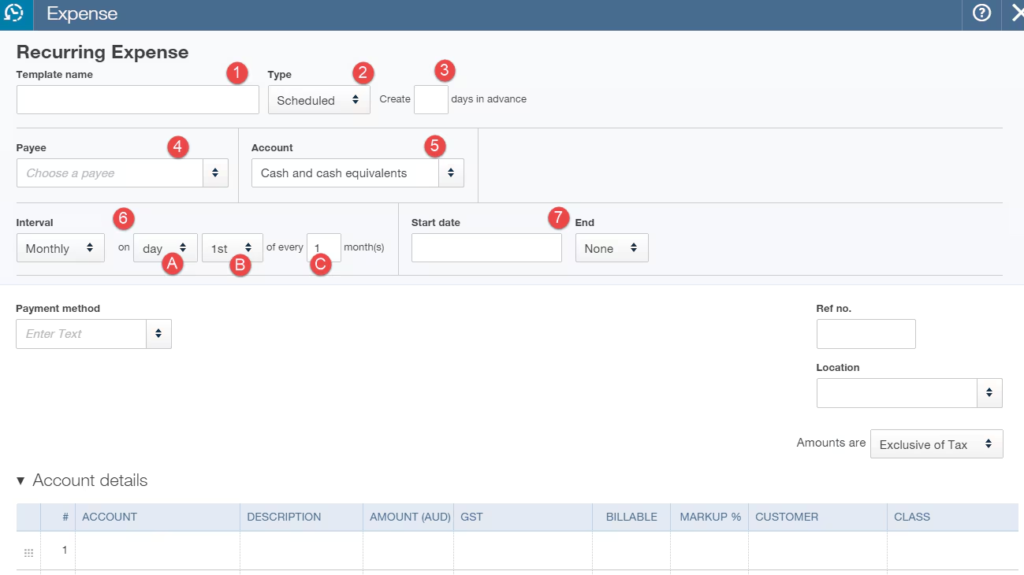
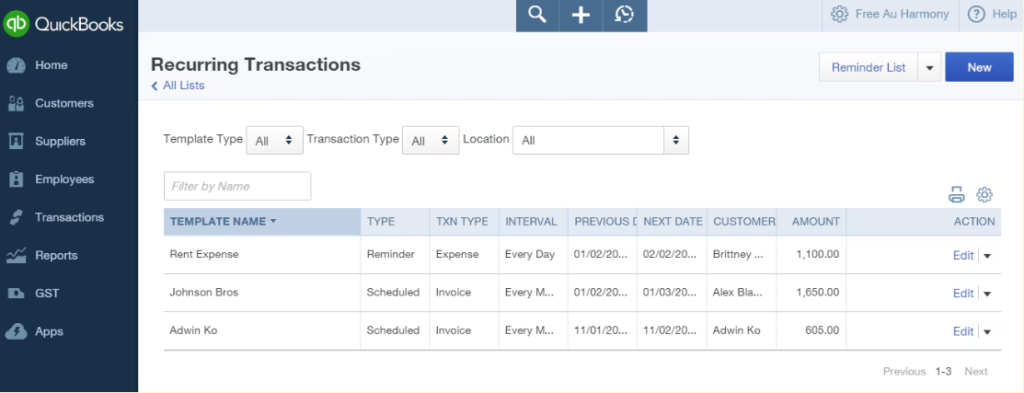
- Recurring invoice templates: Businesses can create scheduled, reminder, or unscheduled recurring transactions. Recurring invoices can be sent to customers for manual payment.
- Automatic customer charges: QuickBooks Payments lets businesses set up recurring charges on daily, weekly, monthly, or annual schedules. Customers authorize the payment method and receive emailed receipts.
- Payment-method support: Recurring payments support cards, Apple Pay, Google Pay, and ACH. Customers can update their payment information through the recurring-payment confirmation email.
Related: Intuit Enterprise Suite Review: Features, Pricing, and Use Cases

Helcim: Best for subscription billing
Overall Reviewer Score:
4.38/5
Pricing and contract:
5/5
Recurring payment types:
5/5
General features:
3.81/5
General features:
4.44/5
Pros
- No monthly account, setup, PCI, or cancellation fees
- Transparent interchange-plus pricing
- Supports recurring payments, ACH, cards, and payment links
- Includes virtual terminal, invoicing, point-of-sale, and accounting integrations
Cons
- Recurring billing adds 0.4% per transaction
- Processing costs can be harder to estimate than flat-rate pricing
- Not as strong as QuickBooks Online for full accounting and bookkeeping
- Standard deposits are not instant
Why I chose Helcim
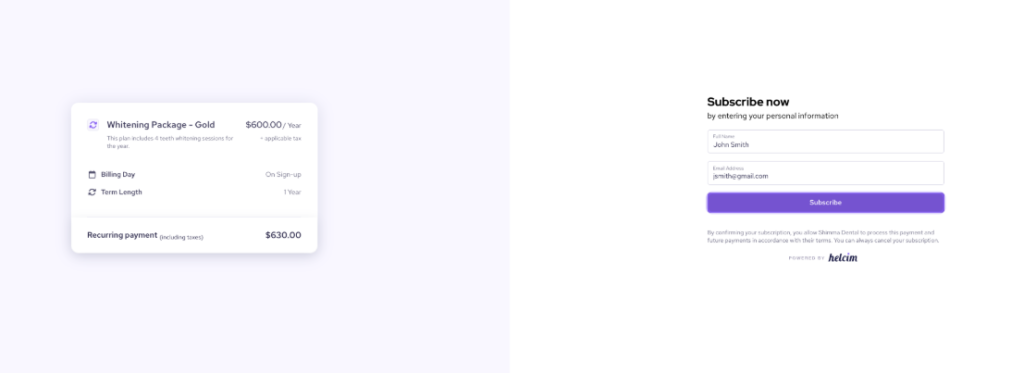
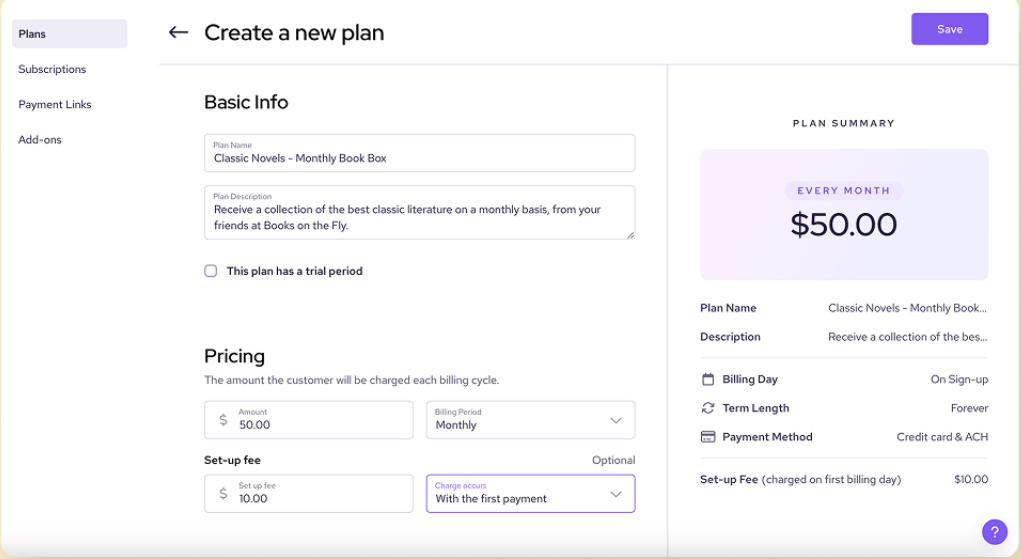
I chose Helcim as the best option for subscription billing because it supports flexible plans, recurring schedules, free trials, prorated billing, and customer self-enrollment. It also offers transparent interchange-plus processing with no monthly software fee, making it practical for small businesses managing recurring revenue.
I attended a Helcim demo, which helped me evaluate its subscription workflow and usability. Helcim is a strong fit for memberships, professional services, B2B companies, and other businesses that need subscription tools without adopting a complex enterprise billing platform. Its limited accounting integrations may be a drawback for businesses that need deeply connected financial reporting.
Helcim has a $0 monthly account fee and does not charge setup, PCI, statement, or cancellation fees. Recurring Payments adds 0.4% per transaction on top of Helcim’s regular card or ACH processing rates.
For businesses processing up to $50,000 in monthly card volume, Helcim lists:
- In-person card payments: Interchange + 0.40% + 8 cents
- Online and keyed-in card payments: Interchange + 0.50% + 25 cents
- ACH payments: 0.5% + 25 cents, capped at $6 per transaction
Card and debit transactions generally receive next-business-morning deposits at no additional cost. Chargebacks resolved in the merchant’s favor cost $0, while lost chargebacks cost $15.
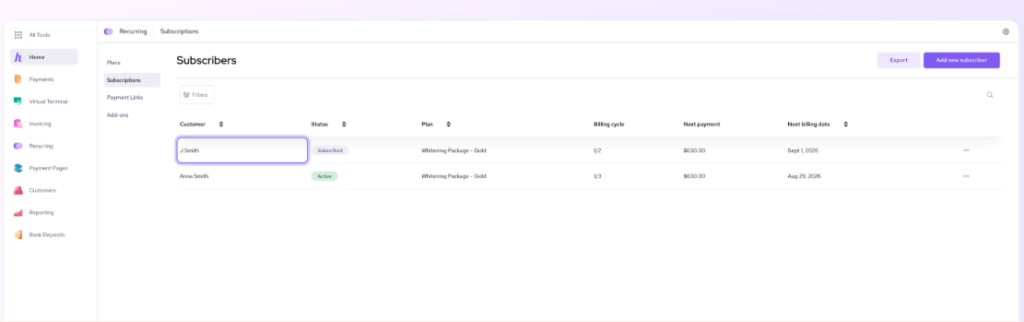
- Recurring payment plans: Helcim supports recurring billing for retainers, memberships, subscriptions, payment plans, and installment payments.
- Payment recovery: Failed recurring payments can be automatically retried, and customers can receive reminders to update expired payment information.
- Flexible customer payments: Customers can pay recurring charges by credit card or ACH and can sign up through payment links.
- Omnichannel payment tools: Helcim includes online invoicing, payment links, a virtual terminal, point-of-sale tools, and accounting integrations with QuickBooks and Xero.
Related: Helcim Review

Stripe Billing: Best for flexible, developer-friendly online subscription billing
Overall Reviewer Score:
4.36/5
Pricing and contract:
3.81/5
Recurring payment types:
5/5
General features:
4.5/5
General features:
3.44/5
Pros
- Supports fixed, tiered, per-seat, usage-based, and hybrid billing
- Includes customer portals, payment links, and subscription management
- Offers Smart Retries and payment-recovery tools
- Supports global payment methods and multiple currencies
Cons
- Requires a separate Billing fee in addition to payment-processing fees
- Advanced implementation may require developer support
- Pay-monthly plans require a one-year contract
- Can be more complex than small businesses need for basic recurring invoices
Why I chose Stripe Billing
I chose Stripe Billing as the best option for online and developer-led businesses because it offers the most flexible recurring-billing infrastructure in this roundup. Businesses can launch fixed subscriptions, tiered plans, per-seat pricing, usage-based billing, and hybrid models through Stripe’s Dashboard, hosted payment tools, or APIs.
Stripe also earned a perfect score for recurring payment types in my evaluation. However, its overall expert score was lower because the platform’s flexibility can create a steeper learning curve for small businesses without technical resources. Stripe is strongest when a business expects its billing model to evolve or needs to connect billing directly to an online product.
Stripe Billing offers a pay-as-you-go plan with no recurring fee and a 0.7% charge on Billing volume. This applies to Billing transactions processed on or off Stripe and excludes one-off invoices.
Stripe also offers annual subscription plans paid monthly. The lowest listed tier is $620 per month for up to $100,000 in monthly Billing volume, with a one-year contract.
Payment processing fees are separate.
- Successful card charges: 2.9% plus 30 cents
- ACH Direct Debit: 0.8%, capped at $5
- Flexible subscription models: Stripe supports flat-rate, per-seat, tiered, usage-based, installment, and hybrid pricing models.
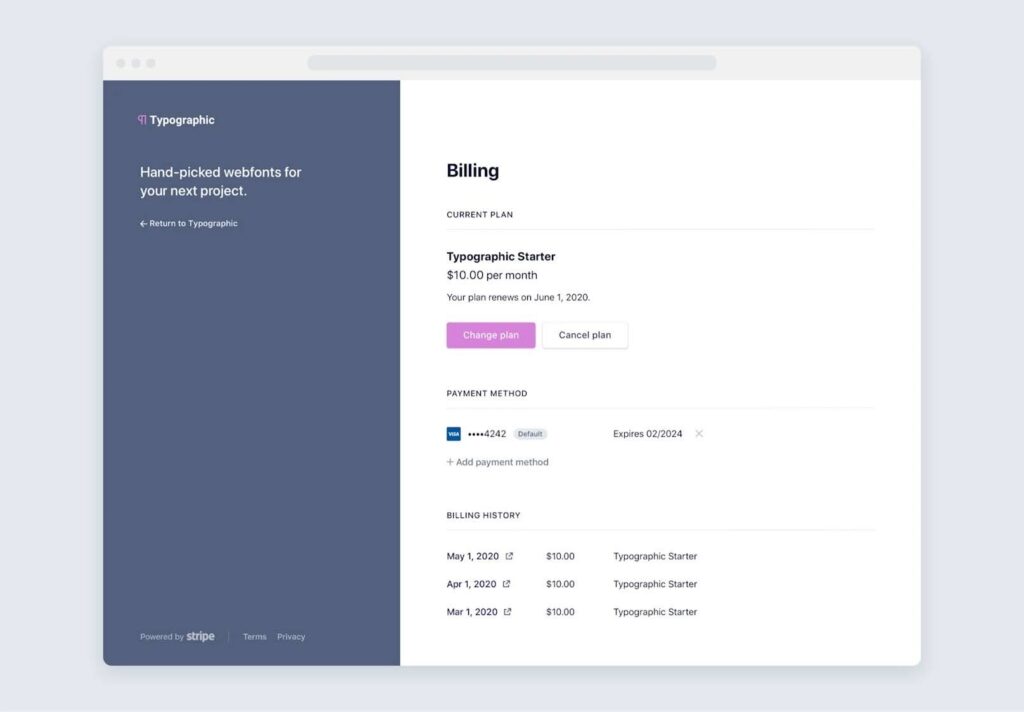
- Customer self-service: The hosted customer portal lets customers update payment details, view invoices, change plans, pause or resume subscriptions, and cancel.
- Revenue recovery: Smart Retries, payment reminders, expired-card updates, and recovery automations help reduce failed recurring payments.
- Online and global payments: Stripe supports cards, wallets, bank debits, bank transfers, buy now, pay later, and more than 100 payment methods across 135+ currencies.


Related: Stripe Review

Square Invoices: Best for retail and service businesses that need invoicing plus in-person payments
Overall Reviewer Score:
4.14/5
Pricing and contract:
5/5
Recurring payment types:
5/5
General features:
3.19/5
General features:
4.69/5
Pros
- Free invoicing plan with no monthly subscription cost
- Supports recurring invoices, card-on-file billing, ACH, and payment links
- Connects online invoicing with Square’s in-person payment tools
- Includes estimates, contracts, payment reminders, refunds, and next-day transfers
Cons
- Card-on-file payments have a higher processing rate
- Customer management is less advanced than a dedicated subscription portal
- Some invoice and support features require a paid plan
- Not designed for complex subscription models or advanced revenue reporting
Why I chose Square Invoices
I chose Square Invoices as the best option for small retail and service businesses that want simple recurring invoices alongside in-person and online payment tools. Its free plan gives businesses a low-cost way to create invoices, accept payments, save cards on file, and send automatic reminders.
I also attended a Square demo, which helped me evaluate the setup process and day-to-day usability. Square is easier to start with than more technical platforms such as Stripe Billing, but businesses with complex subscription changes, usage-based pricing, or detailed customer self-service needs may eventually outgrow it.
Monthly software fees
- Square Free: $0 per month
- Square Plus: Starts at $49 per month per location
- Square Premium: Starts at $149 per month per location
- Custom pricing: Available for businesses processing more than $250,000 annually
Square Invoices is included with the Square Free plan, so businesses can create and send invoices without a monthly software fee. Square charges processing fees when customers pay. Plus and Premium add more advanced tools and may be worthwhile for businesses managing multiple locations or higher payment volumes.
Square payment-processing rates:
- Online invoice card payments on Square Free: 3.3% plus 30 cents
- Online invoice card payments on Square Plus and Premium: 2.9% plus 30 cents
- ACH bank transfers through invoices: 1%, with a $1 minimum
- Manual entry or card-on-file payments: 3.5% plus 15 cents
- Afterpay: 6% plus 30 cents
- Next-day transfers: Free
- Instant transfers: Additional fee applies
For recurring billing, businesses should pay particular attention to Square’s card-on-file rate of 3.5% plus 15 cents, which applies when a saved card is charged for recurring payments.
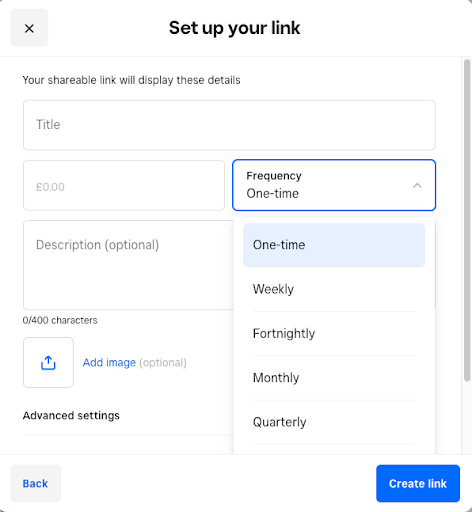
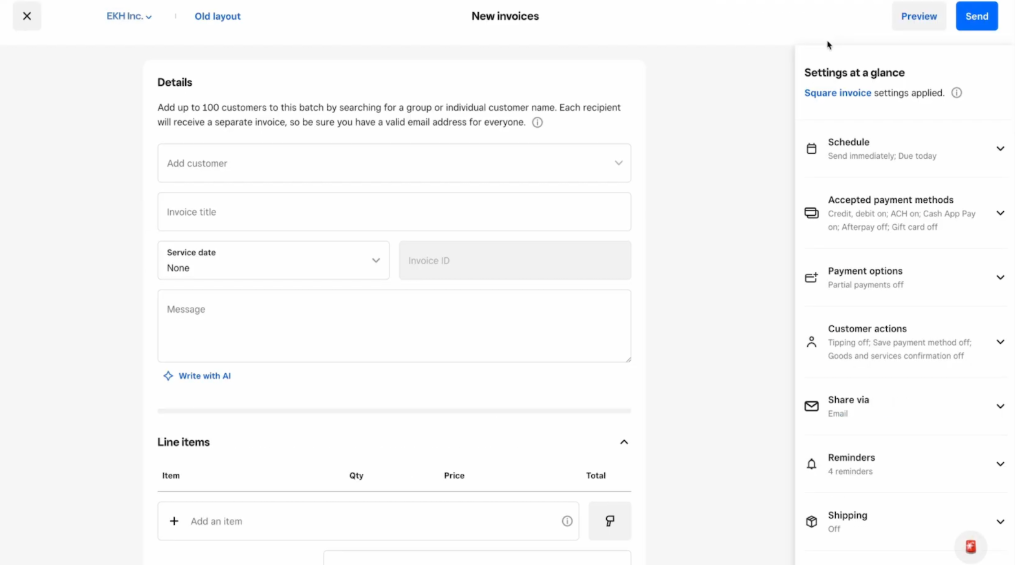
- Recurring invoices: Square lets businesses send recurring invoices on daily, weekly, monthly, or yearly schedules.
- Card-on-file billing: Businesses can securely save a customer’s card and automate billing for future invoices.
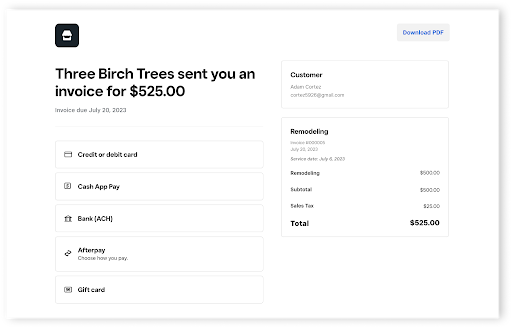
- Flexible payment options: Customers can pay by card, Apple Pay, Google Pay, Cash App Pay, ACH bank transfer, Afterpay, cash, or check.
- Payment reminders and schedules: Businesses can send automatic reminders and create installment or milestone-based payment schedules.
- Omnichannel payments: Square connects invoices with in-person payments, Square POS, Tap to Pay, payment links, and other Square business tools.
Related: What Is Square?

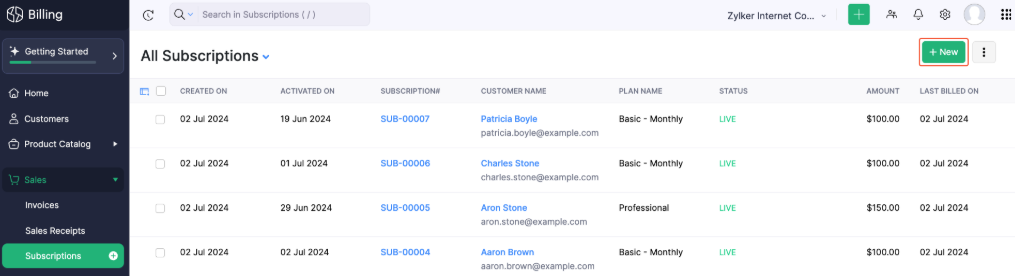
Zoho Billing: Best for growing businesses that need advanced subscription management
Overall Reviewer Score:
4.08/5
Pricing and contract:
4.38/5
Recurring payment types:
4/5
General features:
4/5
General features:
4.13/5
Pros
- Supports subscription management, proration, metered billing, and dunning
- Includes a customer portal and hosted payment pages
- Integrates with Zoho Books, Zoho CRM, Zoho Inventory, and other business tools
- Offers mobile access, reporting, revenue recognition, and multiple pricing models
Cons
- The recurring-billing plan is more expensive than the entry-level plan
- No permanent free plan
- May be more software than very small businesses need
- The broader Zoho ecosystem can take time to configure
Why I chose Zoho Billing
I chose Zoho Billing as the best option for businesses already using Zoho apps or preparing to build a more structured subscription operation. It combines invoicing with subscription management, customer portals, payment pages, proration, metered billing, and dunning tools that are more advanced than those found in basic invoicing platforms.
Zoho Billing is also a practical middle ground between simple invoicing software and developer-heavy platforms such as Stripe Billing. It gives growing businesses room to manage trials, upgrades, cancellations, renewals, and multiple pricing models without requiring a fully custom billing system.
Monthly software fees
- Standard: $50 per month or $39 per month when billed annually
- Premium: $100 per month or $79 per month when billed annually
- Enterprise: Custom pricing
- Free trial: 14 days
The Standard plan is designed primarily for one-time billing and includes up to three users and one location. Premium is the relevant plan for subscription-based businesses because it adds subscription billing, usage-based billing, proration, dunning management, hosted payment pages, and up to 10 users across three locations.
Payment gateways and processing rates
- Zoho Billing supports more than 10 payment gateways for recurring transactions, including Stripe, PayPal, Authorize.Net, GoCardless, Braintree, and Zoho Payments.
- Zoho Payments:
- Domestic cards: 2.90% plus 30 cents per transaction
- ACH direct debit: 0.80% per transaction, capped at $5
- International cards: An additional 1.5% plus the domestic card rate
- Currency conversion: An additional 1%
Zoho Billing does not require Zoho Payments. Businesses can choose another supported payment gateway, so total processing costs depend on the gateway selected.
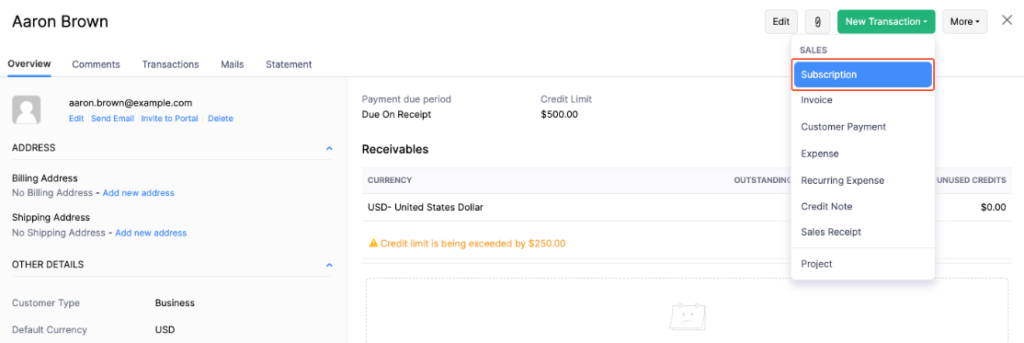
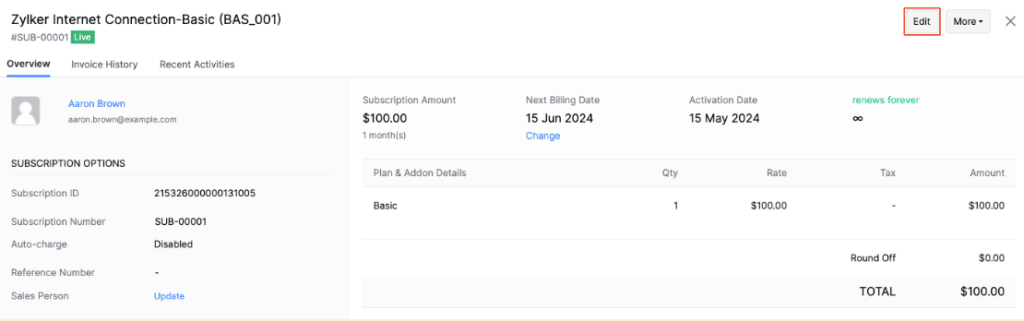
- Subscription lifecycle management: Zoho Billing supports trials, upgrades, cancellations, reactivations, renewals, and customer lifecycle management.
- Flexible pricing models: Businesses can create one-time, recurring, tiered, and metered billing plans, with support for proration and add-ons.
- Dunning management: Automated reminders and payment-recovery workflows help businesses follow up on failed or overdue payments.
- Customer self-service: Customers can use the portal to view transactions, manage billing details, and interact with payment pages.
- Zoho ecosystem integrations: Zoho Billing connects with Zoho Books, Zoho CRM, Zoho Inventory, Zoho Analytics, Zapier, Salesforce, Zendesk, and other business tools.

FreshBooks: Best for freelancers and project-based businesses
Overall Reviewer Score:
4.05/5
Pricing and contract:
4.38/5
Recurring payment types:
4/5
General features:
3.75/5
General features:
4.69/5
Pros
- Simple recurring invoices and automated payment reminders
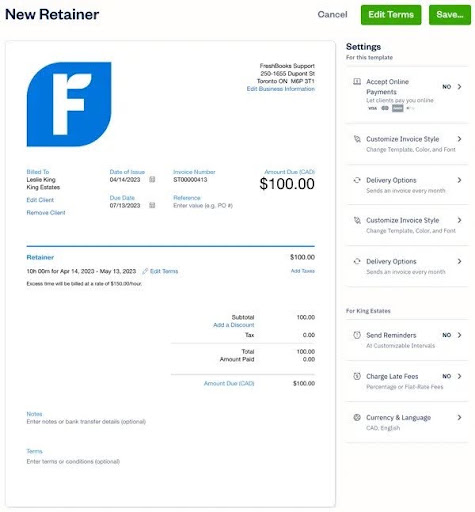
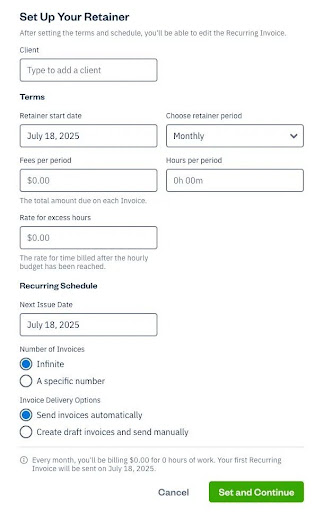
- Strong support for retainers, time tracking, expenses, and projects
- Accepts cards, ACH, Apple Pay, Google Pay, and buy now, pay later
- Client portal, mobile apps, and accountant access
Cons
- Client limits apply to the lower-priced plans
- Advanced Payments costs an additional $20 per month
- Not designed for complex subscription models or usage-based billing
- Less comprehensive accounting than QuickBooks Online
Why I chose FreshBooks
I chose FreshBooks as the best option for freelancers and service-based businesses because it connects recurring billing with the work those businesses already track. Users can turn time, expenses, retainers, and project work into professional invoices without needing a complex subscription-billing system.
FreshBooks also scored highly for expert fit because its interface and billing workflow are easy for small teams to manage. It is a better choice for consultants, agencies, contractors, and other service providers that need predictable client billing than for companies managing large subscription catalogs or advanced pricing models.
Monthly software fees
- Lite: $23 per month for up to five billable clients
- Plus: $43 per month for up to 50 billable clients
- Premium: $70 per month for unlimited billable clients
- Select: Custom pricing for businesses with higher-volume needs
- Team members: $11 per additional user per month
- Advanced Payments: $20 per month
- Free trial: 30 days
All plans support recurring invoices and client-initiated AutoPay at no additional software cost. Businesses that want to save a client’s card, require AutoPay, or use AutoCollect need the $20-per-month Advanced Payments add-on. Advanced Payments is included with the Select plan.
FreshBooks Payments processing rates
- Standard credit and debit cards: 2.9% plus 30 cents
- Commercial, corporate, business, and American Express cards: 3.5% plus 30 cents
- Managed Payments, including AutoCollect and business-managed AutoPay: 3.5% plus 30 cents
- ACH bank transfers, including AutoPay bank transfers: 1%; caps are available for Select plans
- Affirm: 6% plus 30 cents
- Afterpay: 6% plus 30 cents
- Disputes and chargebacks: $15 per dispute
- Failed ACH transfers: $4
- International cards: Additional 1.5%
- Foreign exchange: Additional 2%
- Instant payouts: Additional 1%
FreshBooks Payments is powered by Stripe, and transaction fees are charged only when a payment is processed. Payment-processing fees are not refunded when an invoice payment is refunded.
- Recurring invoices and payment automation: FreshBooks can automate recurring invoices, card-on-file payments, payment reminders, and late fees.
- Retainer billing: Businesses can set fixed retainers, track hours against them, and generate retainer summary reports.
- Service-business accounting: FreshBooks combines invoicing with time tracking, expense tracking, receipt scanning, project profitability, and financial reporting.
- Flexible client payments: Customers can pay by credit card, ACH, Apple Pay, Google Pay, or buy now, pay later.
- Client collaboration: Customers can access invoices and account information through the client portal, while businesses can give accountants access to the account.
Related: FreshBooks Review

Wave: Best for free invoicing and accounting
Overall Reviewer Score:
3.69/5
Pricing and contract:
4.63/5
Recurring payment types:
4/5
General features:
2.88/5
General features:
4.69/5
Pros
- Free accounting and invoicing tools
- Supports recurring invoices and automatic payments through qualifying options
- Simple interface for freelancers and very small businesses
- Includes estimates, mobile invoicing, expense tracking, and cash-flow tools
Cons
- The free Starter plan does not provide the full recurring-billing workflow
- Recurring billing requires the Pro plan or Wave Payments
- Fewer advanced subscription and customer-management tools
- Support availability varies by plan and add-on
Why I chose Wave
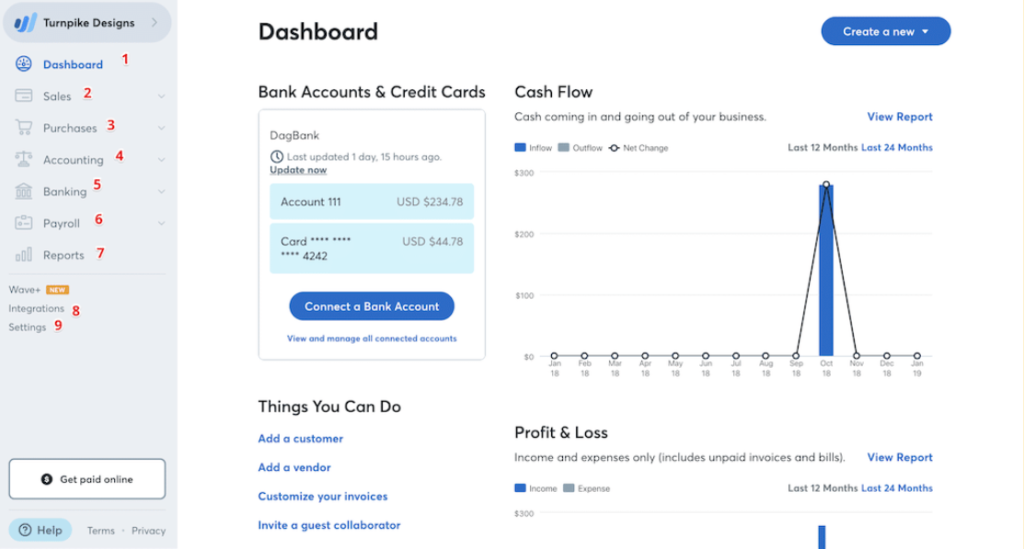
I chose Wave as the best low-cost option for freelancers, consultants, and very small businesses that want basic accounting and invoicing without a monthly software fee. Its Starter plan includes unlimited invoices, estimates, bills, and bookkeeping records, making it useful for businesses that are still establishing their billing process.
Similar to Square, I attended a Wave demo to gain more insight into its day-to-day usability and ease of setup. Wave is a good fit for simple recurring client billing, but businesses should not assume that the free plan includes automatic recurring invoices. Businesses with more complex subscriptions, customer portals, or advanced payment recovery should consider FreshBooks, Zoho Billing, or Stripe Billing instead.
Monthly software fees
- Starter: $0 per month
- Pro: $19 per month or $190 per year when billed annually
Wave’s free Starter plan includes unlimited estimates, invoices, bills, and bookkeeping records. However, recurring invoices are available through the Pro plan or Wave’s online payments feature. Starter supports standard invoices but should not be presented as sufficient for recurring invoices or automatic payment scheduling without one of these upgrades.
Wave payment processing rates
- Pro American Express payments: 3.4% plus no per-transaction fee for the first 10 cumulative monthly transactions; 3.4% plus 60 cents thereafter
- Starter card payments: 2.9% plus 60 cents per transaction
- Starter American Express payments: 3.4% plus 60 cents per transaction
- Pro card payments: 2.9% plus no per-transaction fee for the first 10 cumulative monthly transactions; 2.9% plus 60 cents thereafter
- Recurring billing access: Wave lets businesses switch between manual and automatic recurring invoices and set billing frequencies based on their needs.
- Free bookkeeping tools: Starter includes income and expense tracking, cash flow management, estimates, invoices, and bookkeeping records.
- Online payment collection: Customers can pay invoices by credit card, bank payment, or Apple Pay when online payments are enabled.
- Automated reminders: Pro includes automated late-payment reminders to help reduce manual follow-up.
- Mobile invoicing: Businesses can manage invoices, expenses, and receipts through Wave’s mobile app.
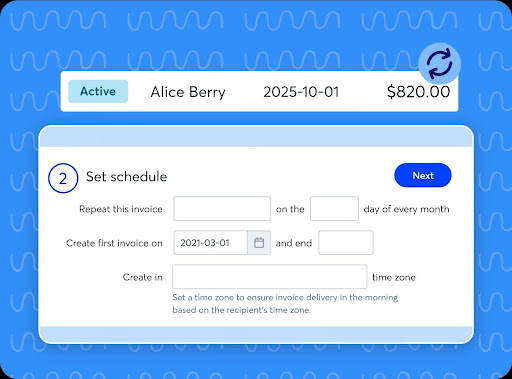
Related: Wave vs QuickBooks
How to choose the best recurring billing software for your small business
Step 1: Identify your billing model
First, determine how your business charges customers. You may need support for:
- Fixed recurring invoices
- Retainers
- Memberships
- Usage-based charges
- Tiered plans
- Installment payments
- Hybrid recurring and one-time billing
Simple recurring invoices may be enough for freelancers and service providers. Memberships, usage-based charges, and tiered plans typically require more advanced subscription tools.
Step 2: Compare total payment costs
Look beyond the monthly software price. Review:
- Monthly software fees
- Card-processing rates
- ACH fees
- Card-on-file fees
- Recurring-billing add-ons
- Instant-deposit fees
- Chargeback and failed-payment fees
A platform with a free plan may still cost more if it charges higher transaction fees or requires paid add-ons for automatic payments.
Step 3: Confirm payment method support
Check whether the provider supports the payment methods your customers prefer, including:
- Credit and debit cards
- ACH or bank debit
- Apple Pay and Google Pay
- Buy now, pay later
- Payment links
- Virtual terminal
- In-person payments
Businesses that accept payments both online and in person may benefit from a platform with built-in point-of-sale or virtual-terminal tools.
Step 4: Check the recurring payment workflow
Confirm whether the platform supports:
- Recurring invoices
- Automatic charges
- Customer authorization
- Saved payment methods
- Payment reminders
- Receipts
- Failed-payment notifications
- Payment-method updates
Pay close attention to the difference between recurring invoices and automatic recurring payments. QuickBooks Online can create and send recurring invoices with an eligible plan, but automatically charging customers requires an active QuickBooks Payments account. Wave’s automatic recurring billing may require the Pro plan or Wave Payments.
Step 5: Review portal and administration tools
Look for tools that make billing easier for both your team and your customers, including:
- Customer invoice access
- Payment-method updates
- Plan changes
- Cancellation
- Refunds and credits
- User roles
- Mobile access
- Transaction history
These features can reduce support requests and give customers more control over their accounts.
Step 6: Match the provider to your business size
Use these recommendations as a starting point:
- Solo operators and freelancers: Wave or FreshBooks
- Accounting-focused small businesses: QuickBooks Online
- Retail and service businesses: Square Invoices
- B2B businesses focused on processing costs: Helcim
- Online and developer-led businesses: Stripe Billing
- Zoho users and growing subscription businesses: Zoho Billing
Frequently asked questions