

Intuit Enterprise Suite (IES) is a cloud-based financial management platform built for mid-market businesses that have outgrown QuickBooks but don’t yet need a full traditional enterprise resource planning (ERP) system. It consolidates multi-entity accounting, payroll, business intelligence, and AI-powered automation into a single system. If you’re managing multiple business entities, drowning in intercompany transactions, or spending hours manually assembling reports for board meetings, IES is the closest thing Intuit has to a serious answer.
That said, I’ll be upfront. The platform has real gaps, particularly for product-based businesses and teams migrating from QuickBooks Desktop Enterprise, which I cover in detail below. In this review, I’ll walk you through exactly what IES does well, where it comes up short, and whether it’s the right fit for where your business is headed.

Pros
- AI-powered payroll agent collects employee hours via SMS, cutting hours of manual back-and-forth
- Passive AI surfaces financial anomalies and root causes in real time, before month-end close
- Multi-entity consolidated reporting with drill-through to line-item detail across all entities
- AI-generated executive summaries turn monthly financial data into board-ready management reports
- Migration from QBO to IES takes days only, not the months a typical ERP implementation requires
Cons
- Single-entity pricing starts around $7,800 to $8,000/year based on third-party estimates; multi-entity pricing rises sharply
- Product-based businesses face real inventory gaps with no serial/lot tracking, barcode scanning, or assembly builds
- Intercompany features are fully gated behind foundational setup; incomplete configuration disables them entirely
- Eligibility rules gate the payroll agent, and not every IES account gets access automatically
What you should consider before buying IES
| Pricing | Intuit doesn’t publish IES pricing publicly. Based on my research across multiple third-party sources, single-entity businesses should budget approximately $7,800 to $8,000 per year as a starting estimate. Multi-entity organizations are typically looking at $12,000–$15,000/year or more. Both figures sit well below traditional ERPs like NetSuite (~$25,000–$30,000/year for comparable businesses). If you work with a ProAdvisor accountant, ask about preferred pricing because Intuit offers up to 60% off for clients referred through an accountant partner. Pricing is ultimately custom and quote-based. Contact Intuit directly for an accurate number. |
|---|---|
| Standout features | • Payroll agent (SMS-based employee time collection) • Passive AI financial anomaly detection • Multi-entity consolidated reporting with drill-through • Dynamic intercompany expense allocations • Custom KPI builder • AI-generated management report executive summaries • PDF-based bank reconciliation • KPI dashboards with real-time intraday tracking |
| Scalability | Built for mid-market businesses managing 2–200+ entities and growing employee headcount. W2 processing has been scaled from 50 to 200+ entities over time. • It is a strong fit for service-based businesses; • For product-based businesses and manufacturers, scalability hits a ceiling early because IES lacks serial or lot tracking, bin management, barcode workflows, and assembly builds, which means businesses that depend on those capabilities will outgrow what IES can handle on the inventory side, regardless of how much the rest of the platform scales. |
| Ease of use | QBO users will adapt quickly given the shared interface. Despite that familiarity, IES is still an ERP-class system — initial configuration of intercompany features is complex enough that I’d recommend having a CPA or ERP-experienced finance professional handle setup. Day-to-day use, once configured, is manageable for most finance teams. |
| AI capabilities | IES’s AI features improve specific workflows meaningfully, but don’t overhaul how a finance team operates day to day. The payroll agent is the clearest win — it eliminates a recurring coordination burden most payroll clerks absorb every pay period. Anomaly detection and AI-generated executive summaries are genuinely useful in the moments they apply. Outside those, the remaining AI features are present and functional without being the kind of thing you’d notice missing if they were gone. |
| AI self-sufficiency? | Partially. Many finance teams already use third-party AI alongside their accounting software, and IES doesn’t eliminate that habit entirely. But where IES has an edge is proximity. Its AI works on live data already inside the platform, without exporting anything. That embedded access to real-time financial data is what third-party AI can’t replicate. |
| ? – This refers to how much of your AI needs IES can cover without leaning on external tools like ChatGPT or Claude. |
What businesses is Intuit Enterprise Suite good for
- Holding companies and multi-subsidiary operators: I’d point businesses running three or more legal entities toward IES before I’d point them anywhere else at this price point. The consolidated reporting, intercompany eliminations, and dynamic allocations replace what most of these businesses are currently doing manually across multiple QBO accounts — and the time savings compound quickly as entity count grows.
- Accounting firms serving mid-market clients: In my view, the management reports and custom KPI features make IES worth a serious look for firms that regularly deliver financial packages to boards or investors. The AI-generated executive summary alone cuts a step that senior accountants are currently doing by hand each month, and that time either tightens the engagement margin or gets reinvested in advisory work.
- Service-based businesses caught between QBO and a full ERP: I’d describe this as IES’s clearest sweet spot. Construction firms, professional services companies, and project-based operators that need more than QBO Advanced but can’t justify NetSuite’s cost or implementation timeline will find that IES closes most of the gap without requiring a rip-and-replace migration.
- Finance teams managing high-touch hourly payroll: The payroll agent addresses a specific, well-defined problem. I’d recommend it most confidently to businesses where the payroll clerk spends significant time each period chasing hours, tips, and reimbursements from a distributed hourly workforce. That coordination overhead is where the agent delivers its clearest ROI.
- Controllers and CFOs managing multiple entities without real-time visibility: I’d specifically flag IES’s passive AI for finance leaders who are currently finding discrepancies at close that could have been caught weeks earlier. Running reports and waiting for the month-end to surface problems is a workflow IES is directly designed to replace.
My verdict
IES earns its place in the market by solving a real problem: there’s a meaningful gap between what QuickBooks products can handle and what a full ERP demands, and most mid-market businesses fall squarely in that gap. The multi-entity consolidation, intercompany workflows, and AI-assisted reporting address the exact friction points that growing businesses hit when QBO or QBE stops being enough without the implementation cost or organizational disruption of NetSuite or SAP.
The limitations are real but specific. Manufacturers, distributors, and product-based businesses will hit the inventory ceiling fast. Intercompany setup is more complex than Intuit’s marketing implies. And opaque pricing makes it harder to budget early than it should be.
On balance, IES is a strong buy for service-based mid-market businesses managing multiple entities and a clear pass for anyone whose operations depend on inventory depth. The right business will find it genuinely useful. The wrong business will find the gaps frustrating enough to keep looking.
How Intuit Enterprise Suite compares to other platforms
Software | Pricing visibility | Multi-entity strength | Inventory depth | Starting price | AI features |
|---|---|---|---|---|---|
Quote-based; transparent plan page, limited public numbers | Strong; built for multi-entity reporting and eliminations | Moderate; less proven than ERP inventory leaders | Strong; AI-native positioning is a key differentiator | Strong; AI-native positioning is a key differentiator | |
Public starting price available | Moderate; supports multiple companies, less unified than ERP | Strong; Advanced Inventory is a major strength | Limited; more automation than AI-led analysis | Limited; more automation than AI-led analysis | |
Quote-based; pricing not publicly standardized | Strong; designed for complex multi-entity operations | Deep; supports advanced, multi-location inventory workflows | Strong; AI is embedded across the suite | Strong; AI is embedded across the suite | |
Usually partner-quoted; public estimates vary | Moderate to strong; supports subsidiaries, often partner-led | Strong; core ERP inventory is a central module | Limited native AI; ecosystem tools extend it | Limited native AI; ecosystem tools extend it |
Ready to try Intuit Enterprise Suite? Visit Intuit now to know more. You may also check out TechnologyAdvice’s list of the best accounting software for more options.
What Intuit Enterprise Suite can do for your business
I think IES’s strongest features cluster around four areas where growing businesses consistently hit ceilings with standard QBO: multi-entity management, AI-powered reporting, payroll automation, and business intelligence. Here’s what each actually delivers.
Multi-entity management and consolidated reporting
For businesses managing multiple legal entities — subsidiaries, acquisitions, franchises, joint ventures — IES does something standard QuickBooks can’t. It gives you a single consolidated view across all entities without requiring manual report stitching in Excel. The consolidated view sits above the parent company level, meaning finance teams can:
- Roll up transactions across every entity in one place
- Drill down to line-item detail from a consolidated report
- View intercompany activity without toggling between separate accounts
- Grant access to more users across the portfolio without blanket admin permissions
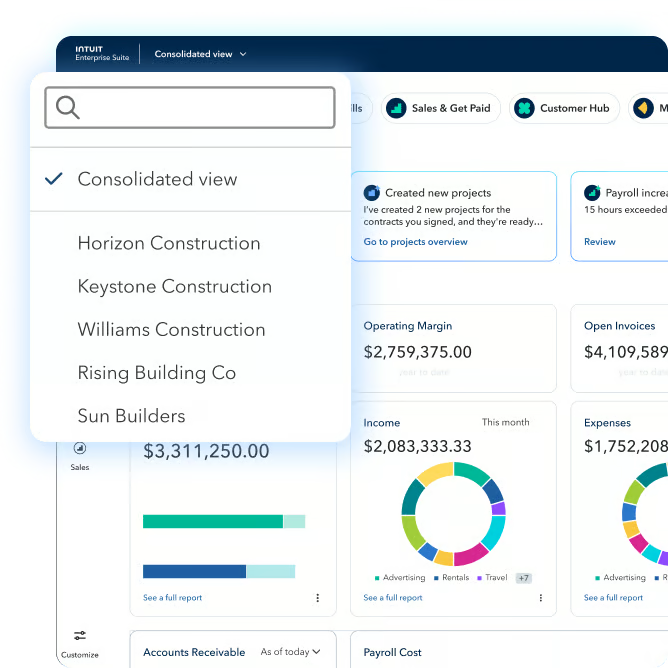
The intercompany workflows cover the most common pain points for multi-entity operators. Expense allocations across entities happen via bills, intercompany journal entries are available natively, and intercompany transactions are automatically eliminated in consolidated reports.
For high-volume scenarios, dynamic allocations are a meaningful time-saver. Instead of opening 30 individual bills — one per day — and allocating each across five entities separately, you grab the vendor’s total monthly expense and split it across businesses in a single action. The trade-off is granularity: dynamic allocations don’t show line-item detail, so if you need a day-by-day breakdown of what made up that total, you’ll fall back on bill-level allocation.
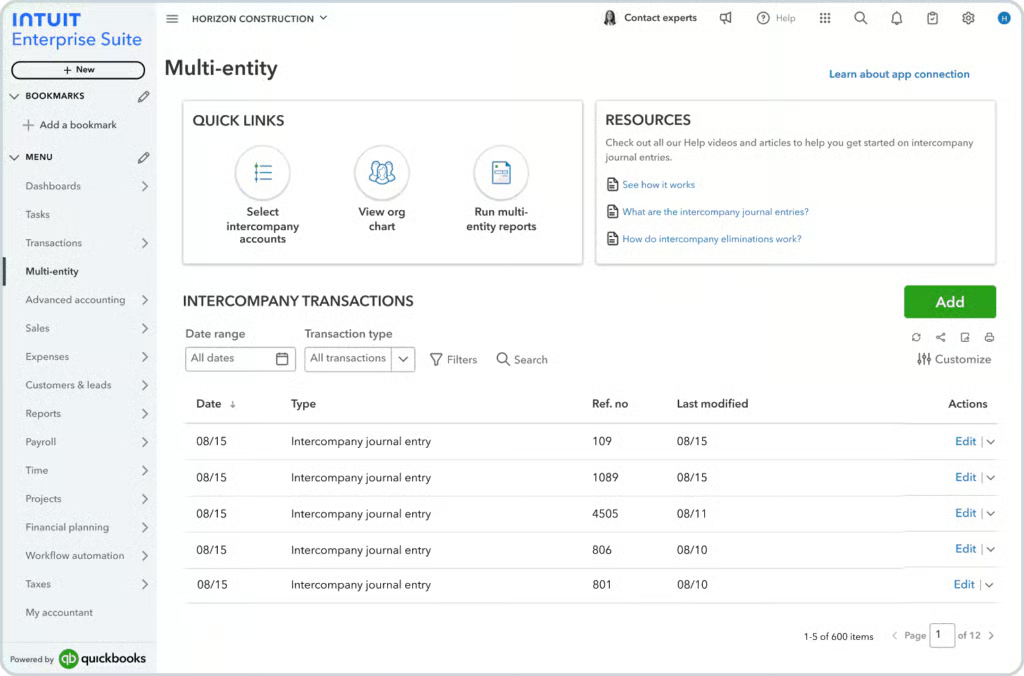
The intercompany sales workflow has also changed based on customer feedback. Previously, when Company A sold to Company B, an invoice was created and auto-posted. Now the invoice is held in unposted transactions until Company B’s bill approver reviews and approves the corresponding bill. I consider this a meaningful improvement for multi-entity businesses that need a cleaner audit trail and better checks and balances between entities.
Passive AI: Financial anomaly detection and reporting
Passive AI is how IES describes automation that runs without you initiating it. The system sweeps through financial data continuously and surfaces insights each time you open a report, rather than waiting for you to go looking.
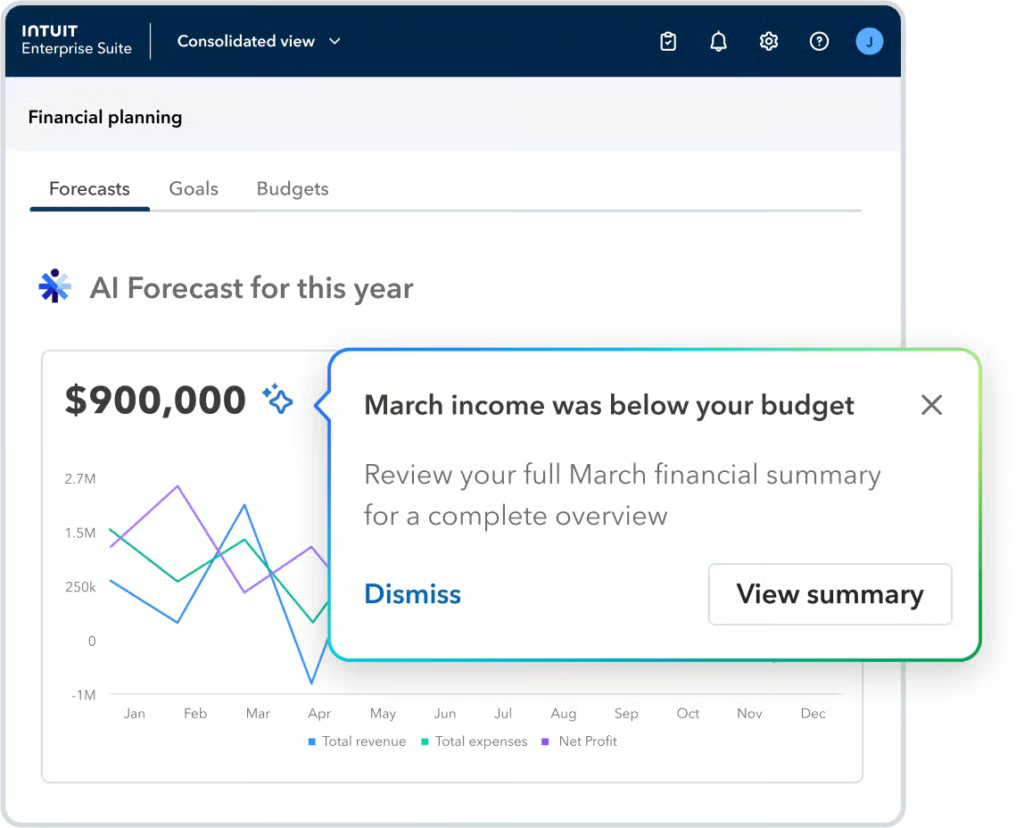
In practice, this shows up in the profit and loss (P&L) report as visual markers — Intuit calls them “little stars” — that flag changes in income or expenses since the last time you ran the report. Clicking a marker opens a breakdown that includes:
- A plain-language summary of what changed
- Root causes the AI identified (a new client driving revenue up, a vendor billing twice, driving costs up)
- A drill-through to the relevant line items for verification
I find the real value here isn’t the AI itself — it’s the timing. In a standard QBO workflow, you might not catch a double-billed vendor until the month-end close. With IES’s passive AI running continuously, the flag appears the next time you open the report, not weeks later when the damage is harder to reverse.
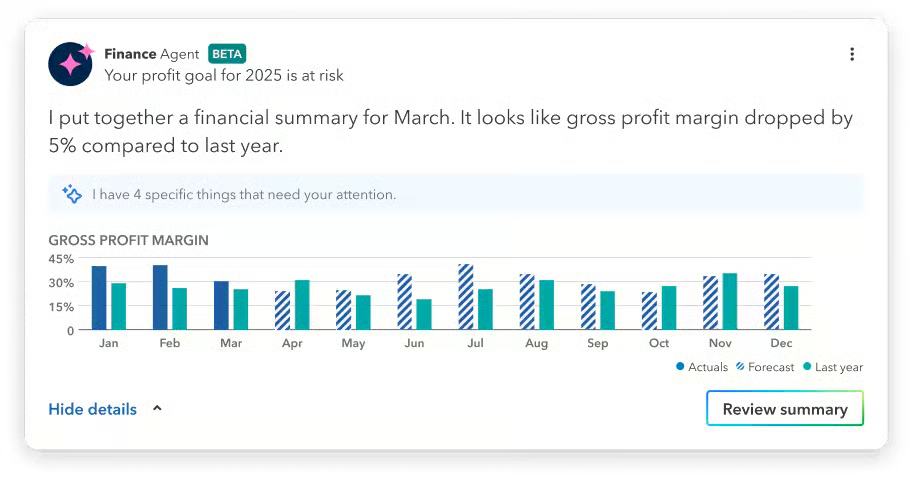
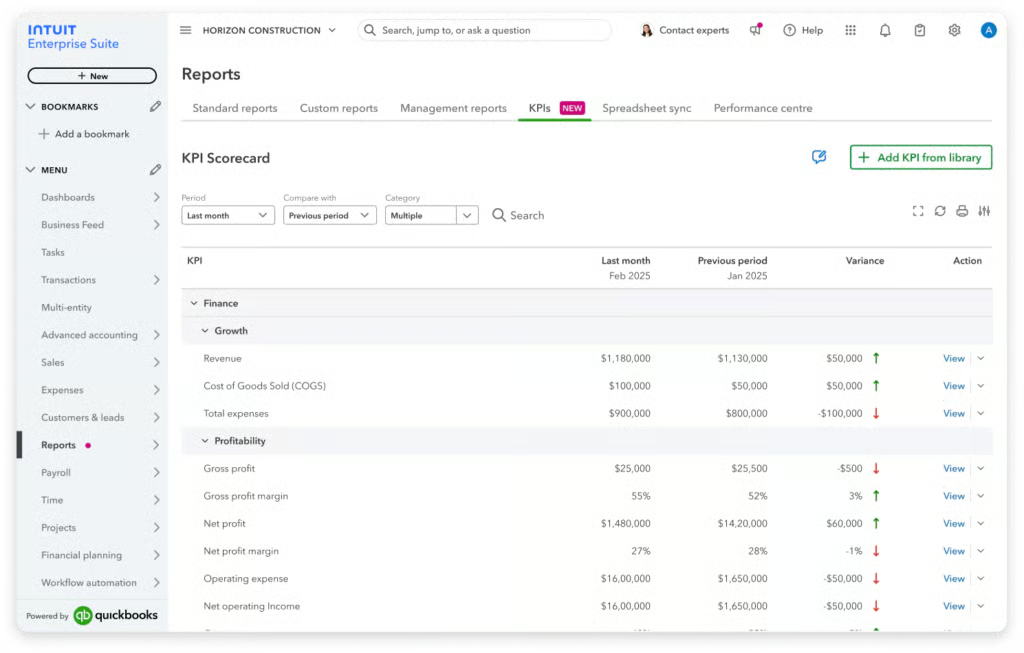
KPI dashboards extend this into forward-looking visibility. You can configure dashboards around whichever metrics matter most — revenue, labor costs, project margins — and the system tracks whether those KPIs are trending up or down in real time, including within a single business day.
Active AI: PDF bank reconciliation and payroll agent
Where passive AI works without user input, active AI refers to workflows you initiate, and the system then executes. Two stand out for practical time savings.
PDF bank reconciliation lets you upload a bank statement as a PDF when a direct bank feed isn’t available or isn’t reliable. The system analyzes the transactions, matches them, and completes the reconciliation — a useful fallback that removes manual entry from the equation.
The payroll agent is the more significant feature. Payroll data collection at mid-market scale is genuinely tedious: chasing employees for hours, overtime, tips, reimbursements, and time-off requests before every pay run. The payroll agent handles the collection step by contacting employees directly via SMS or the IES workforce app, asking for the data in natural language. Employees reply conversationally; the agent converts responses into structured payroll data.
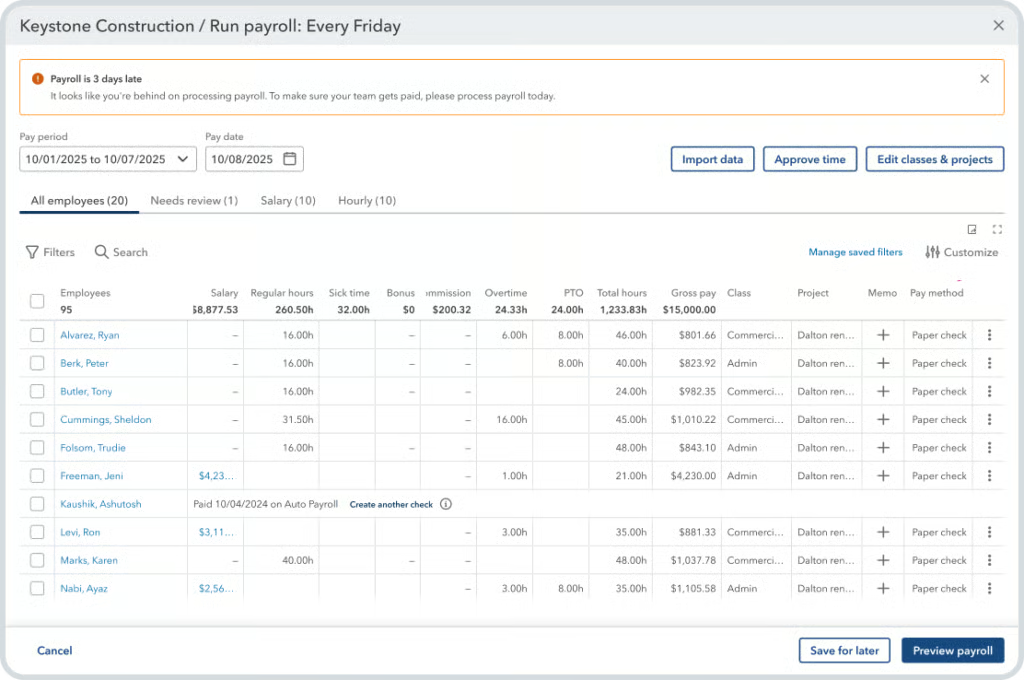
The employer sets up a collection plan during onboarding that specifies:
- Pay types and pay cadence
- Exactly what data the agent is and isn’t permitted to request
- The preferred collection method (SMS or workforce app)
Once collection is complete, the employer gets a status check that includes gross pay estimates, which checking account will be debited, total payroll hours for the period, and a comparison to the prior pay period’s costs. The admin can then approve payroll by logging into the platform or simply replying “yes” via text.
The agent also flags anomalies like an employee submitting overtime for the first time for admin review before the pay run, and maintains a full activity log of every interaction during the collection cycle. I think that log matters more than it sounds: for compliance and audit purposes, having a timestamped record of every employee interaction is the kind of documentation that protects businesses during payroll disputes.
Business intelligence: Custom KPIs and management reports
Two BI features stand out for finance teams that currently rely on Excel for reporting work they wish they could do inside their accounting system.
Custom KPI builder lets users define their own performance metrics with custom formulas, saved alongside a catalog of nearly 100 predefined KPIs. Before this feature, exporting reports to Excel to apply custom formulas was the default workaround for metrics that the product couldn’t calculate natively. I’d argue this matters more than it sounds — every time a finance team exports data to apply a custom formula, they introduce a version-control risk and a reconciliation burden that grows as the business adds entities. Keeping that work inside IES keeps the numbers consistent.
Management reports address the board package problem directly. Once you’ve built out the foundational elements — KPIs, cash flow charts, profitability charts — IES packages them into a branded, presentation-ready document. The AI-generated executive summary analyzes the data and surfaces key findings at the top. The full document is editable, so finance teams can add context or insert additional charts as needed.
I see this as genuinely useful for finance teams that currently:
- Pull financial data from multiple reports
- Reformat everything in PowerPoint or Word for a board meeting
- Write an executive summary from scratch each month
IES compresses that into a review-and-edit workflow. Monthly, quarterly, and annual formats are available.
Bill pay enhancements
Two bill pay additions stand out for accounts payable teams managing volume.
The payment release approval workflow inserts a required approval step between the AP team approving a bill and the payment actually going out. Before this, an AP person could approve and send in one action. Now, a designated reviewer sees the bill before the check is cut or the electronic payment processes. For businesses that need a formal separation of duties in their AP process — and most growing businesses should — this is a practical internal control that auditors and CFOs will appreciate.
Instant pay allows same-business-day vendor payment for bills processed before 5:00 p.m., at a 1% fee. I wouldn’t use it as a default payment method, but for missed due dates or vendor relationships where speed matters, the 1% fee is usually cheaper than a late payment penalty or a strained vendor relationship.
Usability and ease of use
I want to be direct about something upfront. Despite IES’s familiar interface, this is still an ERP-class system. Initial configuration, particularly for intercompany features, is complex enough that I’d strongly recommend having a CPA or someone with ERP implementation experience handle setup. The interface feels like QBO, but the configuration decisions underneath it carry real consequences if made incorrectly.
With that said, usability in IES splits clearly based on where you’re coming from.
- If your team is on QBO, the transition is as low-friction as an ERP migration gets. IES is built on QBO’s infrastructure, and while the navigation has evolved, key tasks now sit in an icon-based layout across the top rather than the older left-hand menu. Teams that know QBO will orient themselves quickly.
- If your team is on QuickBooks Desktop Enterprise, the transition is meaningfully harder. Desktop Enterprise has inventory functionality that IES doesn’t replicate, including:
- Sales orders with backorder control and fulfillment worksheets
- Serial and lot number tracking with expiration dates
- Barcode scanning and mobile pick, pack, ship workflows
- Bin and site management with inventory transfers
- Assembly builds with editable bills of materials
- For new users or teams coming from non-Intuit systems, the learning curve is moderate. The intercompany configuration — account mapping, elimination accounts, user permissions — requires a clear understanding of how entities relate to each other. An incorrect mapping at this stage blocks intercompany features from working entirely. Intuit provides a dedicated customer success manager during onboarding and offers training plans, which is helpful, but the configuration decisions still require informed judgment from whoever is running the setup.
- Once the platform is configured, day-to-day use is where IES earns its keep.
- The payroll agent handles coordination that used to require multiple back-and-forth exchanges.
- Passive AI surfaces issues without manual report runs.
- Dynamic allocations handle bulk intercompany expenses in a single action.
- Bill pay approvals and instant pay are operationally simple.
Related read:What Teams Need in a Modern Accounting Tech Stack
Frequently asked questions (FAQs)
Who is Intuit Enterprise Suite best for?
IES is best for mid-market, service-based businesses managing multiple legal entities that have outgrown QBO but don’t need a full ERP. Strong fits include construction and professional services. Product-based businesses and manufacturers will find the inventory depth insufficient.
How much does Intuit Enterprise Suite cost?
Intuit doesn’t publish pricing. Based on third-party estimates, single-entity businesses should budget around $7,800–$8,000/year; multi-entity organizations typically start at $12,000–$15,000/year or more. ProAdvisor preferred pricing can offer up to 60% off. Contact Intuit directly for an accurate quote.
Is Intuit Enterprise Suite the same as QuickBooks?
No. IES is built on QBO’s infrastructure but is a separate product — Intuit’s step beyond both QBO Advanced and QuickBooks Desktop Enterprise. It adds multi-entity management, intercompany workflows, and AI automation that neither of the QuickBooks products supports natively.
What is the payroll agent, and how does it work?
The payroll agent contacts employees via SMS to collect hours, overtime, tips, and reimbursements in natural language. Employers configure a collection plan specifying what data to gather, and the agent flags anomalies before the pay run. Admins can approve payroll by replying “yes” via text. Access is subject to eligibility rules.
What are the main limitations of Intuit Enterprise Suite?
IES lacks the inventory depth of QuickBooks Desktop Enterprise — no serial/lot tracking, barcode workflows, or assembly builds. Dynamic allocations don’t provide line-item detail. Some AI features remain in development. And pricing rises sharply for multi-entity organizations.
How does Intuit Enterprise Suite compare to NetSuite?
IES costs significantly less — roughly $12,000–$15,000/year versus NetSuite’s $25,000–$30,000/year starting range — and deploys in days rather than months. NetSuite remains stronger for global consolidation, heavy manufacturing, and deep customization. For service-based mid-market businesses, IES is the closer fit.
Does Intuit Enterprise Suite scale as the business grows?
Yes, within its target segment. W2 processing has been scaled from 50 to 200+ entities, and IES supports up to 500 users across entities. Scaling limits appear mainly in inventory and manufacturing depth, which don’t improve meaningfully as the business grows.
Is Intuit Enterprise Suite hard to implement?
Compared to traditional ERPs, no. Intuit offers guided onboarding with a dedicated customer success manager, and QBO users will find the interface familiar. The real complexity is in intercompany configuration — account mapping and elimination accounts must be correctly set up across all companies before intercompany features work. I’d involve a CPA or an IES partner for that step.