Managing ecommerce returns is now a core part of running a profitable online store. The National Retail Federation estimates that $890 billion worth of retail goods were returned in 2024, and nearly 24.5% of online sales ended up coming back. That level of volume makes returns a margin risk, especially during peak seasons when customer expectations and return rates both rise.
In this guide, I walk through the operational playbooks, policy decisions, grading workflows, and KPIs that can reduce return volume and help teams recover more value from every item. You’ll also see how to build returns automation, tighten product description page accuracy, and align CX, operations, finance, and merchandising so the whole workflow runs smoothly.
Whether you’re a small brand or an enterprise retailer, the steps below give you a complete, practical framework to control costs and improve customer experience.
Key takeaways
- Returns management involves a full workflow that affects customer satisfaction, warehouse efficiency, and margin.
- Clear Return Merchandise Authorization (RMA), consistent grading, and automated decisions speed up refunds and avoid warehouse bottlenecks.
- Product description pages (PDP) improvements — such as fit notes, real images, “what’s included” — directly reduce preventable returns.
- Policy choices like free returns, restocking fees, and return windows have measurable margin impact.
- Tracking key performance indicators such as return rate, preventable return rate, and resale recovery shows where your team is losing value.
- Tools like Loop, ReturnLogic, and ReverseLogix help automate approvals, routing, analytics, and restocking.
- Seasonal adjustments — especially during holiday spikes — can prevent January overload and protect revenue.
What ecommerce returns management covers
Ecommerce returns management is the end-to-end workflow for handling items that customers send back. It covers how shoppers initiate a return, how you approve or deny the request, generate labels, receive and inspect the item, decide whether it can be resold or refurbished, and issue a refund, exchange, or store credit.
Statista estimates that around 24.5% of roughly $1.5 trillion in US online sales in 2024 were returned, which shows how much heavier the returns burden is for ecommerce compared with in-store sales. Customer expectations and retailer priorities are also shifting fast. According to the NRF report, 76% of consumers say free returns are a key factor in deciding where to shop, and more than two-thirds of retailers say they are prioritizing upgrades to their returns capabilities in the next six months.
At the same time, 93% of retailers say return fraud and other abusive behavior are a significant issue for their business, which makes returns policy and fraud controls just as important as convenience.
In practical terms, I look at ecommerce returns management as four connected pieces:
- Policy design: What customers can return, on what timeline, and on what terms
- Reverse logistics: How items move back through carriers, hubs, and warehouses
- Inspection and routing: How products are graded and where they go next
- Outcomes and recovery: How you handle refunds, exchanges, store credit, and value recovery from resellable or refurbished stock
Ecommerce returns management playbook
A good returns program is not just a policy on a web page. It is a repeatable workflow that every team follows, so customers get quick answers, the warehouse knows exactly what to do with each package, and finance can see the true cost of returns. That is what this playbook is designed to lay out: clear steps from the moment a shopper asks to send something back through to refund, exchange, or resale.
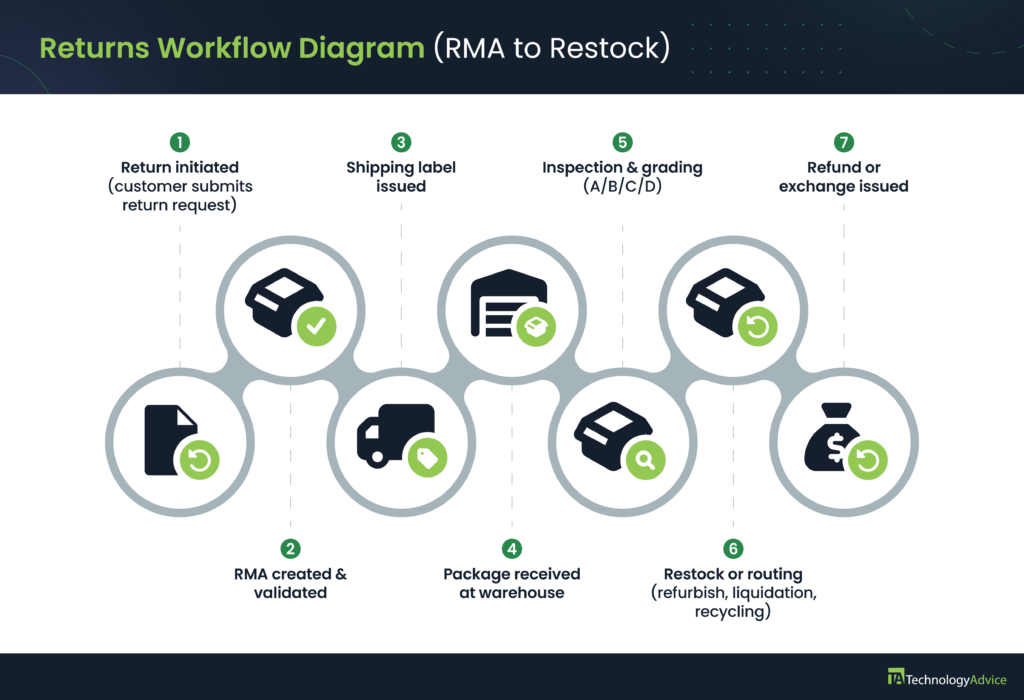
Standard operating procedure from RMA to restock
Use this SOP as your baseline workflow. You can adjust specific steps by product category and tool stack.
Step 1: Customer initiates return
The shopper starts a return through your portal, chat, or a help form. Your system creates a Return Merchandise Authorization (RMA) record, which is the internal ID you use to track the return. Automated checks verify policy rules such as order date, product eligibility, and basic fraud signals.
Why this matters: Customers expect this to be fast and smooth. In the NRF and Happy Returns 2024 report, 76% of consumers said free and easy returns are a key factor in deciding where to shop, so any friction at this first step can send them to a competitor.
Step 2: Make a decision to approve, deny, or offer an alternative
Apply fraud checks here. In the same NRF research, 93% of retailers said returns fraud and other exploitative behavior are a significant problem, so this gate is where you protect margin without making honest customers feel punished. At this step, you can choose from the following:
- Approve instantly when the order, product, and timing meet policy rules.
- Deny when the request is clearly outside your window or category rules.
- Offer alternatives such as store credit or a replacement if the stated reason points to a genuine defect.
I recommend setting up exception rules for VIP customers and high-value orders, so support does not have to debate each case. For example, “auto-approve returns for customers with five or more past orders” or “send to manual review for orders over $500.” This way, consistency is carried out quickly in your decisions.
Step 3: Create shipping label and packaging instructions
Approved RMAs trigger a prepaid label and clear packing instructions. Include simple visuals or bullet checklists for fragile or complex items so they are repacked correctly. This is also where your system can decide whether to use a returnless refund for low-value items.
Why this matters: A large share of total return cost comes from shipping and handling. Tightening this step reduces damage in transit and keeps more items in a resale-ready state.
Step 4: Item received at warehouse or return center
At this step, the returned item has been shipped by the customer and received by your warehouse or return center. The warehouse or 3PL scans the RMA as soon as the package arrives. It should confirm that it is the expected SKU and quantity. The item is then routed to the appropriate inspection lane based on category (for example, apparel vs electronics).
Why this matters: Keeping this scan step mandatory prevents “mystery boxes” from floating around the warehouse and gives customer service real-time visibility for “where is my refund” questions.
Step 5: Inspection and grading of returned merchandise
Create a simple grading framework so every associate makes the same call:
- Grade A: Resale-ready. Looks new, works properly, and has packaging in good condition.
- Grade B: Refurbish or repackage. Minor cosmetic issues or packaging damage, but product is fully functional.
- Grade C: Secondary channel. Functional but not fit for full-price sale; suitable for outlets, marketplaces, or bulk liquidation.
- Grade D: Disposal or recycling. Cannot be safely resold or repaired at a reasonable cost.
Once grading is consistent, you can track how many units move through each bucket and where you are losing recovery value.
Step 6: Restock or route
Based on the grading framework, you can do the following:
- Grade A items go back into saleable inventory and your WMS (warehouse management system) updates stock in real time.
- Grade B and C items follow predefined refurbishment or liquidation workflows.
- Grade D items are logged and moved into the appropriate waste or recycling process.
TIP: Have reasons for return summarized by SKU and shared with merchandising or the appropriate team. If you see a spike in “color not as expected” or “fit is too small,” that is usually a product page issue, not a warehouse problem.
Step 7: Refund, exchange, or credit
Refunds are issued automatically when inspection is complete and the item is graded. Exchanges are created for size, color, or replacement requests, so revenue is preserved rather than fully refunded. Store credit can be offered as a faster option, especially for loyal customers.
TIP: If your warehouse team gets overwhelmed and bottlenecks, split inbound replenishment and returns into separate receiving lines. That simple change keeps new inventory flowing without forcing returns to wait days for inspection.
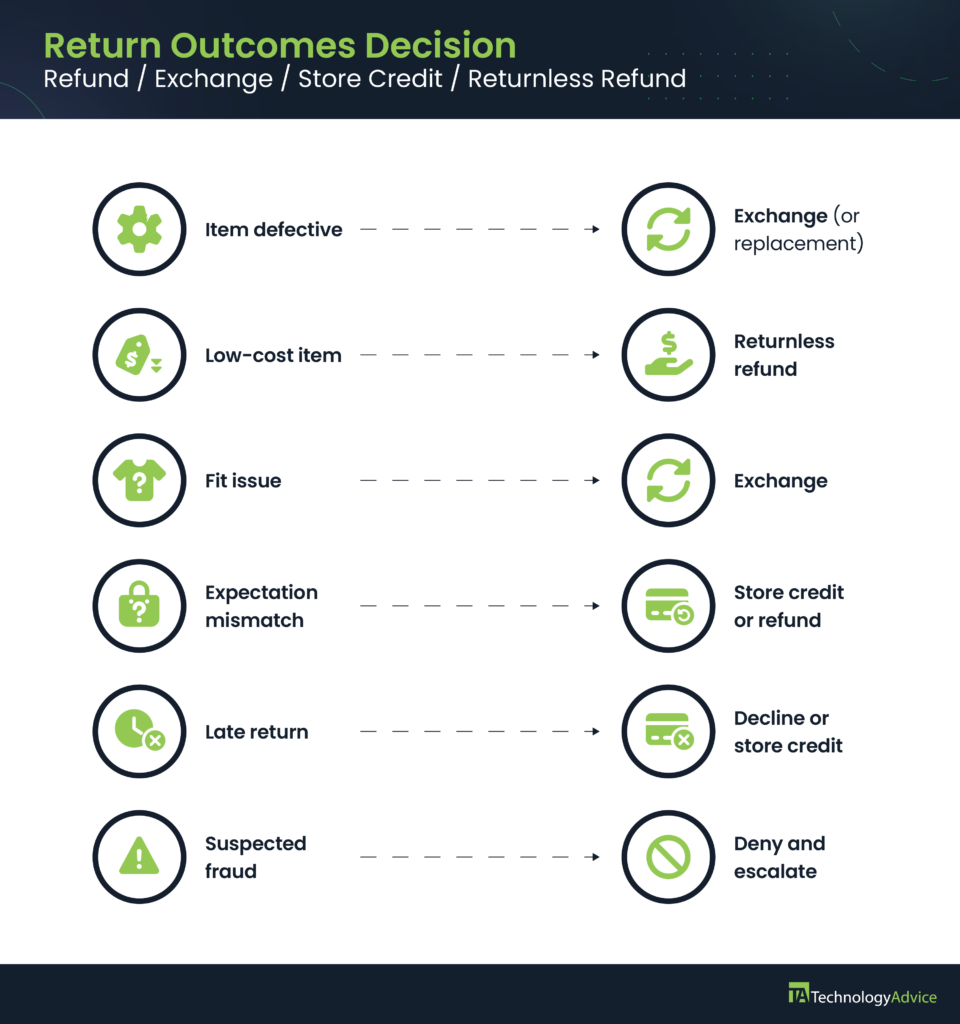
Decision framework: Refund, exchange, store credit, or returnless refund
The goal of this framework is to standardize outcomes so customer service isn’t improvising, and your returns software can apply clear rules. I designed this version around the patterns I see in real ecommerce operations, where most return decisions fall into predictable categories.
How to choose the right return outcome
| Scenario | What to issue | Why this outcome makes sense | Operational notes |
|---|---|---|---|
| Item arrived damaged or defective | Exchange or replacement first; refund only if unavailable | Keeps the sale and reassures the customer you stand behind product quality | Require photo upload to speed approval and reduce unnecessary returns |
| Low-cost or low-resale-value product | Returnless refund | Shipping and labor usually exceed resale value | Set a clear dollar cutoff using true cost data (often $15-$40) |
| Fit or sizing issue (apparel, footwear) | Exchange with size guidance | Retains the order and reduces repeat returns | Pair the exchange step with size charts or customer review data |
| Expectation mismatch (color, material, features) | Store credit or refund, depending on customer value | Prevents frustration while giving your team a clear signal to fix PDP content | Flag SKUs for merchandising to update photos, descriptions, or videos |
| Expired return window | Decline or offer store credit for VIPs | Protects margin while giving flexibility in high-value relationships | Define “VIP” by order count, spend, or loyalty tier |
| Suspected fraud or abusive pattern | Deny and escalate to fraud review | 93% of retailers say returns fraud is a major issue, so this protects against loss | Build simple criteria: excessive high-value returns, item swaps, tags removed |
| Incorrect item shipped by retailer | Exchange (correct item) or refund | Retailer error should not cost the customer time or money | Use this signal to trigger a pick/pack accuracy audit |
How to implement this framework
To make this system work at scale, I recommend the following:
- Add these rules directly into your returns portal so decisions auto-apply.
- Train customer service to follow the same decision points so outcomes stay consistent.
- Use the “why” column internally to explain to warehouse and finance teams why each outcome is chosen.
- Review outcomes quarterly and adjust thresholds based on real cost data.
Returns strategies by ecommerce business size
Return management looks very different for a five-person startup versus a multi-warehouse retailer. Yet most guides treat every business as if they’re operating with the same budget, tools, and staff. I’ve worked with retailers across all stages, and the most effective approach is to align your returns strategy with your operational maturity. Here’s what that looks like in practice.
Early stage brands: Manual workflows and low-cost tactics
Smaller brands typically don’t need complex automation yet; they need clarity, speed, and consistency.
What works best at this stage:
- A simple return form or a lightweight portal that lets customers request returns without friction.
- Manual label creation using USPS, UPS, or FedEx is cost-effective and easy to control.
- A shared spreadsheet that tracks return reasons, SKU trends, and refund status.
- Basic size or usage notes added directly to product pages in response to common complaints.
- One dedicated owner for returns so customers get quick answers.
TIP: Early-stage brands often overspend on automation before they need it. The threshold I use is volume: when you hit 150 to 200 returns per month, manual reviews start slowing down refunds and tying up support staff.
Scaling brands: When to add automation and tools
Once your return volume grows, manual workflows create delays and cost overruns. This is when automation delivers meaningful value.
What to introduce at this stage:
- A dedicated returns portal, such as Loop, ReturnLogic, or Happy Returns, to automate RMA creation, approvals, and routing.
- Automated shipping label generation tied to return rules (for example, auto-approve returns within 30 days unless marked for fraud review).
- Integration between your returns tool and your WMS so inventory updates immediately after grading.
- Workflows that encourage exchanges instead of refunds — helpful for apparel and recurring-purchase categories.
- Analytics that surface preventable return reasons so merchandising teams can update product pages faster.
TIP: If you’re seeing repeat returns on certain SKUs, tools with built-in analytics can help pinpoint whether the issue is sizing, imagery, or inaccurate product details.
If you’re on Shopify, you can manage a lot of this with native apps for exchanges, return labels, and automated RMA rules. Many POS providers also sync with Shopify to keep in-store and online returns in one system.
Enterprise ecommerce: Optimizing networks, 3PLs, and carrier contracts
Enterprise teams deal with massive volume, so the cost of each return matters. At this level, efficiency is driven by infrastructure and agreements, not just software.
What high-volume retailers should prioritize:
- Distributed return centers to reduce carrier distance and lower inbound shipping costs.
- Negotiated carrier contracts that include discounted return parcel rates.
- Grade-based routing inside the warehouse so resale-ready items move back to inventory the same day.
- Collaboration with 3PL partners to standardize inspection steps and reduce processing time.
- Specialized workflows for high-risk categories like electronics, where refurbishment and secondary marketplaces significantly improve recovery value.
TIP: Large retailers often recover substantial margin by shortening the time from arrival to resale. Every extra day an item sits unprocessed increases the chance it becomes unsellable.
Why customers return products and how to fix root causes before purchase
Retailers already know why customers return products — fit issues, damaged packaging, “not as expected,” and so on. What’s usually missing is the next step: turning those reasons into product page improvements that lower returns before they happen. That’s where most ecommerce teams leave money on the table.
Mapping return reasons to PDP improvements
Here is a practical mapping you can use to upgrade product pages or PDPs (product description pages) based on the most common return drivers:
| Return Reason | What to fix on the PDP | Why it works |
|---|---|---|
| Wrong size or poor fit | Add detailed size charts, model measurements, fit notes (“runs small”), and customer review attributes | Helps shoppers self-select the right size, reducing bracketing |
| Color or material mismatch | Upload daylight photos, close-ups, and fabric or material descriptions | Lowers expectation gaps caused by inaccurate or staged imagery |
| Missing features or accessories | Add a “What’s included” and “What’s not included” section | Eliminates returns where customers thought something came in the box |
| Incorrect item shipped | Tighten SKU labeling and pick/pack instructions | Reduces warehouse errors — not technically PDP-related, but tracked through return reasons |
| Quality concerns | Add transparency about materials, testing, or tolerances | Helps buyers understand durability and build expectations accurately |
Any SKU with a return rate above 15 to 20% deserves a PDP audit. High return rates often drop quickly once the page includes accurate sizing, real-life photos, or clearer product expectations.
Size, fit, and usage guidance that reduces bracketing and misorders
Bracketing — ordering multiple sizes or colors with the intention of returning most of them — is common in apparel and footwear. You won’t eliminate it completely, but you can reduce it.
Effective tactics include:
- Adding “fit finder” tools or simple fit guidance (“best for narrow feet,” “stretch fabric,” “oversized silhouette”).
- Using customer reviews tagged with fit attributes like “runs small” or “true to size.”
- Sharing model specs when using lifestyle photography (“model is 5’10” wearing a medium”).
- Explaining intended use cases (for example, “designed for high-impact workouts” or “best for indoor usage only”).
These additions help buyers choose the right item the first time, which reduces both returns and exchange volume.
Image, video and context improvements that cut expectation gaps
A significant portion of returns in categories like furniture, home goods, and electronics comes from expectation mismatches. Improving the visual context of a product prevents many of these.
What to add to your PDPs:
- Natural-light photos instead of heavily edited studio shots.
- 360-degree views or product walkthrough videos.
- Photos that show scale — for example, furniture shown in a standard-sized room.
- Close-ups of ports, textures, stitching, or materials for electronics and apparel.
- Comparison charts that help shoppers pick the correct variant.
If you see “not what I expected” as a top return reason, your images — not your product — are the problem. Updating photos and adding a short user demo video often has a measurable impact within a few weeks.
Crafting returns policies that protect margin
Return policies shape customer expectations, but they also determine how much margin you lose when products come back. Most competitor guides stop at saying “write a clear policy.” What actually matters is understanding the financial impact behind each policy choice and adjusting the rules so the business protects profitability without creating friction for customers.
How policy choices affect net margin
Every return eats into profit through shipping, labor, and lost resale value. Here’s a simple example I use when evaluating policies:
Example: A $60 order with a 55% gross margin
- Gross profit: $33
- Outbound shipping: $6-$10 dollars
- Return shipping: $6-$12 dollars
- Labor to receive and inspect: $2-$5 dollars
- Packaging loss or damage: $2-$6 dollars
- Resale value reduction (if packaging damaged): 10%-30% drop
When you add those numbers together, a single return can easily wipe out the entire margin on that order. That’s why your policy can’t be “generous” without being strategic. The goal is to design rules that feel fair to customers but don’t drain profit when return volume scales.
Expert Tip: If you haven’t run this math before, calculate your real cost per return. Most retailers underestimate it by 20% to 40% because they don’t include labor or liquidation loss.
Free returns, return windows and restocking fees
Each policy lever affects both customer behavior and margin. Here’s how to evaluate them with numbers instead of guesswork.
Free returns
Free returns increase conversion but encourage shoppers to buy multiple variations “just to try.”
For example, if your average return costs $14 (shipping + labor), offering free returns on a $25 product instantly creates a loss unless the customer exchanges instead of refunds.
Free returns work best when paired with features like easy exchanges, store credit incentives, and fit guidance to reduce preventable returns.
Holiday tip: Adjust your return policy for seasonal volume
Holiday shopping dramatically increases return rates — especially for apparel, gifting categories, and items purchased early in the season. Consider:
- Extending the return window to cover gift-related returns
- Promoting exchanges instead of refunds to protect revenue
- Using returnless refunds for low-cost accessories to avoid seasonal warehouse bottlenecks
- Preparing CX scripts for gifting queries (“I didn’t buy this myself,” “I don’t have the order number”)
This seasonal adjustment prevents January bottlenecks and protects margin during the busiest return period of the year.
Return windows
Most retailers default to 30 days, but you can still fine-tune this.
- Shorter windows (14-21 days): Lower abuse risk and reduced returns of worn items.
- Standard window (30 days): Balanced experience for apparel and general goods.
- Extended windows (60-90 days): Works for electronics or higher-ticket items with lower return frequency.
If you reduce your window from 60 days to 30 days, you shrink the time customers have to use or damage the item, improving recovery value. Electronics resold quickly after return can retain 80%–90% of value; after 60+ days, that drops sharply.
Restocking fees
Restocking fees help offset labor and packaging loss for bulky or costly items. These are ideal for furniture, appliances, and large home goods. I don’t recommend these for apparel, as it often frustrates shoppers and increases churn.
For example, if a $200 chair costs you $35 to ship out, $35 to ship back, and $10 to inspect and repackage, a 10% to 20% restocking fee recovers part of that loss.
When do returnless refunds make financial sense?
A returnless refund means the customer keeps the item, and you refund them without requiring a shipment back. This sounds expensive, but for low-value items, it’s the cheapest option.
Use a returnless refund when:
- The return shipping + labor costs exceed the product’s value.
- The product isn’t resellable (for example, personalized or open-box hygiene items).
- A high-value customer reports a legitimate issue.
- The item costs less than your inbound shipping rate, which can range from $6 to $12.
Example: If you sell a $12 phone case and your return shipping label alone costs $8, issuing a returnless refund saves you the shipping fee, labor time, and risk of receiving a damaged item you can’t resell.
Who owns ecommerce returns internally
Returns usually fail in the gaps between teams, not in the warehouse. Customer service wants to keep shoppers happy, operations needs a predictable workflow, finance is watching cost and fraud, and merchandising is trying to fix product issues. If no one is clear on who owns what, returns stall or bounce between inboxes.
Here is how I’d structure ownership so each group knows its role.
Roles across customer support, operations, finance, and merchandising
| Team | Primary responsibilities in ecommerce returns |
|---|---|
| Customer Experience (CX) | • Approves or denies returns based on your policy • Communicates decisions, timelines, and instructions to customers • Flags unusual complaints or spikes in return reasons so other teams can investigate |
| Operations | • Receives, scans, inspects, and grades returned items • Decides routing for each item (restock, refurbish, liquidation, recycling) • Updates inventory and syncs with WMS or OMS so stock levels stay accurate |
| Finance | • Tracks cost per return, including shipping, labor, and write-offs • Monitors refund volume and patterns that may signal fraud or abuse • Calculates recovery value and overall impact of returns on margins |
| Merchandising | • Reviews return reasons by SKU to spot product or content issues • Updates PDP content such as fit notes, images, and specifications • Coordinates with suppliers or product teams to address recurring quality problems |
Once these responsibilities are clear, you can use a simple RACI model (Responsible, Accountable, Consulted, Informed).
Sample RACI model for the returns process
| Step | CX | Ops | Finance | Merch |
|---|---|---|---|---|
| Approve or deny return | R / A | C | C | I |
| Generate labels and instructions | R / A | C | I | I |
| Receive, scan, and inspect items | I | R / A | I | I |
| Process refund or exchange | R / A | C | I | I |
| Update inventory records | I | R / A | I | I |
| Analyze return reasons by SKU | R | I | C | A |
| Review fraud and abuse patterns | C | I | R / A | I |
You can adjust this grid for your own structure, but the goal is the same: one accountable owner per step, clear responsible teams, and no ambiguity about who needs to be consulted or informed. That alone removes a lot of bottlenecks and finger-pointing when return volume spikes.
Returns management KPIs and benchmarks
Most retailers track a few return numbers, but very few create a unified dashboard that shows where they’re losing margin. The goal here isn’t to track everything — it’s to track the right things so teams can act quickly when something shifts.
Ecommerce return KPIs you should track
- Return rate: Percentage of orders that are returned. Apparel often ranges from 20% to 40%, while electronics and home goods trend lower at 5% to 15%.
- Preventable return rate: Returns tied to issues you can fix: sizing, inaccurate product pages, poor packaging, incorrect shipments. This KPI tells merchandising and operations exactly where to adjust content or workflows.
- Cost per return: Your full cost to process a return, including inbound shipping, labor, materials, and any resale value loss. Many brands underestimate this by 20% to 40% because they track carrier fees but not processing costs.
- Resale value recovery: How much value you retain when the item is restocked, refurbished, or sold through secondary channels. Grade-based routing helps maintain higher recovery rates.
KPI alert thresholds and what they signal
You don’t need complex analytics here, just clear thresholds that tell your team when something needs attention. Here are alert thresholds you need to be on top of:
- Return rate jumps more than 20% week-over-week: Possible product defect or a pick/pack accuracy issue.
- Preventable returns exceed 10%: PDP accuracy or packaging needs improvement.
- Processing time over 48 hours: Your inspection line is backed up.
- Resale recovery below 60%: Items are sitting too long before restock or refurbishment.
These alerts help CX, ops, and merchandising prioritize the right changes instead of relying on hunches.
Technology and automation across the returns lifecycle
Automation is most effective when it removes repetitive decisions, speeds up inspection, and routes products correctly. The goal is not to “add tools” but to reduce manual steps that slow down refunds or delay restocking.
Use trigger-based workflows and automated RMA approvals
Automation should handle any return that follows a predictable rule. Useful triggers include:
- Auto-approve returns within your policy window
- Auto-deny clearly ineligible items
- Auto-route damaged items to refurbishment
- Auto-generate labels and packing instructions
This allows CX teams to focus on exceptions rather than every individual return.
If you’re planning to automate approvals and label generation, look for ecommerce platforms and POS systems that support native returns workflows. Shopify, for example, lets you process online and in-store returns in one place and keep inventory synced automatically.
Use analytics for trend detection and avoidable returns
Analytics should help answer three operator-focused questions:
- Which SKUs are driving returns?
- Why are customers sending them back?
- What should be fixed on the PDP or in packaging?
If “color not as pictured” or “fit is off” suddenly spikes on a product, merchandising can update images, descriptions, or size guidance the same day.
Invest in tools for warehouse and receiving teams
Warehouse and 3PL teams need simple tools that reduce handling time and grading errors:
- Mobile barcode scanners for intake
- Clear grading templates for A/B/C/D outcomes
- Automated bin assignments for restock or refurbish routes
- Real-time inventory updates to your WMS or OMS
Small improvements here significantly increase resale recovery because items move back into sellable inventory fast.
Next steps
If you’re not tracking these KPIs yet, the easiest starting point is using an ecommerce platform that centralizes orders, returns, and in-store POS activity in one place. Shopify ecommerce and Shopify POS streamlines return approvals, exchanges, refund tracking, and inventory updates, giving you a single dashboard for all your return data.
This setup makes it much easier to spot trends, calculate real return costs, and tighten your processes as volume grows. Visit Shopify to learn more.
Frequently asked questions (FAQs)
Ecommerce returns management is the end-to-end process for handling products customers send back, from the initial return request through inspection, refund, restock, or disposal. A solid workflow validates the request, issues a label, grades the item on arrival, and routes it to resale, refurbish, or write-off while keeping the customer informed.
Retailers cut return rates by improving product pages, adding clear size and fit guidance, tightening quality control, and fixing common issues that show up in return reasons. Using an intuitive returns portal that nudges customers toward exchanges instead of refunds also helps keep revenue in the business.
An ecommerce return policy should clearly spell out the return window, eligible conditions, refund or exchange options, restocking fees, and how to start a return. It needs to be easy to find and written in plain language so customers know what to expect before they buy.
A business should offer a returnless refund when shipping and handling the item would cost more than it is worth or when the product cannot be resold. This is common for low-cost accessories, damaged items, and as a loyalty perk for high-value customers.
Returns platforms such as Loop, ReturnLogic, Happy Returns, Narvar, and enterprise systems like ReverseLogix automate labels, approvals, routing, exchanges, and analytics. They integrate with your ecommerce and warehouse systems so teams spend less time on manual tasks as volume grows.
Reverse logistics includes everything that happens once a return is on its way back, and it has a direct impact on cost. Efficient routing, nearby return centers, and fast grading help reduce shipping, labor, and write-offs from damaged or delayed items.
Key KPIs include overall return rate, preventable return rate, cost per return, resale recovery rate, and processing time from arrival to resolution. Tracking these by SKU and category helps teams spot patterns early and target the changes that lower total return costs.