


Auto dialer software helps sales teams and contact centers reduce manual dialing, improve agent productivity, and manage outbound campaigns more efficiently. The right platform depends on your call volume, dialing strategy, CRM needs, and whether you need a standalone sales dialer or a full contact center solution.
I evaluated the top auto dialer software providers based on pricing, dialing capabilities, automation, integrations, usability, and customer feedback. GoTo Connect is my top overall pick because it offers the best balance of outbound calling tools, contact center features, reporting, and value for growing businesses.
| Provider | Best for… | Starting price per month, billed annually |
|---|---|---|
| GoTo Connect | Growing contact centers | Custom |
| RingCentral Contact Center | Automation and AI | $20/user |
| Nextiva | Customizable customer journeys | $15/user |
| Genesys Cloud CX | Predictive analytics | $75/user |
| JustCall | International calling | $29/user (minimum of 2 licenses) |
| Five9 | Agent assistance | $119/user |
What is auto dialer software?
Auto dialer software is any technology that automates making calls or sending messages. It is often included with call center software because it is essential for managing a high volume of calls, marketing campaigns, or a team of customer service agents.
There are also varying levels of auto-dialers, reflecting the type of technology used to program the software. While artificial intelligence algorithms power some automatic dialers, others are programmed by creating a call-routing strategy.
Top auto dialer software at a glance
| Provider | Predictive dialing | Power or preview dialing | AI or predictive intelligence | My expert rating out of 5 |
|---|---|---|---|---|
| GoTo Connect | ✕ | ✓ | ✕ | 4.6 |
| RingCentral Contact Center | ✓ | ✓ | ✓ | 4.57 |
| Nextiva | ✓ | ✓ | ✓ | 4.51 |
| Genesys Cloud CX | ✓ | ✓ | ✓ | 4.48 |
| JustCall | ✕ | ✓ | ✕ | 4.39 |
| Five9 | ✓ | ✓ | ✓ | 4.95 |
Why you can trust TechnologyAdvice
TechnologyAdvice evaluates business software based on the factors that matter most to real buyers, including pricing, features, scalability, integrations, usability, security, and customer feedback. For this guide, I focused on contact center solutions and auto dialer software for sales, support, and customer engagement teams.
I compared each provider’s outbound dialing options, call routing tools, reporting features, automation, AI functionality, CRM integrations, plan flexibility, and user reviews. I also considered which teams each platform is best suited for, since a small sales team using a power dialer has different needs than an enterprise contact center using predictive dialing, workforce engagement tools, and omnichannel campaigns.
Methodology: How I evaluated the best auto dialer software
To build this list, I focused on auto dialer software that helps sales, support, and contact center teams manage outbound calling more efficiently. I looked for tools that balance usability with the features most buyers care about, including dialing modes, automation, reporting, integrations, and scalability.
I evaluated each platform using a consistent framework based on the factors that matter most when choosing auto dialer software:
- Pricing: I compared starting costs, annual billing options, contract requirements, scalability, and whether auto dialer features are included or require higher-tier plans or add-ons.
- Dialing capabilities: I reviewed each platform’s outbound dialing options, including predictive, progressive, preview, power, and agentless dialing, to determine how well each tool supports different outbound call strategies.
- Call management and contact center features: I evaluated IVR or auto attendant functionality, call routing, voicemail, customizable dial plans, queue management, real-time monitoring, and reporting.
- Automation and AI: I looked at workflow automation, AI agents, sentiment analysis, agent assistance, dashboards, call summaries, and other tools that help teams improve productivity and customer engagement.
- Integrations and compatibility: I assessed how well each platform connects with CRMs, business phone systems, APIs, help desk tools, and third-party applications that support sales and support workflows.
- Security and usability: I reviewed setup complexity, interface design, technical support availability, encryption, admin controls, and how easy each platform is for agents and managers to use.
- Expert evaluation: This reflects my overall assessment of each platform’s feature depth, usability, scalability, flexibility, and value for its intended buyer.
In addition to comparing features, I reviewed pricing pages, product documentation, provider materials, and verified user feedback to understand how each platform performs in real outbound calling workflows, from sales outreach and lead follow-up to contact center campaigns and customer engagement.
How do the best auto-dialer software compare?

What makes GoTo Connect the best for growing contact centers?
Pros
- Offers customer experience (CX) and contact center solutions
- Unlimited customizable dial plans and auto attendants
- 24/7 customer support with phone, web, and chat support
- Real-time and historical reporting
Cons
- Only includes an agentless dialer and preview dialers on the contact center plan
- Limited CRM integrations in comparison to other providers
Why I chose GoTo Connect
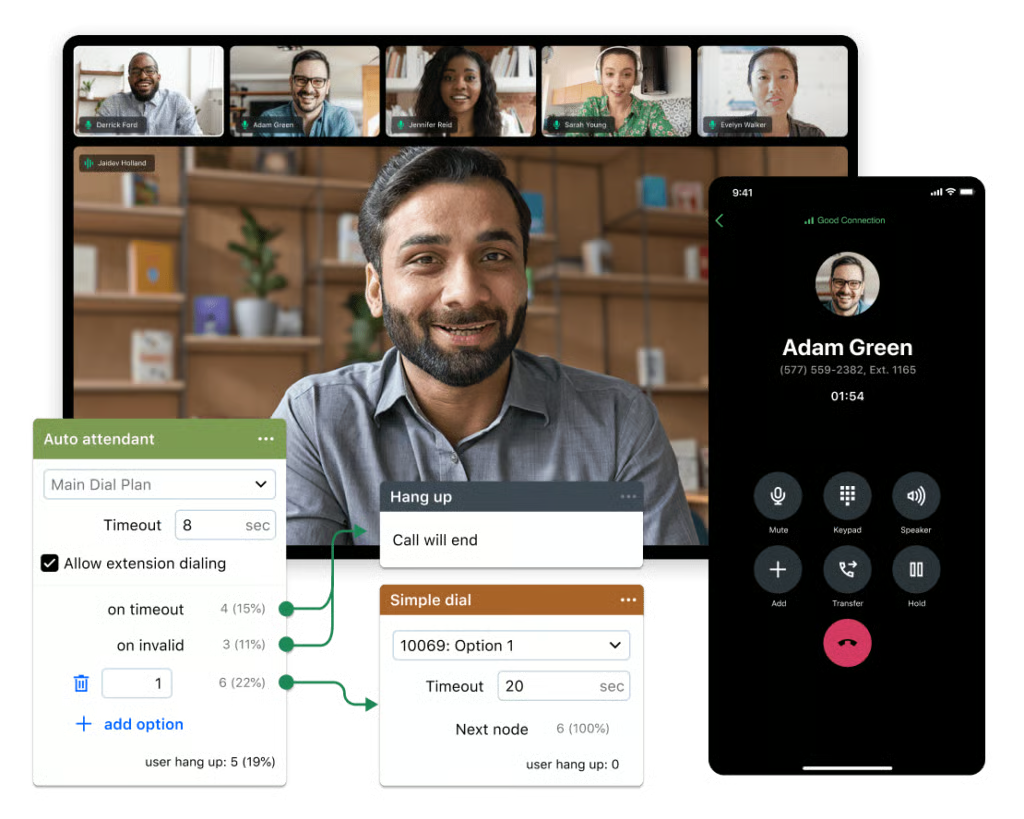
GoTo Connect ranks first because it offers the strongest mix of outbound dialing, contact center functionality, and overall value for SMB contact centers. Rather than functioning as a standalone sales dialer, it gives teams a broader communications setup with call routing, queue management, campaign templates, reporting, and customer engagement tools in one platform. That makes it easier to manage inbound support calls and outbound follow-up without stitching together separate systems.
The main drawback is that its auto dialer capabilities are tied to the Contact Center plan, so teams looking for a low-cost dialer may find it more expensive than simpler sales calling tools. However, that added cost is balanced by the wider feature set. Businesses also get routing, analytics, call queues, and customer experience tools, which can reduce the need for separate phone, dialer, and contact center software.
Gallery
Key features
- Customizable dial plans: GoTo Connect offers a visual call flow editor, making creating a call strategy for your business easy. Using the intuitive drag-and-drop interface, you can also set different patterns for auto attendants, voice mailboxes, and business hours.
- Autodialer: The contact center plan’s agentless dialer uses preview dialing, allowing agents to view customer details before answering the next call.
- Campaign templates: The CX and contact center plans offer templates for marketing campaigns that reflect different industries and business needs. You can also create reusable templates to expedite outbound messaging.
- Agent dashboards: GoTo Connect offers multiple call monitoring features through real-time and historical reporting of call queues, calls, and chats. You can also use the dashboard to manage your on-call status and settings.
Pricing
GoTo Connect uses customized pricing, so businesses need to contact the sales team for a quote. Pricing varies based on the selected plan, number of users, and required contact center features.
Available plans include:
- Phone System
- Customer Experience (CX)
- CX Complete
- Contact Center
What makes RingCentral Contact Center the best for automation and AI?
Pros
- Unlimited domestic inbound and outbound minutes
- Offers voice broadcast, preview, predictive, and progressive dialers
- Integrations with CRMs and team collaboration tools
- Advanced quality and workforce management
Cons
- Autodialer software incurs an additional monthly fee
- Less transparent pricing than other providers
Why I chose RingCentral Contact Center
RingCentral Contact Center ranks first for automation and AI because it combines multiple outbound dialing modes with the workforce management tools needed to run and optimize contact center operations. Its support for voice broadcast, preview, predictive, and progressive dialing gives teams the flexibility to match dialing strategies to different campaign goals. In addition, it is one of the best VoIP phone systems for small businesses
What sets RingCentral apart is the depth of its operational tooling. Features such as queue callbacks, surveys, call recordings, and workforce engagement tools help managers improve agent performance and customer experiences while maintaining visibility into day-to-day operations.
The biggest drawback is pricing transparency. Depending on the features and dialers required, organizations may need to account for additional costs beyond the core platform. Businesses that prioritize predictable pricing may find Genesys Cloud CX easier to evaluate.
Gallery
Key features
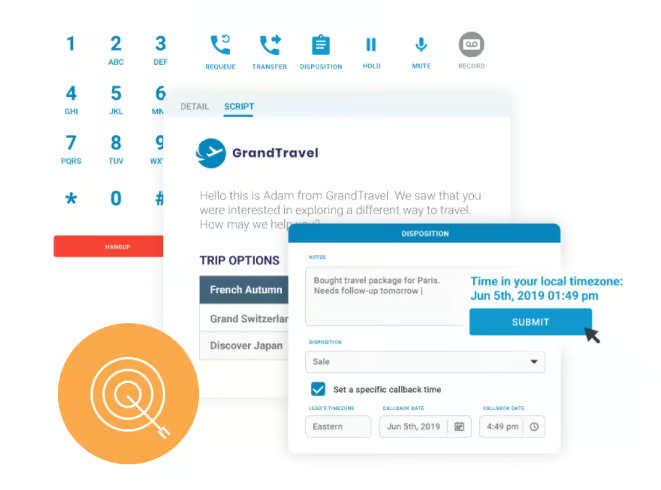
- Voice broadcast dialer: Many dialers focus on matching agents with customers, but voice broadcast allows businesses to send pre-recorded messages to a list of contacts. Mass messages are especially effective for sales and marketing campaigns.
- Call recordings: One of the best ways to monitor calls is to record interactions between agents and customers. These recordings can be automatic or on-demand and are easily accessible via the RingCentral app.
- Skills-based routing: While there are many call strategies, one of the best methods of routing calls is prioritizing sending customers to the best agents for a task or inquiry. You can also create an advanced call flow, which includes IVRs and automatic call distribution.
- Intelligent virtual agent (IVA): Chatbots are one of many tools that can benefit your contact center by providing self-service routing and customer assistance. By incorporating an IVA, you can free up agents to answer more complex calls.
Pricing*
- RingEX (Business Phone): Starts at $20/user/month
- AI Receptionist: Starts at $39/month
- RingCX (Contact Center): Starts at $65/user/month
*Billed annually.

What makes Nextiva the best for customizable customer journeys?
Pros
- Customizable intelligent and skills-based routing
- Chatbots powered by AI
- Offers quarterback, progressive, and predictive dialing
Cons
- Higher cost than other contact center plans
- Omnichannel support is only available on the highest-tier plans
- AI transcription is usage-based pricing
Why I chose Nextiva
Nextiva stands out for its customizable customer journeys, giving businesses more control over how customers move through the contact center experience. Its quarterback, progressive, and predictive dialers support a variety of outbound workflows, while automation tools help guide customers to the appropriate resource at each stage of the interaction.
I found Nextiva particularly compelling for organizations focused on customer experience. Teams can combine IVRs, chatbots, routing logic, and live agents to create structured workflows that balance efficiency with personalization. As a result, it works well for businesses that view outbound dialing as one piece of a larger customer engagement strategy.
The tradeoff is complexity. Teams looking for a straightforward outbound dialer may not need the broader customer-experience functionality that the platform offers. In those cases, JustCall provides a more streamlined approach to sales outreach.
Gallery
Key features
- Quarterback dialing: Although the primary benefit of autodialers is workflow automation, this form of dialing allows a “quarterback” agent to supervise and allocate which numbers agents will call. This is an excellent check on other forms of dialers and ensures that callers are being matched to the best agent for their inquiries.
- Process automation: One way to improve call center efficiency is to streamline workflows by automating repetitive tasks. Therefore, Nextiva’s workflow engine allows you to design a process that swiftly moves callers through their journey.
- Dial-by-name auto attendant: The automated menu allows callers to dial the name of the person they want to contact without speaking to a receptionist. This benefits returning customers or clients with a rapport with a particular agent or team member.
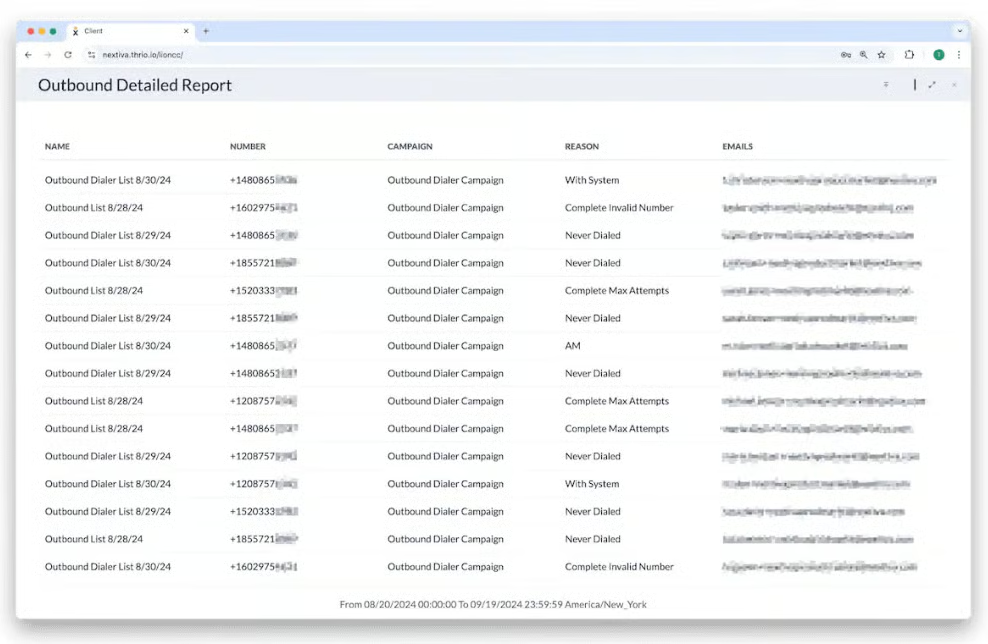
- Real-time reporting: Customizable dashboards allow supervisors to view different agents and up-to-date call center data, such as call volume, duration, and average wait time.
Pricing*
Small Business
- Core: $15/user/month
- Engage: $25/user/month
- Scale: $75/user/month
Enterprise
- Essential: $75/user/month
- Professional: Custom
- Premium: Custom
*Billed annually.

What makes Genesys Cloud CX the best for predictive analytics?
Pros
- Predictive routing and engagement to streamline customer journeys
- Unified communications and team collaboration tools
- Speech and text analytics, which monitors and predicts call center trends
Cons
- Pricing is based on usage and annual subscriptions
- Custom reporting and journey analytics are add-on features
Why I picked Genesys Cloud CX
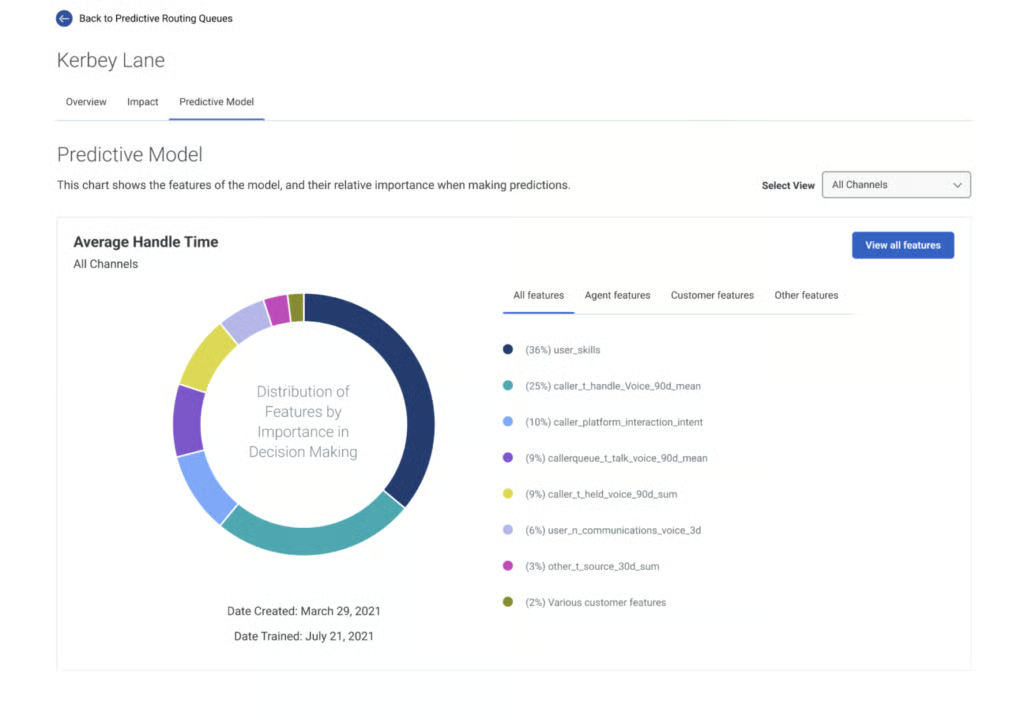
Genesys Cloud CX is the strongest option for predictive analytics because it offers some of the deepest forecasting, routing, and customer intelligence capabilities in this category. Beyond outbound dialing, the platform helps contact centers anticipate call volume trends, optimize staffing, and improve routing decisions using predictive technologies.
Another advantage is its scalability. Organizations can start with voice support and expand into digital channels, messaging, email, and outbound campaigns as their requirements evolve. Combined with predictive, preview, and manual dialing options, the platform supports both customer service and proactive outreach initiatives.
The main consideration is feature packaging. Some advanced capabilities are reserved for higher-tier plans or add-ons, which can make implementation more complex than competing platforms. Businesses that prioritize simplicity may find GoTo Connect or Nextiva easier to deploy and manage.
Gallery
Key features
- Interaction recording: Voice calls are only one component of customer interactions in omnichannel contact centers. Therefore, Genesys Cloud includes an overview of customer sentiment, agent productivity, and transcriptions of each interaction.
- Outbound campaigns: For sales and marketing teams, contact center plans include outbound calling and web, chat, and SMS campaigns to send messages and announcements to customers.
- Predictive engagement: Genesys Cloud CX incorporates AI into many customer solutions. These AI tools can analyze customer behavior and proactively update the customer journey to match their intentions.
- Scheduled callbacks: After a customer call, you can enable agents to schedule follow-ups with customers, or this feature can allow supervisors to decide when and who to call back. You can also see which agents scheduled the call when agent ownership is enabled.
Pricing*
Genesys Cloud CX 1: Best for voice contact centers
- Named license: $75/user/month
- Concurrent license: $110/user/month
Genesys Cloud CX 2: Best for omnichannel support
- Named license: $115/user/month
- Concurrent license: $170/user/month
Genesys Cloud CX 3: Best for workforce engagement tools
- Named license: $155/user/month
- Concurrent license: $230/user/month
*Monthly price, but plans are billed annually. Hourly pricing is also available.

What makes JustCall the best for international calling?
Pros
- Power dialer and preview dialer on the highest tier plans
- International calling to 70+ countries
- 100+ CRM and data integrations
Cons
- Limited SMS messaging on the base suite
- Most AI features are only included in the AI suite
Why I chose JustCall
JustCall is the best choice for international calling because it combines sales-focused dialing tools with broad global calling coverage. Teams can use international numbers, local presence, SMS messaging, and outbound calling features to engage prospects and customers across multiple regions.
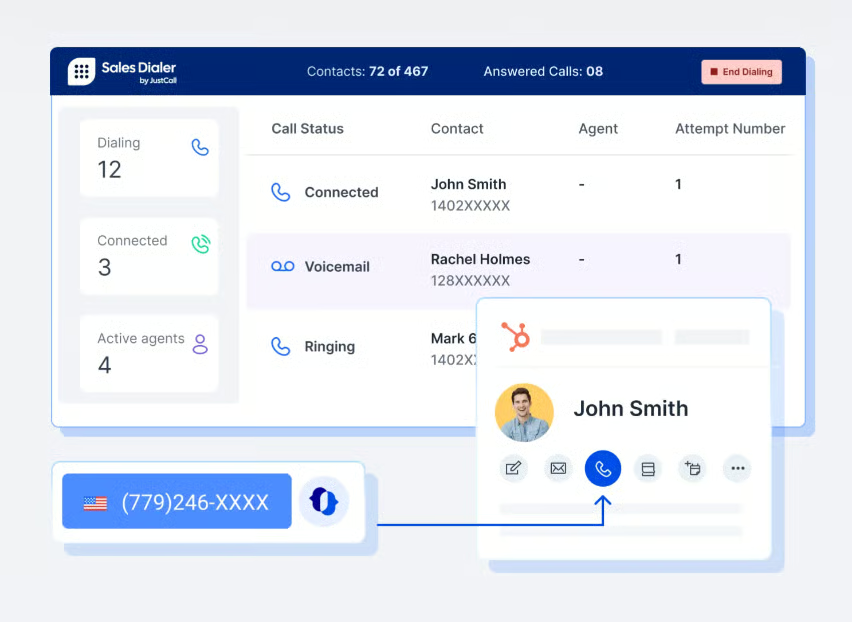
Compared with traditional contact center platforms, JustCall is more focused on helping sales teams increase outreach efficiency. Its power and preview dialers support high-volume calling while still providing the customer context needed for more productive conversations.
The main limitation is that some advanced capabilities are segmented into separate product suites. Organizations that need deeper AI functionality, predictive dialing, or enterprise workforce management tools may be better served by RingCentral or Five9.
Gallery
Key features
- Smart chapters: Organize your call recordings with AI-generated segmentation that creates titles and sections for each part of the call. This makes it easier to search for information and important notes in calls.
- Custom call wrap-up: To provide more assistance to customer service agents, the wrap-up allows space to customize how agents end calls. This could be anything from writing call notes, scheduling call-backs, or previewing customer information.
- SMS campaigns: Besides automating voice calls, JustCall allows you to send bulk messages to a broad audience of potential clients and customers. The sales dialer can also automate these campaigns.
- Audit logs: The business plan provides multiple options for advanced analytics and reporting features that prioritize data security and compliance with legal standards. For example, audit logs allow you to view data on calls, integrations, and caller journeys.
Pricing*
AI Communications Suite
- Team: $29/user/month (minimum of 2 licenses)
- Pro: $49/user/month (minimum of 2 licenses)
- Pro Plus: $89/user/month (minimum of 2 licenses)
- Business: Custom
Sales Suite: Custom
*Billed annually.
What makes Five9 the best for agent assistance?
Pros
- Multiple contact center plans with blended inbound and outbound calling
- Offers predictive, progressive, power, and preview dialers
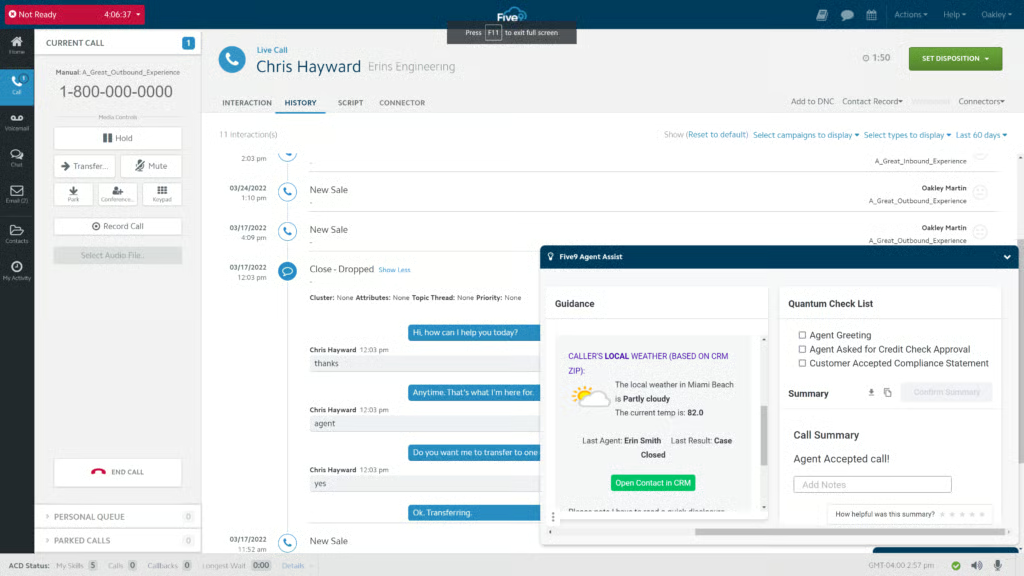
- Agent assist tools for real-time guidance during customer interactions
Cons
- 36-month contracts on the base plans
- It doesn’t offer a free trial
- Autodialers aren’t available on the digital plan
Why I chose Five9
Five9 pairs flexible outbound dialing with tools designed to improve agent performance. The platform supports predictive, progressive, power, and preview dialing, making it suitable for a wide range of outbound and blended contact center environments.
Its strongest differentiator is the depth of its performance management capabilities. Agent assistance, quality management, coaching tools, workforce engagement features, and real-time dashboards give supervisors more opportunities to improve consistency, productivity, and customer outcomes.
The tradeoff is contract flexibility. Businesses looking for a simple subscription model may prefer alternatives with shorter commitments. However, organizations that need advanced dialing, workforce optimization, and agent support tools in a single platform will likely find Five9’s broader capabilities worth the investment.
Gallery
Key features
- Agent scripting: Administrators can use Five9’s call center scripts to create worksheet questions for agents to follow during a call. This ensures agents move through the necessary steps to capture leads and better serve customers.
- Call summarization: Five9 offers multiple summarization methods, including detailed transcripts and artificial intelligence-generated prompts that identify specific call elements, such as topics and outcomes.
- Contact database: The contact history database records and archives all customer data for future reference. This repository is most beneficial for improving agent interactions with returning customers.
- Post-call surveys: Customer feedback is essential to a successful contact center, and Five9 allows you to add surveys to end a customer journey using interactive voice response (IVR).
Pricing*
- Digital: $119/user/month
- Core: $159/user/month
- Plus: Custom
- Pro: Custom
- Enterprise: Custom
*Billed annually.
Benefits of auto dialers
Depending on your business, there are many benefits to incorporating an auto-dialer into your contact center or business phone system. Most of these benefits help improve agent supervision, sales, and call strategy:
- More efficient call routing: A large part of programming an autodialer is creating a call strategy that prioritizes specific types of calls, callers, and agent support. Hence, the primary benefit of any automated dialing software is the ability to route calls more quickly and efficiently by sending them to a larger number of agents or the best agent for the inquiry.
- Improvement in agent performance: An auto dialer allows you to create a strategy that sends calls to the next available agent without the agent spending time dialing each number. Before and in between calls, auto-dialers also cut down on the time agents spend reviewing call notes and lists by providing that information in a dashboard or queue.
- Increased sales and marketing output: For businesses that make a large volume of outgoing calls or send messages to potential clients, auto-dialers can help increase sales by increasing your quantity of calls.
Key features of auto dialers
The best auto dialers on the market have key features that work best for specific industries and business types. Therefore, the following list includes distinguishing factors between auto-dialers and how these features can be used for different goals.
- Dialing modes: There are many different types of auto dialers, so one of the first things you should look for is the type of dialer available in your subscription. Some examples of auto-dialers offered within a VoIP phone system are power dialers, progressive dialers, and preview dialers.
- Call flow editor: Dialers are often part of a more extensive phone system, so choosing software that provides visual call flow editors or a low-code method of accessing the automated dialer is best.
- CRM integrations: Business integrations are essential for preview dialers or other dialing software incorporating customer data. Customer relationship management software provides additional call notes and details that can help inform agents and call strategies. If you use a CRM, you must also find an autodialer that seamlessly integrates with your system.
- Real-time monitoring: The best autodialer software incorporates some form of call reporting or monitoring to support the supervision and management of a call center. Supervisors can use call monitoring features like recording or listening to discern the effectiveness of the autodialer.
- Artificial intelligence: The most advanced autodialers use artificial intelligence to improve call routing strategies. For example, predictive dialers can use customer data or call center reports to create a call flow that routes customers to the next available agent.
How to choose the best auto dialer software for you
To choose the best auto dialer for your business, you should learn more about the differences between available auto-dialers and how they can improve your call-routing strategy, contact center supervision, and customer service. Therefore, the following list includes definitions and use cases for each type of auto-dialing software.
- Preview dialers: In a call center, you can personalize the customer experience by viewing notes or details about previous interactions. Preview dialers give insights into the customer before making the call, which is helpful when dealing with return customers or enterprise clients.
- Predictive dialers: Many dialers now incorporate automation and artificial intelligence, which use real-time data to route calls. Predictive dialing software is best for contact centers or businesses with high call volumes because it reduces the time between calls.
- Power dialer: In a sales setting, outbound calling and marketing campaigns often require agents to send calls to a designated list of customers. The power dialer expedites this process by dialing the next caller in line. If a customer doesn’t pick up, the dialer will move on to the next call.
- Progressive dialer: Similar to the power dialer, progressive dialers are used to automate making calls. However, this dialer divides outgoing calls to one agent at a time. It provides more time to review calls, which is beneficial for customer service agents, help desks, and responding to customer inquiries.
- Voice broadcast: One of the simplest forms of auto-dialing software doesn’t require an individual agent to send information to potential customers, but it can send automated messages using your phone system. This type of auto dialer is best suited for sending announcements like product recalls, account alerts, or reminders.
Frequently asked questions (FAQ’s)
How much does an autodialer cost?
Depending on the business phone system you need, an autodialer can cost anywhere from $20 for access to a dialer on a simple VoIP plan to nearly $200 for a contact center plan with access to multiple outbound dialers.
What is the difference between a predictive dialer and an autodialer?
The difference between a predictive dialer and an autodialer is the technology behind the software. A predictive dialer routes calls using algorithms and artificial intelligence, while an autodialer routes calls based on a pre-programmed sequence.
How much does VoIP cost per month?
The price of a VoIP phone system fluctuates depending on the plan and provider, but plans start as low as $10 a month and can scale up to around $50 or more. Some providers offer free subscriptions for basic business phone systems.
Which dialer is best for a call center?
The best dialer for a call center depends on its call volume and agent availability. A predictive dialer can benefit call centers with a high volume of incoming inquiries or mass marketing campaigns. However, a power dialer would work best if you prioritize sales calls and customer contact. Additionally, preview and progressive dialers are best for working with return customers or providing more personalized support.