

Wrike 2026 Overview: Pricing, Ratings & Details
Wrike Product Overview
Wrike is an enterprise project management platform built to help large teams centralize communication, manage incoming requests, track budgets, optimize workflows, and allocate resources within a single system. It provides task management capabilities while offering the structure required by organizations with more complex workflow needs.
| Overall score | 3.85 out of 5 |
| Supported devices | Web app Desktop: Windows and macOS Mobile: iOS and Android |
| Free trial | 14 days |
| Free plan | Yes |
| Starting price | $10 per user per month (billed annually) |
| Best for | Growing teams and organizations that require strict security controls and resource planning capabilities |
Pros
- Folder hierarchy for nested project structure
- AI features available on the entry-level plan
- Extensive proofing and approval features
Cons
- Subscription plans are billed annually
- Integration platform has a monthly add-on fee
- Bundled pricing can be restrictive for smaller teams
TechnologyAdvice's expert insights
Wrike is my top recommendation for enterprise project management because it meets the core features I look for in large-scale platforms: strong security infrastructure, rich AI capabilities, advanced resource planning, and built-in support for asset management, all of which large teams typically require.
The platform operates in secure, compliant data centers that apply strict physical and network controls to safeguard your data. I am particularly impressed that Wrike developed its own machine learning engine and embedded it across the platform, which better serves tech-savvy teams that expect intelligent features within their daily workflows. It also performs well in resource management, with workload charts that accurately display individual capacity and highlight uneven allocations.
Due to its rich feature set, beginners may expect a steep learning curve during the initial onboarding. However, Wrike offsets this with an extensive library of self-service resources that help users familiarize themselves with its features and resolve issues more efficiently.
Marianne Sison
Project management writer
Wrike's competitive project management features have earned it a spot in these PM software shortlists:
Learn more about Wrike in our video overview:
Who should use Wrike?
- Cross-functional teams Wrike offers two core features that support cross-functional teams: folder hierarchy and cross-tagging. You can use folders to mirror your organizational structure at the team or department level, while cross-tagging lets you place the same task or subtask in multiple folders or projects, so separate teams can track shared work.
- Creative and marketing teams: Wrike includes advanced customization options designed for creative and content production workflows. Its built-in proofing tool keeps reviews and approvals in one place, while the Adobe Creative Cloud extension lets you manage assets and update Wrike tasks from Adobe apps.
- Enterprise project teams: Wrike operates as an enterprise project management platform, with each plan designed to meet the demands of large organizations. It includes capabilities for resource planning and portfolio management, along with support for complex workflows, creative production, and marketing campaign management.
Pricing
| Wrike plan | Monthly price | Inclusions |
| Free | Free | Unlimited users and basic task management |
| Team | $10/user/month | Adds cross-tagging, custom fields, Gantt charts, and portfolio management |
| Business | $25/user/month | Adds AI elite features, request forms, templates, approvals, and resource planning |
| Pinnacle | Custom pricing | Adds advanced reporting, resource and capacity planning, budgeting, and locked spaces |
| Apex | Custom pricing | Adds Wrike Datahub (30M records), and bi-directional integrations with third-party solutions |
Free
The Free plan covers basic task management for individuals or small teams. It supports table and board views and includes access across web, desktop, and mobile, though active task limits apply.
Team
The Team plan supports small teams with shareable dashboards and AI capabilities for content editing and comment summaries. You also get Gantt charts, plus custom fields and workflows for more detailed project tracking.
Business
The Business plan expands customization and resource planning for growing teams. It adds workflow customization, templates, standard integrations, and access to AI Elite features (e.g., widget generator, custom agents)
Pinnacle
Pinnacle targets complex, enterprise-level workflows with advanced resource planning and budgeting tools. It also includes advanced reporting, SSO, stronger security controls, and Wrike Datahub.
Apex
Apex is built for large organizations that need AI-driven automation and deep integrations. It offers unlimited whiteboards, Wrike Integrate and Sync capabilities, plus expanded Datahub capacity for high-volume data management.
Breakdown of core features
Wrike offers several standout capabilities that set it apart from other project management platforms. These strengths make it particularly well-suited for enterprise environments that require advanced features and scalability. Let’s dive in.
Task management
Wrike offers task management features that help you structure your workflow using terms, icons, and custom fields that reflect your business processes. You can further customize your workspace by selecting from different project views such as tables, boards, Gantt charts, calendars, and chart views.
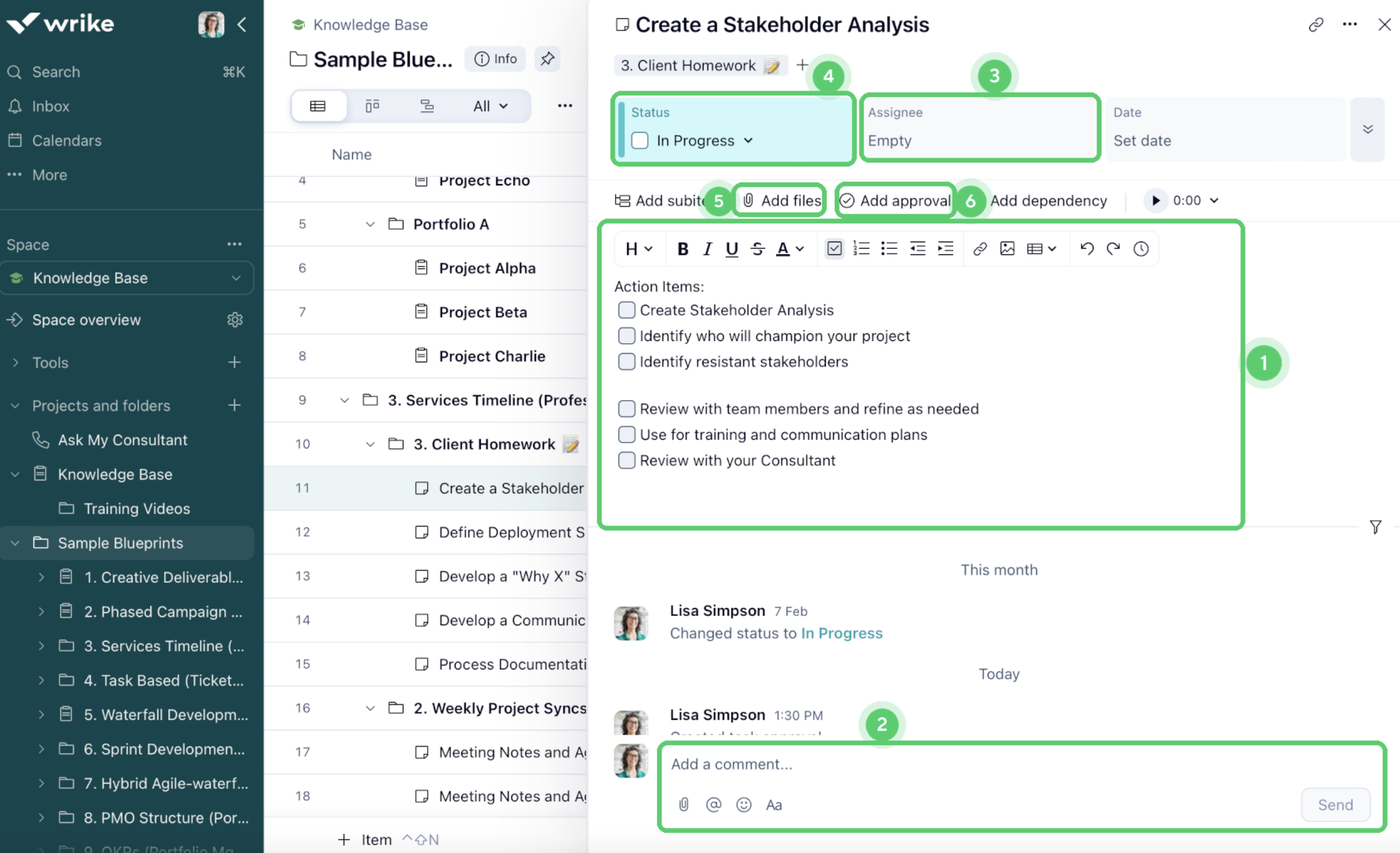
With Wrike’s built-in generative AI capabilities, you can instantly create subtasks and receive recommendations on which tasks to prioritize. The platform also supports content generation, allowing you to draft and summarize task descriptions to save time.
Proofing & approvals
Wrike’s built-in approvals help you assign reviewers and monitor the status of items that require sign-off. You can trigger approvals automatically through request forms and record every decision within the related task or project. You can filter work by approval status, assigned approvers, or due dates, and you can create widgets to highlight pending approvals that need attention.
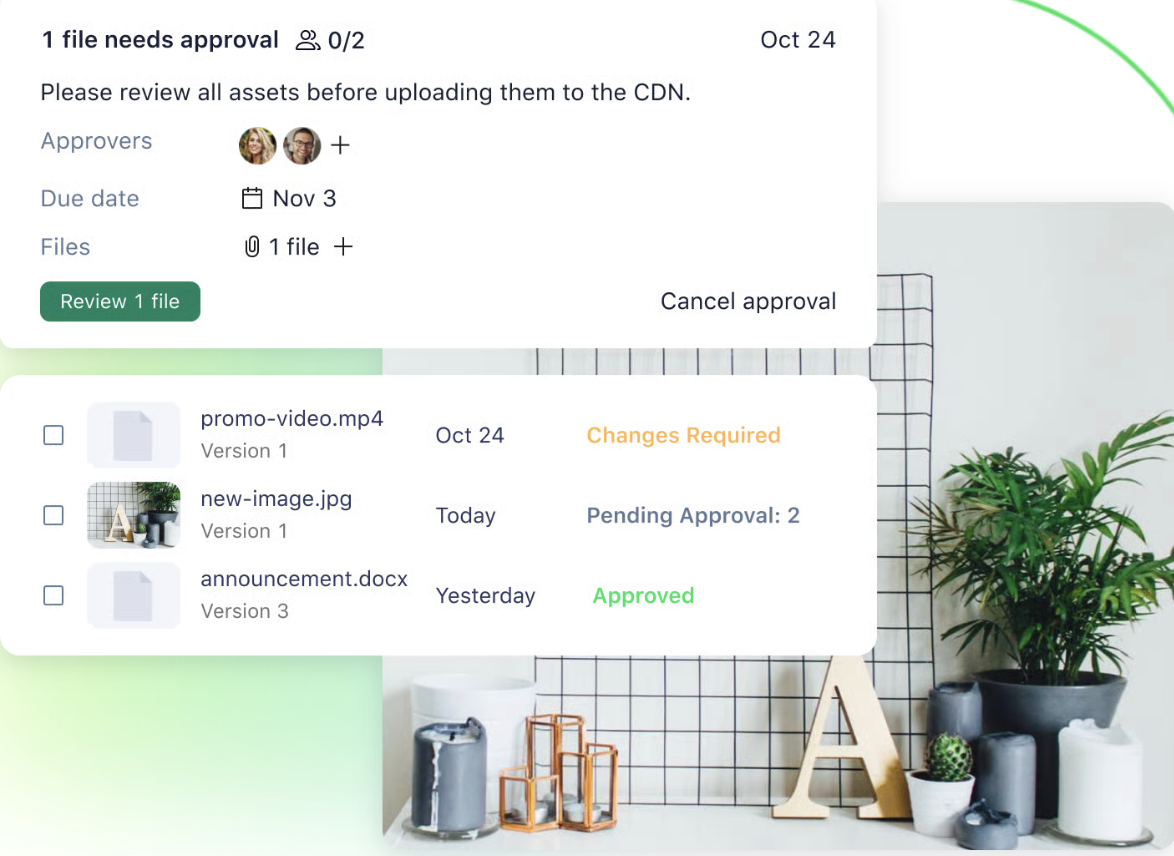
For creative and marketing teams, Wrike includes online proofing tools that centralize feedback on visual assets. You can compare file versions side by side and leave comments on images, videos, or PDFs with markers that point to specific areas. Feedback appears both on the asset itself and in a comment panel, and teams can manage approvals manually or through automation while inviting external reviewers without granting full account access.
Workload management
Wrike's workload view stands out for its real-time visibility into team capacities and assignments. Unlike some competitors, it offers a highly intuitive, drag-and-drop interface that simplifies the process of reallocating tasks to balance workloads effectively.
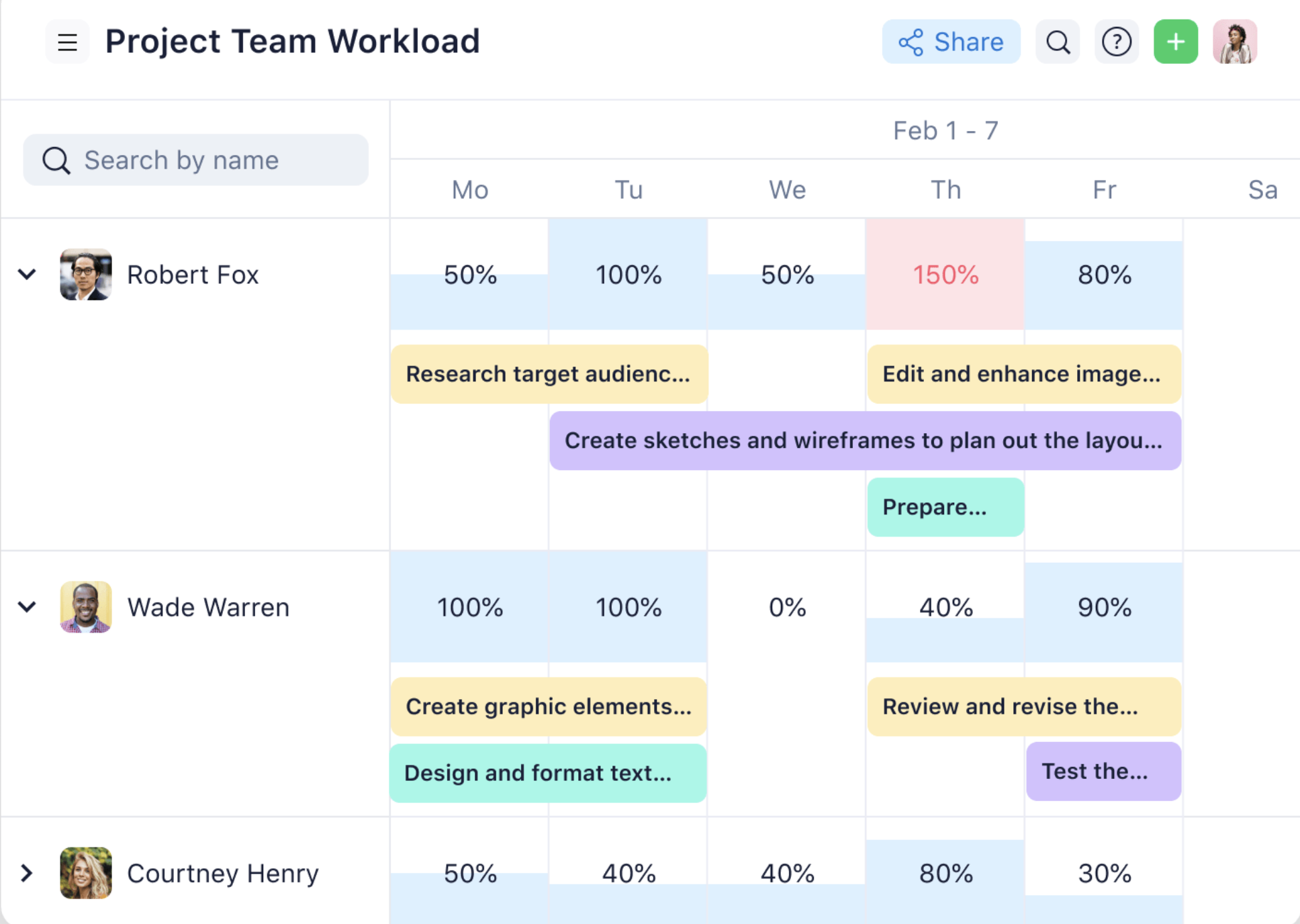
Wrike's customization options enable users to tailor views and reports to specific project or team needs, such as individual or team-wide workloads and availability forecasting. Overall, Wrike's workload view gives managers the right data to make informed decisions about resource allocation and task assignments.
Cross-tagging
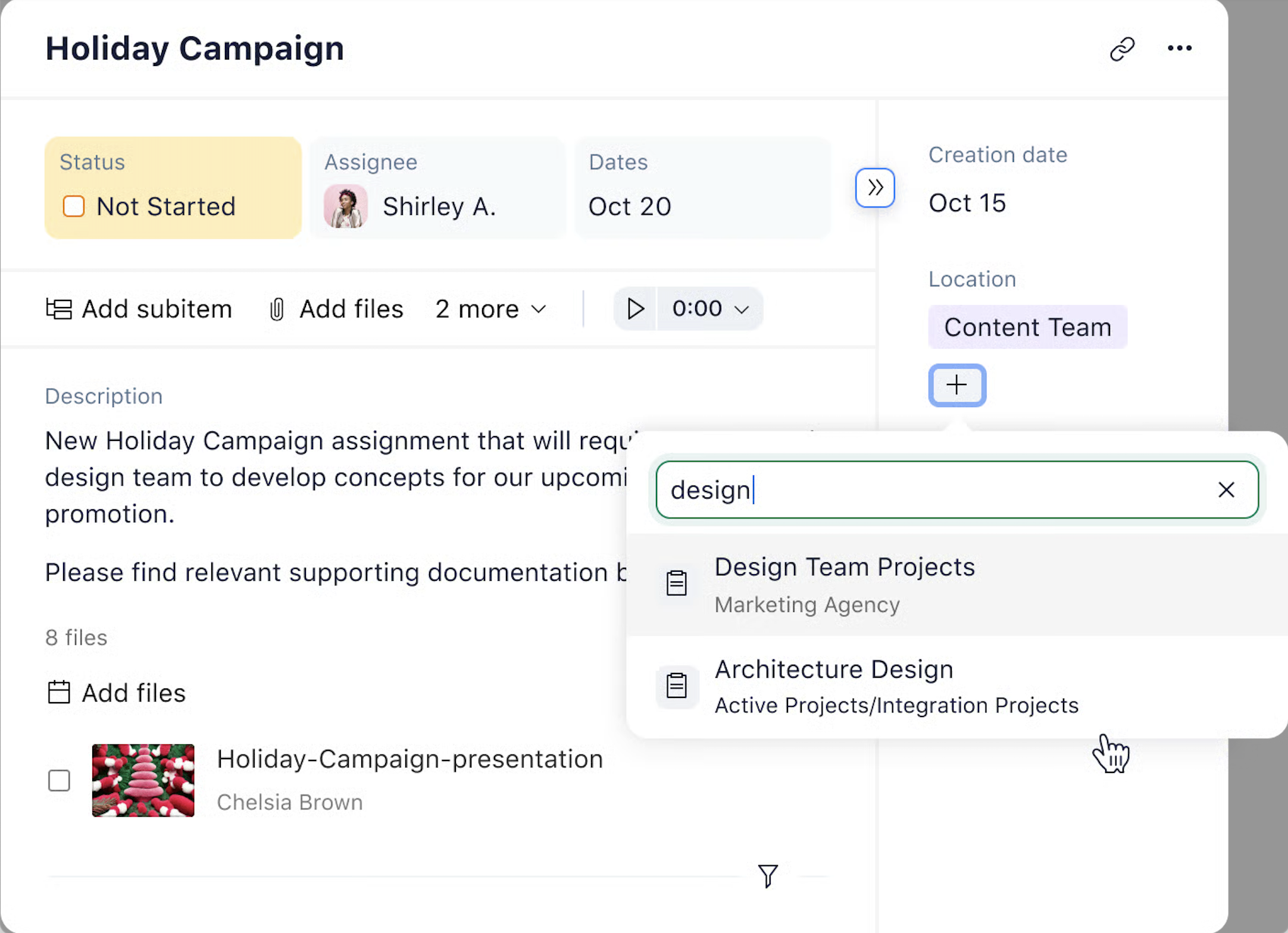
Monitoring a single task connected across multiple departments or campaigns can become complicated, especially when each team follows its own timeline and priorities. Wrike’s cross-tagging feature solves this by allowing the same task, folder, phase, or project to appear in more than one workflow. This means different departments can work from the same item without creating duplicates. Each team can view and manage the task within its own structure while still staying connected to shared progress.
Automation
Wrike includes a built-in automation engine that reduces manual work across projects. You can create logic-based automations that respond to specific conditions, which eliminates repetitive updates and routine follow-ups. For example, you can set automatic reminders after a task status changes or trigger alerts when deadlines are at risk.
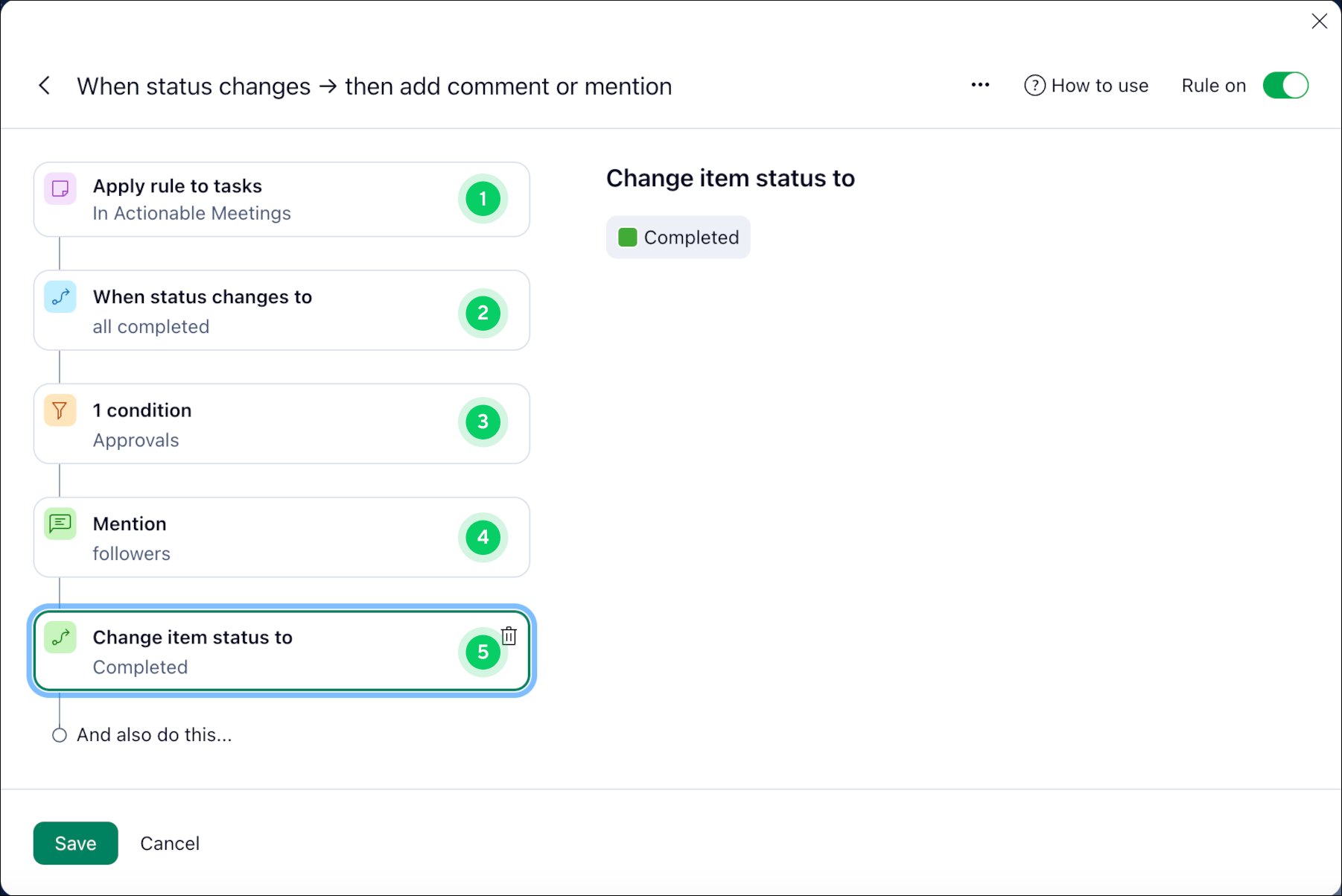
Automation rules use a basic “when → then” structure with setup instructions. These rules can be applied to tasks or custom item types and deployed across multiple folders, projects, or spaces within your account. As project complexity increases, these automations help maintain consistency and reduce admin effort, which can significantly improve overall team efficiency.
Integration
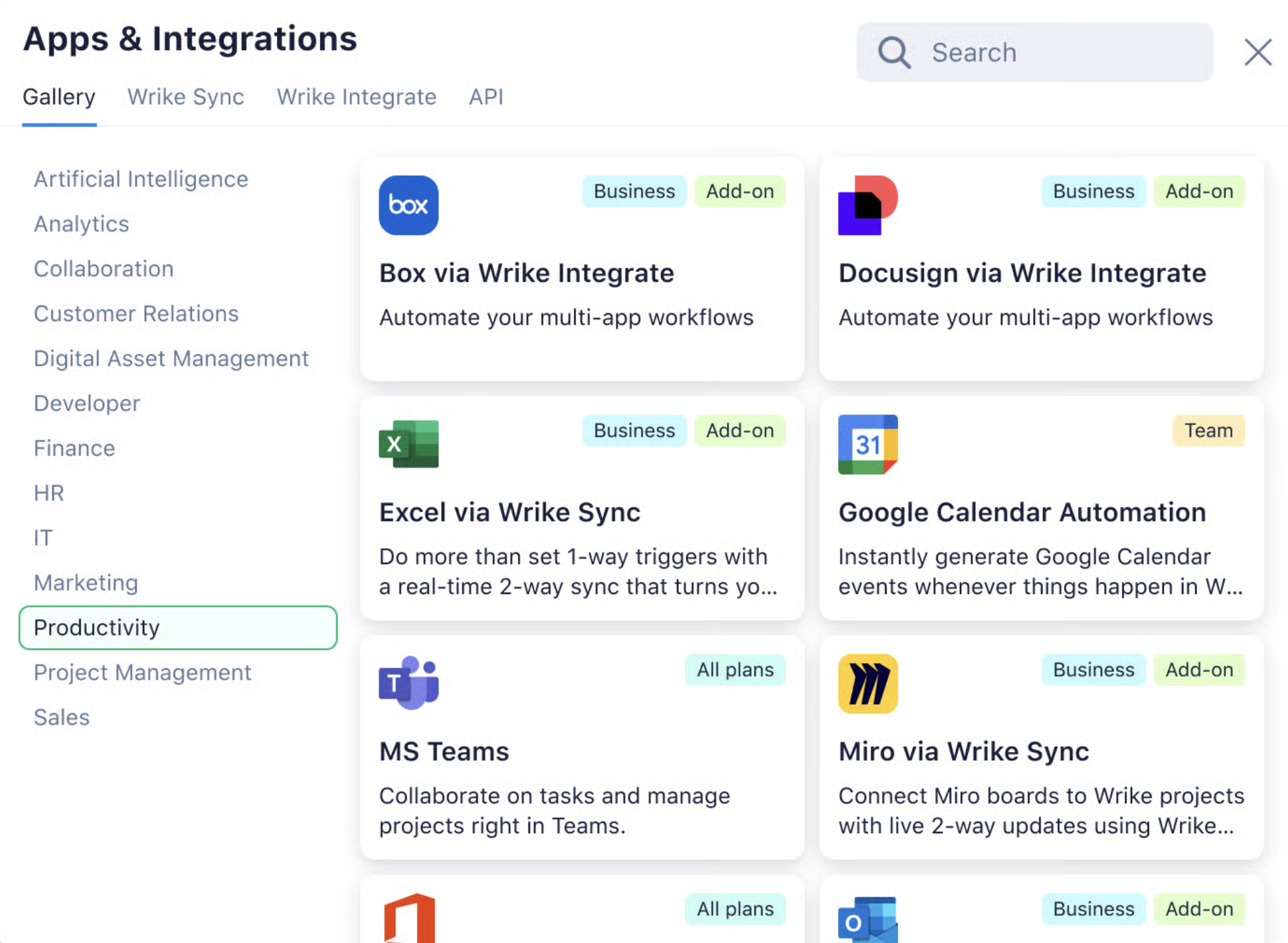
Wrike integrates with more than 400 third-party applications, which allows you to connect the platform to your existing tech stack without replacing the tools your teams already use. These integrations cover a wide range of business categories, including CRM systems, file storage, messaging, IT service software, business intelligence solutions, email platforms, and visual collaboration apps.
Ease of use
Wrike’s centralized platform for project and team communication makes it generally easy to use for daily work. Commenting on tasks, updating statuses, reviewing dashboards, and collaborating with teammates all feel smooth and intuitive. The mobile app also receives positive feedback among users for its speed and convenience, especially for quick updates on the go. Personal dashboards also reduce distractions by allowing users to focus only on their assigned work.
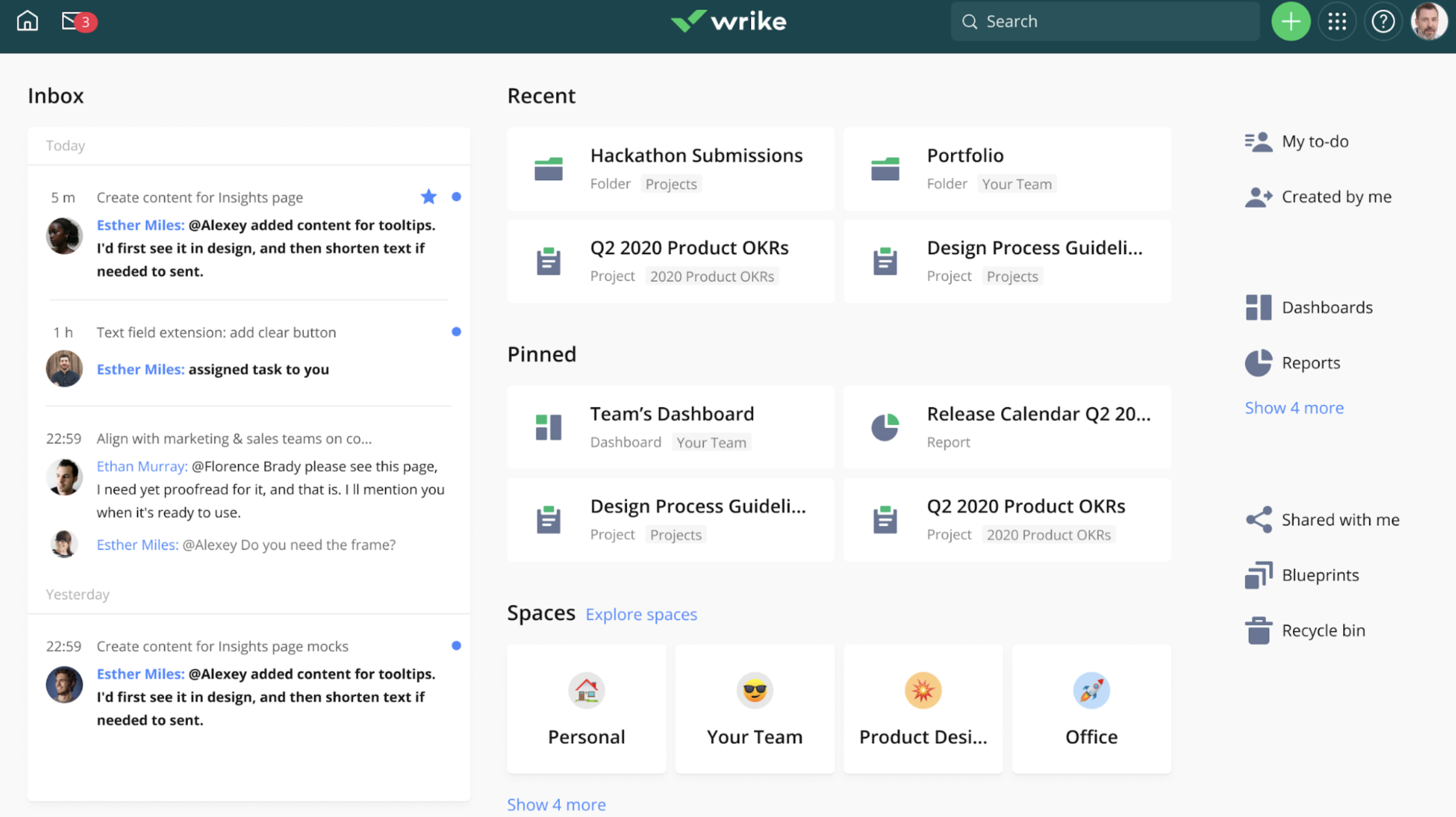
The main challenge appears during initial setup. Many users struggle to understand how folders, projects, and spaces are organized, which can make navigation feel complex at first. Larger workspaces can look overwhelming due to frequent notifications and a crowded sidebar. Some advanced features sit deep within menus, so teams may not discover their full capabilities right away.
Once it is properly set up and supported by a workspace admin, Wrike operates smoothly and supports collaboration across large teams.
Customer support
Wrike’s Help Center provides several ways to get support, including expert-led live webinars, a user community, video tutorials, training courses, and a troubleshooting library. Teams often benefit from taking the Discovery course during onboarding because it offers guided training based on role and experience level. The community forum also gives users a space to exchange advice on utilizing Wrike’s features.
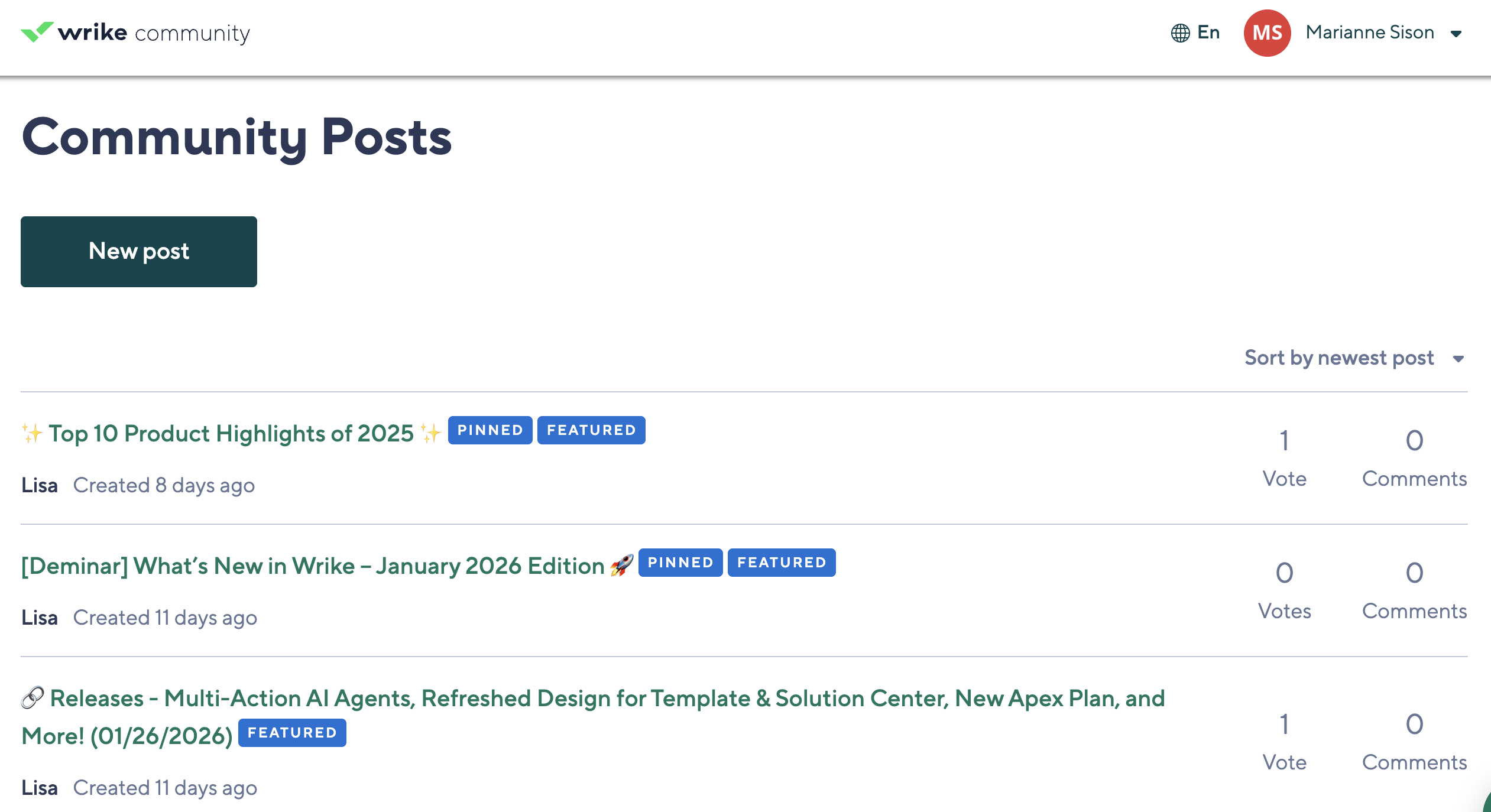
While Wrike guarantees that many issues can be resolved through the Help Center, you have the option to contact its live support via chat, phone, or a request form. Note that access to these channels and support hours depend on your subscription plan. Users who have tried contacting the support describe the team as responsive and helpful in addressing account concerns.
Features
- Task management
- Subtasks
- Folder hierarchy
- Account-wide work schedules
- Personal work schedules
- Custom fields, workflows & statuses
- Portfolio management
- Email integration & notifications
- Custom work views (Table view, Kanban, etc.)
- Calendars
- Dynamic Gantt chart
- Dashboards
- Real-time reports
- Chart view
- Advanced analytics
- AI content and editing
- Whiteboard AI
- Mobile inbox prioritization
- Project templates
- Automations
- Request forms
- Dynamic request forms
- Company-wide administration
- Custom templates & blueprints
- Custom item types
- Task & project approval
- Custom approval flows
- Resources view
- Workload charts
- Effort allocation
- Resource assignment
- Time tracking
- Timesheets
- Job roles
- Budgeting
- Resource bookings
- Team utilization & performance dashboard
- User attributes and skills
- Viewers (free collaborators)
- Guest approvals
- File proofing & approval
- Digital asset management (DAM) integration
- Locked spaces
Final verdict — Is Wrike worth it?
Wrike is worth the investment for mid-sized and enterprise teams that manage complex, multi-department projects. Marketing, professional services, IT, and operations teams benefit most from its automated workflows, advanced reporting, and team collaboration features. If your organization handles layered approvals, resource planning, or campaign-level visibility, Wrike provides the structure to support that scale.
It is not the fastest platform to onboard, and its pricing is less straightforward than lighter tools. However, for companies that are ready to invest time and budget into a powerful system, Wrike delivers long-term value.
Frequently asked questions (FAQs)
Is Wrike worth the cost?
Yes. Wrike delivers strong value for large teams that need advanced project management features across multiple projects and departments. Its extensive feature set for resource planning, automation, and collaboration makes the investment worthwhile for organizations managing complex workflows at scale.
What makes Wrike different from competitors?
Wrike stands out for enterprise-focused capabilities such as workload views, cross-tagging, advanced approvals, and extensive integrations. These features support multi-department collaboration, capacity planning, and creative asset management within one centralized platform.
Is Wrike difficult to learn?
It depends on your experience with similar tools. While the initial setup can feel complex, most teams ramp up quickly using Wrike’s onboarding resources, including webinars, video tutorials, training courses, and an active user community.
Over 3 million industry leaders trust our advice





Screenshots
Videos
Features
- Engineer-to-order (ETO)
- Accounting
- Kanban
- Contact Management
- Visual Resource Forecasting
- Project & Portfolio Management
- Compensation Management
- Templates
- Sales Tracking
- API
- Inventory Management
- Lead Routing
- Work Order Management
- CRM Integration
- Budget / Expense Tracking
- Versioning / Audit Control
- Collaboration Tools
- Gantt Charts
- 360 Degree Feedback
- Mobile Capabilities
- Resources Management
- Project Planning
- Task Management
- Image / Multimedia Editing
- Work Order History
- Submittal Management
- Dashboards
- Employee Information Tracking
- Employee Surveys
- Social Integration
- Epics
- Audio / Video
- Employee Shift Scheduling
- Marketing Tools
- Ordering / Procurement
- Performance Management
- Waterfall
- Workflow Management
- Customer Portal
- Waterfall-Agile Hybrid
- Onboarding
- Invoicing / Billing
- Content Management
- Resource & Skill Matching
- Milestone Tracking
- Purchase Order Processing
- Equipment Tracking
- Inventory
- Dashboard
- Self-Service Portal
- Time Sheets / Time Tracking
- Content Personalization
- Reports
- Equipment Management
- Gamification
- Takeoff and Estimating
- Billing / Invoicing
- Burn-down Charts
- Scrum
- Customizable Dashboard
- Agile Development
- Scheduling
- Time Tracking
- Compliance - Training
- Dependency Tracking
- Departmental Accounting
- Drag & Drop Builder
- Document Management / Sharing
- Supplier Management/Sourcing
- Real Time Analysis
- Campaign Management
- Training / Support Resources
- Assessments / Tests
- Graphic User Interface
- 24/7 Customer Support
- Contract Management
- Approvals / Proofing
- Vacation / Leave Management
- Service Level Management
- Analytics / Reports
- Time/Attendance Management
- Estimating and Bidding
- Order Management
- Forecasting/Planning
- Project Management
- Social Media Integration
- Project Tracking
- Accounting Tools
- Document Storage/Management
- Calendar
- Data Redundancy / Backup
- Instant Message / Internal Message
- Forecasting
- Estimates / Quotes
- Reporting/Analytics
- Ticketing / Issue Tracking
- Notifications
- Accounts Receivable/Payable
- Offline Functionality
- Succession Planning
- Prioritization
Pricing
- Average
Integrations
- Azure
- Box
- Dropbox
- GitHub
- Gmail
- Google Calendar
- Google Drive
- HubSpot
- Jira
- Microsoft Excel
- Microsoft Outlook
- Microsoft Project
- Microsoft Teams
- OneLogin
- Salesforce
- Slack
- Tableau
- Zoom
Useful Resources




Reviews
- 5 Star17
- 4 Star78
- 3 Star13
- 2 Star1
- 1 Star0
Loading reviews…
TechnologyAdvice is able to offer our services for free because some vendors may pay us for web traffic or other sales opportunities. Our mission is to help technology buyers make better purchasing decisions, so we provide you with information for all vendors — even those that don't pay us.