


What is learning management system software?
Learning management system (LMS) software helps organizations create, deliver, and track training in one centralized platform. Administrators can build courses and quizzes, assign required learning, manage certifications, monitor participation, and measure learner performance.
Businesses, government agencies, and educational institutions use LMS platforms for employee onboarding, compliance training, professional development, customer education, and skills-gap analysis. An LMS may be a standalone platform or part of a broader HR software suite, and it can reduce the time and cost associated with managing in-person or manual training programs.
Our picks for the best LMS software
We reviewed the top LMS software solutions and narrowed it down to the best of the best:
| Provider | Best for | Standout feature |
|---|---|---|
| Paylocity | Interactive learning | Combines prebuilt courses with social and instructor-led learning |
| Rippling | Automated workflows | Assigns courses and sends reminders based on employee data and compliance requirements |
| Docebo | AI-supported enterprise learning | Personalizes content and embeds learning into employees’ daily workflows |
| Absorb | Agentic AI learning capabilities | Combines customizable reporting with AI-assisted course creation, recommendations, and admin support |
| 360Learning | Collaborative course creation | Lets internal experts build and improve courses together |
Update notes
- Aug. 25, 2026: Hanna Sillo updated each provider’s information, re-evaluated the pros and cons, and added a quick comparison table. She also updated Absorb LMS to reflect its new name, Absorb.
- Jun. 22, 2023: We added our expert recommendations and added dynamic design elements to improve the visual flow of information.
Methodology
We picked our recommendations with you in mind.
First, we evaluated the top LMS solutions available on the market today. We used vendor demos, technical documentation, and user reviews from customers like you to compile our research.
We then narrowed our selections to the platforms that best addressed the most common priorities among learning and development professionals. These factors include customization, gamification, automation, machine learning, and analytics.
As the market changes, we reevaluate our choices so you always receive the best insight for your purchasing decision.

Paylocity: Best for interactive learning
Pros
- Integration with its native social collaboration tool for knowledge sharing
- Hundreds of prebuilt courses
- Custom course creation and content imports
- Several course delivery methods
- Automated and bulk course assignments
- Interactive quizzes and completion badges
Cons
- Organizations needing advanced learning analytics should confirm the reporting capabilities during a demo
- The larger Go1 course catalog requires a separate subscription
About Paylocity
The talent management module of Paylocity’s human resources information system (HRIS) includes a corporate LMS. HR or learning and development (L&D) teams can assign prebuilt courses to new hires or employees developing new job skills. Paylocity offers hundreds of courses covering topics such as health and wellness, inclusion, professional development, compliance, and workplace safety. This gives employers a starting point without requiring them to build essential training materials from scratch.
Paylocity’s LMS also supports company-specific learning needs. Subject matter experts can create training using screen recordings, quizzes, and imported AICC or SCORM content. They can also share their knowledge through Community, Paylocity’s social engagement and collaboration tool.
Paylocity supports several delivery methods, including recorded webinars that employees can watch later. Employees can also browse elective courses, receive recommendations based on their role and industry, and earn badges after completing training.
HR administrators can assign courses in bulk, set due dates, schedule recurring training, send automated reminders, and track employee progress. Quizzes and surveys can be added to courses to assess employees’ understanding and collect feedback.

Key features
- Ready-made courses for faster implementation
- Custom courses and AICC or SCORM imports
- Automated assignments, reminders, and recurring training
- Interactive quizzes and completion badges
- Integration with Community
Also read: 5 Ways to Increase Employee Engagement with Your LMS

Rippling: Best for automated workflows
Pros
- Automated course assignments and reminders reduce manual HR and L&D tasks
- Library of prebuilt courses helps companies launch training quickly
- Automatically issues and stores completion certificates for compliance records
- Integrates with time and attendance to help enforce training requirements
Cons
- Pricing is not publicly available
- May provide more workforce-management functionality than companies seeking a standalone LMS need
About Rippling
Rippling offers a variety of automated training features. Once automation rules are configured, Rippling can assign courses based on employee information such as role, department, and location, reducing repetitive manual work. It can also send scheduled reminders to employees who need to begin or complete training.
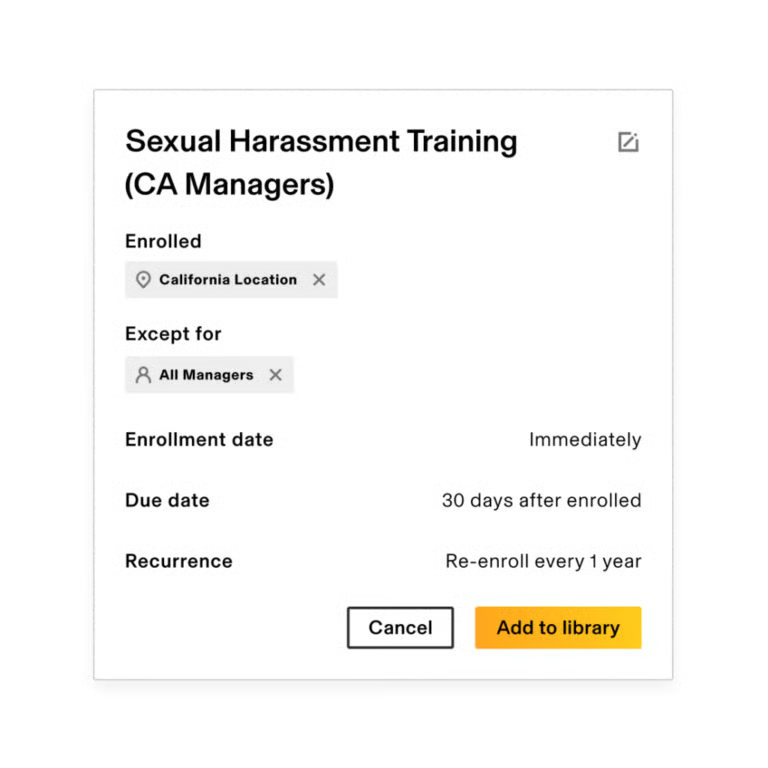
For example, Rippling can automatically enroll employees in the appropriate sexual harassment training based on their work location and applicable requirements. This helps HR teams manage required training without tracking and assigning every course manually.
Users can upload custom courses or select from Rippling’s library of prebuilt courses covering topics such as sexual harassment prevention, workplace safety, and HIPAA compliance. Rippling also provides workflow templates for reminders, notifications, and other training-related processes.
When an employee completes a course, Rippling issues a certificate of completion and retains the training record for compliance purposes. Businesses can also connect training requirements with Rippling’s time and attendance tools. This allows companies to prevent employees from clocking in when required training or certifications are incomplete or expired, helping support workplace compliance and safety.
Key features
- Rules-based course assignments and reminders
- Prebuilt and custom courses
- Compliance tracking and reporting
- Completion certificates and training records
- Integration with time and attendance
Docebo: Best for artificial intelligence support
Pros
- AI for automatic translation of materials, which makes them more accessible.
- Learning infused into everyday work
- Robust social learning tools
- Built-out analytical capabilities
- Some advanced branding and deployment features require add-ons
Cons
- Learning curve and tech savviness to take full advantage of features.
- Necessary add-ons for greater LMS functionality.
About Docebo
Docebo is an extensible, AI-powered learning management system. Companies may choose add-ons that enhance Docebo’s LMS product to:
- Create and manage learning content.
- Infuse learning and development into employees’ daily workflows.
- Measure impact.
- Analyze data related to learning goals, use, and more.
Docebo stands out for its ability to leverage AI for accessibility and personalized learning experiences. Using AI, Docebo can automatically translate learning material into several languages. This makes training more accessible to workforces that operate around the globe.
It also includes virtual coaching and content suggestions, enabling employees to be more self-sufficient in their personalized learning paths. These features free up administrators to focus on program improvement instead of implementation.
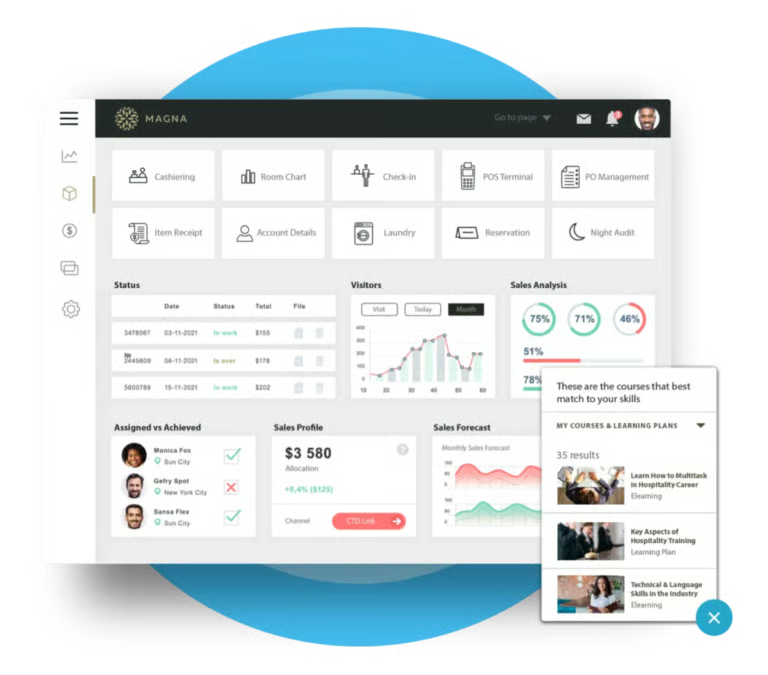
Docebo’s Embedded Learning tools bring training into the applications employees already use. Docebo Companion can also surface relevant learning content within web-based tools, helping employees access training without constantly switching platforms.
Embedded learning content can be configured to appear based on the context of what an employee is doing, while Docebo Companion can surface relevant content based on the webpage or application being used.
Employees, therefore, don’t have to manually pivot from their everyday work to training. This approach can make learning easier to apply in the moment by connecting training more closely with employees’ everyday work. Docebo integrates with more than 400 tools to make this possible.
Docebo also enables social learning to more widely and efficiently share knowledge and come together to answer questions. Learners can indicate their goals and interests, and Docebo’s learning management system serves up relevant content accordingly. The most engaged learners show up on a leaderboard to encourage friendly competition.
Key features
- AI-powered content creation and virtual coaching
- Analytics, reporting, and learning insights
- Multilingual training and AI-powered translation
- Social and personalized learning
Absorb: Best for agentic AI learning capabilities
Pros
- Customizable dashboards and detailed learning reports
- Generative AI tools for creating courses and quizzes
- AI-powered course recommendations and personalized learning paths
- Support for assessments, question banks, multiple attempts, and learner feedback
- Multilingual and multimedia learning support
Cons
- Pricing is not publicly available
- Its extensive feature set may be more than smaller organizations with basic training needs require
- Advanced configuration and reporting may take time to learn
About Absorb
Absorb is an AI-powered learning platform designed for employee development, compliance training, customer education, partner enablement, and course sales. It stands out for its combination of customizable analytics, course creation tools, personalized learning, and connections to other business systems.
Absorb’s reporting tools allow administrators to monitor enrollment, course completion, assessment results, learner activity, certifications, and other training metrics. Organizations can create dashboards for different teams or audiences and use the data to identify participation trends, measure training effectiveness, and connect learning outcomes with broader business goals.
Its newer AI capabilities extend beyond reporting. Absorb Create uses generative AI to help administrators research, structure, and build courses and quizzes. Intelligent Assist lets administrators enter natural-language requests, such as asking for a report of employees who have not completed compliance training, and directs them to the appropriate report or action screen.
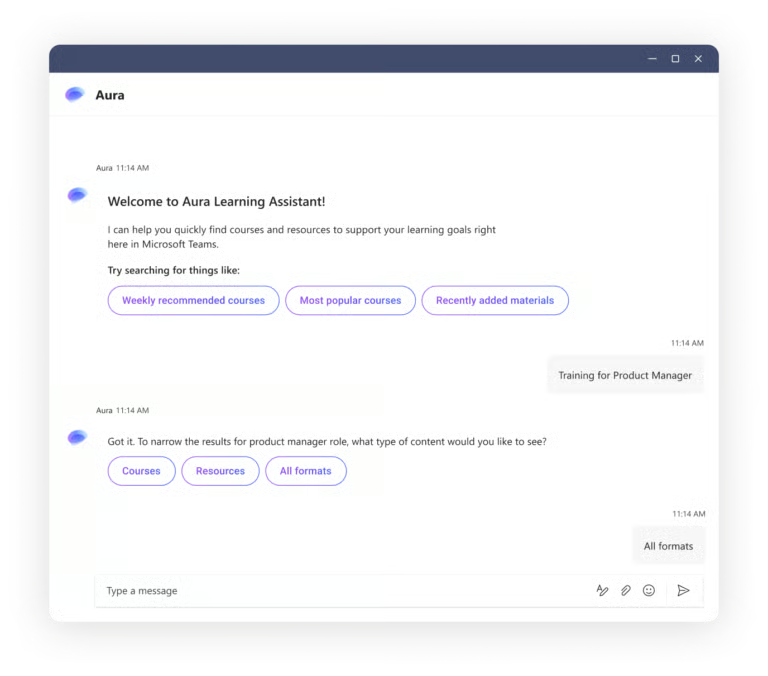
Absorb also uses AI to recommend relevant courses and create personalized upskilling paths based on learners’ roles, interests, progress, and skill gaps. Its Absorb Aura tools provide additional support for course creation, administrative questions, and retrieving answers from assigned training materials.
The platform supports assessments, quizzes, question banks, weighted scoring, multiple attempts, and feedback—making the previous limitation about lacking assessment tools outdated.
Absorb connects with more than 40 business systems, including ADP, BambooHR, Workday, SAP SuccessFactors, UKG Pro, Dayforce, Salesforce, HubSpot, Zoom, Webex, and ServiceNow. Organizations can also create custom connections using APIs and webhooks. See Absorb’s current integration directory for the complete list.
Absorb is best suited to midsize and enterprise organizations that need detailed reporting, personalized learning, and flexibility across employee, customer, or partner training programs. Smaller organizations that only need basic course delivery and completion tracking may find the platform more extensive than necessary.
Key features
- AI-assisted course and quiz creation
- Natural-language administrative support
- Personalized upskilling paths
- Custom integrations through APIs and webhooks
- Training for employees, customers, and partners

360Learning: Best for collaborative course creation
Pros
- Control over content creation and curation for ultimate customizability
- Create courses directly within the interface
- Iterative content creation for up-to-date material
- Social elements
- Diverse assortment of assessment tools
- Collaborative and instructor-led learning tools
Cons
- More control but potentially more work to put courses together
- Accessing larger third-party course libraries may require separate subscriptions
- Instructor-led and coaching-heavy programs require more instructor/expert involvement
- Configuring dashboards and reporting around specific goals takes time
About 360Learning
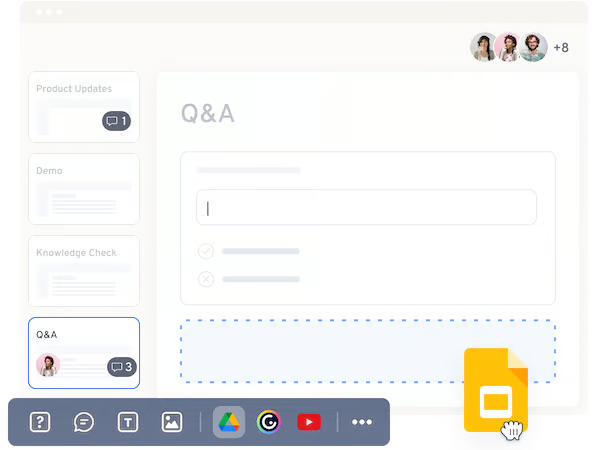
360Learning is a stand-alone corporate learning management system like Docebo and Absorb, but it’s unique in the way users can collaboratively create content directly within the platform. Being able to do so offers more flexibility in content creation and curation. Users don’t necessarily need to resort to available templates or import files from external tools, which might not render correctly in the LMS portal and mobile app.
Administrators can collaborate on the back end to create and iterate on training material. This makes it easier to keep content current and expedite the go-live process. They can provide feedback privately on the back end that users never see on the front end.
360Learning facilitates communication between the administrator and learners. For instance, curators can provide correct answers to assessment questions, so users can learn from their mistakes. The software also contains several feedback tools like the feedback inbox and a reaction score that prompts users to provide feedback on an activity.
360Learning puts a lot of control and responsibility in the administrator’s hands to craft courses for niche or specialized corporate learning needs. This makes 360Learning LMS suitable for companies that want hands-on, highly interactive training, learning, and development that involves instructors and coaches to lead users through their courses.
360Learning combines collaborative learning with a growing set of AI-powered tools. Its AI Companion can help learners find relevant information and receive personalized development guidance, while the platform also uses AI for content recommendations, skills tagging, translation, and other learning tasks. Newsfeeds, comments, and other collaborative tools give learners and internal experts additional ways to share information and stay connected.
Learners can also use features such as achievements and curated learning content to take a more active role in their development. These tools complement 360Learning’s personalized recommendations and collaborative learning features.
Key features
- Collaborative, in-platform course creation
- AI-powered recommendations and learning assistance
- Curated playlists and personalized learning paths
- Social learning and peer collaboration
- Assessments and knowledge checks
- Learner feedback and engagement tools
- Analytics and reporting
Find your new learning management system software
What are the benefits of learning management system software?
Regardless of the business type, learning management system software solutions can provide users and organizations with numerous benefits.
Saves time and money
Without a robust LMS, learners have to take time out of their day to physically attend traditional face-to-face training. With LMS platforms, learners simply log into the system and complete courses at the time most convenient for them.
Additionally, costs can be cut by eliminating the need for live instructors, training days, printed training materials, travel expenses, and facility rentals.
Improves remote accessibility
Most learning management systems support a virtual type of training and enable organizations to build learning programs for every employee, regardless of location and time zone. Once the admin publishes eLearning course materials onto the system, learners can access the information they need.
Many software providers make learning modules accessible from smartphones and tablets, too, so users can reference materials in the field or on the go. Further, learners can return to a lesson to refresh their memory anytime they need to because the materials are hosted online.
Centralizes and standardizes training
LMS platforms centrally organize training and keep professional development content in one location. As a result, companies can reduce the risk of losing important information when subject matter experts leave the business. An LMS secures training materials, such as PowerPoint or PDF documents, video files, quizzes, assessments, and certifications.
Monitors learner progress and performance
Companies and educational organizations can generate training reports on an overall or learner-level basis to pinpoint areas where a course may be lacking, as well as where it excels. LMS solutions allow instructors to check learner progress and ensure they meet performance metrics. Business leaders can track goal progress, knowledge gains, and ROI.
Helps businesses maintain compliance
Numerous industries — including oil and gas, pharmaceuticals, communications, and construction — are required to train employees and report against specific compliance metrics to maintain funding. An LMS helps the organization meet these legal and regulatory requirements.
In addition, learning management systems let businesses add new compliance standards to their training courses. This way, learners are always updated on the latest best practices, avoiding costly penalties for the organization.
What are the types of learning management system software?
Learning management system software can be classified according to implementation or purpose.
Cloud-based LMS
As the name implies, cloud-based LMS software solutions are hosted on the cloud and usually follow a SaaS model. Software providers maintain the LMS, monitor the servers, and handle any updates. Users can also access the system from anywhere with an internet connection.
Self-hosted LMS
Self-hosted LMS platforms often require an application to be installed by the user. It gives the organization better control, customization, and security, but the company’s IT team must maintain the system and is responsible for backing up data. The organization also typically needs to contact the software vendor for license renewals and upgrades.
Open-source LMS
Similar to a self-hosted LMS, an open-source LMS requires an in-house IT team to install, customize, maintain, and update the system. Open-source LMS often comes with no licensing costs, but the organization has to pay for design and development resources to configure the LMS to the company’s needs. Open-source LMS is ideal for those businesses looking to create a custom LMS, but don’t want to start from scratch.
Corporate LMS
Sometimes also called commercial or enterprise LMS, corporate LMS are systems made for business use cases. This software can have white-labeling functionalities, powerful analytic features, gamification, collaboration tools, social learning, and third-party integrations.
A corporate LMS brings an extensive set of premium features to meet the demands of enterprises to train and engage employees at scale. This type of LMS can also support many users simultaneously accessing the same learning materials.
Academic LMS
An academic LMS simplifies implementing a blended learning strategy, employing various teaching methods, and increasing student engagement for educators. It enables schools to maintain the integrity of their programs by letting educators effectively develop courses, deliver instruction, facilitate communication with students, and assess student success.
Educational institutions use LMS software to plan, assess, and monitor student learning. Compared to a corporate LMS, an academic LMS may be more affordable but lacks robust features and integrations.
The business impact of LMS software
Manually tracking the learning processes of every employee in an organization can be overwhelming and difficult. Above a certain headcount, it becomes increasingly impractical for learning and development (L&D) professionals to monitor each worker’s current industry knowledge, find out what learning modules they need to master their skills, keep an eye on their learning engagement levels, and so on.
With LMS software, instructors can keep all training materials organized and ensure all employees receive up-to-date training for their specific jobs, no matter where they are. In fact, an LMS can be the best option for global companies that are unable to deliver instructor-led training to employees in remote locations.
The software guarantees learning consistency and continuous employee development across multiple worksites and regions — overcoming knowledge and skill gaps and achieving better results.
On top of that, using LMS platforms reduces training costs and cut down on total time spent in training. LMS solutions also give flexibility, empowering instructors to conduct training via video, interactive content, games, text, and audio. The availability of diverse training resources can improve employee experience and prepare workers to advance their careers, resulting in increased performance and higher employee retention.